 Lei Feng Fab Academy 2025
"The WordMiser Oracle" - Cross-border AI Writing Machine Project Personal Contribution Report
Project Overview
"The WordMiser Oracle" is a cross-border collaboration project that connects the SenseCAP Watcher AI assistant at Chaihuo Makerspace in Shenzhen with a mechanical writing machine at the Macao Science Center, creating a unique interactive experience. The core concept of this project is to create an AI oracle that "values words like gold," limiting its responses to 30 characters (actually adjusted to 25 characters after testing), which are then physically written by the mechanical writing machine.
The project uses the MQTT protocol to achieve real-time communication between the two locations:
- Shenzhen side: Using the SenseCAP Watcher AI assistant to receive user questions and generate short answers
- Macao side: Designing a mechanical writing machine to receive AI-generated text and physically write it on paper
This week's group assignment can be found at: https://fabacademy.org/2025/labs/chaihuo/docs/week12/week12_group_assignment/
Our team members include:
- Chon Kit Kuok: Responsible for writing machine hardware and program design
- Long Wai Chan: Responsible for mechanical structure design
- Hongtai Liu: Responsible for SenseCAP Watcher AI programming
- Lei Feng: Responsible for MQTT text to Gcode conversion program design
My Task Objectives
As a project team member, my main responsibility was to develop the MQTT text to Gcode conversion program. Specific objectives included:
- Design and implement a program capable of receiving text messages from an MQTT server
- Develop algorithms to convert received text into Gcode instructions recognizable by the GRBL controller
- Ensure the generated Gcode can accurately control the writing machine to execute writing actions
- Implement stable communication between Shenzhen and Macao sides, ensuring system real-time performance and reliability
- Write complete project documentation and user instructions
Development Process
Using Windsurf Tool for Development Assistance
During the development process, I fully utilized the Windsurf tool, combining AI technology to greatly improve development efficiency. Windsurf allowed me to directly generate functional code through natural language descriptions of requirements, while providing code explanations and optimization suggestions.
Development Workflow:
- Requirements Analysis and Planning:
- Clearly define the functions the program needs to accomplish
- Determine Python as the main development language
- Plan program structure and key modules
- AI-Assisted Programming:
- Describe MQTT client requirements to Windsurf: "Design a Python program that can connect to an MQTT server and subscribe to specific topics, receiving messages from the AI assistant"
- Describe text to Gcode conversion requirements to Windsurf: "Develop a function that converts received text into Gcode instructions suitable for an XY writing machine, including pen up and down actions"
- Describe GRBL communication requirements to Windsurf: "Implement a function that sends generated Gcode instructions to the GRBL controller via serial port"
- Code Integration and Optimization:
- Integrate AI-generated modules
- Improve text to G-code conversion logic based on the open-source library Stypox/text-to-gcode
- Optimize error handling and exception cases
- Add logging functionality for debugging
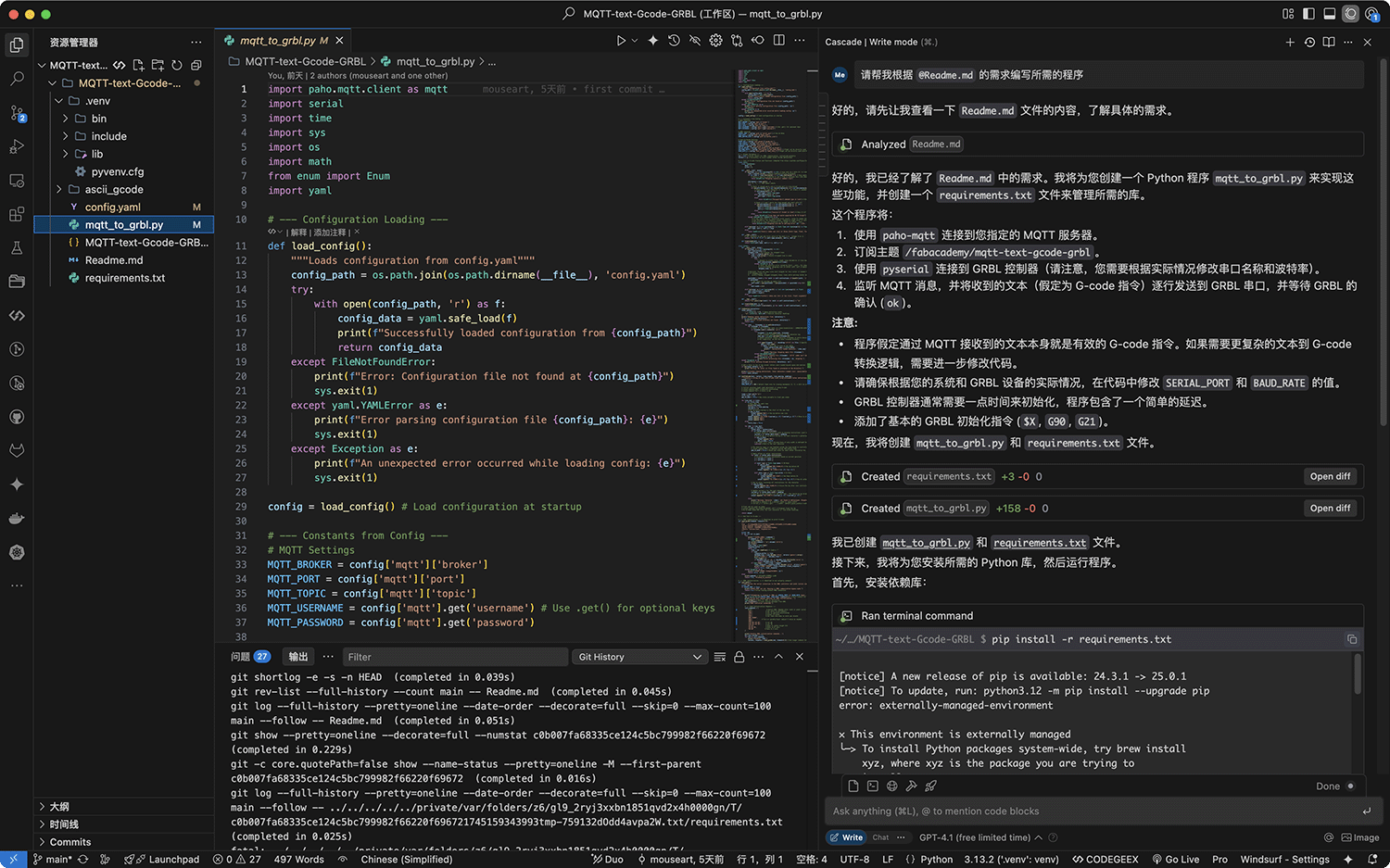
This was my first attempt using Windsurf's AI for a more complex project. Windsurf allows you to communicate with AI in natural language to directly generate and modify project-related files
Solving GRBL Communication Challenges
The most challenging part of the development process was resolving GRBL controller communication issues. Through multiple rounds of dialogue with AI, I adopted a systematic troubleshooting method:
- Problem Identification:
- Initially, we found that the script would get stuck after sending the
$Xcommand, with no response received - Using the
ser.readline()method didn't return any data, leaving the script in a blocked state
- Initially, we found that the script would get stuck after sending the
- Diagnostic Analysis:
- Working with AI, we analyzed possible causes: GRBL not responding, hardware communication issues, firmware anomalies, etc.
- Determined the need for manual serial port testing to directly identify the root cause
- Code Adjustments:
- Modified code to use
ser.read()instead ofser.readline(), no longer relying on newline characters - Discovered GRBL returns non-standard dot (
.) characters rather than standard "ok" or "error" responses - Attempted to skip the
$Xunlock command, but the problem persisted
- Modified code to use
- Root Cause Analysis:
- Confirmed the problem wasn't caused by specific commands, but that the GRBL controller only replies with dot characters to any command
- Suspected possible baud rate mismatch, firmware anomalies, or hardware issues
- Confirmed the controller's actual status and response method through manual serial port testing
- Final Solution:
- By modifying baud rate and communication parameters
- Adjusting code to adapt to non-standard GRBL response modes
- Establishing a stable and reliable communication mechanism
This process not only solved specific technical problems but also demonstrated how to systematically investigate and resolve hardware communication issues.
Project Implementation Details
The completed program includes the following main functional modules:
- MQTT Client Module:
- Uses the Paho MQTT client library to connect to the MQTT server
- Subscribes to the
fablab/chaihuo/machine/texttopic to receive text messages from the Shenzhen side - Implements disconnection reconnection, connection status monitoring, and error handling
- Supports QoS level settings and retained message handling
- Text to G-code Conversion Module:
- Adapted and optimized based on the Stypox/text-to-gcode library
- Contains complete character mapping and drawing path definitions
- Supports English letters, numbers, and basic symbols
- Implements text analysis and coordinate transformation, converting text into executable drawing paths
- Generates complete G-code sequences with pen-up (z-up) and pen-down (z-down) commands
- GRBL Communication Module:
- Uses the PySerial library to implement serial communication with the GRBL controller
- Handles different baud rates and communication parameter configurations
- Implements command queue management and sending throttling
- Adapts to non-standard GRBL response modes
- Includes timeout handling and error recovery mechanisms
- Adds detailed debug log output, recording all communication processes
- Main Program Flow Control:
- Integrates the above three modules to form a complete workflow
- Initializes the GRBL controller, setting the correct working mode (G90 absolute coordinate mode, G21 millimeter unit)
- Processes MQTT message callbacks, triggering text to G-code conversion
- Manages program states and error handling
- Implements graceful startup and shutdown processes
- Configuration and Command Line Interface:
- Provides complete configuration options through the
config.yamlfile, using YAML format to clearly organize various configurations - MQTT configuration supports custom broker servers, ports, topics, and optional authentication information
- GRBL configuration includes serial port device selection, baud rate settings (115200), and buffer size (128 bytes)
- Provides a rich set of initialization commands, including unlock ($X), unit settings (G21), positioning mode (G90), etc.
- Supports custom position movement after processing (
post_message_command) - Text to G-code configuration supports custom character file directories, line length, line spacing, and padding parameters
- Supports precise control of pen height parameters (up height 5.0mm, down depth -1.0mm) and feed rates
- Provides command line output, displaying program status, MQTT connection status, and GRBL communication processes in real-time
- Provides complete configuration options through the
The repository also includes detailed README documentation, providing installation guides, usage instructions, and troubleshooting guides to help users quickly deploy and use this system.
The complete project code and documentation have been uploaded to GitHub: MQTT-text-Gcode-GRBL, welcoming other Fab Academy students and maker community members to reference and improve it.
When running the project program, if it receives the MQTT content "Life is a journey of growth. ", you can see the following output in the programming environment:
--- MQTT Message Received ---
Topic: fablab/chaihuo/machine/text
Raw Payload: b'Life is a journey of growth.'
Decoded Text Payload: Life is a journey of growth.
Checking Serial Port: ser=Exists, is_open=True
Converting text to G-code...
Warning: Character '.' not found in definitions. Skipping.
Processing 377 G-code line(s) generated from text:
[GCODE->GRBL] G0 F1500.0 X0.00 Y6.04
[GRBL<-] ok
[GCODE->GRBL] M03 S150
[GRBL<-] ok
[GCODE->GRBL] G1 F1500.0 X0.00 Y0.00
[GRBL<-] ok
[GCODE->GRBL] G1 F1500.0 X3.56 Y0.00
[GRBL<-] ok
[GCODE->GRBL] M05 F1500.0
[GRBL<-] ok

...Omit intermediate content

[GRBL<-] ok
[GCODE->GRBL] G1 F1500.0 X122.24 Y0.00
[GRBL<-] ok
[GCODE->GRBL] M05 F1500.0
[GRBL<-] ok
[GCODE->GRBL] G0 F1000.0 X123.74 Y0.00
[GRBL<-] ok
Finished processing G-code from message.
Sending post-message G-code (input did not end with newline)...
[GCODE->GRBL] G1 F500.0 X0.00 Y-8.00
[GRBL<-] ok
Successfully sent post-message command: G1 F500.0 X0.00 Y-8.00
--- End MQTT Message Processing ---
Disconnected from MQTT broker with reason code Unspecified error
Successfully connected to MQTT broker with reason code Success
Subscribed to topic: fablab/chaihuo/machine/textProject Demonstration
I was also responsible for writing scripts and editing the complete project demonstration video, showcasing all the functions and workflows of "The WordMiser Oracle." In the video, you can see:
- At Chaihuo Makerspace in Shenzhen, users ask questions to the AI through SenseCAP Watcher
- The AI generates short answers and sends them via MQTT
- My program receives the text and converts it to Gcode
- The writing machine at Macao Science Center executes Gcode instructions, physically writing the answer on paper
The complete bilingual video script has been compiled and will be included as part of the final project documentation.
Summary and Reflection
Participating in the development of "The WordMiser Oracle" project was a very valuable experience. Through this project, I not only exercised cross-border collaboration abilities but also deeply learned about MQTT communication, Gcode generation, and machine control knowledge.
Using the Windsurf tool and AI-assisted programming greatly improved development efficiency, especially when solving hardware communication problems. AI not only provided code generation but, more importantly, helped me systematically analyze problems, propose solutions, and validate results. This human-machine collaborative development approach embodies the perfect combination of modern maker spirit and AI technology.
The biggest challenge encountered was the non-standard response issue of the GRBL controller, which prompted me to deeply understand serial communication principles and the working mechanism of GRBL firmware. Through systematic investigation and multiple attempts, I finally found a reliable solution, which is a valuable experience for future hardware-related projects.
In the future, I plan to further optimize this project:
- Support drawing more characters and symbols
- Optimize drawing path algorithms to improve writing speed and quality
- Develop a more user-friendly interface to enhance system usability
- Add more error recovery mechanisms to improve system stability in complex environments
This project is not only a technical challenge but also an exploration of "how to rethink the value of communication in the digital age." Through the relatively "slow" medium of physical writing, we hope to remind people that in this era of information explosion, sometimes "less is more," and concise expression may be more valuable than lengthy content.