Individual assignment
Intro
I decided to use the board I made for the output week that controls a small servo motor with a ESP32C6 so that I can use its WiFi tat I hadn’t used before.
This was not without incidents though.
When I uploaded the sketch that I did for the output week, it was not working 😢
However, given the troubles I went through in the communication week, I felt more confident to debug the problem.
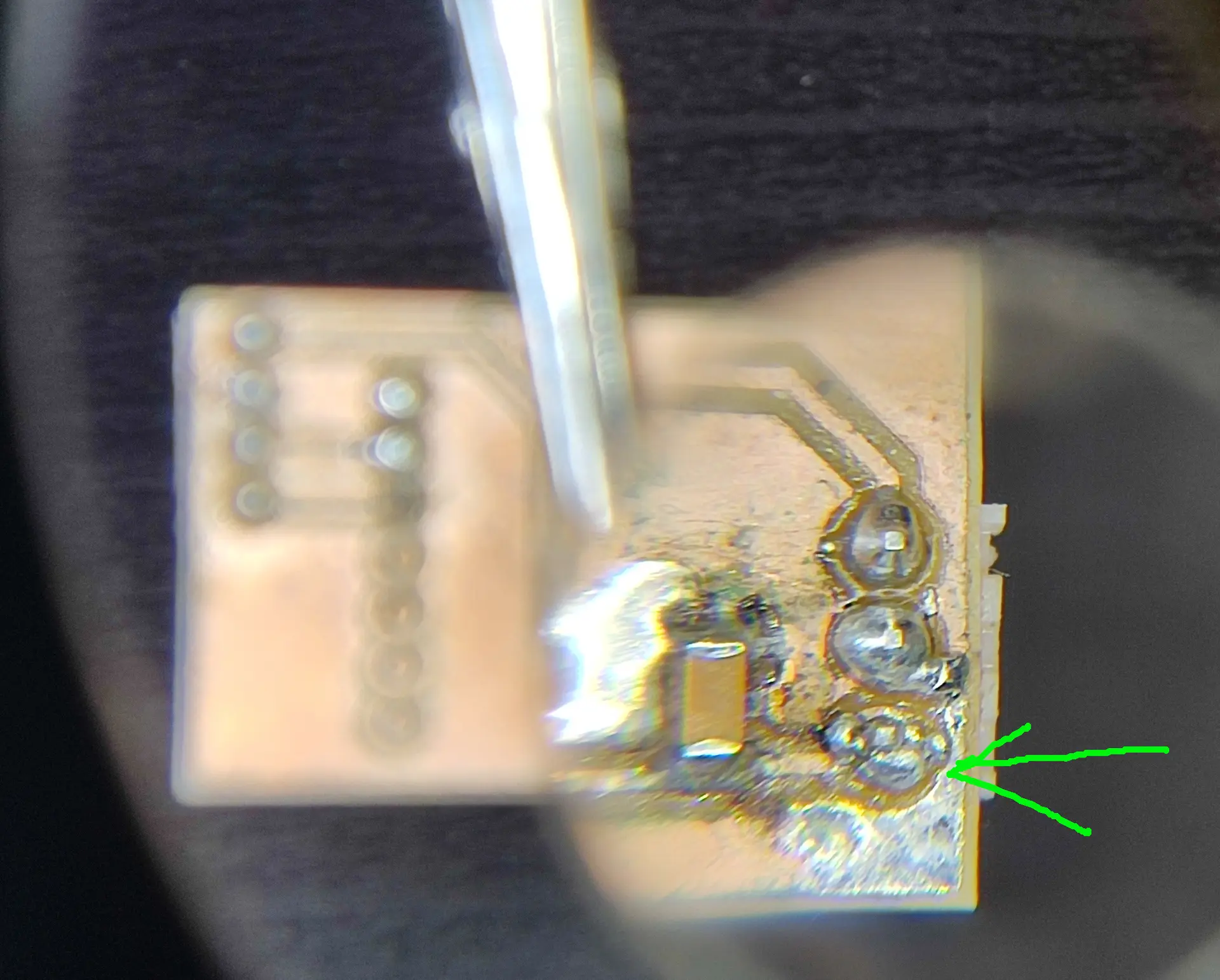
I used the multimeter to check continuity and quickly found that the 5V pin to the servo, was not making a good connection to the 5V pin on the Xiao.
I inspected the PCB with a magnifying glass and figured that, through to some wobbling of the pins, the solder had partially come off. So I redistributed it and added just a little bit more, and it started working again 💪
Bootstrapping the code
I started by prompting Gemini to give me an initial starting code:
AI prompt
I have an ESP32C6 connected to a small servo motor. The control signal is on pin D9.
I need the simplest and shortest code that:
- connects to a hard coded wifi SSID and pass
- receives http requests with a single angle value
- parses that value, returning an empty response
- actuates the servo with the parsed angle
- The code should run in the Arduino IDE and can use as many libraries as needed as long as that makes the code simpler and/or shorter
An here’s the starting code:
#include <WiFi.h>
#include <WebServer.h>
#include <ESP32Servo.h>

const char* ssid = "YOUR_SSID";
const char* password = "YOUR_PASS";

Servo myServo;
WebServer server(80);

void handleTarget() {
  if (server.hasArg("angle")) {
    int angle = server.arg("angle").toInt();
    myServo.write(constrain(angle, 0, 180));
  }
  server.send(200, "text/plain", "");
}

void setup() {
  myServo.attach(D9);
  WiFi.begin(ssid, password);
  while (WiFi.status() != WL_CONNECTED) delay(500);

  server.on("/set", handleTarget);
  server.begin();
}

void loop() {
  server.handleClient();
}
This looks legit.
The ESP32Servo library had to be installed in Tools -> Libraries but otherwise works similar to the Servo library that I used previously with the RP2040, that isn’t supported in the ESP32 family.
Also the code handling the requests looks similar to frameworks I’ve used before. There’s a function on that takes 2 arguments, the 1st being the route you want to handle and the 2nd being the function handling that particular request.
As for the code handling the request, there’s the hasArg function to test for the existence of the arg and there’s the arg function to actually parse it.
Regardless of parsing a correct angle, the send function returns a 200 response with no content.
This forms the basis of our application.
Determining the ESP32 address
Although this works, there’s a few problems and things we can do to improve it.
Namely, how do we find the IP address of ESP32 ?
We could check the assigned address looking into our router’s page, but that is not always available.
So, one thing we can do is to print to Serial the IP address, right after connecting, with
Serial.print("IP Address: ");
Serial.println(WiFi.localIP());
This works fine as a starting point while developing, but the board won’t always be connected to the laptop, so we need another solution.
Gemini suggested using mDNS (Multicast DNS)
Unlike regular DNS, where you need to buy a domain name, and the whole DNS servers hierarchy needs to store the matching IP for a name, in mDNS, a domain name ending in .local doesn’t get registered. Instead, a HTTP client, like a browser, will multicast a request asking who has this name, and the device (the ESP32 in this case) will respond like: Hey, it’s me, I’m at this IP !
This way we can refer to the device by name and not care about the actual IP address.
This only works in local networks, though.
To make this work, I added this:
#include <ESPmDNS.h> // at the top

// Inside setup() after WiFi is connected:
if (!MDNS.begin("servo-bot")) {
  Serial.println("Error setting up MDNS responder!");
}
Serial.println("mDNS responder started: http://servo-bot.local");
Improving connection resilience
We’re now communicating with the board, but checking the serial log, I notice some frequent troubles connecting initially, so after experimenting with my own router issues, I came to a more robust connection with retries and forced reconnects:
WiFi.disconnect(true); // Wipes saved session data
delay(1000);
WiFi.begin(ssid, password);
  Serial.print("Connecting to WiFi");
  int attempt = 0;
  while (WiFi.status() != WL_CONNECTED) {
    delay(1000);
    Serial.print(".");
    attempt += 1;
    // If it gets stuck for more than 15 seconds, force a retry
    if (attempt >= 15 && WiFi.status() != WL_CONNECTED) {
       attempt = 0;
       Serial.println("disconnecting");
       WiFi.disconnect();
       Serial.println("beginning");
       WiFi.begin(ssid, password);
    }
  }
  Serial.println("\nConnected!");
Usually, even if it failed initially, around 30 s later, the connection is successful.
Adding a querying endpoint
It’s looking good, and I can now set the servo angle with a simple curl command:
curl http://servo-bot.local/set?angle=10
I realize I can set the angle, but I don’t know the current angle, so I add another endpoint with
int currentAngle = 90; // Global variable to track state
void handleGetAngle() {
  server.send(200, "text/plain", String(currentAngle));
}

// inside setup
server.on("/get", handleGetAngle);
and change the remainder of the code to use the global variable.
I can now call curl and it will respond with the current angle:
curl http://servo-bot.local/get
Serving a basic GUI web page
I now have the basic handling of requests that will allow me to have an external GUI querying those endpoints and driving the servo.
It would be nice, though, that we didn’t really need an external GUI, and since we already have a web server, I can make it serve a simple page:
<!DOCTYPE HTML>
<html>
<head>
<meta name="viewport" content="width=device-width, initial-scale=1.0">
<style>
body { font-family: Arial; text-align: center; padding: 5%; }
input[type=range] { width: 100%; height: 40px; }
h1 { font-size: 24px; }
.display { font-size: 60px; margin: 20px; color: #222; }
</style>
</head>
<body>
<h1>Servo Control</h1>
<div class="display"><span id="angleDisplay">%CURRENT_ANGLE%</span>°</div>
<input type="range" min="0" max="180" value="%CURRENT_ANGLE%"
oninput="updateText(this.value)" onchange="sendAngle(this.value)">
<script>
function updateText(val) { document.getElementById('angleDisplay').innerHTML = val; }
function sendAngle(val) { fetch(`/set?angle=${val}`); }
</script>
</body>
</html>
The header part is just the usual payload one has to add to the page so that it renders properly on laptops and mobiles, otherwise it looked too tiny on my mobile browser.
Next is the interesting part.
There’s a angleDisplay text field to show the current angle, and slider (input type range) to select the desired angle.
Tied to the slider there’s 2 event handlers:
- the updateText tied to oninput instantly changes the text field as you drag the slider.
- the sendAngle tied to onchange executes the HTTP request to send the desired angle, only when the slider is released, not while it is being dragged. This is to prevent flooding the ESP32 with requests as you drag the slider.
You’ll also notice that the displayed angle in the page is written as %CURRENT_ANGLE%. Because the web server is a simple one, it lacks a templating mechanism that you have when working with a desktop server. So, that string, serves as a place holder so that we can replace it with a single string replace before serving the content:
void process(String &html, int angle) {
  html.replace("%CURRENT_ANGLE%", String(angle));
}
And we add another route to serve this page:
server.on("/", []() {
    String content = index_html; // Copy the flash template to a RAM string
    process(content, currentAngle); // Modify it directly
    server.send(200, "text/html", content);
});
Finally you’ll notice that the web page is hard coded in code as a string, because the default setting of the ESP32 does not include a file system. Though possible with some repartitioning of the flash memory and extra libraries, that seemed overkill for a simple task. Were we to serve dozens of html, css, images and that sort of thing, then I would have considered it.
So, for a simple single page we wrap it like this to avoid dealing with escaping all the quote characters:
const char index_html[] PROGMEM = R"rawliteral(<html>...</html>)rawliteral";
Final result
So here’s the full code:
#include <WiFi.h>
#include <WebServer.h>
#include <ESP32Servo.h>
#include <ESPmDNS.h>
const char* ssid = "REDACTED";
const char* password = "REDACTED";
const char index_html[] PROGMEM = R"rawliteral(
<!DOCTYPE HTML><html>
<head>
<meta name="viewport" content="width=device-width, initial-scale=1.0">
<style>
body { font-family: Arial; text-align: center; padding: 5%; }
input[type=range] { width: 100%; height: 40px; }
h1 { font-size: 24px; }
.display { font-size: 60px; margin: 20px; color: #222; }
</style>
</head>
<body>
<h1>Servo Control</h1>
<div class="display"><span id="angleDisplay">%CURRENT_ANGLE%</span>°</div>
<input type="range" min="0" max="180" value="%CURRENT_ANGLE%"
oninput="updateText(this.value)" onchange="sendAngle(this.value)">
<script>
function updateText(val) { document.getElementById('angleDisplay').innerHTML = val; }
function sendAngle(val) { fetch(`/set?angle=${val}`); }
</script>
</body>
</html>)rawliteral";
Servo myServo;
WebServer server(80);
int currentAngle = 90; // Global variable to track state
void handleTarget() {
if (server.hasArg("angle")) {
currentAngle = server.arg("angle").toInt();
myServo.write(constrain(currentAngle, 0, 180));
}
server.send(200, "text/plain", String(currentAngle));
}
void handleGetAngle() {
server.send(200, "text/plain", String(currentAngle));
}
void process(String &html, int angle) {
html.replace("%CURRENT_ANGLE%", String(angle));
}
void setup() {
Serial.begin(115200); // Initialize serial communication
Serial.setDebugOutput(true); // This will show detailed WiFi handshake errors
myServo.attach(D9);
myServo.write(0);
delay(200);
myServo.write(180);
delay(200);
myServo.write(90);
delay(200);
WiFi.disconnect(true); // Wipes saved session data
delay(1000);
WiFi.begin(ssid, password);
Serial.print("Connecting to WiFi");
int attempt = 0;
while (WiFi.status() != WL_CONNECTED) {
delay(1000);
Serial.print(".");
attempt += 1;
// If it gets stuck for more than 15 seconds, force a retry
if (attempt >= 15 && WiFi.status() != WL_CONNECTED) {
attempt = 0;
Serial.println("disconnecting");
WiFi.disconnect();
Serial.println("beginning");
WiFi.begin(ssid, password);
}
}
Serial.println("\nConnected!");
Serial.print("IP Address: ");
Serial.println(WiFi.localIP()); // This prints the IP to the monitor
if (!MDNS.begin("servo-bot")) {
Serial.println("Error setting up MDNS responder!");
}
Serial.println("mDNS responder started: http://servo-bot.local");
server.on("/", []() {
String content = index_html; // Copy the flash template to a RAM string
process(content, currentAngle); // Modify it directly
server.send(200, "text/html", content);
});
// Route 2: Acts as the "Controller" (The Servo Logic)
server.on("/set", handleTarget);
server.on("/get", handleGetAngle);
server.begin();
}
void loop() {
server.handleClient();
}
Hero shot
Here we can see myself clicking different angles and the servo responding. We also see that when I drag the slider, the servo doesn’t move until I release he mouse button: