Prior knowledge
|
I've already made a bit of interface design in the past mainly with Visual Studio. |
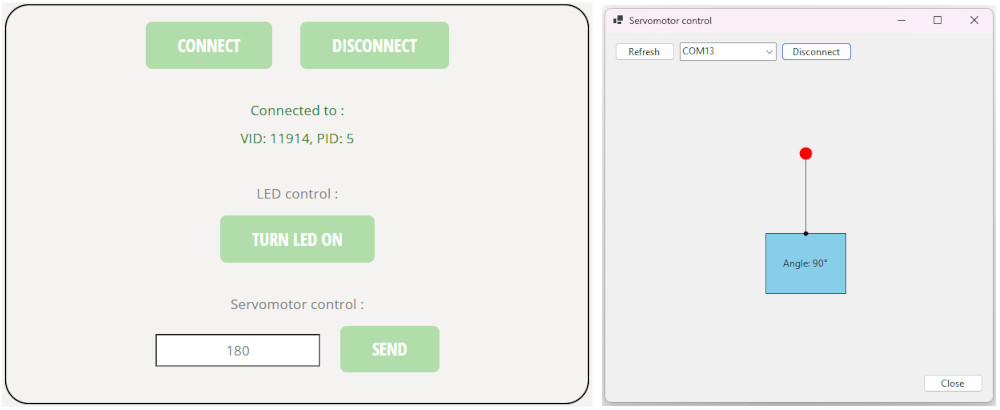
Hero shot
Group assignment
Now that everyone made their own interfaces and applications, here is a comparison between the tools used.
Michel and I both used Web Serial API, recommended by our instructor, to create an application in an HTML page, it was our first time but we found it pretty easy to use and understand. Michel followed a tutorial online while I used ChatGPT. Michel also made a sine wave using HTML and Javascript, he then combined the Web Serial API and the sine wave code to make his assignment of the week.
I also used Visual Studio to make a Windows Forms App, I already had experience in the past, I like the multiple choices it gives and the way you create the application by dragging and dropping a component.
Jonas used other tools, since he knows Python well, he tried PySerial and PyQT6. He followed tutorials online which took him a lot of time to understand correctly and setup. Then he tried different codes and got a bit of help from AI for his final assignment.
| Tool | Language |
| Web Serial API | HTML and Javascript |
| Visual Studio - Windows Forms App | C# |
| PySerial | Python |
| PyQT6 | Python |
Web Serial API
The Web Serial API allows to send and receive data with a serial device using JavaScript.
It allows for example, to use a website to communicate to a microcontroller connected to a computer via USB.
I'll create an interface using the Web Serial API and buttons to control some outputs on a microcontroller directly from my computer.
The interface is composed of :
-
Two buttons to connect and disconnect from a serial port ;
-
One button to toggle the value of a LED on a PCB ;
-
One button and an input box to type and modify the angle of a servomotor on a PCB.
Here's the interface (you can interact with it but be sure to send the code in the microcontroller first, LED on GPIO 3 and servomotor on GPIO0) :
This is the JavaScript code to interact with the buttons and the input box of the interface :
                                // Variables
                                let port;               // Serial device connection
                                let writer;             // Data to send to the device
                                let ledState = false;   // Keeps track of the LED status
                                let infoText = "";      // Empty string for display

                                // Displays status messages for the serial port connection
                                const statusLine1 = document.getElementById("statusLine1");
                                const statusLine2 = document.getElementById("statusLine2");

                                // For the "Connect" button
                                document.getElementById("connect").addEventListener("click", async () => {
                                    try {
                                        // Selection of serial port
                                        port = await navigator.serial.requestPort();

                                        // Open the serial connection
                                        await port.open({ baudRate: 115200 });

                                        writer = port.writable.getWriter();

                                        // Updates status messages for first line and sets color to green
                                        statusLine1.textContent = "Connected to :";
                                        statusLine1.style.color = "green";

                                        // Retrieves USB data about the device
                                        const info = port.getInfo();

                                        // Checks vendor and product IDs
                                        if (info.usbVendorId && info.usbProductId) {
                                            infoText = `VID: ${info.usbVendorId}, PID: ${info.usbProductId}`;
                                        } else if (info.usbVendorId) {
                                            infoText = `VID: ${info.usbVendorId}`;
                                        } else {
                                            infoText = "Unknown device";
                                        }

                                        // Updates status messages for second line and sets color to green
                                        statusLine2.textContent = infoText;
                                        statusLine2.style.color = "green";

                                        // Prints message in browser console
                                        console.log("Connected!");
                                    }
                                    // Error handling
                                    catch (err) {
                                        console.error(err);

                                        // Resets UI on failure
                                        statusLine1.textContent = "Not connected";
                                        statusLine2.textContent = "";
                                        statusLine1.style.color = "red";
                                    }
                                });

                                // For the "Disconnect" button
                                document.getElementById("disconnect").addEventListener("click", async () => {
                                    try {
                                        // Closes writer
                                        if (writer) {
                                            await writer.close();
                                            writer.releaseLock();
                                            writer = null;
                                        }

                                        // Closes serial connection
                                        if (port) {
                                            await port.close();
                                            port = null;
                                        }

                                        // Resets UI
                                        statusLine1.textContent = "Not connected";
                                        statusLine2.textContent = "";
                                        statusLine1.style.color = "red";
                                        ledState = false;
                                        document.getElementById("sendLED").textContent = "Turn LED ON";

                                        // Prints message in browser console
                                        console.log("Disconnected");
                                    }
                                    // Error handling
                                    catch (err) {
                                        console.error("Disconnect error:", err);
                                    }
                                });

                                // For the "Turn LED ON/OFF" button
                                document.getElementById("sendLED").addEventListener("click", async () => {
                                    // Checks port connection
                                    if (!writer) {
                                        alert("Not connected");
                                        return;
                                    }

                                    // Button reference
                                    const btn = document.getElementById("sendLED");

                                    // If the LED is OFF
                                    if (!ledState) {
                                        // Converts string "LED ON\n" into bytes
                                        const data = new TextEncoder().encode("LED ON\n");
                                        // Sends data
                                        await writer.write(data);

                                        // Updates UI and state
                                        btn.textContent = "Turn LED OFF";
                                        ledState = true;
                                    }
                                    // If the LED is ON
                                    else {
                                        // Converts string "LED OFF\n" into bytes
                                        const data = new TextEncoder().encode("LED OFF\n");
                                        // Sends data
                                        await writer.write(data);

                                        // Updates UI and state
                                        btn.textContent = "Turn LED ON";
                                        ledState = false;
                                    }
                                });

                                // For the "Send" button
                                document.getElementById("send").addEventListener("click", async () => {
                                    // Checks port connection
                                    if (!writer) {
                                        alert("Not connected");
                                        return;
                                    }

                                    // Reads input from the text field
                                    const text = document.getElementById("angleValue").value;

                                    // Converts input into bytes
                                    const data = new TextEncoder().encode(text + "\n");

                                    // Send data
                                    await writer.write(data);

                                    // Clears text after sending
                                    document.getElementById("angleValue").value = "";
                                });
Before connecting to the microcontroller, I need to insert a code in it to control the outputs depending on the data received from the interface.
                                ###########################
                                ### Code in MicroPython ###
                                ###########################

                                # Modules of the XIAO-RP2040 for GPIOs control and PWM generation
                                from machine import Pin, PWM

                                # Set pin 3 as LED output
                                led = Pin(3, Pin.OUT)

                                # Set pin 0 as servo output
                                servo = PWM(Pin(0))
                                # Set servo frequency
                                servo.freq(50)

                                # Function that converts an angle (0-180) to a duty cycle
                                def set_angle(angle):
                                    # Safety if values are under 0 or above 180
                                    if angle < 0:
                                        angle = 0
                                    if angle > 180:
                                        angle = 180

                                    # Servo pulse width range : ~500µs to ~2500µs
                                    min_us = 500
                                    max_us = 2500

                                    # Angle to pulse width conversion
                                    pulse_us = min_us + (max_us - min_us) * angle / 180

                                    # Pulse width to PWM duty conversion
                                    # RP2040 PWM : 16-bit (0-65535), 20ms period = 20000µs
                                    duty = int(pulse_us * 65535 / 20000)

                                    # Send PWM signal
                                    servo.duty_u16(duty)

                                # Infinite loop
                                while True:
                                    # Variable that reads the shell's data
                                    shell = input()

                                    # If the shell reads "LED ON"
                                    if shell == "LED ON":
                                        # Turns LED ON
                                        led.value(1)

                                    # If the shell reads "LED OFF"
                                    elif shell == "LED OFF":
                                        # Turns LED OFF
                                        led.value(0)

                                    # If the shell reads a value between 0 and 180
                                    elif 0 <= int(shell) <= 180:
                                        # Sets servomotor angle
                                        set_angle(int(shell))
The LED is connected to the GPIO 3 and the servomotor to the GPIO 0 of the XIAO-RP2040, if you want to change this, you must change the GPIOs in the MicroPython code.
Windows Forms App
I also used Visual Studio to make a Windows Forms App to create an app to control a servomotor with the cursor of my mouse.
To learn how to create an app and place components, refer to Weeks 12 and 13. Mechanical and machine design.
The interface is composed of :
-
Two buttons to refresh and connect or disconnect from a serial port ;
-
A drawing that can be interacted with to control the servomotor :
-
One button to close the application ;
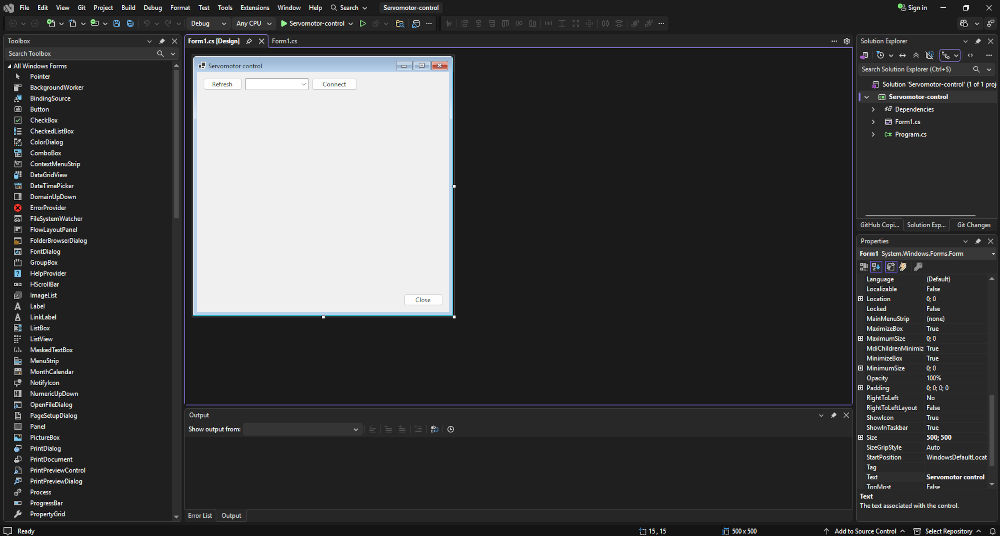
Here's the final result :
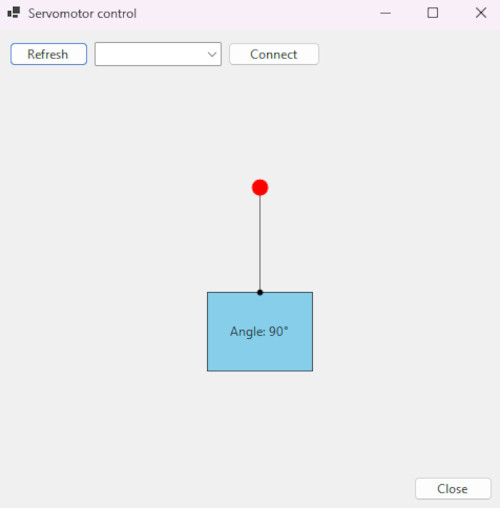
Here's the C# code :
// Libraries for drawings and forms
using System;
using System.Drawing;
using System.Windows.Forms;
using System.IO.Ports; // Library for serial communication
namespace Servomotor_control
{
public partial class Form1 : Form
{
// ========================================== //
// ================= SERIAL ================= //
// ========================================== //
private SerialPort serialPort = new SerialPort(); // Creation of object serialPort
private float lastSentAngle = -1; // Latest stored angle
// Method to refresh the detected ports
private void RefreshPorts()
{
comboBoxPorts.Items.Clear(); // Clears the current list
string[] ports = SerialPort.GetPortNames(); // Detects every serial ports
Array.Sort(ports); // Sorts the ports alphabetically and numerically
comboBoxPorts.Items.AddRange(ports); // Adds every port name in the dropdown list
// If a port is available, automatically connect to it
if (comboBoxPorts.Items.Count > 0)
comboBoxPorts.SelectedIndex = 0;
}
// Method to send the angle value through the serial port
private void SendAngle(float angle)
{
// Checks if the new angle is too similar to the last one
if (Math.Abs(angle - lastSentAngle) < 1) return;
// Updates the latest stored angle
lastSentAngle = angle;
// If the serial port is available, send stored angle value
try
{
if (serialPort.IsOpen)
{
serialPort.WriteLine(((int)angle).ToString());
}
}
catch
{
// ignore disconnect errors
}
}
// =========================================== //
// ================= DRAWING ================= //
// =========================================== //
private float angleDeg = 90f; // Angle value
private float length = 100f; // Length of line
private bool dragging = false; // User interaction detection
private Rectangle rect = new Rectangle(200, 250, 100, 75); // Creation of rectangle
private PointF endPoint; // Stores the current end of the rotating line
// Drawings and forms
protected override void OnPaint(PaintEventArgs e)
{
base.OnPaint(e); // Default drawing behavior
var g = e.Graphics; // Drawing surface
g.SmoothingMode = System.Drawing.Drawing2D.SmoothingMode.AntiAlias; // Makes lines smoother
// Fills rectangle blue with black border
g.FillRectangle(Brushes.SkyBlue, rect);
g.DrawRectangle(Pens.Black, rect);
// Puts pivot at the top center of the rectangle for the line rotation
PointF pivot = new PointF(
rect.X + rect.Width / 2f,
rect.Y
);
double rad = angleDeg * Math.PI / 180.0; // Converts degrees to radians
// Line endpoint calculation
endPoint = new PointF(
pivot.X + (float)(Math.Cos(rad) * length),
pivot.Y - (float)(Math.Sin(rad) * length)
);
// Draws a line
g.DrawLine(Pens.Black, pivot, endPoint);
// Draws a line a draggable red circle (endpoint)
int r = 8;
g.FillEllipse(Brushes.Red, endPoint.X - r, endPoint.Y - r, r * 2, r * 2);
// Draws a line a black circle at pivot point
g.FillEllipse(Brushes.Black, pivot.X - 3, pivot.Y - 3, 6, 6);
// Angle value text
string text = $"Angle: {angleDeg:0}°";
SizeF textSize = g.MeasureString(text, this.Font);
// Center text inside the rectangle
PointF textPos = new PointF(
rect.X + (rect.Width - textSize.Width) / 2f,
rect.Y + (rect.Height - textSize.Height) / 2f
);
// Draws angle value text
g.DrawString(text, this.Font, Brushes.Black, textPos);
}
// Checks if user clicked near the red endpoint
private void OnMouseDown(object sender, MouseEventArgs e)
{
if (Distance(e.Location, endPoint) < 20)
dragging = true;
}
// If the red endpoint is dragged
private void OnMouseMove(object sender, MouseEventArgs e)
{
if (!dragging) return;
// Recalculates pivot
PointF pivot = new PointF(
rect.X + rect.Width / 2f,
rect.Y
);
float dx = e.X - pivot.X;
float dy = pivot.Y - e.Y;
// Converts mouse position into an angle
double rad = Math.Atan2(dy, dx);
double deg = rad * 180.0 / Math.PI;
// Only accept angles in the top half of the rectangle between 0° and 180° and sends it to serial port
if (deg >= 0 && deg <= 180)
{
angleDeg = (float)deg;
SendAngle(angleDeg);
Invalidate();
}
}
// Checks how close the mouse click is to the draggable endpoint
private float Distance(Point a, PointF b)
{
float dx = a.X - b.X;
float dy = a.Y - b.Y;
return (float)Math.Sqrt(dx * dx + dy * dy);
}
// =========================================== //
// ================= APP ===================== //
// =========================================== //
public Form1()
{
InitializeComponent(); // Initialization of application
DoubleBuffered = true; // Enables double buffering (drawing happens off-screen first, then displayed)
// Controls mouse buttons interaction
MouseDown += OnMouseDown;
MouseMove += OnMouseMove;
MouseUp += (s, e) => dragging = false;
}
// Method to close the application
private void btnClose_Click(object sender, EventArgs e)
{
Close(); // Closes the application500
}
// Method to refresh the detected ports
private void btnRefresh_Click(object sender, EventArgs e)
{
RefreshPorts(); // Calls method
}
// Method to connect and disconnect to a port
private void btnConnect_Click(object sender, EventArgs e)
{
// Function to disconnect
if (serialPort.IsOpen)
{
serialPort.Close();
btnConnect.Text = "Connect";
return;
}
try
{
// Function if no ports are selected
if (comboBoxPorts.SelectedItem == null)
{
MessageBox.Show("Please select a COM port.", "Warning !"); // A message box appears
return;
}
// Serial port configuration
serialPort.PortName = comboBoxPorts.SelectedItem.ToString();
serialPort.BaudRate = 115200;
serialPort.NewLine = "\n";
serialPort.Open();
btnConnect.Text = "Disconnect";
}
catch (Exception ex)
{
MessageBox.Show(ex.Message); // A message box appears
}
}
// Method to disconnect the port when closing the application
protected override void OnFormClosing(FormClosingEventArgs e)
{
if (serialPort.IsOpen)
serialPort.Close();
base.OnFormClosing(e);
}
// Method when the application is launched
private void Form1_Load(object sender, EventArgs e)
{
RefreshPorts(); // Calls method
}
private void Form1_Shown(object sender, EventArgs e)
{
this.ActiveControl = null;
}
}
}
Before connecting to the microcontroller, I need to insert a code in it to control the output depending on the data received from the interface.
                                ###########################
                                ### Code in MicroPython ###
                                ###########################

                                # Modules of the XIAO-RP2040 for GPIOs control and PWM generation
                                from machine import Pin, PWM

                                # Set pin 0 as servo output
                                servo = PWM(Pin(0))
                                # Set servo frequency
                                servo.freq(50)

                                # Function that converts an angle (0-180) to a duty cycle
                                def set_angle(angle):
                                    # Safety if values are under 0 or above 180
                                    if angle < 0:
                                        angle = 0
                                    if angle > 180:
                                        angle = 180

                                    # Servo pulse width range : ~500µs to ~2500µs
                                    min_us = 500
                                    max_us = 2500

                                    # Angle to pulse width conversion
                                    pulse_us = min_us + (max_us - min_us) * angle / 180

                                    # Pulse width to PWM duty conversion
                                    # RP2040 PWM : 16-bit (0-65535), 20ms period = 20000µs
                                    duty = int(pulse_us * 65535 / 20000)

                                    # Send PWM signal
                                    servo.duty_u16(duty)

                                # Infinite loop
                                while True:
                                    # Variable that reads the shell's data
                                    shell = input()

                                    # If the shell reads a value between 0 and 180
                                    if 0 <= int(shell) <= 180:
                                        # Sets servomotor angle
                                        set_angle(int(shell))
The servomotor to the GPIO 0 of the XIAO-RP2040, if you want to change this, you must change the GPIO in the MicroPython code.
Useful file(s) (Click to download)
- Web Serial API MicroPython code (Thonny)
- Windows Forms App MicroPython code (Thonny)
- Windows Forms App C# code (Thonny)
Assignments checklist
- ✅Linked to the group assignment page.
- ✅Documented your process.
- ✅Explained the UI that you made and how you did it.
- ✅Explained how your application communicates with your embedded microcontroller board.
- ✅Explained any problems you encountered and how you fixed them.
- ✅Included original source code (or a screenshot of the app code if that4s not possible).
- ✅Included a hero shot of your application running & communicating with your board.