9. Input Devices
group assignment: • probe an input device’s analog levels and digital signals
individual assignment: • measure something: add a sensor to a microcontroller board that you have designed and read it
I tested the following sensor:
Flow Rate Sensor
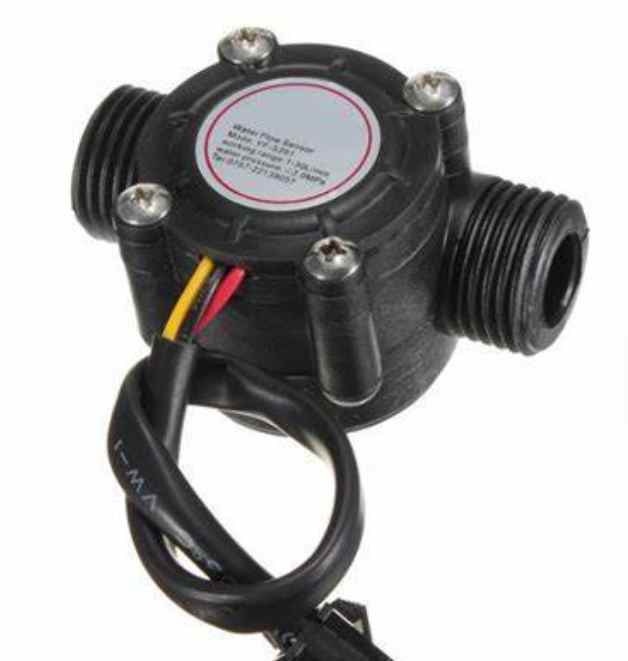
The YF-S201 Water flow sensor consists of a plastic valve body, a water rotor, and a hall-effect sensor. When water flows through the rotor, rotor rolls. Its speed changes with different rate of flow. The hall-effect sensor outputs the corresponding pulse signal
Specifications
- Operating voltage: 5–18V DC
- Output signal: digital pulse (5V TTL)
- Flow range: 1–30 L/min
- Accuracy: ±10%
- Max current: 15mA @ 5V
- Operating temperature: -25°C to +80°C
- Max water pressure: 2.0 MPa
Setup
The sensor was connected to a Xiao ESP32-C3 board. The signal pin was connected to a digital interrupt pin (D2). Every pulse generated by the sensor was counted in the code.
At the start, I tested the sensor by simply printing raw pulse counts on the serial monitor to confirm that it was responding correctly.
Working Principle in Code
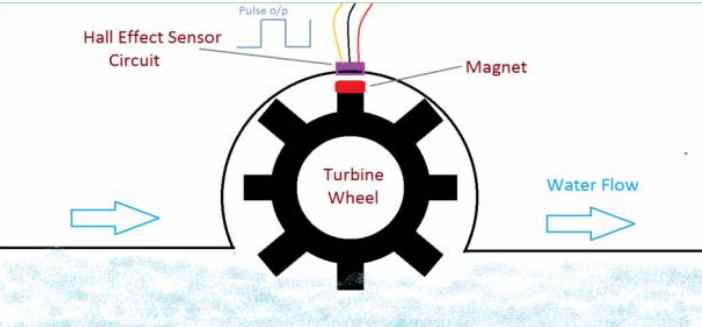
The sensor contains a pinwheel and sits in line with the water line such that water will pass through the sensor striking the pinwheel and rotating it to measure how much has passed through it. There is an integrated Hall-Effect Sensor that will output an electric pulse for every revolution of the pinwheel. By using a suitable conversion formula, the number of pulses can be translated into the amount of water that has flowed through the sensor.
For this project, the flow sensor is connected to the ESP32 through the flowPin. I configured the pin as an input with the internal pull-up resistor:
pinMode(flowPin, INPUT_PULLUP);
The pull-up keeps the signal at HIGH when there is no pulse. When the sensor detects the rotating magnet, the output is pulled LOW. This gives us a change from HIGH to LOW, which is a falling edge.
I use this falling edge to trigger an interrupt:
attachInterrupt(digitalPinToInterrupt(flowPin), pulseCounter, FALLING);
This means that whenever the flow sensor produces a pulse, the ESP32 immediately runs the pulseCounter() function:
void IRAM_ATTR pulseCounter() { pulseCount++; }
The purpose of the interrupt is simply to count the pulses as they occur. I declared pulseCount as volatile because its value is changed by the interrupt while the main program is running:
volatile int pulseCount = 0;
I then use millis() to measure the pulses over a one-second period. The program checks whether 1000 milliseconds have passed since the previous measurement:
if (currentMillis - previousMillis >= 1000) { previousMillis = currentMillis;
Once one second has passed, the number of pulses counted during that period is used to calculate the flow rate:
flowRate = pulseCount / 7.5;
After the calculation, the pulse counter is reset so that the next one-second period can start with a fresh count.
In this way, the flow sensor converts water movement → pinwheel rotation → magnetic pulses, while the ESP32 counts those pulses and uses their frequency to determine the water flow rate in litres per minute (L/min).
#include <WiFi.h>
#include <PubSubClient.h>

// WiFi
const char* ssid = "MT";
const char* password = "#@Innovate";

// MQTT
const char* mqtt_server = "broker.emqx.io";

WiFiClient espClient;
PubSubClient client(espClient);

// Flow sensor
const int flowPin = D2; // D2 (change if needed)
volatile int pulseCount = 0;// pulseCount is changed by the flow sensor ISR every time a pulse is detected.
// volatile ensures the ESP32 always reads the latest value changed by the ISR.

float flowRate = 0.0;
float totalLiters = 0.0;

unsigned long previousMillis = 0; // Stores the time of the last flow-rate measurement.
// unsigned long is used because millis() returns an unsigned long value.
// Starts at 0 because no measurement has been made yet.

// Interrupt
void IRAM_ATTR pulseCounter() {
  pulseCount++;
}
// Interrupt Service Routine (ISR) for the flow sensor.
// Runs automatically whenever the flow sensor generates a pulse.
// Increments pulseCount to keep track of the number of pulses detected.


// Connect WiFi
void setup_wifi() {
  delay(10);
  WiFi.begin(ssid, password);

  while (WiFi.status() != WL_CONNECTED) {
    delay(500);
    Serial.print(".");
  }

  Serial.println("\nWiFi connected");
}

// Reconnect MQTT
void reconnect() {
  while (!client.connected()) {
    if (client.connect("ESP32FlowClient")) {
      Serial.println("MQTT connected");
    } else {
      delay(2000);
    }
  }
}

void setup() {
  Serial.begin(115200);

  pinMode(flowPin, INPUT_PULLUP); // Configures the flow sensor pin as an input. INPUT_PULLUP enables the ESP32's internal pull-up resistor, keeping the pin HIGH when no pulse is being detected.
  attachInterrupt(digitalPinToInterrupt(flowPin), pulseCounter, FALLING); // Configures the flow sensor pin as a digital input using the ESP32's internal pull-up resistor. The pull-up keeps the pin HIGH when no pulse is detected. When the flow sensor generates a pulse, it pulls the signal LOW, creating a FALLING edge. The interrupt detects this HIGH-to-LOW transition and automatically runs pulseCounter(), which increments pulseCount by 1 for each detected flow pulse.

  setup_wifi();
  client.setServer(mqtt_server, 1883);
}

void loop() {
  if (!client.connected()) reconnect();
  client.loop();

  unsigned long currentMillis = millis();

  if (currentMillis - previousMillis >= 1000) { // every 1 sec
    previousMillis = currentMillis; // Checks whether 1 second (1000 ms) has passed since the last measurement. currentMillis is the current time from millis(), while previousMillis stores the time when the last measurement started. If the difference is at least 1000 ms, the 1-second measurement period is complete.

    // Calculate flow rate (L/min)
    flowRate = pulseCount / 7.5;

    // Convert to liters per second and accumulate
    float litersThisSecond = flowRate / 60.0;
    totalLiters += litersThisSecond;

    pulseCount = 0;

    // Convert to string
    char flowMsg[20];
    char totalMsg[20];

    sprintf(flowMsg, "%.2f", flowRate);
    sprintf(totalMsg, "%.2f", totalLiters);

    // Publish to MQTT
    client.publish("water/flow", flowMsg);
    client.publish("water/total", totalMsg);

    // Debug
    Serial.print("Flow: ");
    Serial.print(flowRate);
    Serial.print(" L/min | Total: ");
    Serial.println(totalLiters);
  }
}
Results
PIR Motion Detector Sensor
I also tested a Passive Infrared (PIR) motion detector sensor with my XIAO ESP32-C3 controller to observe its electrical output when motion was detected.
A PIR sensor detects changes in infrared radiation within its field of view. Warm objects, such as humans and animals, emit infrared radiation, and when they move across the sensor’s field of view, the sensor detects changes in the infrared energy.
Unlike an active infrared sensor, a PIR sensor does not emit infrared light. Instead, it responds to changes in infrared radiation, typically within wavelengths of approximately 8–14 micrometres for human-body thermal radiation.
PIR sensors are commonly used in security alarms, motion-activated lighting, automatic doors, and other motion-detection systems. They are designed primarily to detect changes associated with movement rather than directly measure distance or temperature.
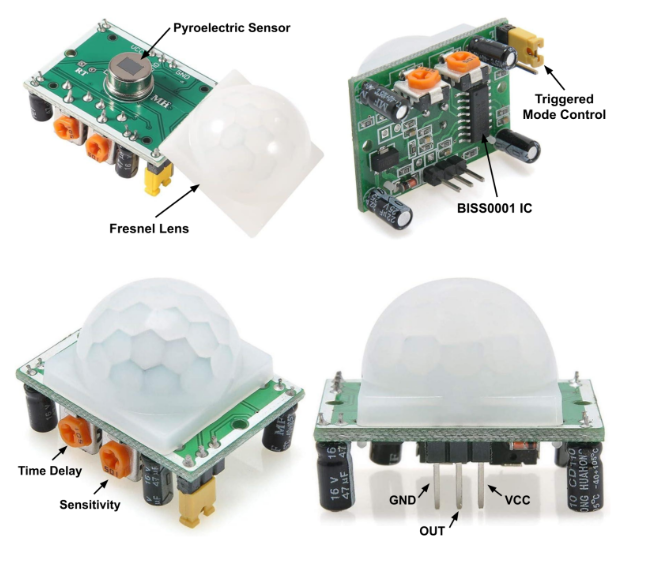
Connecting the PIR Sensor
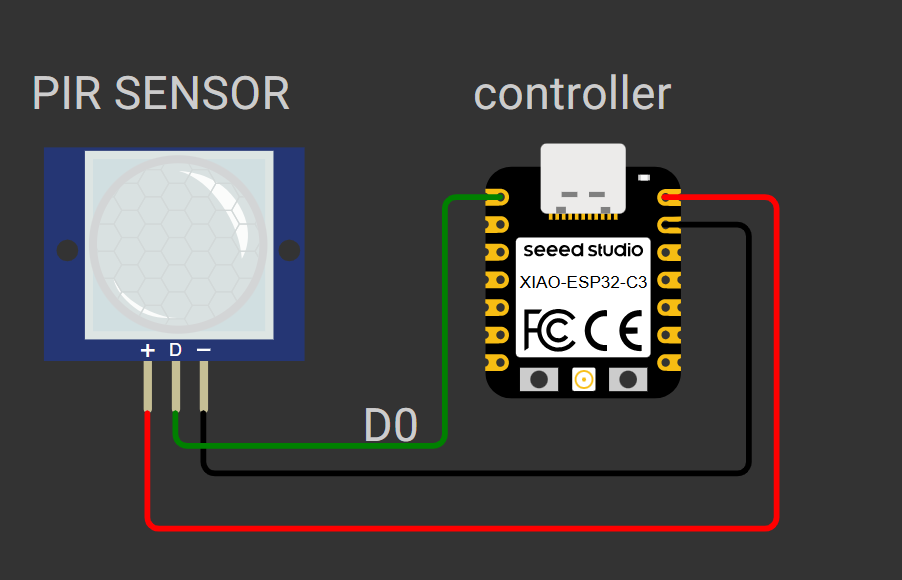
I connected the PIR sensor to my XIAO ESP32-C3 and used the oscilloscope to observe its electrical output. I used a breadboard to make the connections and provide convenient access to the signal for measurement.
The connections were as follows:
- VCC: Connected to the appropriate power supply for the PIR module.
- GND: Connected to the ground of the controller and measurement setup.
- OUT: Connected to pin D0 on the XIAO ESP32-C3.
I used the oscilloscope to observe changes in the sensor’s output signal while moving my hand within its detection area.
Programming the Sensor
I used ChatGPT to help generate the Arduino code for testing the PIR sensor. My prompt was:
“Give me code for a PIR motion sensor connected to D2 on the XIAO ESP32-C3. I want to test the sensor by moving my hand in front of it and observing the output in the Serial Monitor. When motion is detected, it should print ‘Motion detected: HIGH’. When there is no motion, it should print ‘No motion: LOW’. Do not use an LED. Include the correct wiring connections and allow the sensor time to stabilize before testing.”
The code reads the digital output from the PIR sensor and prints its state to the Serial Monitor.
#define PIR_PIN D0

void setup() {
  Serial.begin(115200);
  pinMode(PIR_PIN, INPUT);

  Serial.println("PIR sensor initializing...");
  delay(60000);
  Serial.println("PIR sensor ready");
}

void loop() {
  int motion = digitalRead(PIR_PIN);

  if (motion == HIGH) {
    Serial.println("Motion detected: HIGH");
  } else {
    Serial.println("No motion: LOW");
  }

  delay(500);
}
The 60-second delay gives the sensor time to stabilize after power-up. The program then reads the sensor output every 500 milliseconds. When the output is HIGH, it reports motion detected; when the output is LOW, it reports no motion.
The actual stabilization time depends on the PIR module, so I would follow the manufacturer’s recommended warm-up time where available.
Testing and Observing the Output
After uploading the code, I opened the Serial Monitor at 115200 baud and moved my hand within the sensor’s field of view. I observed the changes in the digital output and used the oscilloscope to examine the electrical signal.
During my experiment, I observed that the voltage increased when I moved my hand closer to the sensor and decreased when I moved it farther away. This happened because the movement of my hand changed the infrared radiation detected by the sensor, causing a change in its electrical output. The PIR sensor responds to changes in infrared radiation rather than measuring distance directly