Final Project
Smart Access Control System for the FabLab
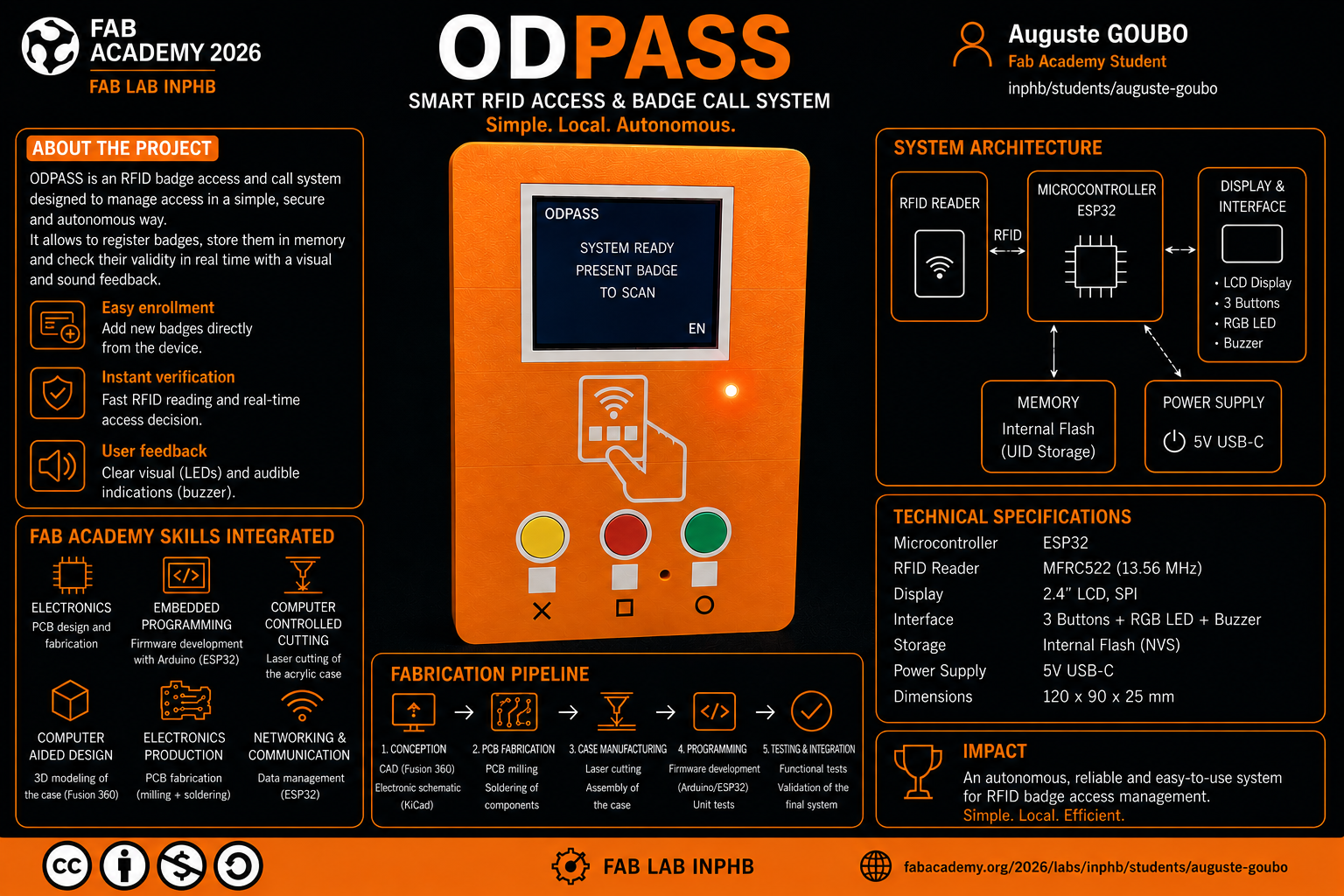
My final project is a smart access control system for the FabLab, designed to restrict entry to registered and authorized members only. The system uses an RFID badge for identification and logs every entry and exit through a web monitoring dashboard accessible via Wi-Fi.
Summary slide
Video Presentation
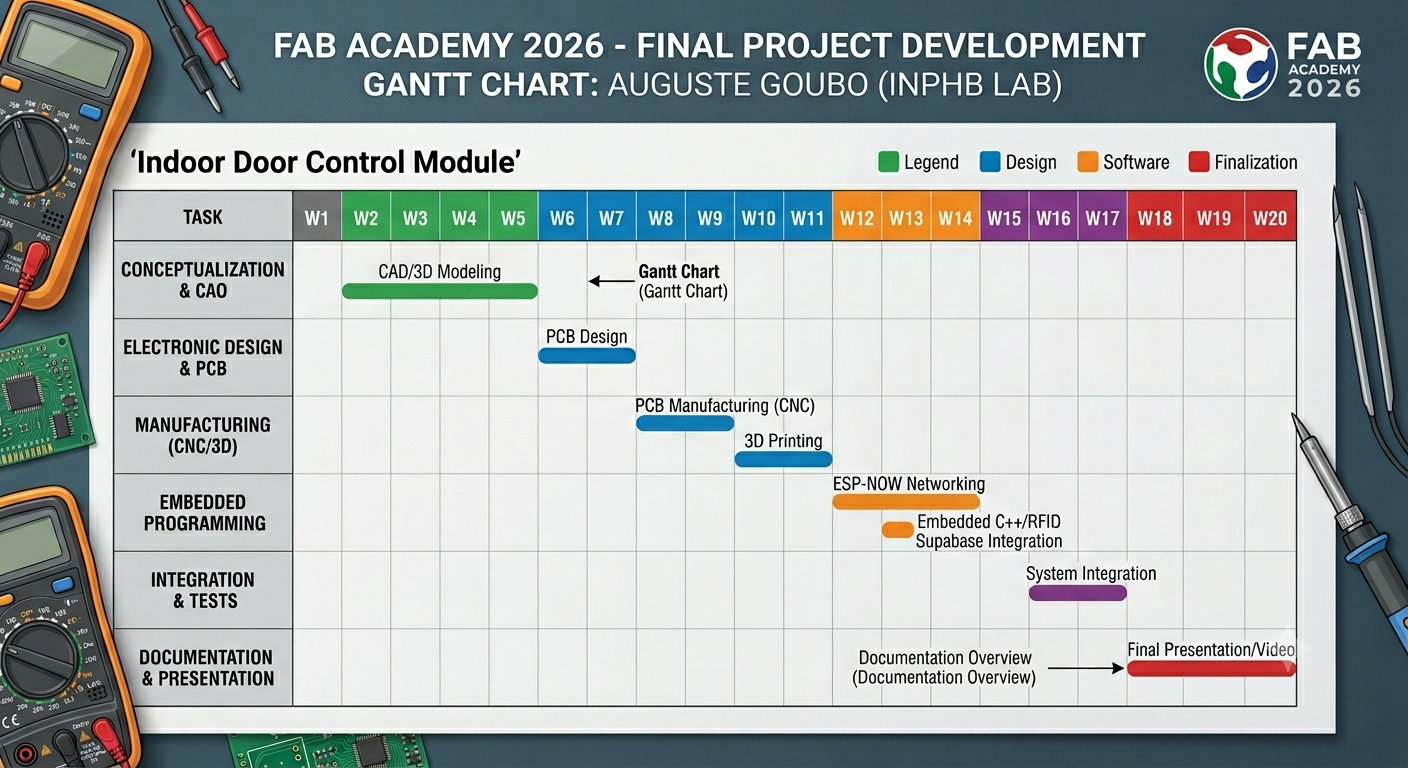
Gantt Chart
What does it do?
The project is a smart access control system for the FabLab INPHB. It restricts entry to registered and authorized members via an RFID badge.
This idea came from observations made during my time at the FabLab: the physical key was often unavailable or lost, and it was difficult to know exactly who had entered the FabLab and at what time.
The objective of this project is to develop a system that allows only authorized persons to access the FabLab using an RFID badge. The system also includes a web application for logging and monitoring entries and exits, ensuring complete traceability.
Concretely:
- A member presents their RFID badge to the reader installed at the entrance.
- The ESP32 reads the badge UID and checks it against the list of authorized members stored in flash memory.
- If the badge is authorized: the green LED turns on, a confirmation beep sounds, the TFT screen displays "Access Granted", and an ESP-NOW signal is sent to the indoor module which activates the relay and unlocks the door for 5 seconds.
- If the badge is denied: the red LED turns on, a warning beep sounds, and the screen displays "Access Denied".
- In all cases, the event (access granted or denied, badge UID, timestamp) is logged in real time to a Supabase database (cloud PostgreSQL) and can be viewed via a Next.js web dashboard.
- A manual indoor button also allows anyone already inside the FabLab to open the door without a badge.
Who has done what beforehand?
I researched previous Fab Academy projects and existing commercial products related to access control and RFID-based systems.
-
IOT FABTRACKER — by Achraf Ben Jamaa, Fab Academy 2020 A connected system for tracking people and equipment in a FabLab using IoT technologies.
-
SMART DOOR LOCK SYSTEM — by Mansoor Ahmed, Fab Academy 2020 A smart door lock system using RFID and microcontroller programming.
-
FAB BUDDY — by Philippe Libioulle, Fab Academy 2019 A system to manage access and usage of FabLab machines.
On the commercial side, I was inspired by FABMAN, a professional solution for managing FabLab resources and machine access.
What did you design?
The following elements were entirely designed by the author:
| Element | Tool | Description |
|---|---|---|
| Outdoor enclosure (access module) | SolidWorks | Two parts: main shell + cover |
| Indoor enclosure (door module) | SolidWorks | Two parts: main shell + cover |
| Front panel | Inkscape / DXF | Laser-cut 3mm MDF |
| Outdoor access module PCB | KiCad | Custom PCB with ESP32, RFID RC522, TFT ILI9341 screen, LEDs, buzzer |
| ESP32 firmware (Program 1) | Arduino IDE | Main controller: RFID reading, ESP-NOW, HTTPS Supabase, OTA |
| ESP-01S firmware (Program 2) | Arduino IDE | Door controller: ESP-NOW reception, relay activation, OTA |
| Web application | Next.js + Supabase | Real-time access monitoring dashboard |
| Network architecture | — | 4-layer communication schema (physical → LAN → cloud → web) |
What materials and components were used? Where did they come from? How much did they cost?
| Component | Supplier | Unit price (USD) | Qty | Subtotal (USD) |
|---|---|---|---|---|
| ESP32-WROOM-32D | Digikey | $4.08 | 1 | $4.08 |
| RFID Module RC522 | Amazon | $3.50 | 1 | $3.50 |
| TFT LCD ILI9341 3.5" | Amazon | $10.00 | 1 | $10.00 |
| Relay Module 5V 1 channel | Akunatek | $4.00 | 1 | $4.00 |
| Buzzer magnetic 5V 12mm TH | Digikey | $0.61 | 1 | $0.61 |
| LED BLUE CLEAR 1206 SMD | Digikey | $0.37 | 2 | $0.74 |
| LED RED CLEAR 1206 SMD | Digikey | $0.39 | 2 | $0.78 |
| IC REG LINEAR 3.3V 1A SOT223 | Digikey | $0.63 | 1 | $0.63 |
| RES SMD 100 OHM 1% ¼W 1206 | Digikey | $0.10 | 4 | $0.40 |
| RES SMD 10K OHM 1% ¼W 1206 | Digikey | $0.10 | 2 | $0.20 |
| CAP CER 10UF 35V X7R 1206 | Digikey | $0.48 | 2 | $0.96 |
| CAP CER 0.1UF 35V X7R 1206 | Digikey | $0.23 | 2 | $0.46 |
| SWITCH SLIDE SPDT 100MA 12V | Digikey | $1.09 | 1 | $1.09 |
| SWITCH TACTILE 0.05A 24V | Digikey | $1.08 | 1 | $1.08 |
| TTL-232R-5V USB-UART cable | FTDI | $18.00 | 1 | $18.00 |
| RFID badge cards (pack of 10) | Amazon | $5.00 | 1 | $5.00 |
| PLA 1.75mm filament (~200g) | Prusament | $29.99/kg | 200g | $6.00 |
| FR1 copper board (PCB substrate) | FabLab stock | — | 1 | — |
| ESP-01S Relay Module V1.0 | Local supplier | ~$5.00 | 1 | $5.00 |
| Mini MP1584 DC-DC buck converter | Local supplier | ~$2.00 | 1 | $2.00 |
| 12V Electric Mortise Door Lock (Fail-Safe NC) | Amazon | ~$25.00 | 1 | $25.00 |
| Push Button — Siemens SIRIUS ACT 3SU1150 | RS Components | ~$8.00 | 1 | $8.00 |
| 12V 5A DC Power Supply (60W) | Leroy Merlin | ~$15.00 | 1 | $15.00 |
| Total | ≈ $107.53 |
What parts and systems were made?
Fabricated parts
| Part | Process | Machine |
|---|---|---|
| Outdoor enclosure — main shell | 3D printing | Prusa MK4S+ |
| Outdoor enclosure — cover | 3D printing | Prusa MK4S+ |
| Indoor enclosure — main shell | 3D printing | Prusa MK4S+ |
| Indoor enclosure — cover | 3D printing | Prusa MK4S+ |
| MDF front panel | Laser cutting | Epilog Laser |
| Outdoor access module PCB | CNC milling | Roland SRM-20 |
Developed systems
| System | Description |
|---|---|
| Outdoor access module | ESP32 + RFID RC522 + TFT screen + LEDs + buzzer assembled in 3D-printed enclosure |
| Indoor door control module | ESP-01S Relay + DC-DC converter + electric lock + manual button |
| ESP32 firmware (Program 1) | RFID reading, badge verification, ESP-NOW, HTTPS Supabase, TFT display, OTA |
| ESP-01S firmware (Program 2) | ESP-NOW reception, relay activation for 5s, OTA |
| Cloud database | access_logs PostgreSQL table on Supabase |
| Web supervision application | Next.js dashboard with real-time updates via WebSockets |
What processes were used?
| Process | FA week | Application in the project |
|---|---|---|
| 3D CAD design | Week 2 | Enclosures designed in SolidWorks |
| Laser cutting | Week 3 | 3mm MDF front panel on Epilog Laser |
| 3D printing | Week 5 | PLA enclosures on Prusa MK4S+, 0.20mm QUALITY, 20% infill |
| Electronics design | Week 6 | PCB drawn in KiCad (schematic + PCB layout) |
| Electronics production | Week 8 | PCB milling on Roland SRM-20 (1/64" traces, 1/32" outline) + component soldering |
| Input devices | Week 9 | RFID RC522 reader (SPI) |
| Output devices | Week 10 | TFT ILI9341 screen, LEDs, buzzer, relay / electric lock |
| Networking and communications | Week 11 | ESP-NOW (peer-to-peer), HTTPS REST (Supabase), WebSockets, OTA (ElegantOTA) |
| Interface programming | Week 14 | Next.js web application + Supabase JS client |
| System integration | Week 15 | Full assembly and system testing |
What questions were answered?
1. Can physical events be logged to the cloud from a microcontroller?
Yes. Each badge scan generates an HTTPS POST request to a Supabase database (PostgreSQL), which is then visible in real time from any browser via WebSockets.
2. Can two ESP devices communicate peer-to-peer without a Wi-Fi router?
Yes, using Espressif's ESP-NOW protocol. The transmission latency is below 50ms, which is imperceptible to the user.
3. Can a 3D-printed enclosure serve a permanent physical installation?
Yes, for indoor or semi-protected environments. PLA at 20% infill provides sufficient rigidity. A more robust version could use PETG or ABS for more humid environments.
4. Can the firmware of physically installed microcontrollers be updated without dismantling them?
Yes, using ElegantOTA. Both ESP devices (ESP32 and ESP-01S) expose an /update endpoint accessible over the local Wi-Fi network.
What worked? What didn't?
What worked ✅
- RFID reading by the ESP32 via SPI with custom GPIO reassignment (to avoid conflicts with the TFT screen's HSPI bus) works reliably.
- ESP-NOW communication between the ESP32 and the ESP-01S is stable and fast.
- Logging to Supabase via HTTPS works correctly (using
WiFiClientSecurewithsetInsecure()to bypass TLS certificate verification). - The Next.js web application displays events in real time via Supabase WebSockets.
- 3D printing of the enclosures with the Prusa MK4S+ produced precise, well-fitted parts.
- PCB milling with the Roland SRM-20 produced a clean and functional circuit on the first attempt.
- OTA firmware updates via ElegantOTA work on both ESP devices.
- The Fail-Safe (NC) mode of the electric lock guarantees automatic unlocking in the event of a power failure, meeting safety requirements.
What didn't work / Challenges encountered ⚠️
- SPI conflict: simultaneous use of the RFID RC522 reader and the ILI9341 TFT screen on the same SPI bus caused interference. Solution: reassigning the RFID's GPIO pins to the main SPI bus and using the dedicated HSPI bus for the screen.
- TLS certificate: the secure HTTPS connection to Supabase required
client.setInsecure()due to the lack of root certificate management on the ESP32. - ESP-01S memory: the low RAM of the ESP8266 (80KB) limited the features that could be implemented on the door module. The solution was to keep the firmware minimal (ESP-NOW reception + OTA only).
- Supabase latency: the HTTPS POST request to Supabase adds a delay of ~500ms to 1s per scan. This is noticeable but acceptable for the use case, since the physical door unlocking happens independently and immediately via ESP-NOW.
How was it evaluated?
The system was evaluated against the following criteria:
-
Authorized badge functional test: presenting a registered badge → verifying that the lock opens, the green LED turns on, and the entry appears as "granted" in the dashboard.
-
Denied badge functional test: presenting an unregistered badge → verifying that the lock stays closed, the red LED turns on, and the event appears as "denied" in the dashboard.
-
Indoor manual button test: pressing the Siemens button → verifying that the lock opens without a badge.
-
Network robustness test: disconnecting then reconnecting the Wi-Fi → verifying automatic reconnection and resumption of Supabase logging.
-
OTA test: deploying a new firmware version via the ElegantOTA web interface on both modules.
-
Security test: verifying that an unknown badge (unregistered UID) never unlocks the door.
-
Fail-Safe test: cutting the 12V power supply → verifying that the NC lock opens automatically (safety compliance).
-
Latency test: measuring the delay between badge presentation and physical door opening.
What are the implications?
Immediate practical implications
- FabLab INPHB security: the system effectively controls who enters the FabLab, tracks attendance, and restricts access to registered members, protecting expensive equipment.
- Traceability: the timestamped log of every access event (granted or denied) provides a valuable history for lab management.
- Remote monitoring: the administrator can check access logs from any connected device, without being physically present.
Extension potential
- Web-based member management: adding an admin interface to register or revoke badges without reprogramming the ESP32.
- Notifications: sending email or SMS alerts on repeated denied access attempts (intrusion attempts).
- Multi-door: replicating the system across multiple building entrances (each door module having its own ESP-NOW MAC address).
- Attendance tracking: using the access log to automatically calculate member presence hours.
Current limitations
- The Supabase connection uses
setInsecure()(no TLS verification). In production, the Supabase root certificate should be embedded. - PLA is not suited for outdoor installation exposed to rain or high humidity.
Licensing
Like all Fab Academy students, my work is supported by the MIT License, which ensures it remains open and freely accessible.
In addition, I have chosen to apply the following Creative Commons license to this project:

This work is licensed under a Creative Commons Attribution-NonCommercial-ShareAlike 4.0 International License.
This means you are free to share and adapt this work, under the following terms:
- Attribution — You must give appropriate credit, provide a link to the license, and indicate if changes were made.
- NonCommercial — You may not use this material for commercial purposes.
- ShareAlike — If you remix, transform, or build upon this material, you must distribute your work under the same license.
All Project Files
All files related to this project are available for download below. For details on how each file was produced, refer to the Project Development page.