Week 11 Networking and Communications
Group assignment
Week 11 Chaihuo group assignment.
Individual assignment
For my final project, the Xiao ESP32 needs to connect to Wi-Fi, then send out all the voice information for ASR and wake-up words. I use Cursor to help me with the software.
Connect device to Wi-Fi
After connecting with the laptop, tell Cursor you want to connect the device to Wi-Fi.
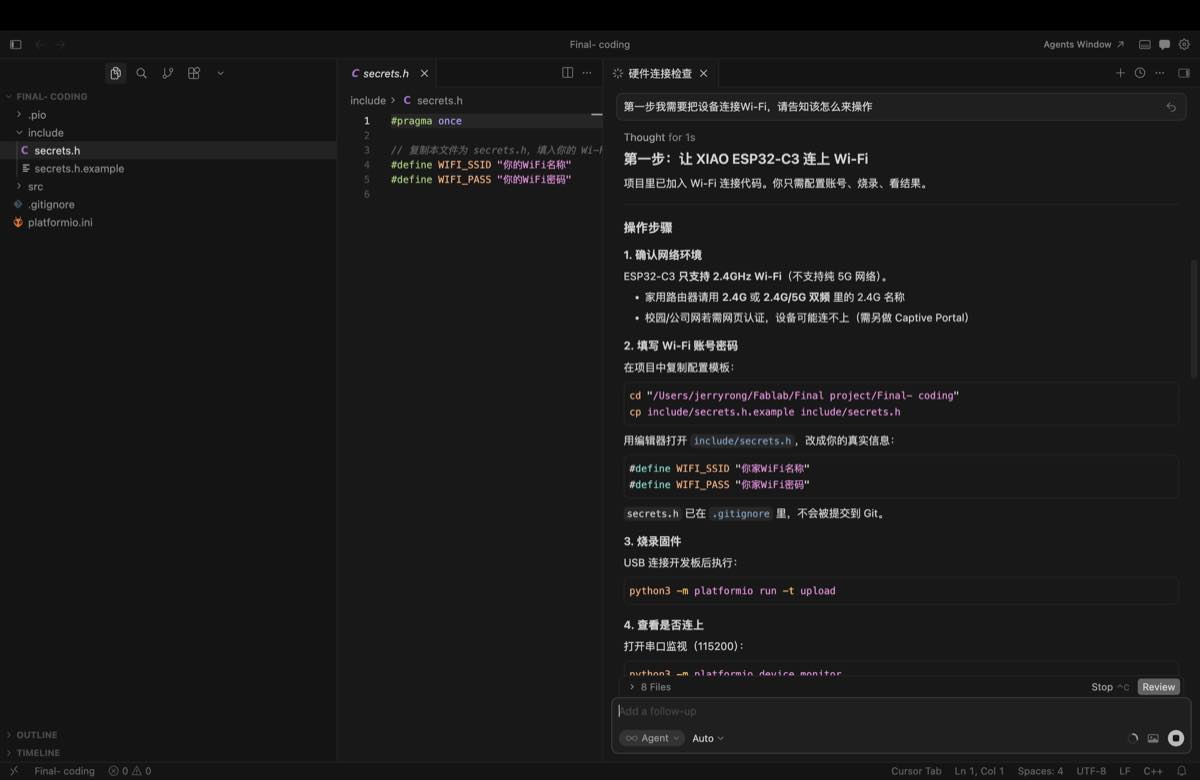
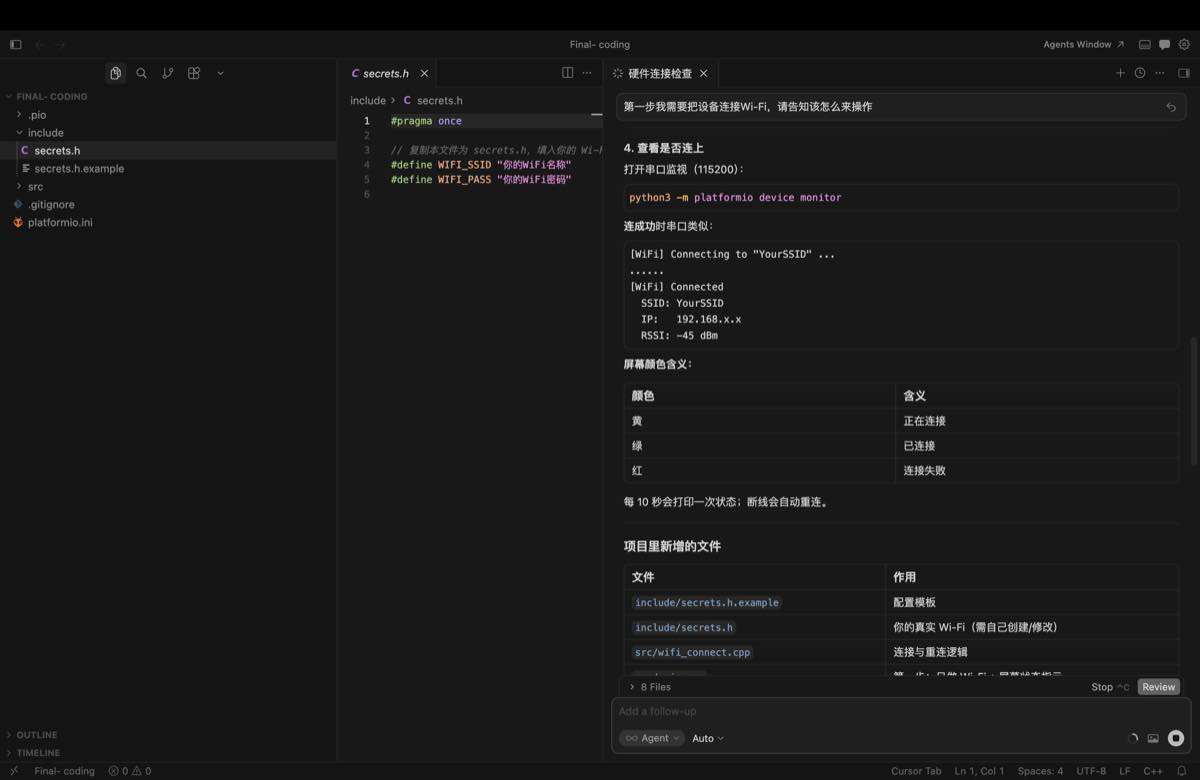
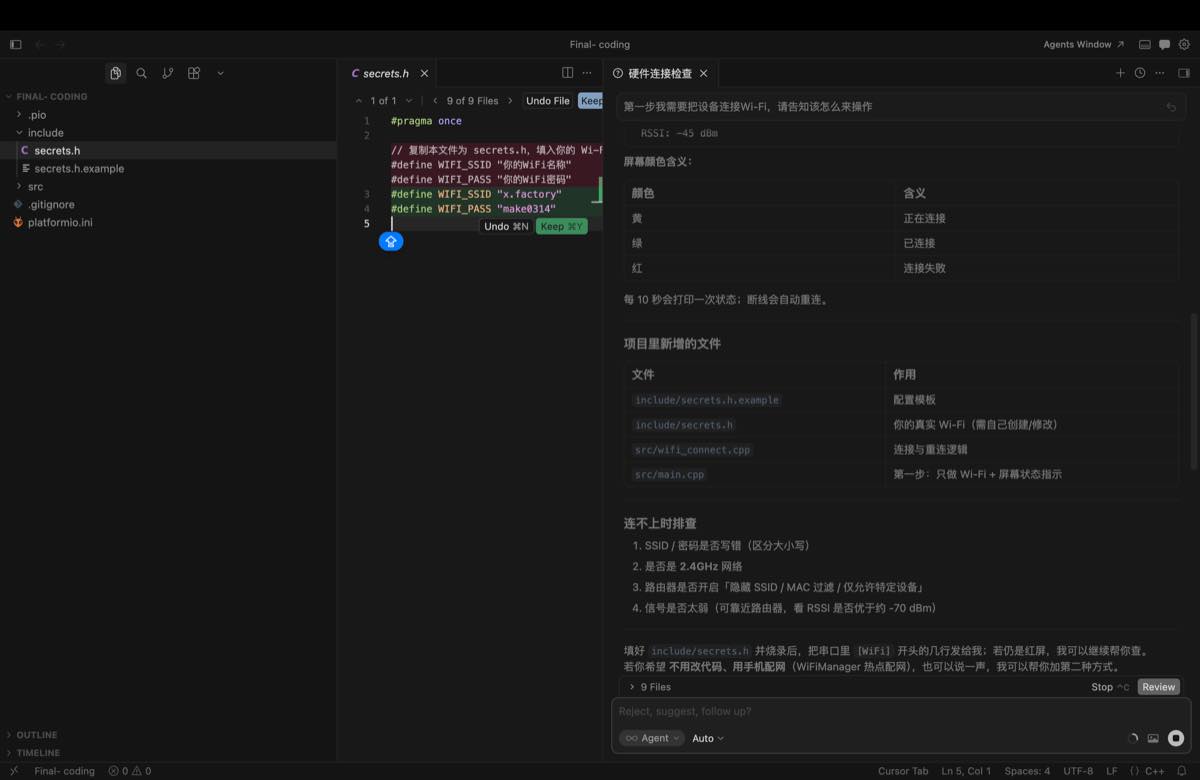
Provide the Wi-Fi account and password to generate the firmware, and burn the firmware.
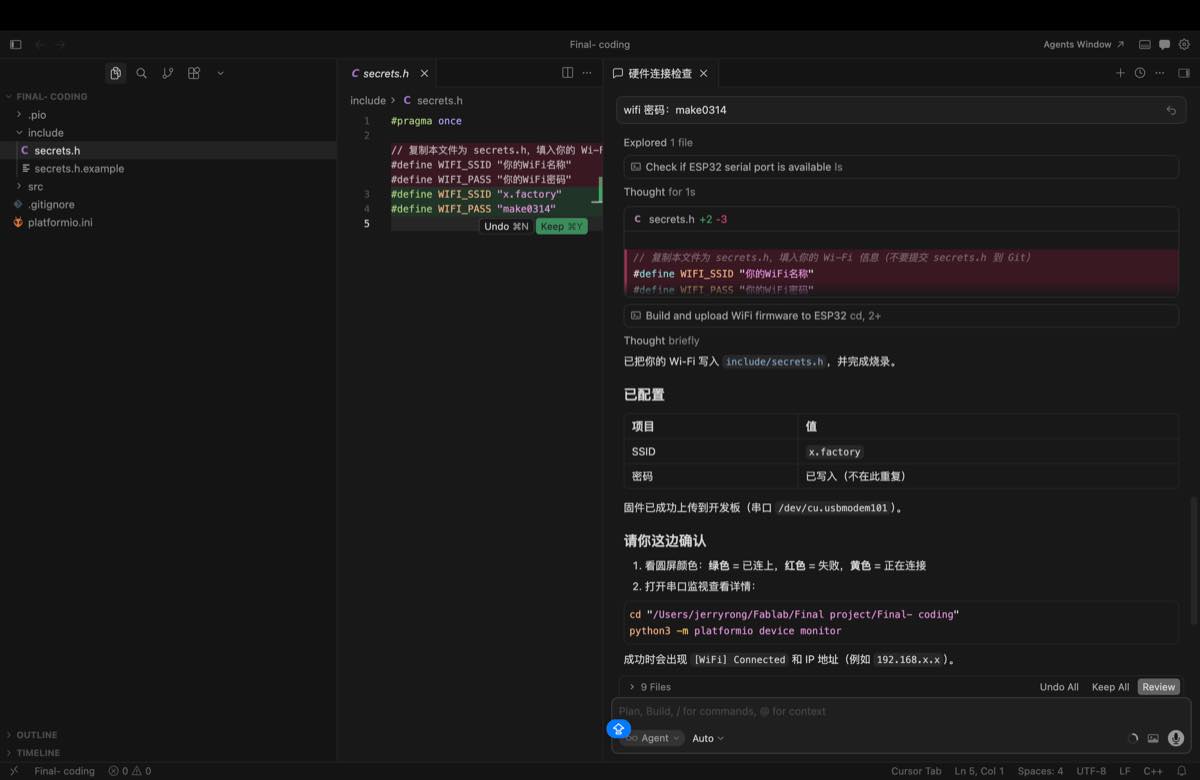
Testing
Testing: when the display shows green, it means the device is connected to Wi-Fi.
- Green: connected
- Red: disconnected
- Yellow: connecting
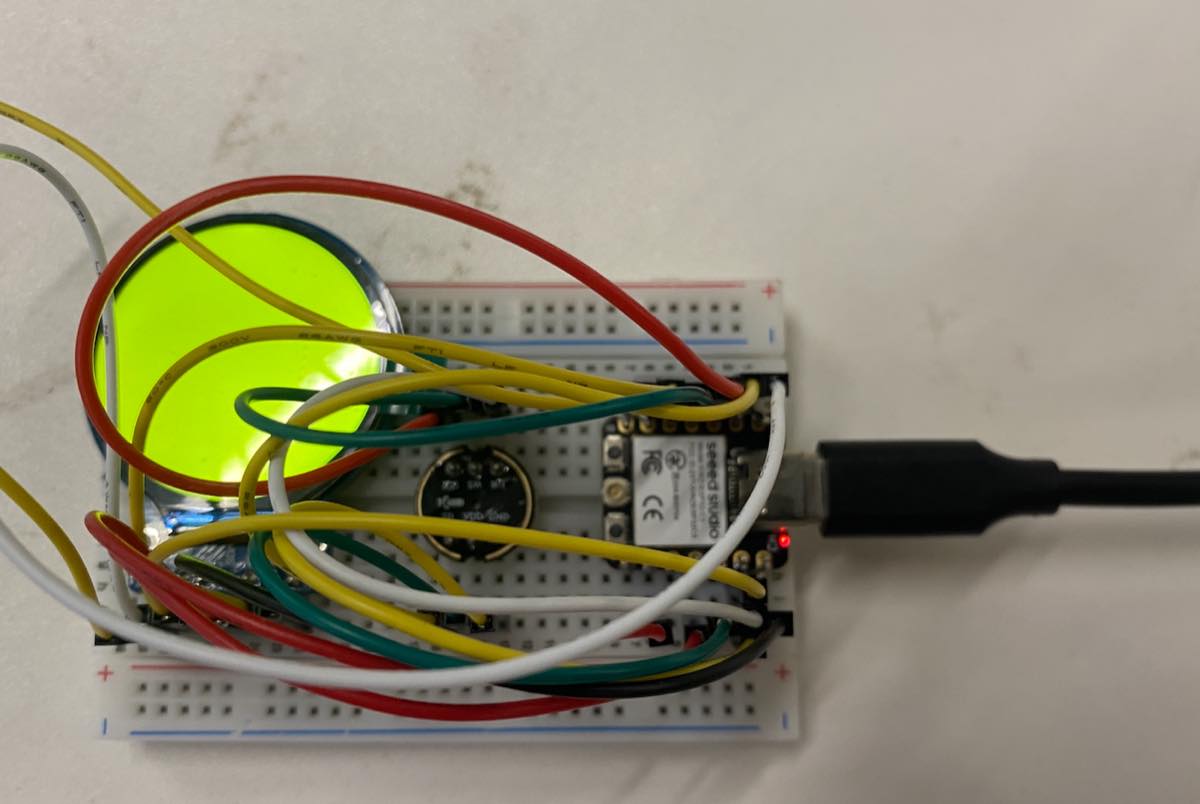
Key source code — WiFi connect + WiFi test (GC9A01 round LCD)
Early Wi-Fi hardware test on Seeed Xiao ESP32-C3 + GC9A01: round screen shows connection state by colour, Serial prints RSSI, auto-reconnect on disconnect.
The same wifi_connect module is reused in the full Lucky Bot firmware (main.cpp).
Project files: include/secrets.h, src/wifi_connect.cpp, src/gc9a01_hsd.cpp, src/main.cpp
| Screen colour | Meaning |
|---|---|
| Yellow | Connecting to Wi-Fi |
| Green | Connected (got IP) |
| Red | Disconnected / connect failed |
1. Wi-Fi credentials (include/secrets.h.example → copy to secrets.h):
#pragma once

#define WIFI_SSID "your_wifi_name"
#define WIFI_PASS "your_wifi_password"

// Mac LAN IP (terminal: ipconfig getifaddr en0)
#define ASR_SERVER_HOST "192.168.0.100"
#define ASR_SERVER_PORT 8765
2. Wi-Fi driver API (src/wifi_connect.h):
struct WiFiConnectResult {
  bool ok;
  int8_t rssi;
  IPAddress ip;
  const char* message;
};

void wifiInitSta();
bool wifiIsLinked();   // WL_CONNECTED + valid IP

WiFiConnectResult connectWiFi(const char* ssid, const char* password,
                              uint32_t timeoutMs = 45000);
void printWiFiStatus();  // SSID, IP, RSSI dBm
3. Wi-Fi connect function (src/wifi_connect.cpp):
#include "wifi_connect.h"
#include <WiFi.h>
#include <esp_wifi.h>

void wifiInitSta() {
  WiFi.onEvent(onWiFiEvent);
  WiFi.mode(WIFI_STA);
  WiFi.setAutoReconnect(false);
  WiFi.setSleep(false);
  esp_wifi_set_ps(WIFI_PS_NONE);
}

bool wifiIsLinked() {
  return WiFi.status() == WL_CONNECTED &&
         WiFi.localIP() != IPAddress(0, 0, 0, 0);
}

WiFiConnectResult connectWiFi(const char* ssid, const char* password,
                              uint32_t timeoutMs) {
  WiFiConnectResult result = {false, 0, IPAddress(), "timeout"};
  if (!ssid || !ssid[0]) {
    result.message = "SSID empty — edit include/secrets.h";
    return result;
  }

  wifiInitSta();
  Serial.printf("[WiFi] Connecting to \"%s\" ...\n", ssid);

  // Scan hotspot first (helps iPhone hotspot — find channel + RSSI)
  int targetChannel = 0;
  const int found = WiFi.scanNetworks(false, true);
  for (int i = 0; i < found; i++) {
    if (WiFi.SSID(i) == ssid) {
      targetChannel = WiFi.channel(i);
      Serial.printf("[WiFi] Found \"%s\" ch=%d rssi=%d\n",
                      ssid, targetChannel, WiFi.RSSI(i));
      break;
    }
  }
  WiFi.scanDelete();

  WiFi.disconnect(false);
  delay(400);
  if (targetChannel > 0)
    WiFi.begin(ssid, password, targetChannel);
  else
    WiFi.begin(ssid, password);

  const uint32_t start = millis();
  while (!wifiIsLinked()) {
    if (WiFi.status() == WL_CONNECT_FAILED ||
        WiFi.status() == WL_NO_SSID_AVAIL) {
      result.message = "auth failed or SSID not found";
      return result;
    }
    if (millis() - start > timeoutMs) {
      result.message = "connection timeout";
      return result;
    }
    delay(400);
    Serial.print('.');
  }
  Serial.println();

  result.ok = true;
  result.rssi = WiFi.RSSI();
  result.ip = WiFi.localIP();
  result.message = "connected";
  Serial.printf("[WiFi] OK IP=%s rssi=%d\n",
                result.ip.toString().c_str(), (int)result.rssi);
  return result;
}

void printWiFiStatus() {
  if (!wifiIsLinked()) {
    Serial.printf("[WiFi] Status=%d (not ready)\n", WiFi.status());
    return;
  }
  Serial.println("[WiFi] Connected (stable)");
  Serial.printf("  SSID: %s\n", WiFi.SSID().c_str());
  Serial.printf("  IP:   %s\n", WiFi.localIP().toString().c_str());
  Serial.printf("  RSSI: %d dBm\n", WiFi.RSSI());
}
4. Wi-Fi test — colour screen + periodic status (early test main.cpp, reconstructed from hardware-check logic):
#include "gc9a01_hsd.h"
#include "wifi_connect.h"
#include "secrets.h"

GC9A01_HSD lcd;

constexpr uint32_t kStatusPrintMs = 10000;   // print RSSI every 10 s
constexpr uint32_t kReconnectMs   = 10000;   // retry if link lost

void showWifiColour(uint16_t color) {
  lcd.fillScreen(color);
}

void setup() {
  Serial.begin(115200);
  delay(500);
  Serial.println("=== WiFi test — GC9A01 colour status ===");

  lcd.begin();

  showWifiColour(COLOR_YELLOW);              // Yellow = connecting
  WiFiConnectResult r = connectWiFi(WIFI_SSID, WIFI_PASS);

  if (r.ok) {
    showWifiColour(COLOR_GREEN);            // Green = connected
    printWiFiStatus();
  } else {
    showWifiColour(COLOR_RED);              // Red = failed
    Serial.printf("[WiFi] FAIL: %s\n", r.message);
  }
}

void loop() {
  static uint32_t lastPrint = 0;
  static uint32_t lastReconnect = 0;
  const uint32_t now = millis();

  if (wifiIsLinked()) {
    showWifiColour(COLOR_GREEN);
    if (now - lastPrint >= kStatusPrintMs) {
      lastPrint = now;
      printWiFiStatus();                    // e.g. RSSI: -45 dBm
    }
  } else {
    showWifiColour(COLOR_RED);              // Red = disconnected
    if (now - lastReconnect >= kReconnectMs) {
      lastReconnect = now;
      Serial.println("[WiFi] Link lost — reconnecting...");
      showWifiColour(COLOR_YELLOW);
      connectWiFi(WIFI_SSID, WIFI_PASS);
      if (wifiIsLinked()) {
        showWifiColour(COLOR_GREEN);
        printWiFiStatus();
      }
    }
  }
  delay(300);
}
LCD colour constants (src/gc9a01_hsd.h):
constexpr uint16_t COLOR_RED    = 0xF800;
constexpr uint16_t COLOR_GREEN  = 0x07E0;
constexpr uint16_t COLOR_YELLOW = 0xFFE0;
5. Merged into full Lucky Bot (src/main.cpp — same connectWiFi, UI upgraded to photos):
void setup() {
  lcd.begin();
  ui.show(LuckyScreen::kOffline);
  wifiInitSta();
  connectWiFi(WIFI_SSID, WIFI_PASS);
}

void loop() {
  if (!wifiIsLinked()) {
    ui.show(LuckyScreen::kOffline);
    if (now - lastReconnect >= 8000)
      connectWiFi(WIFI_SSID, WIFI_PASS);
    return;
  }
  if (!printedStable) {
    printWiFiStatus();
    ui.show(LuckyScreen::kWakeListen);
  }
  deviceStatusTick(ASR_SERVER_HOST, ASR_SERVER_PORT, WIFI_SSID);
}
Expected behaviour: power on → yellow → green + RSSI: -45 dBm → every 10 s status print → link lost → red → auto-reconnect.
How to change the Wi-Fi configuration
Step 1
Revise the Wi-Fi information in include/secrets.h.
Step 2
Burn the firmware again.
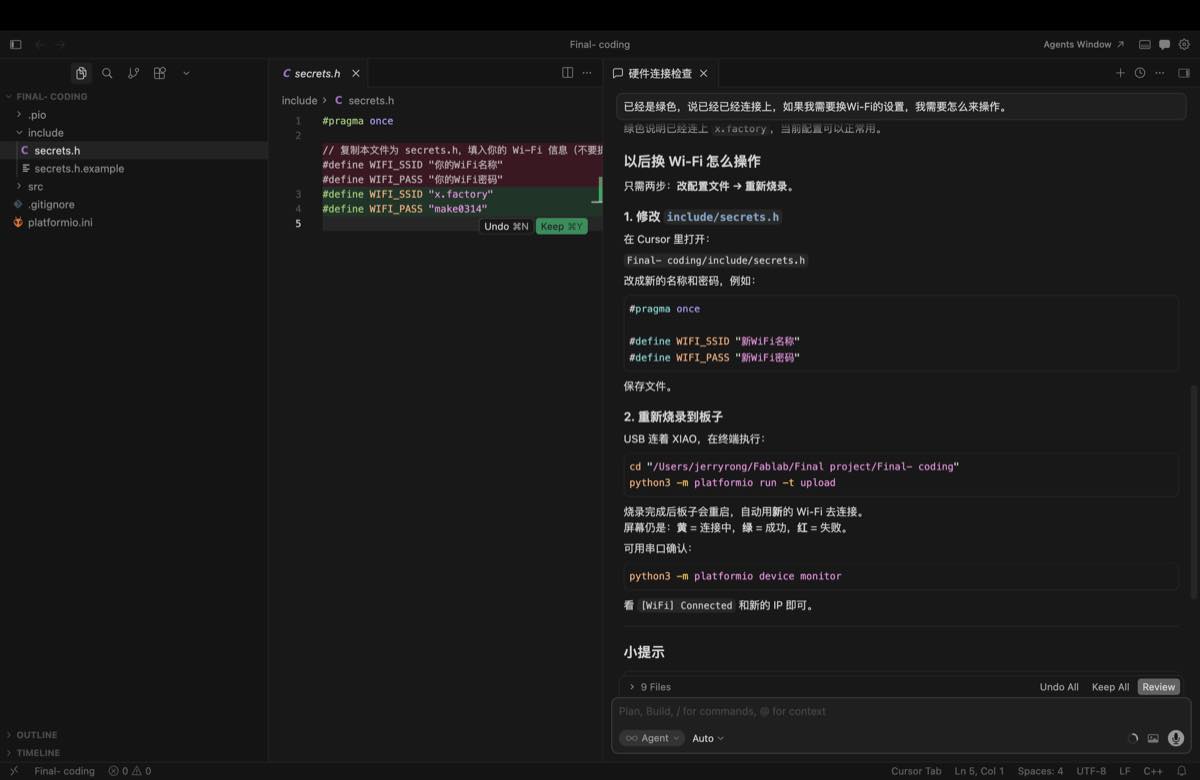
Edit Wi-Fi credentials (include/secrets.h — copy from secrets.h.example if needed):
#pragma once

#define WIFI_SSID "your_wifi_name"
#define WIFI_PASS "your_wifi_password"

// Mac LAN IP (terminal: ipconfig getifaddr en0)
#define ASR_SERVER_HOST "192.168.0.100"
#define ASR_SERVER_PORT 8765
Build, upload, and monitor (connect Xiao ESP32-C3 via USB first):
cd "/Users/jerryrong/Fablab/Final project/Final- coding"
python3 -m platformio run -t upload
python3 -m platformio device monitor
After re-flashing, check the round display: yellow = connecting, green = connected, red = failed.
Serial monitor prints the new IP and RSSI, for example:
[WiFi] Connected (stable)
  SSID: your_wifi_name
  IP:   192.168.x.x
  RSSI: -45 dBm