Week 20 - Project Presentation
The theme of this week is Final Project Presentations . The task requirements given on the course page are: Course Page: https://fabacademy.org/2026/classes/project_presentation/index.html
This week is the final presentation week of Fab Academy. The course requires us to complete the final project documentation, answer questions related to project design, manufacturing, testing, and impact, and prepare a summary slide and a one-minute video to showcase the project's concept, manufacturing, and operation process.
For my final project Maker Assistant , the focus of Week 20 is not to repeat all the production details but to organize the work from the previous months into a clear final presentation: what this project is, what parts I've worked on, how it works, what has succeeded, and what still needs improvement.
1. Final Project Overview
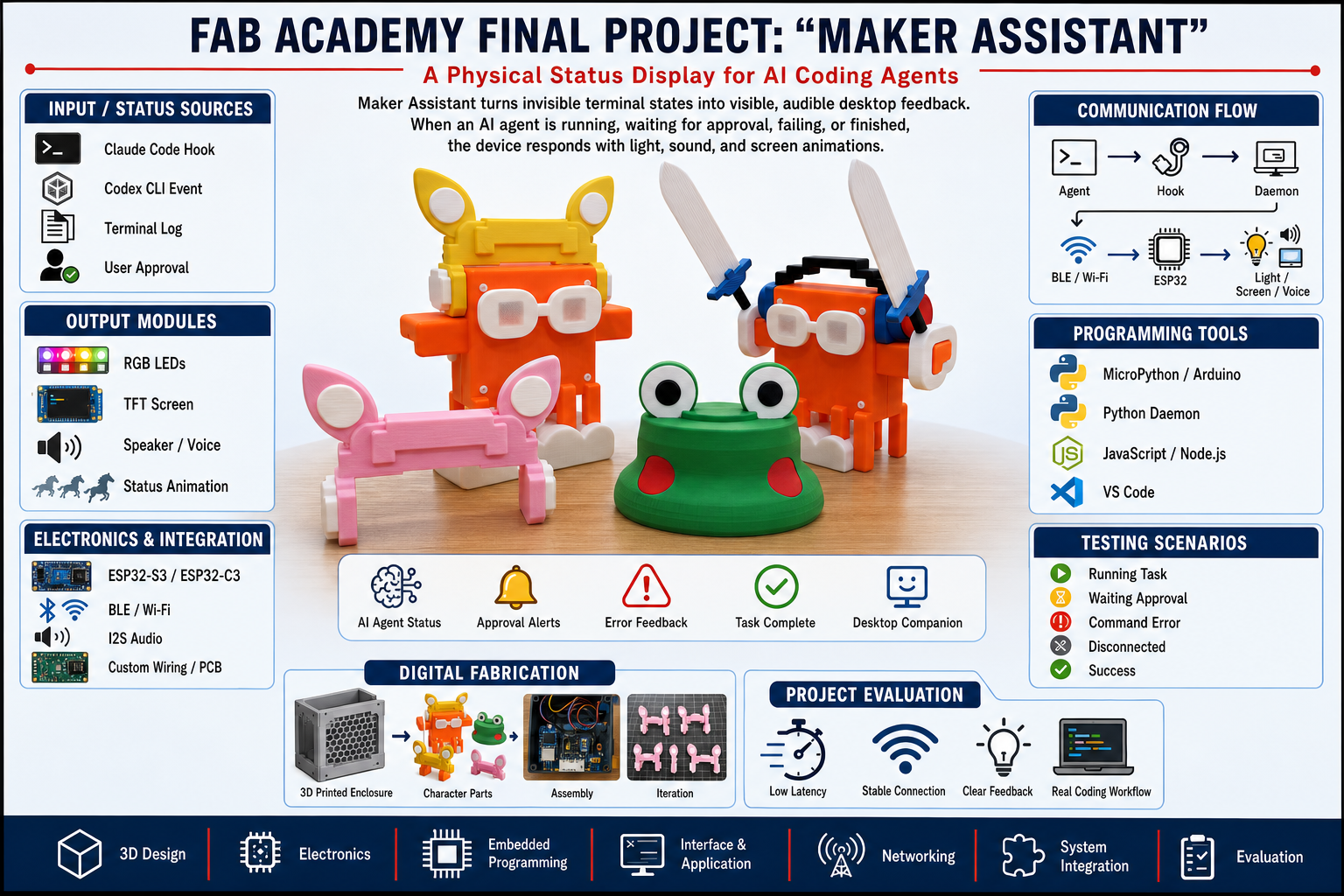
My final project is Mark Assistant, a desktop status feedback device designed for AI programming workflows. It can convert the execution status of Claude Code, Codex CLI, or similar AI Agent tools in the terminal into lights, voice, and screen animations on a physical device.
The core idea of this project is:
The problem it aims to solve is that AI Agents often execute long-running tasks. If users keep staring at the terminal, they will be interrupted; if they leave, they may miss approval, error, or completion prompts. Mark Assistant transfers these states to desktop hardware, allowing users to know the task progress without constantly looking at the screen.
2. What will it do?
The Mark Assistant will display the operating status of AI programming tools and convert different states into different feedbacks.
Main functions include:
- When the Agent is executing a command, the device displays the working status;
- When the Agent is waiting for user approval, the device uses yellow blinking and voice alerts;
- When the task is completed, the device displays the "completed" status and plays a completion prompt;
- When a command fails or a test fails, the device displays an error status;
- When the device is disconnected from the computer, it displays the "disconnected" status;
- Users do not need to constantly switch back to the terminal and can also perceive whether a task needs to be processed.
The state mapping is as follows:
| Status | Meaning | Feedback Method |
|---|---|---|
| Idle | Idle | Soft lighting or standby animation |
| Working | is being executed | Breathing light, in-operation animation |
| Pending | Waiting for approval | Yellow flashing, voice reminder |
| Completed | Task completed | Green light, completion beep |
| Error | An error occurred | Red light, error beep |
| Disconnected | Connection Disconnected | Gray state, disconnection prompt |
3. Who did what before?
This project is built on multiple existing technological directions.
The existing foundation includes:
- AI programming tools such as Claude Code, Codex CLI, etc.;
- ESP32 development board and MicroPython / Arduino ecosystem;
- Communication methods such as BLE, Wi-Fi, WebSocket, etc.;
- Output modules such as WS2812B lights, TFT screens, I2S power amplifiers, etc.;
- Various desktop status lights, reminders, and notification devices in the maker community.
My job is not to invent these basic technologies, but to combine them into a new application scenario: creating a physical state feedback device for the AI Agent programming workflow .
In the Fab Academy project, I focused on completing:
- Usage scenarios and state logic definitions;
- Design of desktop device enclosure and role-based structure;
- Electronic connections and PCB organization;
- ESP32 firmware writing;
- Computer-side state capture and forwarding;
- BLE communication and device-side status rendering;
- Final assembly, testing, and documentation compilation.
4. What sources of information were used?
Materials used and referenced in the project include:
| Source | Usage |
|---|---|
| Fab Academy Course Materials | Design, electronics, input/output, communication, and system integration methods |
| ESP32 / MicroPython Documentation | Device firmware, I/O, BLE, and audio control |
| aioble / bleak Documentation | Communication between BLE device and computer |
| Claude Code Hooks | Capture AI Agent runtime events |
| WS2812B / NeoPixel Materials | Status Light Control |
| MAX98357A I2S Power Amplifier Data | Voice broadcast output |
| LVGL / ST7789 Screen Materials | Panel / D-Shell Screen Expansion |
| JLCPCB EDA / LCSC Mall | PCB Design, BOM, and PCB Fabrication |
| Bambu Studio / 3D Printing Experience | Shell slicing, printing, and assembly |
Project code repository:
https://github.com/FreakStudioCN/MicroPython_Claude_Assistant_Public
5. What did I design?
In this project, I designed or organized the following content:
- Usage scenarios and problem definition of Mark Assistant;
- AI Agent state classification and feedback logic;
- Clock Alarm Edition Desktop Shell;
- Characterized accessories, including glasses, ears, hats, feet, and other decorative items;
- 2D display diagrams, project visual creatives, and presentation pages;
- ESP32-C3 Electronic Connections and PCB Carrier Board;
- Device-side MicroPython firmware;
- State protocol and finite-state machine;
- Computer-side hook bridge and daemon;
- BLE communication process;
- Light, voice, and screen feedback methods;
- Final assembly and testing process.
The final project uses Clock Alarm Edition as the main manufacturable version, while retaining Panel / D-Shell Panel Edition as an extended form. The Clock version is suitable for comprehensively demonstrating Fab Academy's capabilities in design, manufacturing, electronics, programming, and system integration; the Panel / D-Shell shows the potential for extending the same architecture to screen animation and multi-session status display.
6. What materials and components were used?
The main materials and components are as follows:
| Category | Component or Material | Usage |
|---|---|---|
| Master Control | ESP32-C3 Development Board | Clock version master controller, responsible for BLE, lighting, and audio |
| Extended Master | ESP32-S3 / D-Shell Board | Panel / D-Shell Version Screen and Touch Controls |
| Lighting | WS2812B RGB LED | Displays different status colors and blinking rhythms |
| Audio | MAX98357A I2S Digital Power Amplifier | Drive the speaker to play a prompt tone |
| Sound Output | 4Ω / 3W Small Speaker | Play voices for startup, connection, completion, error, etc. |
| Input | Vibration Sensor / Touch Module | Optional Input and Interaction |
| Show | 2.4-inch ST7789 TFT Screen | Panel animation and status text |
| Structure | PLA / PETG Printing Materials | Printed shells and accessories |
| circuit | Self-made PCB, pin headers, connectors | Stable connection electronic module |
| Fixed | M2 / M3 Screws, Heat-set Copper Nuts | Fix the housing, PCB, and speaker |
| Software | MicroPython、Python、Claude Code Hooks | Firmware, Host Computer Program, and Status Capture |
7. Where do they come from?
Materials and components mainly come from common domestic supply chains and laboratory inventories.
| Materials / Components | Source | Instructions |
|---|---|---|
| ESP32-C3 / ESP32-S3 | Taobao / Lichuang Mall | Rapid development and verification |
| WS2812B RGB LED | Lichuang Mall / Taobao | Common Programmable LED Beads |
| MAX98357A Power Amplifier Module | Lichuang Mall / Taobao | I2S Digital Audio Output |
| Speaker, vibration motor, wire | Taobao / Lab Inventory | Universal low-cost components |
| PCB Prototype | JLC | Proofing after JLCPCB EDA Design |
| Resistor-capacitor, Interface, Pin Header | Lichuang Mall | PCB Peripheral Components |
| PLA / PETG Filament | Fab Lab / Taobao | 3D Printed Shells and Accessories |
| Screws, nuts, hot-melt copper nuts | Taobao / Lab Inventory | Assembly and Fixation |
| TTS Voice Resources | Doubao TTS | Generate device beep sound |
In the project, parts that can be self-made should be made by oneself as much as possible, such as shells, accessories, PCBs, firmware, status protocols, and computer programs; standard electronic components should be obtained through procurement.
8. What is the cost?
Cost Estimate for a Single Prototype of
| Name | Quantity | Unit Price Estimation | Total Price Estimation | Remarks |
|---|---|---|---|---|
| ESP32-C3 Development Board | 1 | ¥18 | ¥18 | Master Control |
| WS2812B RGB LED | 2 | ¥1 | ¥2 | Status Light |
| MAX98357A I2S 功放 | 1 | ¥8 | ¥8 | Voice Output |
| Small speaker | 1 | ¥6 | ¥6 | 4Ω / 3W |
| vibration motor | 1 | ¥3 | ¥3 | Optional haptic feedback |
| Vibration Sensor | 1 | ¥2 | ¥2 | Optional Input |
| USB Cable / Pin Header / Interface | 1 batch | ¥8 | ¥8 | Connection and Power Supply |
| PCB Prototype | 1 | ¥20 | ¥20 | Small batch amortization |
| Resistors, Capacitors, and Connectors | 1 batch | ¥8 | ¥8 | PCB Periphery |
| PLA / PETG Materials | Approximately 120g | ¥0.15/g | ¥18 | Shells and Accessories |
| Screws and hot-melt copper nuts | 1 batch | ¥5 | ¥5 | Assembly Fixation |
| Total | — | — | Approximately ¥98 | Single Clock Prototype |
This cost analysis shows that the Clock version is suitable as a low-cost, reproducible prototype for the Fab Academy final project.
9. What components and systems have been fabricated?
The final project includes the following systems:
9.1 Physical Structure System
It includes a 3D printed housing, character accessories, PCB fixing structure, speaker mounting position, and removable housing. The main body is not a simple electronic box but a desktop character device.
9.2 Electronic System
Includes ESP32-C3, WS2812B, MAX98357A, speaker, vibration module, and PCB connection system. The role of the PCB is to organize the originally loose connections into a more stable and assembly-friendly form.
9.3 Embedded Systems
The ESP32-side firmware is responsible for receiving status, parsing protocols, maintaining the finite-state machine, and refreshing light, voice, and screen feedback.
9.4 Computer Software System
The computer side consists of hook bridge, daemon, BLE transport, pairing tool, and test script, and is responsible for sending the status of Claude Code / Codex-like tools to the hardware.
9.5 System Integration
The final system combines software status, computer program, BLE communication, ESP32 firmware, electronic output, and 3D printed enclosure into a standalone desktop device.
10. What tools and processes were used?
This project integrates skills from multiple units in Fab Academy.
| Tool / Process | Usage in the project |
|---|---|
| SolidWorks | 3D shell and accessory modeling |
| Photoshop | 2D display graphics, stickers, and presentation design |
| Bambu Studio | 3D Printing Slicing |
| FDM 3D Printing | Print the housing, body, and accessories |
| Laser Cutting / 2D Production | can be used to display base plates, nameplates, or decorative parts |
| JLCPCB EDA | Schematic and PCB Design |
| PCB Prototype / Soldering | Make electronic connection board |
| MicroPython | ESP32 device firmware |
| Python | Computer-side daemon, hook bridge, and tool scripts |
| BLE | Wireless communication between computers and devices |
| I2S | Voice broadcast output |
| WS2812B Control | Status light feedback |
| System Integration | Integration of housing, electronics, firmware, communication, and testing |
11. Which questions were answered?
This project ultimately answered the following questions:
- Can the terminal state of an AI Agent be effectively expressed by physical devices?
- Which type of feedback, lighting, voice, or screen, is suitable for different states?
- Can users understand the task status without looking at the terminal?
- Is BLE sufficient for transmitting simple status messages?
- Can a low-cost ESP32 device handle state reception, lighting, and voice feedback?
- Is the low-complexity hardware like Clock sufficient to deliver the core experience?
- Do multiple sessions and more complex information require screen version expansion?
The conclusion is that for core status reminders, the Clock version is already effective enough; for multiple sessions, project names, and history records, the Panel / D-Shell screen version is more suitable.
12. Which ones succeeded? Which ones didn't?
12.1 Successful Parts
- Hooking into the device's status link can work;
- The status light is very intuitive, with colors and rhythms easy to understand;
- The voice prompt for waiting for approval and completion status is very valuable;
- The Clock version has appropriate hardware complexity and is suitable for reproduction;
- The same set of state protocols can be extended to different hardware versions;
- GUI programming and pairing tools lower the deployment threshold.
12.2 Areas Still Needing Improvement
- BLE still requires stronger exception handling in the Windows environment;
- Clock version cannot display the full multi-session history;
- The frequency of voice prompts needs to be controlled to avoid disturbing users;
- The wire space, speaker openings, and maintenance structure of the enclosure can still be optimized;
- Panel / D-Shell has more features, but its manufacturing and debugging complexity is higher.
13. How to evaluate?
I evaluate the project from five aspects: functionality, latency, stability, readability, and real-world scenarios.
| Test Item | Testing Method | Result |
|---|---|---|
| State Capture | Trigger events such as prompt, tool use, notification, stop, failure, etc. | The daemon process can identify and transition states |
| State Protocol | Use protocol testing and simulate payload | The device can parse status messages |
| finite-state machine | Test W/P/C/E/I state transitions | Priority and state transitions meet expectations |
| BLE Push | Push wire status at approximately 5Hz | The device can display changes in a timely manner |
| Light feedback | Simulate idle, working, pending, completed, and error respectively | Colors and blinking rhythms can be distinguished |
| Voice Feedback | 播放 startup、connect、disconnect、done、error、pending | Speaker is normal, key prompts are effective |
| Disconnection Recovery | Close the daemon or reconnect after disconnecting the device | can enter the disconnection/reconnection process, but still needs optimization |
| Real Scenario | Run a long task in Claude Code and leave the terminal window | The device reduces the frequency of frequently checking the terminal |
The most important evaluation conclusion is: Waiting for Approval and Task Completed are the states that most require external reminders. The working state is suitable to be expressed by lights, and the error state is suitable for red lights plus voice.
14. What is the impact of the project?
Maike Assistant explains that AI programming tools do not necessarily only exist on screens and in terminals. As AI Agents execute tasks for longer periods, users need new ways to perceive what the Agents are doing.
This project can be extended to:
- AI Agent Status Reminder;
- CI/CD Build Status Reminder;
- Server task monitoring;
- Reminder for laboratory equipment operation;
- Multi-Agent Status Dashboard;
- Remote task completion reminder;
- Sound and light reminder device for accessibility needs.
Its impact does not lie in how complex a single piece of hardware is, but in proposing an interactive approach that brings software states into the physical space.
15. Downloadable Files
Downloadable files:
-
3D Model File: 闹钟3D外壳设计(终版).7z
-
2D design files: Maker Assistant.psd
-
PCB manufacturing files; 码克助手制板文件.zip
-
Source code and firmware files: https://github.com/FreakStudioCN/MicroPython_Claude_Assistant_Public
-
Bill of Materials (BOM): BOM_ESP32C3-插件版本_PCB1_2026-06-23.xlsx
16. License
The project code uses MIT License , making it easy for others to learn, modify, and reproduce.
3D shells, character appearances, and presentation documents are shared under the CC BY-SA 4.0 license, allowing others to learn and modify them, but requiring the preservation of attribution and sharing of derivative designs in the same manner.
Third-party tools and libraries used in the project, such as MicroPython, aioble, bleak, LVGL, esptool, mpremote, Pillow, websockets, etc., retain their original licenses. Voice resources are generated by Doubao TTS, and users need to comply with the terms of service of the corresponding platform when using them.
17. This Week's Summary
Week 20 is the week for the final project presentation and also the culmination of the entire Fab Academy program.
Through Doubao Assistant, I integrated the content learned in previous weeks into a complete work:
2D / 3D 设计
      -> 3D 打印和结构装配
      -> PCB 设计与电子生产
      -> ESP32 嵌入式编程
      -> 输入输出设备
      -> BLE 通信
      -> 电脑端应用程序
      -> 系统集成和封装
      -> 最终展示和评估
The final project demonstrates an idea: the state of an AI Agent can emerge from the terminal and transform into visible, audible, and perceptible feedback on the desktop. The current Clock version has already completed the core experience, while the Panel / D-Shell version showcases the direction of future expansion towards screen animations and multi-session status panels.
AI Assistance:
During the preparation of this documentation, ChatGPT (GPT-4) was used as a language assistance tool.
It helped with sentence polishing and translation from Chinese to English to improve readability and clarity.