Week 17 - Wildcard Week (Machine Learning)
The theme of this week is Wildcard Week. The task requirements given on the course page are: Course Page: https://fabacademy.org/2026/classes/wildcard/index.html
The problem I need to solve this week is: how to deploy an AI vision model to the Grove Vision AI V2 image processing module and enable the XIAO ESP32C3 to read the recognition results.
Therefore, this week I will document the deployment of models on the SenseCraft AI platform, local inference of Grove Vision AI V2, the invocation of model results by XIAO ESP32C3, serial output testing, and the reproduction process.
1. Understanding this week's tasks
The focus of Wildcard Week is not to repeat the 3D printing, laser cutting, PCB fabrication, or ordinary embedded programming that has been done before, but to choose a digital manufacturing or digital process not covered in other assignments and turn it into a reproducible project.
For my project this week, I have chosen Embedded Machine Vision / Edge AI Model Deployment . It differs from ordinary sensor reading because the image is not directly processed by the main control board, but rather image acquisition and model inference are completed by a dedicated vision AI module, and then the recognition results are passed to the microcontroller.
The core objective of this week's project is to ensure that the following chain runs smoothly:
SenseCraft AI 模型
      -> Grove Vision AI V2 图像处理模块
      -> 本地图像采集与 AI 推理
      -> XIAO ESP32C3 调用结果
      -> 串口监视器显示识别数据
That is to say, this project cannot simply stop at individual steps such as "opening a web page", "connecting modules", or "uploading code", but rather it is necessary to verify: whether the model has truly been deployed to the vision module, whether the vision module can perform local inference, whether XIAO can read the recognition results, and whether these results can be understood and further used for interactive control.
2. Project System Boundary
This week's project focuses on deploying the SenseCraft model to the Grove Vision AI V2 image processing module . It is neither a complete final project nor a retraining of a large AI model, but rather a documentation of the complete process of an edge AI vision module from model deployment to result reading.
This week's system boundary includes the following parts:
- How to select Grove Vision AI V2 as image processing hardware;
- How to deploy models through the SenseCraft AI platform;
- How to confirm that the model can already run on the module;
- How to use XIAO ESP32C3 to communicate with Grove Vision AI V2;
- How to call model inference through an Arduino program;
- How to read results such as boxes, classes, and points;
- How to verify the recognition results through the serial monitor;
- How to organize reproduction steps.
This week, we will not focus on custom dataset collection, model training, complex shell structure, and final product interaction, as these topics can be expanded upon later. What is emphasized here is how to run through the model deployment and machine vision inference pipeline .
3. Overall System Architecture
The system of this project can be divided into four layers.
3.1 Model Source Layer
The model is sourced from the SenseCraft AI platform. SenseCraft AI provides some models suitable for running on embedded devices, which can be directly deployed into Seeed's Visual AI Modules.
For this test, I used a Rock-Paper-Scissors recognition model. The reason for choosing it is:
- Gesture targets are easy to prepare and do not require additional production of complex test objects;
- The classification results are intuitive, making it easy to judge whether the recognition is correct;
- Suitable for verifying the image recognition capabilities of Grove Vision AI V2;
- can serve as an input method for subsequent interactive projects.
3.2 Image Processing Layer
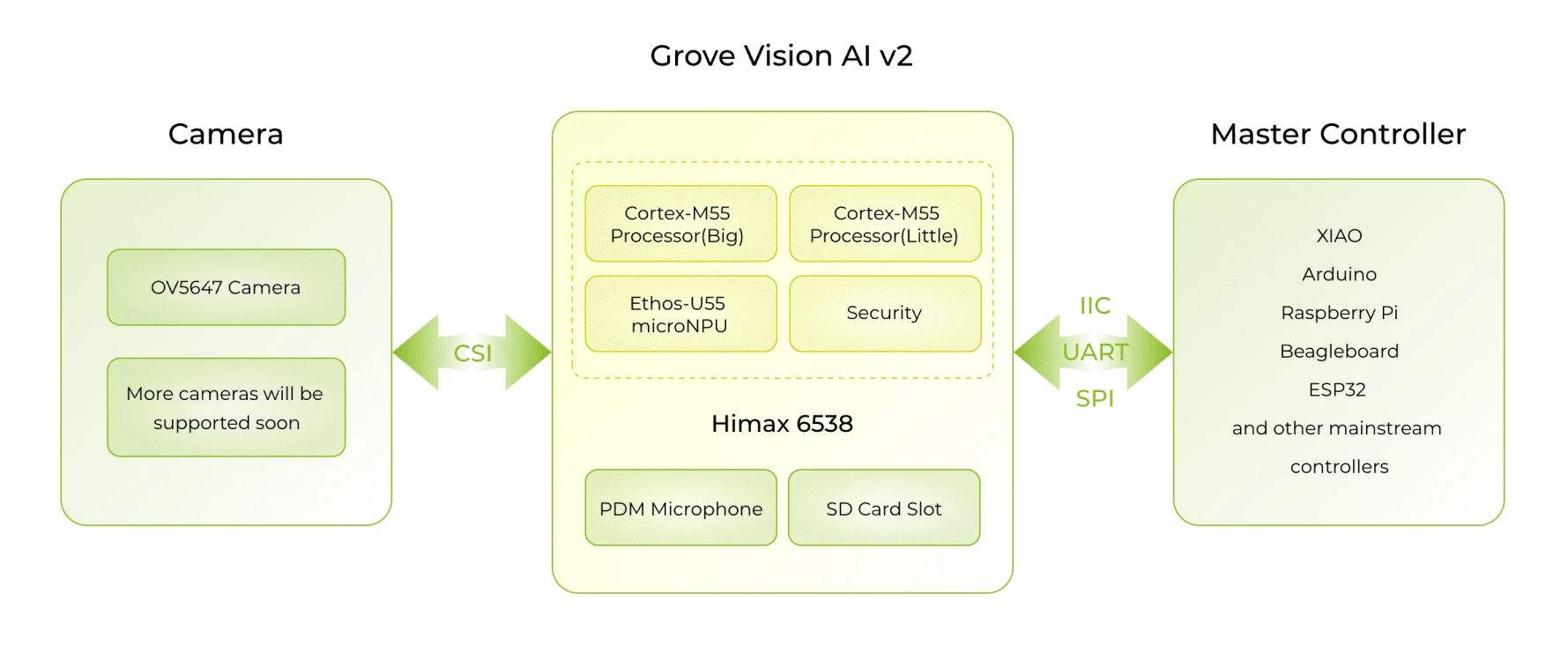
The Image Processing Layer is implemented by Grove Vision AI V2 . This module is responsible for image acquisition, model execution, and outputting inference results.
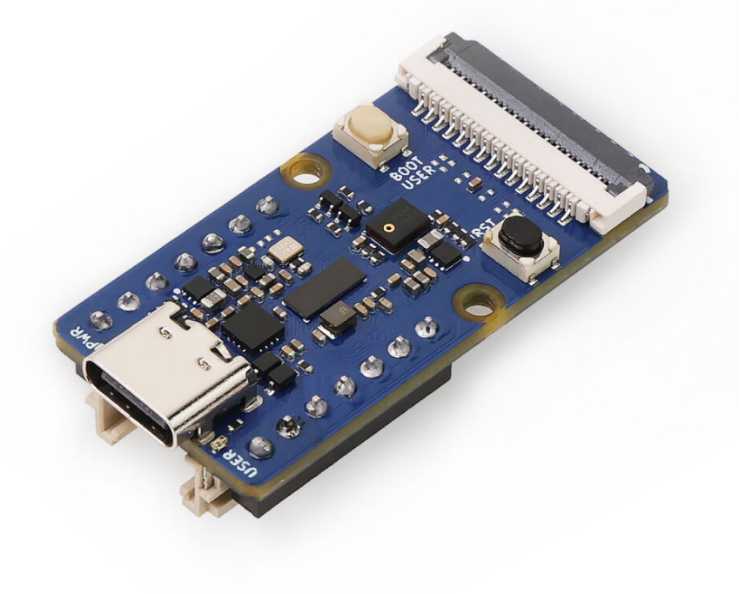
The role of Grove Vision AI V2 is not simply that of a camera, but rather a vision module with local AI inference capabilities. It can perform image preprocessing, neural network inference, and postprocessing within the module, and then send the results to the main control board in the form of Structured Data.
3.3 Master Reading Layer
The master control reading layer is completed by XIAO ESP32C3 . XIAO is not responsible for running the AI model, but instead calls Grove Vision AI V2 through the Seeed_Arduino_SSCMA library and reads the inference results.
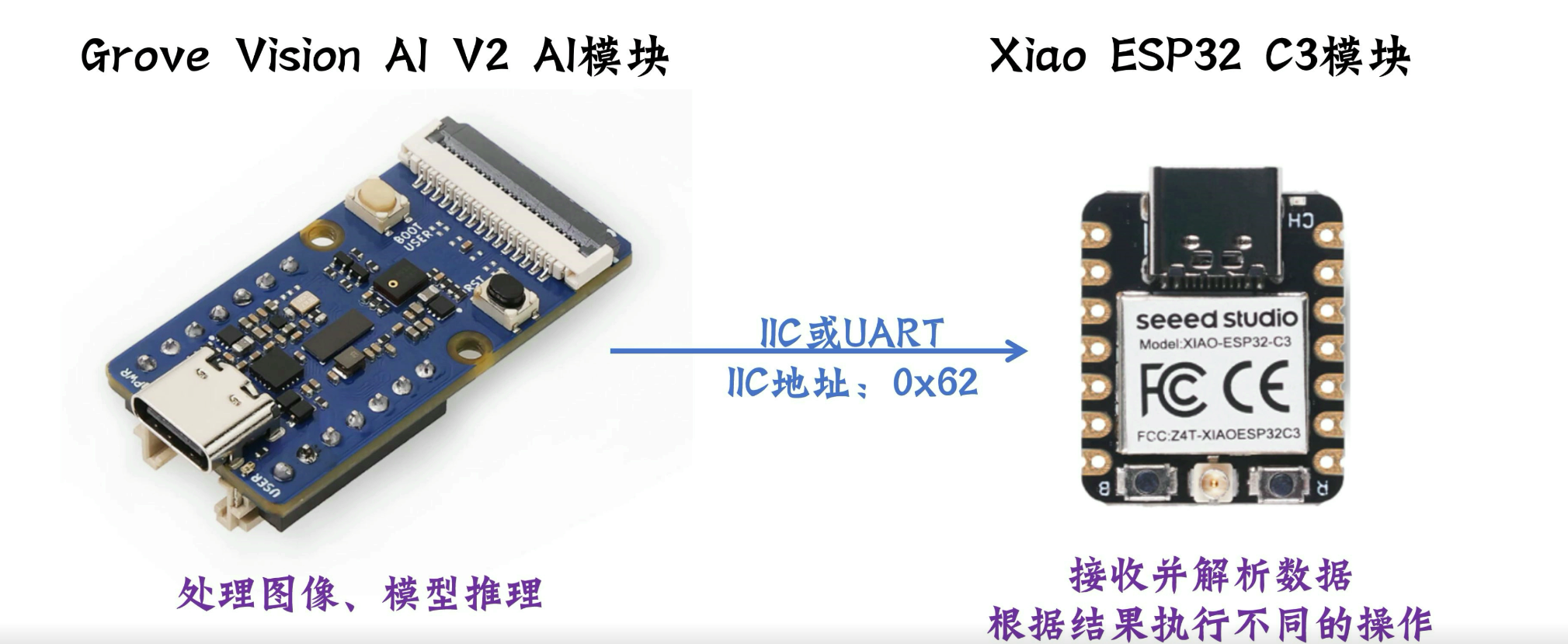
XIAO's main tasks include:
- Initialize Grove Vision AI V2;
- Call
AI.invoke()to trigger inference; - Read the model runtime;
- Read detection boxes, classification results, or key points;
- Output the results to the serial monitor.
3.4 Results Display Layer
The results for this week are displayed via the serial monitor. Although serial output is simple, it is highly suitable for verifying the success of model deployment.
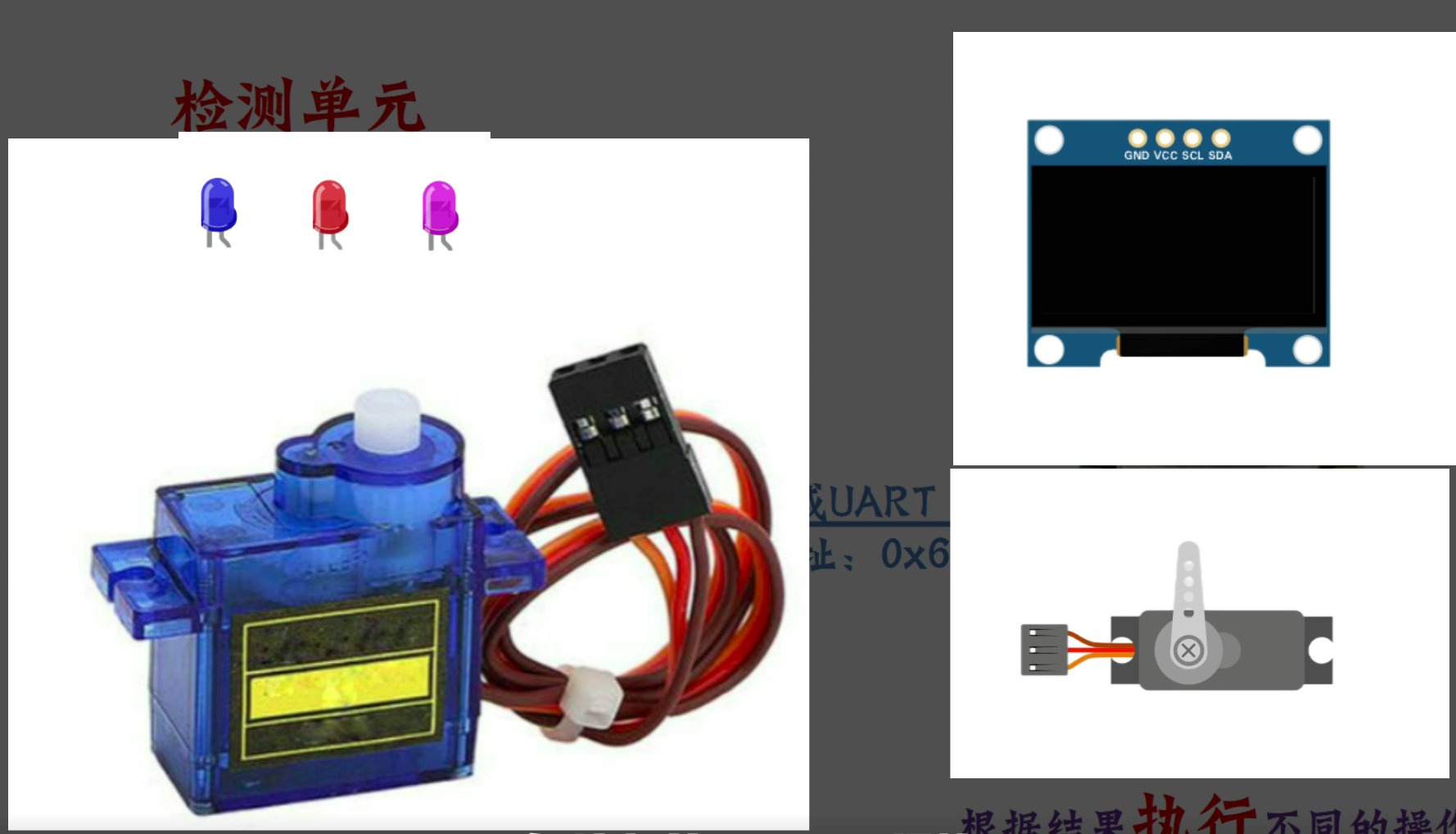
If further expansion is carried out in the future, the serial port results can be changed to:
- Control the LED to display different gestures;
- Control servos or mechanical structures;
- Display the recognized category on the screen;
- Send to the computer via Wi-Fi or BLE.
4. Hardware Section
The core hardware used this week is as follows:
| Category | Component or Device | Function |
|---|---|---|
| Visual AI Module | Grove Vision AI V2 | Image Acquisition and Local AI Inference |
| Main Control Board | XIAO ESP32C3 | Call the AI module and read the results |
| Communication Connection | Grove Interface / I2C / Serial Communication | Connect the vision module and the main control board |
| Data Cable | USB Type-C | Power Supply, Deployment Model, and Upload Program |
| computer | Windows computer | Open SenseCraft, Arduino IDE, and Serial Monitor |
The core feature of Grove Vision AI V2 is that it can directly run vision models locally. This way, image data does not need to be uploaded to the cloud, resulting in faster response times and making it more suitable for integration into physical interactive devices.
Its main features include:
- Uses the WiseEye2 HX6538 processor;
- 搭载 Arm Cortex-M55 和 Ethos-U55 NPU;
- Supports visual tasks such as Image Classification and Object Detection;
- Models can be deployed via SenseCraft AI;
- can be used in conjunction with hardware such as XIAO, Arduino, ESP32, Raspberry Pi, etc.
5. Software and Platform
The software and platforms used this week are as follows:
| Software / Platform | Function | Meaning |
|---|---|---|
| SenseCraft AI | Select and Deploy AI Models | Location and Confidence Level output by the Object Detection Model |
| Arduino IDE | Upload a program to XIAO ESP32C3 | Categories and scores output by the image classification model |
| Seeed_Arduino_SSCMA 库 | Communicate with Grove Vision AI V2 | Position output by the pose or key point model |
| Serial Monitor | View model inference results | |
| Official Documentation for Grove Vision AI V2 | Query the usage of hardware and software |
6. SenseCraft Model Deployment Process
6.1 Connect Hardware
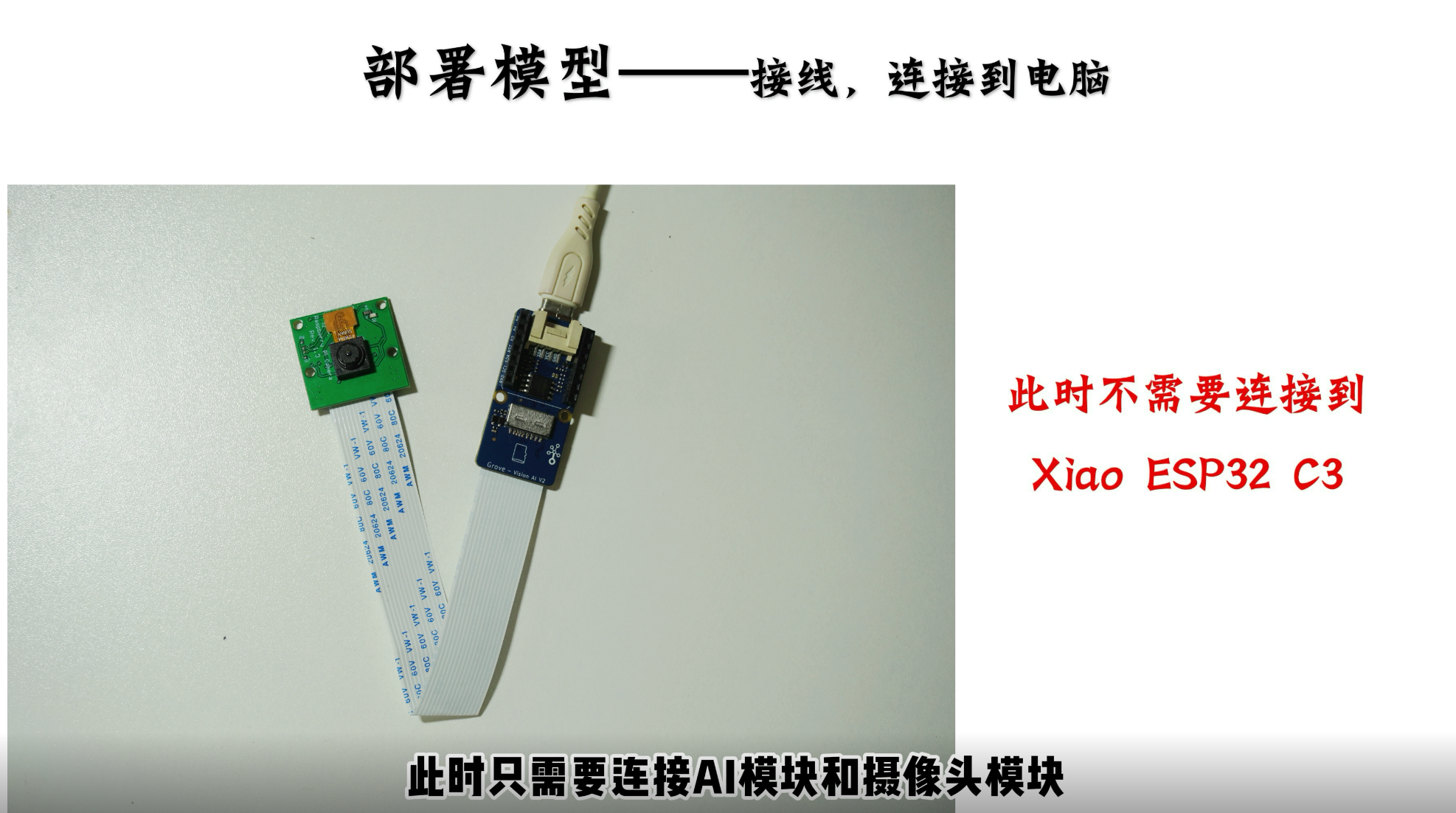
First, use a USB Type-C cable to connect the Grove Vision AI V2 to the computer. After the connection, the computer needs to be able to recognize the device so that the SenseCraft AI platform can deploy the model to the module.
The focus of this stage is to confirm:
- USB cables can transmit data, not just provide power;
- The module can be powered on normally;
- The browser or SenseCraft platform can recognize the device;
- The device is not occupied by other software.
6.2 Open the SenseCraft AI Platform
After entering the SenseCraft AI platform, select Grove Vision AI V2 as the target hardware. The platform will provide deployable models and also support some custom model processes.
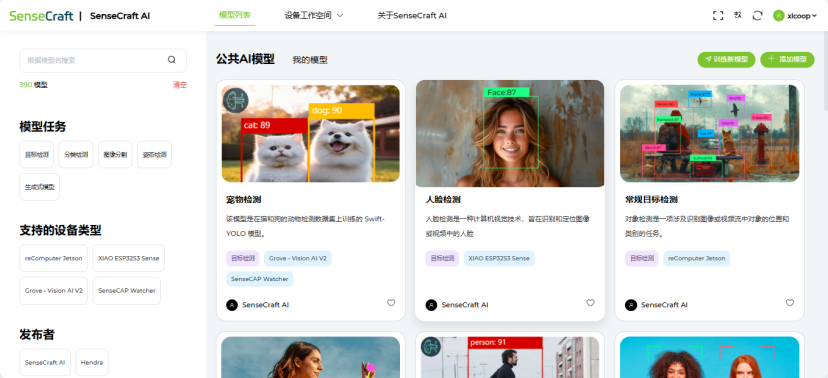
This time, I have chosen a Rock-Paper-Scissors recognition model suitable for rapid testing. This model can be used to determine whether the vision module can recognize different gestures.
6.3 Deploy the Model
After selecting a model in SenseCraft AI, deploy the model to Grove Vision AI V2. After the deployment is completed, the model will be stored in the vision module, and subsequent inference, even when invoked by XIAO, will be completed on Grove Vision AI V2.
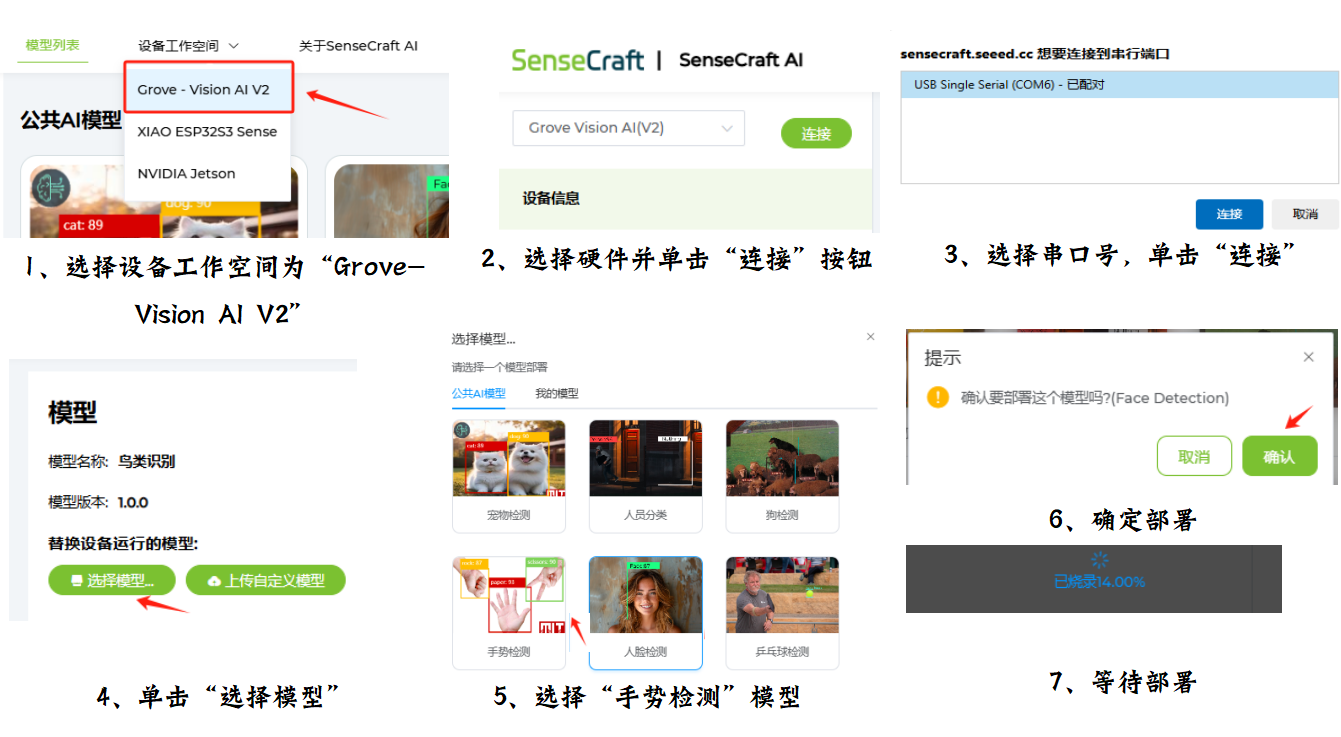
This step is the most core digital process this week, as it writes an AI model from a web platform into physical hardware.
6.4 Preview the Recognition Effect
After the deployment is completed, I first use the preview function of the platform to check the recognition effect. The reason for doing this is that if the model fails to work during the preview stage, it will be difficult to determine whether the problem stems from the model, hardware connection, or code when the Arduino program fails to read the results later.
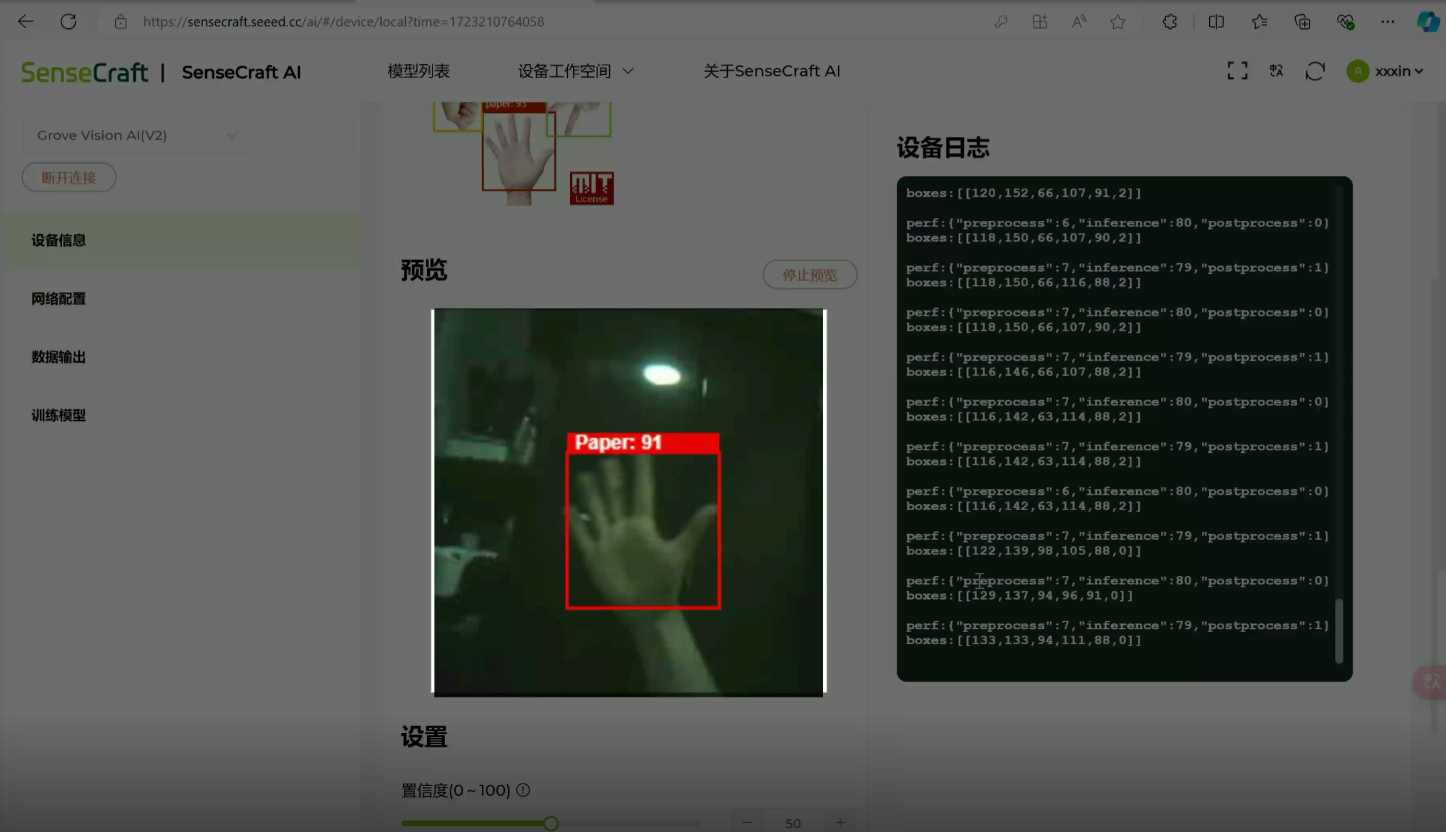
During the preview phase, the following needs to be observed:
- Is the camera image normal?
- Does the model have an output?
- Identify whether the category is reasonable;
- Is the Confidence Level within the acceptable range;
- Is the module response stable?
7. Arduino Program
After confirming that the model can run on Grove Vision AI V2, I started writing the program for the XIAO ESP32C3 side.
The program uses the Seeed_Arduino_SSCMA library. The function of this library is to handle the communication between XIAO and Grove Vision AI V2 and provide an interface for reading inference results.
#include <Seeed_Arduino_SSCMA.h>

SSCMA AI;

void setup()
{
    AI.begin();
    Serial.begin(9600);
}

void loop()
{
    if (!AI.invoke())
    {
        Serial.println("invoke success");
        Serial.print("perf: prepocess=");
        Serial.print(AI.perf().prepocess);
        Serial.print(", inference=");
        Serial.print(AI.perf().inference);
        Serial.print(", postpocess=");
        Serial.println(AI.perf().postprocess);

        for (int i = 0; i < AI.boxes().size(); i++)
        {
            Serial.print("Box[");
            Serial.print(i);
            Serial.print("] target=");
            Serial.print(AI.boxes()[i].target);
            Serial.print(", score=");
            Serial.print(AI.boxes()[i].score);
            Serial.print(", x=");
            Serial.print(AI.boxes()[i].x);
            Serial.print(", y=");
            Serial.print(AI.boxes()[i].y);
            Serial.print(", w=");
            Serial.print(AI.boxes()[i].w);
            Serial.print(", h=");
            Serial.println(AI.boxes()[i].h);
        }

        for (int i = 0; i < AI.classes().size(); i++)
        {
            Serial.print("Class[");
            Serial.print(i);
            Serial.print("] target=");
            Serial.print(AI.classes()[i].target);
            Serial.print(", score=");
            Serial.println(AI.classes()[i].score);
        }

        for (int i = 0; i < AI.points().size(); i++)
        {
            Serial.print("Point[");
            Serial.print(i);
            Serial.print("] target=");
            Serial.print(AI.points()[i].target);
            Serial.print(", score=");
            Serial.print(AI.points()[i].score);
            Serial.print(", x=");
            Serial.print(AI.points()[i].x);
            Serial.print(", y=");
            Serial.println(AI.points()[i].y);
        }
    }
}
8. Program Logic Description
8.1 Initialize the AI Module
Here, we import Seeed's SSCMA library and create an object named AI. This object is used to communicate with Grove Vision AI V2.
AI.begin() is used to initialize the AI module, Serial.begin(9600) is used to open the serial port output.
8.2 Call Model Inference
AI.invoke() will trigger Grove Vision AI V2 to perform a model inference. It should be noted here that in the example program, when AI.invoke() returns 0, it indicates a successful call, so !AI.invoke() is used as the judgment condition.
8.3 Output Performance Information
This section is used to view the time taken for the model to run, including:
- Preprocessing time;
- Inference time;
- Post-processing time.
These data can help determine whether the model is suitable for real-time interaction. If the inference time is too long, significant delays may occur in subsequent projects.
8.4 Output the recognition results
The program reads three types of results respectively:
| Result Type | Program Interface | Meaning |
|---|---|---|
| Detection Box | AI.boxes() |
Location and Confidence Level output by the Object Detection Model |
| Classification Results | AI.classes() |
Categories and scores output by the image classification model |
| Key Point | AI.points() |
Position output by the pose or key point model |
I print out all three types of results because the output formats of different models vary. This approach can prevent the situation where the true output of the model cannot be seen when only one type of result is printed.
9. Test Results
After uploading the program, open the Serial Monitor of Arduino IDE and set the baud rate to 9600.
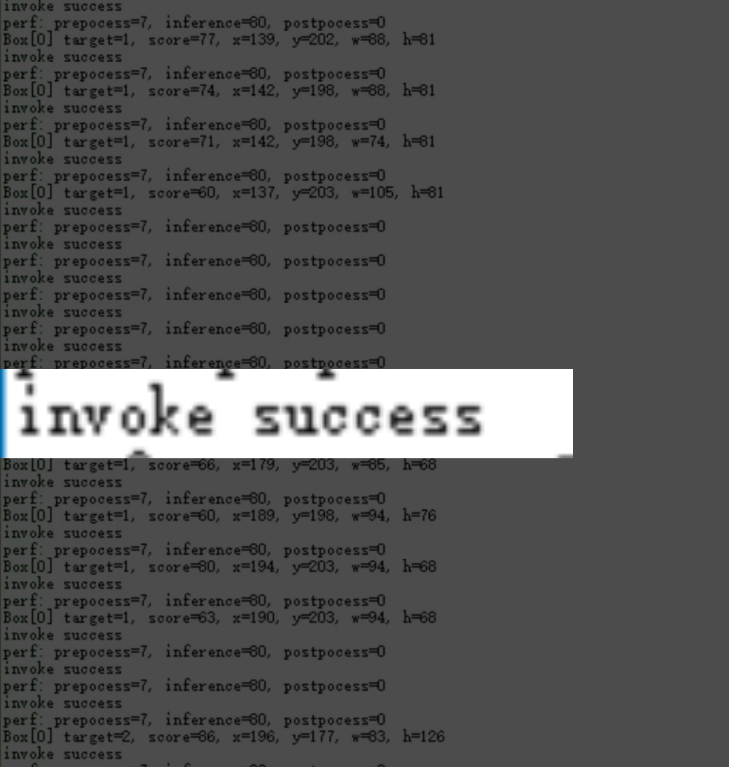
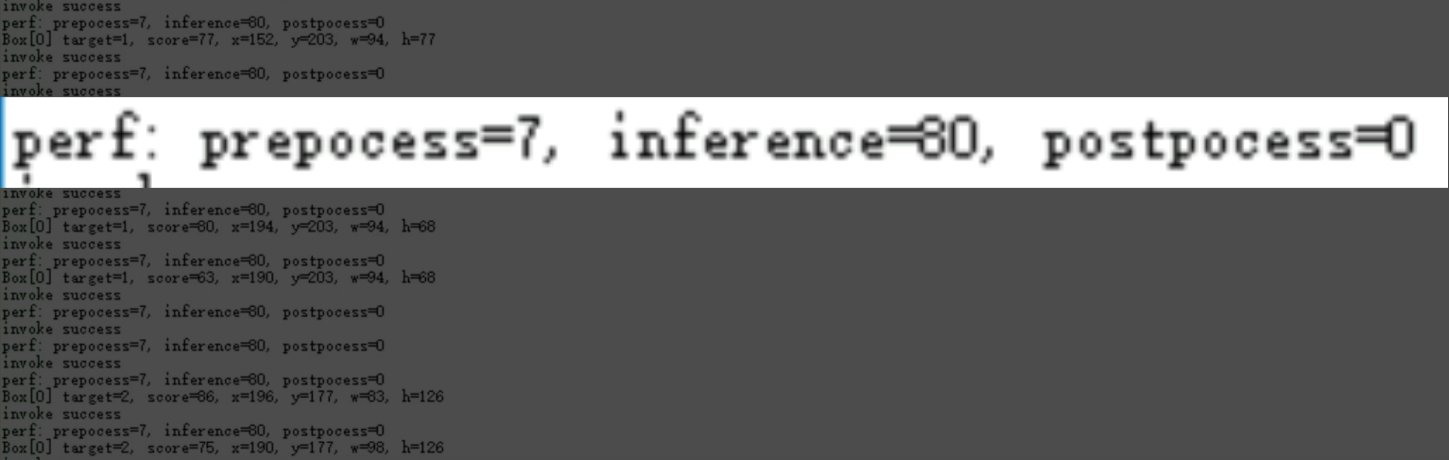
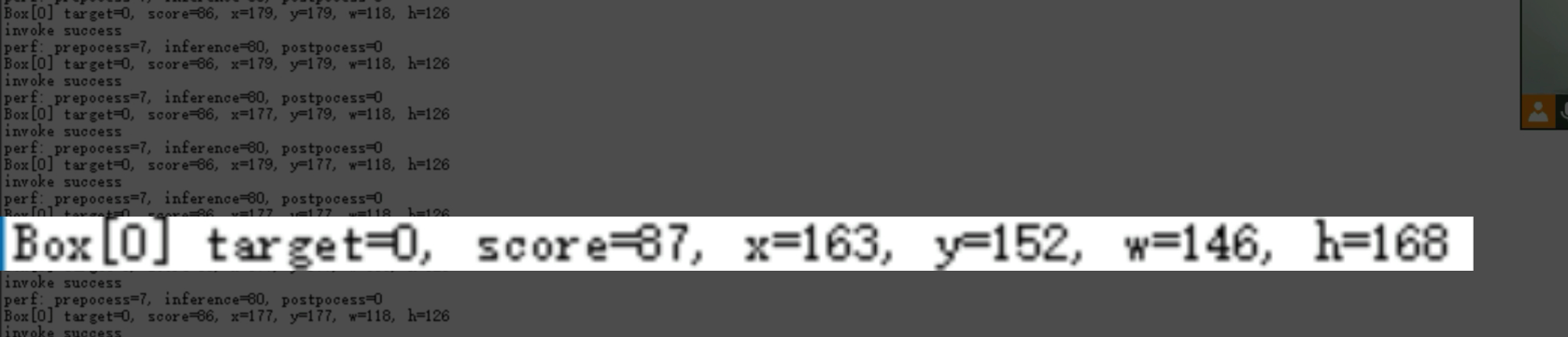
When Grove Vision AI V2 successfully completes an inference, the serial port will output content similar to the following:
invoke success
perf: prepocess=7, inference=80, postpocess=0
Box[0] target=1, score=81, x=209, y=161, w=63, h=114
These outputs indicate:
invoke successindicates that the model invocation was successful;prepocess=7indicates that preprocessing took approximately 7 ms;inference=80indicates that model inference took approximately 80 ms;postpocess=0indicates that the post-processing time is very short;target=1represents the identified target category number;score=81represents the Confidence Level score;x=209, y=161, w=63, h=114represents the position and size of the detection box.
From this result, it can be confirmed that Grove Vision AI V2 has completed model inference, and XIAO ESP32C3 can read the structured recognition results.
10. Issues Encountered This Week
10.1 Whether the model is successfully deployed needs to be verified separately first
If you directly start Arduino programming at the beginning, it is difficult to determine where the problem lies. It could be that the model was not successfully deployed, the hardware was not properly connected, or the code did not correctly read the results.
Therefore, I first use the preview function of SenseCraft to confirm that the model can run, and then enter the XIAO-side program for testing. This way, troubleshooting problems is clearer.
10.2 Different models have different output formats
Some models output boxes, some models output classes, and some models output points. If only one type of result is printed, it may be mistakenly assumed that the model did not recognize any content.
Therefore, I print all three types of results simultaneously in the program. This way, regardless of whether the currently deployed model is a classification model, a detection model, or a keypoint model, the corresponding output can be seen.
10.3 Edge AI is different from ordinary sensor reading
Previously, when using sensors, the main control board typically directly read raw data, such as temperature, distance, voltage, or button status. However, in this project, the main control board does not read raw images but rather the processed results from Grove Vision AI V2.
This distinction is important. The system division of labor should be:
- Grove Vision AI V2 is responsible for image acquisition and AI inference;
- XIAO ESP32C3 is responsible for reading the results and performing subsequent actions.
10.4 Recognition effectiveness is affected by lighting and angle
Visual models such as Rock-Paper-Scissors are relatively sensitive to gesture angle, distance, and lighting. If the hand is too close to the camera, the background is too complex, or the light is too dim, the recognition results may be unstable.
If it is to be used in real interactive devices in the future, the camera position needs to be fixed, and the test environment should be controlled as much as possible.
11. Reproduction Steps
If you want to reproduce this project, you can follow the steps below:
- 准备 Grove Vision AI V2 和 XIAO ESP32C3;
- Connect Grove Vision AI V2 to the computer using USB Type-C;
- Open the SenseCraft AI Platform;
- Select Grove Vision AI V2 as the target hardware;
- Select the Rock-Paper-Scissors or other image recognition models;
- Deploy the model to Grove Vision AI V2;
- Use the preview function in SenseCraft to confirm that the model can be recognized;
- Open Arduino IDE;
- Install or import the
Seeed_Arduino_SSCMAlibrary; - Connect to XIAO ESP32C3;
- Select the correct development board and serial port;
- Upload the Arduino program in this week's document;
- Open the serial monitor and set the baud rate to
9600; - Place the gesture or target object in front of the camera;
- View the category, Confidence Level, coordinates, and inference time output from the serial port.
12. This Week's Summary
Through this week's Wildcard Week, I completed a working link for embedded machine vision:
This process demonstrates that Grove Vision AI V2 is not just a camera module, but an EdgeComputing module capable of running AI models locally. XIAO ESP32C3 does not need to directly process images, but only needs to read the structured results after inference.
This week's assignment meets the requirements of Wildcard Week because it uses digital processes not covered in previous assignments: Machine Vision Model Deployment and Edge AI Inference . The documentation also records hardware, software, deployment process, test code, serial port results, and reproduction steps.
Subsequent optimization can continue:
- Train a custom model using self-collected data;
- Connect the recognition results to an LED, servo, or screen;
- Design a housing with a fixed camera angle;
- Record the inference speed and recognition accuracy of different models;
- Integrate AI visual input into the final project or interactive device.
13. Related Links:
- SenseCraft AI Platform: https://sensecraft.seeed.cc/ai/#/model
- Official Documentation for Grove Vision AI V2:https://wiki.seeedstudio.com/cn/grove_vision_ai_v2/