Week 15 - Interface and Application Programming
This week we are learning Interface and Application Programming . In the previous weeks, we have completed the input devices, output devices, and network communication. The focus of this week is to turn these hardware functions into application interfaces that users can directly operate or view.
In embedded projects, application interfaces can take many forms: web pages, mobile apps, desktop programs, local OLED interfaces, and even Node-RED dashboards. Their common goal is to enable users to more intuitively read device data, control device status, or understand the current operating conditions of the system.
Group assignment:
The group assignment requires comparing as many interface and application development tools as possible. We investigated tools such as Arduino IDE, Thonny, VS Code, Node-RED, MATLAB / Simulink, Cursor, OpenAI Codex CLI, Claude Code, etc., and compared them in terms of usage scenarios, advantages, and limitations.
Individual assignment:
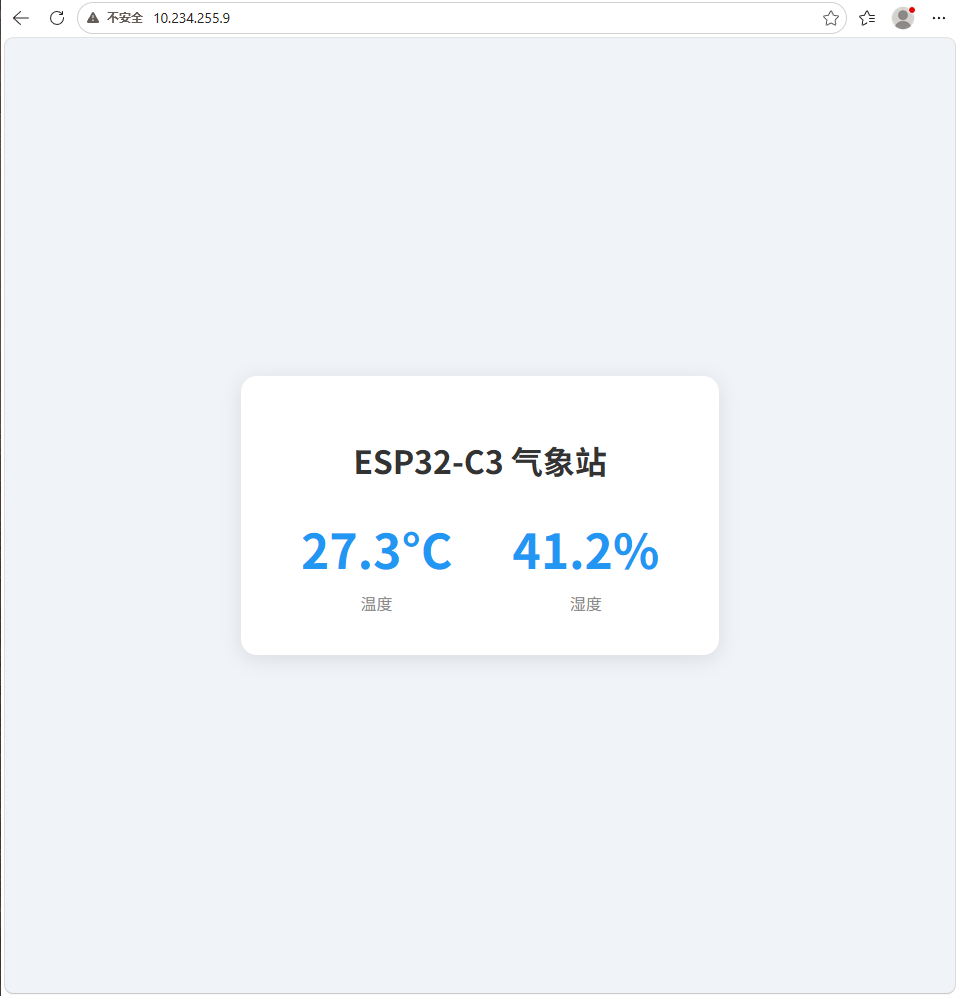
The personal assignment requires writing an application that allows users to interact with self-made input or output devices through an interface. This time, I created a ESP32-C3 Temperature and Humidity Web UI. The development board reads data from the DHT22 temperature and humidity sensor and simultaneously displays it on both the local OLED screen and the web interface. Users can access the IP address of the ESP32-C3 via a browser to view temperature and humidity data in real time.
Overall, the focus of this week is not to create complex visual effects, but to establish a complete connection between "Hardware Data - Communication Protocol - User Interface".
Group Assignment
Group Assignment Page: https://fabacademy.org/2026/labs/chaihuo/docs/week15/chaihuo/week15_group_assignment
1. Tool Research
1.1 Arduino IDE
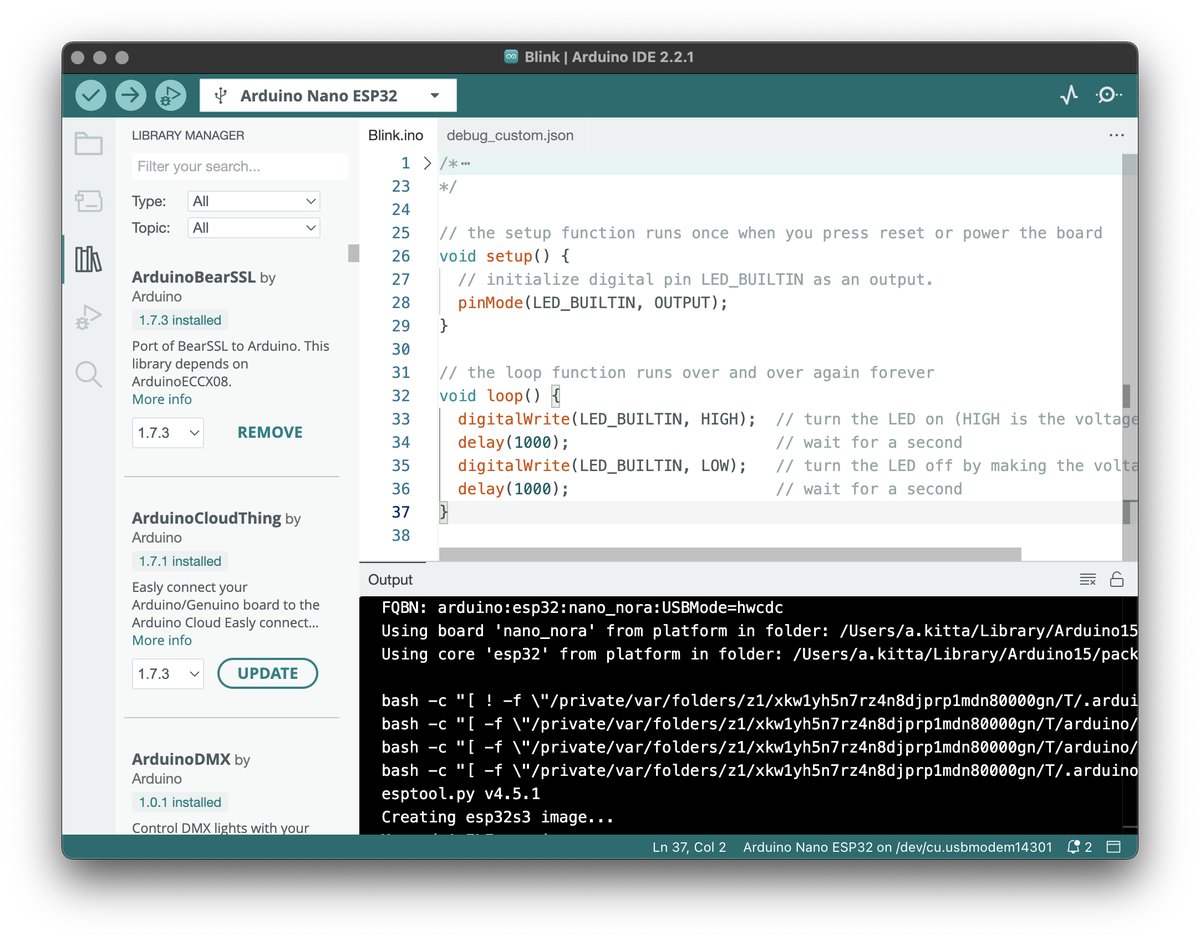
Arduino IDE is one of the most common microcontroller development environments, suitable for quickly writing, compiling, and uploading programs to Arduino and compatible development boards.
- Typical Applications: Sensor Reading, LED Control, Motor Control, Basic Embedded Prototyping.
- Advantages: Easy to install, rich community resources, and abundant sample code.
- Limitations: Weak large project management capabilities, and code completion and debugging experience are inferior to modern IDEs.
- Website: https://www.arduino.cc/en/software
1.2 Thonny(MicroPython / CircuitPython)
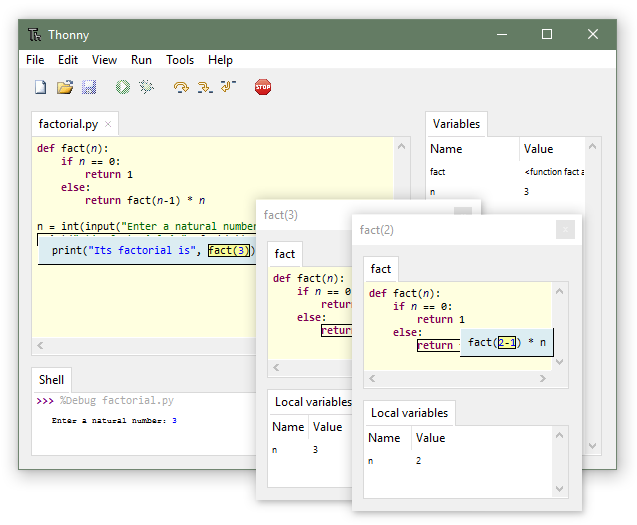
Thonny is a beginner-friendly Python IDE that is also well-suited for developing MicroPython and CircuitPython projects. It can directly connect to development boards such as ESP32 and Raspberry Pi Pico, run scripts, and view REPL output.
- Typical Use Cases: MicroPython debugging, sensor reading, simple web server, rapid prototyping.
- Advantages: Simple interface, convenient serial port connection, and clear error messages.
- Limitations: Limited capabilities in large project management and relatively weak capabilities in interface application development.
- Website: https://thonny.org/
1.3 VS Code
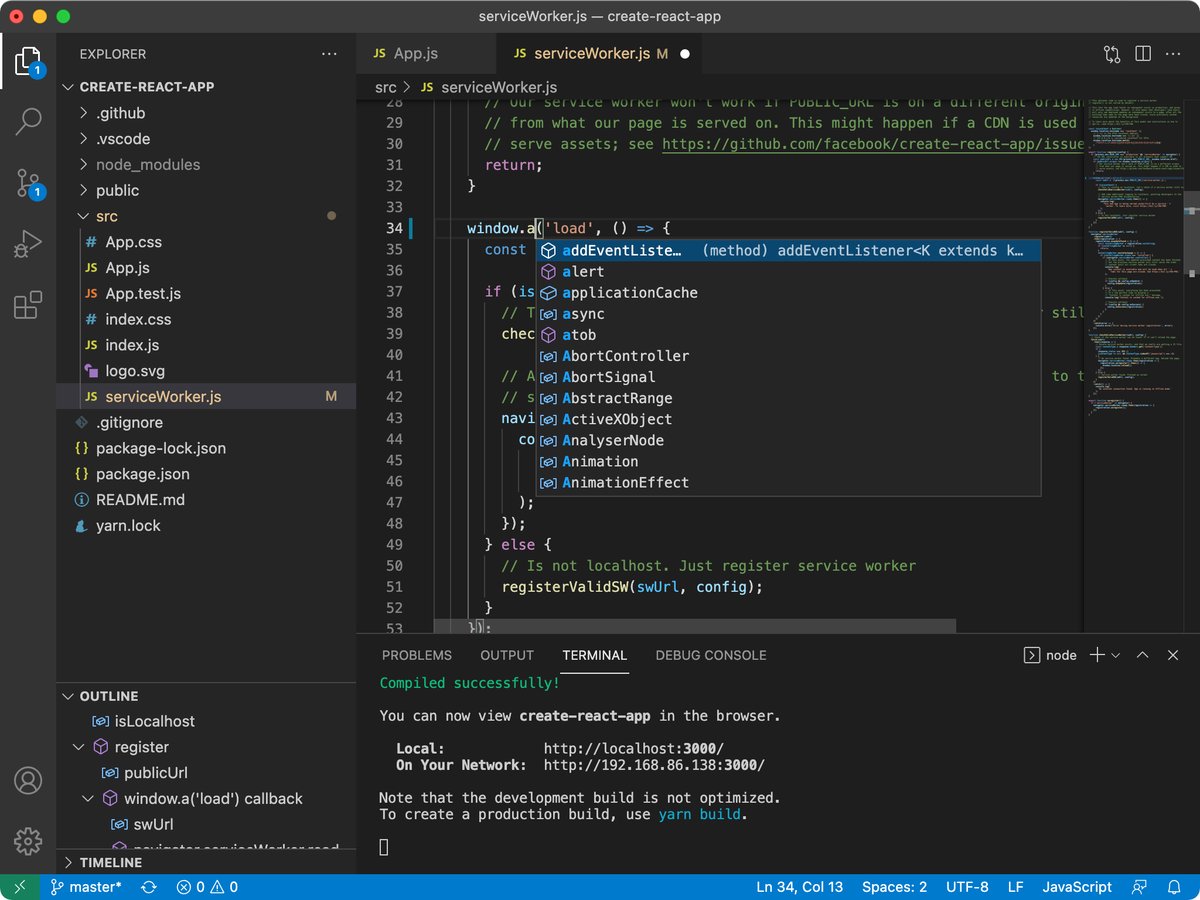
VS Code is a lightweight yet powerful code editor that supports multiple languages such as JavaScript, Python, C/C++, and can also be used for embedded development through the PlatformIO extension.
- Typical Use Cases: Web development, Python scripting, embedded projects, full stack applications.
- Advantages: Rich plugin ecosystem, strong code completion and project management capabilities.
- Limitations: For beginners, there are many configuration items and appropriate plugins need to be installed.
- Website: https://code.visualstudio.com/
1.4 Node-RED
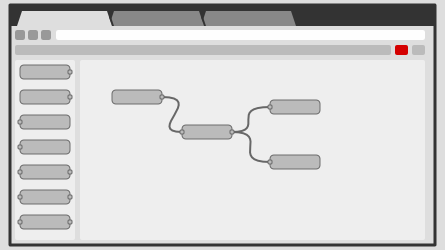
Node-RED is a flow-based visual programming tool suitable for connecting hardware devices, APIs, databases, and web dashboards. It is commonly used for data stream processing in Internet of Things (IoT) projects.
- Typical Use Cases: IoT dashboards, MQTT data streams, home automation, and rapid API integration.
- Advantages: Visual drag-and-drop, suitable for quickly building data flows and interfaces.
- Limitations: Complex logic is not as clear as code when it comes to maintenance, and the deployment environment requires Node.js.
- Website: https://nodered.org/
1.5 MATLAB / Simulink

MATLAB and Simulink are more inclined towards engineering computation, modeling, simulation, and control system design. They are suitable for algorithm verification before deployment to hardware.
- Typical Applications: Control system simulation, signal processing, mathematical modeling, and engineering analysis.
- Advantages: Powerful analysis tools and strong Simulink visualization and modeling capabilities.
- Limitations: High learning and software costs, not suitable for simple and fast web UIs.
- Website: https://www.mathworks.com/products/matlab.html
1.6 Cursor

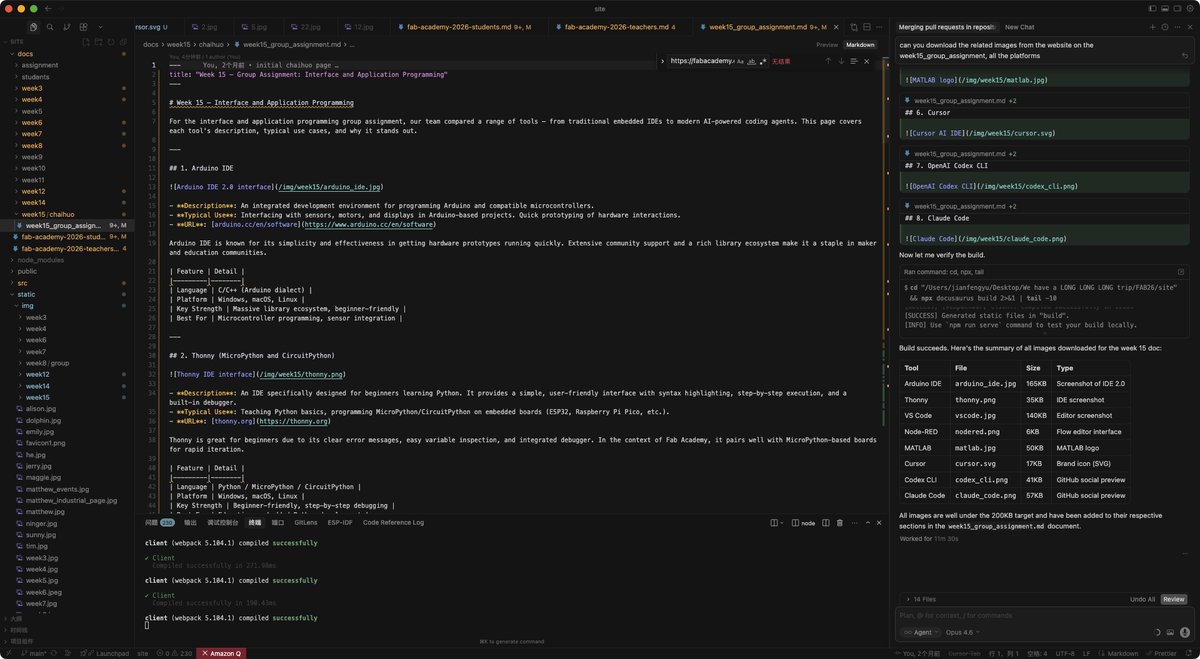
Cursor is an AI-assisted code editor based on VS Code. It can help generate code, modify files, explain errors, and refactor projects through natural language.
- Typical Use Cases: Web application development, scripting, debugging, and cross-file modification.
- Advantages: AI can understand project context, making it suitable for quickly generating and modifying interface code.
- Limitations: Generated code still requires manual inspection, and hardware debugging cannot rely entirely on AI.
- Website: https://cursor.com/
1.7 OpenAI Codex CLI
OpenAI Codex CLI is an AI coding assistant designed for terminal workflows, capable of reading, editing, and running code in local projects, suitable for scenarios where multi-step development tasks need to be completed via the command line.
- Typical Uses: Terminal development, code generation, test execution, and project file organization.
- Advantages: Suitable for integration with local files, command lines, and test processes.
- Limitations : Understanding the terminal and project structure is required, which poses a slightly higher threshold for beginners.
- Website: https://github.com/openai/codex
1.8 Claude Code
Claude Code is Anthropic's terminal-style agent coding tool, which can perform code generation, debugging, and project modification through natural language.
- Typical uses: code generation, debugging, refactoring, and documentation organization.
- Advantages: Suitable for conversational development and multi-file modification.
- Limitations : Manual verification of results is still required and cannot replace actual hardware testing.
- URL: https://docs.anthropic.com/en/docs/claude-code/quickstart
2. Other Interfaces and Application Tools
In addition to IDE and AI programming tools, interface and application programming can also use some tools that are more directly oriented towards the User Interface. They may not all be suitable for this assignment, but can serve as a reference for different project selections.
| Tools | Suitable Scenarios | Features |
|---|---|---|
| Processing | Desktop Visualization, Serial Port Data Display | Suitable for quickly creating graphical user interfaces and visualizing sensor data |
| p5.js | Web interactive interface, browser visualization | Based on JavaScript, suitable for creating lightweight web interactions |
| Python Tkinter | Simple Desktop Application | Python comes with built-in capabilities, suitable for quickly creating button, text, and chart interfaces |
| MIT App Inventor | Mobile App Prototype | Drag-and-drop development, suitable for Bluetooth or simple IoT mobile User Interface |
| MQTT Dashboard | IoT Data Dashboard | Suitable for displaying sensor data and controlling devices via MQTT |
| WebSocket | Real-time Web Communication | Suitable for web control interfaces that require low-latency two-way communication |
This individual assignment chose the HTTP web interface instead of WebSocket because the temperature and humidity data changes slowly and does not require real-time two-way communication. Refreshing the web page every 3 seconds is already sufficient to meet the display requirements, and the program structure is also simpler.
3. Tool Comparison Summary
| Tool | Suitable Population / Scenarios | Advantages | Restriction |
|---|---|---|---|
| Arduino IDE | Beginners, Arduino Projects | Simple and straightforward, with many libraries and examples | Weak in project management and UI development capabilities |
| Thonny | MicroPython Beginners | Convenient to connect to the development board, fast REPL debugging | Not suitable for large-scale applications |
| VS Code | Comprehensive Development | Rich in plugins, suitable for the combination of web and embedded systems | Environment needs to be configured |
| Node-RED | IoT Data Streams and Dashboards | Visualization, fast setup | Complex logic maintainability is average |
| MATLAB / Simulink | Engineering Simulation and Control System | Strong in modeling and analysis | High cost, not suitable for lightweight Web UI |
| Cursor | AI-assisted development | High efficiency in generating and modifying interface code | Requires manual review |
| Codex CLI | Terminal development and automation tasks | Suitable for command-line workflows | Needs to be familiar with the project structure |
| Claude Code | Conversational Agent Development | Suitable for explanation, reconstruction, and multi-file modification | Hardware results still need to be measured |
| Processing / p5.js | Visualization and Interactive Interface | Suitable for quickly creating graphical user interfaces | Additional application-side code needs to be written |
| MIT App Inventor | Mobile control interface | Drag-and-drop development, easy to get started | Complex interface and limited underlying control capabilities |
| WebSocket | Real-time web control | Two-way communication is timely | Code complexity is higher than that of ordinary HTTP |
For the Fab Academy project, if the goal is to quickly read sensors and debug hardware, Thonny + MicroPython is a good fit; if the goal is to develop a web interface, VS Code or Cursor is more convenient; if the goal is to quickly create an IoT dashboard, Node-RED is a great choice. For this individual assignment, I chose MicroPython + ESP32-C3 built-in HTTP Server + browser web UI + OLED local UI because it does not require an additional server, has a simple structure, and is suitable for quick verification within a local area network.
Individual Assignment
1. Project Objectives
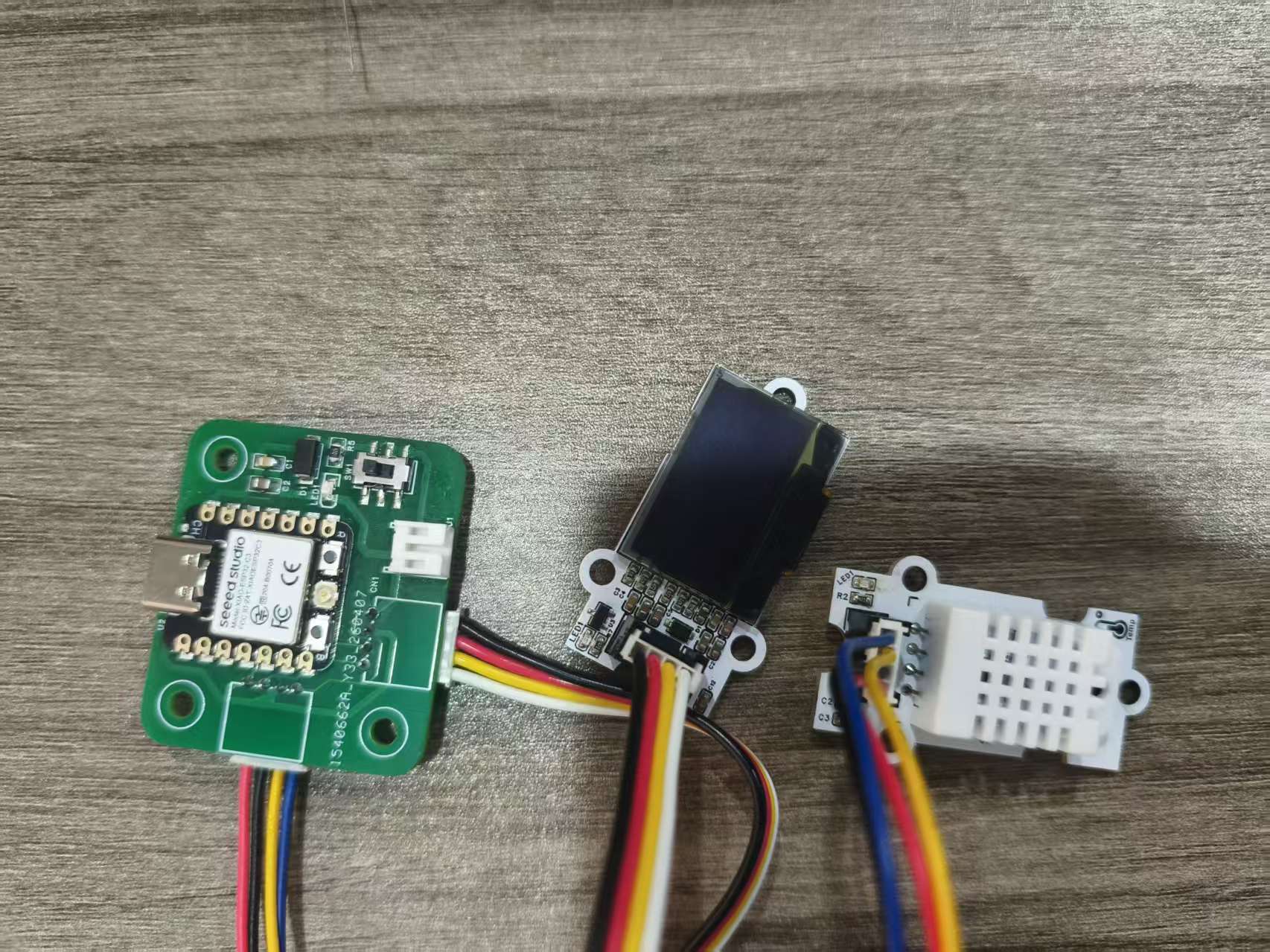
For this individual assignment, I created a ESP32-C3 Temperature and Humidity Web UI. It uses the DHT22 temperature and humidity sensor as an input device, and the OLED screen and web page as output interfaces. Users can view data in two ways:
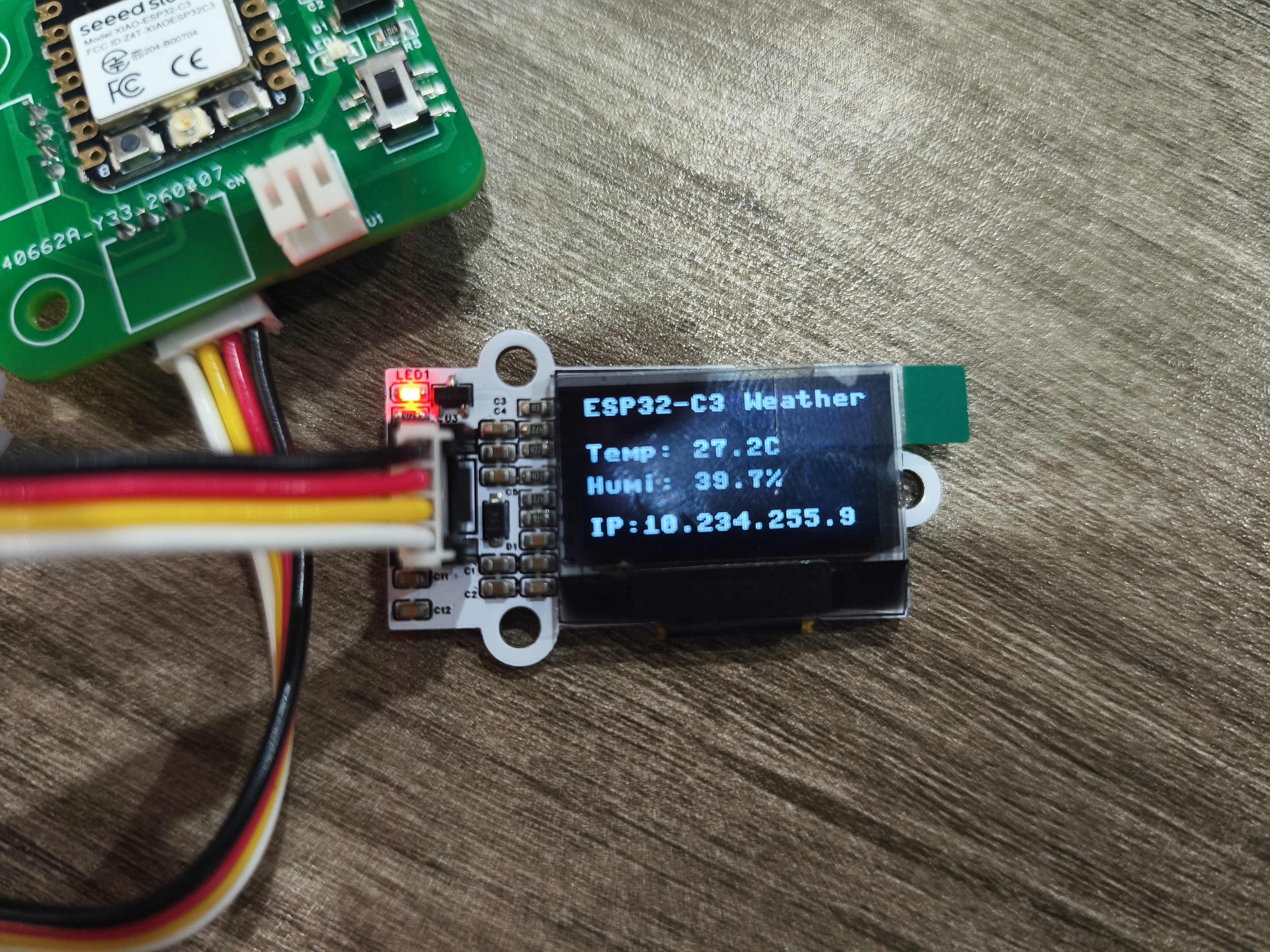
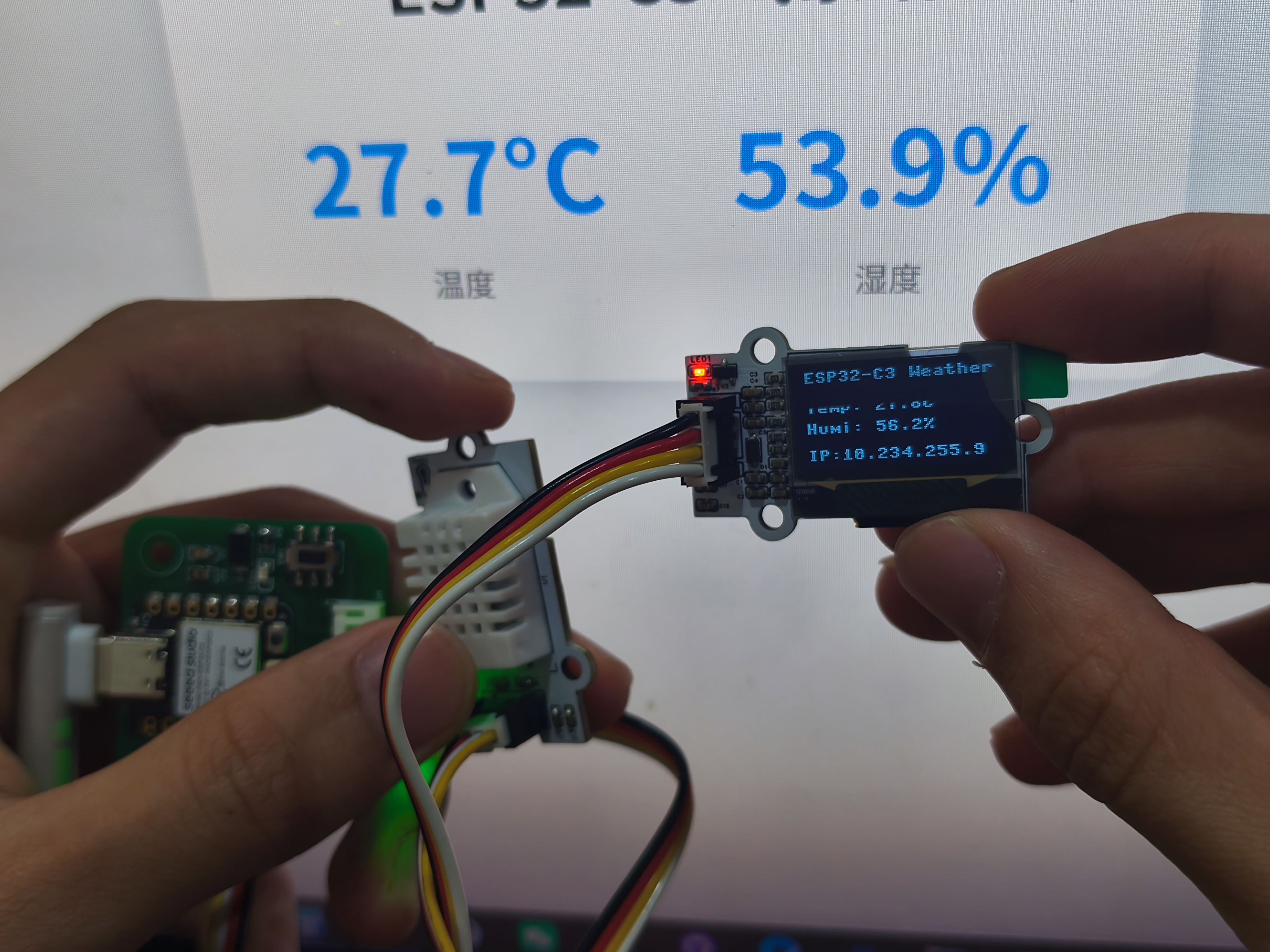
- Local OLED Screen: Directly displays temperature, humidity, and device IP.
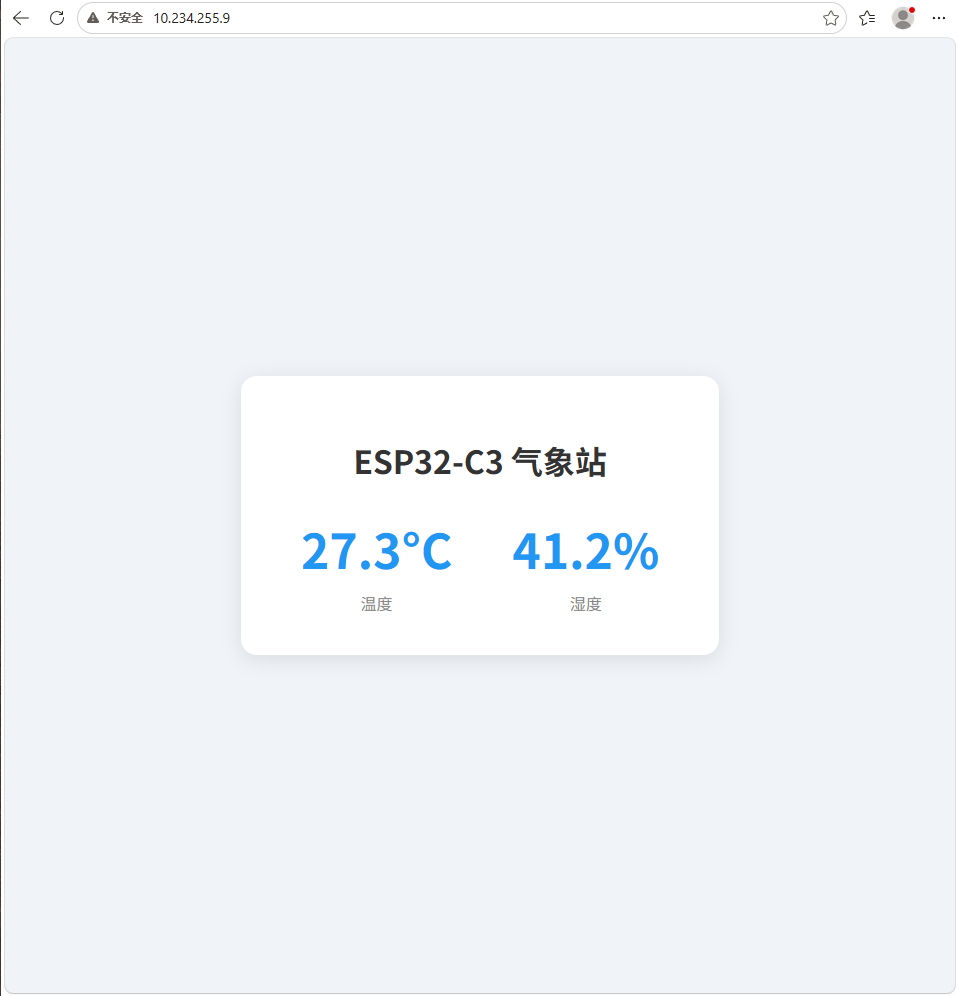
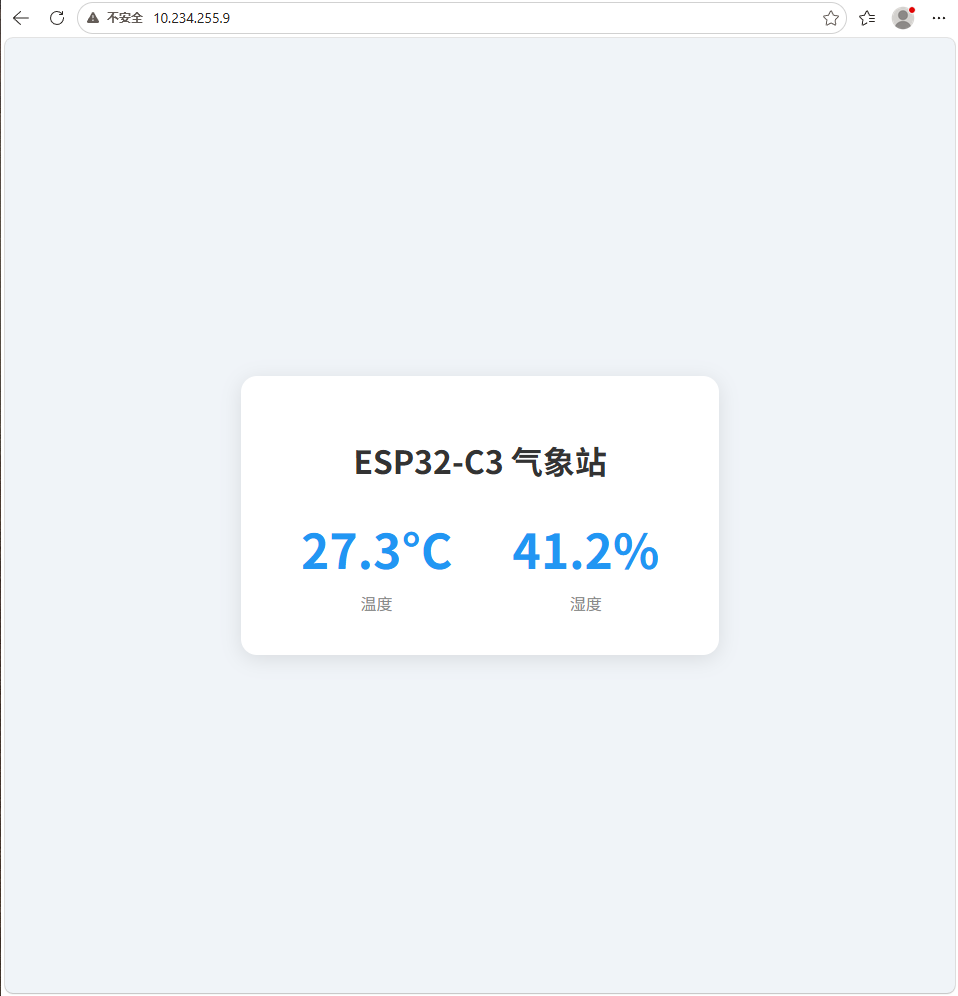
- Browser Webpage: Access the IP address of ESP32-C3 within the same local area network to view the card-style temperature and humidity interface.
The core of this project is to enable users to interact with the input device they made through the application interface, meeting the requirement of "write an application that interfaces a user with an input &/or output device that you made" for this week.
2. System Structure
The system consists of the following parts:
| Part | Function |
|---|---|
| ESP32-C3 Development Board | Run MicroPython programs, providing Wi-Fi and HTTP services |
| DHT22 Temperature and Humidity Sensor | Input device, collecting ambient temperature and humidity |
| SSD1306 OLED | Local Output Interface, displaying data and IP |
| Browser Web Page | Remote User Interface, view data via HTTP |
| Wi-Fi Router | Connect ESP32-C3 to Mobile Phone / Computer |
The communication architecture is:
3. Create User Interface
3.1 Web UI
The web User Interface (UI) is implemented by accessing the HTTP service of ESP32-C3 through a browser. The interface uses a card-style centered layout, with a light-colored background, rounded corners, and shadows, making temperature and humidity data easier to read.
The web page automatically refreshes every 3 seconds to obtain the latest data.
3.2 OLED Local User Interface
The OLED local interface uses a 128×64 SSD1306 screen and communicates with the ESP32-C3 via I2C. The interface is divided into 4 lines:
- Project Title;
- Temperature;
- Humidity;
- Device IP address.
This way, even without opening the web page, you can directly view the current status and access address from the device.
4. Application and Communication with the Development Board
4.1 Communication Mode
This project uses Wi-Fi (STA mode) + HTTP protocol (port 80) as the communication method.
The ESP32-C3 first connects to the specified Wi-Fi and obtains a local area network IP address. After a mobile phone or computer connects to the same Wi-Fi, it can access this IP address via a browser. After receiving an HTTP request, the ESP32-C3 reads the DHT22 data and returns an HTML page.
4.2 Communication Process
- ESP32-C3 starts up and connects to Wi-Fi.
- Obtain the LAN IP after successful connection.
- ESP32-C3 starts an HTTP server on port 80.
- Access the IP address of ESP32-C3 via a browser.
- ESP32-C3 receives an HTTP GET request.
- The program reads the temperature and humidity data from the DHT22.
- ESP32-C3 embeds data into an HTML page and returns it.
- The browser renders the page and automatically refreshes every 3 seconds.
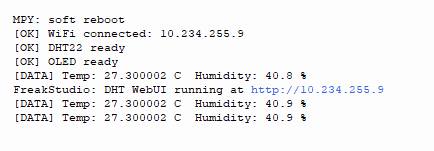
- OLED refreshes the local display every 2 seconds.
5. Use Tools
| Category | Tools / Components |
|---|---|
| Development Board | ESP32-C3(MicroPython v1.23) |
| Development Language | MicroPython |
| Programming / Debugging Tool | mpremote |
| Input Device | DHT22 Temperature and Humidity Sensor |
| Output Device | SSD1306 OLED 128×64 |
| UI Carrier | Browser (HTML + CSS), OLED |
| Communication Method | Wi-Fi STA Mode + HTTP |
6. Project Code Structure
dht_webui/
├── wifi_task.py     # Wi-Fi STA 模式连接逻辑
├── dht_task.py      # DHT22 传感器数据读取
├── oled_task.py     # SSD1306 OLED 显示控制
└── main.py          # HTTP 服务器 + 主循环调度
7. Core Code
7.1 wifi_task.py (Wi-Fi Connection)
import network
import time

def connect_wifi(ssid, password):
    wlan = network.WLAN(network.STA_IF)
    # 重置WLAN状态避免Internal State Error
    wlan.active(False)
    time.sleep(0.5)
    wlan.active(True)

    if not wlan.isconnected():
        print(f"[INFO] Connecting to {ssid}...")
        wlan.connect(ssid, password)
        # 最长等待20秒
        timeout = 20
        while not wlan.isconnected() and timeout > 0:
            time.sleep(1)
            timeout -= 1
            print(f"[INFO] Remaining time: {timeout}s")

    if wlan.isconnected():
        ip = wlan.ifconfig()[0]
        print(f"[OK] WiFi connected: {ip}")
        return ip
    else:
        print("[ERROR] WiFi connect failed")
        return None
7.2 dht_task.py (DHT22 Data Reading)
from machine import Pin
import dht

def read_dht22():
    sensor = dht.DHT22(Pin(20))
    sensor.measure()
    temp = sensor.temperature()
    humi = sensor.humidity()
    return round(temp, 1), round(humi, 1)
7.3 oled_task.py (OLED Display Core Logic)
from ssd1306_driver import SSD1306_I2C
from machine import I2C, Pin

def init_oled():
    i2c = I2C(0, sda=Pin(6), scl=Pin(7), freq=400000)
    oled = SSD1306_I2C(i2c, 0x3C, 128, 64, False)  # 适配非官方驱动参数
    oled.fill(0)
    oled.show()
    return oled

def show_oled(oled, temp, humi, ip):
    oled.fill(0)  # 清屏
    oled.text("ESP32-C3 Weather", 0, 0)
    oled.text(f"Temp: {temp}C", 0, 16)
    oled.text(f"Humi: {humi}%", 0, 32)
    oled.text(f"IP: {ip}", 0, 48)
    oled.show()
7.4 main.py (Main Program + HTTP Server)
import socket
import time
from wifi_task import connect_wifi
from dht_task import read_dht22
from oled_task import init_oled, show_oled

# 配置Wi-Fi
SSID = "YOUR_WIFI_SSID"
PASSWORD = "YOUR_WIFI_PASSWORD"

# 初始化组件
ip = connect_wifi(SSID, PASSWORD)
oled = init_oled()
print("[OK] DHT22 ready")
print("[OK] OLED ready")

# 初始化socket
s = socket.socket(socket.AF_INET, socket.SOCK_STREAM)
s.bind(('', 80))
s.listen(5)
s.settimeout(1)  # 非阻塞accept

# 主循环
while True:
    # 读取传感器数据并刷新OLED
    try:
        t, h = read_dht22()
        show_oled(oled, t, h, ip)
    except Exception as e:
        print(f"[ERROR] Read DHT22 failed: {e}")

    # 处理HTTP请求
    try:
        conn, addr = s.accept()
        request = conn.recv(1024)
        # 构造HTML响应
        html = f"""
        <!DOCTYPE html>
        <html>
        <head>
            <meta http-equiv="refresh" content="3">
            <title>ESP32-C3 Weather</title>
            <style>
                body {{ font-family: Arial; margin: 0; padding: 20px; display: flex; justify-content: center; align-items: center; height: 100vh; }}
                .card {{ background: #f5f5f5; padding: 30px; border-radius: 15px; box-shadow: 0 0 10px #ccc; text-align: center; }}
                .temp, .humi {{ font-size: 48px; margin: 10px 0; }}
                .label {{ font-size: 20px; color: #666; }}
            </style>
        </head>
        <body>
            <div class="card">
                <h1>ESP32-C3 气象站</h1>
                <div class="temp">{t}°C</div>
                <div class="label">温度</div>
                <div class="humi">{h}%</div>
                <div class="label">湿度</div>
            </div>
        </body>
        </html>
        """
        conn.send('HTTP/1.1 200 OK\r\nContent-Type: text/html\r\n\r\n' + html)
        conn.close()
    except OSError:
        # 无请求时超时,继续循环
        pass

    time.sleep(2)

print(f"FreakStudio: DHT WebUI running at http://{ip}")
8. Test Results
| Test Item | Test Results | Remarks |
|---|---|---|
| Wi-Fi Connection | Success | Connect to the specified Wi-Fi within 20 seconds and return a valid LAN IP |
| DHT22 Data Reading | Normal | Both temperature and humidity can be read and rounded to 1 decimal place |
| OLED Display | Normal | The content of 4 lines is free of garbled characters and refreshed every 2 seconds |
| HTTP Web Access | Normal | Accessible via mobile phone or computer browser |
| Automatic Web Page Refresh | Normal | Automatically refresh data every 3 seconds |
| Long-running | Stable | Continuously running without significant crashes |
9. Issues and Solutions
| Phenomenon | Reason | Solution |
|---|---|---|
Wifi Internal State Error |
WLAN status is abnormal during ESP32-C3 startup | Before initializing WLAN, first wlan.active(False), then after a delay, wlan.active(True) |
function takes 7 positional arguments but 6 were given |
The parameters of the third-party SSD1306 driver differ from those of the official version | Explicitly pass in external_vcc=False |
Webpage humidity shows as 40.600004 |
Floating-point precision issue | Use round(v, 1) to format |
mpremote: failed to access COM9 |
Serial port is occupied | Terminate the occupied process or restart the development board |
10. Original source code and screenshots of interface operation
10.1 Complete Source Code
See the complete code snippets in Section 4.3 "Board-side code" forwifi_task.py/dht_task.py/oled_task.py/main.py;
暂时无法在飞书文档外展示此内容
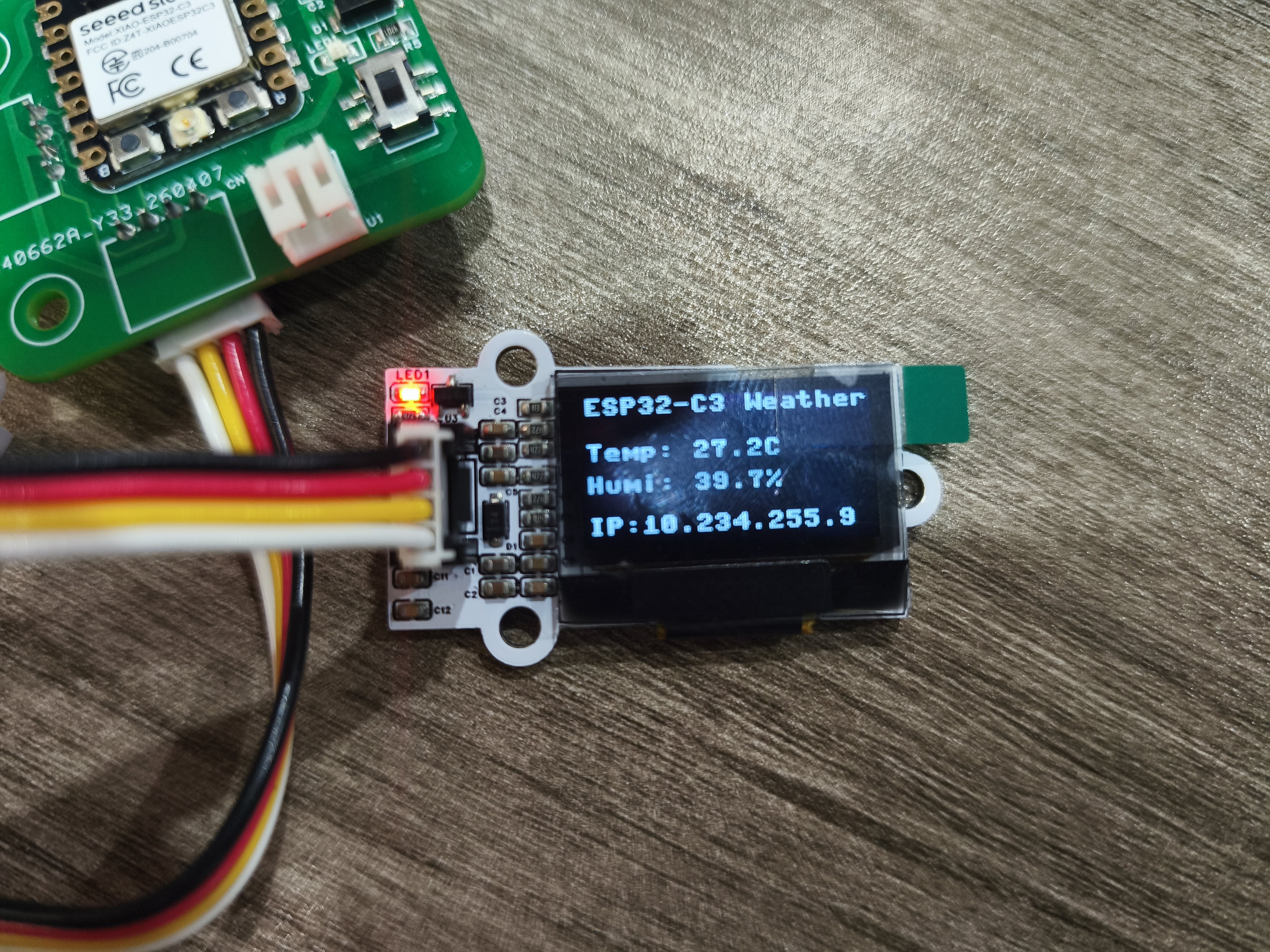
10.2 Interface and Runtime Screenshots
10.3 Application Runtime Communication Core Display Diagram
11. Summary
Through this week's assignment, I completed a complete interactive system from sensors to application interfaces. The DHT22 collects temperature and humidity data, the ESP32-C3 reads the data via MicroPython and starts an HTTP service, users can access the web page through a browser, and can also directly view the device status on the OLED.
This exercise has made me understand that interface programming is not just about "displaying" data; it also requires consideration of communication methods, refresh rates, error handling, and user readability. For embedded projects, a simple and stable interface is often more important than complex visual effects.
AI Assistance:
During the preparation of this documentation, ChatGPT (GPT-4) was used as a language assistance tool.
It helped with sentence polishing and translation from Chinese to English to improve readability and clarity.