Final Project
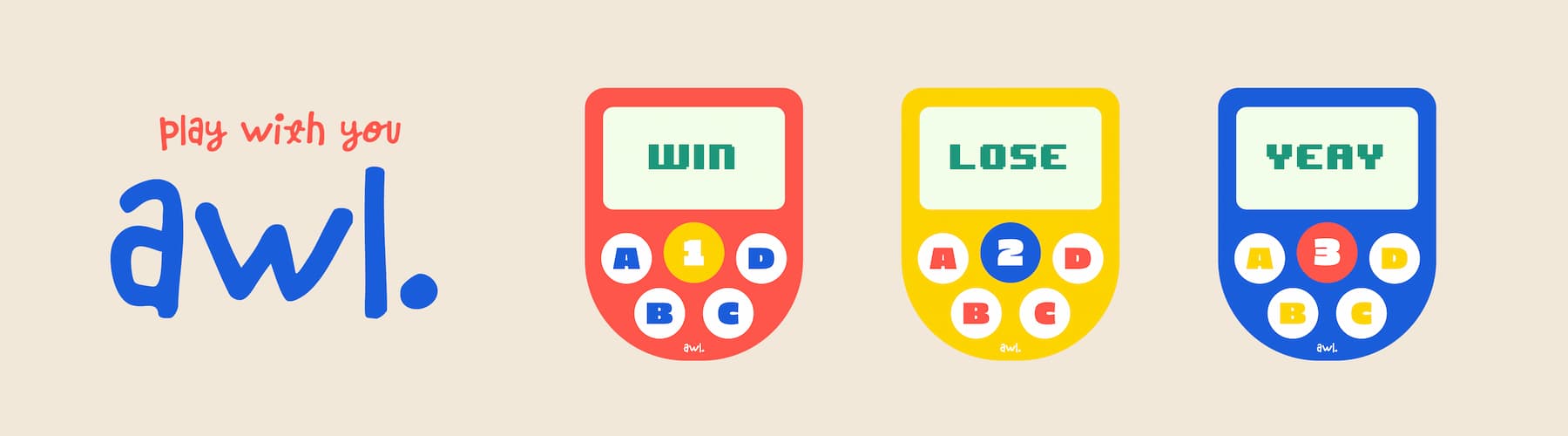
Background
The initial idea for this game controller came from a problem I kept running into when hosting games: it was always hard to tell who raised their hand first. I wanted to build something that could solve that.
What is AWL?
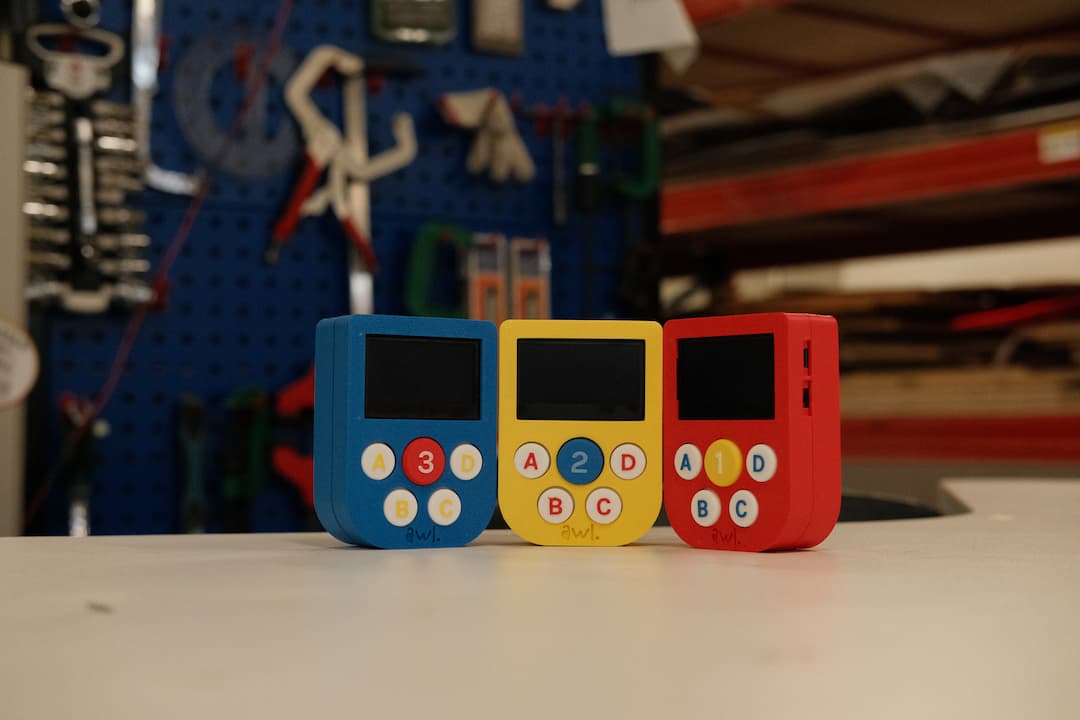
Ever played a quiz with friends and argued over who said the answer first?
AWL solves that!
Three custom wireless controllers let teams buzz in physically; the laptop decides who was first, in milliseconds. Get it right and you score - get it wrong and the other teams steal the chance.
Presentation
Video
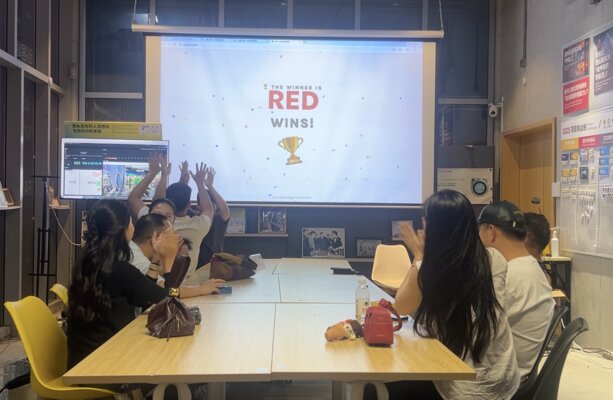
Playtest
31 May 2026 - I ran the playtest with 3 different groups.
flowchart TD
   R[RED ESP32C3<br/>5 buttons · OLED · LED · I²S audio]
   Y[YELLOW ESP32C3<br/>5 buttons · OLED · LED · I²S audio]
   B[BLUE ESP32C3<br/>5 buttons · OLED · LED · I²S audio]

   mDNS[/"ws://Emilys-MacBook-Pro.local:8080<br/>resolved via mDNS"/]

   R -- WiFi --> mDNS
   Y -- WiFi --> mDNS
   B -- WiFi --> mDNS

   subgraph mac["MacBook Pro"]
      server["Node.js — server.js<br/>• 6-phase state machine<br/>• Lockout buzzer race<br/>• Auto-mark from questions.json<br/>• WebSocket + HTTP on port 8080"]
   end

   mDNS --> server

   server -- HTTP --> display["Host display<br/>/index.html<br/>(audience watches)"]
   server -- HTTP --> admin["Admin editor<br/>/admin.html<br/>(pre-game setup)"]

   classDef red    fill:#F4604A,color:#fff,stroke:#C84634,stroke-width:2px
   classDef yellow fill:#F5C81C,color:#1a1a1a,stroke:#b89202,stroke-width:2px
   classDef blue   fill:#1a5edb,color:#fff,stroke:#103e96,stroke-width:2px
   classDef white  fill:#FFFFFF,color:#1a5edb,stroke:#1a5edb,stroke-width:2px
   classDef cream  fill:#F4EBE0,color:#1a5edb,stroke:#F4604A,stroke-width:2px

   class R red
   class Y yellow
   class B blue
   class server,display,admin white
   class mDNS,mac cream
flowchart TD
start([Page loaded])
intro["🎯 Intro screen<br/>READY! button"]
howto["📖 How to Play<br/>1 · Buzz first<br/>2 · Correct = +1<br/>3 · First to 3 wins"]
idle["IDLE — Game ready"]
join["Players tap HAND<br/>to join their team"]
preview["QUESTION_PREVIEW<br/>Question shown<br/>▶ Start Countdown button"]
countdown["⏱ 3 → 2 → 1 → GO!"]
open["QUESTION_OPEN<br/>Controllers may buzz"]
locked["LOCKED — Team picks A/B/C/D"]
check{"Server auto-checks<br/>1.2 s suspense"}
rebound["Team locked out —<br/>others can buzz"]
point["+1 point"]
winCheck{"Score = 3?"}
next["Next question"]
over["🏆 GAME OVER<br/>Confetti + winner!"]
start --> intro
intro -- click READY --> howto
howto -- click LET'S PLAY --> idle
join -.-> idle
idle -- "host: Next Q" --> preview
preview -- "host: Begin" --> countdown
countdown -- "auto 3 s" --> open
open -- "team buzzes" --> locked
locked -- "answer arrives" --> check
check -- "wrong" --> rebound
rebound --> open
check -- "correct" --> point
point --> winCheck
winCheck -- "no" --> next
next --> preview
winCheck -- "yes" --> over
classDef coral fill:#F4604A,color:#fff,stroke:#C84634
classDef blue fill:#1a5edb,color:#fff,stroke:#103e96
classDef yellow fill:#F5C81C,color:#1a1a1a,stroke:#b89202
classDef green fill:#2da44e,color:#fff,stroke:#1f7a1f
classDef white fill:#FFFFFF,color:#1a5edb,stroke:#1a5edb
classDef cream fill:#F4EBE0,color:#1a5edb,stroke:#F4604A
class intro,rebound,over coral
class locked blue
class countdown yellow
class point green
class howto,preview,open,next white
class start,idle,join,check,winCheck creamQuestions
1. What does it do?
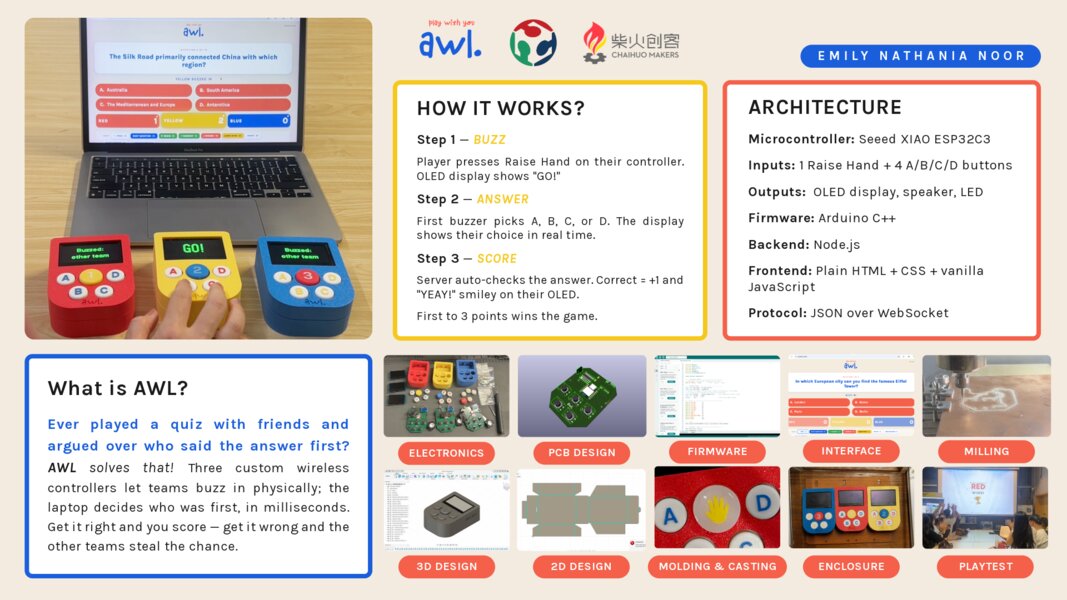
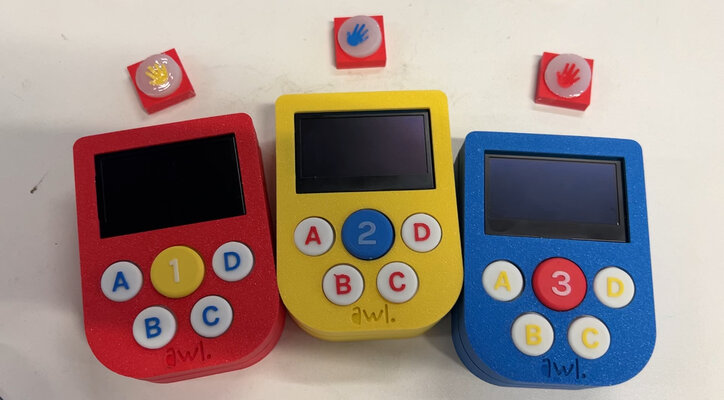
AWL is a tabletop quiz game built around three identical wireless controllers I designed and fabricated. Each team has their own physical buzzer; a laptop runs the game and shows the current question on a shared screen.
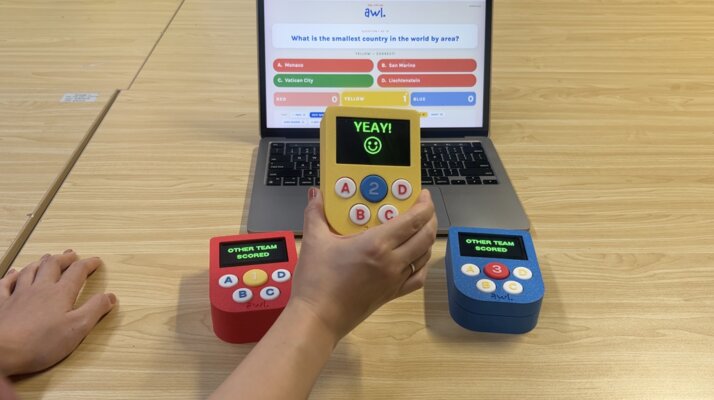
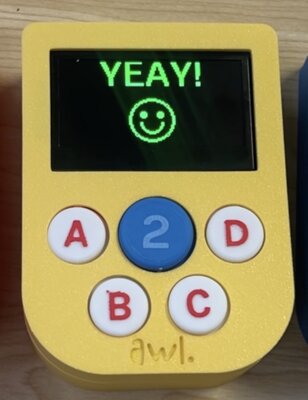
When the host opens a question, a 3-2-1-GO countdown plays on the display. After “GO!”, players race to press their Raise Hand button. The first team to buzz in (decided fairly, to the millisecond, by the server) gets to pick A, B, C, or D on their controller. Correct answers earn the team a point and a “YEAY!” smiley face appears on their OLED. Wrong answers re-open the round to the other teams (rebound buzzing), so nobody is locked out for being too eager.
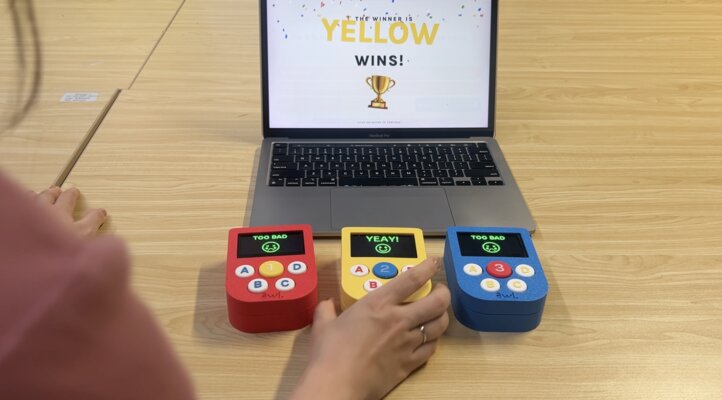
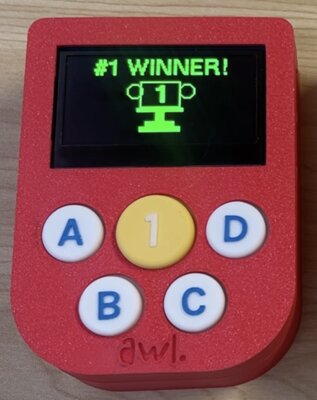
The first team to reach 3 points triggers a celebration overlay on the display — confetti, the winning team’s name bouncing in their brand color, and a rocking trophy emoji. On the winning controller’s OLED, a “#1 WINNER!” graphic with a trophy is drawn.
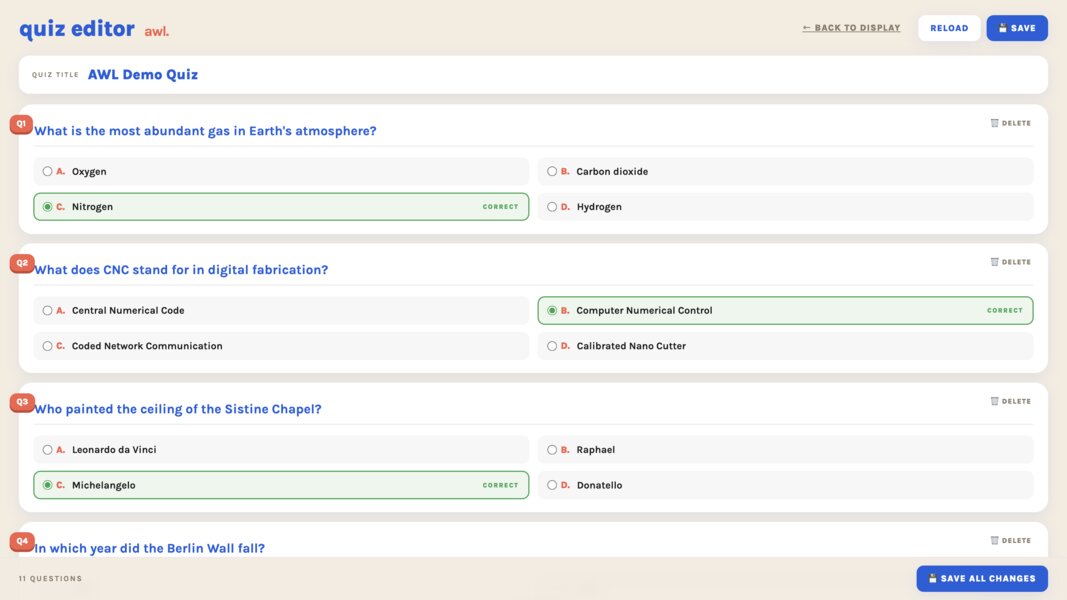
Behind the scenes, the host can write and edit questions in a browser-based editor without touching any code or files, and the live display refreshes immediately when new questions are saved.
It solves a real problem:
In group quiz games, arguments about who raised their hand or shouted the answer first are common and frustrating. AWL ends that argument — the system decides fairly, to the millisecond.
2. Who’s done what beforehand?
I’ll frame this through three personal inspirations: Nintendo Game Boy Color (red), Family 100 (Indonesian TV Program), Kahoot!
Personal Inspirations:
-
Nintendo Game Boy Color (red) — my first handheld console as a kid. It’s the reason AWL is a dedicated little device you hold in your hand, with chunky tactile buttons and a small screen, instead of yet another phone app. The form factor, the colorful plastic shell, and the feeling of holding a single-purpose console all come from here.
-
Family 100 (Indonesian TV Program) — contestants slap a buzzer to earn the right to answer. This is exactly the “raise hand first” mechanic AWL implements, just scaled to three teams playing together in a room rather than two teams/families on a TV stage.
-
Kahoot! — the modern reference for “questions on a big shared screen, players answer on their own devices, points scale with speed and correctness.” Beautiful UX, but the moment WiFi drops, the whole thing dies. AWL is the offline answer to the same problem.
3. What sources did you use?
AI:
- Claude
- ChatGPT
- Gemini
Software libraries (all open-source)
- U8g2 — OLED graphics on the ESP32
- ArduinoWebsockets (Gil Maimon) — WebSocket client on the ESP32
- ESPmDNS — resolving the MacBook’s
.localhostname - ws (Node.js) — WebSocket server library
- Karla typeface — Google Fonts, used in the host display
Tools
- KiCad — schematic + PCB layout
- Fusion 360 — enclosure CAD + mold design
- Arduino IDE — firmware build + flash
- VS Code — server, frontend, documentation editing
- Bambu Studio — 3D print slicing
- JLCPCB online tools — gerber viewer, DRC, ordering boards
- Adobe Illustrator / Express — brand identity + presentation slide
- CapCut — 1-minute project video
References
- Seeed Studio XIAO ESP32C3 wiki — pinout + flashing instructions
- U8g2 docs — font names and drawing primitives
- MDN Web Docs — browser WebSocket and DOM APIs
- Node.js
wslibrary README — server-side WebSocket pattern - FAB Academy weekly tutorials — by Neil Gershenfeld + my Chaihuo instructors
4. What did you design?
- Electronics Design & Production — Schematic & PCB layout
- 3D Design - Enclosure and Raise Hand and A/B/C/D Buttons
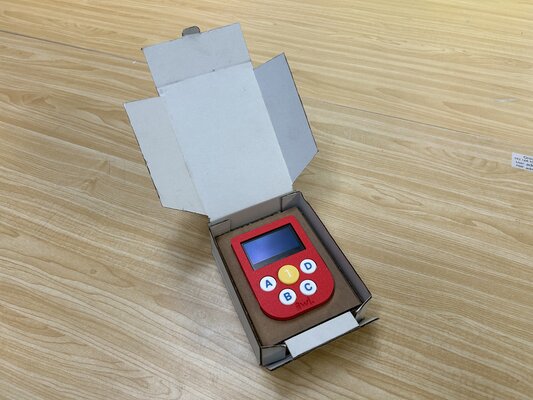
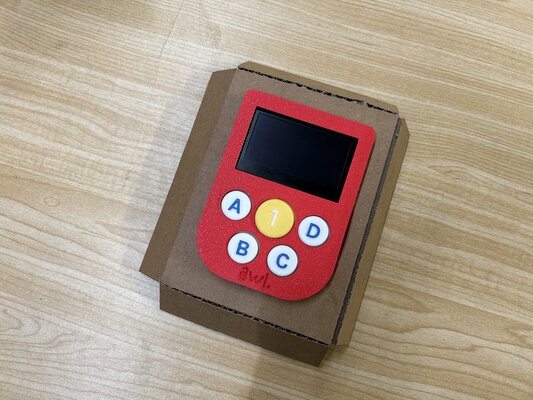
- 2D Design - Cardboard box for packaging
- Molding & Casting - Raise Hand Button
- Brand & Visual Design - Logo and Color Palettes
5. What materials and components?
Electronics:
- Seeed XIAO ESP32C3
- OLED Display 2.42” 128×64 SSD1309 I²C (4pins)
- Push button 12×12×10mm (5 per board)
- Speaker 4Ω
- MAX98357A I²S amplifier
- LiPo Battery 2000mAh
- TP4056 USB-C charging module
- Power slide switch
- LED 1206 Red
- 330Ω resistor (LED current limit)
- Capacitor 0.1µF
- Capacitor 10µF
- Custom PCB
- Pin Socket 2.54mm 4P - right
Enclosure & button caps
- Bambu Lab PLA Matte – Red (11200)
- Bambu Lab PLA Matte – Yellow (11400)
- Bambu Lab PLA Matte – Blue (11600)
- Tin-cure silicone — for cast button caps
- Heat-set insert M2.5x2x3.5 mm
- Machine screw M2.5 × 6 mm
Packaging
- Cardboard (laser-cut display box)
Play setup
- Big screen / projector
- HDMI cable
- MacBook running the AWL server
6. Where did they come from?
Building AWL in Shenzhen meant the whole supply chain was local: Seeed Studio (XIAO), Taobao and Pinduoduo sellers (components, mostly from Shenzhen), JLCPCB (PCBs), and Chaihuo Makerspace (tools and consumables). No order took more than three days to arrive, which made one-month delivery realistic.
| Source | Description |
|---|---|
| Seeed Studio (Shenzhen) | XIAO ESP32-C3 modules |
| Taobao & Pinduoduo (multiple sellers, mostly Shenzhen) | All other electronic components, batteries, filament, casting equipment |
| JLCPCB (Shenzhen) | 5 × custom PCBs |
| Chaihuo Makerspace (Shenzhen) | Big screen/projector, HDMI cable |
7. How much did they cost?
AWL — Bill of Materials
Total project cost: ¥578.58 CNY ≈ $86.79 USD (1 ¥ ≈ 0.15 USD)
| No | Description | Qty | Price/pc | Price | Source |
|---|---|---|---|---|---|
| 1 | Seeed XIAO ESP32C3 | 3 | ¥27.00 | ¥81.00 | Buy |
| 2 | OLED Display 2.42” 128×64 SSD1309 I²C (4pins) | 3 | ¥56.00 | ¥168.00 | Buy |
| 3 | Pin Socket 2.54mm 4P — right (5 pcs) | 1 | ¥2.80 | ¥2.80 | Buy |
| 4 | Push button 12×12×10mm | 15 | ¥0.10 | ¥1.50 | Buy |
| 5 | Speaker 4Ω | 3 | ¥4.30 | ¥12.90 | Buy |
| 6 | MAX98357A I²S amplifier | 3 | ¥3.74 | ¥11.22 | Buy |
| 7 | LiPo Battery 2000 mAh | 3 | ¥19.80 | ¥59.40 | Buy |
| 8 | TP4056 USB-C charging module | 3 | ¥0.75 | ¥2.25 | Buy |
| 9 | Power slide switch (5 pcs) | 1 | ¥1.56 | ¥1.56 | Buy |
| 10 | Capacitor 0.1 µF (50 pcs) | 1 | ¥3.00 | ¥3.00 | Buy |
| 11 | Capacitor 10 µF (20 pcs) | 1 | ¥4.60 | ¥4.60 | Buy |
| 12 | LED 1206 red (50 pcs) | 1 | ¥1.50 | ¥1.50 | Buy |
| 13 | Resistor 360 Ω (100 pcs) | 1 | ¥3.00 | ¥3.00 | Buy |
| 14 | Bambu Lab PLA Matte — Red (11200) | 1 | ¥69.00 | ¥69.00 | Buy |
| 15 | Bambu Lab PLA Matte — Yellow (11400) | 1 | ¥57.30 | ¥57.30 | Buy |
| 16 | Bambu Lab PLA Matte — Blue (11600) | 1 | ¥57.30 | ¥57.30 | Buy |
| 17 | Heat-set insert M2.5 × 3.5 mm (20 pcs) | 1 | ¥0.86 | ¥0.86 | Buy |
| 18 | Screw KM2.5 × 6 mm (100 pcs) | 1 | ¥1.24 | ¥1.24 | Buy |
| 19 | Cardboard 60 × 60 mm, 3 mm | 1 | ¥11.50 | ¥11.50 | Buy |
| 20 | Custom PCB (5pcs) | 1 | ¥28.65 | ¥28.65 | Buy |
| TOTAL | ¥578.58 |
8. What parts and systems were made?
| Learning | What I made for AWL |
|---|---|
| 2D Design | Cardboard box, brand visual identity |
| 3D Design | Fusion 360 console enclosure + mold for button caps |
| Additive fabrication | 3D-printed enclosure shells in Red, Yellow, Blue PLA |
| Subtractive fabrication | Laser-cut cardboard (display box) + PCB milling |
| Molding & casting | Silicone-cast button caps from 3D-printed negative |
| Electronics design | KiCad schematic + PCB layout |
| Electronics production | Milled prototype + JLCPCB production + hand-soldering |
| Embedded microcontroller | ESP32-C3 firmware (Arduino C++) — buttons, OLED, audio, mDNS, WebSocket |
| Interfacing & programming | JSON-over-WebSocket protocol + Node.js server + browser display + admin editor |
| System integration & packaging | 3 consoles + MacBook server + browser display + cardboard display box |
9. What tools and processes?
Design tools
- KiCad — schematic capture + PCB layout
- Adobe Illustrator / Express — brand identity, presentation slide
- Fusion 360 — 3D parametric modeling (enclosure + mold)
- VS Code — code editor (firmware, server, web UI)
- Arduino IDE — firmware compilation + flashing
- CapCut — 1-minute project video editing
Fabrication tools & processes
- JLCPCB online service — gerber viewer, DRC, ordered final 3 PCBs
- Bambu Lab 3D printer + Bambu Studio slicer — enclosure shells (PLA Matte Red/Yellow/Blue)
- Laser cutter — cardboard display box
- Silicone molding & casting — button caps from 3D-printed negative
- Soldering iron + hot air — through-hole and surface-mount assembly
- Heat-set insert tool (soldering iron) — pressing M2.5 brass inserts into PLA
- Kexu CNC milling machine — PCB milling (prototype board)
System Integration
- WiFi for the wireless link between controllers and laptop
- WebSocket protocol for low-latency bidirectional messaging
- mDNS for service discovery (no hardcoded IPs)
- HTTP for serving the host display + admin editor
- REST API for the quiz editor
- JSON as the wire format throughout
10. What questions were answered?
-
Can 3 controllers connect to the MacBook server reliably over a local WiFi network, with no internet?
Yes.
The system runs entirely on the local LAN. WiFi credentials are flashed into the firmware; once each ESP32 joins the network, it discovers the MacBook via mDNS (Emilys-MacBook-Pro.local) and opens a WebSocket.
-
Does the XIAO ESP32-C3 antenna work inside the shell? Is the WiFi range good enough across a whole room?
Yes.
The connection works fine inside the meeting room where the playtest was held.
-
Is the first-press arbitration fair? Is WiFi latency small and consistent enough that the team who really pressed first actually wins?
Yes.
The fairness comes from Node’s single-threaded event loop, not from clock synchronisation. When two
handmessages arrive within microseconds of each other, the event loop processes them serially: the first one transitionsphasetoLOCKED; the second one checksphase !== 'QUESTION_OPEN'and is rejected. So the team whose packet hits the Mac’s network stack first wins. -
Will one battery charge last a full play session?
Yes.
A 2000 mAh LiPo powers the XIAO ESP32-C3, the OLED, and the I²S amp. It lasts approximately ~20 hours of continuous-on time per charge, which is far more than any single play session.
-
Will the speaker be loud and clear enough during a noisy group game?
It depends on how loud the crowd is. The MAX98357A I²S amplifier driving a 4 Ω speaker is comfortably audible across a room over normal conversation.
-
Can all the components fit inside the enclosure, and will the case survive being held and passed around?
Yes — but assembly is tricky. All components fit inside the Fusion 360 enclosure (PCB, 2000 mAh battery, speaker, OLED), but two details took iteration to get right and still need care during assembly:
-
OLED-to-socket alignment. The OLED’s 4-pin header has to slide into the matching socket on the PCB while the top half of the case comes down on top of it. If the OLED is rotated even a few degrees off, the pins miss the socket and the case won’t close. Once aligned, it sits firmly — but you have to align it carefully every time you open and close the case.
-
Button cap fit. The button caps press through holes in the top of the case. The hole tolerance is tight: a fraction of a millimetre off and the caps either rattle loose (too big) or jam in place (too small). I iterated the Fusion 360 hole diameter twice to get a snug fit that still lets the buttons travel cleanly when pressed.
-
-
What is the best way to assemble the case: heat-set inserts or plain screws?
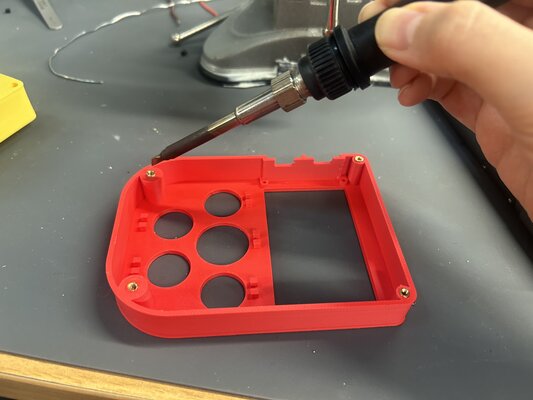
Heat-set inserts. Heat-set inserts give a clean metal-on-metal thread that holds up to repeated opening/closing — important when I needed to get inside the case dozens of times during firmware debugging.
-
Can the MacBook display quiz questions clearly on a big screen, with a live scoreboard, and is there a fast way to add new questions?
Yes. The host display is a browser page (http://localhost:8080/) served by the same Node.js process that runs the game logic. Plug the laptop into a projector / TV over HDMI and you’ve got a big shared screen for the audience.
11. What worked? What didn’t?
Worked:
-
The lockout buzzer race. Tested by slamming two Raise Hand buttons within milliseconds of each other; the server consistently picked one winner and rejected the other.
-
mDNS service discovery. Changed my Mac’s WiFi network (different SSID, different IP range) and the controllers found the server on reboot without any re-flashing. Exactly what I hoped for.
Didn’t work
-
Hardcoded IPs. First version of the firmware had the laptop’s IP burned in. DHCP changed my Mac’s IP overnight; the next morning all 3 controllers couldn’t connect. Solved by adding mDNS.
-
Heat-set insert — soldering iron too hot. First heat-set insert attempt: I used my soldering iron at its default ~350 °C tip temperature. The brass insert sank in fine, but the PLA around it melted too aggressively — the surrounding plastic deformed and bulged out around the insert, leaving an ugly raised ring and weakening the press-fit grip. Fix: dialled the soldering iron down to ~220 °C (just above PLA’s melting point of ~180 °C), and slowed down the press. At the lower temperature the brass transfers just enough heat to soften the plastic locally, the insert sinks in cleanly, and the surrounding PLA stays smooth. After 2–3 attempts on scrap I had a consistent technique.
-
WiFi credentials are baked into the firmware. mDNS solves IP changes, not network changes. If the MacBook’s IP shifts because of DHCP, the controllers find it automatically — no intervention, no re-flash. But if I move AWL to a different venue with a different WiFi SSID, the controllers can’t even join the WiFi (because
WIFI_SSIDandWIFI_PASSare hardcoded in the firmware), so they never get to the mDNS lookup. Each new venue means re-flashing all 3 controllers with the new credentials — about 10 minutes of preparation. -
TP4056 footprint orientation. I made a mistake in the placement/routing of the TP4056 charging module — as I’d laid it out, the connections only line up correctly if the module is mounted upside down relative to how I first intended. I solder it flipped, and because it sits upside down the pads don’t line up directly, so I bridged the connections with metal pin/socket legs as short jumpers between the TP4056 and the board. It works reliably. I also had to adjust the top 3D-printed enclosure so the USB-C charging port lined up correctly with the flipped module. It works fine now, but it’s the first thing I’d re-route in a v2 so the board and case go back to their intended orientation.
12. How was it evaluated?
One real controller next
After the simulator was clean, I flashed only the Red controller and verified its button presses showed up in the server’s terminal. When {team:”red”, event:”hand”} first appeared in the log, I knew the bridge was complete.
Three real controllers (race test)
Flashed Yellow and Blue, then ran the 3-way race test: slamming two Hand buttons at the same instant on different controllers, repeatedly, to verify the server always picked exactly one winner. After ~20 trials it had never been wrong.
End-to-end live play
Played multiple real quiz rounds with friends. Caught small UX issues (e.g., a wrong answer was ending the round too quickly — that’s how rebound buzzing got added) and tuned timing (e.g., the 1.2-second delay between “answered” and “result” came from this stage).
13. What are the implications?
For game design:
- Physicality matters even in a digital game. A real button you slam is more satisfying than tapping a phone screen. Several first-time players said the speaker chirp + LED pop made it feel “real” in a way other apps don’t.
- Fair lockout enables friendly competition. The frequent argument such as “I said it first!” just disappears.
For education contexts:
- A single shared screen + per-team controllers is a powerful classroom format. I can imagine teachers using AWL to liven up review sessions. The quiz editor is friendly enough that a non-technical teacher could write their own questions.
For future improvement:
-
The same architecture could support more teams, more game modes (timed answers, multi-choice, image questions), or a separate spectator view
-
A WiFiManager-style configuration portal would fix the problem of network change. On first boot, the ESP32 creates its own access point (
AWL-Setup), the user joins from their phone, enters the venue’s WiFi credentials via a config webpage, and the ESP32 saves them to flash. ~30 lines of code, makes the controllers truly portable.
Fabrication
3D Design
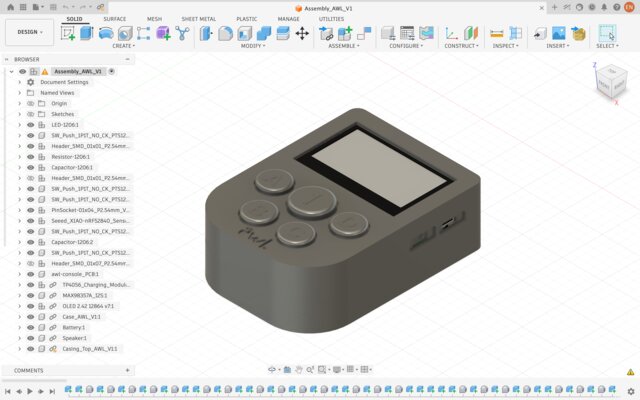
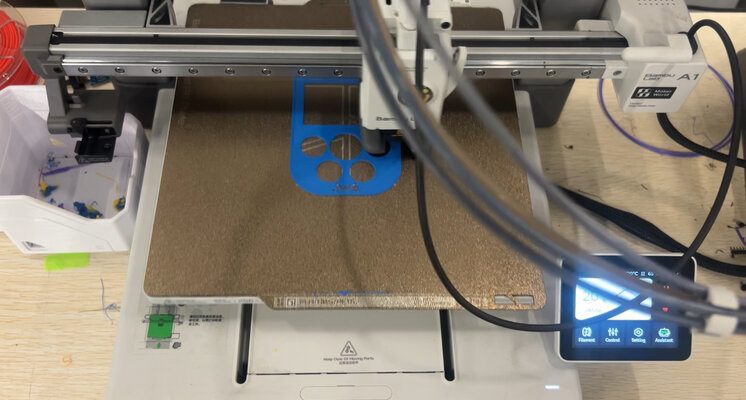
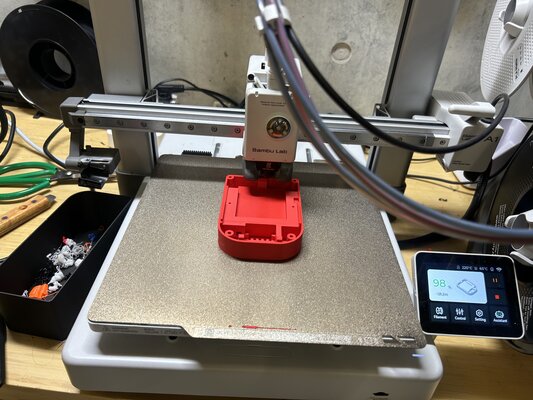
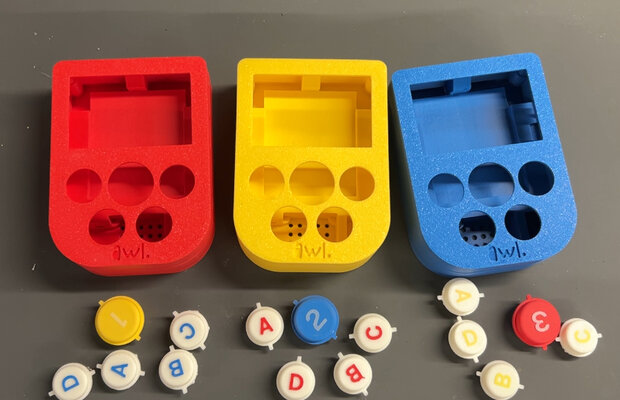
All three console shells were modeled in Fusion 360 and printed on the Bambu Lab A1 in PLA Matte (Red, Yellow, Blue — one color per team). I designed the enclosure as a two-part case (top + bottom) held together with heat-set inserts and M2.5 screws so I could reopen it during firmware debugging.
Enclosure + Buttons
A handheld two-part shell sized around the PCB, 2000 mAh LiPo, speaker, and 2.42” OLED — modeled so everything stacks inside with the buttons and screen reachable from the top face.
Print Settings
-
(Top Enclosure)
Layer height 0.16 mm, walls 4, top shell layers 5, sparse infill pattern Gyroid.
-
(Bottom Enclosure)
Layer height 0.16 mm, Ironing type Top surfaces, walls 5, top shell layers 4, sparse infill pattern Gyroid.
-
(Buttons)
Layer height 0.12 mm, walls 3, top shell layers 6, sparse infill density 25%, sparse infill pattern Gyroid, speed outer wall 100mm/s, enable support yes (support critical regions only).
Printed in Bambu Studio A1.
Two fit problems took tuning
-
Button-cap holes. The holes in the top face had a tight tolerance — a fraction of a millimetre off and caps either rattled (too big) or jammed (too small). I increased the hole diameter slightly to give more tolerance, so the button cap drops in and travels cleanly without binding.
-
OLED-to-socket alignment. The OLED’s 4-pin header has to drop into the PCB socket as the top half closes. A few degrees of rotation and the pins miss — so this step needs extra care during assembly. I align the header by eye before pressing the two halves together.
Button Mold
A 3D-printed negative mold — the cavity is the inverse of the final silicone button — with a flat parting face so the cured cap lifts straight out.
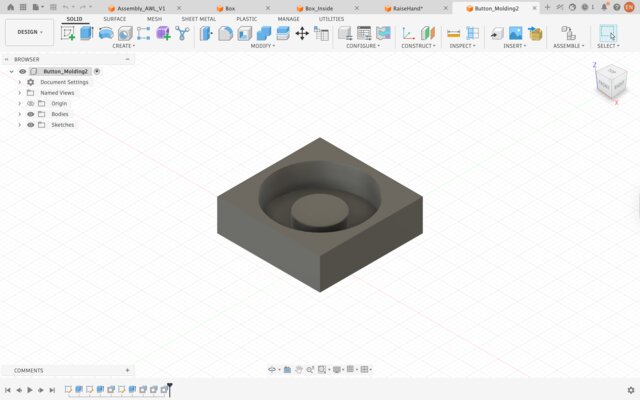
Print Settings
Button Mold
 Layer height **0.08 mm**, ironing type **top surfaces**, ironing speed **15 mm/s**, ironing flow **10%**, ironing line spacing **0.1 mm**, walls **4**, top shell layers **6**, bottom shell layers **4**, sparse infill pattern **Gyroid**, outer wall speed **50 mm/s**, inner wall speed **150 mm/s**, top surface **80 mm/s**, outer wall acceleration **500 mm/s2**

 Printed in Bambu Studio A1.
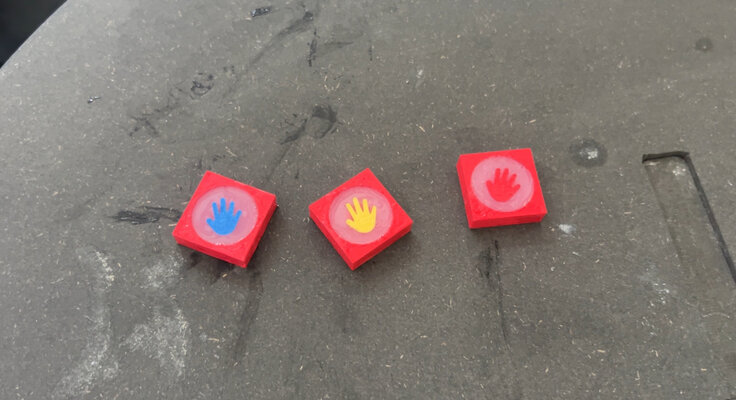
Raise Hand
A small printed decoration that sits on the raise-hand button to mark it — so players can tell at a glance which button is the buzz-in. Printed in 3 different colors - red, yellow and blue PLA.
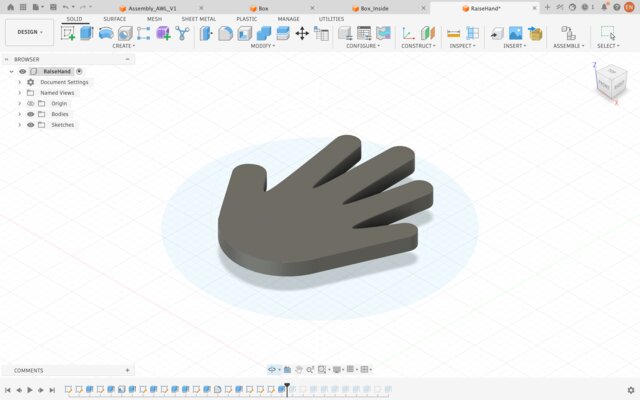
Print Settings
Raise Hand
 Layer height **0.08 mm**, walls **3**, infill/wall overlap **25%**, outer wall speed **50 mm/s**

 Printed in Bambu Studio A1.
Silicone Button Holder
A printed frame that locates the cast silicone buttons over the tactile switches on the PCB and keeps them from shifting when pressed. Printed in white PLA, similar colour to the silicone.
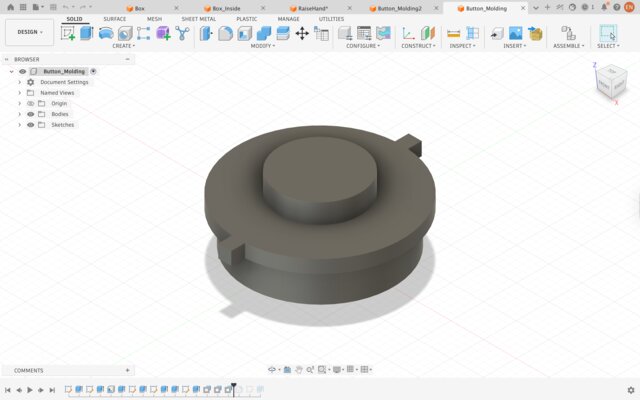
Print Settings
Silicone Button Holder
 Layer height **0.12 mm**, walls **3**, top shell layers **6**, sparse infill density **25%**, sparse infill pattern **Gyroid**, speed outer wall **100mm/s**, enable support **yes** (support critical regions only).

 Printed in Bambu Studio A1.

 (settings are the same as buttons)
2D Design
A laser-cut cardboard display/packaging box. I modeled it in Fusion 360’s Sheet Metal workspace, then used the flat-pattern to export a DXF for the laser cutter.
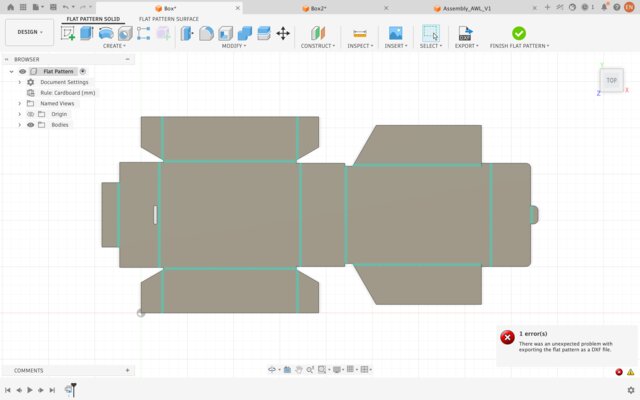
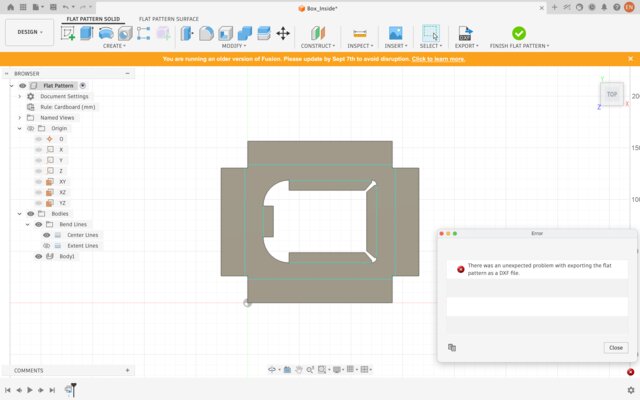
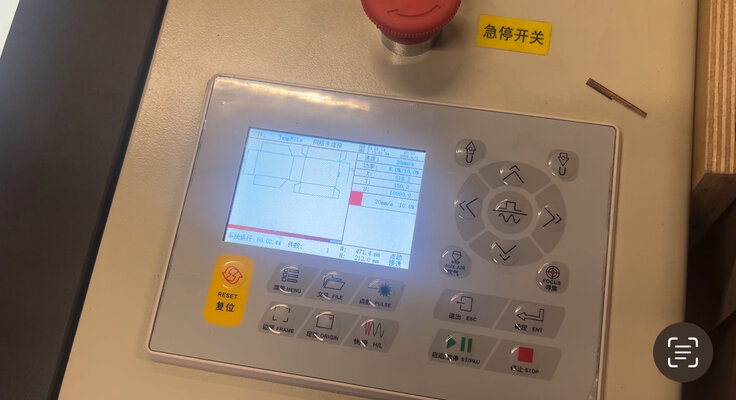
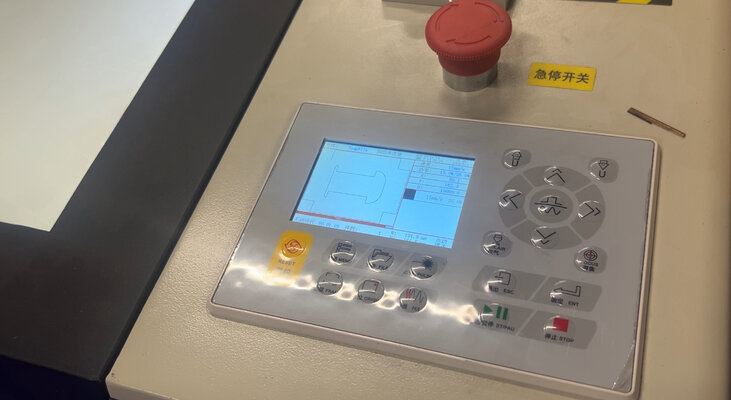
Material & Settings
Material: 3 mm cardboard.
Laser cut: speed 20 mm/s, min power 5.0%, max power 10.0%
Note: different laser cutters have different settings.
Molding & Casting
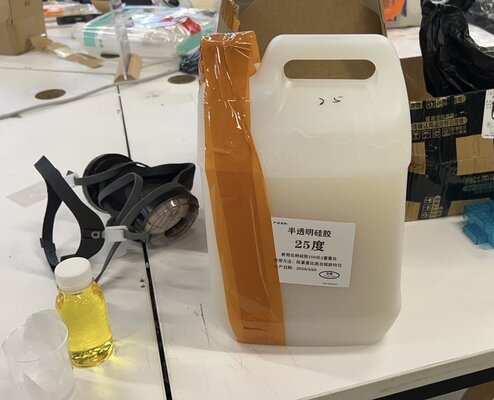
I cast the soft button caps in silicone from a 3D-printed negative mold, so the button feels squishy and tactile to slam — something a rigid PLA cap couldn’t give me.
I chose tin-cure (condensation-cure) silicone rather than platinum-cure. Platinum/addition-cure silicone is prone to cure inhibition — against PLA or certain resins the surface won’t fully cure and stays tacky. Tin-cure avoids this, so it’s the safer match for a PLA mold.
Mixing & curing”
The mixing ratio is 50:1. After stirring I tapped to release bubbles and cured for 24 hours at room temperature before demolding.
PCB Design
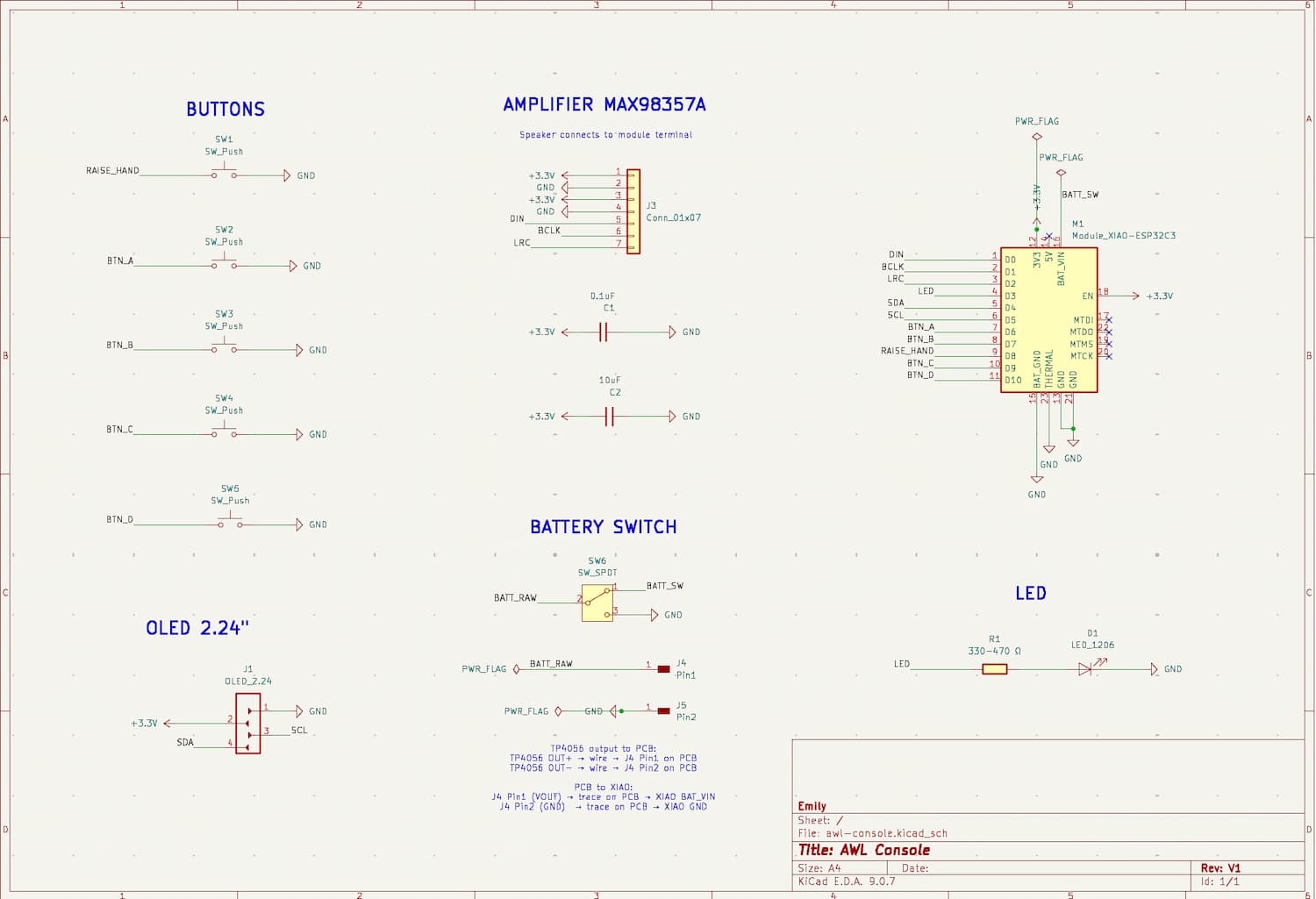
Designed in KiCad. The board carries the XIAO ESP32-C3, the SSD1309 OLED socket, five tactile buttons, the MAX98357A I²S amp + speaker, TP4056 charger, LiPo, slide switch, and a status LED.
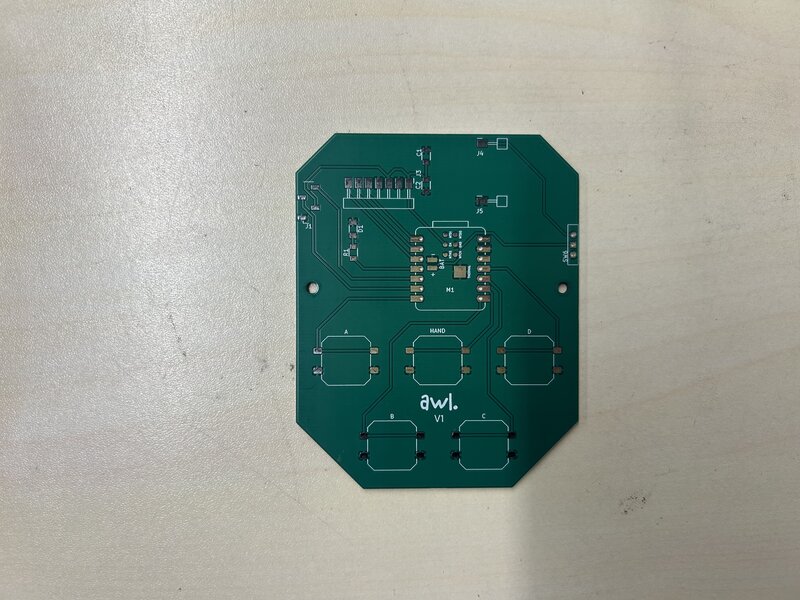
JLCPCB Board Specs
- Base Material: FR-4
- Layers: 2
- Dimensions: 72 x 90 mm
- PCB Thickness: 1.6 mm
Schematic
The component assemblies are shown below:
PCB Layout
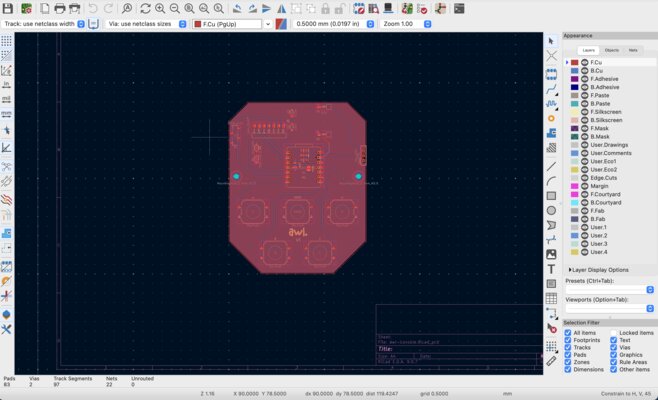
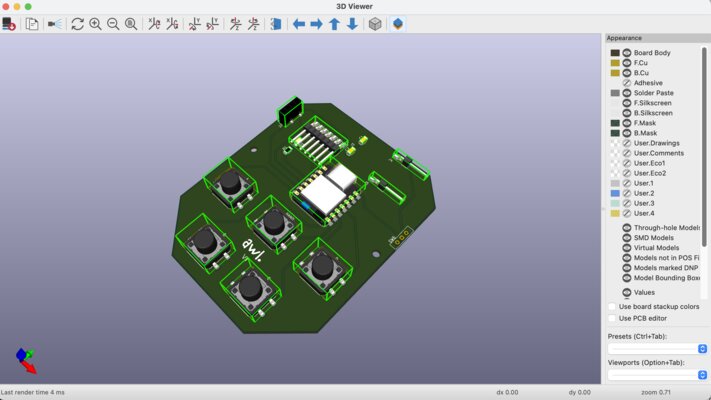
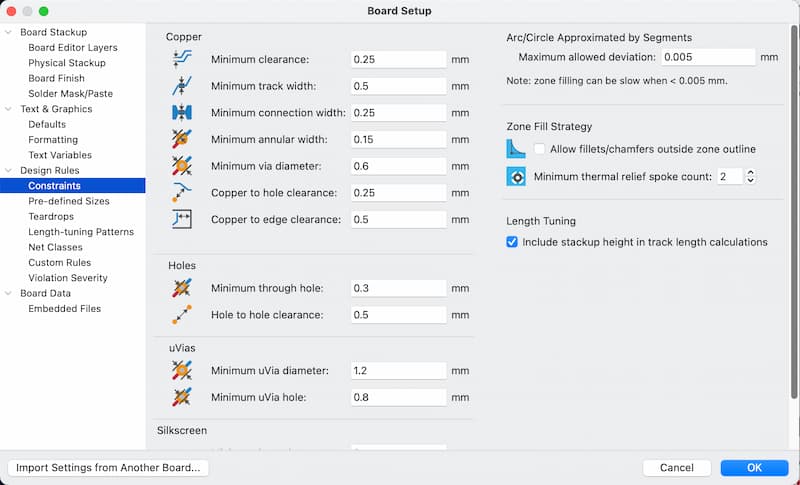
These are the Board Setup settings that I used:
Notes
Designing for a compact stack. The biggest layout constraint was fitting everything into a handheld shell. To save horizontal space I put the OLED on a socket instead of soldering it flat — this lets the display sit raised above the board, so I could tuck the taller components (XIAO ESP32-C3, TP4056 charger, MAX98357A amp) on the PCB underneath it. The OLED stacks on top rather than competing for board area.
Button alignment. The five button positions had to line up exactly with the holes and caps in the 3D-printed top shell. I placed the switches to match the enclosure so that, at final assembly, every cap presses cleanly through its hole with the right travel — no rattling or jamming.
TP4056 orientation. The TP4056 charging module is mounted upside down relative to the rest of the board — see What worked / What didn’t for why.
Electronics
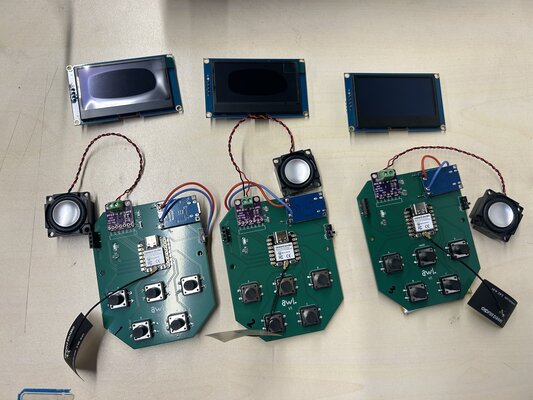
Putting Electronics Components
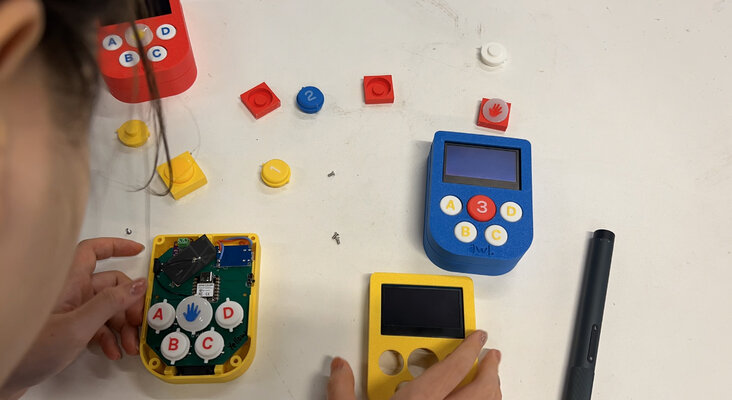
Soldering the electronics. For the surface-mount parts (XIAO ESP32C3, buttons, MAX98357A, OLED socket, LED, capacitors, resistor) I applied solder paste and reflowed the board on a hot plate, nudging parts into place with tweezers. For the TP4056 (solder it flipped with metal pin/socket legs) and slide switch (through hole) I used a soldering iron with solder wire.
When a joint went wrong I cleaned it up with solder wick / a solder sucker and re-soldered. After assembly I checked for shorts and continuity with a multimeter before powering the board.
Assembly
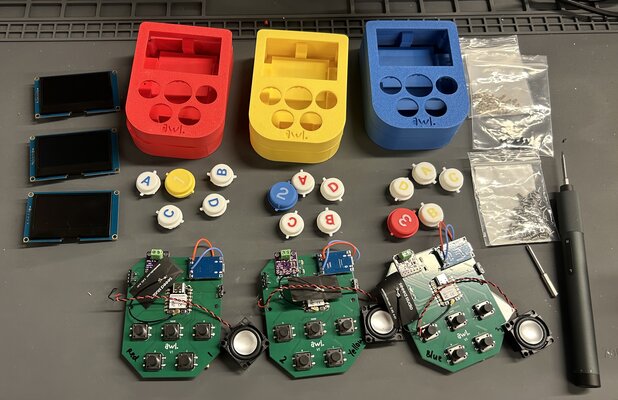
Putting Heat-set Inserts
Heat-set inserts, not plain screws. I pressed M2.5 brass heat-set inserts into the PLA and closed the case with M2.5 × 6 mm screws. Inserts give a clean metal thread that survives repeated opening — essential when I was getting inside the case dozens of times during firmware debugging.
The Assembly Process
Order of assembly:
-
Place the LiPo battery and speaker into the bottom enclosure.
LiPo battery and speaker holders
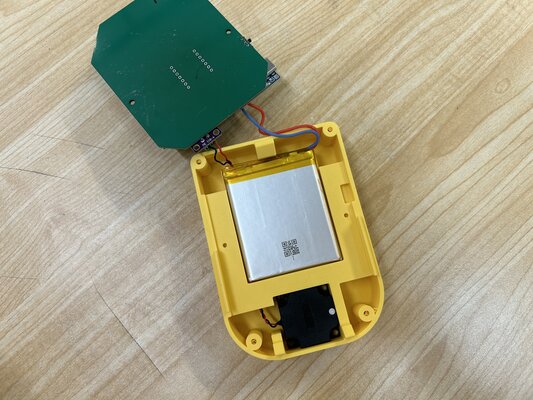
The LiPo battery sits in its holder, with its wires connected to the TP4056 charger. The speaker sits in the speaker holder, wired to the MAX98357A amplifier. To keep the wiring tidy I designed a routing hole for the speaker wire, and added a grille of holes on the bottom shell so the sound can escape.
-
Mount the OLED to the top enclosure, screwing it down at its 4 corners with countersunk screws.
-
Press the 3D-printed button caps into the buttons.
-
Lower the top shell onto the bottom, aligning the OLED’s 4-pin header so it seats cleanly into the socket on the PCB. The OLED has to be straight or the pins miss the socket and the case won’t close.
-
Secure the two shells together with the M2.5 countersunk screws into the heat-set inserts.
Interface & Applications
The Controller Firmware
The firmware is one source file. To flash three controllers, I change one line (#define TEAM_ID “red” / “yellow” / “blue”) and re-upload. No per-device branches.
This code is generated by Claude:
(File name: awl_console_V1.ino)
// AWL Console — Networked v5
// XIAO ESP32C3 quiz console: WiFi + WebSocket + OLED + I2S audio + 5 buttons
//
// Per-team build: change TEAM_ID below to match the physical controller color.
//   Red    = P1
//   Yellow = P2
//   Blue   = P3
//
// Boot flow:
//   1. Boot screen "AWL READY?"  — player presses HAND to join
//   2. Then "TEAM: <color> / Ready" until a question opens
//   3. Press HAND during QUESTION_OPEN to buzz, then A/B/C/D to answer
//   4. Answer letter stays on OLED until result is shown (trophy / crying face)
//
// Library needed (install via Library Manager):
//   ArduinoWebsockets by Gil Maimon

#include <Wire.h>
#include <U8g2lib.h>
#include <driver/i2s.h>
#include <WiFi.h>
#include <ESPmDNS.h>
#include <ArduinoWebsockets.h>

using namespace websockets;

// ── PER-DEVICE CONFIG ────────────────────────────────
// Change ONLY this line when flashing each controller:
#define TEAM_ID   "blue"        // "red" | "yellow" | "blue"

// ── NETWORK CONFIG ───────────────────────────────────
const char* WIFI_SSID = "X.factory2.4G";
const char* WIFI_PASS = "make0314";
// The Mac's IP changes from day to day. Instead of hardcoding it, we use mDNS:
// at runtime we ask the network for the IP of this hostname.
const char* WS_HOST   = "Emilys-MacBook-Pro";   // Mac's mDNS name (without .local)
const int   WS_PORT   = 8080;
String      ws_url    = "";                      // built after mDNS resolves

// ── Pins ─────────────────────────────────────────────
#define LED_PIN          D3
#define I2C_SDA          D4
#define I2C_SCL          D5
#define I2S_DOUT         D0
#define I2S_BCLK         D1
#define I2S_LRC          D2
#define BTN_A            D6
#define BTN_B            D7
#define BTN_RAISE_HAND   D8
#define BTN_C            D9
#define BTN_D            D10

// ── OLED ─────────────────────────────────────────────
U8G2_SSD1309_128X64_NONAME0_F_HW_I2C u8g2(U8G2_R0, U8X8_PIN_NONE);

// ── WebSocket client ─────────────────────────────────
WebsocketsClient wsClient;
bool wsConnected = false;
unsigned long lastReconnectAttempt = 0;
const unsigned long RECONNECT_INTERVAL_MS = 3000;

// ── Game state (local to this controller) ───────────
bool ready = false;          // set to true after player presses HAND on boot
char lastChoice = 0;         // 'A'/'B'/'C'/'D' if we sent an answer, else 0

// ── Audio ─────────────────────────────────────────────
const int SAMPLE_RATE = 22050;
const int AMPLITUDE   = 4000;

void setupI2S() {
  i2s_config_t cfg = {
    .mode                 = (i2s_mode_t)(I2S_MODE_MASTER | I2S_MODE_TX),
    .sample_rate          = SAMPLE_RATE,
    .bits_per_sample      = I2S_BITS_PER_SAMPLE_16BIT,
    .channel_format       = I2S_CHANNEL_FMT_RIGHT_LEFT,
    .communication_format = I2S_COMM_FORMAT_STAND_I2S,
    .intr_alloc_flags     = 0,
    .dma_buf_count        = 8,
    .dma_buf_len          = 64,
    .use_apll             = false
  };
  i2s_pin_config_t pins = {
    .bck_io_num   = I2S_BCLK,
    .ws_io_num    = I2S_LRC,
    .data_out_num = I2S_DOUT,
    .data_in_num  = I2S_PIN_NO_CHANGE
  };
  i2s_driver_install(I2S_NUM_0, &cfg, 0, NULL);
  i2s_set_pin(I2S_NUM_0, &pins);
  i2s_zero_dma_buffer(I2S_NUM_0);
}

void playTone(uint32_t freq_hz, uint32_t duration_ms) {
  uint32_t totalSamples = (SAMPLE_RATE * duration_ms) / 1000;
  if (freq_hz == 0) {
    int16_t silence[2] = {0, 0};
    for (uint32_t i = 0; i < totalSamples; i++) {
      size_t bw;
      i2s_write(I2S_NUM_0, silence, sizeof(silence), &bw, portMAX_DELAY);
    }
    return;
  }
  uint32_t halfPeriod = SAMPLE_RATE / (freq_hz * 2);
  if (halfPeriod < 1) halfPeriod = 1;
  bool     high       = true;
  uint32_t counter    = 0;
  for (uint32_t i = 0; i < totalSamples; i++) {
    int16_t s        = high ? AMPLITUDE : -AMPLITUDE;
    int16_t stereo[2] = {s, s};
    size_t bw;
    i2s_write(I2S_NUM_0, stereo, sizeof(stereo), &bw, portMAX_DELAY);
    if (++counter >= halfPeriod) { high = !high; counter = 0; }
  }
}

void flushAudio() {
  int16_t silence[2] = {0, 0};
  for (int i = 0; i < 512; i++) {
    size_t bw;
    i2s_write(I2S_NUM_0, silence, sizeof(silence), &bw, portMAX_DELAY);
  }
  i2s_zero_dma_buffer(I2S_NUM_0);
}

// ── Sound effects ─────────────────────────────────────
void soundRaiseHand() { playTone(1800, 80); playTone(0, 30); playTone(2400, 120); flushAudio(); }
void soundA()         { playTone(1500, 100); flushAudio(); }
void soundB()         { playTone(1800, 100); flushAudio(); }
void soundC()         { playTone(2100, 100); flushAudio(); }
void soundD()         { playTone(2400, 100); flushAudio(); }
void soundCorrect()   { playTone(1500, 80); playTone(2000, 80); playTone(2500, 150); flushAudio(); }
void soundWrong()     { playTone(800, 100); playTone(600, 200); flushAudio(); }
void soundStartup()   { playTone(1200, 60); playTone(0, 30); playTone(1600, 60); playTone(0, 30); playTone(2000, 100); flushAudio(); }
void soundConnected() { playTone(2000, 60); playTone(2400, 60); playTone(2800, 100); flushAudio(); }
void soundJoin()      { playTone(1000, 80); playTone(1500, 80); playTone(2000, 80); playTone(2500, 150); flushAudio(); }

// ── Display ───────────────────────────────────────────
void showOnOLED(const char* text) {
  u8g2.clearBuffer();
  u8g2.setFont(u8g2_font_logisoso32_tr);
  u8g2.drawStr((128 - u8g2.getStrWidth(text)) / 2, 48, text);
  u8g2.sendBuffer();
}

void showStatus(const char* line1, const char* line2) {
  u8g2.clearBuffer();
  u8g2.setFont(u8g2_font_helvB12_tr);   // Helvetica Bold (closest built-in to Karla)
  u8g2.drawStr((128 - u8g2.getStrWidth(line1)) / 2, 25, line1);
  u8g2.drawStr((128 - u8g2.getStrWidth(line2)) / 2, 50, line2);
  u8g2.sendBuffer();
}

// Uppercase helper — returns the TEAM_ID like "RED" instead of "red"
String teamUpper() {
  String s = String(TEAM_ID);
  s.toUpperCase();
  return s;
}

// "AWL READY?" boot screen — shown until player presses HAND to join
void showReadyScreen() {
  u8g2.clearBuffer();
  u8g2.setFont(u8g2_font_logisoso24_tr);
  const char* big = "AWL";
  u8g2.drawStr((128 - u8g2.getStrWidth(big)) / 2, 32, big);
  u8g2.setFont(u8g2_font_helvB12_tr);
  const char* sub = "READY?";
  u8g2.drawStr((128 - u8g2.getStrWidth(sub)) / 2, 56, sub);
  u8g2.sendBuffer();
}

void showIdle() {
  // If player hasn't joined yet, show the READY? screen instead
  if (!ready) { showReadyScreen(); return; }

  u8g2.clearBuffer();
  u8g2.setFont(u8g2_font_helvB12_tr);
  String header = String("TEAM: ") + teamUpper();   // → "TEAM: RED"
  u8g2.drawStr((128 - u8g2.getStrWidth(header.c_str())) / 2, 25, header.c_str());
  const char* sub = wsConnected ? "READY" : "CONNECTING...";
  u8g2.drawStr((128 - u8g2.getStrWidth(sub)) / 2, 50, sub);
  u8g2.sendBuffer();
}

// ── Happy face (per-round CORRECT answer) ────────────
void showHappyFace() {
  u8g2.clearBuffer();

  // "YEAY!" label at top
  u8g2.setFont(u8g2_font_helvB18_tr);
  const char* label = "YEAY!";
  u8g2.drawStr((128 - u8g2.getStrWidth(label)) / 2, 18, label);

  int cx = 64;
  int cy = 44;
  int r  = 16;

  // Face circle (double line for emphasis)
  u8g2.drawCircle(cx, cy, r);
  u8g2.drawCircle(cx, cy, r - 1);

  // Eyes — small filled dots
  u8g2.drawDisc(cx - 6, cy - 4, 2);
  u8g2.drawDisc(cx + 6, cy - 4, 2);

  // Big smile — lower half of a small circle, opens upward
  u8g2.drawCircle(cx, cy + 2, 8, U8G2_DRAW_LOWER_LEFT | U8G2_DRAW_LOWER_RIGHT);
  u8g2.drawCircle(cx, cy + 2, 7, U8G2_DRAW_LOWER_LEFT | U8G2_DRAW_LOWER_RIGHT);

  u8g2.sendBuffer();
}

// ── #1 + Trophy (END OF GAME winner) ─────────────────
void showWinnerFinal() {
  u8g2.clearBuffer();

  // "#1 WINNER!" label at top
  u8g2.setFont(u8g2_font_helvB12_tr);
  const char* label = "#1 WINNER!";
  u8g2.drawStr((128 - u8g2.getStrWidth(label)) / 2, 13, label);

  int cx = 64;

  // Cup body (rectangle frame so we can put "1" inside)
  u8g2.drawFrame(cx - 14, 18, 28, 20);
  // "1" inside the cup
  u8g2.setFont(u8g2_font_helvB14_tr);
  const char* one = "1";
  u8g2.drawStr(cx - u8g2.getStrWidth(one) / 2, 34, one);

  // Cup bottom edge
  u8g2.drawBox(cx - 16, 38, 32, 3);
  // Side handles
  u8g2.drawCircle(cx - 18, 25, 5);
  u8g2.drawCircle(cx + 18, 25, 5);
  // Stem
  u8g2.drawBox(cx - 3, 41, 6, 7);
  // Two-tier base
  u8g2.drawBox(cx - 10, 48, 20, 4);
  u8g2.drawBox(cx - 14, 52, 28, 4);

  u8g2.sendBuffer();
}

// ── Crying face graphic (for loser) ──────────────────
void showCryingFace() {
  u8g2.clearBuffer();

  // "TOO BAD" label at top
  u8g2.setFont(u8g2_font_helvB12_tr);
  const char* label = "TOO BAD";
  u8g2.drawStr((128 - u8g2.getStrWidth(label)) / 2, 12, label);

  int cx = 64;
  int cy = 42;
  int r  = 18;

  // Face circle outline
  u8g2.drawCircle(cx, cy, r);
  u8g2.drawCircle(cx, cy, r - 1);  // double line for emphasis

  // Eyes - X marks (closed crying eyes)
  u8g2.drawLine(cx - 9, cy - 6, cx - 5, cy - 2);
  u8g2.drawLine(cx - 9, cy - 2, cx - 5, cy - 6);
  u8g2.drawLine(cx + 5, cy - 6, cx + 9, cy - 2);
  u8g2.drawLine(cx + 5, cy - 2, cx + 9, cy - 6);

  // Frown (upper half of small circle, so the curve opens downward)
  u8g2.drawCircle(cx, cy + 12, 6, U8G2_DRAW_UPPER_LEFT | U8G2_DRAW_UPPER_RIGHT);

  // Tear drops
  u8g2.drawDisc(cx - 9, cy + 4, 2);
  u8g2.drawDisc(cx + 9, cy + 4, 2);
  // Tear streams
  u8g2.drawLine(cx - 9, cy + 2, cx - 9, cy + 7);
  u8g2.drawLine(cx + 9, cy + 2, cx + 9, cy + 7);

  u8g2.sendBuffer();
}

// ── WebSocket send ────────────────────────────────────
void sendEvent(const char* event, const char* choice = nullptr) {
  if (!wsConnected) {
    Serial.println("[ws] not connected, skipping send");
    return;
  }
  String msg = String("{\"team\":\"") + TEAM_ID +
               "\",\"event\":\"" + event + "\"";
  if (choice) {
    msg += String(",\"choice\":\"") + choice + "\"";
  }
  msg += String(",\"t\":") + millis() + "}";
  wsClient.send(msg);
  Serial.print("[ws->] "); Serial.println(msg);
}

// ── WebSocket message handler ────────────────────────
void onMessage(WebsocketsMessage message) {
  String data = message.data();
  Serial.print("[ws<-] "); Serial.println(data);

  if (data.indexOf("\"type\":\"lockout\"") >= 0) {
    if (data.indexOf(String("\"team\":\"") + TEAM_ID + "\"") >= 0) {
      // We won the buzz
      digitalWrite(LED_PIN, HIGH);
      showOnOLED("GO!");
    } else {
      showStatus("Buzzed:", "other team");
    }
  }
  else if (data.indexOf("\"type\":\"result\"") >= 0) {
    bool wasUs = data.indexOf(String("\"team\":\"") + TEAM_ID + "\"") >= 0;
    bool correct = data.indexOf("\"correct\":true") >= 0;
    if (wasUs) {
      if (correct) { showHappyFace();  soundCorrect(); }   // "YEAY!" + smiley
      else         { showCryingFace(); soundWrong();   }   // tears
      delay(2500);
    } else {
      showStatus("OTHER TEAM", correct ? "SCORED" : "MISSED");
      delay(800);
    }
    digitalWrite(LED_PIN, LOW);
    lastChoice = 0;
    showIdle();
  }
  else if (data.indexOf("\"type\":\"gameover\"") >= 0) {
    // Server tells us who won the whole game
    bool weWon = data.indexOf(String("\"winner\":\"") + TEAM_ID + "\"") >= 0;
    if (weWon) {
      showWinnerFinal();
      soundCorrect();
      delay(150);
      soundCorrect();   // double celebration jingle
    } else {
      showCryingFace();
      soundWrong();
    }
    // Stay on this screen until host presses 'r' (reset) or device is power-cycled.
  }
  else if (data.indexOf("\"type\":\"reset\"") >= 0) {
    digitalWrite(LED_PIN, LOW);
    lastChoice = 0;
    showIdle();
  }
}

void onEvent(WebsocketsEvent event, String data) {
  if (event == WebsocketsEvent::ConnectionOpened) {
    wsConnected = true;
    Serial.println("[ws] connected");
    soundConnected();
    showIdle();
    sendEvent("hello");
  } else if (event == WebsocketsEvent::ConnectionClosed) {
    wsConnected = false;
    Serial.println("[ws] disconnected");
    showIdle();
  }
}

// Resolve the Mac's hostname (Emilys-MacBook-Pro.local) to an IP via mDNS.
// Returns true if we got an IP and built ws_url.
bool resolveServer() {
  Serial.print("[mdns] resolving "); Serial.print(WS_HOST); Serial.println(".local ...");
  showStatus("Finding", "server...");
  IPAddress ip = MDNS.queryHost(WS_HOST, 3000);   // 3-second timeout
  if (ip == IPAddress(0, 0, 0, 0)) {
    Serial.println("[mdns] resolve FAILED");
    return false;
  }
  ws_url = "ws://" + ip.toString() + ":" + String(WS_PORT);
  Serial.print("[mdns] resolved -> "); Serial.println(ws_url);
  return true;
}

void connectWebSocket() {
  // Make sure we have an IP for the server. If not, resolve via mDNS.
  if (ws_url.length() == 0) {
    if (!resolveServer()) return;   // try again next reconnect tick
  }
  Serial.print("[ws] connecting to "); Serial.println(ws_url);
  showStatus("Connecting", "to server...");
  wsClient.onMessage(onMessage);
  wsClient.onEvent(onEvent);
  bool ok = wsClient.connect(ws_url);
  if (!ok) {
    Serial.println("[ws] connect failed - clearing URL to re-resolve next time");
    ws_url = "";   // force re-resolution (Mac's IP may have changed)
  }
}

// ── Edge detection ────────────────────────────────────
bool lastA = HIGH, lastB = HIGH, lastH = HIGH, lastC = HIGH, lastD = HIGH;

bool justPressed(bool curr, bool& last) {
  bool fired = (last == HIGH && curr == LOW);
  last = curr;
  return fired;
}

// ── Button reaction (local feedback + network send) ──
// persist=true means the OLED label STAYS until a result/reset message clears it.
void buttonReact(const char* label, void (*soundFn)(),
                 const char* eventName, const char* choice = nullptr,
                 bool persist = false) {
  digitalWrite(LED_PIN, HIGH);
  showOnOLED(label);
  Serial.print("Button: "); Serial.println(label);
  soundFn();
  sendEvent(eventName, choice);
  if (!persist) {
    digitalWrite(LED_PIN, LOW);
    showIdle();
  }
  // If persist=true: leave LED on + label showing until the server replies.
}

// ── Handle a HAND press (context-dependent) ──────────
void handleHandPress() {
  if (!ready) {
    // First press = "join". Don't send a buzz to the server, just go to Ready state.
    ready = true;
    Serial.println("[ready] player joined");
    showStatus("WELCOME", String(String("TEAM: ") + teamUpper()).c_str());
    soundJoin();
    delay(800);
    showIdle();
  } else {
    // Real buzz
    buttonReact("HAND", soundRaiseHand, "hand");
  }
}

// ── Setup ─────────────────────────────────────────────
void setup() {
  Serial.begin(115200);
  delay(500);
  Serial.println("\nAWL Console v5 — TEAM: " TEAM_ID);

  pinMode(LED_PIN,        OUTPUT);
  digitalWrite(LED_PIN,   LOW);
  pinMode(BTN_A,          INPUT_PULLUP);
  pinMode(BTN_B,          INPUT_PULLUP);
  pinMode(BTN_RAISE_HAND, INPUT_PULLUP);
  pinMode(BTN_C,          INPUT_PULLUP);
  pinMode(BTN_D,          INPUT_PULLUP);

  Wire.begin(I2C_SDA, I2C_SCL);
  u8g2.begin();
  setupI2S();

  showStatus("AWL", "Booting...");
  soundStartup();

  // WiFi
  Serial.print("[wifi] connecting to "); Serial.println(WIFI_SSID);
  showStatus("WiFi", "connecting...");
  WiFi.mode(WIFI_STA);
  WiFi.begin(WIFI_SSID, WIFI_PASS);
  unsigned long t0 = millis();
  while (WiFi.status() != WL_CONNECTED && millis() - t0 < 15000) {
    delay(250);
    Serial.print(".");
  }
  Serial.println();
  if (WiFi.status() == WL_CONNECTED) {
    Serial.print("[wifi] OK, ip="); Serial.println(WiFi.localIP());
    showStatus("WiFi OK", WiFi.localIP().toString().c_str());
    delay(800);
  } else {
    Serial.println("[wifi] FAILED (will keep retrying)");
    showStatus("WiFi", "FAILED");
  }

  // Start mDNS so we can resolve "Emilys-MacBook-Pro.local" to an IP.
  // The name we pass here is what THIS device would advertise — not what we're querying.
  if (!MDNS.begin("awl-client")) {
    Serial.println("[mdns] start FAILED");
  } else {
    Serial.println("[mdns] started");
  }

  connectWebSocket();
  // After WS connect, onEvent() will fire and call showIdle() — which now
  // shows "AWL READY?" because ready==false. Player must press HAND to join.
  showIdle();
}

// ── Loop ──────────────────────────────────────────────
void loop() {
  // Maintain WiFi
  if (WiFi.status() != WL_CONNECTED) {
    wsConnected = false;
    showStatus("WiFi", "reconnecting");
    WiFi.reconnect();
    delay(500);
    return;
  }

  // Maintain WebSocket
  if (wsConnected) {
    wsClient.poll();
  } else if (millis() - lastReconnectAttempt > RECONNECT_INTERVAL_MS) {
    lastReconnectAttempt = millis();
    connectWebSocket();
  }

  // Buttons
  bool a = digitalRead(BTN_A);
  bool b = digitalRead(BTN_B);
  bool h = digitalRead(BTN_RAISE_HAND);
  bool c = digitalRead(BTN_C);
  bool d = digitalRead(BTN_D);

  if (justPressed(h, lastH)) handleHandPress();

  // Answer buttons only respond after player has joined (ready==true)
  if (ready) {
    if (justPressed(a, lastA)) { lastChoice = 'A'; buttonReact("A", soundA, "answer", "A", true); }
    if (justPressed(b, lastB)) { lastChoice = 'B'; buttonReact("B", soundB, "answer", "B", true); }
    if (justPressed(c, lastC)) { lastChoice = 'C'; buttonReact("C", soundC, "answer", "C", true); }
    if (justPressed(d, lastD)) { lastChoice = 'D'; buttonReact("D", soundD, "answer", "D", true); }
  } else {
    // Still update the edge-detect history so we don't fire on join transition
    lastA = a; lastB = b; lastC = c; lastD = d;
  }

  delay(20);
}
The Server (Node.js)
// AWL Game Server v2
// ---------------------------------------------------------------
// 3-team quiz with lockout buzzer + host keyboard control.
//
// Phases:
//   IDLE              - nothing happening, between rounds
//   QUESTION_PREVIEW  - question is shown to host & audience, but buzzes are NOT accepted yet
//   COUNTDOWN         - host clicked "Begin"; counting 3..2..1..GO before buzzes open
//   QUESTION_OPEN     - countdown finished, teams may now buzz
//   LOCKED            - a team won the buzz, waiting for their A/B/C/D
//   RESULT            - answer marked, showing result
//
// Team messages IN:
//   { team, event:"hello" }
//   { team, event:"hand", t }
//   { team, event:"answer", choice:"A|B|C|D", t }
//
// Server messages OUT (broadcast to all):
//   { type:"hello", message }
//   { type:"state", phase, lockedTeam, scores }
//   { type:"lockout", team }                 // a team won the buzz
//   { type:"answered", team, choice }        // team submitted an answer
//   { type:"result", team, correct, choice } // host marked it
//   { type:"reset" }                         // back to idle / new round
//
// Host commands (type one letter + Enter in the Pi terminal):
//   o  open new question (teams may now buzz)
//   c  current locked team got it CORRECT  (+1)
//   w  current locked team got it WRONG    (0)
//   r  reset to IDLE
//   s  print scores
//   z  zero out scores (new game)
//   q  quit server
//
// HTTP: also serves the host display page from ./public on the same port.
//   Open http://<pi-ip>:8080/  in a browser to see the live scoreboard.
// ---------------------------------------------------------------

const http      = require('http');
const fs        = require('fs');
const path      = require('path');
const WebSocket = require('ws');
const readline  = require('readline');

const PORT           = 8080;
const PUBLIC_DIR     = path.join(__dirname, 'public');
const QUESTIONS_FILE = path.join(__dirname, 'questions.json');
const TEAMS          = ['red', 'yellow', 'blue'];
const WIN_SCORE      = 3;     // first team to reach this many points wins the game

// ── Quiz content ────────────────────────────────────────────────
let quiz = { title: 'Quiz', questions: [] };
let qIndex = -1;     // -1 = no question loaded yet; index into playOrder (not quiz.questions)
let playOrder = [];  // shuffled list of indices into quiz.questions

// Fisher-Yates shuffle of [0..n-1]
function shufflePlayOrder() {
  playOrder = quiz.questions.map((_, i) => i);
  for (let i = playOrder.length - 1; i > 0; i--) {
    const j = Math.floor(Math.random() * (i + 1));
    [playOrder[i], playOrder[j]] = [playOrder[j], playOrder[i]];
  }
  console.log(`[shuffle] play order: [${playOrder.map(i => i + 1).join(', ')}]`);
}

function loadQuestions() {
  try {
    quiz = JSON.parse(fs.readFileSync(QUESTIONS_FILE, 'utf8'));
    console.log(`[quiz] loaded ${quiz.questions.length} questions ("${quiz.title}")`);
  } catch (e) {
    console.log(`[quiz] could not load questions.json: ${e.message}`);
    quiz = { title: 'No quiz loaded', questions: [] };
  }
  shufflePlayOrder();
}
loadQuestions();

function currentQuestion() {
  if (qIndex < 0 || qIndex >= playOrder.length) return null;
  const q = quiz.questions[playOrder[qIndex]];
  if (!q) return null;
  return {
    index: qIndex,
    total: playOrder.length,
    text: q.q,
    choices: q.choices,
  };
}

// ── Game state ──────────────────────────────────────────────────
let phase       = 'IDLE';
let lockedTeam  = null;
let lastAnswer  = null;
const scores    = { red: 0, yellow: 0, blue: 0 };
const sockets   = {};        // team -> WebSocket
const attemptedTeams = new Set();   // teams that already tried (and missed) the current question
let countdownTimers = [];           // setTimeout IDs for in-progress countdown

function cancelCountdown() {
  countdownTimers.forEach(t => clearTimeout(t));
  countdownTimers = [];
}

function startFreshRound() {
  // Called when host advances to a new question OR fully resets.
  cancelCountdown();
  attemptedTeams.clear();
  lockedTeam = null;
  lastAnswer = null;
}

// ── HTTP server (serves the host display) ───────────────────────
const MIME = {
  '.html': 'text/html; charset=utf-8',
  '.js':   'text/javascript; charset=utf-8',
  '.css':  'text/css; charset=utf-8',
  '.json': 'application/json',
  '.png':  'image/png',
  '.jpg':  'image/jpeg',
  '.svg':  'image/svg+xml',
  '.ico':  'image/x-icon',
};

const server = http.createServer((req, res) => {
  // ── API: questions ─────────────────────────────────
  if (req.url === '/api/questions' && req.method === 'GET') {
    res.writeHead(200, {'Content-Type': 'application/json'});
    res.end(JSON.stringify(quiz));
    return;
  }

  if (req.url === '/api/questions' && req.method === 'PUT') {
    let body = '';
    req.on('data', chunk => body += chunk);
    req.on('end', () => {
      try {
        const incoming = JSON.parse(body);
        // basic shape check
        if (typeof incoming.title !== 'string' || !Array.isArray(incoming.questions)) {
          res.writeHead(400, {'Content-Type':'application/json'});
          res.end(JSON.stringify({ok: false, error: 'expected {title, questions:[]}'}));
          return;
        }
        // sanitise each question
        const cleaned = incoming.questions.map(q => ({
          q: String(q.q || '').trim(),
          choices: {
            A: String(q.choices?.A || '').trim(),
            B: String(q.choices?.B || '').trim(),
            C: String(q.choices?.C || '').trim(),
            D: String(q.choices?.D || '').trim(),
          },
          correct: ['A','B','C','D'].includes(q.correct) ? q.correct : 'A',
        }));
        quiz = { title: incoming.title.trim() || 'Quiz', questions: cleaned };
        fs.writeFileSync(QUESTIONS_FILE, JSON.stringify(quiz, null, 2));
        shufflePlayOrder();   // questions changed — reshuffle the play order
        if (qIndex >= playOrder.length) qIndex = Math.max(0, playOrder.length - 1);
        console.log(`[admin] saved ${quiz.questions.length} questions ("${quiz.title}")`);
        broadcastState();
        res.writeHead(200, {'Content-Type':'application/json'});
        res.end(JSON.stringify({ok: true, count: quiz.questions.length}));
      } catch (e) {
        res.writeHead(400, {'Content-Type':'application/json'});
        res.end(JSON.stringify({ok: false, error: e.message}));
      }
    });
    return;
  }

  // ── Static files ───────────────────────────────────
  const reqPath = (req.url === '/' ? '/index.html' : req.url).split('?')[0];
  const filePath = path.normalize(path.join(PUBLIC_DIR, reqPath));
  // prevent path traversal outside public/
  if (!filePath.startsWith(PUBLIC_DIR)) {
    res.writeHead(403); res.end('Forbidden'); return;
  }
  fs.readFile(filePath, (err, data) => {
    if (err) { res.writeHead(404, {'Content-Type':'text/plain'}); res.end('Not found'); return; }
    const ext = path.extname(filePath).toLowerCase();
    res.writeHead(200, {'Content-Type': MIME[ext] || 'application/octet-stream'});
    res.end(data);
  });
});

// ── WebSocket server (shares the same HTTP port) ────────────────
const wss = new WebSocket.Server({ server });
server.listen(PORT, () => {
  console.log(`AWL server listening on port ${PORT}`);
  console.log(`  WebSocket:    ws://<pi-ip>:${PORT}`);
  console.log(`  Host display: http://<pi-ip>:${PORT}/`);
  console.log('Host commands: [n]ext Q | [p]rev | [o] preview | [b]egin countdown | [c]orrect | [w]rong | [g]ame over | [r]eset | [s]cores | [z]ero | [l]oad Qs | [q]uit');
});

function broadcast(obj) {
  const msg = JSON.stringify(obj);
  wss.clients.forEach((c) => {
    if (c.readyState === WebSocket.OPEN) c.send(msg);
  });
}

function broadcastState() {
  broadcast({
    type: 'state',
    phase,
    lockedTeam,
    scores,
    quizTitle: quiz.title,
    question: currentQuestion(),
  });
}

wss.on('connection', (ws, req) => {
  const ip = req.socket.remoteAddress;
  ws.teamId = null;
  console.log(`[+] connect from ${ip}`);
  ws.send(JSON.stringify({ type: 'hello', message: 'Welcome to AWL' }));
  broadcastState();

  ws.on('message', (data) => {
    let msg;
    try { msg = JSON.parse(data.toString()); }
    catch { console.log(`[!] bad JSON: ${data}`); return; }

    // Host commands from the web UI buttons
    if (msg.type === 'host' && msg.cmd) {
      console.log(`[<-host UI] ${msg.cmd}`);
      handleHostCmd(msg.cmd);
      return;
    }

    const { team, event } = msg;
    console.log(`[<-${team || '?'}] ${JSON.stringify(msg)}`);

    if (!TEAMS.includes(team)) {
      console.log(`[!] unknown team: ${team}`);
      return;
    }

    // First message from a team: register socket
    if (!ws.teamId) {
      ws.teamId = team;
      // If a previous socket existed for this team, close it
      const prev = sockets[team];
      if (prev && prev !== ws && prev.readyState === WebSocket.OPEN) {
        console.log(`[reg] team ${team} reconnected, dropping old socket`);
        try { prev.close(); } catch (e) {}
      }
      sockets[team] = ws;
      console.log(`[reg] team ${team} <- ${ip}`);
      broadcastState();
    }

    if (event === 'hello') return;

    if (event === 'hand') {
      if (phase !== 'QUESTION_OPEN') {
        console.log(`[skip] hand from ${team} while phase=${phase}`);
        return;
      }
      if (attemptedTeams.has(team)) {
        console.log(`[skip] hand from ${team} — already attempted this question`);
        return;
      }
      lockedTeam = team;
      phase = 'LOCKED';
      console.log(`[lock] >>> ${team} won the buzz <<<`);
      broadcast({ type: 'lockout', team });
      broadcastState();
      return;
    }

    if (event === 'answer') {
      if (phase !== 'LOCKED' || team !== lockedTeam) {
        console.log(`[skip] answer from ${team} (phase=${phase}, locked=${lockedTeam})`);
        return;
      }
      lastAnswer = msg.choice;
      const q = quiz.questions[playOrder[qIndex]];
      const correctChoice = q?.correct;
      const isCorrect = (correctChoice && correctChoice === msg.choice);

      console.log(`[answer] ${team} picked ${msg.choice} -> ${isCorrect ? 'CORRECT (+1)' : 'WRONG'}`);
      broadcast({ type: 'answered', team, choice: msg.choice });

      if (isCorrect) {
        // CORRECT: award point, end the round
        scores[team] += 1;
        const reachedWinScore = scores[team] >= WIN_SCORE;
        setTimeout(() => {
          broadcast({
            type: 'result',
            team, correct: true,
            choice: msg.choice,
            correctChoice,
          });
          phase = 'RESULT';
          broadcastState();

          // If this team just hit the winning score, auto-fire GAME OVER
          // after a brief celebration for the correct answer itself.
          if (reachedWinScore) {
            setTimeout(() => {
              console.log(`[winner] ${team} reached ${scores[team]} pts (target ${WIN_SCORE}) — GAME OVER!`);
              broadcast({ type: 'gameover', winner: team, scores });
              phase = 'IDLE';
              lockedTeam = null;
              lastAnswer = null;
              broadcastState();
            }, 2000);
          }
        }, 1200);
      } else {
        // WRONG: lock this team out of the rest of the round
        attemptedTeams.add(team);
        const remaining = TEAMS.filter(t => !attemptedTeams.has(t));
        const roundContinues = remaining.length > 0;
        console.log(`[wrong] ${team} attempted. remaining: [${remaining.join(',')}]`);

        setTimeout(() => {
          // Broadcast the result. Only reveal the correct answer if the round is OVER.
          broadcast({
            type: 'result',
            team, correct: false,
            choice: msg.choice,
            correctChoice: roundContinues ? null : correctChoice,
            roundContinues,
            attempted: Array.from(attemptedTeams),
            remaining,
          });

          if (roundContinues) {
            // After the result animation plays out on controllers, re-open for remaining teams
            setTimeout(() => {
              phase = 'QUESTION_OPEN';
              lockedTeam = null;
              lastAnswer = null;
              console.log(`[reopen] question open again for: [${remaining.join(',')}]`);
              broadcastState();
            }, 2500);
          } else {
            // Everyone tried. End the round; correct answer was revealed above.
            phase = 'RESULT';
            broadcastState();
          }
        }, 1200);
      }

      return;
    }
  });

  ws.on('close', () => {
    if (ws.teamId && sockets[ws.teamId] === ws) {
      console.log(`[-] team ${ws.teamId} disconnected`);
      delete sockets[ws.teamId];
      broadcastState();
    } else {
      console.log(`[-] disconnect from ${ip}`);
    }
  });

  ws.on('error', (err) => {
    console.log(`[!] socket error: ${err.message}`);
  });
});

// ── Host control (shared by stdin keyboard AND web UI buttons) ───
function handleHostCmd(rawCmd) {
  const cmd = (rawCmd || '').toString().trim().toLowerCase();
  switch (cmd) {
    case 'o':
      if (qIndex < 0) { console.log('[host] no question loaded — press [n] to load first question'); break; }
      startFreshRound();
      phase = 'QUESTION_PREVIEW';
      console.log(`[host] PREVIEW Q${qIndex+1}/${playOrder.length} — press [b] to begin countdown`);
      broadcast({ type: 'reset' });
      broadcastState();
      break;

    case 'n':
      if (playOrder.length === 0) { console.log('[host] no questions loaded'); break; }
      qIndex = Math.min(qIndex + 1, playOrder.length - 1);
      startFreshRound();
      phase = 'QUESTION_PREVIEW';
      console.log(`[host] NEXT — Q${qIndex+1}/${playOrder.length}: ${quiz.questions[playOrder[qIndex]].q}`);
      broadcast({ type: 'reset' });
      broadcastState();
      break;

    case 'p':
      if (playOrder.length === 0) { console.log('[host] no questions loaded'); break; }
      qIndex = Math.max(qIndex - 1, 0);
      startFreshRound();
      phase = 'QUESTION_PREVIEW';
      console.log(`[host] PREV — Q${qIndex+1}/${playOrder.length}: ${quiz.questions[playOrder[qIndex]].q}`);
      broadcast({ type: 'reset' });
      broadcastState();
      break;

    case 'b': {
      // BEGIN — start 3-2-1-GO countdown, then transition to QUESTION_OPEN
      if (phase !== 'QUESTION_PREVIEW') {
        console.log(`[host] cannot start countdown from phase=${phase}`);
        break;
      }
      cancelCountdown();
      phase = 'COUNTDOWN';
      console.log('[host] COUNTDOWN starting');
      broadcast({ type: 'countdown', value: 3 });
      broadcastState();
      countdownTimers.push(setTimeout(() => broadcast({ type: 'countdown', value: 2 }), 1000));
      countdownTimers.push(setTimeout(() => broadcast({ type: 'countdown', value: 1 }), 2000));
      countdownTimers.push(setTimeout(() => {
        broadcast({ type: 'countdown', value: 0 });   // 0 = "GO!"
        phase = 'QUESTION_OPEN';
        console.log('[host] QUESTION OPEN — teams may buzz');
        broadcastState();
      }, 3000));
      break;
    }

    case 'c':
      if (phase !== 'LOCKED' || !lockedTeam) {
        console.log('[host] no team is locked in');
        break;
      }
      scores[lockedTeam] += 1;
      console.log(`[host] CORRECT for ${lockedTeam}  (score: ${scores[lockedTeam]})`);
      broadcast({
        type: 'result',
        team: lockedTeam,
        correct: true,
        choice: lastAnswer,
        correctChoice: quiz.questions[qIndex]?.correct,
      });
      phase = 'RESULT';
      broadcastState();
      break;

    case 'w':
      if (phase !== 'LOCKED' || !lockedTeam) {
        console.log('[host] no team is locked in');
        break;
      }
      console.log(`[host] WRONG for ${lockedTeam}`);
      broadcast({
        type: 'result',
        team: lockedTeam,
        correct: false,
        choice: lastAnswer,
        correctChoice: quiz.questions[qIndex]?.correct,
      });
      phase = 'RESULT';
      broadcastState();
      break;

    case 'l':
      loadQuestions();
      console.log('[host] reloaded questions.json');
      broadcastState();
      break;

    case 'g': {
      // GAME OVER — figure out the winning team(s) and broadcast
      let maxScore = -1;
      let winner = null;
      for (const t of TEAMS) {
        if (scores[t] > maxScore) {
          maxScore = scores[t];
          winner = t;
        }
      }
      console.log(`[host] GAME OVER — winner: ${winner} (${maxScore} pts)`);
      broadcast({ type: 'gameover', winner: winner, scores: scores });
      phase = 'IDLE';
      lockedTeam = null;
      lastAnswer = null;
      broadcastState();
      break;
    }

    case 'r':
      startFreshRound();
      phase = 'IDLE';
      console.log('[host] RESET to IDLE');
      broadcast({ type: 'reset' });
      broadcastState();
      break;

    case 's':
      console.log('[host] scores:', scores, ' phase:', phase, ' locked:', lockedTeam);
      break;

    case 'z':
      for (const t of TEAMS) scores[t] = 0;
      qIndex = -1;
      startFreshRound();
      shufflePlayOrder();   // new game = freshly shuffled question order
      phase = 'IDLE';
      console.log('[host] NEW GAME — scores zeroed, questions reshuffled');
      broadcast({ type: 'reset' });
      broadcastState();
      break;

    case 'q':
      console.log('[host] quitting');
      process.exit(0);
      break;

    case '':
      break;

    default:
      console.log('Commands: n (next Q) | p (prev) | o (preview) | b (begin countdown) | c (correct) | w (wrong) | g (GAME OVER) | r (reset) | s (scores) | z (zero) | l (reload Qs) | q (quit)');
  }
}

// Stdin (keyboard) input -> handleHostCmd
const rl = readline.createInterface({ input: process.stdin, output: process.stdout });
rl.on('line', (line) => handleHostCmd(line));
Host Display
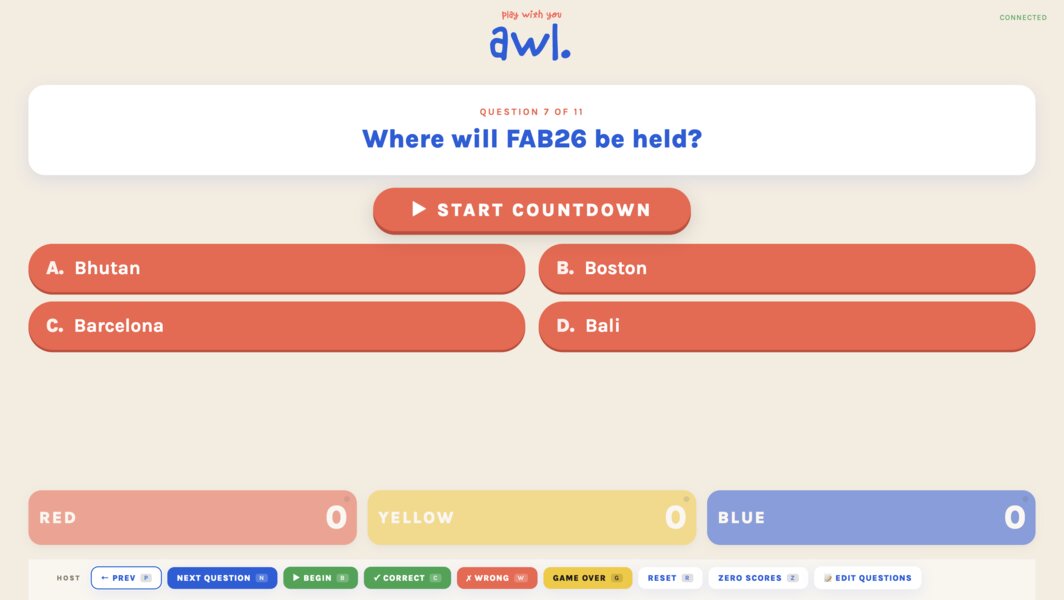
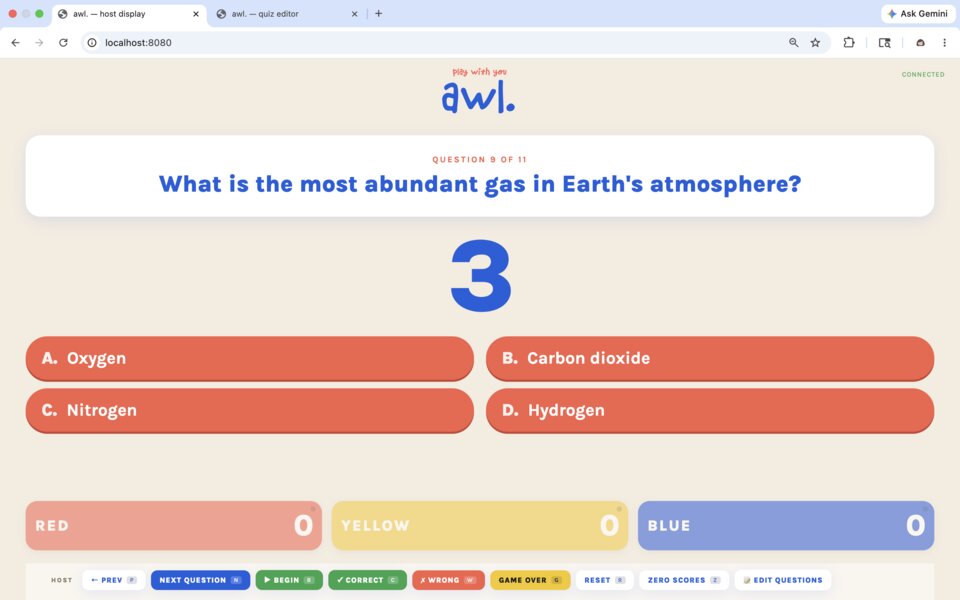
The display walks the audience through 5 stages:
-
Landing screen — pulsing “READY!” button
-
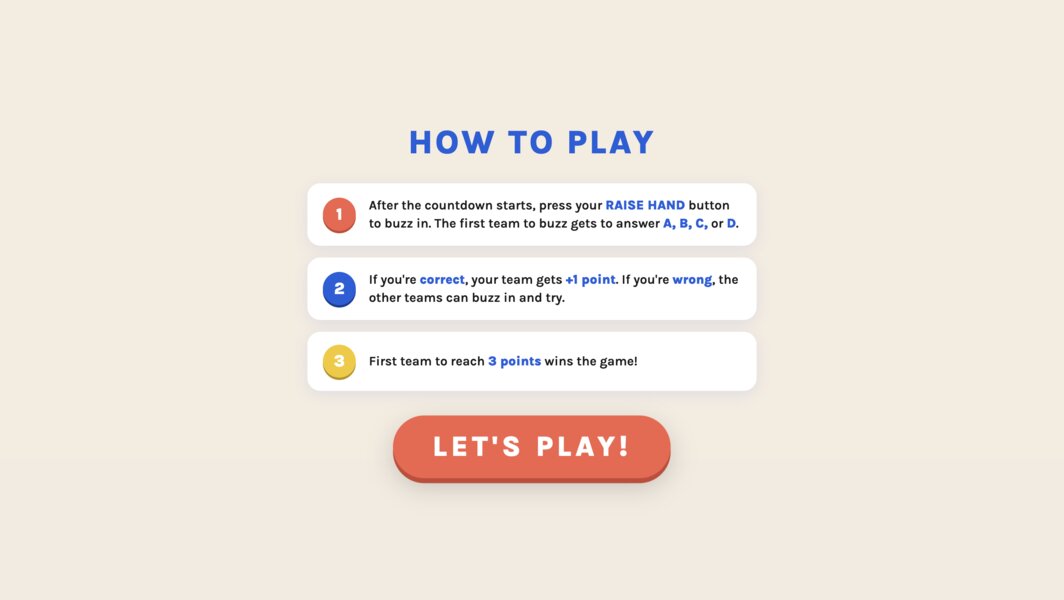
How to Play instructions — three numbered rules
-
Question + Start Countdown button — question card with the 4 coral pills below
-
Countdown — big 3 → 2 → 1 → GO! number
-
Buzz race — team locks in, answers, pill goes green/red
-
Game over celebration — full-screen overlay with bouncing winner name + trophy + confetti
Quiz Editor
OLED Graphics
YEAY
WINNER
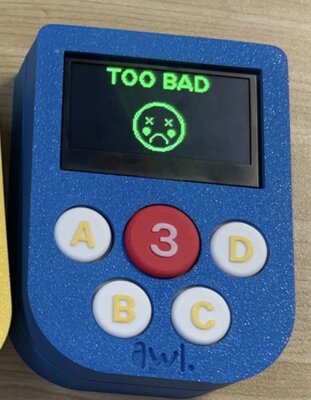
TOO BAD
Further details of the interface & applications are in week 15’s documentation.
Files
The Files:
-
3D Design
- AWL Enclosure - STEP file
- Enclosure (Top) - STEP file
- Enclosure (Bottom) - STEP file
- Button 1 - STEP file
- Button 2 - STEP file
- Button 3 - STEP file
- Button A - STEP file
- Button B - STEP file
- Button C - STEP file
- Button D - STEP file
- Button Mold - STL file
- Raise Hand (to put on the top of the silicone) - STL file
- Silicone Button Holder - STL file
-
3D Print Settings
-
2D Design
-
PCB Design
-
Interface & Applications
- server.js - Node.js game server (HTTP + WebSocket + state machine)
- awl_console_V1.ino - ESP32 firmware — same source for all 3 controllers
- index.html - Host display: intro → instructions → game → celebration
- admin.html - Quiz editor + API client
- playwithyou.svg - Brand mark loaded by the display
- awl.svg - AWL Logo
- questions.json - Quiz content (editable via the admin page)
License
This project is licensed under the Creative Commons Attribution-NonCommercial-ShareAlike 4.0 International license.

You are free to:
- Share — copy and redistribute the material in any medium or format
- Adapt — remix, transform, and build upon the material
Under the following terms:
- Attribution — You must give appropriate credit, provide a link to the license, and indicate if changes were made
- NonCommercial — You may not use the material for commercial purposes
- ShareAlike — If you remix, transform, or build upon the material, you must distribute your contributions under the same license
Acknowledgments
- Fab Academy - Neil, all the instructors, and fellow students
- Instructors - My local instructor (Matthew) and global instructor (Lambert) at FAB Academy 2026 for tutorials and feedback
- Fellow students at FAB Chaihuo - Tim, Meia, Alison, Sunny, Jerry, Maggie, Jenny, Guannan, Dolphin, John, Henry, Ruili
- Chaihuo Makerspace — thanks to all the Chaihuo members & managers: Chris, Yumi, Jovan, Dumpling, Dean, Aaron, Xiaotong, Bianca, Ethan, Namas
- My playtesters — Matthew, Sunny, Alison, Tim, Joel, Joan, Joel’s dad, Edwin, Valen, Mancius, Nicole, Jason, James