Week 18 — Applications & Implications
From a Traditional Symbol to an Interactive Cultural Experience
This is the first week where Fab Academy asks us to step back from the bench and look at the final project as a whole: what it does, why it matters, who might use it, and what it could become. Most of the physical building, wiring, and debugging for Smart Fu — Digital Door Guardian is documented on my Final Project page. On this page I answer the Applications & Implications questions in one place, with the cultural story first, and the technical details woven in where they belong.
Assignments
Our tasks for this week are to propose a final project masterpiece that integrates the range of units covered, answering:
- What will it do?
- Who's done what beforehand?
- What will you design?
- What materials and components will be used?
- Where will they come from?
- How much will they cost?
- What parts and systems will be made?
- What processes will be used?
- What questions need to be answered?
- How will it be evaluated?
The project should incorporate 2D and 3D design, additive and subtractive fabrication processes, electronics design and production, embedded microcontroller interfacing and programming, system integration and packaging.
The Idea — Why This Project Matters
I have always been fascinated by traditional Chinese culture and the stories behind the symbols that appear in our daily lives. Many traditional elements are not only visual designs, they carry emotions, memories, and wishes passed down through generations.
Growing up in China, Fu (福) was part of my memory of home. Every Spring Festival, my family would write or hang a Fu decoration on the front door. It symbolized good fortune, welcome, and protection.
Last year I hand-wrote a large Fu character with ink on special paper. I liked it a lot, but after one year the color had faded. That made me ask a simple question:
How can a Fu that carries memory also survive in modern daily life?
At first this sounded like a material problem: replace paper with a screen. But the more I worked through Fab Academy, the more I realized the interesting part was not only the display. It was the relationship between the object, the door, the person inside, and the visitor outside.
I often work with headphones on. In that focused state I can easily miss someone knocking. I wanted a gentle way for visitors to announce themselves without adding a loud, technical-looking doorbell. So my question became:
Could a traditional Fu decoration still carry the feeling of welcome and protection, while also becoming useful in modern life?
For me, preserving culture does not mean keeping everything unchanged. Culture stays alive when people continue to interact with it, reinterpret it, and create new experiences around it. This project is my attempt to do exactly that, not by freezing Fu as a static image online, but by turning it into something you can touch, see, and share.
The Story Behind "Fu" (福)
The Chinese character Fu represents blessing, happiness, good fortune, and a better life. During Chinese New Year, families traditionally place Fu on doors, windows, or walls to express their wishes for the coming year.
The tradition of displaying Fu is not simply decoration. It represents people's hopes for family reunion, health, happiness, and prosperity. Chinese households also placed Door Guardians at the entrance to watch over the home and greet visitors. My project borrows from both traditions: the blessing of Fu and the protective role of a guardian at the threshold.
The character Fu has a long history in Chinese culture. Its early forms can be traced back to ancient Chinese writing systems, where it was connected with people's prayers and wishes for blessings. Over time, the meaning of Fu gradually developed from a symbol of divine blessing into a symbol representing happiness and positive wishes in everyday life.
Through this project, I wanted to explore one more question:
What if Fu was not only something we see, but something we can interact with?
What Will It Do?
Smart Fu — Digital Door Guardian is an interactive door decoration inspired by traditional Chinese Fu culture.
Most of the time it behaves like a quiet decorative object. The 7.3 inch color ePaper display shows Fu artwork, seasonal posters, or personalized graphics with a paper-like calmness. When a visitor arrives, they do not need to press a loud doorbell. They touch the small sensor near the decoration. The OLED greets them with:
Hello
My Friend
At the same time, the touch device sends a WiFi message to a local Node.js server. The web dashboard shows a visitor notification, and the ePaper display switches to a visitor poster. In that moment, the traditional Fu is "awakened" and becomes a digital door guardian.
The result is not a commercial smart doorbell. I see it more as a calm-technology object: useful when someone arrives, quiet when nothing is happening, and still recognizable as a cultural decoration.
Instead of receiving a temporary digital greeting that disappears in a chat thread, users can experience a physical object that carries a personal blessing — one that responds at the door, where Fu already belongs.
Who's Done What Beforehand?
I searched Fab Academy archives and the wider web for projects that combine Chinese cultural symbols with interactive electronics. I found many smart doorbells, ePaper dashboards, and touch-based IoT demos, but very few that begin from a specific cultural object and ask what function belongs there.
Some projects came close in spirit:
- Nadieh Bremer's light jigsaw puzzle (Applications & Implications, 2021) she turned a familiar physical ritual (placing puzzle pieces) into a responsive light experience. Her project reminded me that interaction design can start from an everyday emotional action, not from a sensor datasheet.
- Smart home doorbells and visitor displays widely available commercially, but usually designed as generic gadgets first and only styled as "home decor" afterward.
- ePaper information displays common in maker projects for low-power signage, but rarely tied to festival symbolism or threshold rituals.
- Digital embroidery and cultural motifs during my wildcard week I stitched Fu with a Brother embroidery machine, which showed me how the same symbol can move between paper, thread, resin, plywood, and pixels.
I did not find a Fab Academy project that specifically reimagined Fu as an interactive door guardian. That gap felt meaningful rather than intimidating. It meant I had to define my own references: traditional door decoration, calm technology, and the maker-community habit of remixing open hardware into personal objects.
What Will I Design?
My goal was to transform a traditional symbol into a living object by combining digital fabrication, embedded systems, and interaction design.
The final system has three connected modules:
| Module | Role | Main parts |
|---|---|---|
| Visitor interaction | Touch at the door, immediate OLED feedback | XIAO ESP32-C3, custom PCB, Grove touch sensor, 128×128 OLED |
| Network hub | Shared state between devices and browser | Node.js Express server, REST API, web dashboard |
| Ambient display | Slow, paper-like visual change indoors | XIAO ESP32-S3 Plus, EE04 ePaper driver, 7.3 inch Spectra 6 display |
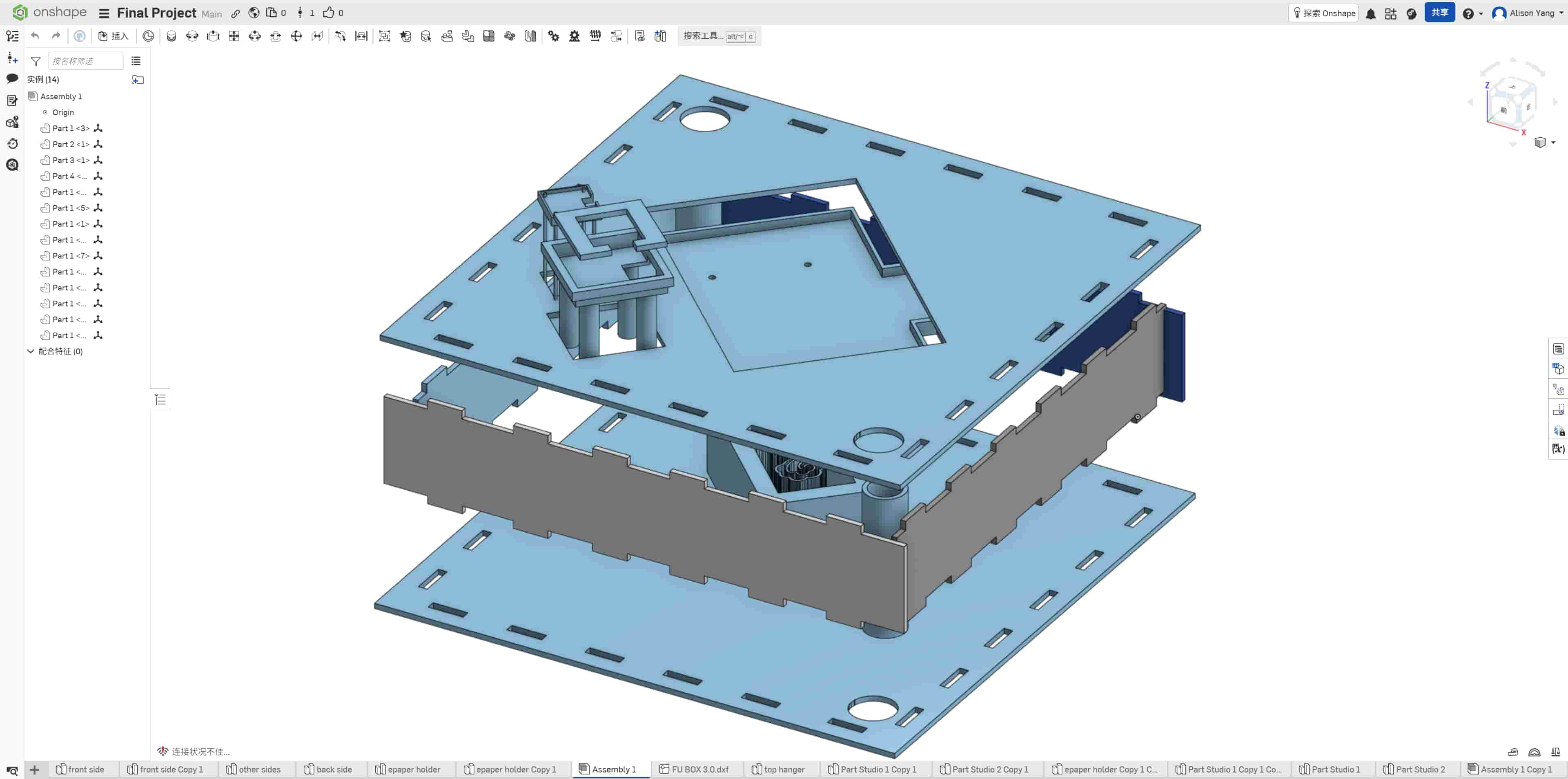
I also designed the physical object around these modules:
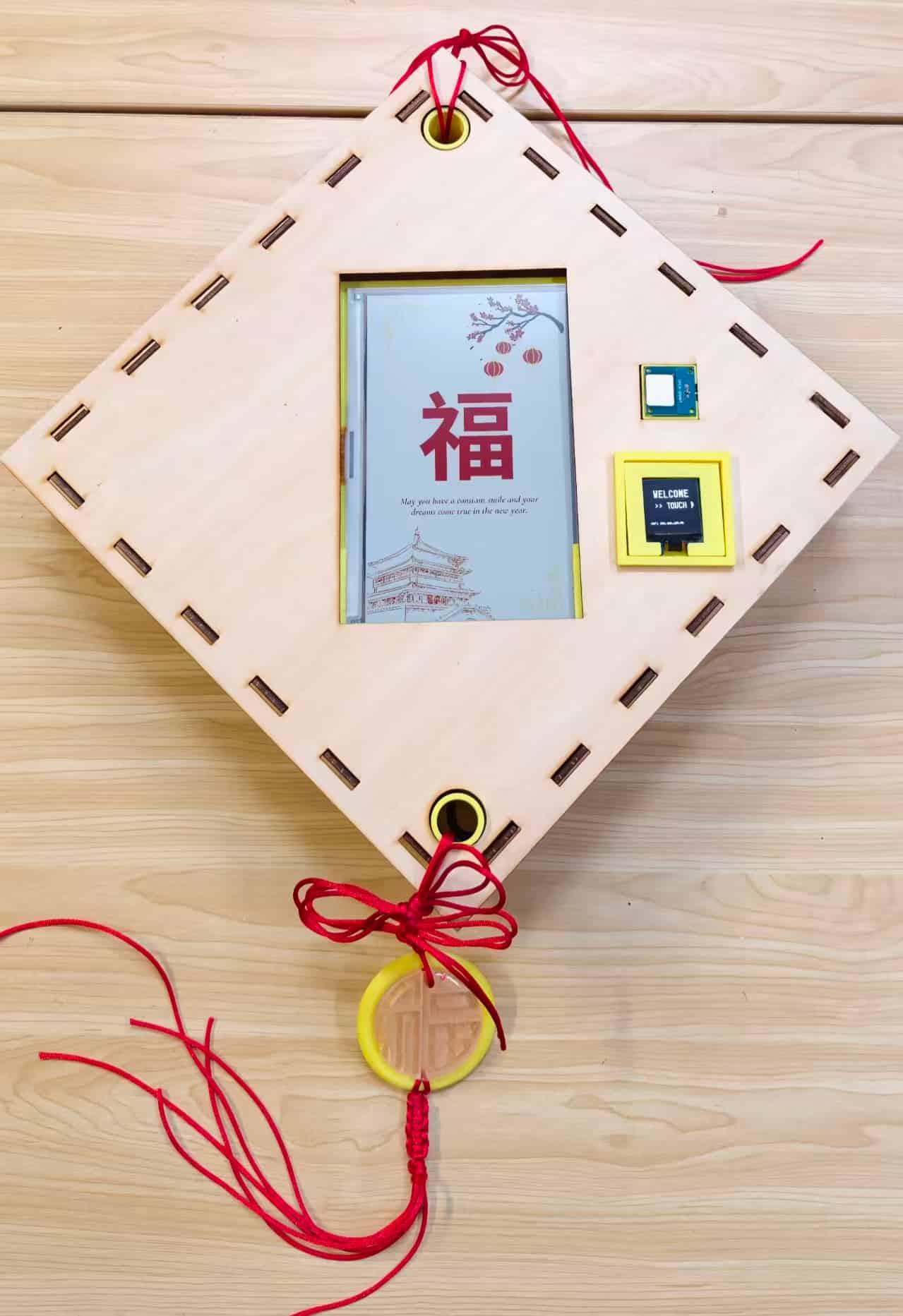
- laser-cut wooden front frame with a diamond Fu silhouette
- 3D-printed holders for the ePaper, OLED, and touch sensor
- rear support structure inspired by ruyi cloud patterns from molding week
- three prepared Fu poster states for the ePaper display
- firmware for both ESP32 boards and the local server
The project evolved in spirals from decorative Fu object, to smart display, to interactive Fu, to door guardian, to a two-board networked system. Each spiral made the project less like a screen with a Chinese character attached, and more like an interaction system rooted in a cultural threshold.
Materials and Components
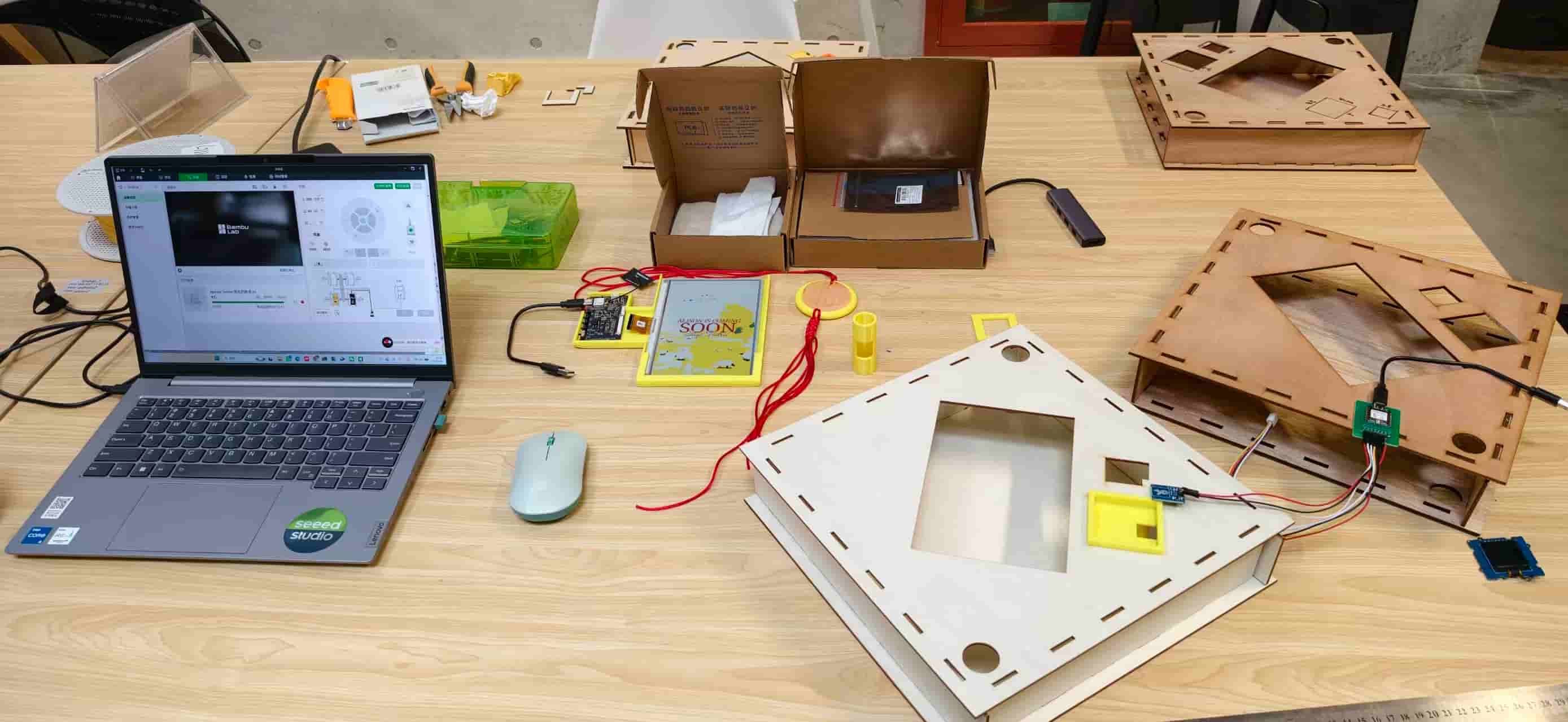
Electronics
| Item | Quantity | Purpose |
|---|---|---|
| XIAO ESP32-C3 | 1 | Touch sensing and WiFi event sender |
| Custom PCB | 1 | Main C3 interaction board |
| Touch sensor | 1 | Visitor input |
| Grove 128 × 128 OLED | 1 | Local visitor feedback |
| EE04 ePaper driver board | 1 | Driver for 7.3 inch ePaper |
| 7.3 inch Spectra 6 ePaper display | 1 | Main ambient Fu display |
| Jumper wires, headers, screws | As needed | Assembly |
| USB power / power bank | 1–2 | Prototype power |
Fabrication materials
- plywood for the laser-cut frame
- PLA filament for holders and support parts
- resin and silicone from molding/casting experiments (cloud-pattern support)
- screws for mechanical mounting points
Software and design tools
- Arduino IDE, KiCad, Inkscape, Onshape
- Node.js, Express, Tailwind CSS
- Python image conversion script for ePaper posters
- Seeed ePaper and display libraries
Where Will They Come From?
Most electronics came from Seeed Studio and the Fab Lab inventory XIAO boards, Grove modules, and the EE04 ePaper driver were standard parts I could test quickly and document for other makers. Plywood and PLA were supplied through the lab. Some fasteners, stabilizers, and personal materials (such as the paper I used for my handwritten Fu reference) came from local shops.
The making process itself happened across the Fab Academy workflow: lab machines for laser cutting, 3D printing, and PCB milling; my laptop for firmware, server code, and the web dashboard; and many informal conversations with instructors and classmates when I was stuck on tolerance, WiFi, or ePaper refresh timing.
That mix matters for the project's implications. This is not a factory product. It is a locally made cultural object built from parts that other Fab Labs and maker spaces can already source.
How Much Will They Cost?
This is an approximate bill of materials. Exact prices depend on supplier and local stock, but the project is intentionally built from accessible maker hardware rather than custom industrial parts.
| Category | Approximate cost | Notes |
|---|---|---|
| XIAO ESP32-C3 | $4.49 | Core microcontroller pair |
| Custom PCB | $8 | Second revision after first learning board |
| Touch Sensor + Grove OLED | $18 | Off-the-shelf modules speed integration |
| EE04 driver + 7.3 inch ePaper | $52.5 | Main visual output |
| Plywood + PLA + fasteners | Low | Frame and internal structure |
| USB power | $10 | Server host during prototype stage |
| Wooden Board | $10 | Outlook |
| Colorful glitter | $2 | Molding Fu |
The project costs around $100. I am quite satisfied about the result, it's affordable and works well:
What Parts and Systems Will Be Made?
I designed and fabricated:
- the interaction concept and visitor flow
- Fu poster graphics for the ePaper display
- the laser-cut wooden front frame (multiple iterations)
- ePaper holder, OLED support, touch sensor support, and rear cloud-pattern structure
- a custom ESP32-C3 PCB workflow (two board generations)
- C3 touch / OLED / WiFi firmware
- S3 ePaper poster-switching firmware
- Node.js server, REST API, and browser dashboard
- Python workflow to convert poster images for the ePaper
Existing modules were used where that made sense, especially the ePaper driver and Grove sensors, but the system integration, enclosure, interaction logic, dashboard, and final behavior were designed for this project.
What Processes Will Be Used?
In order of how they shaped the final object:
| Process | What it made |
|---|---|
| 2D design (Inkscape) | Fu graphics, laser-cut layouts, poster artwork |
| 3D design (Onshape) | Holders, rear support, assembly planning |
| Laser cutting | Diamond wooden front frame, iterative tolerance tests |
| 3D printing | ePaper, OLED, and touch holders; structural supports |
| PCB design and milling | Custom XIAO ESP32-C3 interaction board |
| Embedded programming | C3 touch sender, S3 ePaper controller |
| Networking | WiFi communication, REST API, device polling |
| Interface programming | Web dashboard, toast alerts, poster control |
| Molding and casting | Ruyi cloud pattern experiments reused in rear support |
| Wildcard embroidery | Fu stitched in thread — another medium for the same symbol |
| System integration | Mechanical fit, firmware timing, UI behavior as one loop |
This is the Fab Academy arc in one object: subtractive and additive fabrication, electronics production, programming, networking, and packaging all meeting at the door.
Project Timeline
Based on the 20-week Fab Academy rhythm, I mapped Smart Fu as a mixed sequential-parallel process. Early weeks focused on concept and architecture, middle weeks ran electronics and software in parallel with mechanical development, and May (weeks 14-18) was heavily focused on structural upgrades and extended 3D redesign iterations for the enclosure and internal supports. Final integration started only after fabrication, electronics, and networking all reached a stable test state.
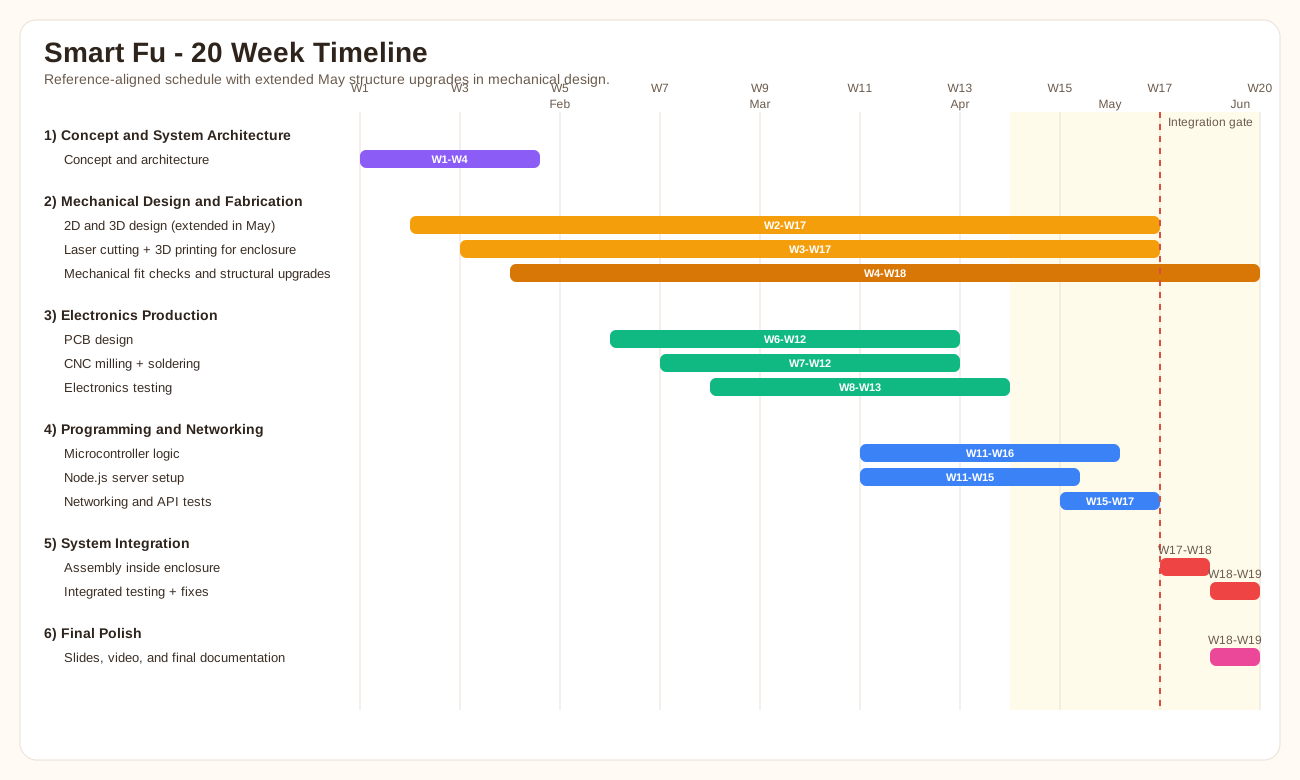
This schedule highlights the core dependency: system integration cannot start until mechanical fabrication, electronics production, and programming/networking are all test-ready. The May redesign loop increased mechanical effort, but also improved fit, reliability, and final assembly quality.
Questions That Needed to Be Answered
For a long time I did not know how much "smartness" Fu needed. Should it show time and weather? Should it use a pull-ring interaction like an old lamp? Should one board do everything?
The questions that actually moved the project forward were:
- Where does Fu belong? At the door, not on a desk as a generic information screen.
- Who initiates interaction? The visitor, not only the person inside.
- How should the object respond? Immediately at the touch point (OLED), and more slowly indoors (ePaper), respecting the calm feeling of paper.
- One board or two? Two, separating visitor interaction from the large display simplified timing and debugging.
- Local server or cloud? Local first, so I could inspect JSON, test posters, and understand every layer during integration week.
- How hidden should the technology be? Visible enough to repair, decorative enough to still read as Fu.
These were not abstract design questions. Each one showed up again as a concrete failure: a frame that would not fit, a missing ground on a PCB, a toast that re-fired every poll, an ePaper panel that hung on the second refresh. The questions and the mistakes were two sides of the same process.
Applications
1. Personal Blessing Object at the Threshold
The first application is intimate: a personal interactive object for family and friends at the entrance of a home.
Traditional greetings often travel through text messages or social media, where they disappear quickly in a stream of notifications. This project explores another possibility, a physical object that holds personal memory and welcome. When a visitor touches the Fu, they receive an immediate greeting on the OLED. Indoors, the household sees that someone has arrived.
During testing I used personalized messages like "Hello Alison" to prove that the greeting layer can be changed. Future versions could display different blessings based on time, festival, or relationship.
2. Cultural Education in Fab Labs and Schools
Another application is educational. In Fab Labs, maker workshops, or schools, building this object can teach electronics, programming, digital fabrication, and interaction design, while also telling the cultural story behind the symbol.
The making process becomes a way to experience and continue cultural traditions, not only read about them. A student far from China might learn why Fu appears on doors during Spring Festival, and also learn how to mill a PCB or convert a poster for ePaper. That combination is exactly what I hope maker education can offer: technical skill and cultural context in the same build.
3. Community Interaction and Festival Installations
The concept can scale beyond a single door. Imagine:
- a digital blessing wall where many people contribute wishes
- a festival interactive display that changes posters for Lunar New Year, Mid-Autumn Festival, or local community events
- a community message system where multiple Fu objects share state through a local network
Multiple users could contribute their own greetings and create a collective cultural experience, still rooted in the symbol of blessing, but distributed across a space.
Why Digital Fabrication Matters Here
Digital fabrication makes it possible to create personalized cultural objects instead of mass-produced decorations that look identical in every home.
This project explores three possibilities that matter to me as a maker:
Personalization. Traditional Fu decorations are often repeated forms, but digital fabrication allows each object to carry different posters, messages, enclosure proportions, and interaction rules.
Open modification. By using open hardware (XIAO, Grove modules, documented server code) and modular holders, future makers can add sensors, change the dashboard, or rebuild the frame for their own cultural symbols, not only Fu.
Local creation. Instead of relying only on industrial production, cultural objects can be made locally in Fab Labs and maker communities. That feels especially important for diaspora communities, festival installations, and educational programs where the object needs to be adapted on site.
Digital fabrication is not the point of the project. It is the method that lets tradition be remade by the people who live with it.
Implications
Cultural implications
If cultural symbols survive only as flat images in group chats, they lose the spatial and ritual context that gave them meaning. Fu on a door is not the same as Fu in a sticker pack. By placing interaction back at the threshold, the project asks whether technology can extend ritual instead of replacing it.
There is also a risk. A "smart Fu" could become gimmicky — blinking, shouting, over-automated. I tried to design against that by using slow ePaper, gentle copy on the OLED, and a calm dashboard palette. The implication I care about is not "make tradition high-tech," but make technology respect the pace and feeling of tradition.
Maker-community implications
Working in the maker community, I often see open hardware used to solve generic problems: weather stations, plant monitors, LED cubes. Those projects are valuable. This one argues that open hardware can also serve personally meaningful problems — missing a visitor, wanting a faded handwritten Fu to live longer, wanting a door to feel welcoming again.
Because the server is local and inspectable, another maker can fork the project without a cloud subscription. Because the enclosure is laser-cut and 3D-printed, it can be resized for different displays or different doors. That is the maker implication I want to keep: culture-scale ideas built with lab-scale tools.
Technical and social implications
The project also sits in the wider conversation about smart home devices: cameras, always-on microphones, aggressive notifications. A door guardian that only wakes on touch, uses a local server, and defaults to a quiet poster is a small counter-example — technology at the door that does not have to behave like surveillance.
Future versions could raise harder questions: Should visitor events be logged? Should messages be AI-generated? Should the object connect to the public internet? I have not solved those yet, but Applications & Implications week is where those questions belong — on the table, not hidden inside firmware.
Limitations and Future Improvements
During this project I realized how many directions remain open. The current prototype works as a proof of concept, but it still has clear limits:
- the enclosure design can be improved for usability, cable routing, and a more polished rear cover
- battery-powered operation needs further optimization; the prototype still depends on USB power
- the touch area is functional but not yet fully integrated into the visual surface of Fu
- ePaper refresh is slow, so interaction timing must respect display physics
- the server runs locally on a laptop, not yet as a long-term deployed service
- WiFi credentials are still hardcoded in prototype firmware
Future versions could include:
- voice interaction or soft chime instead of only visual feedback
- AI-generated personalized blessings — with careful thought about authenticity
- multiple connected devices sharing messages across rooms
- seasonal poster packs and festival modes
- mobile notifications while keeping the local-first spirit
- open-source release of hardware files, firmware, and dashboard code for the maker community
The most important future improvement is not a single feature. It is making the system feel like one object instead of a beautiful frame around visible seams between wood, holders, boards, and browser tabs.
How Will It Be Evaluated?
I evaluate the project at two levels: the cultural experience and the technical loop.
Cultural success means a visitor can recognize Fu, understand that touch is invited, and feel welcomed rather than interrogated by a machine. It also means the indoor display changes in a way that feels calm and intentional — closer to replacing a paper sign than triggering an alarm.
Technical success means the full interaction chain works reliably:
- Start the local Node.js server.
- Open the dashboard in the browser.
- Power the S3 ePaper board and confirm poster 1 appears.
- Power the C3 touch board and confirm the OLED idle screen appears.
- Touch the sensor.
- Confirm the OLED shows
Hello / My Friend. - Confirm the server receives the event.
- Confirm the dashboard shows the visitor toast.
- Confirm the ePaper switches to poster 3.
- Use the dashboard reset button to return to poster 1.
What works well today:
- touch triggers the network flow
- OLED gives immediate local feedback
- dashboard can switch posters manually
- S3 updates ePaper only when poster state changes
- device status is visible on the dashboard
- the physical frame communicates the Fu decoration idea
What still needs improvement is listed above — and I consider that honesty part of evaluation, not a footnote.
Reflection
This project started from a simple cultural symbol, but through the Fab Academy journey I learned that making is not only about creating a functional object. Making is also about creating connections between technology, people, and stories.
At the beginning, I thought I was making a smart Fu decoration. By the end, I understood the project more as a conversation between culture and technology. The Fu character carries memory, blessing, and welcome. The touch sensor gives it a small ritual. The OLED answers the visitor immediately. The server carries the message indoors. The ePaper changes slowly, almost like a paper sign being replaced. The dashboard makes the invisible network visible.
I also learned that interaction is not only about adding sensors. It is deciding what should happen, when it should happen, how strongly it should respond, and what feeling the response should create. I did not want the visitor to feel like they were pressing a machine button. I wanted the action to feel gentle: touching a Fu, sending a greeting, waking the guardian.
The hardest parts were not always the most impressive-looking parts. A missing ground, a wrong WiFi band, a too-large OLED font, a repeated toast, and an ePaper sleep problem each stopped the project in a different way. At the time, those mistakes felt like delays. Looking back, they are the actual structure of the project. Each failure forced the next spiral.
As someone working in the maker community, I often see how open hardware helps people turn ideas into reality. Through this project, I wanted to explore how technology can also help transform cultural memories — not preserve them in a glass case, but let them keep living at the door.
The character Fu represents blessing, happiness, and connection. By combining traditional culture with digital fabrication, I hope this small interactive object can become a bridge between the past and the future — one touch at a time.
Wrapping Up
Applications & Implications week helped me name what the project had been doing all along: starting from a symbol I grew up with, and asking what it means to welcome someone in the digital age. The electronics, the frame, the server, and the posters are not separate achievements. They are layers of the same question.
The detailed build history, failure log, files, and BOM live on my Final Project page. Here, the takeaway is simpler: Smart Fu — Digital Door Guardian is still a prototype, but it already shows the kind of maker I want to become — someone who can connect personal culture, physical form, electronics, and software into one object that feels meaningful, not only functional.
Only one week of Fab Academy remains. I am grateful that the physical and networked sides of the project now speak to each other. The next step is to keep refining the object until the technology disappears a little more, and the blessing remains.
Downloadable Files
Paths below are site-relative and resolve directly inside this documentation website after deployment.
The full build history, failure log, and BOM live on my Final Project page. Key implementation files:
Firmware and server
- C3 touch sender firmware
- S3 ePaper poster firmware
- Node.js server
- Web dashboard:
static/img/interface/index.html(served bynode server.js) - Poster conversion script
- Editable project timeline source (
.mmd)
Enclosure and fabrication