Week 15 - Interface and Application Programming
Group Assignment
Compare as many interface and application programming tool options as possible, and document the trade-offs that push you toward one over another.
Site content
-
What counts as interface and application programming
-
The core decision: where does the app run
-
Tool comparison
the hands-on comparison: drag, describe, adapt
a. Languages
b. GUI and interface frameworks
c. Creative coding environments
d. Talking to the board (communication)
e. Speech, vision, and AI service tools
-
Summary matrix
-
Where AI helped
-
Files and references
What counts as interface and application programming
An interface is whatever lets a human send something to a device or read something back from it. The application is the program that sits between the two: it takes input (a click, a typed word, a spoken sentence, a face in front of a camera), does something with it, and drives an output (a screen, a sound, a motor, a lock).
For this week the question was not "which tool is best" in the abstract. It was: which tool gives the cleanest path from a human action to the hardware responding, for the kinds of interactive objects we build. So the comparison below is organised by the decisions you actually have to make, in order.
The core decision: where does the app run
Before picking a language or a framework, you pick the runtime. Everything else follows from this.
| Runtime | What the user does to start | Cross-platform | Hardware access | Good for |
|---|---|---|---|---|
| Native desktop app | Download and install a binary | Per-OS build needed | Full (serial, USB, GPIO on a Pi) | Heavy local processing, offline tools |
| Mobile app | Install from a store or sideload | iOS and Android differ | BLE, camera, mic | Things carried in a pocket |
| Web app (hosted) | Open a URL | Yes, any modern browser | Camera, mic, fetch, limited serial | UI-heavy apps, sharing a link |
| Web app served from the device | Connect to the device WiFi, open a URL | Yes, any modern browser | Whatever the board exposes over WiFi | Self-contained installations, no install at all |
The last row is the most self-contained: if the microcontroller serves its own page, there is nothing to install, a visitor connects and the interface is just there.
Tool comparison
The hands-on comparison: one app, three ways
The survey tables below cover the wider field. To actually feel the differences we built the same small app three ways: a pad you draw on that erases when you shake it. The only thing that changes between the three is the tool, so the comparison is clean. The three sit on a ladder of abstraction: drag it, describe it, or read and adapt real code.
Drag it: MIT App Inventor
You assemble the app from visual blocks, no typed syntax. Two blocks do the whole job: Canvas.Dragged calls Canvas.DrawLine to draw, and AccelerometerSensor.Shaking calls Canvas.Clear to wipe the screen. The shake is a ready-made block, so nobody touches the sensor maths. Testing runs through the AI2 Companion over a QR code, which needs internet.
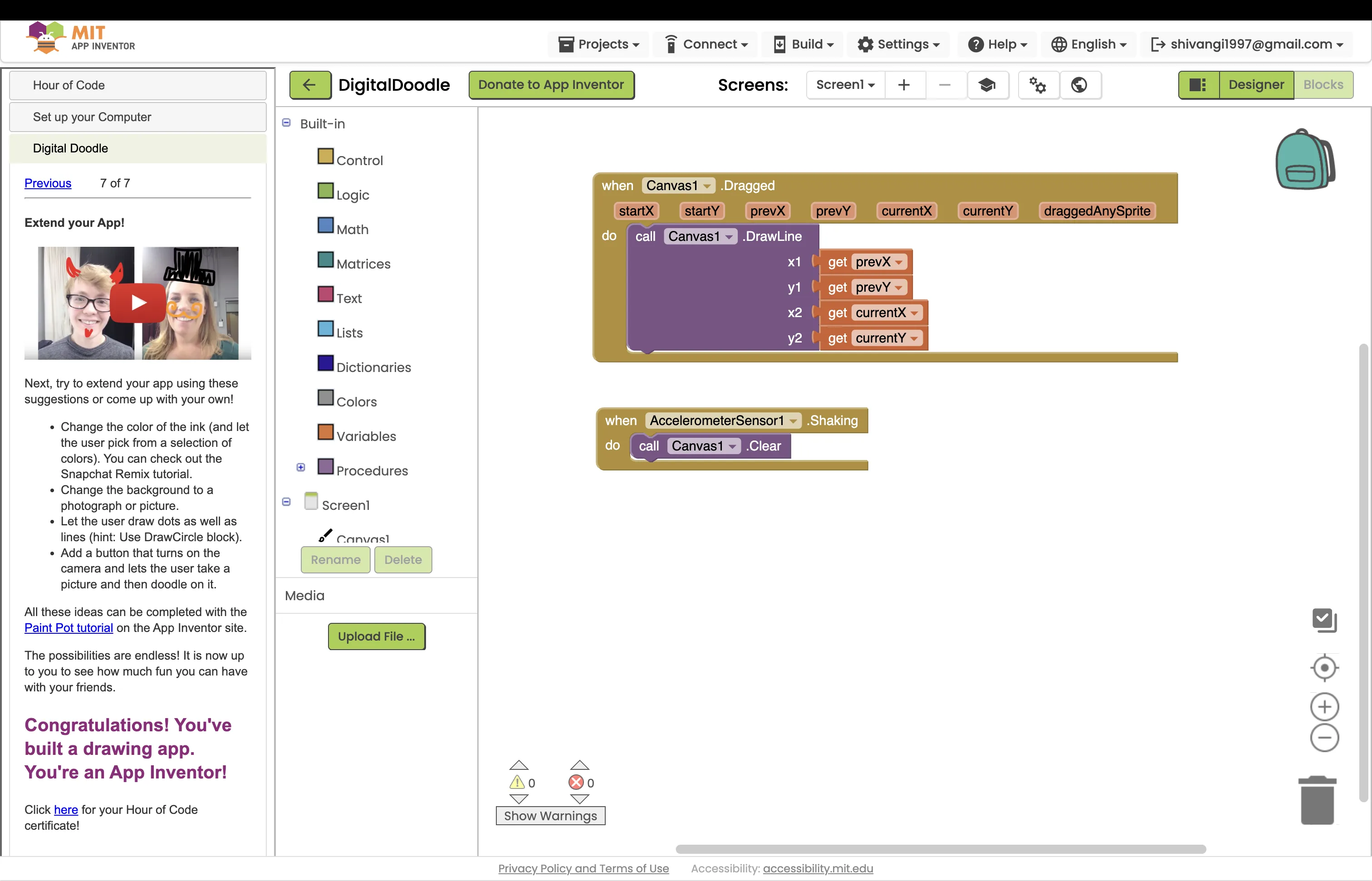
Project file: DigitalDoodle.aia (import it into App Inventor)
Describe it: vibe coding with Gemini
You write what you want in plain language and the AI writes the code. The whole prompt was one line: "app that lets you draw and on shaking phone erases everything." Gemini 3.5 Flash ran about four minutes and produced a six-file React and TypeScript app (a DrawingCanvas component, a useShakeDetector hook, types, styles), then built and previewed it. It also added things nobody asked for: a neon glow brush, a rainbow pen, an eraser, and sound on the shake.
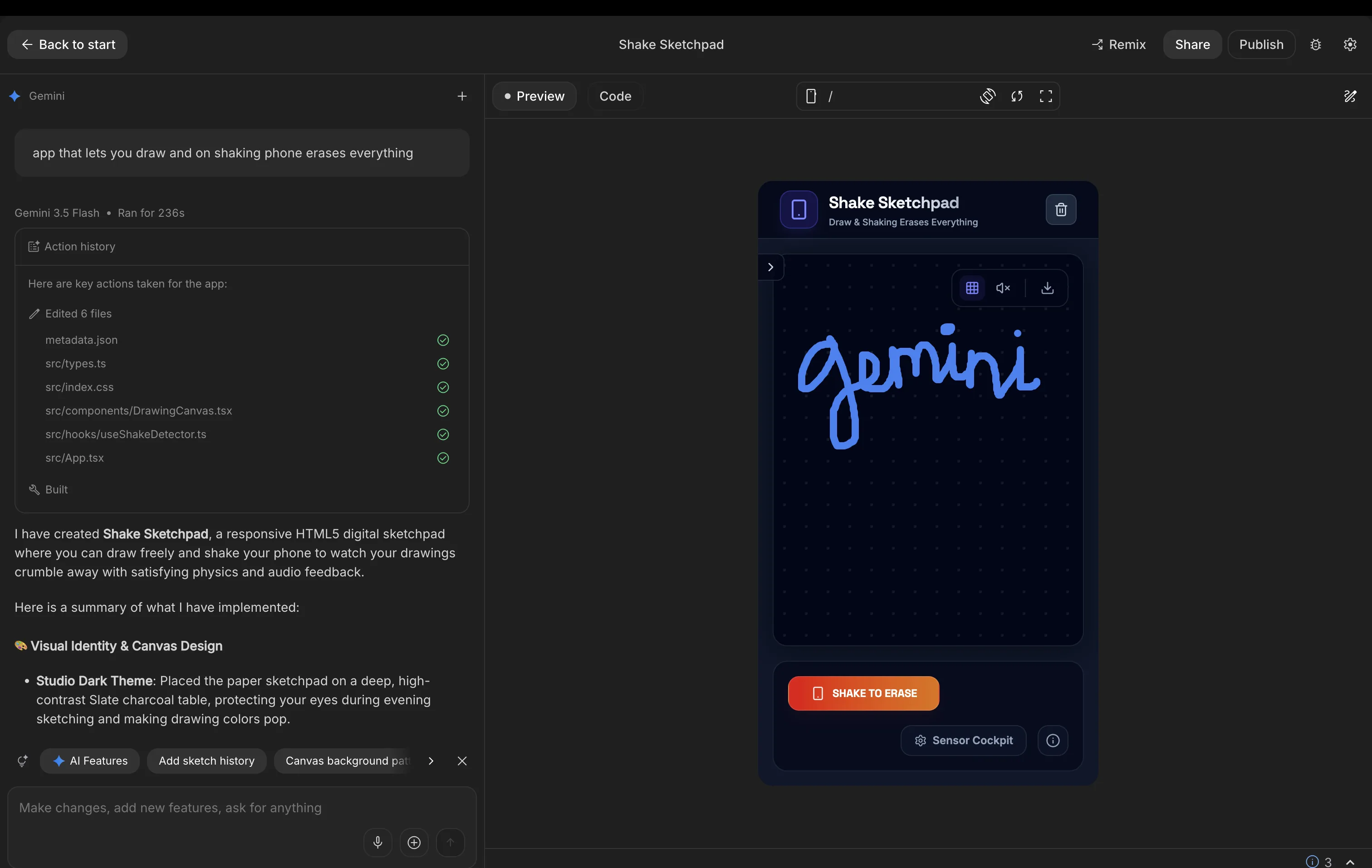
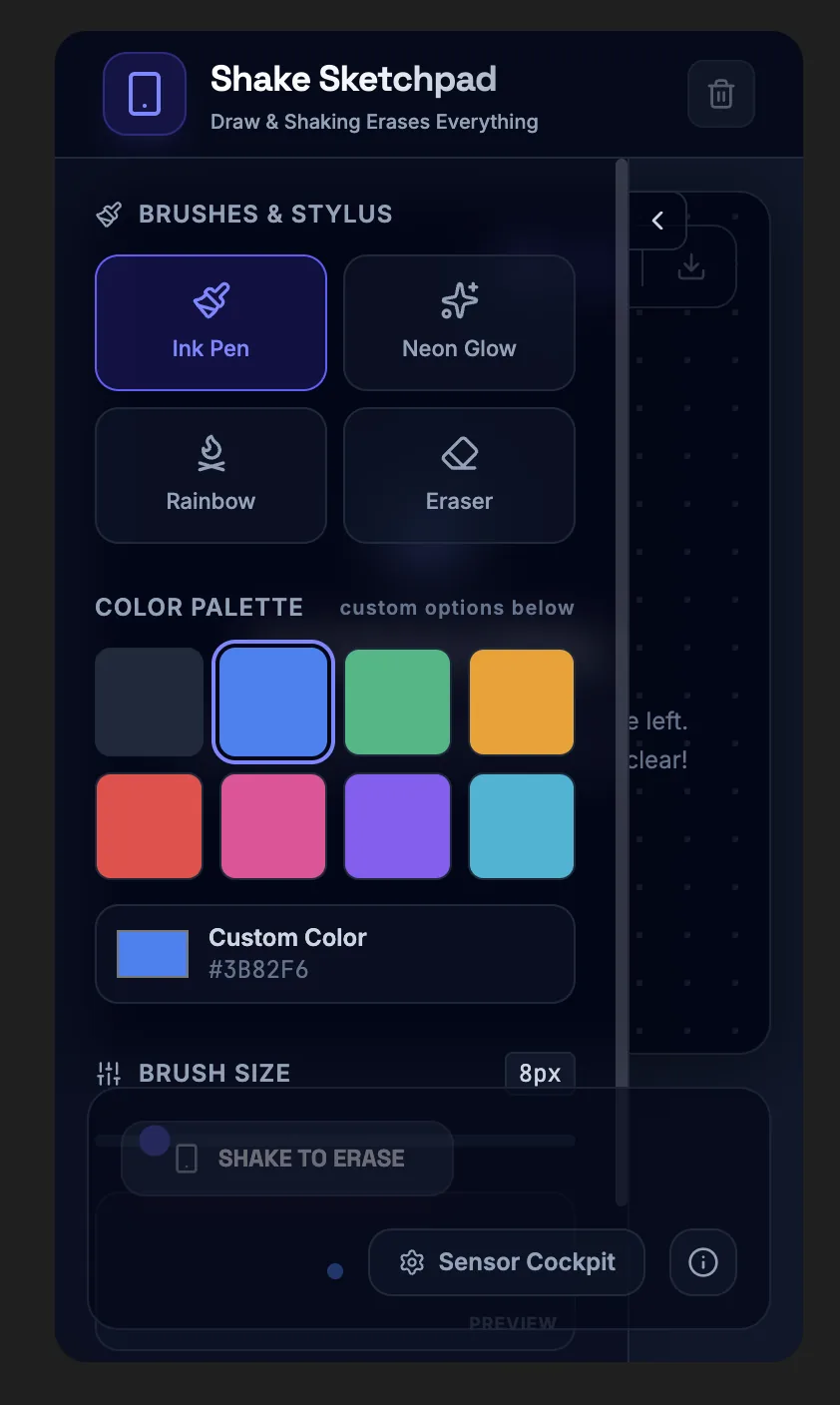
Live build: Shake Sketchpad on Google AI Studio
Adapt it: hand-coding from a reference
Rather than write Vue from scratch, we forked a working pen, "Drawing on Canvas with VueJS" by Kamyar Lajani, and made it ours: a size slider, a full-window canvas, and resize handling that preserves the drawing with getImageData and putImageData, plus Eraser and Clear controls. Then we added the shake to match the other two builds, a devicemotion listener that calls the same clear, with a CSS shake animation and the iOS requestPermission gate. Reading the original structure before changing anything was the cost, and the lesson.
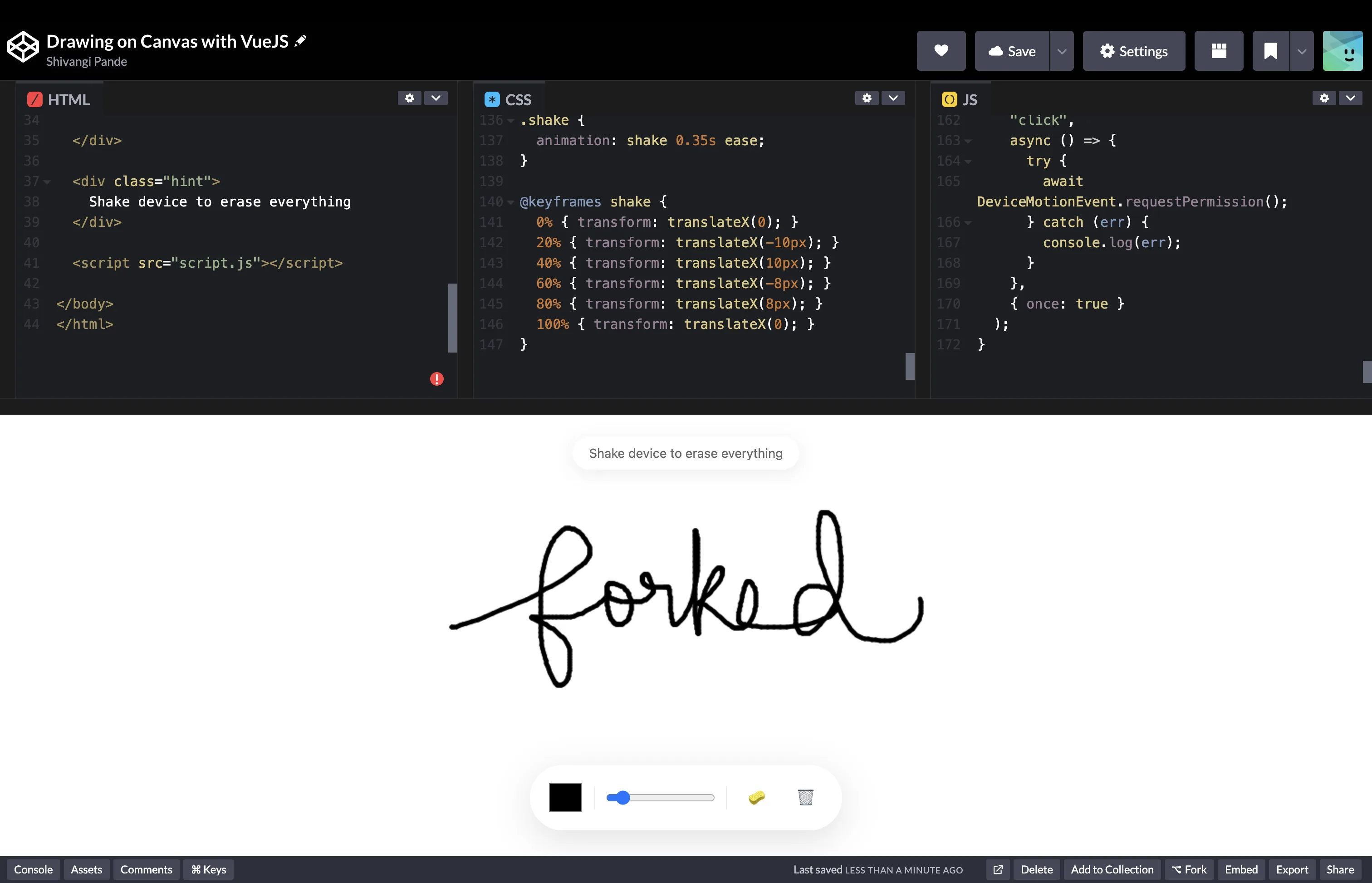
Live demo: our fork on CodePen. Forked and adapted from Drawing on Canvas with VueJS by Kamyar Lajani for inspiration.
The three side by side
| Criterion | MIT App Inventor | Vibe coding (Gemini) | Hand-coding (adapt a pen) |
|---|---|---|---|
| How you work | Drag and wire blocks | Describe in plain language | Read existing code, then edit it |
| Our input | About a dozen blocks | One sentence | A fork plus targeted edits |
| Draw behavior | One block: Dragged to DrawLine |
Pointer events written for us | Canvas getContext('2d'), read and adapted |
| Shake to erase | One block: Shaking to Clear |
A useShakeDetector hook written for us |
A devicemotion listener added by hand |
| Scope control | Exactly the blocks we place | It added features nobody asked for | Total, we change only what we want |
| Time to working app | Fast | About four minutes, unattended | Medium, the cost is understanding the code |
| Output and runtime | An Android app (iOS limited) | A six-file React app, browser | One Vue page, browser |
| User install | Install the APK | Open a link, or publish | Open a link |
| How you test it | QR and Companion, needs internet | Live browser preview | Live browser preview |
| Debugging | Visual, block soup at scale | Debugging code we did not write | We own it, after learning its structure |
| What you learn | Logic and flow, not real code | Architecture and judgement | The most: reading and modifying real code |
| Best for | Beginners, Android, quick control | A working app fast, then refine | Learning, control, a known-good base |
| Main risk | Hits a ceiling fast, weak on iOS | Confident wrong code, scope creep | Stuck without understanding the borrowed code |
Conclusion
The same shake-to-erase behavior exposed the trade at each rung of the ladder. App Inventor gave the gesture as a single block and ran in minutes, perfect for a classroom or a quick hardware remote, but it ships as a separate Android install and tests over an internet-bound Companion, so it fits an offline access-point board badly. Vibe coding turned one sentence into a full app, at the cost of reading what it wrote and reining in features it invented. Adapting a reference pen was the slowest, because you have to understand someone else's Vue before you can add the shake, but it taught the most and gave total control. Two of the three land in a plain browser, which stays install-free, so the real question is rarely the runtime, it is how much of the code you want written for you versus by you.
a. Languages
| Language | Runs where | End-user install | Hardware and serial | UI strength | Best for |
|---|---|---|---|---|---|
| Python | Desktop, Raspberry Pi | Python runtime needed | Excellent (pyserial) | Moderate (needs a GUI lib) | Quick desktop GUIs, data, prototyping |
| JavaScript | Browser, Node | None in the browser | Web Serial (Chromium only) or Node SerialPort, or WiFi | Excellent | Anything UI-heavy, web APIs (mic, camera, speech) |
| C / C++ | Microcontroller, native desktop | Compiled binary | Native and direct | Weak for UI | Firmware, performance-critical work |
| Processing (Java) | Desktop | Runtime or exported app | Built-in serial library | Good for visuals | Creative sketches, teaching, fast prototypes |
The split is clean: C lives on the board, Python is the easy desktop default, JavaScript wins the moment the interface lives in a browser.
b. GUI and interface frameworks
| Tool | Language | Platform | User install | Hardware access | Visual ceiling | Learning curve |
|---|---|---|---|---|---|---|
| Tkinter | Python | Desktop | Python runtime | via pyserial | Low, utilitarian | Gentle |
| PyQt / PySide | Python | Desktop | Python plus Qt | via pyserial | High | Steep |
| Kivy | Python | Desktop and mobile | Runtime or packaged | via pyserial | Medium to high | Moderate |
| Dear PyGui | Python | Desktop | Runtime | via pyserial | Medium (GPU drawn) | Moderate |
| Streamlit / Gradio | Python | Browser (local server) | None (browser) | via backend | Medium (dashboards) | Gentle |
| Plain HTML / CSS / JS | JavaScript | Browser | None | Web Serial, fetch, WebSocket | High | Gentle to moderate |
| p5.js | JavaScript | Browser | None | Serial via library or WebSocket | High (creative) | Gentle |
| Three.js / WebGL | JavaScript | Browser | None | Visual only | Very high (3D) | Steep |
| React / Vue / Svelte | JavaScript | Browser | None | via web APIs | Very high | Moderate to steep |
| openFrameworks | C++ | Desktop | Packaged app | Direct | Very high | Steep |
| Max/MSP / TouchDesigner | Visual patching | Desktop | App install | Serial, OSC, MIDI | Very high | Moderate |
| Node-RED | Visual flows | Browser (local server) | None (browser) | Serial and MQTT nodes | Medium (dashboards) | Gentle |
| MIT App Inventor | Blocks | Android | App install | BLE and Web (HTTP) | Medium | Very gentle |
| Electron | JavaScript | Desktop (packaged) | Bundled runtime | Node serial | Very high | Moderate |
| Unity | C# | Desktop, mobile, web | Packaged | Serial via plugins | Very high | Steep |
Read this top to bottom and a pattern shows up: the Python tools all cost the user an install, the browser tools all cost nothing. For an installation that strangers walk up to, that single column (user install) decides a lot.
c. Creative coding environments
Worth calling out separately, because these blur the line between "interface" and "artwork," which is the space many of our projects sit in.
| Tool | Strength | Weakness |
|---|---|---|
| Processing | Fastest path from idea to a drawn frame, serial built in | Desktop only, Java packaging is clunky |
| p5.js | Processing in the browser, instant to share | Performance ceiling for heavy 3D |
| Three.js | Real 3D and shaders in the browser | Steeper, more boilerplate |
| openFrameworks | Highest performance, C++ | Long build and setup cost |
| TouchDesigner | Node based, real-time visuals, great for installations | Proprietary, desktop bound |
d. Talking to the board (communication)
Once the app exists, it has to reach the hardware. This is the layer people forget to compare.
| Method | Medium | Browser-accessible | Range | Persistent connection | Latency | Setup cost |
|---|---|---|---|---|---|---|
| Serial (USB) | Wired | Web Serial, Chromium only | Cable length | Yes | Very low | Low |
| WiFi HTTP / REST | Wireless | Yes (fetch) | LAN or internet | No (request then response) | Low to medium | Medium |
| WebSocket | Wireless | Yes | LAN or internet | Yes (full duplex) | Low | Medium |
| MQTT | Wireless | Via broker plus JS lib | Internet | Yes (publish and subscribe) | Low | Medium to high |
| BLE | Wireless | Web Bluetooth, Chromium only | Around 10 m | Yes | Low | Medium |
The honest constraint here: Web Serial and Web Bluetooth only work in Chromium browsers. If you want a page that works everywhere with no install, WiFi HTTP from the board sidesteps that whole problem, because the board just answers normal web requests. This is the same plain HTTP path the App Inventor build used through its Web component to control hardware.
e. Speech, vision, and AI service tools
Interactive installations often listen, talk, and reason, so we compared the service layer too.
Text to speech:
| Tool | Quality | Cost | Runs | Notes |
|---|---|---|---|---|
| ElevenLabs | Very high, expressive | Paid API | Cloud | Best for a character voice, network latency |
| Browser SpeechSynthesis | Robotic to decent | Free | Local, offline | Voice quality varies by OS |
| Google Cloud TTS / Amazon Polly | Good | Paid | Cloud | Solid, less expressive than ElevenLabs |
| Piper / Coqui | Decent | Free, open source | Local | No network, more setup |
Speech to text:
| Tool | Accuracy | Cost | Runs | Notes |
|---|---|---|---|---|
| Web Speech API | Good | Free | Browser | Easiest, Chrome leans on Google servers |
| Whisper | Very high | Free local or paid API | Local or cloud | Heavier, best accuracy |
| Vosk | Moderate | Free | Local | Light and offline, lower accuracy |
Language model:
| Tool | Strength | Notes |
|---|---|---|
| Claude Haiku | Fast, cheap, strong persona control | Good for a character that has to reply quickly |
| GPT-4o | Multimodal, fast | Strong alternative, vision built in |
| Local (Llama via Ollama) | Private, no API cost | Needs capable hardware, no internet dependency |
Face and vision:
| Tool | Strength | Notes |
|---|---|---|
| MediaPipe FaceMesh | Real-time, 468 landmarks, runs in the browser | No install, good for face and gesture input |
| OpenCV | Powerful, mature | Desktop and Python, heavier |
| face-api.js | Simple face detection in the browser | Lighter than MediaPipe, fewer features |
Summary matrix
Collapsing all of the above into the questions that actually drive the decision:
| If you need... | Reach for |
|---|---|
| A quick desktop tool just for yourself | Python with Tkinter, or Processing |
| A polished desktop product | PyQt, Electron, or Unity |
| Zero install for strangers, rich visuals | Browser JS (plain, p5.js, or Three.js) |
| The hardware to serve its own interface | A microcontroller serving an HTML file, browser as the runtime |
| Real-time face or gesture input | MediaPipe in the browser |
| Voice in and voice out | Web Speech API plus ElevenLabs or browser TTS |
| A first prototype with no code | MIT App Inventor blocks |
| A working app from a sentence | Vibe coding, then read and tighten the output |
Where AI helped
- Gemini 3.5 Flash (Google AI Studio) generated the whole vibe-coded build from a one-line prompt: a six-file React and TypeScript sketchpad, including the drawing canvas and the shake detector. We reviewed the output and chose not to ship the extra features it invented.
- For the hand-coded build we wrote the shake logic ourselves, using the pen by Kamyar Lajani as the reference and starting point.
- An AI assistant helped structure this page, draft the comparison tables, and convert the screenshots to webp. We checked and edited the final text.
Files and references
- DigitalDoodle.aia: MIT App Inventor build, import to open
- Shake Sketchpad: Gemini build on Google AI Studio
- Canvas drawing fork: our hand-coded build on CodePen
- Drawing on Canvas with VueJS: Kamyar Lajani, the pen we forked
- MIT App Inventor: block-based app builder
- Google AI Studio: the vibe-coding environment