Wireless ESP-NOW communication between the custom ESP32-S3 board (transmitter) and a Heltec LoRa V3 (receiver), streaming live weather data for Kigali — temperature, humidity, location, and weather state — fetched from the OpenWeatherMap API and sent peer to peer over 2.4 GHz, addressed by MAC.
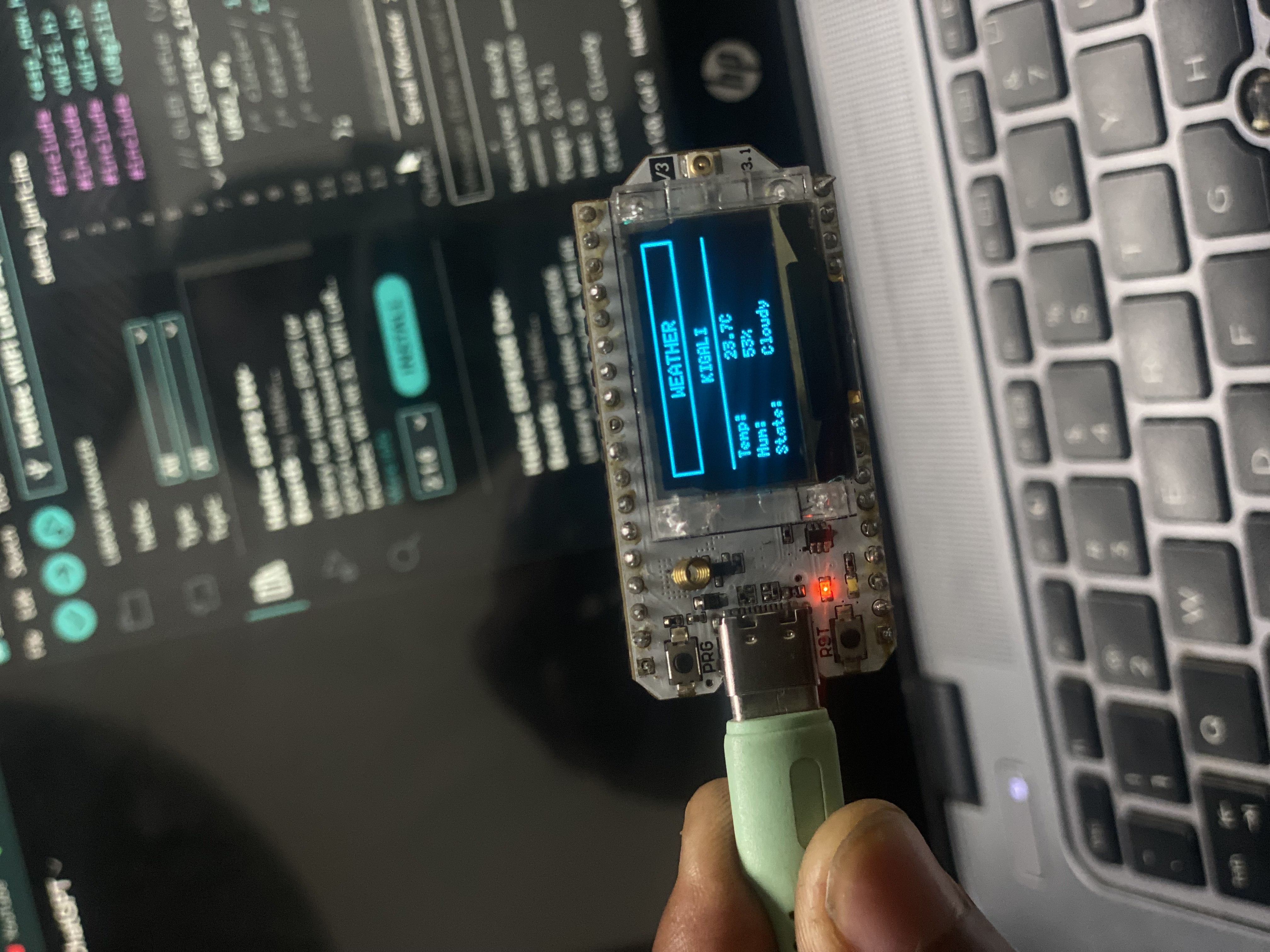
. Both boards powered side by side
Overview
Introduction
Networking week moves the microcontroller beyond its own sensors, making boards talk to each other. For this week I set up a wireless ESP-NOW link between my custom ESP32-S3 board and a Heltec LoRa V3 (which is also ESP32 based). The ESP32-S3 acts as the transmitter, connecting to Wi-Fi to fetch live weather data for Kigali, Rwanda from the OpenWeatherMap API — temperature, humidity, location name, and weather state (Sunny, Cloudy, Rainy, etc.) — then forwarding that data wirelessly to the Heltec receiver over ESP-NOW.
ESP-NOW is Espressif's connectionless wireless protocol with no router, no IP stack, and no pairing handshake. Every device is addressed purely by its factory-burned MAC address. The workflow had three clear milestones: reading the Heltec receiver MAC address to use as the peer address, programming the ESP32-S3 transmitter to fetch and forward weather data, then programming the Heltec receiver and watching the live Kigali weather arrive wirelessly.
Transmitter
ESP32-S3
Custom Board
OpenWeatherMap API → Temp + HumidityLocation: Kigali, RW · Weather State
As a group we sent a message between two student projects. We chose the I2C bus as the protocol: one board acted as the controller and the other as a peripheral on a shared two wire bus, each with its own bus address. The controller wrote a short message to the peripheral address, the peripheral read it back from its buffer, and we confirmed on the Serial Monitor that the exact bytes sent arrived intact on the other side. That proved the data arrived and was not corrupted on the wire. The full write up lives on the group page linked above.
Individual Assignment Design, build, and connect a wired or wireless node with network or bus addresses and local input and/or output device(s).
Individually, I used the custom ESP32-S3 board as a wireless weather transmitter node and the Heltec LoRa V3 as the receiver node, each uniquely identified by its hardware MAC address on the ESP-NOW network. Live weather data for Kigali is fetched from the OpenWeatherMap API and forwarded wirelessly to the receiver.
Concepts
Why ESP-NOW?
ESP-NOW is a connectionless protocol by Espressif that runs on the ESP32's built-in 2.4 GHz Wi-Fi radio without needing a router, access point, or IP address for the wireless link itself. Devices address each other directly by their 48-bit hardware MAC address.
Connectionless & Fast
No pairing, no handshake, no DHCP for the ESP-NOW link. The transmitter registers the receiver's MAC as a peer and sends immediately. Latency is under 10 ms, far faster than MQTT or HTTP over Wi-Fi, and it works without any network infrastructure between the two boards.
🏷
MAC Addressing
Every ESP32 has a unique 48-bit MAC address burned into eFuse at the factory. The receiver's MAC is read first and hardcoded into the transmitter as the peer address. This hardware address is the network identity for this assignment.
📦
Struct Payload
ESP-NOW sends raw bytes up to 250 bytes per packet. A shared C struct is defined identically on both devices, holding temperature, humidity, location string, and weather state string, so the receiver can cast the received bytes straight back into readable values.
Process
Step-by-Step
The approach this week combines two wireless technologies: the ESP32-S3 first connects to Wi-Fi to pull live weather data from OpenWeatherMap, then uses ESP-NOW to forward that data wirelessly to the Heltec — no wires, no shared router needed between the two boards.
Phase 01Read the Heltec Receiver MAC AddressNode identity · Peer address · Serial output
Step 01
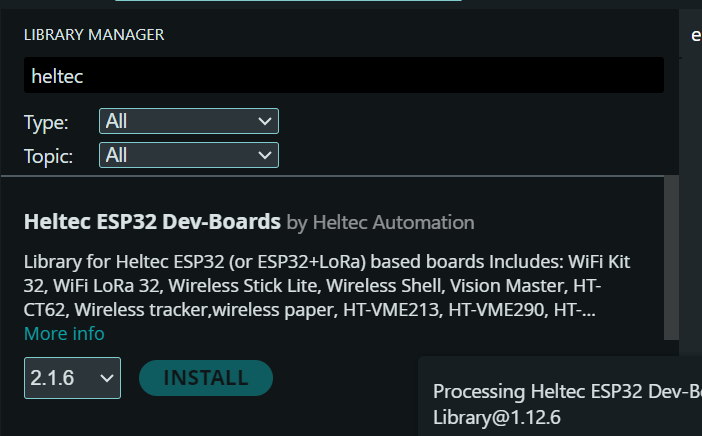
Install Heltec Board Support in Arduino IDE
Added the Heltec ESP32 board package via the Arduino IDE Board Manager. Searched for Heltec ESP32 Series Dev-boards and installed it. This gives access to the correct board target for the Heltec LoRa V3 and ensures the right pin definitions load for the device.
Arduino IDEBoard ManagerHeltec ESP32
Board Manager
Step 02
Upload MAC Reader Sketch to Heltec
Uploaded a minimal sketch to the Heltec that reads its Wi-Fi MAC address using WiFi.macAddress() and prints it to Serial. This value is essential: it must be hardcoded byte by byte into the transmitter as the ESP-NOW peer address. Getting it right before writing any radio code avoids a silent link failure later.
WiFi.macAddress()WIFI_STA modeSerial Monitor
arduinocopy
#include <WiFi.h>

void setup() {
  Serial.begin(115200);
  WiFi.mode(WIFI_STA);  // required to read the MAC
  Serial.print("Receiver MAC Address: ");
  Serial.println(WiFi.macAddress());
}

void loop() {}
Result: The Serial Monitor printed the Heltec MAC in the format XX:XX:XX:XX:XX:XX. This value was noted and converted to the byte array used in the transmitter's receiverMAC[].
Serial Monitor
Phase 02Get an OpenWeatherMap API KeyAccount · Free plan · API key · Test endpoint
Step 03
Create a Free OpenWeatherMap Account
Go to openweathermap.org and click Sign In → Create an Account. Fill in your name, email, and password, then confirm your email. The free plan gives 60 API calls per minute and access to the Current Weather Data endpoint — all we need for this project.
openweathermap.orgFree planEmail confirmation
Step 04
Generate an API Key
Once logged in, go to your account menu (top right) and click My API Keys. A default key is already generated — copy it. It is a 32-character hex string. Important: new keys take up to 10 minutes to activate. If the first API call returns HTTP 401, wait a few minutes and try again.
My API Keys32-char hex key10 min activation
Key format: the key looks like dc1d744dcedcfc32de5d6f15c8d0f1b0 — paste it directly into the apiKey variable in the transmitter sketch.
Step 05
Test the Endpoint in a Browser
Before uploading any code, verify the key works by pasting this URL into a browser (replace YOUR_KEY with your actual key). A JSON response confirms the key is active and the city name is recognised.
Expected response: a JSON object with "main": { "temp": ..., "humidity": ... } and a "weather" array containing the condition string (e.g. "Clouds"). If you see {"cod":401} the key is not yet active — wait a few minutes and retry.
Open the transmitter sketch and paste your key into the apiKey variable. The city and country are already set to Kigali and rw — no other API configuration changes are needed.
apiKey variableKigali · rwReady to upload
arduinocopy
// OpenWeatherMap API
String apiKey  = "dc1d744dcedcfc32de5d6f15c8d0f1b0"; // ← your key here
String city    = "Kigali";
String country = "rw";
Keep your key private: avoid committing it to a public repository. For a class project sharing the sketch is fine, but for any production use store the key outside the source file.
Phase 03Program the ESP32-S3 TransmitterOpenWeatherMap API · ESP-NOW TX · Weather struct · Send callback
Step 07
Define the Shared Data Struct
Defined a C struct struct_message with three fields: float temp for temperature in °C, int humidity for relative humidity percentage, and char state[20] for the weather label. The state is derived by a getState() helper that maps the raw API string to one of Sunny, Cloudy, Rain, or Unknown. The identical struct must be declared in both the transmitter and receiver sketches so both sides interpret the raw bytes the same way.
structtypedefshared layout
arduinocopy
// Shared struct — identical on TX and RX sides
typedef struct struct_message {
  float temp;       // °C from OpenWeatherMap
  int   humidity;   // % relative humidity
  char  state[20];  // "Sunny", "Cloudy", "Rain", "Unknown"
} struct_message;

struct_message weatherData;
Step 08
Write the Full Transmitter Firmware
The transmitter first connects to Wi-Fi, then initialises ESP-NOW and registers the Heltec MAC as a peer. Every 30 seconds it calls the OpenWeatherMap API over HTTP, parses the JSON response using ArduinoJson, fills the struct with temperature, humidity, location, and the mapped weather state, then forwards it wirelessly via esp_now_send(). A send callback confirms delivery for each packet. The Wi-Fi connection is only used for the HTTP fetch — the ESP-NOW link to the Heltec runs independently over the same radio.
#include <WiFi.h>
#include <HTTPClient.h>
#include <ArduinoJson.h>
#include <esp_now.h>
#include <esp_wifi.h>

// WiFi (for internet only)
const char* ssid = "STARLINK";
const char* password = "InnovationS";

// OpenWeatherMap API
String apiKey = "dc1d744dcedcfc32de5d6f15c8d0f1b0";
String city = "Kigali";
String country = "rw";

// YOUR RECEIVER MAC ADDRESS
uint8_t receiverMac[] = {0x64, 0xE8, 0x33, 0x69, 0x69, 0x14};

// Data structure
typedef struct struct_message {
  float temp;
  int humidity;
  char state[20];
} struct_message;

struct_message weatherData;

esp_now_peer_info_t peerInfo;

// Convert weather → simple state
String getState(String w) {
  w.toLowerCase();

  if (w.indexOf("rain")  >= 0) return "Rain";
  if (w.indexOf("cloud") >= 0) return "Cloudy";
  if (w.indexOf("clear") >= 0) return "Sunny";

  return "Unknown";
}

void setup() {
  Serial.begin(115200);

  // Connect WiFi (for API only)
  WiFi.begin(ssid, password);
  Serial.print("Connecting WiFi");

  while (WiFi.status() != WL_CONNECTED) {
    delay(500);
    Serial.print(".");
  }

  Serial.println("\nWiFi Connected!");

  // ESP-NOW init
  WiFi.mode(WIFI_STA);

  if (esp_now_init() != ESP_OK) {
    Serial.println("ESP-NOW Init Failed");
    return;
  }

  memcpy(peerInfo.peer_addr, receiverMac, 6);
  peerInfo.channel = 0;
  peerInfo.encrypt = false;

  if (esp_now_add_peer(&peerInfo) != ESP_OK) {
    Serial.println("Failed to add peer");
    return;
  }

  Serial.println("ESP-NOW Ready");
}

void loop() {

  if (WiFi.status() == WL_CONNECTED) {

    HTTPClient http;

    String url = "https://api.openweathermap.org/data/2.5/weather?q=" +
                 city + "," + country +
                 "&units=metric&appid=" + apiKey;

    http.begin(url);

    int httpCode = http.GET();

    if (httpCode > 0) {

      String payload = http.getString();

      DynamicJsonDocument doc(2048);
      DeserializationError error = deserializeJson(doc, payload);

      if (!error) {

        float temp    = doc["main"]["temp"];
        int   hum     = doc["main"]["humidity"];
        String weather = doc["weather"][0]["main"];

        weatherData.temp     = temp;
        weatherData.humidity = hum;

        String state = getState(weather);
        state.toCharArray(weatherData.state, 20);

        // Send via ESP-NOW
        esp_now_send(receiverMac, (uint8_t *)&weatherData, sizeof(weatherData));

        Serial.println("Sent:");
        Serial.print("Temp: ");  Serial.println(temp);
        Serial.print("Hum: ");   Serial.println(hum);
        Serial.print("State: "); Serial.println(state);
        Serial.println("------------------");
      }
    }

    http.end();
  }

  delay(60000); // update every 60 seconds
}
Note: The struct on this side uses float temp, int humidity, and char state[20] — the receiver must declare the identical layout or the bytes will be misread. The getState() helper maps the raw API weather string to a simple label: Rain, Cloudy, Sunny, or Unknown.
ESP32-S3 Serial Monitor — weather data fetched and sent
Phase 04Program the Heltec Receiver & View ResultsESP-NOW RX · OnDataRecv callback · Live weather display
Step 09
Write the Heltec Receiver Firmware
The receiver sketch initialises the SSD1306 OLED display (128×64, connected on pins 17/18/21) using U8g2, draws a static UI frame with a WEATHER header box, the city name KIGALI centred below it, a separator line, and three labels — Temp, Hum, State. It then initialises ESP-NOW and registers an onReceive callback. Whenever a packet arrives, the callback copies the raw bytes into the struct and calls updateUI(), which clears only the value area (right side of the display) and redraws the live values without flickering the static labels. The Serial Monitor also logs each received packet for debugging.
Uploaded the receiver sketch to the Heltec LoRa V3, selected its COM port, and opened the Serial Monitor at 115200 baud. With both boards powered, the OLED display immediately showed the static WEATHER / KIGALI layout while waiting for data. Once the ESP32-S3 completed its first API fetch and sent the packet, the Heltec OLED updated live — showing temperature, humidity percentage, and weather state (e.g. Cloudy) in the right-side value column without clearing the labels.
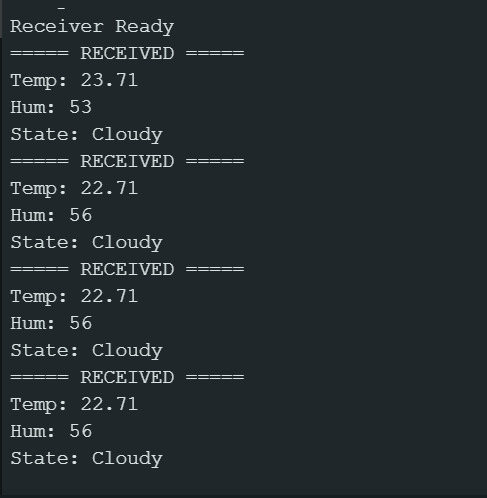
Link established: The Heltec OLED displayed live Kigali weather — temperature, humidity, and weather state — updating every 60 seconds as the ESP32-S3 pulled fresh data from OpenWeatherMap and forwarded it wirelessly over ESP-NOW. The Serial Monitor confirmed each received packet alongside the display update.
Heltec Serial Monitor — live Kigali weather receivedBoth boards powered side by side
Step 11
Verify Live Data End-to-End
Watched the OLED on the Heltec update every 60 seconds with fresh data pulled from OpenWeatherMap. Confirmed the temperature, humidity, and state label all rendered correctly in the value column without corrupting the static labels. The partial screen clear approach — erasing only the value box at coordinates (60, 34) before redrawing — kept the display clean with no flicker. End-to-end chain verified: API fetch over Wi-Fi → struct pack → ESP-NOW wireless → struct decode → OLED render.
OLED live updateKigali state confirmedEnd-to-end verified
Serial output proof — location, state, temp & humidity on Heltec
Results
Link Summary
Protocol
ESP-NOW
Frequency
2.4GHz
Addressing
48-bitMAC
Max payload
250bytes
TX interval
60s
Payload fields
3values
Data source
OpenWeatherMapAPI
Location
KigaliRW
Router needed
✗ None(ESP-NOW)
Link status
Active
TXESP32-S3 Custom Board
RoleTransmitter
Data sourceOpenWeatherMap API
Fields sentTemp, Humidity, State
Send functionesp_now_send()
Node IDMAC (factory)
RXHeltec LoRa V3
RoleReceiver
OutputOLED Display + Serial
LibraryU8g2 (SSD1306 128×64)
CallbackonReceive()
Decodememcpy → struct
Node IDMAC (factory)
Debugging
Problems and Solutions
Getting the full chain working — from API fetch to wireless delivery — brought up a few issues. These are the ones I ran into and how I fixed each one.
Problem 01
Packets sent but nothing arrived on the Heltec
My first run reported delivery OK on the transmitter but the receiver Serial Monitor stayed empty. The cause was the receiver MAC. I had typed one byte wrong when I copied it from Step 02 into receiverMAC[]. ESP-NOW throws no error for a wrong peer address, it just sends into nothing. I read the Heltec MAC again, fixed the byte, and packets started arriving right away.
Wrong peer MACSilent failure
Problem 02
Both boards must be on the same Wi-Fi channel
Even with the correct MAC, the link was unreliable until both boards were confirmed to be on the same channel. ESP-NOW peers have to share a channel. Setting the peer channel to 0 so it follows the current Wi-Fi channel, and keeping both boards in WIFI_STA mode, made delivery stable. The transmitter's Wi-Fi connection for the API fetch and the ESP-NOW link share the same radio without conflict.
Channel mismatchWIFI_STA
Problem 03
API returned HTTP 401 on first test
The first fetch attempt returned a 401 Unauthorized error. The OpenWeatherMap free API key takes a few minutes to activate after account creation — I had tried it immediately. Waiting about 10 minutes and retrying resolved the issue. After that the JSON response came back correctly and the struct filled with valid values every cycle.
API key activationHTTP 401
Problem 04
Weather state arriving as garbage characters
Early tests showed the state field on the receiver printing as random characters. The cause was not null-terminating the char array after strncpy. Added myData.state[sizeof(myData.state)-1] = '\0' as a safety guard and the string arrived clean on the Heltec every time after that.
Null terminationchar arraystrncpy
Takeaways
Conclusion
This week connected a real external data source — the internet — into a peer-to-peer wireless system with a physical output. The ESP32-S3 became a bridge between the cloud and the local ESP-NOW network: pulling live weather data for Kigali from OpenWeatherMap over Wi-Fi, then forwarding it wirelessly to the Heltec receiver, where a U8g2-driven OLED display renders the temperature, humidity, and weather state in a clean two-panel layout — static labels on the left, live values on the right. That full chain, from an internet API to pixels on a screen with no wires between the two boards, is a pattern that appears across a huge range of real embedded systems.
Reading the Heltec MAC address first was a necessary first step: ESP-NOW is a purely MAC address based protocol with no discovery, no IP, and no DNS. You must know the receiver's exact 6 byte address before writing a single line of transmitter code. It makes the concept of a network address very concrete and tangible.
Using a struct with mixed types — floats and char arrays — also highlighted how important it is that both sides of the link declare the struct identically. A mismatch in field order or size would silently misalign the data on arrival. The OnDataSent and OnDataRecv callbacks together give a closed-loop confirmation of delivery without any extra test equipment.