Embedded Programming
Week 4 Assignment
Assignment Overview
Week 4: Embedded Programming. Individual work starts with the UNO R4 WiFi datasheet. Group work compares the Raspberry Pi 5B and Arduino UNO R4 WiFi toolchains.
1. Individual Work
Board for this week: Arduino UNO R4 WiFi. The notes below are from the datasheet.
1.1 Datasheet
The main microcontroller is the Renesas RA4M1 (R7FA4M1AB3CFM), an Arm Cortex-M4 at 48 MHz. Wi-Fi and Bluetooth are on a separate ESP32-S3 module. Source: UNO R4 WiFi documentation.
| Feature | Value | Why it mattered |
|---|---|---|
| Memory | 256 kB flash, 32 kB SRAM, 8 kB data flash | Enough for these small sketches |
| Operating voltage | 5 V (ESP32-S3 runs at 3.3 V) | Board logic is 5 V; the radio module is 3.3 V |
| Digital I/O | 14 pins, 6 with PWM (D3, D5, D6, D9, D10, D11) | PWM is only on D3, D5, D6, D9, D10, and D11 |
| Analog inputs | 6 (A0–A5), 14-bit ADC | Available for sensors later |
| Current per I/O pin | Up to 8 mA | Each LED needs a series resistor |
| Communication | USB-C, 1× UART, 2× I2C, 1× SPI, 1× CAN | USB-C is the programming and serial port |
The 8 mA pin limit is the practical point. An LED with no resistor can pull more than that and damage the pin.
2. Group Work
Team assignment for Week 4: compare development workflows on two representative platforms — a Linux single-board computer and a microcontroller board.
Part 1 — Raspberry Pi 5B vs Arduino UNO R4 WiFi: Toolchain & Workflow Comparison
This section contrasts an application-processor + OS platform (Raspberry Pi 5B) with a microcontroller (MCU) platform (Arduino UNO R4 WiFi). Both use Arm® cores, but their roles, memory models, and programming workflows differ fundamentally.
1. Architecture Comparison
| Dimension | Raspberry Pi 5B | Arduino UNO R4 WiFi |
|---|---|---|
| Platform class | Single-board computer (SBC) — application processor | Microcontroller board — embedded MCU system |
| Main processor | Broadcom BCM2712 — quad-core Arm Cortex-A76 @ up to 2.4 GHz | Renesas RA4M1 — Arm Cortex-M4 @ 48 MHz (+ ESP32-S3 coprocessor for Wi-Fi/BLE) |
| Typical RAM | 4 GB or 8 GB LPDDR4X (system memory) | 32 KB SRAM (on-chip); 256 KB Flash program memory |
| Operating system | Full Linux (Raspberry Pi OS / Debian-based) | No general-purpose OS; bare-metal firmware (Arduino core) runs directly on MCU |
| Program model | Multi-process, virtual memory, filesystem, networking stack in kernel | Single firmware image; reset → bootloader → setup() / loop() |
| GPIO access | Via OS drivers / libraries (e.g. lgpio, gpiozero) — not direct register bit-banging in user space by default |
Direct peripheral register access through Arduino API / HAL |
| Real-time behavior | Best-effort; preemptive multitasking — not hard real-time | Deterministic, low-jitter control loops suitable for sensing & actuation |
| Typical use cases | Vision, networking, databases, web servers, ML inference, desktop-like apps | Sensor reading, motor/PWM control, low-power I/O, rapid prototyping |
Summary: The Pi 5B is a computer that runs Linux; the UNO R4 WiFi is a device that runs one firmware program. Choose the Pi when you need OS services and compute; choose the MCU when you need predictable, low-level hardware interaction.
2. Toolchain & IDE
| Category | Raspberry Pi 5B | Arduino UNO R4 WiFi |
|---|---|---|
| Primary IDEs | VS Code, Thonny, Geany; terminal + SSH | Arduino IDE 2.x, Arduino Web Editor, PlatformIO (optional) |
| Languages | C/C++, Python 3, Rust, others via apt |
C/C++ (Arduino sketch syntax), limited Python via MicroPython ports (not default on R4) |
| Compilers / build | gcc / g++, cmake, make, pip |
arm-none-eabi-gcc (via Arduino build system / arduino-cli) |
| Build orchestration | Native compile on Pi, or cross-compile on host PC | Arduino CLI / IDE invokes board core + linker scripts for RA4M1 |
| Libraries | System packages (apt), PyPI, system headers |
Arduino Libraries Manager, vendor cores (Renesas UNO R4 core) |
| Debug | gdb, strace, logs, journalctl |
Serial Monitor, optional debugger (SWD) with external probe |
| Official resources | Raspberry Pi documentation | Arduino UNO R4 WiFi docs |
3. Code Compilation & Deployment Workflow
On the Pi, you deploy programs to a running OS. On the UNO R4, you flash firmware into MCU memory and the chip reboots into that image.
Raspberry Pi 5B workflow
- Initial setup: Use Raspberry Pi Imager to write Raspberry Pi OS to microSD (or NVMe).
- Boot: Power on → firmware/GPU loader → Linux kernel → userspace (systemd).
- Develop: SSH or desktop session; edit source (Python/C++) on the Pi or remotely.
- Build:
gcc/g++/cmakeor run Python directly — no cross-flash step for interpreted code. - Deploy: Copy binary/script to filesystem; install deps with
apt/pip; run from shell or register as asystemdservice. - Update: Replace files or packages; reboot only if kernel/drivers change.
Arduino UNO R4 WiFi workflow
- Setup: Install Arduino IDE 2.x + Arduino UNO R4 Boards core (Renesas).
- Develop: Write sketch (
.ino) —setup()runs once,loop()repeats. - Compile: IDE invokes
arduino-builder→ preprocess sketch →arm-none-eabi-gcc→ linked.elf/.bin. - Upload: USB-C connection; tool (e.g. bossac) writes image to internal Flash via on-board bootloader.
- Run: MCU resets; firmware starts from reset vector — no OS in between.
- Debug: Serial Monitor @ 115200 baud for
Serial.print()output.
| Workflow stage | Raspberry Pi 5B | Arduino UNO R4 WiFi |
|---|---|---|
| “Burn” / install | OS image → storage device (SD/NVMe) | Firmware binary → MCU Flash (repeat per sketch upload) |
| Program lifetime | Process ends; OS keeps running | Firmware runs until power-off or re-flash |
| Dependency model | Shared libraries on filesystem | Statically linked into single binary |
| Typical iteration | Edit → build/run → observe logs (seconds) | Edit → Verify/Upload → board resets (seconds) |
4. When to use which platform
- Use Raspberry Pi 5B when the task needs a filesystem, network services, cameras/USB devices, higher compute, or running existing Linux tools.
- Use Arduino UNO R4 WiFi when the task needs simple, fast I/O, low power, always-on control loops, or tight coupling to pins/peripherals.
- Combined systems: Pi for “brain” (logic, UI, networking) + MCU for “reflexes” (motors, sensors) via UART/I2C/USB — a common Fab Academy pattern.
Part 2 — Arduino UNO R4 WiFi: Board Research & Specifications
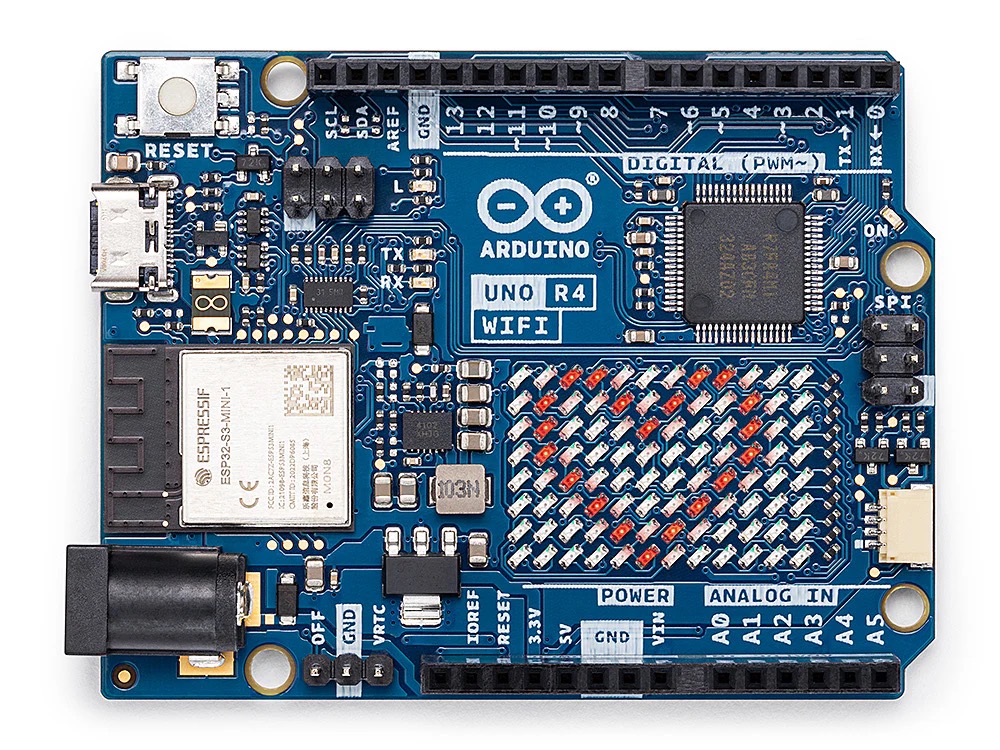
The Arduino UNO R4 WiFi merges the processing power of the Renesas RA4M1 with the wireless connectivity of the ESP32-S3-MINI-1. It maintains 5V logic and the classic UNO form factor while introducing an integrated 12×8 LED matrix and a Qwiic connector for rapid prototyping. See Official Datasheet.
Technical Specifications
| Feature | Specification | Data Source |
|---|---|---|
| Name | Arduino UNO R4 WiFi | Arduino Datasheet |
| Microcontroller | Renesas RA4M1 (Arm® Cortex®-M4) | RA4M1 User's Manual |
| Connectivity | ESP32-S3-MINI-1 (Wi-Fi® + Bluetooth®) | Arduino Docs |
| Operating Voltage | 5V | Arduino Docs |
| Input Voltage (VIN) | 6–24V | Arduino Store |
| GPIO Pins | 20 | Arduino Pinout |
| Digital / PWM Pins | 14 Digital / 6 PWM | UNO R4 WiFi Cheat Sheet |
| Analog Input Pins | 6 | RA4M1 Hardware Spec |
| DAC (Analog Out) | 1 (12-bit) | RA4M1 Hardware Spec |
| I2C / Qwiic Ports | 1 (Standard) + 1 (Qwiic Connector) | Arduino Cheat Sheet |
| UART / SPI / CAN | 1 UART / 1 SPI / 1 CAN Bus | RA4M1 Peripheral Map |
| Flash Memory | 256 KB (RA4M1) | RA4M1 User's Manual |
| SRAM | 32 KB (RA4M1) | RA4M1 User's Manual |
| EEPROM | 8 KB (Data Flash) | RA4M1 Memory Map |
| Clock Speed | 48 MHz (Main Core) | Arduino Docs |
References
- Arduino Official Docs (docs.arduino.cc):
- Arduino Official Store (store.arduino.cc):
- Arduino Support & Help Center (support.arduino.cc):
- Renesas Official Specifications:
Key Architectural & Integrated Features
- Dual-Core Architecture: Uses a 32-bit Arm® Cortex®-M4 with built-in Floating Point Unit (FPU), offering 3× the clock speed of the UNO R3. [Source: Arm® Architecture Docs]
- Integrated Wireless: Wi-Fi® 802.11 b/g/n and Bluetooth® 5.0 (LE) via ESP32-S3 coprocessor, enabling native Arduino Cloud integration. [Source: Arduino IoT Cloud Support]
- 12×8 LED Matrix: Built-in grid of 96 red LEDs for animations, scrolling text, or sensor data visuals. [Source: Arduino UNO R4 WiFi Cheat Sheet]
- Qwiic Connector: Industry-standard I2C connector for plug-and-play sensor integration (Qwiic/STEMMA QT ecosystem). [Source: Arduino Hardware Design]
- Real-Time Clock (RTC): Built-in RTC for time-sensitive logging; VRTC pin for backup battery, OFF pin for power management. [Source: RA4M1 RTC Peripheral Spec]
- USB-C & HID Support: USB-C port with Human Interface Device (HID) emulation—board can act as keyboard or mouse. [Source: Arduino USB Stack]
- Runtime Diagnostics: Error-catching mechanism that identifies runtime crashes and highlights the specific line of code in the Serial Monitor. [Source: Arduino IDE 2.0/Support]