Networking and communications
- Send a message between two projects
Project overview
For this week, the goal is to make two electronic boards communicate with each other using the ESP-NOW protocol, a lightweight wireless communication protocol developed by Espressif, allowing ESP32 boards to exchange data directly (without going through a Wi-Fi router), with low latency.
The project consists of two systems:
🟦 Board 1 — ESP32
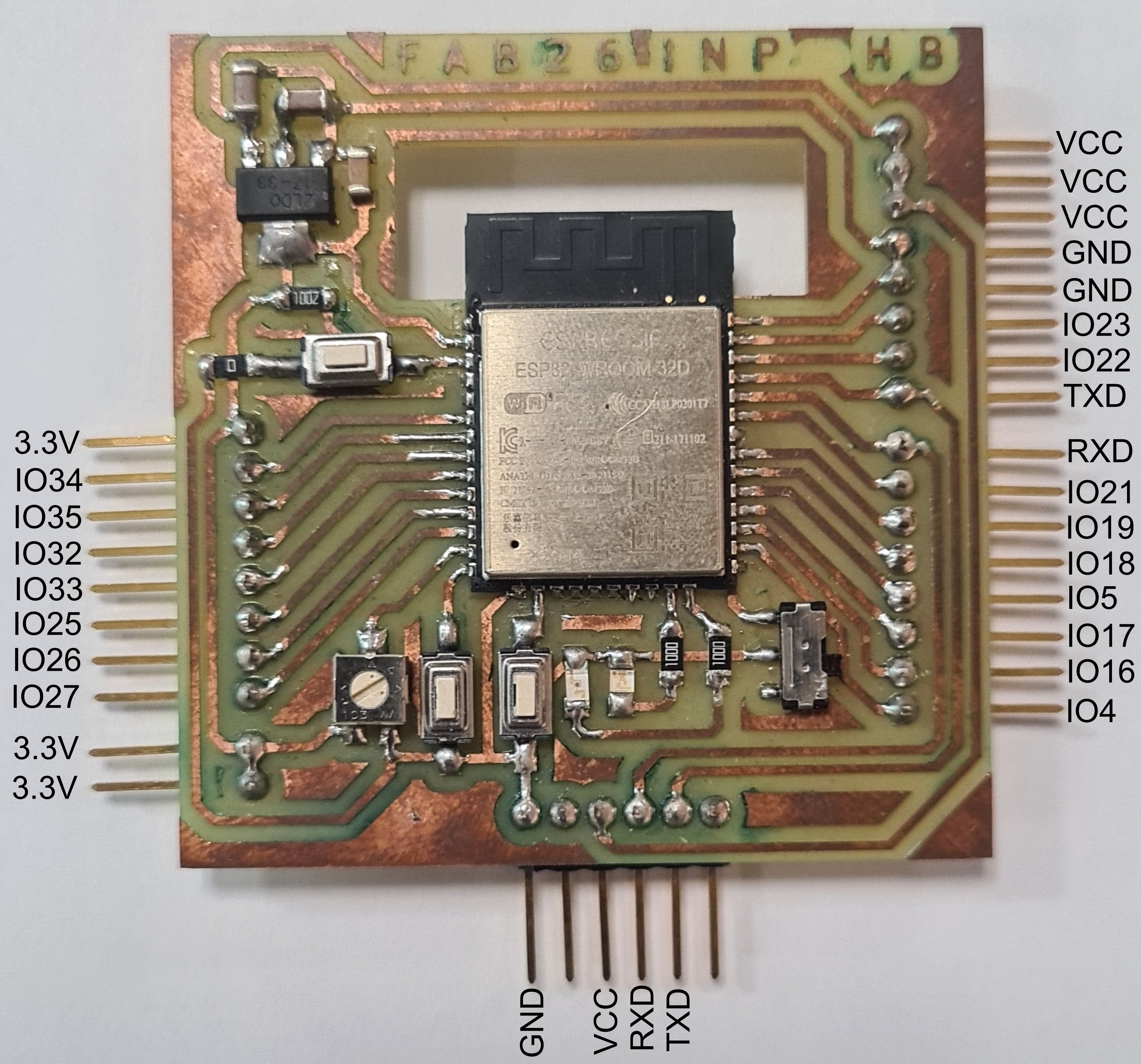
This board was made by GOUBO Auguste Dimitri for more details click here.
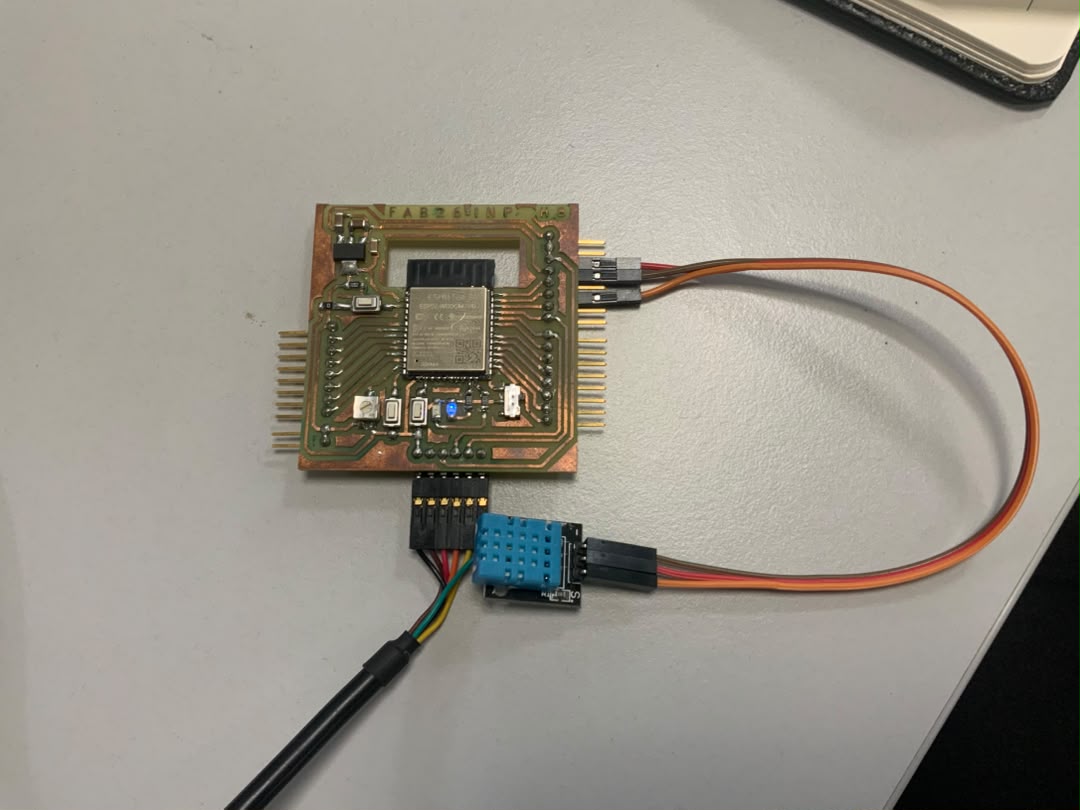
This board continuously reads the temperature/humidity values from the DHT11, and sends this data via ESP-NOW to the second board. It also receives an ESP-NOW message containing the state of a push button, and turns the LED on or off based on that state.
🟩 Board 2 — XIAO ESP32S3
This board was made by KOUASSI AMANY WILLIAMS for more details click here.
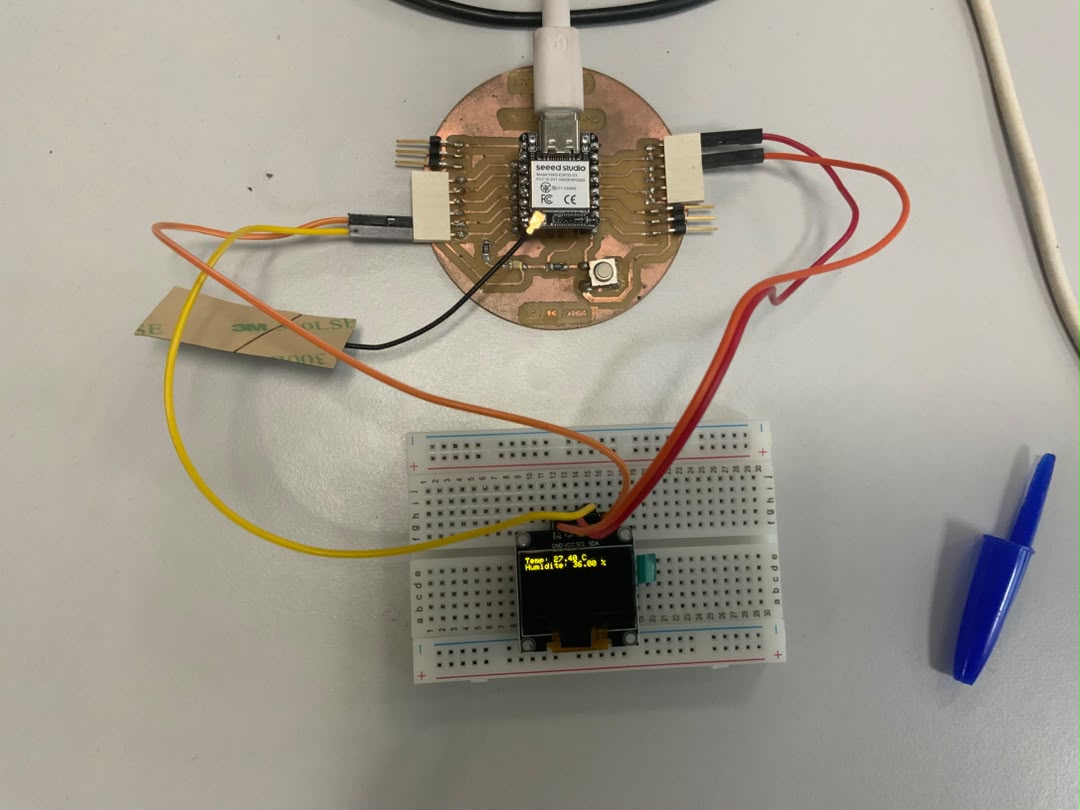
This board receives via ESP-NOW the DHT11 data sent by the ESP32, and displays it on the OLED screen. It also reads the state of the push button and sends this message via ESP-NOW to the ESP32 to remotely control the LED.
Wiring diagram
Board 1 — ESP32 + DHT11 + LED
| Component | Component pin | ESP32 pin |
|---|---|---|
| DHT11 | VCC | 3V3 |
| DHT11 | GND | GND |
| DHT11 | DATA | GPIO 23 |
| LED | Anode | GPIO 15 |
| LED | Cathode | GND |
Board 2 — XIAO ESP32S3 + OLED + push button
| Component | Component pin | XIAO ESP32S3 pin |
|---|---|---|
| OLED (I2C) | VCC | 3V3 |
| OLED (I2C) | GND | GND |
| OLED (I2C) | SDA | D4 (GPIO6) |
| OLED (I2C) | SCL | D5 (GPIO7) |
| Push button | Pin 1 | D7 (GPIO44) |
| Push button | Pin 2 | GND |
Code
ESP-NOW works by sending data structures (struct) between the boards. Each board needs to know the MAC address of the other one in order to send it messages.
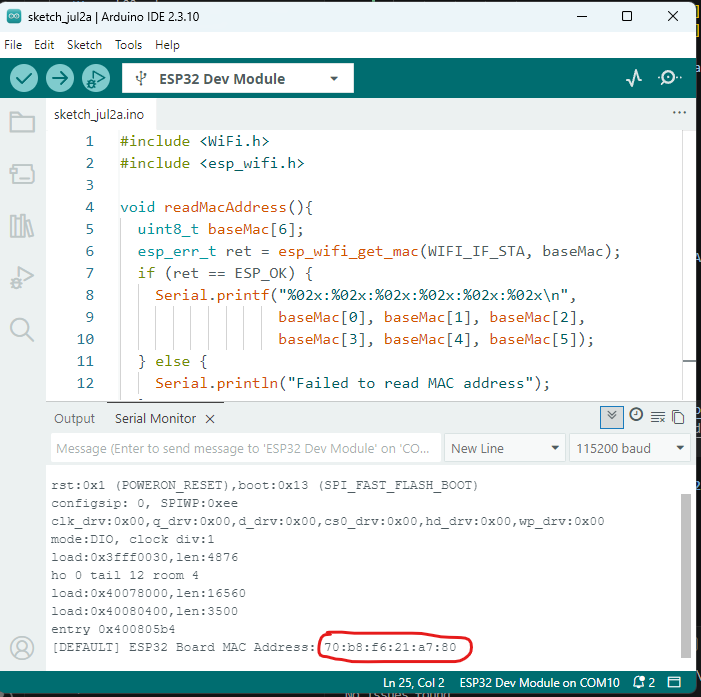
Step 1: retrieve the MAC address of each board
First, upload this small piece of code to each board to find out its MAC address, which will then be used in the final code:
#include <WiFi.h>
#include <esp_wifi.h>

void readMacAddress(){
  uint8_t baseMac[6];
  esp_err_t ret = esp_wifi_get_mac(WIFI_IF_STA, baseMac);
  if (ret == ESP_OK) {
    Serial.printf("%02x:%02x:%02x:%02x:%02x:%02x\n",
                  baseMac[0], baseMac[1], baseMac[2],
                  baseMac[3], baseMac[4], baseMac[5]);
  } else {
    Serial.println("Failed to read MAC address");
  }
}

void setup(){
  Serial.begin(115200);

  WiFi.mode(WIFI_STA);
  WiFi.STA.begin();

  Serial.print("[DEFAULT] ESP32 Board MAC Address: ");
  readMacAddress();
}

void loop(){

}
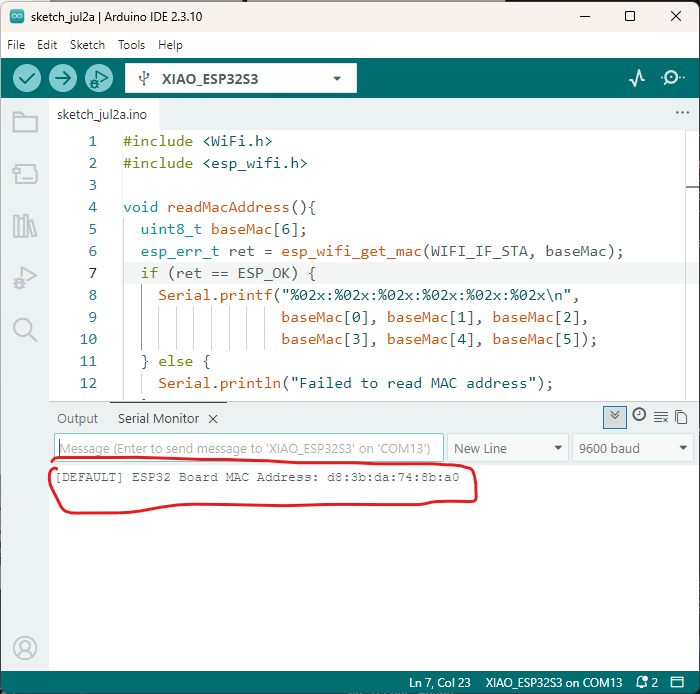
Step 2: code for board 1 — ESP32 (DHT11 + LED)
#include <esp_now.h>
#include <WiFi.h>
#include <DHT.h>

#define DHTPIN 23
#define DHTTYPE DHT11
#define LEDPIN 15

DHT dht(DHTPIN, DHTTYPE);

// MAC address of the XIAO ESP32S3 board (replace with the actual address)
uint8_t xiaoAddress[] = {0xd8, 0x3b, 0xda, 0x74, 0x8b, 0xa0};

// Structure sent: temperature + humidity
typedef struct message_sent {
  float temperature;
  float humidity;
} message_sent;

// Structure received: button state
typedef struct message_received {
  bool buttonState;
} message_received;

message_sent dataToSend;
message_received dataReceived;

esp_now_peer_info_t peerInfo;

// Callback called after a send attempt
// New signature (ESP32 core 3.x): wifi_tx_info_t* instead of uint8_t*
void OnDataSent(const wifi_tx_info_t *tx_info, esp_now_send_status_t status) {
  Serial.print("Last send -> status: ");
  Serial.println(status == ESP_NOW_SEND_SUCCESS ? "SUCCESS" : "FAILED");
}

// Callback called when a message is received
void OnDataRecv(const esp_now_recv_info_t *info, const uint8_t *incomingData, int len) {
  Serial.print("Message received from: ");
  for (int i = 0; i < 6; i++) {
    Serial.printf("%02X", info->src_addr[i]);
    if (i < 5) Serial.print(":");
  }
  Serial.print(" | Size: ");
  Serial.println(len);

  if (len != sizeof(dataReceived)) {
    Serial.println("Unexpected message size, message ignored.");
    return;
  }

  memcpy(&dataReceived, incomingData, sizeof(dataReceived));
  Serial.print("Button state received: ");
  Serial.println(dataReceived.buttonState);

  digitalWrite(LEDPIN, dataReceived.buttonState ? HIGH : LOW);
}

void setup() {
  Serial.begin(115200);
  delay(1000);
  Serial.println("=== Starting ESP32 board (DHT11 + LED) ===");

  pinMode(LEDPIN, OUTPUT);
  dht.begin();

  WiFi.mode(WIFI_STA);
  Serial.print("MAC address of this board: ");
  Serial.println(WiFi.macAddress());

  if (esp_now_init() != ESP_OK) {
    Serial.println("ERROR: ESP-NOW initialization failed!");
    return;
  }
  Serial.println("ESP-NOW successfully initialized.");

  esp_now_register_send_cb(OnDataSent);
  esp_now_register_recv_cb(OnDataRecv);

  // Registering the XIAO board as a "peer"
  memcpy(peerInfo.peer_addr, xiaoAddress, 6);
  peerInfo.channel = 0;
  peerInfo.encrypt = false;

  if (esp_now_add_peer(&peerInfo) != ESP_OK) {
    Serial.println("ERROR: unable to add the XIAO peer!");
    return;
  }
  Serial.println("XIAO peer successfully added.");
  Serial.println("=== Setup finished, entering loop() ===");
}

void loop() {
  dataToSend.temperature = dht.readTemperature();
  dataToSend.humidity = dht.readHumidity();

  if (isnan(dataToSend.temperature) || isnan(dataToSend.humidity)) {
    Serial.println("ERROR: invalid DHT11 reading (check wiring/pin/power supply).");
  } else {
    Serial.print("DHT11 reading -> Temp: ");
    Serial.print(dataToSend.temperature);
    Serial.print(" C | Humidity: ");
    Serial.print(dataToSend.humidity);
    Serial.println(" %");

    esp_err_t result = esp_now_send(xiaoAddress, (uint8_t *) &dataToSend, sizeof(dataToSend));
    if (result != ESP_OK) {
      Serial.println("ERROR: esp_now_send() failed (peer not registered correctly?).");
    }
  }

  delay(2000); // the DHT11 cannot be read too frequently
}
Explanation:
-
We define a
message_sentstructure containing temperature and humidity, sent every 2 seconds to the XIAO board. -
We define a
message_receivedstructure containing the button state, received via theOnDataRecv()function. -
As soon as a message is received, the LED is updated directly inside the callback.
Step 3: code for board 2 — XIAO ESP32C3 (OLED + button)
#include <esp_now.h>
#include <WiFi.h>
#include <esp_wifi.h>
#include <Wire.h>
#include <Adafruit_GFX.h>
#include <Adafruit_SSD1306.h>

#define BUTTONPIN 44   // D2 on the XIAO ESP32S3
#define SDA_PIN 5     // D4 on the XIAO ESP32S3
#define SCL_PIN 6     // D5 on the XIAO ESP32S3
#define SCREEN_WIDTH 128
#define SCREEN_HEIGHT 64
#define OLED_ADDR 0x3C // adjust if the I2C scanner found a different address

Adafruit_SSD1306 display(SCREEN_WIDTH, SCREEN_HEIGHT, &Wire, -1);

// MAC address of the ESP32 (replace with the actual address)
uint8_t esp32Address[] = {0x70, 0xb8, 0xf6, 0x21, 0xa7, 0x80};

typedef struct message_sent {
  bool buttonState;
} message_sent;

typedef struct message_received {
  float temperature;
  float humidity;
} message_received;

message_sent dataToSend;
message_received dataReceived;

esp_now_peer_info_t peerInfo;
bool oledOK = false;

// New signature (ESP32 core 3.x): wifi_tx_info_t* instead of uint8_t*
void OnDataSent(const wifi_tx_info_t *tx_info, esp_now_send_status_t status) {
  Serial.print("Button state send -> status: ");
  Serial.println(status == ESP_NOW_SEND_SUCCESS ? "SUCCESS" : "FAILED");
}

void OnDataRecv(const esp_now_recv_info_t *info, const uint8_t *incomingData, int len) {
  Serial.print("Message received from: ");
  for (int i = 0; i < 6; i++) {
    Serial.printf("%02X", info->src_addr[i]);
    if (i < 5) Serial.print(":");
  }
  Serial.print(" | Size: ");
  Serial.println(len);

  if (len != sizeof(dataReceived)) {
    Serial.println("Unexpected message size, message ignored.");
    return;
  }

  memcpy(&dataReceived, incomingData, sizeof(dataReceived));
  Serial.print("Temp received: ");
  Serial.print(dataReceived.temperature);
  Serial.print(" C | Humidity received: ");
  Serial.print(dataReceived.humidity);
  Serial.println(" %");

  if (!oledOK) {
    Serial.println("WARNING: OLED screen not initialized, display not possible.");
    return;
  }

  display.clearDisplay();
  display.setCursor(0, 0);
  display.setTextSize(1);
  display.setTextColor(SSD1306_WHITE);
  display.print("Temp: ");
  display.print(dataReceived.temperature);
  display.println(" C");
  display.print("Humidity: ");
  display.print(dataReceived.humidity);
  display.println(" %");
  display.display();
}

void setup() {
  Serial.begin(115200);
  delay(1000);
  Serial.println("=== Starting XIAO ESP32S3 board (OLED + button) ===");

  pinMode(BUTTONPIN, INPUT);

  Wire.begin(SDA_PIN, SCL_PIN);

  if (!display.begin(SSD1306_SWITCHCAPVCC, OLED_ADDR)) {
    Serial.println("ERROR: OLED screen not detected! Check wiring and I2C address.");
    oledOK = false;
  } else {
    Serial.println("OLED screen successfully initialized.");
    oledOK = true;
    display.clearDisplay();
    display.setCursor(0, 0);
    display.setTextSize(1);
    display.setTextColor(SSD1306_WHITE);
    display.println("Waiting...");
    display.display();
  }

  WiFi.mode(WIFI_STA);
  esp_wifi_start();   // force Wi-Fi to start before reading the MAC address
  delay(100);

  Serial.print("MAC address of this board: ");
  Serial.println(WiFi.macAddress());

  if (esp_now_init() != ESP_OK) {
    Serial.println("ERROR: ESP-NOW initialization failed!");
    return;
  }
  Serial.println("ESP-NOW successfully initialized.");

  esp_now_register_send_cb(OnDataSent);
  esp_now_register_recv_cb(OnDataRecv);

  memcpy(peerInfo.peer_addr, esp32Address, 6);
  peerInfo.channel = 0;
  peerInfo.encrypt = false;

  if (esp_now_add_peer(&peerInfo) != ESP_OK) {
    Serial.println("ERROR: unable to add the ESP32 peer!");
    return;
  }
  Serial.println("ESP32 peer successfully added.");
  Serial.println("=== Setup finished, entering loop() ===");
}

void loop() {
  bool pressed = (digitalRead(BUTTONPIN) == LOW);

  if (pressed != dataToSend.buttonState) {
    Serial.print("Button state change: ");
    Serial.println(pressed);
  }

  dataToSend.buttonState = pressed;

  esp_err_t result = esp_now_send(esp32Address, (uint8_t *) &dataToSend, sizeof(dataToSend));
  if (result != ESP_OK) {
    Serial.println("ERROR: esp_now_send() failed (peer not registered correctly?).");
  }

  delay(100);
}
Explanation:
- The button is read continuously
- Its state is sent every 100 ms to the ESP32 via ESP-NOW.
- As soon as a message is received (temperature/humidity), the OLED screen is updated inside the OnDataRecv() callback.
Photo