Interface and application programming
Group assignment:
- Compare as many tool options as possible.
🎯 Objective
The goal of this group work is to compare different tools for building an interface/application able to communicate with an electronic board, in order to identify the advantages, drawbacks, and typical use cases of each approach.
To cover as many tools as possible, we first put together a general overview of existing solutions, then tested two tools in depth as a group: Python and JavaScript (Node.js / Web Serial API).
🗺️ General overview of existing tools
| Tool / Language | Type | Platforms | Learning curve | Typical use case | ² |---|---|---|---|---| | Python (Tkinter, PySerial, matplotlib) | General-purpose language | Windows / macOS / Linux | Low to medium | Rapid prototyping, data processing/visualization | | JavaScript (Node.js + serialport, or Web Serial API) | Web language | Cross-platform (browser or Node.js) | Medium | Interactive web interfaces, dashboards accessible without installation | | Processing | Dedicated visual language/IDE | Windows / macOS / Linux | Low | Graphic visualization, generative art, rapid prototyping | | p5.js | JS library (derived from Processing) | Web browser | Low | Web version of Processing, interactive graphic interfaces | | openFrameworks / C++ | Creative coding framework | Windows / macOS / Linux | High | High-performance, real-time applications, advanced graphics | | MIT App Inventor | No-code/low-code tool | Android (via browser) | Very low | Simple mobile apps with Bluetooth | | Node-RED | Flow-based (visual) programming | Cross-platform (via Node.js) | Low | Rapid IoT prototyping, connecting services together | | C# (.NET / WinForms) | Compiled language | Mainly Windows | Medium to high | Native Windows desktop applications | | Unity (C#) | Game engine / 3D | Windows / macOS / Linux | High | 3D interfaces, virtual/augmented reality |
This table is not meant to be exhaustive, but it gives an overview of the diversity of possible approaches: general-purpose languages, dedicated visual tools, no-code, or performance-oriented frameworks.
🧪 Detailed group tests
The group chose to test two tools in depth, representative of two different philosophies: a locally installed general-purpose language (Python) and a cross-platform web ecosystem (JavaScript).
In both cases, the test consists of reading data sent by a board (ESP32) over the serial port and displaying it in a simple interface.
🐍 Python (Tkinter + PySerial + matplotlib)
Installation:
Code example — serial reading + display in a Tkinter window:
import serial
import tkinter as tk
from tkinter import Label

# Adjust according to the port used (e.g. "COM5" on Windows, "/dev/ttyUSB0" on Linux)
PORT = "COM7"
BAUDRATE = 115200

ser = serial.Serial(PORT, BAUDRATE, timeout=1)

root = tk.Tk()
root.title("Lecture serie - Python")
root.geometry("300x150")

label = Label(root, text="En attente de donnees...", font=("Arial", 14))
label.pack(pady=20)

def read_serial():
    if ser.in_waiting > 0:
        line = ser.readline().decode("utf-8", errors="ignore").strip()
        if line:
            label.config(text=line)
    root.after(100, read_serial)  # relit toutes les 100 ms

read_serial()
root.mainloop()
Example with matplotlib (real-time chart):
import serial
import matplotlib.pyplot as plt
from matplotlib.animation import FuncAnimation

PORT = "COM7"
BAUDRATE = 115200
ser = serial.Serial(PORT, BAUDRATE, timeout=1)

data = []
fig, ax = plt.subplots()

def update(frame):
    if ser.in_waiting > 0:
        try:
            value = float(ser.readline().decode("utf-8", errors="ignore").strip())
            data.append(value)
            data[:] = data[-50:]  # keeps the last 50 values
            ax.clear()
            ax.plot(data)
            ax.set_title("Donnees recues en temps reel")
        except ValueError:
            pass

ani = FuncAnimation(fig, update, interval=200)
plt.show()
Observed advantages:
-
Fast to set up, very little code needed for a working result.
-
matplotlibis extremely convenient for visualizing numerical data (curves, charts). -
Good documentation and large community (PySerial widely used in the maker context).
Observed drawbacks:
-
The graphical interface (Tkinter) is visually limited and quickly feels dated, not well suited to "modern" interfaces.
-
Requires every user to install Python plus the libraries to run the application (no simple link to share).
-
Serial port handling can sometimes be sensitive to access permissions depending on the OS (especially on Linux).
🌐 JavaScript (Node.js + serialport / Web Serial API)
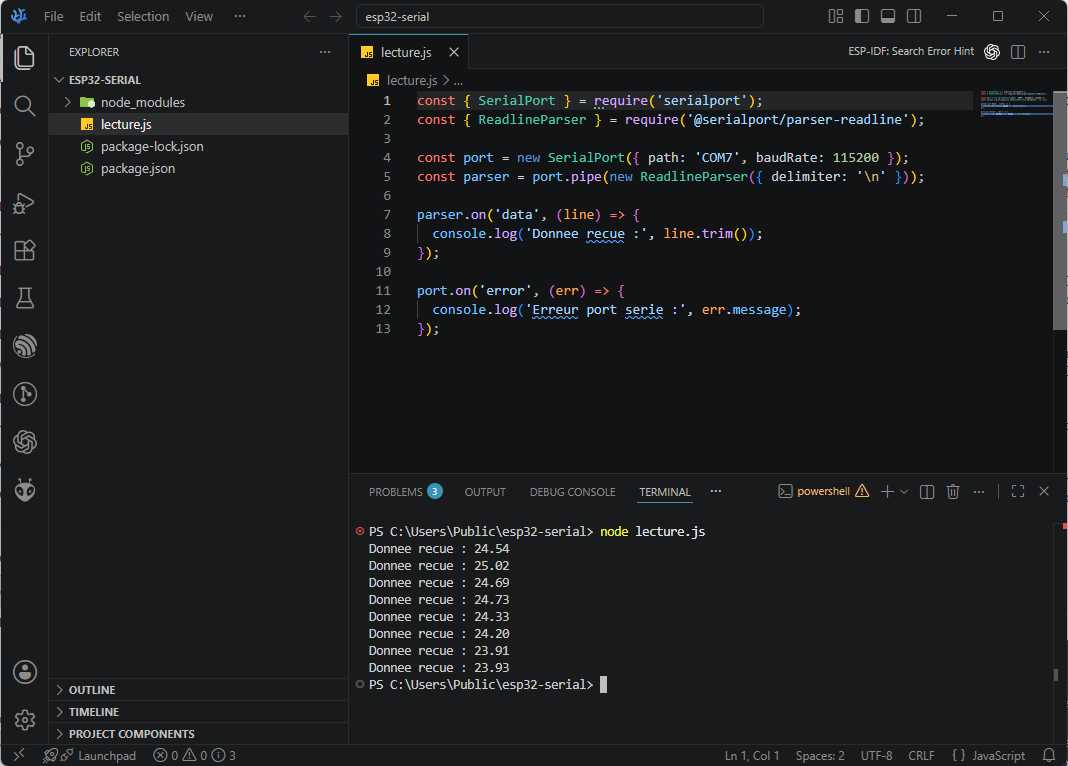
Two approaches are possible in JavaScript: a Node.js application (using the serialport module), or directly in the browser thanks to the Web Serial API (no installation needed on the user's side, but only compatible with Chromium-based browsers: Chrome, Edge).
Option A — Node.js + serialport
Installation:
Code example:
const { SerialPort } = require('serialport');
const { ReadlineParser } = require('@serialport/parser-readline');

const port = new SerialPort({ path: '/dev/ttyUSB0', baudRate: 115200 });
const parser = port.pipe(new ReadlineParser({ delimiter: '\n' }));

parser.on('data', (line) => {
  console.log('Donnee recue :', line.trim());
});

port.on('error', (err) => {
  console.log('Erreur port serie :', err.message);
});
Option B — Web Serial API (in the browser, no installation)
Code example (HTML + JS):
<!DOCTYPE html>
<html lang="fr">
<head>
    <meta charset="UTF-8">
    <title>Lecture Port Serie - ESP32</title>
</head>
<body>
    <button id="connectBtn">Se connecter au port serie</button>
    <p id="output">En attente de donnees...</p>

    <script>
        let buffer = "";

        document.getElementById('connectBtn').addEventListener('click', async () => {
            try {
                const port = await navigator.serial.requestPort();
                await port.open({ baudRate: 115200 });

                const reader = port.readable.getReader();
                const decoder = new TextDecoder();

                while (true) {
                    const { value, done } = await reader.read();
                    if (done) break;

                    if (value) {
                        buffer += decoder.decode(value);

                        // On cherche une ligne complete (terminee par \n)
                        let lines = buffer.split("\n");

                        // La derniere partie est incomplete, on la garde pour la suite
                        buffer = lines.pop();

                        // On affiche uniquement la derniere ligne complete recue
                        if (lines.length > 0) {
                            const derniereLigne = lines[lines.length - 1].trim();
                            document.getElementById('output').innerText = derniereLigne;
                        }
                    }
                }
            } catch (err) {
                document.getElementById('output').innerText = "Erreur : " + err.message;
            }
        });
    </script>
</body>
</html>
Observed advantages:
-
The Web Serial API requires no installation on the user's side: just opening a web page in Chrome/Edge is enough.
-
Very rich JavaScript ecosystem for building modern, responsive interfaces (dashboards, visualizations with D3.js, Chart.js, p5.js...).
-
Easy to share: the application can be hosted online and accessed from any machine with a compatible browser.
Observed drawbacks:
-
The Web Serial API is not supported by all browsers (no support on Firefox or Safari as of today), which limits its universality.
-
The Node.js approach requires, like Python, a local installation (Node.js + npm dependencies).
-
Slightly steeper learning curve if starting from scratch with asynchronous JavaScript (Promises,
async/await).
📊 Summary table
| Criterion | Python (Tkinter/PySerial) | JavaScript (Node.js) | JavaScript (Web Serial API) |
|---|---|---|---|
| Installation required | Yes (Python + libs) | Yes (Node.js + libs) | No (browser only) |
| Browser compatibility | N/A | N/A | Chrome / Edge only |
| Prototyping speed | High | Medium | Medium to high |
| Default visual quality | Low (basic Tkinter) | Medium (depends on libs) | High (free HTML/CSS) |
| Data visualization | Excellent (matplotlib) | Good (Chart.js, D3.js) | Good (Chart.js, D3.js) |
| Easy to share the app | Low | Low | Excellent (just a link) |
| Cross-platform | Yes | Yes | Yes (with browser limitation) |
✅ Conclusion
Each tool has its own relevance depending on the project context:
-
Python is ideal for rapid prototyping and data analysis/visualization (sensors, measurements), thanks to its simplicity and
matplotlib. -
JavaScript with Node.js is well suited when building a more complete application, potentially connected to other services.
-
The Web Serial API is the best option when an interface needs to be accessible without any installation, at the cost of limited compatibility to Chromium-based browsers.
The final choice therefore depends on the target audience of the interface: an internal/technical use case works very well with Python, while an interface meant to be easily shared with other users benefits more from the web approach.