2. Electronics Simulate
2.1. Idea
Since my final project involves a wireless controller, I incorporated the ESP32 and buttons into this week's assignment to practice and better understand how they work.
2.2 Circuit Simulation
I used Wokwi to simulate the circuit. The components used are:
| Component | Quantity |
|---|---|
| ESP32 DEV Kit (30pin) | 1 |
| Direction buttons | 4 |
| Action buttons (A/B) | 2 |
| LEDs | 4 |
| Resistors | 6 |
Here is the ESP32 Dev Kit(30pin) :
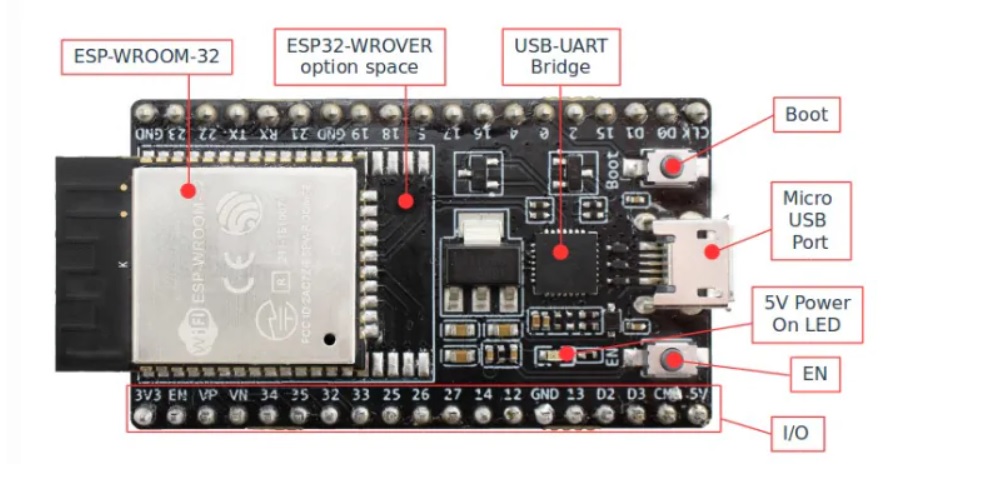 | 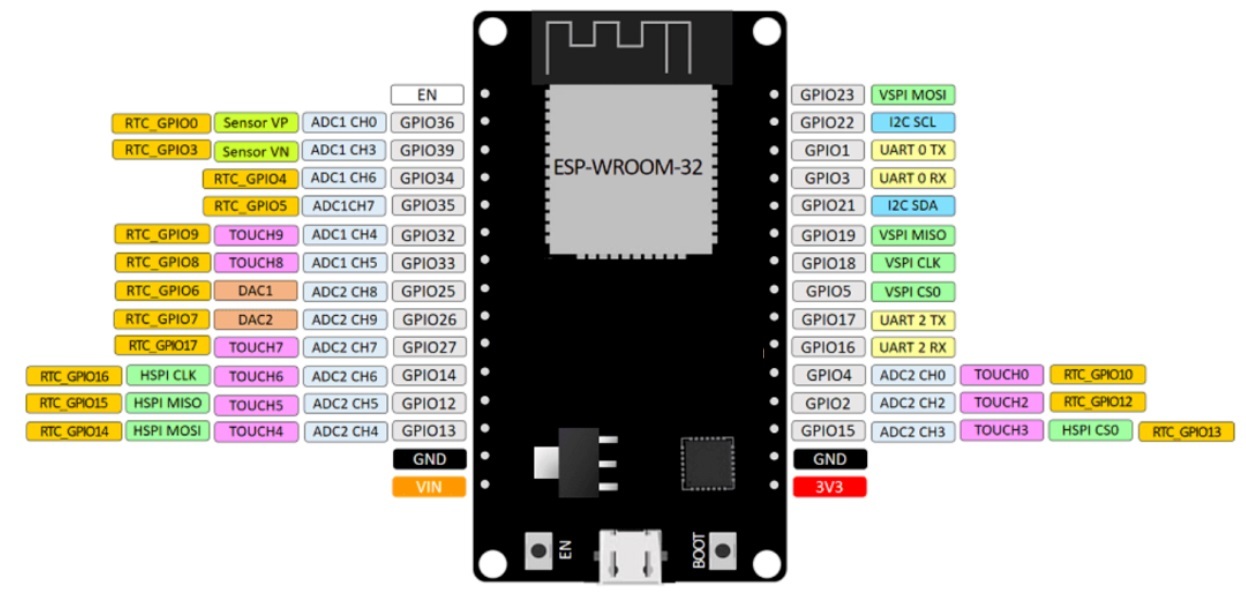 |
|---|
Functionality: Each direction button toggles one LED on and off.
Here is the circuit in wokwi:
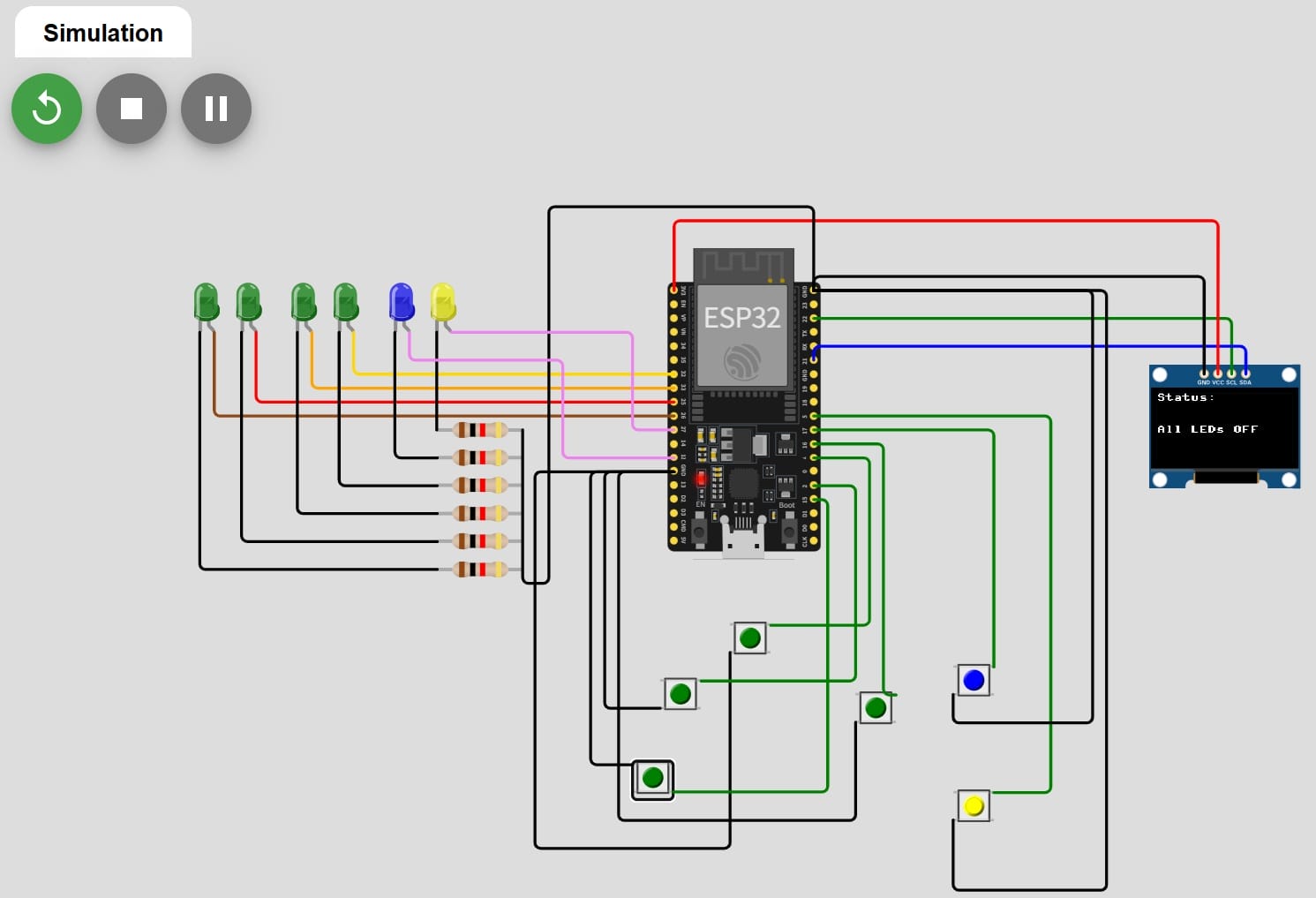
Here is the code in wokwi:
from machine import Pin, I2C
import ssd1306
import time

# --- I2C 与 OLED 配置 ---
i2c = I2C(0, scl=Pin(22), sda=Pin(21))
oled = ssd1306.SSD1306_I2C(128, 64, i2c)

# --- 引脚定义映射表 ---
config = [
    (15, 27, "LED A"),
    (2,  12, "LED B"),
    (4,  32, "LED C"),
    (16, 33, "LED D"),
    (17, 25, "LED E"),
    (5,  26, "LED F")
]

buttons = []
outputs = []
labels = []

for btn_pin, out_pin, label in config:
    # 确保按钮另一端接地 (GND)
    buttons.append(Pin(btn_pin, Pin.IN, Pin.PULL_UP))
    outputs.append(Pin(out_pin, Pin.OUT, value=0))
    labels.append(label)

last_active = -1  # 用于记录上一次亮灯的索引,减少刷新频率

print("System Ready...")

while True:
    current_active = -1  # 默认没有任何灯亮

    for i in range(len(buttons)):
        # 检测按下(低电平)
        if buttons[i].value() == 0:
            outputs[i].value(1)
            current_active = i # 记录当前按下的按钮
        else:
            outputs[i].value(0)

    # --- OLED 刷新逻辑 ---
    # 只有当按下的灯发生变化时,才更新屏幕,防止闪烁
    if current_active != last_active:
        oled.fill(0) # 清屏
        oled.text("Status:", 0, 0)

        if current_active != -1:
            # 有按钮按下
            info = labels[current_active] + " ON"
            oled.text(info, 0, 30)
            print(f"Active: {labels[current_active]}")
        else:
            # 全部松开
            oled.text("All LEDs OFF", 0, 30)
            print("All Off")

        oled.show()
        last_active = current_active

    time.sleep(0.05) # 消抖并降低CPU负载