14 : Interface and Application<
Learning Outcomes<
What did I learn this week ?
- API :
- Use pySerial to read data from a serial port
- User Interface :
- Use PyQt6 to create a customize window
- Use matplotlib with PyQt6
- Use pySerial with PyQt6
- Use multthreading with PyQt6
Assignments<
This fourteenth week's asignments are :
- Group :
- Compare as many tool options as possible
- Individual :
- Write an application that interfaces a user with an input &/or output device that you made
1. Group Assignment<
This week, I will use the assignment to work on my final project (as many of us I guess). To recall, I'm working on a device that can measure the fog's density. At this moment, the first prototype is working but for now, I use Arduino IDE interface to visualise the serial data sent by the device. Therefore I will try to create my own interface that reads serial data, plot the data and maybe do some computation on these data to prepare the analysis.
We started talking with the rest of the group about the existing options. Patrick told us about WebSerial that seemed quite easy to use and that allows one to write its interface with web development languages (HTML, CSS, JavaScript, ...). The interface can then be embeded in any webpages which can be quite convenient. One could indeed imagine a device remotly controlled and the user would connect to it through its web browser. Michel and Fabio, who already know about interfaces never used WebSerial therefore wanted to try that.
On my side, having a web interface is not really usefull and I'm more comfortable with Python. Michel showed me a former project he did using PyQt for the user interface and PySerial for the serial data interface. It clearly corresponds to the kind of interface I would like and it's coded in Python, so I will use the same tools.
2. Individual Assignment<
2.1. Tutorials<
To learn about PyQt6 and PySerial, I followed tutorials that are linked below. It was quite long (it took me almost a whole work day to do only the PyQt6 "Getting Started") and the tutorials are very complete therefore I will not summarize them on my webpage. However I will link the parts that are the most important according to me. The numbers represent the order I think one should follow them :
-
PyQT6
- (1) Installation
- (2) Creating your first app
- (3) Signals, Slots and Events
- (4) Widgets
- (5) Layouts
- (6) Toolbars and Menus
- (7) Plotting with Matplotlib and PyQt6
- (11) Multithreading
-
PySerial
- (8) Installation
- (9) Getting Started
- (10) Reading Data
2.2. API with PySerial<
I first tested to create a data interface with the Getting Started tutorial. In order to understand what was going on, I copied the complete example :
import serial
import time

def read_test(port, baudrate=9600):
    try:
        ser = serial.Serial(port, baudrate, timeout=2)
        print(f"Connected to {ser.name}")
        time.sleep(1)  # wait for device init

        # Read everything currently in the buffer
        if ser.in_waiting > 0:
            available = ser.read(ser.in_waiting)
            print(available.decode('utf-8').strip())

        ser.close()

    except serial.SerialException as e:
        print(f"Serial error: {e}")
    except FileNotFoundError:
        print("Port not found. Check device connection.")
    except PermissionError:
        print("Permission denied. Add yourself to the dialout group (Linux).")

if __name__ == "__main__":
    read_test('COM15')
I connected my laptop to my fog density measuring device and it worked quite well :
Connected to COM15
0.0, 0.0, 260
1000.0, 0.0, 260
1000.0, 0.0, 261
1000.0, 0.0, 260
1000.0, 0.0, 259
1000.0, 0.0, 261
1000.0, 0.0, 261
1000.0, 0.0, 260
1000.0, 0.0, 261
1000.0, 0.0, 260
1000.0, 0.0, 260
1000.0, 0.0, 260
1000.0, 0.0, 260
1000.0, 0.0, 261
1000.0, 0.0, 259
1000.0, 0.0, 260
1000.0, 0.0, 260
1000.0, 0.0, 260
1000.0, 0.0, 260
1000.0, 0.0, 261
1000.0, 0.0, 260
1000.0, 0.0, 260
1000.0, 0.0, 260
1000.0, 0.0, 259
1000.0, 0.0, 261
1000.0, 0.0, 260
1000.0, 0.0, 260
1000.0, 0.0, 260
1000.0, 0.0, 260
1000.0, 0.0, 261
1000.0, 0.0, 260
1000.0, 0.0, 261
1000.0, 0.0, 261
1000.0, 0.0, 260
1000.0, 0.0, 261
1000.0, 0.0, 260
1000.0, 0.0, 260
1000.0, 0.0, 260
1000.0, 0.0, 261
1000.0, 0.0, 260
1000.0, 0.0, 260
1000.0, 0.0, 260
1000.0, 0.0, 261
1000.0, 0.0, 260
1000.0, 0.0, 260
1000.0, 0.0, 260
1000.0, 0.0, 259
1000.0, 0.0, 261
1000.0, 0.0, 260
1000.0, 0.0, 260
1000.0, 0.0, 260
1000.0, 0.0, 261
1000.0, 0.0, 260
1000.0, 0.0, 2
However it is only reading the data during one second. By reading carefully the code, I understood it was normal since it does the following things :
- opening the serial port and defining
seras the serial port object:
ser = serial.Serial(port, baudrate, timeout=2) - sleeping for a second :
time.sleep(1) - checking if something is waiting in the input buffer (buffer containing data that were received but not read yet) :
if ser.in_waiting > 0: - if yes, reading these data :
available = ser.read(ser.in_waiting) - closing the serial port :
ser.close()
I looked for a continuous reading example and I found it in the Reading Data tutorial. I modified it a bit to match my case and obtained :
import serial

ser = serial.Serial('COM15', 9600, timeout=1)

# Continuous reading
while True:
    line = ser.read_until(b'\n')
    if line:
        text = line.decode('utf-8', errors='ignore').strip()
        if text:
            if text[0:6]=='1000.0':
                data=int(text[-4:])
                print(data)
I worked perfectly. Of course, I will not show the output I got since it is not stopping. The important lines to undertsand are :
line = ser.read_until(b'\n'): reads what's in the input buffer until encountering a line breakline.decode('utf-8', errors='ignore').strip(): decode what was read using utf-8
2.3. GUI with PyQT6<
After reading all the PyQT6 tutorials that I listed earlier, I started doing my interface from the Plotting with Matplotlib and PyQt6 example. It contains two explicitely defined classes :
class MplCanvas(FigureCanvas):
The matplotlib canvas that contains the properties of the plot.class MainWindow(QtWidgets.QMainWindow):
The Window class that defines the displayed window and all its update rules and interactions.
The properties and methods of the MplCanvas(FigureCanvas) are not really important to explain here. On the other side, take the time to read the MainWindow(QtWidgets.QMainWindow) ones. They are quite well commented :
import sys
import os
import random

os.environ["QT_API"] = "PyQt6"

from PyQt6 import QtCore, QtWidgets
from matplotlib.backends.backend_qtagg import FigureCanvas
from matplotlib.figure import Figure


class MplCanvas(FigureCanvas):

    def __init__(self, parent=None, width=5, height=4, dpi=100):
        fig = Figure(figsize=(width, height), dpi=dpi)
        self.axes = fig.add_subplot(111)
        super().__init__(fig)


class MainWindow(QtWidgets.QMainWindow):

    def __init__(self, *args, **kwargs):
        super().__init__(*args, **kwargs)

        self.canvas = MplCanvas(self, width=5, height=4, dpi=100)
        self.setCentralWidget(self.canvas)

        n_data = 50
        self.xdata = list(range(n_data))
        self.ydata = [random.randint(0, 10) for i in range(n_data)]
        self.update_plot()

        self.show()

        # Setup a timer to trigger the redraw by calling update_plot.
        self.timer = QtCore.QTimer()
        self.timer.setInterval(100)
        self.timer.timeout.connect(self.update_plot)
        self.timer.start()


    def update_plot(self):
        # Drop off the first y element, append a new one.
        self.ydata = self.ydata[1:] + [random.randint(0, 10)]

        # Note: we no longer need to clear the axis.
        if self._plot_ref is None:
            # First time we have no plot reference, so do a normal plot.
            # .plot returns a list of line <reference>s, as we're
            # only getting one we can take the first element.
            plot_refs = self.canvas.axes.plot(self.xdata, self.ydata, 'r')
            self._plot_ref = plot_refs[0]
        else:
            # We have a reference, we can use it to update the data for that line.
            self._plot_ref.set_ydata(self.ydata)

        # Trigger the canvas to update and redraw.
        self.canvas.draw()


app = QtWidgets.QApplication(sys.argv)
w = MainWindow()
app.exec()
I then tried to modify the code by adding PySerial functions. The goal is to read data from the serial port and plot them in the displayed window. I would like my interface to continuously read and plot the coming data. Below you may find all my fail and retry iterations and I tried to explain each time why it was not working.
First try : Updating too frequently
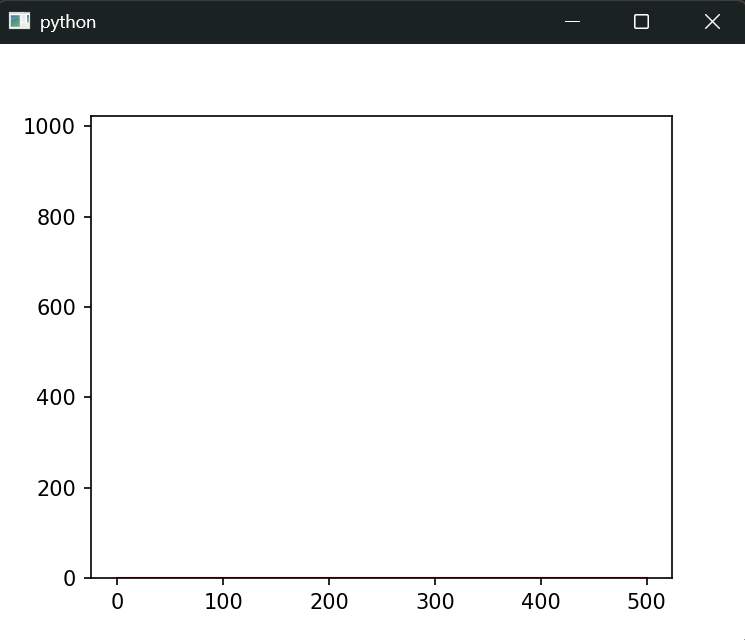
The code of my first try is shown below. It did not work : the window was not showing anything and freezing. I think it is due to the while True condition to update the plot, it is updating to frequently.
import os
import sys
import random
import time

os.environ["QT_API"] = "PyQt6"

import numpy as np

from PyQt6 import QtCore, QtWidgets
from matplotlib.backends.backend_qtagg import FigureCanvas
from matplotlib.figure import Figure

import pandas as pd
from scipy.signal import savgol_filter

import serial

ser = serial.Serial('COM15', 9600, timeout=1)

class MplCanvas(FigureCanvas):

    def __init__(self, parent=None, width=5, height=4, dpi=100):
        fig = Figure(figsize=(width, height), dpi=dpi)
        self.axes = fig.add_subplot(111)
        super().__init__(fig)

class MainWindow(QtWidgets.QMainWindow):

    def __init__(self, *args, **kwargs):
        super().__init__(*args, **kwargs)

        self.canvas = MplCanvas(self, width=5, height=4, dpi=100)
        self.setCentralWidget(self.canvas)

        n_data = 50
        self.xdata = np.array(list(range(n_data)))
        self.ydata = np.zeros(n_data)
        print(self.xdata.shape, self.ydata.shape)

        # We need to store a reference to the plotted line
        # somewhere, so we can apply the new data to it.
        self._plot_ref = None
        self.update_plot()

        self.show()

        # Continuous reading
        while True:
            self.update_plot()


    def update_plot(self):
        line = ser.read_until(b'\n')
        if line:
            text = line.decode('utf-8', errors='ignore').strip()
            if text:
                if text[0:6]=='1000.0':
                    data=int(text[-4:])
                    self.ydata = np.append(self.ydata[1:],data)

        # Note: we no longer need to clear the axis.
        if self._plot_ref is None:
            # First time we have no plot reference, so do a normal plot.
            # .plot returns a list of line <reference>s, as we're
            # only getting one we can take the first element.
            plot_refs = self.canvas.axes.plot(self.xdata, self.ydata, 'r')
            self._plot_ref = plot_refs[0]
        else:
            # We have a reference, we can use it to update the data for that line.
            self._plot_ref.set_ydata(self.ydata)

        # Trigger the canvas to update and redraw.
        self.canvas.draw()
        time.sleep(1)


app = QtWidgets.QApplication(sys.argv)
w = MainWindow()
app.exec()
Second try : Updating to slowly
For my second try, I replaced the while True by a timer (as suggested in the PyQt6 tutorial by the way...). It works but it keeps and stores all the received data. When the timer is over, it updates the plot by taking the next data in the list but not the most recently received (even with a 1sec timer).
import os
import sys
import random

os.environ["QT_API"] = "PyQt6"

import numpy as np

from PyQt6 import QtCore, QtWidgets
from matplotlib.backends.backend_qtagg import FigureCanvas
from matplotlib.figure import Figure

import pandas as pd
from scipy.signal import savgol_filter

import serial

ser = serial.Serial('COM15', 9600, timeout=1)


class MplCanvas(FigureCanvas):

    def __init__(self, parent=None, width=5, height=4, dpi=100):
        fig = Figure(figsize=(width, height), dpi=dpi)
        self.axes = fig.add_subplot(111)
        self.axes.set_ylim(0,1023)
        super().__init__(fig)

class MainWindow(QtWidgets.QMainWindow):

    def __init__(self, *args, **kwargs):
        super().__init__(*args, **kwargs)

        self.canvas = MplCanvas(self, width=5, height=4, dpi=100)
        self.setCentralWidget(self.canvas)

        n_data = 50
        self.xdata = np.array(list(range(n_data)))
        self.ydata = np.zeros(n_data)

        # We need to store a reference to the plotted line
        # somewhere, so we can apply the new data to it.
        self._plot_ref = None
        self.update_plot()

        self.show()

        # Setup a timer to trigger the redraw by calling update_plot.
        self.timer = QtCore.QTimer()
        self.timer.setInterval(100)
        self.timer.timeout.connect(self.update_plot)
        self.timer.start()

    def update_plot(self):
        line = ser.read_until(b'\n')
        if line:
            text = line.decode('utf-8', errors='ignore').strip()
            if text:
                if text[0:6]=='1000.0':
                    data=float(text[-4:])
                    self.ydata = np.append(self.ydata[1:],data)

        # Note: we no longer need to clear the axis.
        if self._plot_ref is None:
            # First time we have no plot reference, so do a normal plot.
            # .plot returns a list of line <reference>s, as we're
            # only getting one we can take the first element.
            plot_refs = self.canvas.axes.plot(self.xdata, self.ydata, 'r')
            self._plot_ref = plot_refs[0]
        else:
            # We have a reference, we can use it to update the data for that line.
            self._plot_ref.set_ydata(self.ydata)

        # Trigger the canvas to update and redraw.
        self.canvas.draw()


app = QtWidgets.QApplication(sys.argv)
w = MainWindow()
app.exec()
I think the reason is that the read functions of pySerial are reading the last received data in the input buffer. The reading is executed each time the timer is finised but the data are ariving with a 9600 bauds speed in the input buffer. I should maybe simply clear the buffer after reading its first entry.
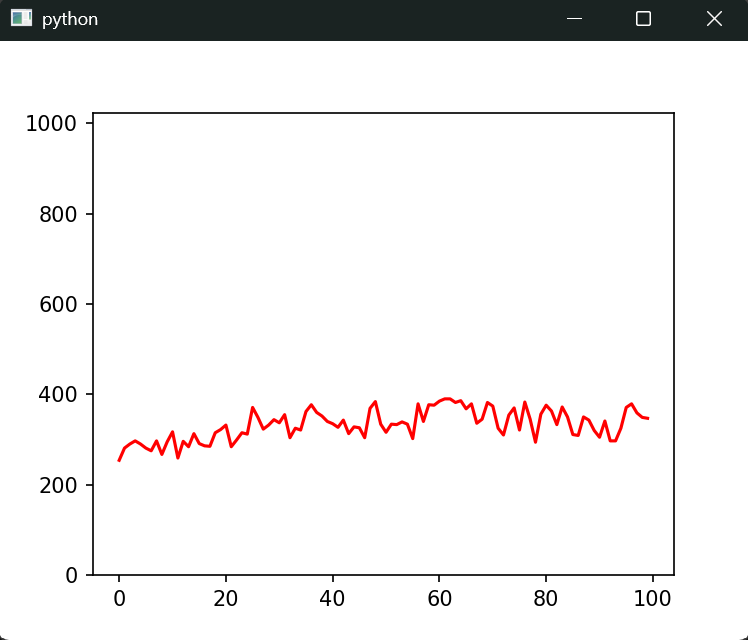
Works fine !
I added ser.reset_input_buffer() after reading the data in order to avoid the former problem and it works fine.
import os
import sys
import random

os.environ["QT_API"] = "PyQt6"

import numpy as np

from PyQt6 import QtCore, QtWidgets
from matplotlib.backends.backend_qtagg import FigureCanvas
from matplotlib.figure import Figure

import pandas as pd
from scipy.signal import savgol_filter

import serial
# Serial Port Connection
ser = serial.Serial('COM15', 9600, timeout=1)
print(f"Connected to {ser.name}")


class MplCanvas(FigureCanvas):

    def __init__(self, parent=None, width=5, height=4, dpi=100):
        fig = Figure(figsize=(width, height), dpi=dpi)
        self.axes = fig.add_subplot(111)
        self.axes.set_ylim(0,1023)
        super().__init__(fig)

class MainWindow(QtWidgets.QMainWindow):

    def __init__(self, *args, **kwargs):
        super().__init__(*args, **kwargs)

        self.canvas = MplCanvas(self, width=5, height=4, dpi=100)
        self.setCentralWidget(self.canvas)

        n_data = 1000
        self.xdata = np.array(list(range(n_data)))
        self.ydata = np.zeros(n_data)

        # We need to store a reference to the plotted line
        # somewhere, so we can apply the new data to it.
        self._plot_ref = None

        # First Plot Generation
        self.update_plot()
        self.show()

        # Setup a timer to trigger the redraw by calling update_plot.
        self.timer = QtCore.QTimer()
        self.timer.setInterval(10)
        self.timer.timeout.connect(self.update_plot)
        self.timer.start()

    def update_plot(self):
        line = ser.readline()
        if line:
            text = line.decode('utf-8', errors='ignore').strip()
            if text:
                if text[0:6]=='1000.0':
                    data=float(text[-3:])
                    self.ydata = np.append(self.ydata[1:],data)
                    # Clear input buffer (discard unread data)
                    ser.reset_input_buffer()

        # Note: we no longer need to clear the axis.
        if self._plot_ref is None:
            # First time we have no plot reference, so do a normal plot.
            # .plot returns a list of line <reference>s, as we're
            # only getting one we can take the first element.
            plot_refs = self.canvas.axes.plot(self.xdata, self.ydata, 'r')
            self._plot_ref = plot_refs[0]
        else:
            # We have a reference, we can use it to update the data for that line.
            self._plot_ref.set_ydata(self.ydata)

        # Trigger the canvas to update and redraw.
        self.canvas.draw()


app = QtWidgets.QApplication(sys.argv)
w = MainWindow()
app.exec()
2.4. Multithreading<
Since I would like to have an interface that represents data but also that allows the user to interact (simple data analysis, pause/play data acquisition, different kind of representations) it is quite important that the user interactions do not interfere with the data acquisition. Therefore I will implement multithreading. A thread will get the data and the other will manage user interface.
Works but...
The multithreading tutorial was quite complex and not very clear. I tried to implement it to my case and it worked but I think it is possible to improve it.
import os
import sys
import random

os.environ["QT_API"] = "PyQt6"

import numpy as np

from PyQt6 import QtCore, QtWidgets
from matplotlib.backends.backend_qtagg import FigureCanvas
from matplotlib.figure import Figure

from PyQt6.QtCore import QRunnable, QThreadPool, QTimer, pyqtSlot

import pandas as pd
from scipy.signal import savgol_filter

import serial
# Serial Port Connection
ser = serial.Serial('COM15', 9600, timeout=1)
print(f"Connected to {ser.name}")


class Worker(QRunnable):
    """Worker thread.

    Inherits from QRunnable to handler worker thread setup, signals and wrap-up.

    :param callback: The function callback to run on this worker thread.
                    Supplied args and kwargs will be passed through to the runner.
    :type callback: function
    :param args: Arguments to pass to the callback function
    :param kwargs: Keywords to pass to the callback function
    """

    def __init__(self, fn, *args, **kwargs):
        super().__init__()
        self.fn = fn
        self.args = args
        self.kwargs = kwargs

    @pyqtSlot()
    def run(self):
        """Initialise the runner function with passed args, kwargs."""
        self.fn(*self.args, **self.kwargs)


class MplCanvas(FigureCanvas):

    def __init__(self, parent=None, width=5, height=4, dpi=100):
        fig = Figure(figsize=(width, height), dpi=dpi)
        self.axes = fig.add_subplot(111)
        self.axes.set_ylim(0,1023)
        super().__init__(fig)

class MainWindow(QtWidgets.QMainWindow):

    def __init__(self, *args, **kwargs):
        super().__init__(*args, **kwargs)

        self.canvas = MplCanvas(self, width=5, height=4, dpi=100)
        self.setCentralWidget(self.canvas)

        n_data = 100
        self.xdata = np.array(list(range(n_data)))
        self.ydata = np.zeros(n_data)

        # We need to store a reference to the plotted line
        # somewhere, so we can apply the new data to it.
        self._plot_ref = None

        # First Plot Generation
        self.update_plot()
        self.show()

        # Instantiate ThreadPool
        self.threadpool = QThreadPool()
        thread_count = self.threadpool.maxThreadCount()
        print(f"Multithreading with maximum {thread_count} threads")

        # Setup a timer to trigger the redraw by calling update_plot.
        self.timer = QtCore.QTimer()
        self.timer.setInterval(100)
        self.timer.timeout.connect(self.parallel_update_plot)
        self.timer.start()

    def update_plot(self):
        line = ser.readline()
        if line:
            text = line.decode('utf-8', errors='ignore').strip()
            if text:
                if text[0:6]=='1000.0':
                    data=float(text[-3:])
                    self.ydata = np.append(self.ydata[1:],data)
                    # Clear input buffer (discard unread data)
                    ser.reset_input_buffer()

        # Note: we no longer need to clear the axis.
        if self._plot_ref is None:
            # First time we have no plot reference, so do a normal plot.
            # .plot returns a list of line <reference>s, as we're
            # only getting one we can take the first element.
            plot_refs = self.canvas.axes.plot(self.xdata, self.ydata, 'r')
            self._plot_ref = plot_refs[0]
        else:
            # We have a reference, we can use it to update the data for that line.
            self._plot_ref.set_ydata(self.ydata)

        # Trigger the canvas to update and redraw.
        self.canvas.draw()

    def parallel_update_plot(self):
        # Pass the function to execute
        worker = Worker(self.update_plot)
        # Any other args, kwargs are passed to the run function
        # Execute
        self.threadpool.start(worker)


app = QtWidgets.QApplication(sys.argv)
w = MainWindow()
app.exec()
Code optimization with Claude AI
I decided to use AI to improve my code. Below you may find the prompt I wrote (translated in English) :
I am currently programming a Python interface with PyQt6 and pySerial. The purpose of this interface is to read data that arrives continuously via a serial port and then represent it in a matplotlib graph. Little by little, I will improve my interface by making certain changes to the representation possible while the data is being collected (axis scales, colors, speed of graph update, etc.). For now, my code is very simple, but I would like to know if it can be optimized. Here is my code:
[insert my previous code]
Here is the answer I got (translated in English) :
Identified problems :
- Thread safety (critique) — update_plot is launched in a thread via QThreadPool, but it directly accesses self.canvas and matplotlib, which are not thread-safe. This can cause random crashes.
- Architecture — The read/display separation is not clean: the worker does both the serial reading and the matplotlib drawing. The two must be separated.
- Fragile Parsing — text[0:6]=='1000.0' is very fragile. A missing byte or a corrupted frame can break everything silently.
- canvas.draw() costly—Redrawing the entire canvas every tick is slow. canvas.draw_idle() is more suitable for your case.
- Unnecessary imports—pandas, scipy, random are imported but not used.
and the new generated code :
import os
import sys
os.environ["QT_API"] = "PyQt6"

import numpy as np
from PyQt6 import QtCore, QtWidgets
from PyQt6.QtCore import QThread, pyqtSignal
from matplotlib.backends.backend_qtagg import FigureCanvas
from matplotlib.figure import Figure
import serial


# ── Constantes ────────────────────────────────────────────────────────────────
SERIAL_PORT   = 'COM15'
BAUD_RATE     = 9600
BUFFER_SIZE   = 100
PLOT_INTERVAL = 100   # ms entre chaque redraw
Y_MIN, Y_MAX  = 0, 1023


# ── Lecture série dans un thread dédié ────────────────────────────────────────
class SerialReader(QThread):
    """
    Lit le port série en continu dans son propre QThread.
    Émet new_value(float) chaque fois qu'une donnée valide arrive.
    Ne touche jamais à l'UI.
    """
    new_value = pyqtSignal(float)

    def __init__(self, port: str, baud: int, parent=None):
        super().__init__(parent)
        self._port = port
        self._baud = baud
        self._running = True

    def run(self):
        try:
            ser = serial.Serial(self._port, self._baud, timeout=1)
            print(f"Connected to {ser.name}")
        except serial.SerialException as e:
            print(f"Serial error: {e}")
            return

        while self._running:
            try:
                raw = ser.readline()
                if not raw:
                    continue
                text = raw.decode('utf-8', errors='ignore').strip()
                value = self._parse(text)
                if value is not None:
                    self.new_value.emit(value)   # signal thread-safe vers l'UI
            except serial.SerialException as e:
                print(f"Read error: {e}")
                break

        ser.close()

    def _parse(self, text: str) -> float | None:
        """
        Adaptez cette méthode à votre protocole réel.
        Exemple actuel : la trame commence par '1000.0', la valeur est dans les 3 derniers chars.
        Retourne None si la trame est invalide.
        """
        if not text:
            return None
        if text.startswith('1000.0'):
            try:
                return float(text[-4:])
            except ValueError:
                return None
        return None

    def stop(self):
        self._running = False
        self.wait()   # attend la fin propre du thread


# ── Canvas matplotlib ──────────────────────────────────────────────────────────
class MplCanvas(FigureCanvas):
    def __init__(self, parent=None, width=5, height=4, dpi=100):
        fig = Figure(figsize=(width, height), dpi=dpi)
        self.axes = fig.add_subplot(111)
        self.axes.set_ylim(Y_MIN, Y_MAX)
        super().__init__(fig)


# ── Fenêtre principale ─────────────────────────────────────────────────────────
class MainWindow(QtWidgets.QMainWindow):
    def __init__(self):
        super().__init__()

        self.canvas = MplCanvas(self, width=5, height=4, dpi=100)
        self.setCentralWidget(self.canvas)

        # Buffer circulaire : on ne stocke que ce qu'on affiche
        self.xdata = np.arange(BUFFER_SIZE)
        self.ydata = np.zeros(BUFFER_SIZE)
        self._plot_ref = None
        self._dirty = False   # True = nouvelles données à afficher

        self._init_plot()

        # Thread de lecture série
        self.reader = SerialReader(SERIAL_PORT, BAUD_RATE)
        self.reader.new_value.connect(self._on_new_value)
        self.reader.start()

        # Timer de redraw (UI thread uniquement)
        self.timer = QtCore.QTimer()
        self.timer.setInterval(PLOT_INTERVAL)
        self.timer.timeout.connect(self._refresh_plot)
        self.timer.start()

        self.show()

    # ── Slots ──────────────────────────────────────────────────────────────────

    def _on_new_value(self, value: float):
        """Reçoit une valeur depuis le thread série (signal → slot, thread-safe)."""
        self.ydata = np.roll(self.ydata, -1)
        self.ydata[-1] = value
        self._dirty = True

    def _refresh_plot(self):
        """Appelé par le timer dans l'UI thread. Redessine seulement si nécessaire."""
        if not self._dirty:
            return
        self._dirty = False
        self._plot_ref.set_ydata(self.ydata)
        self.canvas.draw_idle()   # plus léger que draw()

    # ── Helpers ────────────────────────────────────────────────────────────────

    def _init_plot(self):
        refs = self.canvas.axes.plot(self.xdata, self.ydata, 'r')
        self._plot_ref = refs[0]

    def closeEvent(self, event):
        """Arrêt propre du thread série à la fermeture de la fenêtre."""
        self.timer.stop()
        self.reader.stop()
        super().closeEvent(event)


# ── Point d'entrée ─────────────────────────────────────────────────────────────
if __name__ == '__main__':
    app = QtWidgets.QApplication(sys.argv)
    w = MainWindow()
    sys.exit(app.exec())
The most important modification according to me is the separation of serial reading and plotting in two distincts threads. I was a bit lost when I tried to implement multithreading myself but now I better undertand it.