Focus This Week
The first week of Fab Academy is all about laying the groundwork: defining your final project vision, setting up a Git-based documentation workflow, and establishing the habits that will carry you through 20 weeks of intense making. This week I sketched my final project idea, built this documentation website from scratch, configured my development environment, and officially joined the Fab Academy 2026 community.
Principles and Practices — Final Project Idea
The Concept: Electric Karting Car
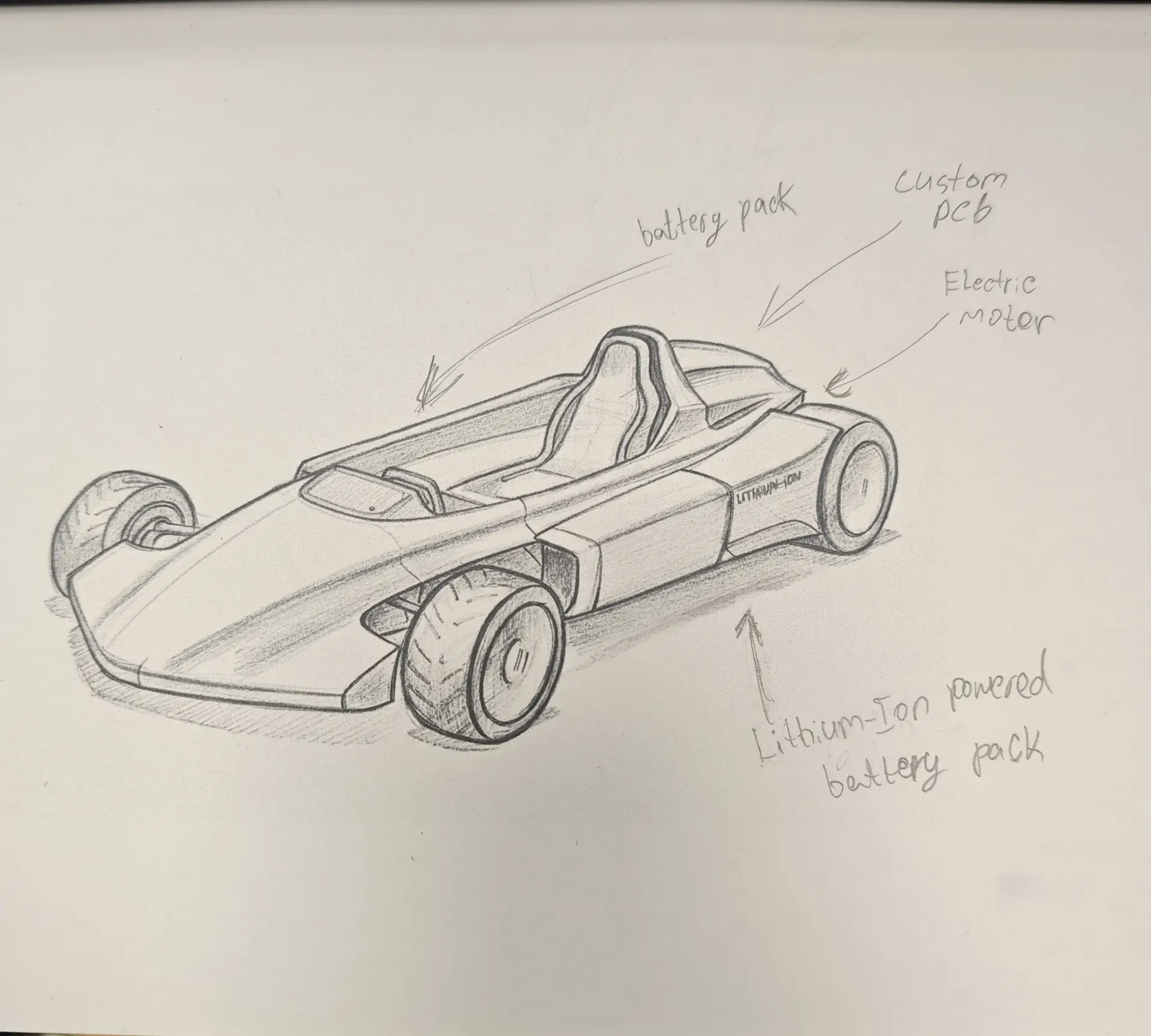
My final project is to design and build a fully functional Electric Karting Car from scratch using digital fabrication techniques. This vehicle is not just a transportation toy — it is a testbed for integrating every Fab Academy skill into a single cohesive project: CNC-milled chassis components, 3D-printed aerodynamic and ergonomic parts, custom-designed electronics, and embedded control systems.
What It Will Do
- Be powered by an electric motor and rechargeable battery pack
- Feature a custom-designed PCB for motor control and driver interface
- Include a digital dashboard with speed, battery status, and telemetry
- Use a CNC-milled frame with 3D-printed structural brackets and body panels
- Incorporate an ergonomic steering assembly with embedded sensors
Who Will Use It
This kart is designed for students, makers, and electric vehicle enthusiasts who want to explore sustainable mobility through hands-on fabrication. It also serves as a live demonstration platform for the Fablab Dilijan to inspire the next generation of builders and engineers in Georgia.
Initial Sketch
Below is my initial hand-drawn concept sketch that captures the layout of the kart — the drivetrain positioning, chassis profile, and seating arrangement. It was my starting point to think through the physical constraints before moving to digital modeling tools.
Key Design Features
- Aerodynamic Chassis: A low-profile frame optimized for weight reduction and lateral stability.
- Electric Powertrain: Centrally mounted motor and battery packs for balanced weight distribution.
- Integrated Controls: A front-mounted digital dashboard and ergonomic steering assembly with embedded sensors.
- Fabrication Methods: CNC milling for the primary frame, laser cutting for electronics housing, 3D printing for ergonomic interfaces and aerodynamic panels.
- Safety: Integrated braking system, fused power circuit, and rollover protection.
Project Management
Building This Website
As a full-stack developer, I chose to build my documentation site using a custom Static Site Generation (SSG) approach powered by Python + Jinja2 — rather than using a pre-built framework like MkDocs or Jekyll. This gave me full control over the layout and styling.
How It Works
- Content: Each week is written as an HTML fragment inside a
content/assignments/folder. - Templates: A
base.htmlJinja2 template wraps every page with a shared header, footer, navigation, and sidebar. - Generator:
generate.pywalks the content directory, renders each file through the template engine, and outputs the final pages into apublic/folder. - Dev Server:
serve.pyuses thewatchdoglibrary to watch for file changes and auto-rebuilds the site in real time. - Deployment: The
.gitlab-ci.ymlpipeline automatically runsgenerate.pyand deploys thepublic/folder to GitLab Pages on every push to the main branch.
Tech Stack
- Python 3.12 virtual environment (
venv) - Jinja2 for templating
- HTML5 UP — Hyperspace theme for the visual design
- GitLab CI/CD for automatic deployment
Key Design Decision
Images are converted to .webp format before committing, keeping the repository well under the
GitLab 10MB limit while maintaining visual quality.
generate.py — The Build Script
This script walks the content/ directory, renders each HTML fragment through the Jinja2 base
template, and writes the final pages into public/. It also calculates the correct relative
base URL for each page so assets load correctly regardless of nesting depth.
import os
import shutil
from jinja2 import Environment, FileSystemLoader

BASE_DIR = os.path.dirname(os.path.abspath(__file__))
TEMPLATE_DIR = os.path.join(BASE_DIR, 'templates')
CONTENT_DIR = os.path.join(BASE_DIR, 'content')
OUTPUT_DIR = os.path.join(BASE_DIR, 'public')

env = Environment(loader=FileSystemLoader(TEMPLATE_DIR))
base_template = env.get_template('base.html')
git_url = "https://cdn.jsdelivr.net/gh/programdeveloper/FabAcademy3DHub@main/"

def generate():

    for root, dirs, files in os.walk(CONTENT_DIR):
        folder_name = os.path.basename(root)
        for filename in files:
            if filename.endswith(".html"):
                file_path = os.path.join(root, filename)

                # --- CALCULATE RELATIVE BASE ---
                rel_to_content = os.path.relpath(root, CONTENT_DIR)
                depth = 0 if rel_to_content == "." else len(rel_to_content.split(os.sep))
                relative_base = "." if depth == 0 else "../" * depth
                relative_base = relative_base.rstrip('/')

                # --- STEP 1: RENDER THE CONTENT FILE ITSELF ---
                with open(file_path, 'r', encoding='utf-8') as f:
                    raw_content = f.read()

                content_template = env.from_string(raw_content)
                rendered_content = content_template.render(
                    git_url=git_url,
                    week=filename,
                    base_url=relative_base
                )

                # --- STEP 2: RENDER INTO BASE TEMPLATE ---
                page_title = filename.replace('.html', '').replace('-', ' ').title()

                final_html = base_template.render(
                    title=page_title,
                    content=rendered_content,
                    is_assignments=(folder_name == "assignments"),
                    week=filename,
                    base_url=relative_base
                )

                # --- SAVE FILE ---
                relative_path = os.path.relpath(file_path, CONTENT_DIR)
                output_path = os.path.join(OUTPUT_DIR, relative_path)
                os.makedirs(os.path.dirname(output_path), exist_ok=True)

                with open(output_path, 'w', encoding='utf-8') as f:
                    f.write(final_html)

                print(f"Built: {relative_path}")

if __name__ == "__main__":
    generate()
serve.py — The Development Server
This script runs a local HTTP server on port 8888 and uses the watchdog library
to monitor the project directory for changes. Whenever a file is saved, it automatically triggers
generate.py and refreshes the build — giving instant live feedback during development.
import time
import subprocess
import os
import threading
from watchdog.observers import Observer
from watchdog.events import PatternMatchingEventHandler
from http.server import SimpleHTTPRequestHandler, ThreadingHTTPServer

PROJECT_ROOT = os.path.abspath(os.path.dirname(__file__))
GENERATE_SCRIPT = os.path.join(PROJECT_ROOT, "generate.py")

WATCH_DIR = PROJECT_ROOT
PUBLIC_DIR = os.path.join(PROJECT_ROOT, "public")
PORT = 8888

class RebuildHandler(PatternMatchingEventHandler):
    patterns = ["*.html", "*.jinja2", "*.py", "*.css", "*.js"]
    ignore_patterns = [
        "*/public/*",
        "*/public/assignments/*",
        "*/.git/*",
        "*__pycache__*",
        "*.tmp"
    ]

    def process(self, event):
        print(f"File {event.src_path} changed. Regenerating...")
        subprocess.run(["python3", GENERATE_SCRIPT])

    def on_modified(self, event):
        if not event.is_directory:
            self.process(event)

    def on_created(self, event):
        if not event.is_directory:
            self.process(event)

def start_server():
    if not os.path.exists(PUBLIC_DIR):
        os.makedirs(PUBLIC_DIR)
    os.chdir(PUBLIC_DIR)
    server = ThreadingHTTPServer(('0.0.0.0', PORT), SimpleHTTPRequestHandler)
    print(f"🚀 Serving site at http://localhost:{PORT}")
    server.serve_forever()

if __name__ == "__main__":
    print("Initial build...")
    subprocess.run(["python3", GENERATE_SCRIPT])

    threading.Thread(target=start_server, daemon=True).start()

    event_handler = RebuildHandler()
    observer = Observer()
    observer.schedule(event_handler, WATCH_DIR, recursive=True)
    observer.start()

    print(f"👀 Watching for changes in {WATCH_DIR}...")
    try:
        while True:
            time.sleep(1)
    except KeyboardInterrupt:
        observer.stop()
        print("\nStopping server...")

    observer.join()
About Me — Personal Section
I created a dedicated About page on this site that includes:
- A brief personal bio and my approach to problem solving
- My educational background (Georgian Technical University, Tbilisi State University)
- Full work history — from Full-Stack Developer to Fablab Specialist at Georgia's Innovation and Technology Agency
- A skill breakdown across web development, digital fabrication, 3D modeling, and teaching
- Contact information
Git Repository Setup
My development environment is Ubuntu 24.04 LTS (Noble Numbat). Below are the exact steps I followed to configure Git and connect to the Fab Academy GitLab server.
1. Installing Git
sudo apt update && sudo apt install git -y2. Identity Configuration
git config --global user.name "Daviti Khukhua"
git config --global user.email "dkhukhua@gita.gov.ge"
3. SSH Key Generation
To securely push to the GitLab repository without entering a password each time, I generated an ED25519 SSH key:
ssh-keygen -t ed25519 -C "dkhukhua@gita.gov.ge"
I then copied the public key from ~/.ssh/id_ed25519.pub and added it to my
Fab Academy GitLab profile under Settings → SSH Keys.
4. Cloning the Repository
git clone git@gitlab.fabcloud.org:academany/fabacademy/2026/labs/dilijan/students/daviti-khukhua.git5. Setting Up the Python Environment
cd daviti-khukhua
python3 -m venv venv
source venv/bin/activate
pip install jinja2 watchdog
Pushing to GitLab
After building and testing the site locally, I staged all files and pushed the initial commit:
git add .
git commit -m "Initial commit: Week 1 setup and project proposal"
git push origin main
The CI/CD pipeline triggered automatically, ran generate.py,
and deployed the site to GitLab Pages within a few minutes.
Student Agreement
I have officially joined the Fab Academy 2026 cycle by reading, signing, and uploading the Student Agreement to my GitLab repository. This document confirms my commitments to:
- Open-source sharing of all project files, source code, and documentation
- Following lab safety rules and equipment protocols
- Maintaining academic integrity — all work documented is my own
- Actively participating in the global Fab Academy community
The signed agreement has been uploaded to the repository and is available here: Signed Student Agreement.
Have you answered these questions?
- Sketched your final project idea(s)?
Yes. The initial hand-drawn sketch of the Electric Karting Car concept is shown in the Principles and Practices section. - Described briefly what it will do and who will use it?
Yes. Section What It Will Do describes its electrical drivetrain, dashboard, and custom controller. Section Who Will Use It defines the target audience as students, makers, and EV enthusiasts. - Made a website and described how you did it?
Yes. The static site generator workflow (using Python + Jinja2) and styling details are documented in the Project Management section. - Created a section about yourself on that website?
Yes. The personal profile section is located on the About Me section of the homepage. - Added a page with your sketch and description of your final project idea(s)?
Yes. A dedicated presentation page is available at Final Project Page. - Documented steps for setting up your Git repository and adding files to it?
Yes. Git installation, SSH configuration,git add,git commitcommands are detailed in the Git Setup section. - Pushed to your class GitLab repository?
Yes. Documented pushing changes usinggit push origin mainto the class repository in the Git Setup section. - Signed and uploaded Student Agreement?
Yes. The signed agreement is uploaded and available at agreement.html.
Week 1 — Summary
Week 1 was a productive sprint that set a solid foundation for the rest of the program. Here's a quick recap of everything accomplished:
Final Project Defined
Conceived and sketched the Electric Karting Car — a vehicle that will integrate every Fab Academy skill into one cohesive build.
Website Live
Built a custom static site generator using Python + Jinja2, deployed automatically to GitLab Pages via CI/CD on every push.
Git Workflow Ready
Configured Git with SSH authentication, cloned the Fab Academy repository, and established a clean commit workflow.
Student Agreement Signed
Read, signed, and uploaded the Student Agreement — committing to open-source sharing, safety, and academic integrity.