Interface and Application Programming

Summary
Build a web server running on the ESP8266 that displays real-time entry data for two users — tracking who entered, when, and how many times.
This week the assignment was to write an application that interfaces a user with an input and/or output device. I decided to build a web-based interface for an RFID attendance tracking system using an ESP8266 and an RC522 NFC reader module.
Hardware Setup
Firstly I connected the esp8266 to RC522 with this scematics
SDA to GPIO 15 (D8)


SCK to GPIO 14 (D5)


MOSI to GPIO 13 (D7)


MISO to GPIO 12 (D6)


RST to GPIO 0 (D3)


3.3V to 3.3V

GND to GND
Reading Card UIDs
Before building the main application, I first needed to find out the UID of each NFC card and tag. I flashed a small utility sketch that simply reads any card presented to the reader and prints the UID to the Serial Monitor.
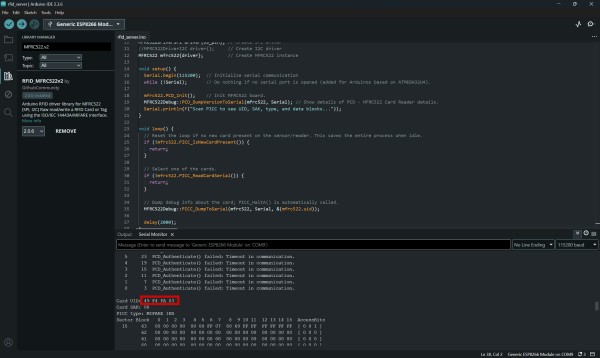
I placed each card on the reader one at a time and noted down the UIDs printed in the Serial Monitor. These UIDs were then copied into the main firmware to identify the two users.
#include <MFRC522v2.h>
#include <MFRC522DriverSPI.h>
//#include <MFRC522DriverI2C.h>
#include <MFRC522DriverPinSimple.h>
#include <MFRC522Debug.h>


MFRC522DriverPinSimple ss_pin(15);

MFRC522DriverSPI driver{ss_pin};
//MFRC522DriverI2C driver{};
MFRC522 mfrc522{driver};

void setup() {
  Serial.begin(115200);
  while (!Serial);

  mfrc522.PCD_Init();
  MFRC522Debug::PCD_DumpVersionToSerial(mfrc522, Serial);
  Serial.println(F("Scan PICC to see UID, SAK, type, and data blocks..."));
}

void loop() {

  if (!mfrc522.PICC_IsNewCardPresent()) {
    return;
  }


  if (!mfrc522.PICC_ReadCardSerial()) {
    return;
  }


  MFRC522Debug::PICC_DumpToSerial(mfrc522, Serial, &(mfrc522.uid));

  delay(2000);
}
Web Interface
After confirming the UIDs, I built the main application. The ESP8266 acts as a standalone Wi-Fi Access Point — no router is needed. Any phone or computer can connect directly to the ESP's network and open the dashboard in a browser.
connect to Wi-Fi network RFID-Tracker (password: 12345678), then open http://192.168.4.1 in any browser.
-
Live entry counters Each user has a card showing how many times they have entered, quick reading.
-
Last scan display Shows the name and UID of the most recently scanned card, updated every 3 seconds.
-
Entry log A table of the last 10 scans showing who entered and the uptime timestamp.
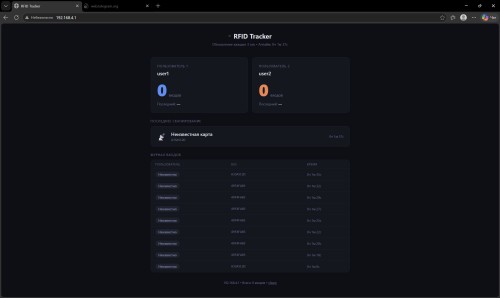
And code
#include <SPI.h>
#include <MFRC522v2.h>
#include <MFRC522DriverSPI.h>
#include <MFRC522DriverPinSimple.h>
#include <ESP8266WiFi.h>
#include <ESP8266WebServer.h>
const char* ssid = 1111111";
const char* password = "12345678";
const String UID_USER1 = "A1B2C3D4";
const String UID_USER2 = "E5F6A7B8";
const String NAME_USER1 = "Алексей";
const String NAME_USER2 = "Мария";
#define SS_PIN 15
#define RST_PIN 0
MFRC522DriverPinSimple ss_pin(SS_PIN);
MFRC522DriverSPI driver{ss_pin};
MFRC522 rfid{driver};
ESP8266WebServer server(80);
int count1 = 0;
int count2 = 0;
String lastScan1 = "";
String lastScan2 = "";
String lastScanAny = "";
String lastUID = "";
struct LogEntry { String name; String uid; String time; };
LogEntry scanLog[10];
int logIndex = 0;
int logCount = 0;
String getUptime() {
unsigned long s = millis() / 1000;
unsigned long m = s / 60;
unsigned long h = m / 60;
return String(h) + "ч " + String(m % 60) + "м " + String(s % 60) + "с";
}
String uidToString(MFRC522::Uid uid) {
String r = "";
for (byte i = 0; i < uid.size; i++) {
if (uid.uidByte[i] < 0x10) r += "0";
r += String(uid.uidByte[i], HEX);
}
r.toUpperCase();
return r;
}
void addLog(String name, String uid) {
scanLog[logIndex] = {name, uid, getUptime()};
logIndex = (logIndex + 1) % 10;
if (logCount < 10) logCount++;
}
String buildPage() {
String html = "";
html += "<!DOCTYPE html><html lang='ru'><head>";
html += "<meta charset='UTF-8'>";
html += "<meta name='viewport' content='width=device-width,initial-scale=1'>";
html += "<meta http-equiv='refresh' content='3'>";
html += "<title>RFID Tracker</title>";
html += "<style>";
html += ":root{--bg:#0d0f16;--card:#141720;--border:#1f2230;--b1:#4f8ef7;--b2:#f7834f;--go:#3ecf7a;--tx:#dde1ed;--mu:#6b7394;--r:12px}";
html += "*{box-sizing:border-box;margin:0;padding:0}";
html += "body{background:var(--bg);color:var(--tx);font-family:'Segoe UI',system-ui,sans-serif;padding:28px 16px}";
html += ".wrap{max-width:680px;margin:0 auto}";
html += "header{text-align:center;margin-bottom:36px}";
html += "header h1{font-size:22px;font-weight:700;display:flex;align-items:center;justify-content:center;gap:10px}";
html += "header p{color:var(--mu);font-size:12px;margin-top:6px}";
html += ".live{width:7px;height:7px;border-radius:50%;background:var(--go);animation:p 1.6s infinite}";
html += "@keyframes p{0%,100%{opacity:1}50%{opacity:.2}}";
html += ".grid{display:grid;grid-template-columns:1fr 1fr;gap:14px;margin-bottom:20px}";
html += ".card{background:var(--card);border:1px solid var(--border);border-radius:var(--r);padding:22px}";
html += ".clabel{font-size:11px;text-transform:uppercase;letter-spacing:1px;color:var(--mu);margin-bottom:6px}";
html += ".cname{font-size:17px;font-weight:600;margin-bottom:16px}";
html += ".num{font-size:56px;font-weight:800;line-height:1;display:inline}";
html += ".nlabel{font-size:13px;color:var(--mu);vertical-align:bottom;padding-bottom:8px;padding-left:6px;display:inline}";
html += ".u1 .num{color:var(--b1)}.u2 .num{color:var(--b2)}";
html += ".lst{margin-top:14px;font-size:12px;color:var(--mu)}";
html += ".lst b{color:var(--tx);font-weight:500}";
html += ".sec{margin-bottom:20px}";
html += ".sec-title{font-size:11px;text-transform:uppercase;letter-spacing:1px;color:var(--mu);margin-bottom:10px}";
html += ".scancard{background:var(--card);border:1px solid var(--border);border-radius:var(--r);padding:16px 20px;display:flex;align-items:center;gap:14px}";
html += ".sname{font-size:16px;font-weight:600}";
html += ".suid{font-size:11px;color:var(--mu);font-family:monospace;margin-top:3px}";
html += ".stime{margin-left:auto;font-size:11px;color:var(--mu)}";
html += ".logtable{background:var(--card);border:1px solid var(--border);border-radius:var(--r);overflow:hidden}";
html += ".row{display:grid;grid-template-columns:2fr 2fr 1fr;padding:10px 16px;font-size:13px;border-bottom:1px solid var(--border);align-items:center}";
html += ".row:last-child{border-bottom:none}";
html += ".hrow{font-size:10px;text-transform:uppercase;letter-spacing:.8px;color:var(--mu);padding:8px 16px}";
html += ".badge{display:inline-block;padding:2px 10px;border-radius:20px;font-size:11px;font-weight:700}";
html += ".b1{background:rgba(79,142,247,.12);color:var(--b1)}.b2{background:rgba(247,131,79,.12);color:var(--b2)}.bx{background:rgba(107,115,148,.12);color:var(--mu)}";
html += ".foot{text-align:center;font-size:11px;color:var(--mu);padding-top:8px}";
html += "@media(max-width:480px){.grid{grid-template-columns:1fr}}";
html += "</style></head><body><div class='wrap'>";
html += "<header><h1><span class='live'></span>RFID Tracker</h1>";
html += "<p>Обновление каждые 3 сек • Аптайм: " + getUptime() + "</p></header>";
html += "<div class='grid'>";
html += "<div class='card u1'><div class='clabel'>Пользователь 1</div>";
html += "<div class='cname'>" + NAME_USER1 + "</div>";
html += "<span class='num'>" + String(count1) + "</span><span class='nlabel'>входов</span>";
html += "<div class='lst'>Последний: <b>" + (lastScan1.length() ? lastScan1 : "—") + "</b></div></div>";
html += "<div class='card u2'><div class='clabel'>Пользователь 2</div>";
html += "<div class='cname'>" + NAME_USER2 + "</div>";
html += "<span class='num'>" + String(count2) + "</span><span class='nlabel'>входов</span>";
html += "<div class='lst'>Последний: <b>" + (lastScan2.length() ? lastScan2 : "—") + "</b></div></div>";
html += "</div>";
html += "<div class='sec'><div class='sec-title'>Последнее сканирование</div>";
html += "<div class='scancard'><div style='font-size:26px'>📡</div><div>";
html += "<div class='sname'>" + (lastScanAny.length() ? lastScanAny : "Ожидание карты...") + "</div>";
html += "<div class='suid'>" + (lastUID.length() ? lastUID : "—") + "</div>";
html += "</div><div class='stime'>" + (lastScanAny.length() ? getUptime() : "—") + "</div></div></div>";
html += "<div class='sec'><div class='sec-title'>Журнал входов</div><div class='logtable'>";
html += "<div class='row hrow'><div>Пользователь</div><div>UID</div><div>Время</div></div>";
for (int i = 0; i < logCount; i++) {
int idx = ((logIndex - 1 - i) + 10) % 10;
LogEntry& e = scanLog[idx];
String bc = "bx";
if (e.name == NAME_USER1) bc = "b1";
else if (e.name == NAME_USER2) bc = "b2";
html += "<div class='row'>";
html += "<div><span class='badge " + bc + "'>" + e.name + "</span></div>";
html += "<div style='font-family:monospace;font-size:11px;color:var(--mu)'>" + e.uid + "</div>";
html += "<div style='font-size:11px;color:var(--mu)'>" + e.time + "</div></div>";
}
if (logCount == 0) {
html += "<div class='row' style='color:var(--mu)'>Нет записей</div>";
}
html += "</div></div>";
html += "<div class='foot'>ESP8266 • " + WiFi.localIP().toString();
html += " • Всего: " + String(count1 + count2) + " входов";
html += " • <a href='/reset' style='color:var(--mu)'>сброс</a></div>";
html += "</div></body></html>";
return html;
}
void handleAPI() {
String j = "{\"user1\":{\"name\":\"" + NAME_USER1 + "\",\"count\":" + count1 + ",\"last\":\"" + lastScan1 + "\"},"
"\"user2\":{\"name\":\"" + NAME_USER2 + "\",\"count\":" + count2 + ",\"last\":\"" + lastScan2 + "\"},"
"\"total\":" + String(count1 + count2) + ",\"lastUID\":\"" + lastUID + "\",\"uptime\":\"" + getUptime() + "\"}";
server.send(200, "application/json", j);
}
void handleReset() {
count1 = 0; count2 = 0;
lastScan1 = ""; lastScan2 = ""; lastScanAny = ""; lastUID = "";
logIndex = 0; logCount = 0;
server.sendHeader("Location", "/");
server.send(302, "text/plain", "");
}
void setup() {
Serial.begin(115200);
SPI.begin();
rfid.PCD_Init();
WiFi.begin(ssid, password);
while (WiFi.status() != WL_CONNECTED) delay(500);
Serial.println("IP: http://" + WiFi.localIP().toString());
server.on("/", []() { server.send(200, "text/html", buildPage()); });
server.on("/api", handleAPI);
server.on("/reset", handleReset);
server.begin();
}
void loop() {
server.handleClient();
if (!rfid.PICC_IsNewCardPresent() || !rfid.PICC_ReadCardSerial()) return;
String uid = uidToString(rfid.uid);
lastUID = uid;
if (uid == UID_USER1) {
count1++;
lastScan1 = getUptime();
lastScanAny = NAME_USER1;
addLog(NAME_USER1, uid);
} else if (uid == UID_USER2) {
count2++;
lastScan2 = getUptime();
lastScanAny = NAME_USER2;
addLog(NAME_USER2, uid);
} else {
lastScanAny = "Неизвестная карта";
addLog("Неизвестно", uid);
}
Serial.println(uid + " -> " + lastScanAny);
rfid.PICC_HaltA();
rfid.PCD_StopCrypto1();
delay(1000);
}
Problems
In this week i had lot of problems and i spend more time than expectations
-
After connecting the ESP8266, the programmer was not being detected by the computer. The upload kept failing with a connection error. After checking the setup, I found the issue was with the USB-to-Serial programmer itself. I replaced the programmer with a working one and the connection was established successfully.
-
After uploading, the RFID reader was not responding at all. I carefully rechecked every wire against the pinout table. I discovered that the 3.3V power wire from the RC522 was accidentally connected to GPIO 0 instead of the 3.3V power pin. This was causing the module to not receive power and also pulling GPIO 0 low, which put the ESP8266 into flash mode on boot.
-
The issue with the code was that I used the wrong library. I was using MFRC522.h, but I should have used MFRC522v2.h instead. This caused compatibility problems and errors during compilation because the two libraries have different method structures and initialization processes. I need to replace the include statement, update the object declaration, and fix the function calls to match the v2 requirements.
Conclusion
I succesfully finish this week and solve the problem which i spend lot of time and I learned How to use SPI protocol to communicate with an RFID reader on ESP8266,How to set up a Wi-Fi Access Point and HTTP server on a microcontroller and make site with html,How to read RFID card UIDs and use them to identify users in firmware