Skip to content

Machine Building Preparation

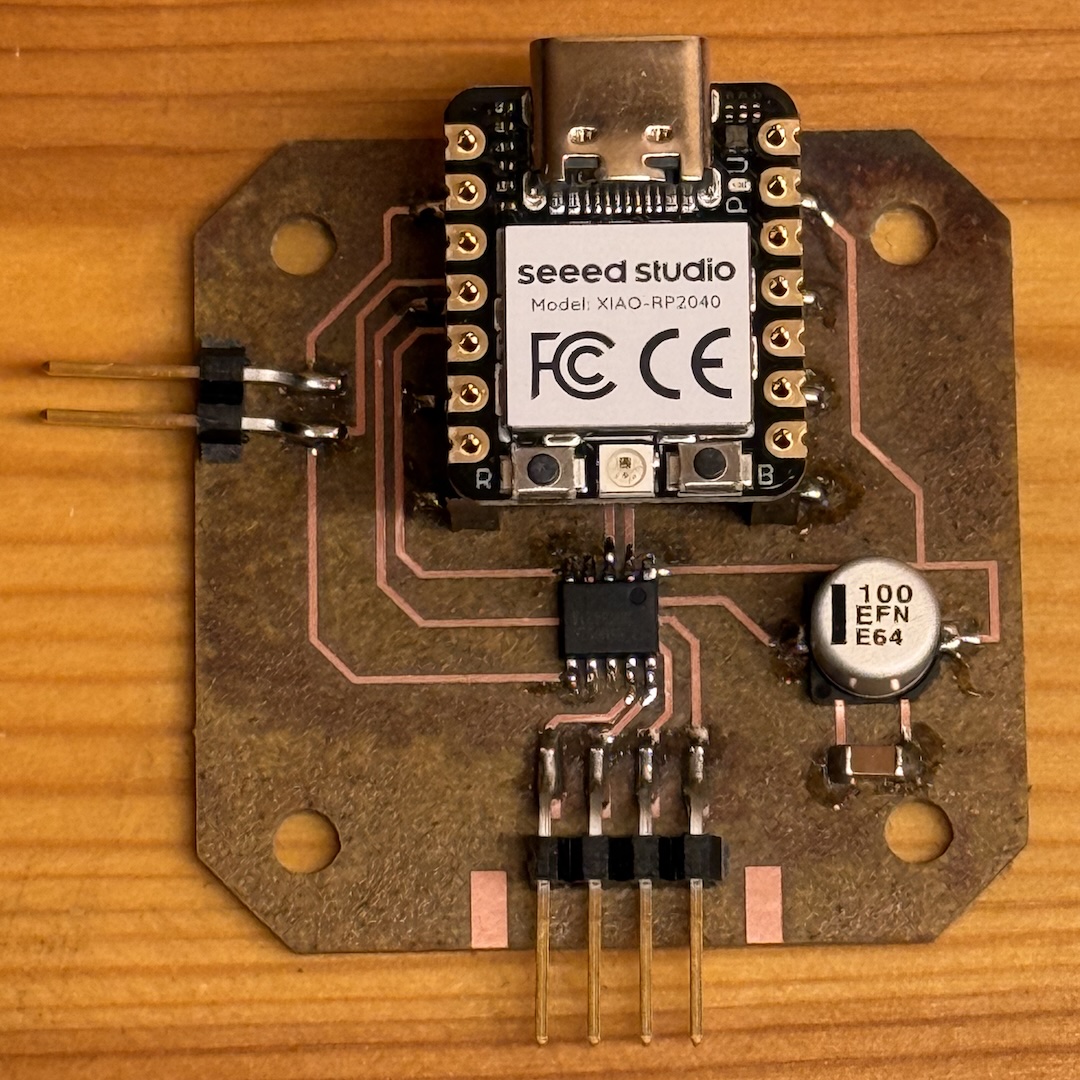
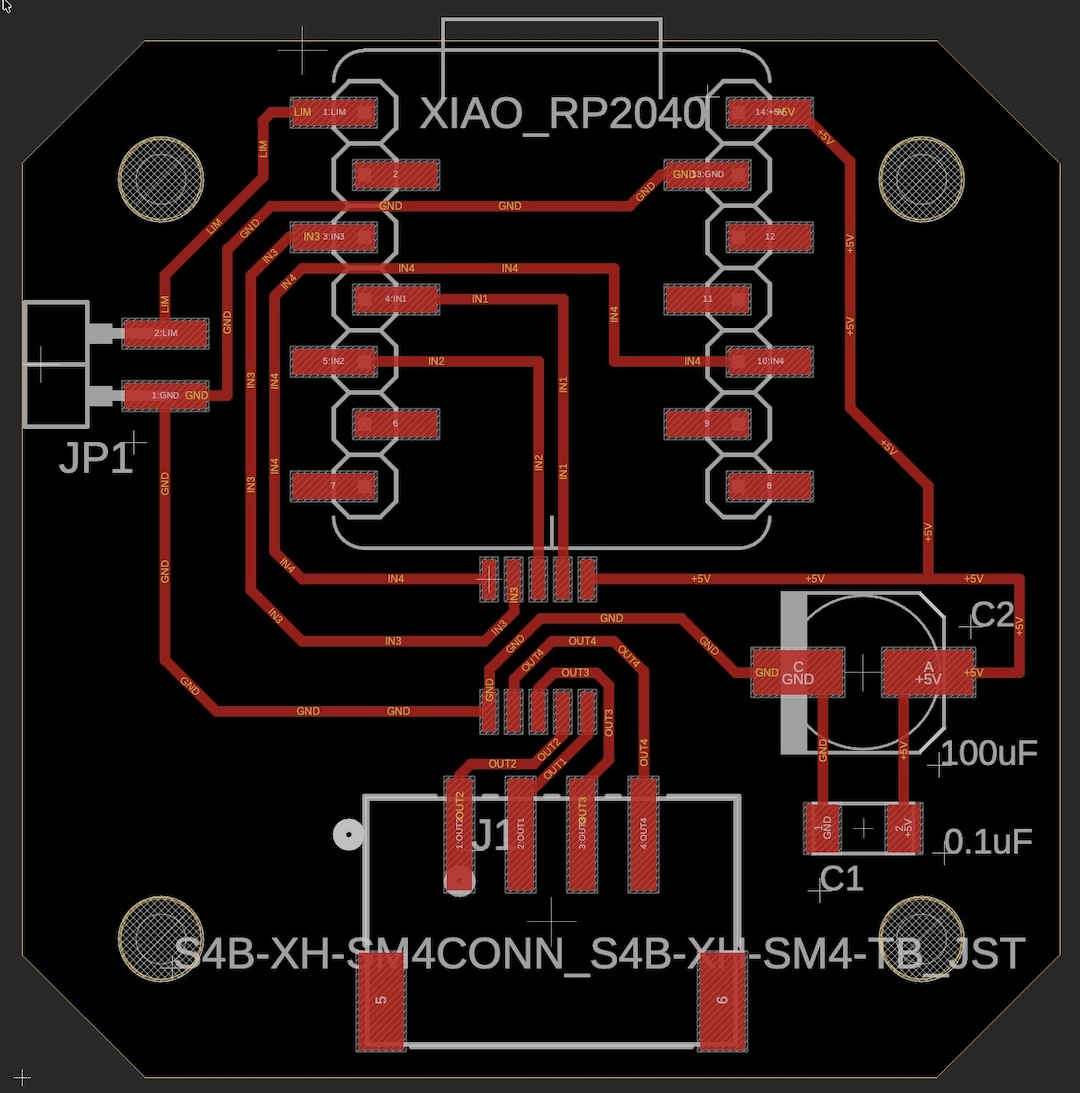
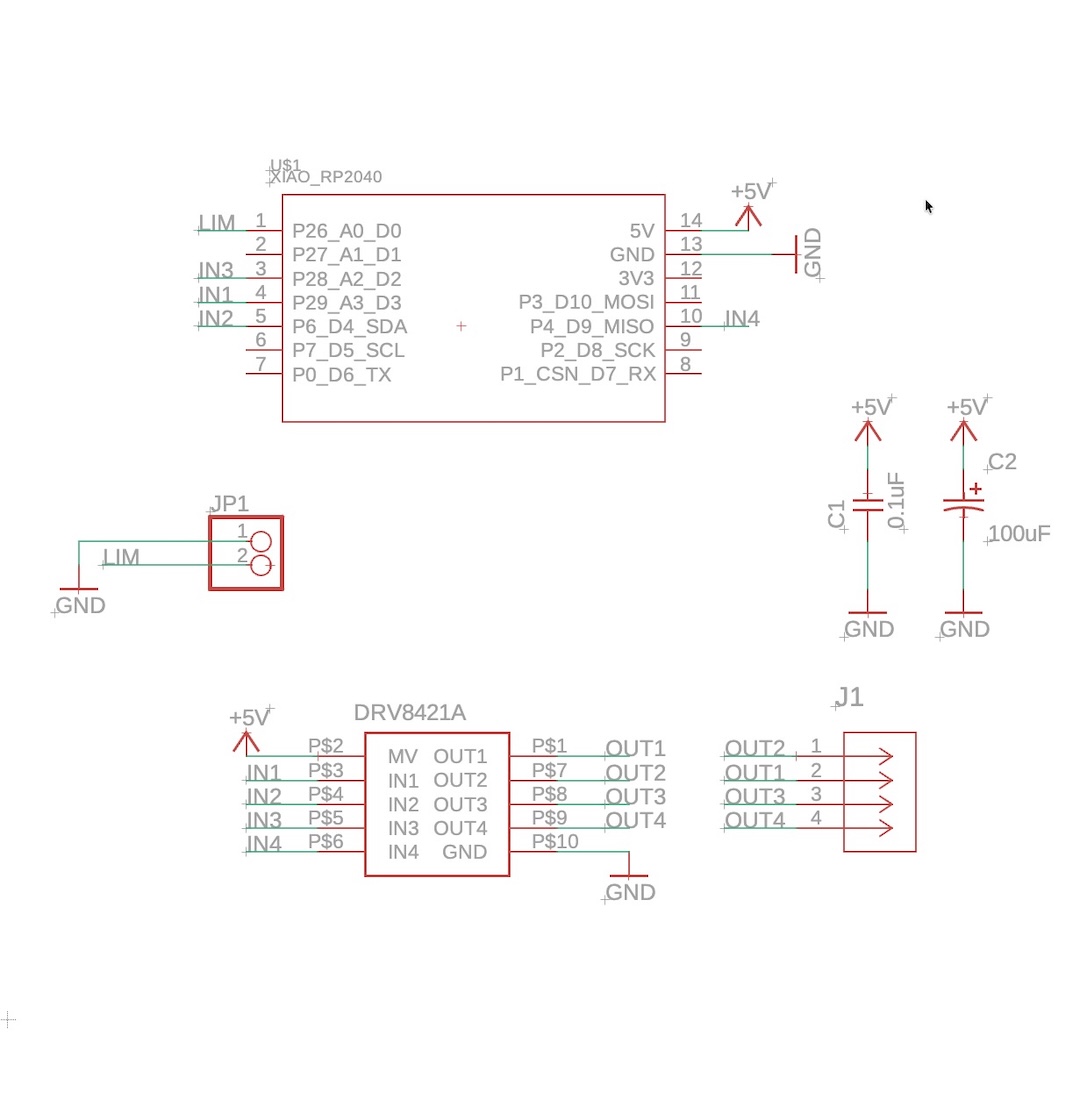
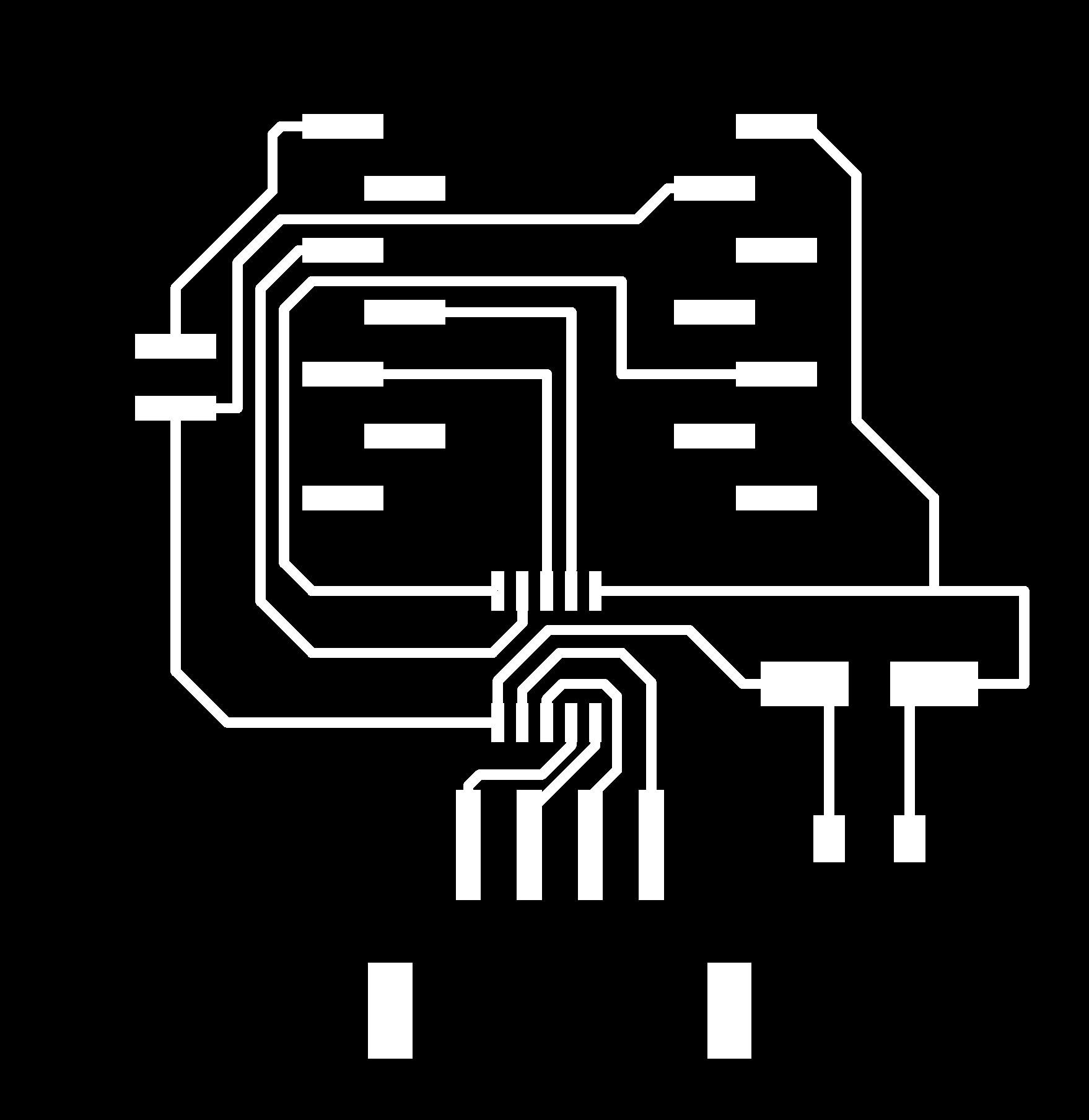
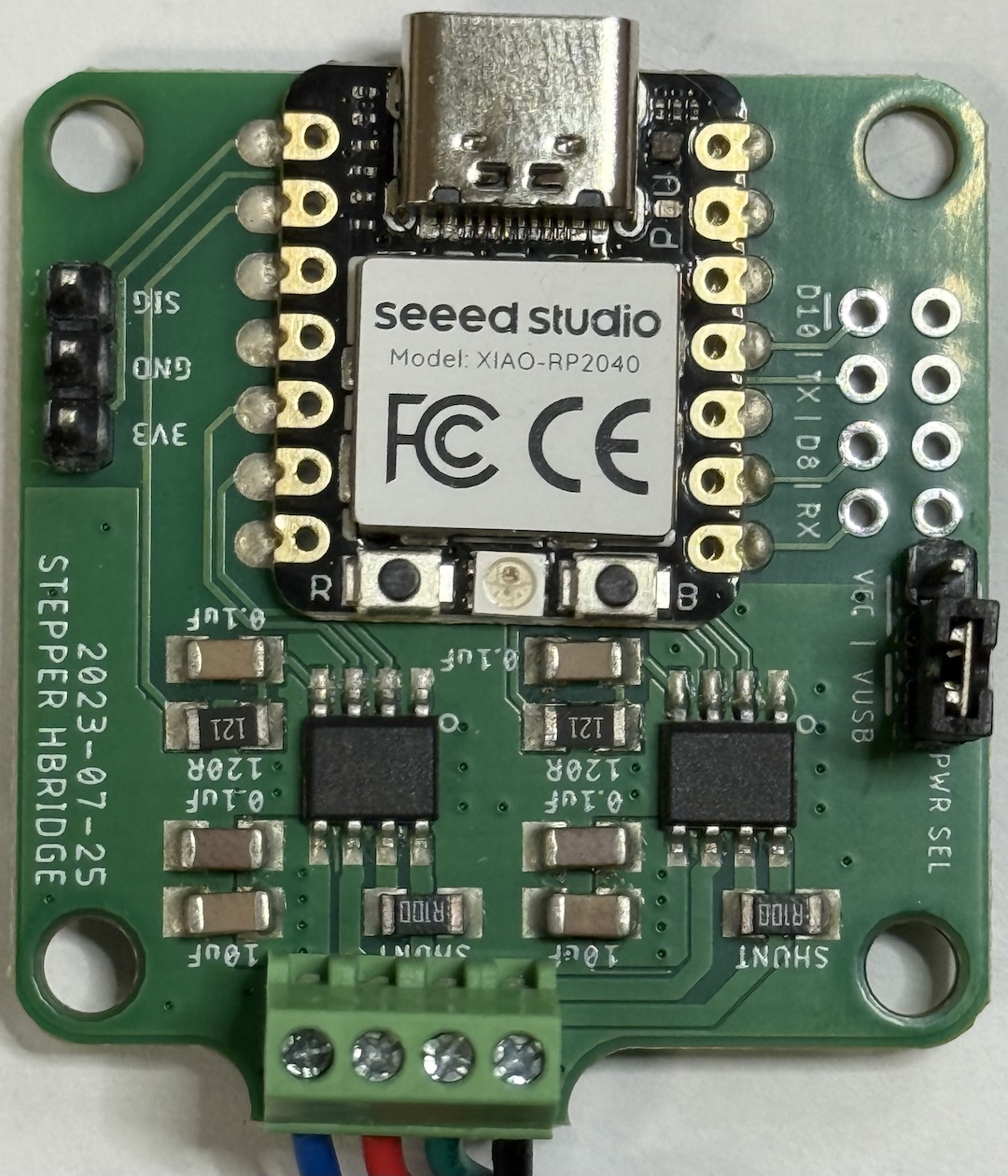
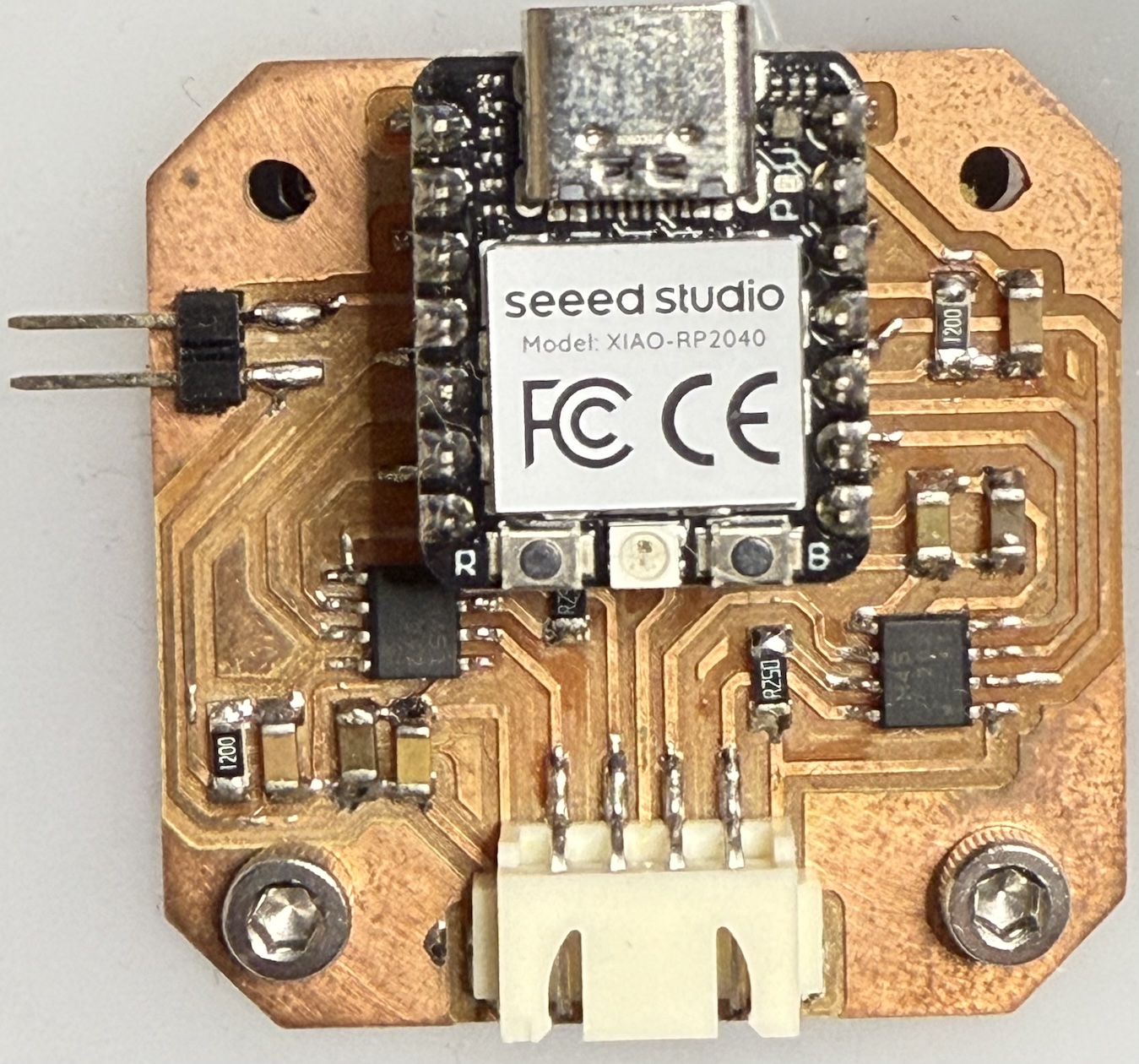
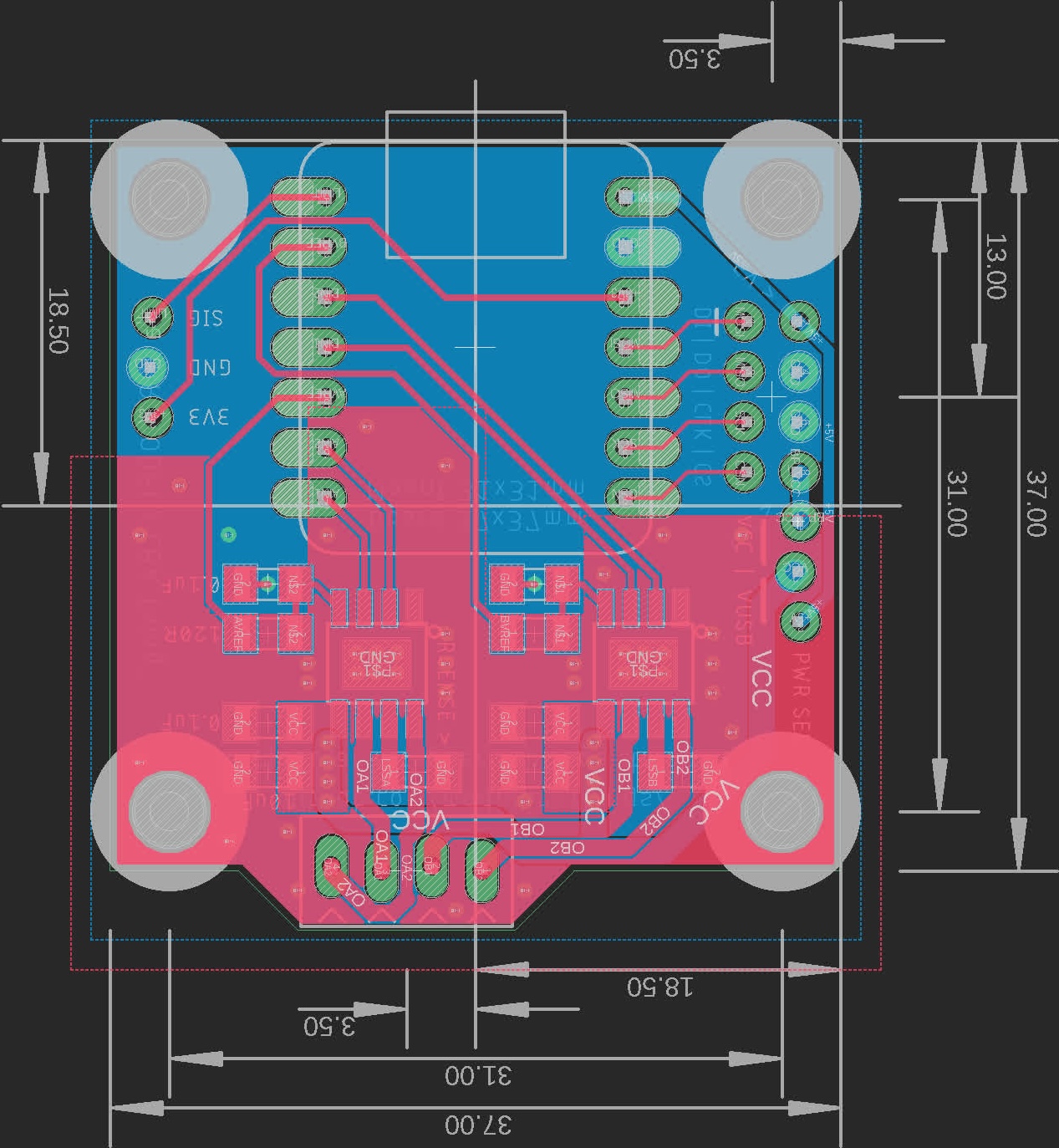
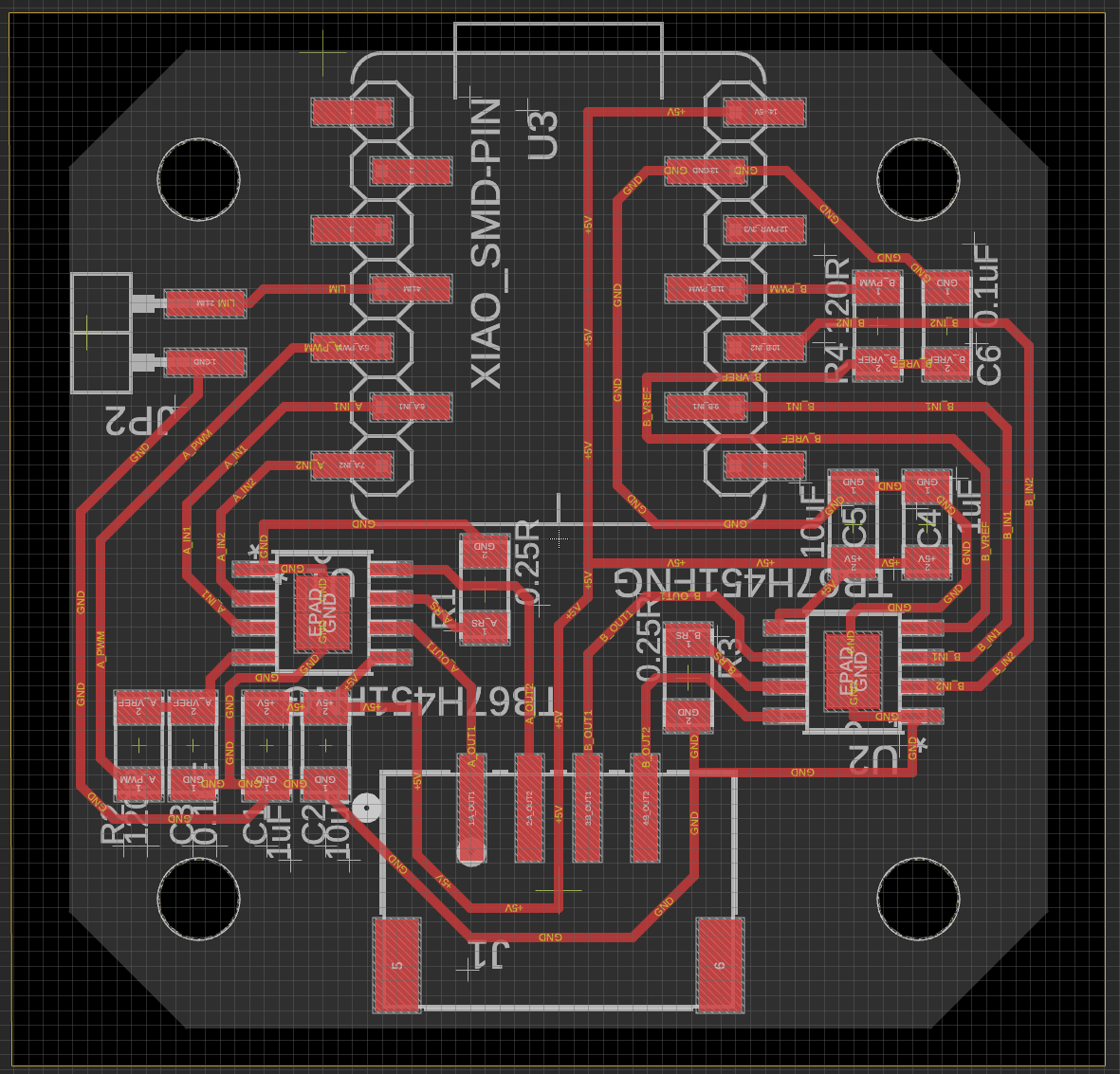
Dual H-Bridge chip Board

Ref. Norwway bootcamp

alt text
alt text alt text alt text

BOM

Item Qty
Xiao RP2040 1
DRV8421A Dual H-Bridge Stepper Driver 1
100uF 1
0.1uF 1206 1
S4B-XH-SM4-TB
or
1x4 SMD Pinheader
1
1x2 SMD Pinheader 1
1x7 SMD Vertical Pinsocket 2

alt text

Moduler Things BootCamp Leon2024 BootCamp Norway2026
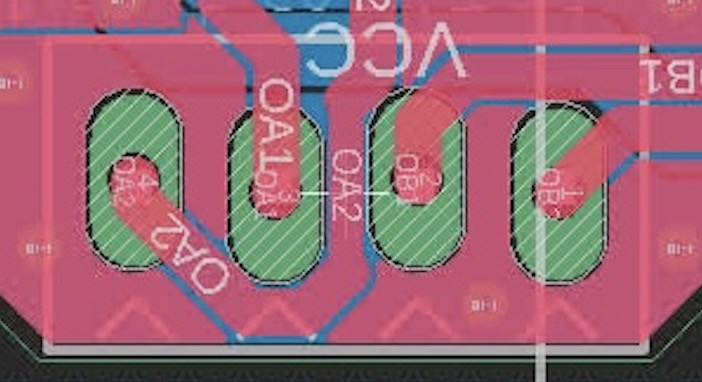
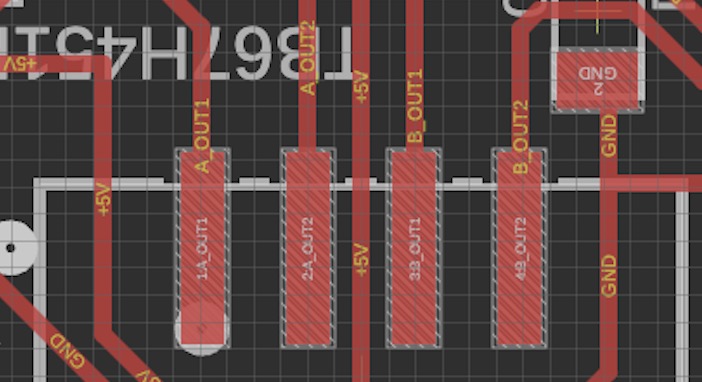
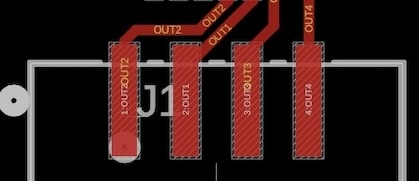
OA2, OA1, OB1, OB2 OA1, OA2, OB1, OB2 Out1, Out2, Out3, Out4
(OA1, OA2, OB1, OB2)
stepperDriver.cpp
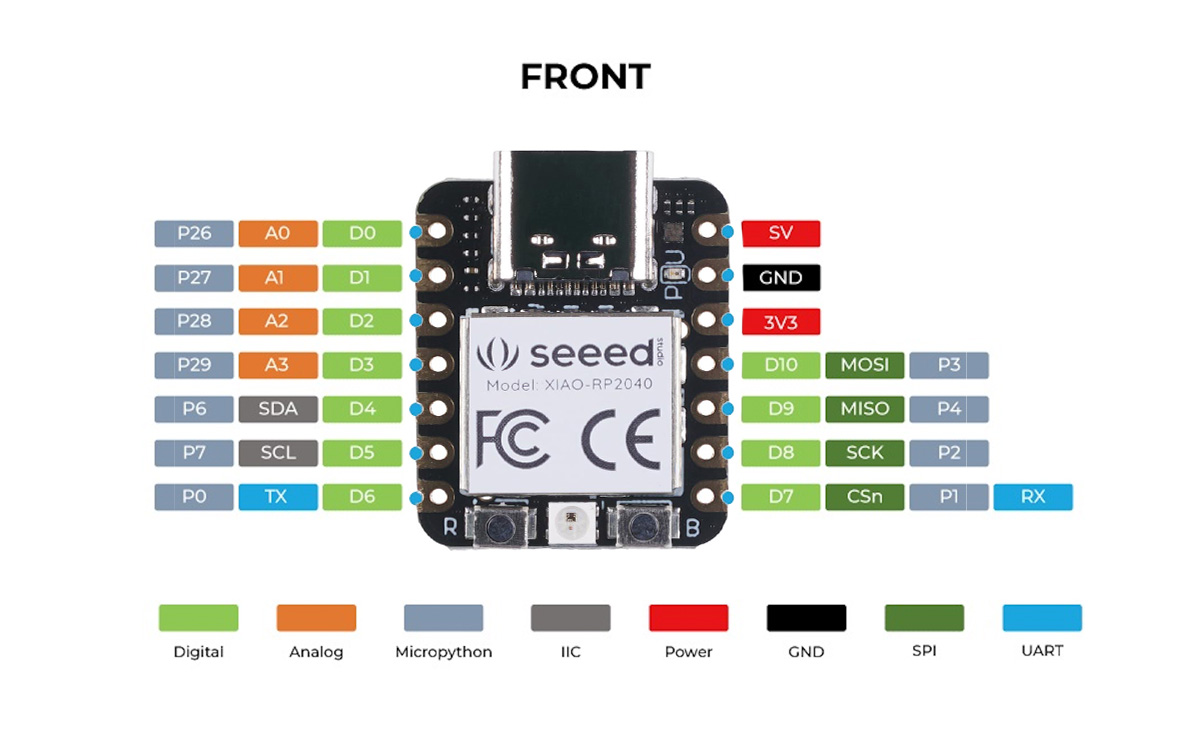
#define AIN1_PIN 6 // on D4 #define AIN1_PIN 7 // on D5 #define AIN1_PIN 29 //(IN1) on D3
#define AIN2_PIN 7 // on D5 #define AIN2_PIN 0 // on D6 #define AIN2_PIN 6 //(IN2) on D4
#define BIN1_PIN 28 // on D2 #define BIN1_PIN 2 // on D8 #define BIN1_PIN 4 //(IN3) on D2
#define BIN2_PIN 4 // on D9 #define BIN2_PIN 4 // on D9 #define BIN2_PIN 28 //(IN4) on D9
#define APWM_PIN 27 // on D1 #define APWM_PIN 6 // on D4
#define BPWM_PIN 29 // on D3 #define BPWM_PIN 3 // on D10
simple_stepper.ino
#define PIN_LIMIT 26 // on D0 #define PIN_LIMIT 29 // on D3 #define PIN_LIMIT 26 // on D0
Reference
Moduler Things site(Tips) FA24_JPN
FA24_NGA
FA25
class page

DRV8421A sample code

DRV8421A sample code (click to view)
DRV8421A_sample.cpp
 1
 2
 3
 4
 5
 6
 7
 8
 9
10
11
12
13
14
15
16
17
18
19
20
21
22
23
24
25
26
27
28
29
30
31
32
33
34
35
36
37
38
39
40
41
42
43
44
45
46
47
48
49
50
51
52
53
54
55
56
57
58
59
60
61
62
63
64
65
66
67
68
69
70
71
72
73
74
75
76
77
  // Pin definitions for XIAO
  #define AIN1_PIN 29  // DRV8421A IN1
  #define AIN2_PIN 6   // DRV8421A IN2
  #define BIN1_PIN 4   // DRV8421A IN3
  #define BIN2_PIN 28  // DRV8421A IN4

  // PWM value to limit effective voltage to 2.8V with a 5.0V supply
  // Calculation: 255 * (2.8V / 5.0V) approx 143
  const int limitPWM = 143; 

  // Step speed in microseconds (lower is faster)
  int stepDelayUs = 3000; 

  // Steps required for a 360-degree rotation (360 / 1.8 = 200 steps)
  const int stepsPerRev = 200;

  void setup() {
    // Set all control pins as outputs
    pinMode(AIN1_PIN, OUTPUT);
    pinMode(AIN2_PIN, OUTPUT);
    pinMode(BIN1_PIN, OUTPUT);
    pinMode(BIN2_PIN, OUTPUT);
  }

  /**
    * Sends control signals to the 4-wire input of DRV8421A.
    * Uses analogWrite for HIGH states to limit the motor current.
    */
  void setStep(bool a1, bool a2, bool b1, bool b2) {
    // Phase A control
    if (a1) analogWrite(AIN1_PIN, limitPWM); else digitalWrite(AIN1_PIN, LOW);
    if (a2) analogWrite(AIN2_PIN, limitPWM); else digitalWrite(AIN2_PIN, LOW);

    // Phase B control
    if (b1) analogWrite(BIN1_PIN, limitPWM); else digitalWrite(BIN1_PIN, LOW);
    if (b2) analogWrite(BIN2_PIN, limitPWM); else digitalWrite(BIN2_PIN, LOW);

    delayMicroseconds(stepDelayUs);
  }

  // Perform a 360-degree forward rotation
  void moveForward() {
    for (int i = 0; i < stepsPerRev; i++) {
      int phase = i % 4;
      switch(phase) {
        // Full-Step sequence based on data sheet Figure 7-4
        case 0: setStep(true,  false, true,  false); break; // Step 1
        case 1: setStep(false, true,  true,  false); break; // Step 2
        case 2: setStep(false, true,  false, true);  break; // Step 3
        case 3: setStep(true,  false, false, true);  break; // Step 4
      }
    }
  }

  // Perform a 360-degree backward rotation
  void moveBackward() {
    for (int i = 0; i < stepsPerRev; i++) {
      int phase = i % 4;
      switch(phase) {
        // Reverse of the Full-Step sequence
        case 0: setStep(true,  false, false, true);  break; // Step 4 rev
        case 1: setStep(false, true,  false, true);  break; // Step 3 rev
        case 2: setStep(false, true,  true,  false); break; // Step 2 rev
        case 3: setStep(true,  false, true,  false); break; // Step 1 rev
      }
    }
  }

  void loop() {
    // 1. Rotate 360 degrees forward
    moveForward();
    delay(1000); // Wait for 1 second

    // 2. Rotate 360 degrees backward
    moveBackward();
    delay(1000); // Wait for 1 second
  }

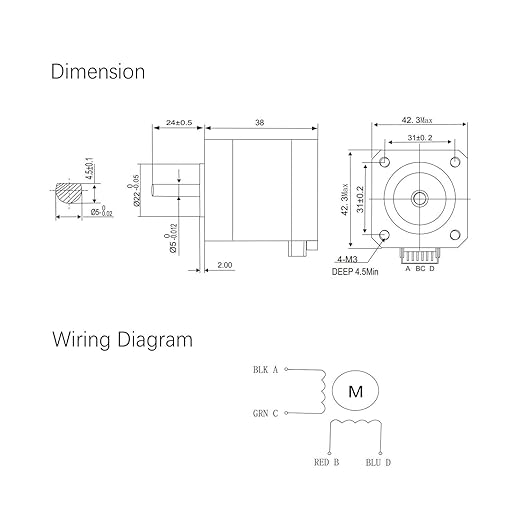
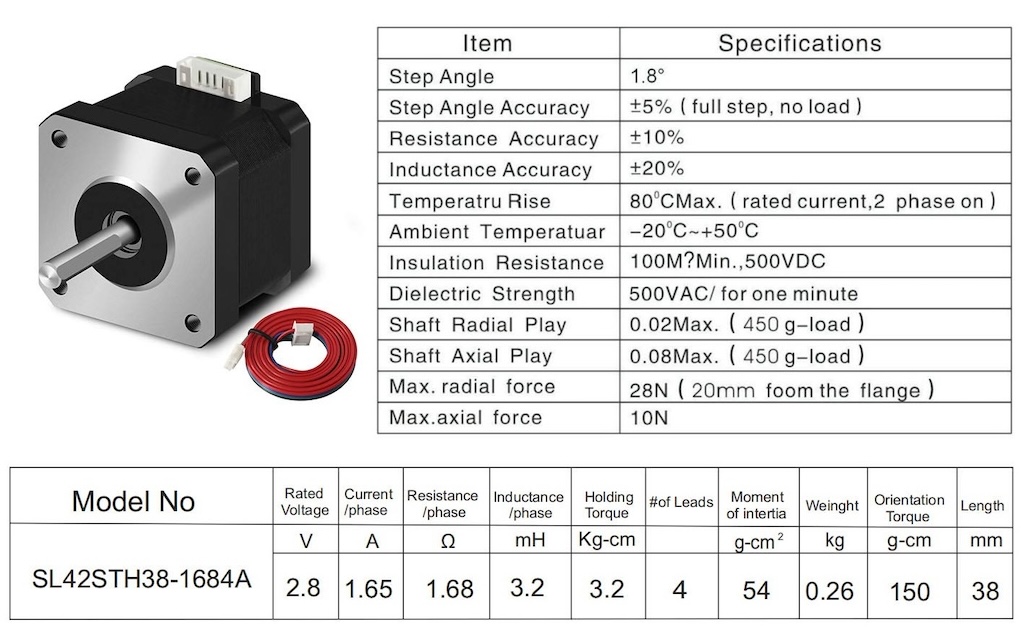
Stepper Motor

Nema 17

alt text

alt text

Rated Volatage 2.8 V
Current/phase 1.65 A
Resistance/phase 1.68 OHM
Inductance/phase 3.2 mH
Holding Torque 3.2 Kg-cm
Orientation Torque 150 g-cm

Firmware

In gitlab (arduino and python)

.
└── simple_stepper
    ├── cobs.cpp
    ├── cobs.h
    ├── COBSUSBSerial.cpp
    ├── COBSUSBSerial.h
    ├── fixedPointUtes.cpp
    ├── fixedPointUtes.h
    ├── lutgen.js
    ├── motionStateMachine.cpp
    ├── motionStateMachine.h
    ├── serializationUtes.cpp
    ├── serializationUtes.h
    ├── simple_stepper.ino
    ├── stepperDriver.cpp
    ├── stepperDriver.h
    └── stepperLUT.h
stepperDriver.cpp
4
5
6
7
8
// XIAO Pin Definitions
#define AIN1_PIN 29
#define AIN2_PIN 6
#define BIN1_PIN 4
#define BIN2_PIN 28
simple_stepper.ino
6
#define PIN_LIMIT 26

Note

using the RP2040 at 200MHz

Python

Python code

The code is designed for Python >= 3.10
Dependencies:
pyserial >= 3.4
cobs >= 1.1

% python3 --version
Python 3.13.5

# Check pyserial version (if installed)
% python3 -c "import serial; print(serial.__version__)"
3.5

# Install or update pyserial if missing or outdated
% python3 -m pip install --user --upgrade pyserial

# Check cobs version
% python3 -c "import cobs; print(cobs.__version__)"
1.2.1

# Install or update pyserial and cobs if needed
% python3 -m pip install --user --upgrade pyserial cobs
.
├── __pycache__
│   ├── cobs_usb_serial.cpython-312.pyc
│   └── motor.cpython-312.pyc
├── cobs_usb_serial.py
├── coreXY.py
├── coreXYZ.py
├── linearAxis.py
├── main_test_gantry.py
├── main_test.py
├── motor.py
└── two_axis.py

Code

Serial port

%  ls /dev/cu.usb* 
/dev/cu.usbmodem1101
linearAxis.py
33
m = motor.Motor("/dev/cu.usbmodem1101")
linearAxis.py (click to view)
linearAxis.py
 1
 2
 3
 4
 5
 6
 7
 8
 9
10
11
12
13
14
15
16
17
18
19
20
21
22
23
24
25
26
27
28
29
30
31
32
33
34
35
36
37
38
39
40
41
42
43
44
45
46
47
48
49
50
51
52
53
54
55
56
57
58
59
60
61
62
63
64
65
66
67
68
69
70
71
72
73
74
75
76
77
import motor
import time
import random

def goto(m: motor.Motor, x, vel, accel):
    m.set_target_position(x, vel, accel)

    while True:
        states = m.get_states()
        current_pos = states["position"]
        is_moving = states["is_moving"]

        # for debugging: display current status
        # print(f"Pos: {current_pos:.3f}, Moving: {is_moving}")

        if not is_moving:
            break
        if abs(current_pos - x) < 0.01:
            break
        time.sleep(0.05)

def goto_debag(m: motor.Motor, x, vel, accel):
    m.set_target_position(x, vel, accel)
    while True:
        states = m.get_states()
        print(f"DEBUG: Current={states['position']:.2f}, Target={x}")

        if not states["is_moving"] or abs(states["position"] - x) <= 0.05:
            break
        time.sleep(0.1)

def main():
    m = motor.Motor("/dev/cu.usbmodem1101") # ========== your serial port

    # --- Motor Specifications & Hardware Setup ---
    rated_current_a = 1.65      # Motor rated current [A]
    steps_per_unit = 200        # Steps per full revolution

    # --- Current Scaling Factor (0.0 to 1.0) ---
    # This factor is a ratio of the driver's max output.
    # Estimated Current [A] = rated_current_a * current_factor
    #  - 0.25 : ~0.41A (Safe without heatsink)
    #  - 0.45 : ~0.74A (Recommended with heatsink, balanced torque)
    #  - 0.60 : ~1.00A (High torque, REQUIRES heatsink + active fan)
    current_factor = 0.45 

    # --- Motion Profile ---
    vel = 1.5 +1.5              # Speed (turns/sec)
    acc = 5.0                   # Acceleration (turns/sec²)

    # --- Apply Settings to Motor ---
    m.set_steps_per_unit(steps_per_unit)
    m.set_current(current_factor)  # Passing the ratio to the driver


    # --- loop ---
    print("Starting oscillation... Press Ctrl+C to stop.")
    try:
        while True:
            print("Moving to 1.0...")
            goto(m, 1.0, vel, acc)
            time.sleep(0.2)

            print("Moving to 0.0...")
            goto(m, 0.0, vel, acc)
            time.sleep(0.2)

    except KeyboardInterrupt:
        print("\nInterrupted by user. Cleaning up...")
    # --- end loop ---

    time.sleep(0.1)
    m.set_current(0)
    print("Motor disabled.")

if __name__ == "__main__":
    main()

CoreXY

Ref. CoreXY UI for Leon board

coreXY.py (click to view)
coreXY.py
 1
 2
 3
 4
 5
 6
 7
 8
 9
10
11
12
13
14
15
16
17
18
19
20
21
22
23
24
25
26
27
28
29
30
31
32
33
34
35
36
37
38
39
40
41
42
43
44
45
46
47
48
49
50
51
52
53
54
55
56
57
58
59
60
61
62
63
64
65
66
67
68
69
70
71
72
73
74
75
76
77
78
79
80
81
82
83
84
85
86
87
88
89
90
91
92
93
94
    import motor
    import time

    def goto_xy(m1, m2, x_pos, y_pos, vel, accel):
        """
        CoreXY Kinematics Calculation: 
        Motor A (m1) = X + Y
        Motor B (m2) = X - Y
        """
        target_a = x_pos + y_pos
        target_b = x_pos - y_pos

        # Send target positions to motor controllers
        m1.set_target_position(target_a, vel, accel)
        m2.set_target_position(target_b, vel, accel)

        # Wait until movement is completed
        while True:
            s1 = m1.get_states()
            s2 = m2.get_states()

            # Check if both motors finished their moves
            if not s1["is_moving"] and not s2["is_moving"]:
                break

            # Tolerance check to prevent infinite loops due to minor encoder noise
            if abs(s1["position"] - target_a) < 0.05 and abs(s2["position"] - target_b) < 0.05:
                break

            time.sleep(0.05)

    def main():
        # --- Motor Connection Setup ---
        # Verified ports from 'ls /dev/cu.usb*'
        m1 = motor.Motor("/dev/cu.usbmodem11101") # Motor A
        m2 = motor.Motor("/dev/cu.usbmodem11201") # Motor B

        # --- Motor Specifications & Hardware Setup ---
        rated_current_a = 1.65      # Motor rated current [A]
        steps_per_unit = 200        # Steps per revolution

        # --- Current Scaling Factor (0.0 to 1.0) ---
        # This factor is a ratio of the driver's max output.
        # Estimated Current [A] = rated_current_a * current_factor
        #  - 0.25 : ~0.41A (Safe without heatsink)
        #  - 0.45 : ~0.74A (Recommended with heatsink, balanced torque)
        #  - 0.60 : ~1.00A (High torque, REQUIRES heatsink + active fan)
        current_factor = 0.45  

        # --- Motion Profile ---
        vel = 2.0 #3.0 for coreXY, 2.0 for coreXYZ  # Speed (revolutions/second)
        acc = 1.0 #3.0 for coreXY, 1.0 for coreXYZ  # Acceleration (revolutions/sec²)

        # --- Initialization ---
        print("Initializing CoreXY motors...")
        for m in [m1, m2]:
            m.set_steps_per_unit(steps_per_unit)
            m.set_current(current_factor)
            m.set_position(0.0)    # Set current physical location as (0,0)

        # --- Main Loop ---
        print("Starting X and Y axis test... Press Ctrl+C to stop.")
        try:
            while True:
                # --- X-Axis Test ---
                print("Testing X-Axis (+1.0)... Both motors should spin in SAME direction.")
                goto_xy(m1, m2, 1.0, 0.0, vel, acc)
                time.sleep(0.5)

                print("Returning to Home...")
                goto_xy(m1, m2, 0.0, 0.0, vel, acc)
                time.sleep(0.5)

                # --- Y-Axis Test ---
                print("Testing Y-Axis (+1.0)... Both motors should spin in OPPOSITE directions.")
                goto_xy(m1, m2, 0.0, 1.0, vel, acc)
                time.sleep(0.5)

                print("Returning to Home...")
                goto_xy(m1, m2, 0.0, 0.0, vel, acc)
                time.sleep(0.5)
        # -- End Loop ---

        except KeyboardInterrupt:
            print("\nTest interrupted by user. Cleaning up...")

        # --- Shutdown Procedure ---
        time.sleep(0.1)
        m1.set_current(0) # Disable current to prevent overheating while idle
        m2.set_current(0)
        print("Motors disabled. Safety shutdown complete.")

    if __name__ == "__main__":
        main()

CoreXYZ + UI (Not yet tested)

https://core-xyz.com/theory.html

coreXYZ.py (click to view)
coreXYZ.py
  1
  2
  3
  4
  5
  6
  7
  8
  9
 10
 11
 12
 13
 14
 15
 16
 17
 18
 19
 20
 21
 22
 23
 24
 25
 26
 27
 28
 29
 30
 31
 32
 33
 34
 35
 36
 37
 38
 39
 40
 41
 42
 43
 44
 45
 46
 47
 48
 49
 50
 51
 52
 53
 54
 55
 56
 57
 58
 59
 60
 61
 62
 63
 64
 65
 66
 67
 68
 69
 70
 71
 72
 73
 74
 75
 76
 77
 78
 79
 80
 81
 82
 83
 84
 85
 86
 87
 88
 89
 90
 91
 92
 93
 94
 95
 96
 97
 98
 99
100
101
102
103
104
105
106
107
108
109
110
111
112
113
114
115
116
117
118
119
120
121
122
123
124
125
126
127
128
129
130
131
132
133
134
135
136
137
138
139
140
141
142
143
144
145
146
147
148
149
150
151
152
153
154
155
156
157
158
159
160
161
162
163
164
165
166
167
168
169
170
171
172
173
174
175
176
177
178
179
180
181
182
183
184
import time
import tkinter as tk
import threading
import math

''' 
MODE SWITCH:
Set USE_REAL_HARDWARE = True to connect to the boards.
Set USE_REAL_HARDWARE = False to run the Simulator (No boards needed).
'''
USE_REAL_HARDWARE = False

try:
    if USE_REAL_HARDWARE:
        import motor
        from cobs import cobs
        import struct
        ''' Hardware libraries loaded successfully '''
except ImportError:
    ''' Fallback to Simulator if libraries are missing '''
    USE_REAL_HARDWARE = False
    print("Libraries missing. Falling back to Simulator mode.")

'''
Dummy Motor Class
Used when USE_REAL_HARDWARE is False.
Outputs calculated revolutions to the console.
'''
class DummyMotor:
    def __init__(self, port):
        self.port = port
        print(f"DummyMotor initialized on {port}")

    def set_current(self, factor):
        print(f"[{self.port}] Current factor set to: {factor}")

    def set_position(self, pos):
        print(f"[{self.port}] Logic position reset to: {pos}")

    def set_target_position(self, target, vel, accel):
        print(f"  --> [{self.port}] Target: {target:+.4f} rev (Vel: {vel}, Accel: {accel})")

'''
Hardware Calibration Constants
'''
CAPSTAN_DIAMETER = 19.0
XY_CIRCUMFERENCE = CAPSTAN_DIAMETER * math.pi
XY_MM_TO_REV = 1.0 / XY_CIRCUMFERENCE

''' Z Lead Screw: Tr8x8 (Pitch 2mm, 4 starts) '''
Z_PITCH = 2.0
Z_START = 4.0
Z_LEAD = Z_PITCH * Z_START
Z_MM_TO_REV = 1.0 / Z_LEAD

class CoreXYZApp:
    def __init__(self, root):
        self.root = root
        self.root.title("CoreXYZ Controller (Hybrid Mode)")
        self.root.geometry("400x550")

        ''' 
        Motor Initialization 
        If USE_REAL_HARDWARE is True, it attempts to open serial ports.
        Make sure the port paths match your Mac (e.g., /dev/cu.usbmodem...)
        '''
        if USE_REAL_HARDWARE:
            try:
                self.m1 = motor.Motor("/dev/cu.usbmodem11101")
                self.m2 = motor.Motor("/dev/cu.usbmodem11201")
                self.m3 = motor.Motor("/dev/cu.usbmodem11301")
                print("Connected to Real Hardware.")
            except Exception as e:
                print(f"Serial Connection Failed: {e}")
                self.root.destroy()
                return
        else:
            self.m1 = DummyMotor("Motor_A")
            self.m2 = DummyMotor("Motor_B")
            self.m3 = DummyMotor("Motor_C")
            print("Running in Simulator Mode.")

        ''' Default Motion Parameters '''
        self.current_factor = 0.45
        self.velocity = 2.0
        self.accel = 1.0
        self.pos_x, self.pos_y, self.pos_z = 0.0, 0.0, 0.0

        ''' Hardware Pre-setup '''
        for m in [self.m1, self.m2, self.m3]:
            m.set_current(self.current_factor)
            m.set_position(0.0)

        self.setup_ui()

    def setup_ui(self):
        ''' Layout Setup '''
        input_frame = tk.Frame(self.root, pady=15)
        input_frame.pack()

        tk.Label(input_frame, text="Step Distance (mm):").pack(side=tk.LEFT)
        self.step_ent = tk.Entry(input_frame, width=8)
        self.step_ent.insert(0, "10.0")
        self.step_ent.pack(side=tk.LEFT, padx=5)

        ''' Position Readout '''
        self.status_label = tk.Label(self.root, text="X:0.00 Y:0.00 Z:0.00", 
                                    font=("Arial", 16, "bold"), fg="blue", pady=10)
        self.status_label.pack()

        ''' XY Motion Pad '''
        pad_frame = tk.Frame(self.root)
        pad_frame.pack(pady=10)

        tk.Button(pad_frame, text="Y+ (Back)", width=10, height=2, 
                command=lambda: self.move_rel(0, 1, 0)).grid(row=0, column=1, pady=5)

        tk.Button(pad_frame, text="X- (Left)", width=10, height=2, 
                command=lambda: self.move_rel(-1, 0, 0)).grid(row=1, column=0, padx=5)
        tk.Button(pad_frame, text="HOME", width=10, height=2, bg="lightgrey",
                command=self.go_home).grid(row=1, column=1)
        tk.Button(pad_frame, text="X+ (Right)", width=10, height=2, 
                command=lambda: self.move_rel(1, 0, 0)).grid(row=1, column=2, padx=5)

        tk.Button(pad_frame, text="Y- (Front)", width=10, height=2, 
                command=lambda: self.move_rel(0, -1, 0)).grid(row=2, column=1, pady=5)

        ''' Z Motion Pad '''
        z_frame = tk.Frame(self.root, pady=15)
        z_frame.pack()
        tk.Button(z_frame, text="Z+ (Up)", width=12, height=2, fg="darkgreen",
                command=lambda: self.move_rel(0, 0, 1)).pack(side=tk.LEFT, padx=10)
        tk.Button(z_frame, text="Z- (Down)", width=12, height=2, fg="darkred",
                command=lambda: self.move_rel(0, 0, -1)).pack(side=tk.LEFT, padx=10)

        ''' Safety Options '''
        tk.Button(self.root, text="DISABLE MOTORS", fg="white", bg="black",
                command=self.disable_all).pack(pady=20)

    def move_rel(self, dx, dy, dz):
        try:
            dist = float(self.step_ent.get())
            self.pos_x += dx * dist
            self.pos_y += dy * dist
            self.pos_z += dz * dist

            self.status_label.config(text=f"X:{self.pos_x:.2f} Y:{self.pos_y:.2f} Z:{self.pos_z:.2f}")

            threading.Thread(target=self.execute_kinematics, 
                            args=(self.pos_x, self.pos_y, self.pos_z), daemon=True).start()
        except Exception as e:
            print(f"Error: {e}")

    def execute_kinematics(self, x_mm, y_mm, z_mm):
        ''' CoreXYZ Matrix Conversion '''
        x_rev = x_mm * XY_MM_TO_REV
        y_rev = y_mm * XY_MM_TO_REV
        z_rev = z_mm * Z_MM_TO_REV

        target_a = x_rev + y_rev + z_rev
        target_b = x_rev - y_rev + z_rev
        target_c = z_rev

        ''' Send computed targets to motor controllers '''
        self.m1.set_target_position(target_a, self.velocity, self.accel)
        self.m2.set_target_position(target_b, self.velocity, self.accel)
        self.m3.set_target_position(target_c, self.velocity, self.accel)

    def go_home(self):
        self.pos_x, self.pos_y, self.pos_z = 0.0, 0.0, 0.0
        self.status_label.config(text="X:0.00 Y:0.00 Z:0.00")
        threading.Thread(target=self.execute_kinematics, args=(0, 0, 0), daemon=True).start()

    def disable_all(self):
        ''' Sets current to zero for all linked motors '''
        self.m1.set_current(0)
        self.m2.set_current(0)
        self.m3.set_current(0)
        print("Motors Disabled.")

if __name__ == "__main__":
    root = tk.Tk()
    app = CoreXYZApp(root)
    root.mainloop()

Screw shop

Next Spiral development

DRV8421A MicroPython Implementation (1/32 Microstepping) with PIO (Not yet tested)

firmware.py (click to view)
firmware.py
  1
  2
  3
  4
  5
  6
  7
  8
  9
 10
 11
 12
 13
 14
 15
 16
 17
 18
 19
 20
 21
 22
 23
 24
 25
 26
 27
 28
 29
 30
 31
 32
 33
 34
 35
 36
 37
 38
 39
 40
 41
 42
 43
 44
 45
 46
 47
 48
 49
 50
 51
 52
 53
 54
 55
 56
 57
 58
 59
 60
 61
 62
 63
 64
 65
 66
 67
 68
 69
 70
 71
 72
 73
 74
 75
 76
 77
 78
 79
 80
 81
 82
 83
 84
 85
 86
 87
 88
 89
 90
 91
 92
 93
 94
 95
 96
 97
 98
 99
100
101
102
103
104
105
106
107
108
109
110
111
112
113
114
115
116
117
118
119
120
121
122
123
124
125
126
127
128
129
130
131
132
133
134
135
136
137
138
139
140
141
142
143
144
145
146
147
148
149
150
151
152
153
import machine
import time
import struct
import sys
from rp2 import PIO, StateMachine, asm_pio
from array import array
import math

'''
System Clock and PWM Resolution Configuration
We overclock the RP2040 to 250MHz to achieve ultra-high frequency PWM.
This removes audible switching noise and improves current stability.
'''
machine.freq(250_000_000)
PWM_CLOCK = 250_000_000
PWM_RANGE = (1 << 13) - 1 ''' 8191 increments for fine-grained current control '''

'''
Hardware Pin Assignments for XIAO RP2040
These GPIO numbers correspond to your Arduino #define statements.
I1/I2 control Phase A, while I3/I4 control Phase B.
'''
I1, I2 = 29, 6   ''' AIN1, AIN2 '''
I3, I4 = 4, 28   ''' BIN1, BIN2 (IN3, IN4) '''
PIN_LIMIT = machine.Pin(26, machine.Pin.IN, machine.Pin.PULL_UP)

'''
Motor Current and Step Constants
m_limit: Limits duty cycle to ~65% to match the 2.8V motor rating on a 5V rail.
MOTOR_ID: Unique identifier for serial communication.
'''
m_limit = int(0.65 * PWM_RANGE)
MOTOR_ID = 2
MSG_SET_TARG_VEL = 21
MSG_GET_STATES = 25
MSG_ACK = 31

'''
PIO (Programmable I/O) Program
This assembly code runs on a dedicated co-processor to generate hardware-accurate PWM.
It ensures that the CPU remains free to handle serial communication without 
jittering the motor timing.
'''
@asm_pio(sideset_init=PIO.OUT_LOW)
def pwm_prog():
    pull(noblock).side(0) ''' Load duty cycle from system memory '''
    mov(x, osr)           ''' Store duty cycle in register X '''
    mov(y, isr)           ''' Load PWM period into register Y '''
    label("loop")
    jmp(x_not_y, "skip")  ''' Flip output bit when duty cycle threshold is met '''
    nop().side(1)
    label("skip")
    jmp(y_dec, "loop")    ''' Count down until end of period '''

class PIOPWM:
    '''
    Driver class to interface with the PIO State Machines.
    Each instance manages one H-Bridge input pin.
    '''
    def __init__(self, sm_id, pin):
        self._sm = StateMachine(sm_id, pwm_prog, freq=PWM_CLOCK, sideset_base=machine.Pin(pin))
        self._sm.put(PWM_RANGE)
        self._sm.exec("pull()")
        self._sm.exec("mov(isr,osr)")
        self._sm.active(1)

    def put(self, val):
        ''' Updates duty cycle. Using -1 forces a 0% duty (Off state) '''
        self._sm.put(val)

''' Initialize 4 PWM channels to drive the Dual H-Bridge (DRV8421A) '''
pwms = [PIOPWM(i, p) for i, p in enumerate([I1, I2, I3, I4])]

@micropython.native
def calc_steps(power):
    '''
    Generates a microstepping lookup table using a sine-wave approximation.
    A power value of 5 creates 128 entries for a full electrical cycle (4 steps).
    This provides 128 / 4 = 32 microsteps per full step (1/32).
    '''
    length = int(math.pow(2, power + 2))
    segment = length // 4
    steps = [array('i', [0] * length), array('i', [0] * length)]
    for i in range(0, segment):
        ''' Calculate linear slopes to approximate a sinusoidal current drive '''
        steps[0][i] = m_limit
        steps[1][i] = int(m_limit * ((segment-1-i)/(segment-1)) + (-m_limit)*i/(segment-1))
        steps[0][segment+i] = int(m_limit * ((segment-1-i)/(segment-1)) + (-m_limit)*i/(segment-1))
        steps[1][segment+i] = -m_limit
        steps[0][2*segment+i] = -m_limit
        steps[1][2*segment+i] = int((-m_limit) * ((segment-1-i)/(segment-1)) + m_limit*i/(segment-1))
        steps[0][3*segment+i] = int((-m_limit) * ((segment-1-i)/(segment-1)) + m_limit*i/(segment-1))
        steps[1][3*segment+i] = m_limit
    return steps

''' Prepare the 1/32 Microstepping Table '''
step_table = calc_steps(5)

@micropython.native
def update_motor(step_idx):
    '''
    Translates the step table into H-Bridge control signals.
    Positive values drive the first pin of the phase, Negative drive the second.
    '''
    s12 = step_table[0][step_idx]
    s34 = step_table[1][step_idx]

    ''' Phase A Logic '''
    if s12 > 0:
        pwms[0].put(s12)
        pwms[1].put(-1)
    else:
        pwms[0].put(-1)
        pwms[1].put(-s12)

    ''' Phase B Logic '''
    if s34 > 0:
        pwms[2].put(s34)
        pwms[3].put(-1)
    else:
        pwms[2].put(-1)
        pwms[3].put(-s34)

def main():
    current_step = 0
    table_len = len(step_table[0])

    while True:
        ''' 
        Serial Command Listener
        Allows host applications to query status or update parameters via binary packets.
        '''
        if sys.stdin.any():
            cmd = sys.stdin.buffer.read(1)[0]
            if cmd == MSG_SET_TARG_VEL:
                payload = sys.stdin.buffer.read(8)
                targ_v, max_a = struct.unpack('<ff', payload)
                sys.stdout.buffer.write(bytes([MSG_ACK]))
            elif cmd == MSG_GET_STATES:
                ''' Returns binary state data compatible with serializationUtes.h '''
                sys.stdout.buffer.write(bytes([MSG_ACK]) + struct.pack('<f', float(current_step)))

        ''' 
        Motor Drive Execution
        Incrementing 'current_step' cycles through the microstep table.
        Adjusting sleep_us changes the RPM of the motor.
        '''
        update_motor(current_step % table_len)
        current_step += 1
        time.sleep_us(400) ''' Control step frequency here '''

if __name__ == '__main__':
    main()

COREXYZ

coreXYZ.py (click to view)
coreXYZ.py
  1
  2
  3
  4
  5
  6
  7
  8
  9
 10
 11
 12
 13
 14
 15
 16
 17
 18
 19
 20
 21
 22
 23
 24
 25
 26
 27
 28
 29
 30
 31
 32
 33
 34
 35
 36
 37
 38
 39
 40
 41
 42
 43
 44
 45
 46
 47
 48
 49
 50
 51
 52
 53
 54
 55
 56
 57
 58
 59
 60
 61
 62
 63
 64
 65
 66
 67
 68
 69
 70
 71
 72
 73
 74
 75
 76
 77
 78
 79
 80
 81
 82
 83
 84
 85
 86
 87
 88
 89
 90
 91
 92
 93
 94
 95
 96
 97
 98
 99
100
101
102
103
104
105
106
107
108
109
110
111
112
import motor
import time
import tkinter as tk
from tkinter import ttk
import threading

'''
Hardware Constants & Scaling
Calculate steps or revolutions required to move 1mm for each drive type.
'''
''' XY Capstan: Diameter 19.0mm -> Circumference = 19.0 * PI '''
CAPSTAN_CIRCUMFERENCE = 19.0 * 3.14159 
XY_MM_TO_REV = 1.0 / CAPSTAN_CIRCUMFERENCE

''' Z Lead Screw: Tr8x8 (8mm lead per revolution) '''
Z_LEAD = 8.0
Z_MM_TO_REV = 1.0 / Z_LEAD

class CoreXYZApp:
    def __init__(self, root):
        self.root = root
        self.root.title("CoreXYZ Controller")

        ''' Motor Connections '''
        try:
            self.m1 = motor.Motor("/dev/cu.usbmodem11101") ''' Motor A '''
            self.m2 = motor.Motor("/dev/cu.usbmodem11201") ''' Motor B '''
            self.m3 = motor.Motor("/dev/cu.usbmodem11301") ''' Motor C '''
            print("Motors connected successfully.")
        except Exception as e:
            print(f"Connection Error: {e}")

        ''' Default Parameters '''
        self.current_factor = 0.45
        self.velocity = 2.0
        self.accel = 1.0
        self.step_size = 10.0 ''' Move 10mm per click '''

        ''' Initialize Motors '''
        for m in [self.m1, self.m2, self.m3]:
            m.set_current(self.current_factor)
            m.set_position(0.0)

        self.setup_ui()

    def setup_ui(self):
        ''' Create UI Layout using Buttons '''
        frame = ttk.Frame(self.root, padding="20")
        frame.grid(row=0, column=0, sticky=(tk.W, tk.E, tk.N, tk.S))

        ''' Step Size Entry '''
        ttk.Label(frame, text="Step (mm):").grid(row=0, column=0)
        self.step_ent = ttk.Entry(frame, width=7)
        self.step_ent.insert(0, "10.0")
        self.step_ent.grid(row=0, column=1)

        ''' Navigation Buttons (Grid Layout) '''
        ''' Row 1: Y+ and Z+ '''
        ttk.Button(frame, text="Y+", command=lambda: self.move_rel(0, 1, 0)).grid(row=1, column=1, pady=5)
        ttk.Button(frame, text="Z+", command=lambda: self.move_rel(0, 0, 1)).grid(row=1, column=3, padx=20)

        ''' Row 2: X-, Home, X+ '''
        ttk.Button(frame, text="X-", command=lambda: self.move_rel(-1, 0, 0)).grid(row=2, column=0)
        ttk.Button(frame, text="HOME", command=self.go_home).grid(row=2, column=1)
        ttk.Button(frame, text="X+", command=lambda: self.move_rel(1, 0, 0)).grid(row=2, column=2)

        ''' Row 3: Y- and Z- '''
        ttk.Button(frame, text="Y-", command=lambda: self.move_rel(0, -1, 0)).grid(row=3, column=1, pady=5)
        ttk.Button(frame, text="Z-", command=lambda: self.move_rel(0, 0, -1)).grid(row=3, column=3)

        ''' Safety Stop Button '''
        ttk.Button(frame, text="DISABLE MOTORS", command=self.disable_all).grid(row=4, column=0, columnspan=4, pady=20)

    def move_rel(self, dx, dy, dz):
        ''' Read step size from UI and trigger movement in a thread to keep UI responsive '''
        dist = float(self.step_ent.get())
        threading.Thread(target=self.goto_xyz_mm, args=(dx*dist, dy*dist, dz*dist)).start()

    def goto_xyz_mm(self, x_mm, y_mm, z_mm):
        '''
        CoreXYZ Kinematics with Differential Scaling:
        A = X_rev + Y_rev + Z_rev
        B = X_rev - Y_rev + Z_rev
        C = Z_rev
        '''
        x_rev = x_mm * XY_MM_TO_REV
        y_rev = y_mm * XY_MM_TO_REV
        z_rev = z_mm * Z_MM_TO_REV

        target_a = x_rev + y_rev + z_rev
        target_b = x_rev - y_rev + z_rev
        target_c = z_rev

        ''' Note: Using relative target for simplified UI click logic '''
        self.m1.set_target_position(target_a, self.velocity, self.accel)
        self.m2.set_target_position(target_b, self.velocity, self.accel)
        self.m3.set_target_position(target_c, self.velocity, self.accel)

    def go_home(self):
        ''' Return to 0, 0, 0 position '''
        threading.Thread(target=self.goto_xyz_mm, args=(0, 0, 0)).start()

    def disable_all(self):
        ''' Safety shutdown '''
        for m in [self.m1, self.m2, self.m3]:
            m.set_current(0)
        print("Safety shutdown: Motors disabled.")

if __name__ == "__main__":
    root = tk.Tk()
    app = CoreXYZApp(root)
    root.mainloop()