5 MicroBlocks
As I am Ambassador of MicroBlocks , I often use MicroBlocks with STEM hardware to make course for students and teachers.
I would like to share the experience of how MicroBlocks improve embedded programming efficiency, and make STEM project easy to DIY for students.
This includes rapid prototyping methods, debugging strategies, and optimization tips that leverage MicroBlocks' live programming capabilities to accelerate ESP32 development.
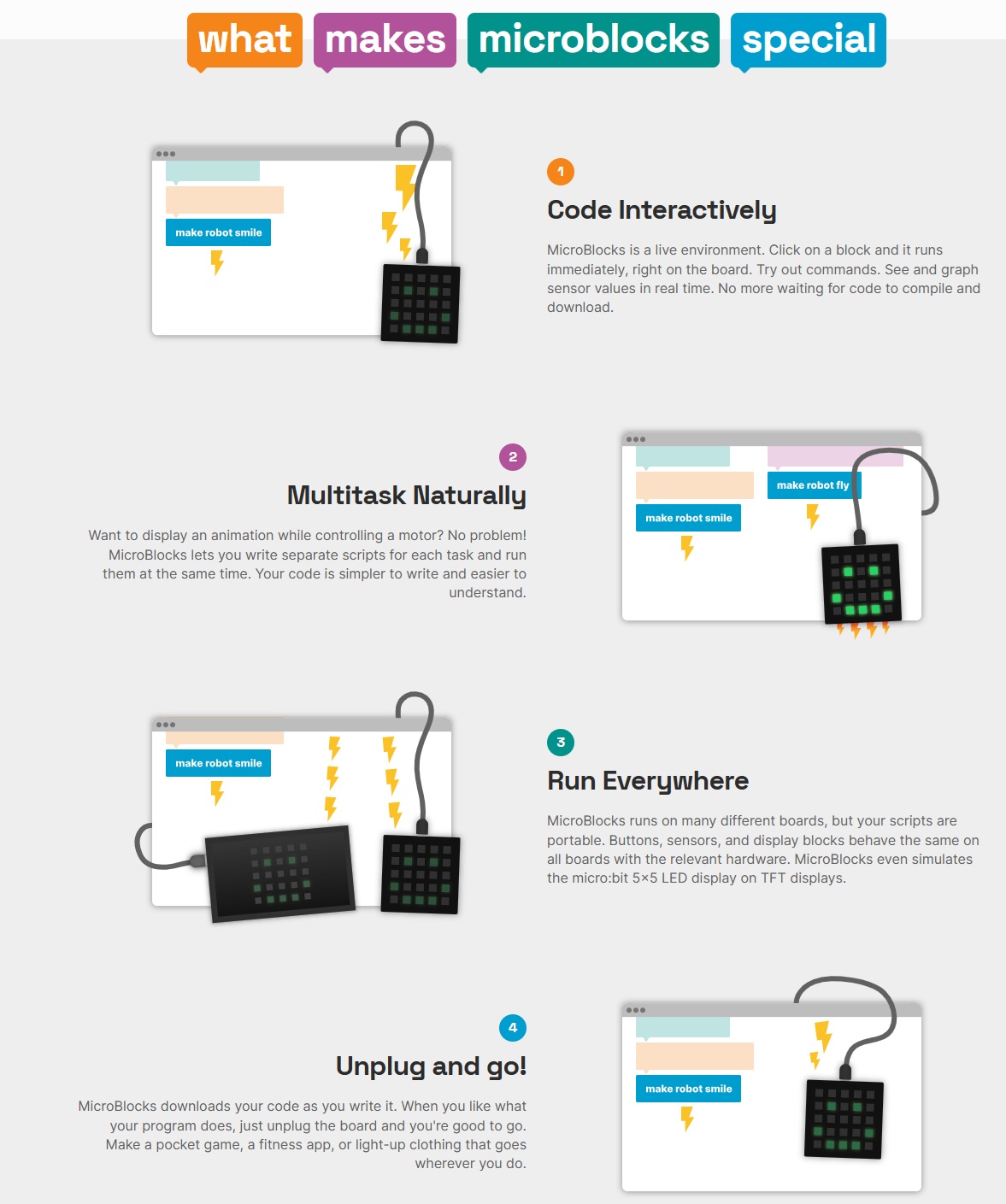
MicroBlocks is a high-performance, visual block-based programming language. Unlike other block editors that translate to C and then compile, MicroBlocks runs a small virtual machine on the board, enabling live, parallel execution.
Pros:
● Parallelism: Naturally supports running multiple scripts simultaneously (multi-threading), which is intuitive for managing multiple sensors.
● Live Coding: Changes to the blocks are reflected on the hardware instantly without a "compile-and-upload" cycle.
● Accessibility: Great for beginners or non-programmers to understand logic without syntax errors.
| Dimension | MicroBlocks | Arduino (C++) | MicroPython |
|---|---|---|---|
| Programming Language | Graphical Blocks (Scratch-like) | C / C++ | Python 3 |
| Execution Mode | Real-time Interpretation: Instant code execution | Compiled: Requires building and flashing | Interpreted: REPL Interactive mode |
| Learning Curve | Very Low (Beginners/K-12) | Moderate (Syntax & Memory management) | Low (Clean syntax, easy for data) |
| Execution Performance | Medium (Virtual Machine overhead) | Highest (Near-native hardware speed) | Medium (Interpreter overhead, higher RAM) |
| Multi-tasking | Native Support (Parallel blocks) | Manual (via millis or FreeRTOS) | Supported (via uasyncio / threads) |
| Library Ecosystem | Limited (Community-driven modules) | Vast (Supports almost every sensor) | Rich (Easy to port Python libraries) |
| Debugging Experience | Excellent: Real-time variable feedback | Slower: Relies on Serial Print/Reboot | Excellent: Real-time via REPL command line |
| Ideal Use Cases | STEM Education, Rapid Prototyping | Industrial Products, High-performance apps | IoT, AI, Data logging, Web services |
| ESP32 Feature Support | Basic GPIO, WiFi, Bluetooth | Full Support (Dual-core, Low-power, DSP) | Good (WiFi, Filesystem, Network protocols) |
Source: Gemini by Google, Mar 2026
5.1 Open MicroBlocks Web IDE
I simply used Chrome to open the following links to access the MicroBlocks IDE.
No installation is required.
● International version: https://microblocks.fun/run/microblocks.html
● Chinese mirror: https://microblocksfun.cn/run/microblocks.html
5.2 Flash ESP32 with MicroBlocks firmware(VM)
I followed these steps to flash the MicroBlocks firmware into the ESP32 board.
● Connect the ESP32 to your computer via
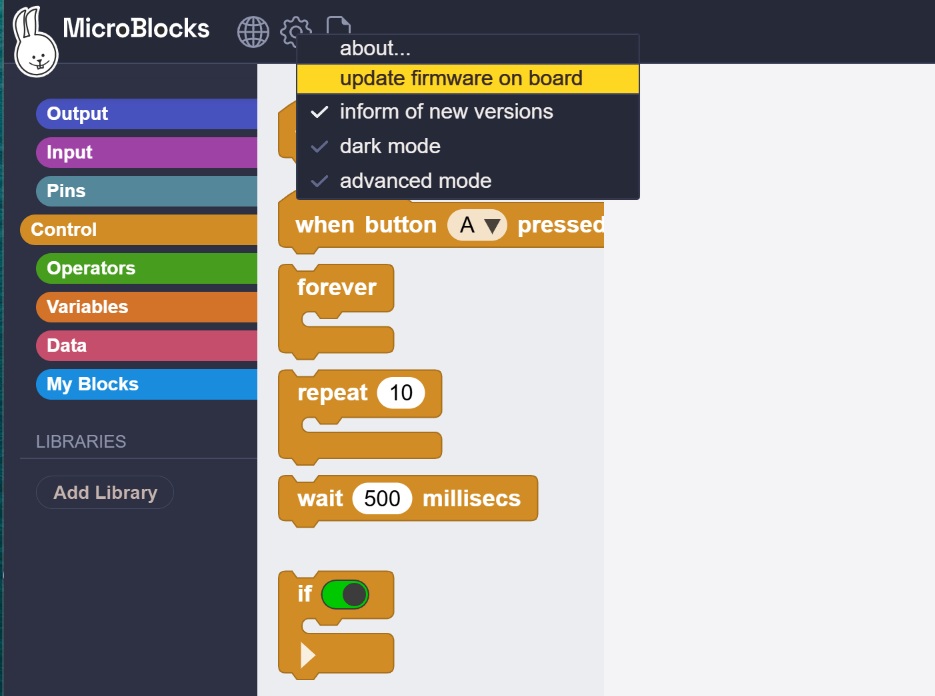
● Select "Advance - update fireware on board" button in the MicroBlocks IDE
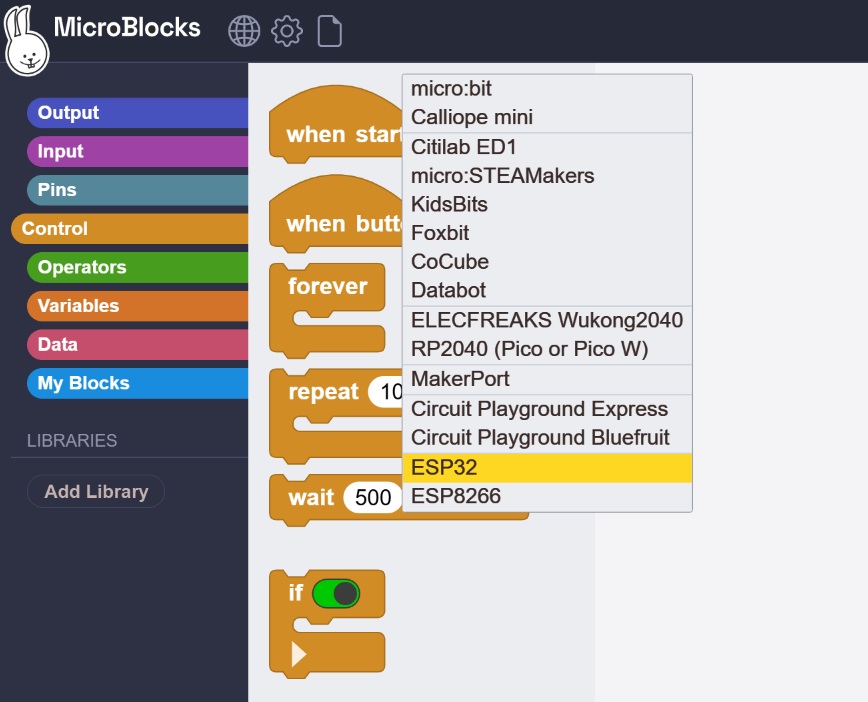
● Select "ESP32" For the board type
● Select ESP32 Serial Port(COM port) for flash
● Wating for the flash process to complete
| Step 1: Select | Step 2: Flash Firmware |
|---|---|
 |  |
5.3 MicroBlocks let LED blink
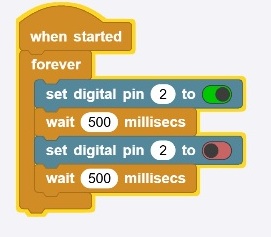
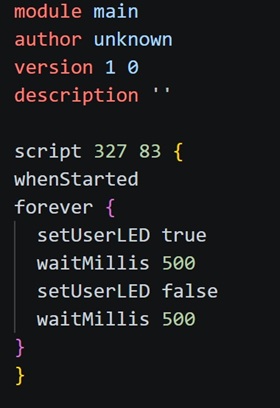
The following example demonstrates programming the ESP32 using the MicroBlocks IDE to make an LED fade in and out. The program outputs debug logs directly in the IDE, which can be viewed for troubleshooting and monitoring purposes.
 |  |
|---|
5.4 MicroBlocks feature - live debug
5.4.1 live debug
Here is an experiment on LED blinking. I utilized the live debugging feature of MicroBlocks to complete this test. As demonstrated, MicroBlocks enables real-time updates to the ESP32 without requiring firmware flashing, making it highly convenient for STEM projects and educational activities.
5.4.2 LED Fade Rate Experiment
Investigation Question: At what fade speed does the human eye perceive the LED as continuously lit rather than flickering?
I adjusted the delay parameter incrementally to determine the threshold where flickering becomes imperceptible.
- Initial setting: 500ms — Obvious flickering effect.
- Adjusted to 100ms: Flickering still clearly visible.
- Adjusted to 50ms: Flickering still detectable.
- Adjusted to 10ms: Flickering still noticeable.
- Final test at 5ms: No visible flickering; the LED appeared steadily lit.
Conclusion: When the LED blink interval is reduced to 5ms, the human eye perceives it as continuously illuminated. This indicates the critical flicker fusion threshold for this observation falls between 5ms and 10ms (equivalent to 100–200 Hz), beyond which discrete flashes merge into apparent steady light.
5.5 MicroBlocks let servo motor rotate
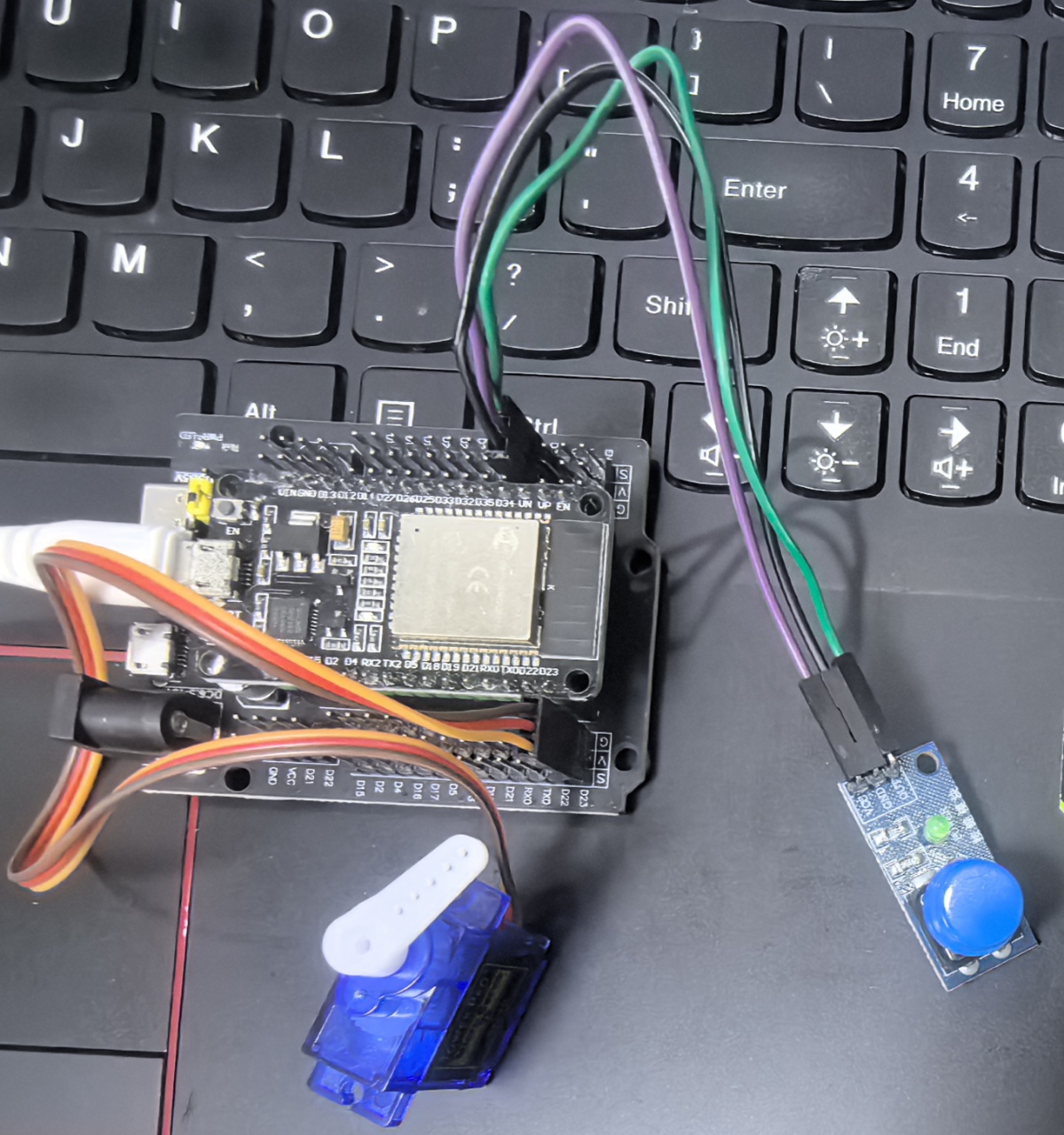
The following is an example of ESP32 and servo motor.
 |  |
|---|
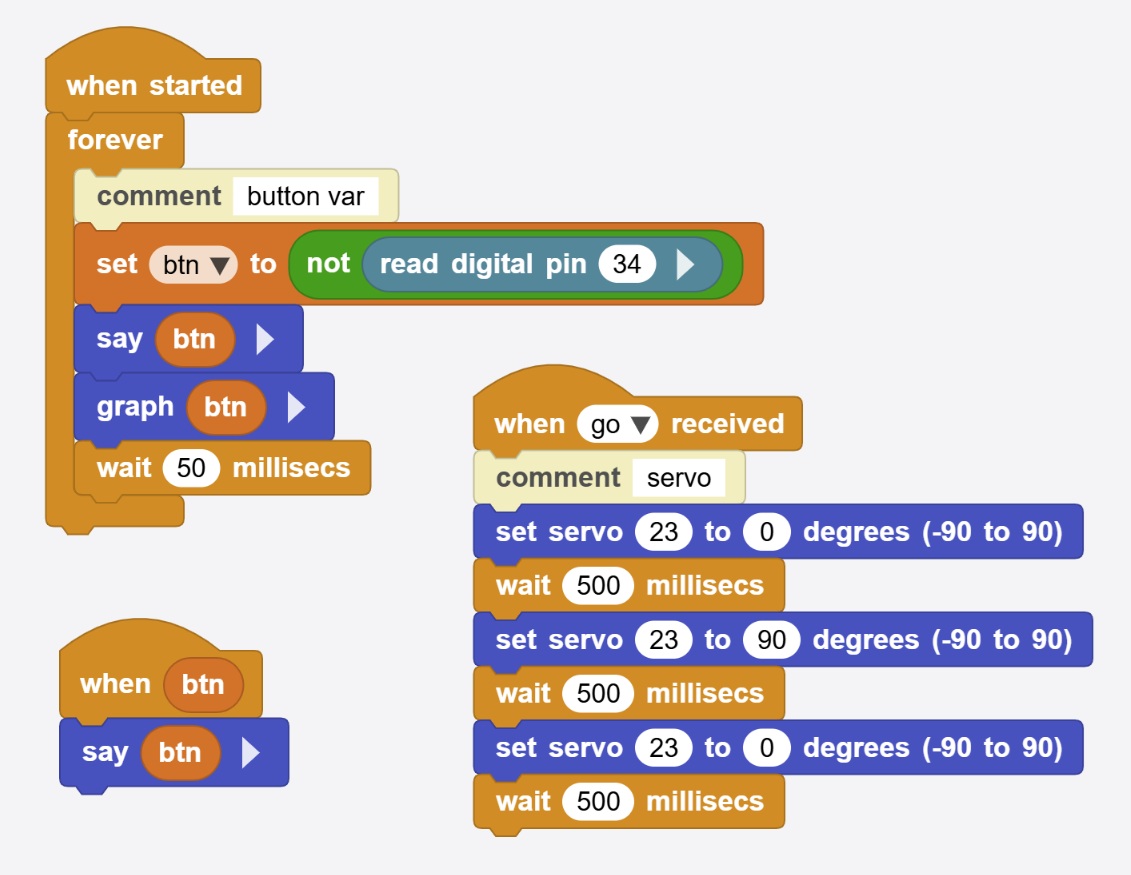
Here is the code of block code above:
module main
author unknown
version 1 0
description ''
variables btn

script 49 49 {
whenStarted
forever {
  comment 'button var'
  btn = (not (digitalReadOp 34))
  sayIt btn
  graphIt btn
  waitMillis 50
}
}

script 263 218 {
whenBroadcastReceived 'go'
comment 'servo'
setServoAngle 23 0
waitMillis 500
setServoAngle 23 90
waitMillis 500
setServoAngle 23 0
waitMillis 500
}

script 56 345 {
whenCondition btn
sayIt btn
}
5.6 MicroBlocks feature - bidirectional real-time communication.
The following examples illustrate the bidirectional real-time capabilities of MicroBlocks:
-
Real-time sensor feedback: When the user presses a physical button, the web-based MicroBlocks IDE instantly displays the button state (true/false) with live graphical data visualization.
-
Real-time actuator control: When clicking the servo block in the MicroBlocks IDE, the physical servo on the board responds and rotates immediately.
These examples demonstrate seamless two-way communication between the hardware and software environments, enabling interactive debugging and rapid prototyping without code compilation or firmware flashing.