Output Devices
weekly schedule.
| Time block | Wed | Thu | Fri | Sat | Sun | Mon | Tue | Wed |
|---|---|---|---|---|---|---|---|---|
| Global class | 3 h | |||||||
| Local class | 1,5 h | 1,5 h | ||||||
| Research | 1 h | 2 h | ||||||
| Design | 2 h | 4 h | ||||||
| Fabrication | 1 h | |||||||
| Documentation | 2 h | 3 h | ||||||
| Review |
overview.
If input devices are about reading the world, output devices are about acting on it. This week the assignment is to add an output device to a microcontroller board I’ve designed and make it do something. The obvious connection to my final project — a height-adjustable standing desk — is motors. The desk has four telescopic legs, each driven by a stepper motor. That makes stepper control the natural target here: useful now, essential later.
The group assignment is to measure power consumption of an output device. Both the individual and group work are documented here and on the Fab Lab León 2026 Group Page.
learning objectives.
- Understand the role of PWM as the foundation of output device control.
- Know when to use a MOSFET vs an H-bridge vs a dedicated driver IC.
- Design and fabricate a PCB that interfaces a stepper motor driver to the XIAO RP2040.
- Write firmware that drives a stepper motor with acceleration/deceleration.
- Measure power consumption of an output device using a multimeter.
- Connect this week’s work directly to the standing desk final project.
assignments.
- Group assignment: measure the power consumption of an output device — document on group page and reflect here on what I learned.
- Individual assignment: add an output device to a microcontroller board I’ve designed, program it to do something.
research.
Neil’s class this week opened with the usual safety reminder, but with more weight than usual — we’re moving up in voltage and current. One thing he said that stuck with me: approach higher voltage work the same way you approach machining. Don’t do it late at night, don’t do it alone, don’t do it when you’re angry. Same discipline, different danger. A milliamp through your heart is fibrillation; 10 milliamps contracts your muscles and you lose control. The numbers are not abstract.
Beyond that, the class was a tour of the full output device landscape:
Pulse Width Modulation (PWM) is the foundation of most of what we’re doing. A digital pin can only be fully on (3.3 V) or fully off (0 V) — there is no middle ground. PWM cheats around this: instead of holding a steady voltage, it switches the pin on and off thousands of times per second and varies the fraction of time it stays on. That fraction is the duty cycle. This is also why Arduino’s analogWrite() function is misleadingly named — it doesn’t produce a true analog voltage, it produces a PWM signal. More on that in the Arduino Analog Output documentation.
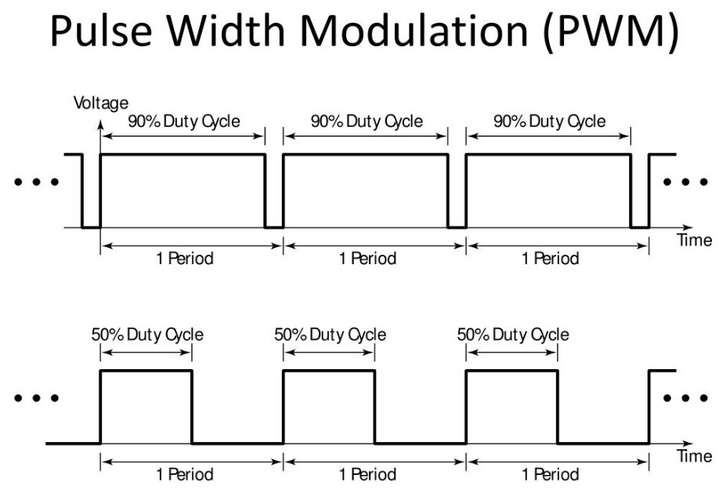
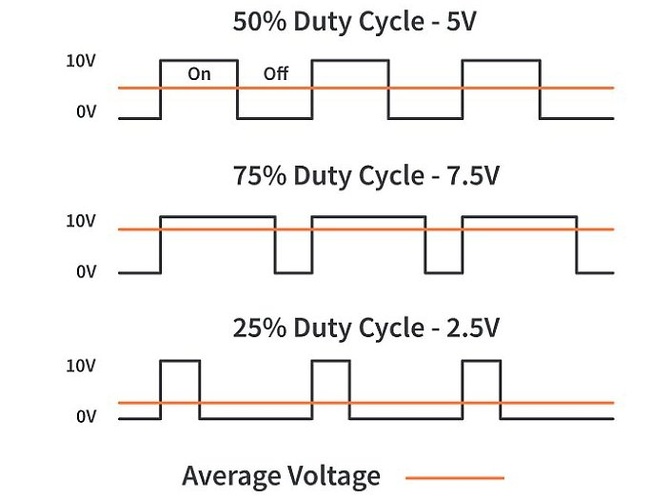
The key insight is that the output device — an LED, a motor coil, a speaker — cannot react fast enough to follow the individual pulses. It only sees the average. If the pin is on 50% of the time at 10 V, the device behaves as if it were receiving a steady 5 V. At 75% on-time it sees 7.5 V. At 25% it sees 2.5 V. The processor is always switching between fully on and fully off; the physics of the load does the averaging for free.
Power transistors — MOSFETs — are what actually drive the current. A processor pin can push maybe 50 mA. A motor or a bright LED needs much more. A MOSFET (a 20-cent part) sits between the processor and the load: the processor sets the gate voltage, the MOSFET handles the current. NMOSFET sinks current to ground; PMOSFET sources it. For one direction, a single NMOSFET is enough. For two directions (reversible motors), you need an H-bridge: two PMOSFETs on top, two NMOSFETs on bottom, and you alternate which pair is on to flip the current direction.


Power measurement is the group assignment. The key idea: power is voltage × current, not just one or the other. Neil demonstrated three approaches: using the ammeter input on the multimeter (series with the load), using a shunt resistor (measure the tiny voltage drop across a known resistance with V = IR), and using a USB power meter if the device is USB-powered.
Output device types Neil covered:
- LEDs — blink and fade via PWM. Charlieplexing (N pins control N×(N-1) LEDs), NeoPixels (smart RGB LEDs chained over a single data line), and high-power LEDs (require MOSFETs; thermal runaway risk).
- Displays — LCD (character only, not recommended), OLED via I2C (pixel-addressable, cheap — SSD1306, already used in Week 04), TFT via SPI (colour, larger), e-ink (retains image without power).
- Audio — MP3 module with SD card, I2S DAC chip for wavetable synthesis (Neil’s recommendation), or Class D audio through an H-bridge.
- DC motors — H-bridge, PWM to control speed. Gearhead motors for high-torque low-speed applications.
- BLDC motors — brushless DC: three sets of coils, triple half-bridge. Used in drone propellers, fans, milling spindles.
- Stepper motors — the one I care about most. Two sets of coils, driven in sequence. Full step → half step → microstepping → sinusoidal drive: each level smoother than the last. Standard step angle: 1.8° (200 steps/revolution).
- Servo motors — a DC motor with a gear train, potentiometer, and closed-loop controller built in. Driven by 50 Hz PWM, 1–2 ms pulse width sets the angle.
Connection to my final project: the standing desk legs use stepper motors. Each leg needs a stepper running off a dedicated XIAO RP2040, with RS485/CAN communication to the master controller. This week is the right time to get the stepper driver working on a board I’ve designed, even if it’s a test board rather than the final one.
group assignment.
The group assignment for this week is to measure the power consumption of an output device. I used a small DC motor as the device under test, measuring voltage and current with the Fluke 179 multimeter in ammeter mode. Both the methodology and the results are documented on the Fab Lab León 2026 Group Page.
Device under test: small DC motor, no load.
Measurement setup: the multimeter was placed in series with the motor using the ammeter input (mA port). Voltage was read directly from the 9 V battery.
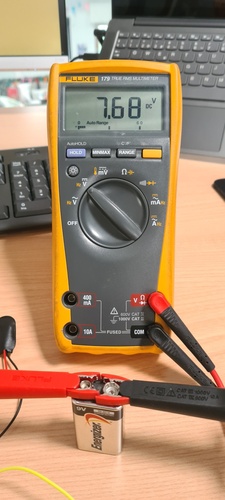
Results:
| Parameter | Value |
|---|---|
| Voltage (V) | 7.68 V |
| Current (I) | 10 mA = 0.01 A |
| Power (P = V × I) | 0.077 W |
The power formula is straightforward: P = V × I. At 7.68 V and 10 mA, the motor draws roughly 77 mW with no load attached. That is a realistic idle figure for a small DC motor — under load, current rises and so does power consumption proportionally, since P scales linearly with both V and I.
One thing worth keeping in mind: milliamps need to be converted to amps before applying the formula. 10 mA = 0.01 A, not 10. Easy mistake to make when reading the multimeter display.
DC motor running at 7.68 V, multimeter showing 10 mA current draw.
What I learned: the measurement itself is simple, but it makes you think about what the numbers mean in practice. A motor drawing 77 mW at idle will draw significantly more under load — the current is what changes, not the voltage. For the standing desk final project, where four stepper motors will run simultaneously, knowing idle vs loaded current draw is critical for sizing the power supply correctly.
Two rookie mistakes worth flagging for anyone doing this for the first time:
1. Wrong probe port. The Fluke 179 has three input jacks: COM (black, always), V/Ω (red, for voltage and resistance), and mA/400mA or 10A (red, for current). Plugging the red probe into V/Ω and switching the dial to amps does nothing useful — the current path goes through the wrong jack. The probe must go into the mA port. For currents above 400 mA, use the 10A port instead or you will blow the internal fuse.
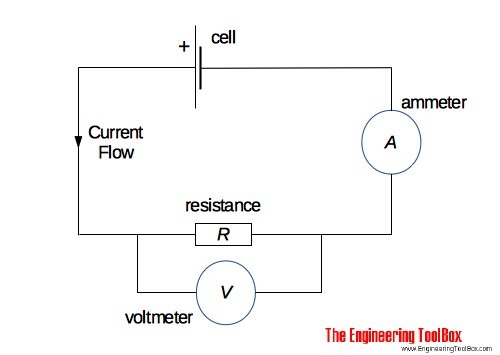
2. Parallel instead of series. A voltmeter goes in parallel with the load — an ammeter goes in series. The diagram below shows both instruments in the same circuit: the ammeter (A) is part of the main current loop, the voltmeter (V) taps across the resistance without interrupting it. Connecting an ammeter in parallel instead of series creates a near short-circuit: the multimeter’s internal resistance is almost zero, so all the current from the source flows through the meter instead of the load. Best case: the internal fuse blows. Worst case: damage to the meter or the source.
spiral 0 — output device selection.
The first step was to go through the kit and list the available actuators at Fab Lab León.
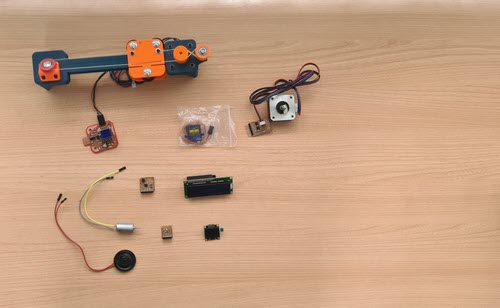
Selection rationale:
The standing desk needs stepper motors — one per leg, four total. The whole final project depends on getting stepper control right. That makes this week’s individual assignment a direct investment in the final project rather than a detour.
The motor is the Usongshine 17HS4023 — a NEMA 17 bipolar stepper with a step angle of 1.8° (200 steps/revolution), 0.7 A per phase, 4 Ω phase resistance. The step angle is printed in the motor’s datasheet: olimex.com/Products/Robot-CNC-Parts/StepperMotors/SM-17HS4023.
spiral 1 — first test with Adrián’s board.
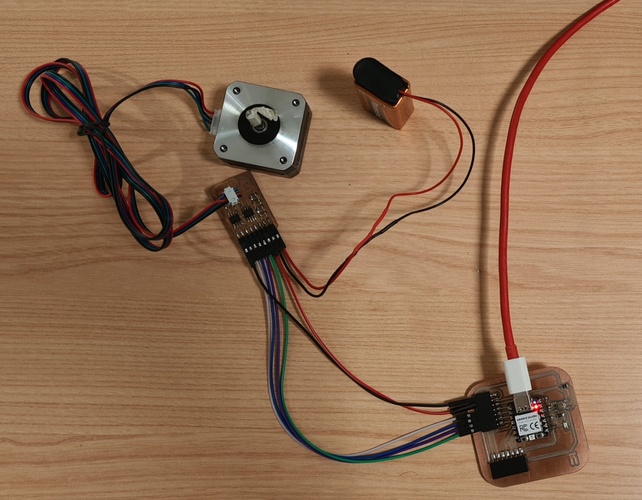
Before designing my own PCB, I borrowed Adrián’s A4953 dual H-bridge board to validate the full chain: XIAO RP2040 → driver → NEMA 17. The A4953 is a single full-bridge DMOS driver (±2 A, up to 40 V) — two of them on the same board cover the two coils of a bipolar stepper. Control is simple: two pins per driver (IN1, IN2) set the current direction via a truth table.
Connection — XIAO RP2040 → Adrián’s board (6-pin FTDI connector):
| FTDI pin | Signal | XIAO pin |
|---|---|---|
| 1 | GND | GND |
| 2 | IN2-A | D0 (GPIO26) |
| 3 | IN1-A | D1 (GPIO27) |
| 4 | IN2-B | D2 (GPIO28) |
| 5 | IN1-B | D3 (GPIO29) |
| 6 | VCC | 3V3 |
Motor power (9 V) goes to the VDO/GND pads on the board — completely separate from the logic supply. GND common between XIAO and driver board is mandatory.
🤖 Claude (Anthropic) on the stepper motor full-step sequence prompt:
I need to control a NEMA 17 bipolar stepper motor via two Allegro A4953 H-bridge drivers using a XIAO RP2040. Write a minimal Arduino sketch that rotates the motor one full revolution clockwise, pauses one second, then one full revolution counter-clockwise, using a manual full-step sequence without any library.
The sketch drives four control pins (coilA_IN1, coilA_IN2, coilB_IN1, coilB_IN2) using a 4-step sequence array. Each step applies a specific combination of HIGH/LOW to alternate current direction in each coil. After every move, coast() sets all pins LOW to put both A4953s into standby and prevent coil heating. STEP_DELAY_US = 2000 µs gives a safe starting speed of 500 steps/s — well below the measured pull-in rate of ~695 steps/s for this motor at 9 V.
🤖 Claude (Anthropic) on the stepper serial control and acceleration prompt:
Extend the previous sketch to accept Serial commands at 115200 baud: s
The sketch implements a step() function that advances one step and delays 1000000/stepsPerSecond microseconds, making speed a live variable. The ‘a’ command ramps linearly from 100 to 1200 steps/s over 150 steps using integer interpolation, cruises at peak speed for 200 steps, then ramps back down — demonstrating the difference between pull-in rate (~695 steps/s cold start) and slew rate (1200 steps/s with ramp). The ‘v’ command is capped at 700 steps/s to prevent stall on cold starts.
tab: stepper-spiral1.ino | stepper-spiral1.ino
// Fab Academy 2026 - Fab Lab León
// Week 10: Output Devices — stepper motor spiral 1
// NEMA 17 bipolar (Usongshine 17HS4023) via 2x Allegro A4953 (Adrián's board)
// XIAO RP2040 (arduino-pico core)
// Spiral 1: rotate CW 200 steps, pause, CCW 200 steps

// A4953 #1 — coil A
const int coilA_IN1 = D1;  // GPIO27 → PA6 → IN1
const int coilA_IN2 = D0;  // GPIO26 → PA7 → IN2

// A4953 #2 — coil B
const int coilB_IN1 = D3;  // GPIO29 → PA4 → IN1
const int coilB_IN2 = D2;  // GPIO28 → PA5 → IN2

const int STEP_DELAY_US = 2000;

// Full-step sequence [coilA_IN1, coilA_IN2, coilB_IN1, coilB_IN2]
// A4953 truth table: IN1=1,IN2=0 → Forward | IN1=0,IN2=1 → Reverse
const int seq[4][4] = {
  {1, 0, 1, 0},
  {0, 1, 1, 0},
  {0, 1, 0, 1},
  {1, 0, 0, 1}
};

void coast() {
  // IN1=IN2=0 → Coast/Standby — releases coils, saves power
  digitalWrite(coilA_IN1, 0); digitalWrite(coilA_IN2, 0);
  digitalWrite(coilB_IN1, 0); digitalWrite(coilB_IN2, 0);
}

void setCoils(int s) {
  s = ((s % 4) + 4) % 4;
  digitalWrite(coilA_IN1, seq[s][0]);
  digitalWrite(coilA_IN2, seq[s][1]);
  digitalWrite(coilB_IN1, seq[s][2]);
  digitalWrite(coilB_IN2, seq[s][3]);
}

void rotate(int numSteps, bool clockwise) {
  for (int i = 0; i < numSteps; i++) {
    int s = clockwise ? (i % 4) : (3 - (i % 4));
    setCoils(s);
    delayMicroseconds(STEP_DELAY_US);
  }
  coast();
}

void setup() {
  pinMode(coilA_IN1, OUTPUT); pinMode(coilA_IN2, OUTPUT);
  pinMode(coilB_IN1, OUTPUT); pinMode(coilB_IN2, OUTPUT);
  coast();
  delay(500);
}

void loop() {
  rotate(200, true);   // 1 full revolution CW — 200 steps × 1.8° = 360°
  delay(1000);
  rotate(200, false);  // 1 full revolution CCW
  delay(1000);
}
tab: stepper-spiral2.ino | stepper-spiral2.ino
// Fab Academy 2026 - Fab Lab León
// Week 10: Output Devices — stepper motor spiral 2
// NEMA 17 bipolar (Usongshine 17HS4023) via 2x Allegro A4953
// XIAO RP2040 (arduino-pico core)
//
// Serial interface at 115200 baud. Commands:
//   s<steps>  → rotate N steps CW  (e.g. "s400" = 2 revolutions)
//   s-<steps> → rotate N steps CCW (e.g. "s-200")
//   v<speed>  → set speed in steps/s (max reliable without ramp: ~695)
//   a         → run acceleration/deceleration demo
//   ?         → print current settings

const int coilA_IN1 = D1;
const int coilA_IN2 = D0;
const int coilB_IN1 = D3;
const int coilB_IN2 = D2;

const int seq[4][4] = {
  {1, 0, 1, 0},
  {0, 1, 1, 0},
  {0, 1, 0, 1},
  {1, 0, 0, 1}
};

int stepsPerSecond = 500;
int currentStep = 0;

void coast() {
  digitalWrite(coilA_IN1, 0); digitalWrite(coilA_IN2, 0);
  digitalWrite(coilB_IN1, 0); digitalWrite(coilB_IN2, 0);
}

void setCoils(int s) {
  s = ((s % 4) + 4) % 4;
  digitalWrite(coilA_IN1, seq[s][0]);
  digitalWrite(coilA_IN2, seq[s][1]);
  digitalWrite(coilB_IN1, seq[s][2]);
  digitalWrite(coilB_IN2, seq[s][3]);
}

// step() advances one step in the given direction at current speed
void step(int direction) {
  currentStep += direction;
  setCoils(currentStep);
  delayMicroseconds(1000000 / stepsPerSecond);
}

void rotate(int numSteps) {
  int direction = (numSteps > 0) ? 1 : -1;
  for (int i = 0; i < abs(numSteps); i++) step(direction);
  coast();
}

// accelDemo() ramps from 100 to 1200 steps/s, cruises, then ramps down
// demonstrates smooth acceleration without any external library
void accelDemo() {
  const int minSpeed = 100;
  const int maxSpeed = 1200;
  const int accelSteps = 150;
  const int cruiseSteps = 200;

  Serial.println("Ramp up -> cruise -> ramp down (CW)");
  for (int i = 0; i < accelSteps; i++) {
    stepsPerSecond = minSpeed + (maxSpeed - minSpeed) * i / accelSteps;
    step(1);
  }
  stepsPerSecond = maxSpeed;
  for (int i = 0; i < cruiseSteps; i++) step(1);
  for (int i = accelSteps; i > 0; i--) {
    stepsPerSecond = minSpeed + (maxSpeed - minSpeed) * i / accelSteps;
    step(1);
  }
  coast();
  delay(800);

  Serial.println("Returning CCW...");
  for (int i = 0; i < accelSteps; i++) {
    stepsPerSecond = minSpeed + (maxSpeed - minSpeed) * i / accelSteps;
    step(-1);
  }
  stepsPerSecond = maxSpeed;
  for (int i = 0; i < cruiseSteps; i++) step(-1);
  for (int i = accelSteps; i > 0; i--) {
    stepsPerSecond = minSpeed + (maxSpeed - minSpeed) * i / accelSteps;
    step(-1);
  }
  coast();
  stepsPerSecond = 500;
  Serial.println("Done. Speed reset to 500 steps/s.");
}

void printHelp() {
  Serial.println("---------------------------------");
  Serial.println("Stepper serial control — XIAO RP2040 + A4953");
  Serial.println("  s<n>   rotate N steps CW");
  Serial.println("  s-<n>  rotate N steps CCW");
  Serial.println("  v<n>   set speed steps/s (max reliable: ~695)");
  Serial.println("  a      acceleration demo");
  Serial.println("  ?      help + current settings");
  Serial.print("Current speed: "); Serial.print(stepsPerSecond); Serial.println(" steps/s");
}

void parseSerial() {
  String input = Serial.readStringUntil('\n');
  input.trim();
  if (input.length() == 0) return;
  char cmd = input.charAt(0);

  if (cmd == 's') {
    int steps = input.substring(1).toInt();
    if (steps == 0) { Serial.println("Invalid step count."); return; }
    Serial.print("Rotating "); Serial.print(steps); Serial.println(" steps...");
    rotate(steps);
    Serial.println("Done.");
  } else if (cmd == 'v') {
    int spd = input.substring(1).toInt();
    if (spd < 50 || spd > 700) { Serial.println("Speed out of range (50-700 steps/s)."); return; }
    stepsPerSecond = spd;
    Serial.print("Speed set to "); Serial.print(stepsPerSecond); Serial.println(" steps/s.");
  } else if (cmd == 'a') {
    accelDemo();
  } else if (cmd == '?') {
    printHelp();
  } else {
    Serial.println("Unknown command. Send '?' for help.");
  }
}

void setup() {
  pinMode(coilA_IN1, OUTPUT); pinMode(coilA_IN2, OUTPUT);
  pinMode(coilB_IN1, OUTPUT); pinMode(coilB_IN2, OUTPUT);
  coast();
  Serial.begin(115200);
  delay(1500);
  printHelp();
}

void loop() {
  if (Serial.available()) parseSerial();
}
tab: end
testing and results.
Motor characterisation — Usongshine 17HS4023 at 9 V, full-step:
| Parameter | Value |
|---|---|
| Pull-in rate (cold start, no ramp) | ~695 steps/s |
| Safe operating speed (no ramp) | ≤ 600 steps/s |
| Peak speed with acceleration ramp | 1200 steps/s |
| Motor supply | 9 V (battery) |
| Step angle | 1.8° |
| Steps per revolution | 200 |
The pull-in rate is the maximum speed at which the motor can start moving from standstill without losing steps. Above ~695 steps/s the coils don’t have time to build up enough current before the next step fires — the field changes faster than the rotor can follow, and the motor stalls. The electrical time constant explains why: L/R = 3.2 mH / 4 Ω = 0.8 ms. At 1000 steps/s the step period is only 1 ms — barely more than one time constant.
With a ramp (command a), the motor has time to accelerate gradually and reaches 1200 steps/s without issue. This is the difference between pull-in rate (cold start limit) and slew rate (speed reachable with a ramp).
Spiral 1: NEMA 17 rotating one full revolution CW, pause, one full revolution CCW. 200 steps × 1.8°/step = 360°.
spiral 2 — PCB design with A4950.
With the full-step behaviour validated on Adrián’s board, the next step was designing my own driver board using the Allegro A4950 — the same H-bridge architecture as the A4953, pin-compatible, but with higher current capacity (±3.5 A vs ±2 A) and lower RDS(on) (0.6 Ω vs 0.8 Ω). The A4950 is the part available in Fab Lab León stock.
Board decisions:
- 2× A4950, one per coil
- No sense resistor (LSS tied to GND directly) — valid for light loads at 0.7 A
- VREF tied to 3.3 V
- 2× 100 µF bulk capacitors + 2× 100 nF decoupling capacitors
- 6-pin horizontal SMD header for XIAO control signals
- 2×2 SMD connector for motor coils
- 2-pin connector for 9 V motor supply
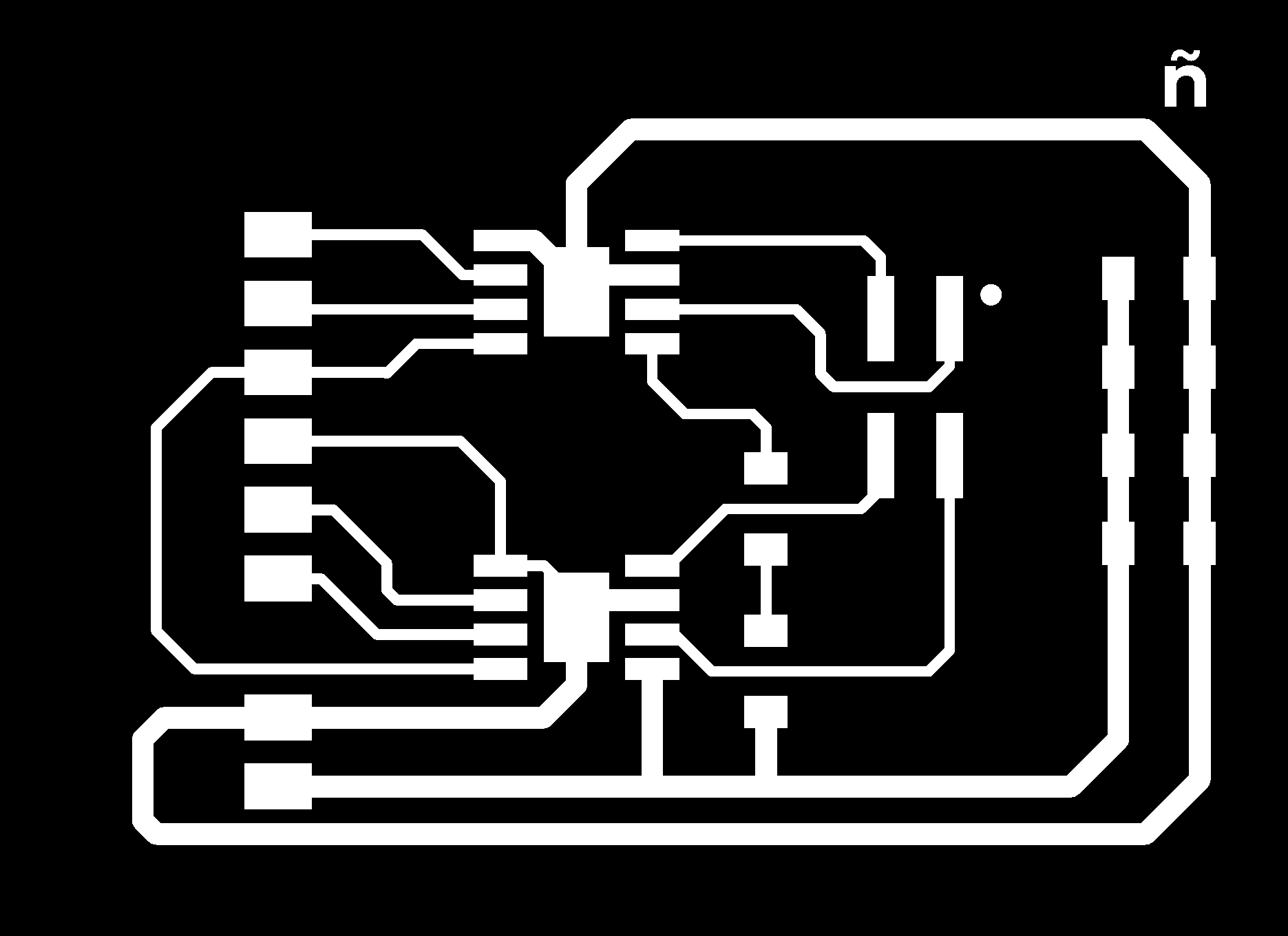
Fabrication — Roland MDX-20:
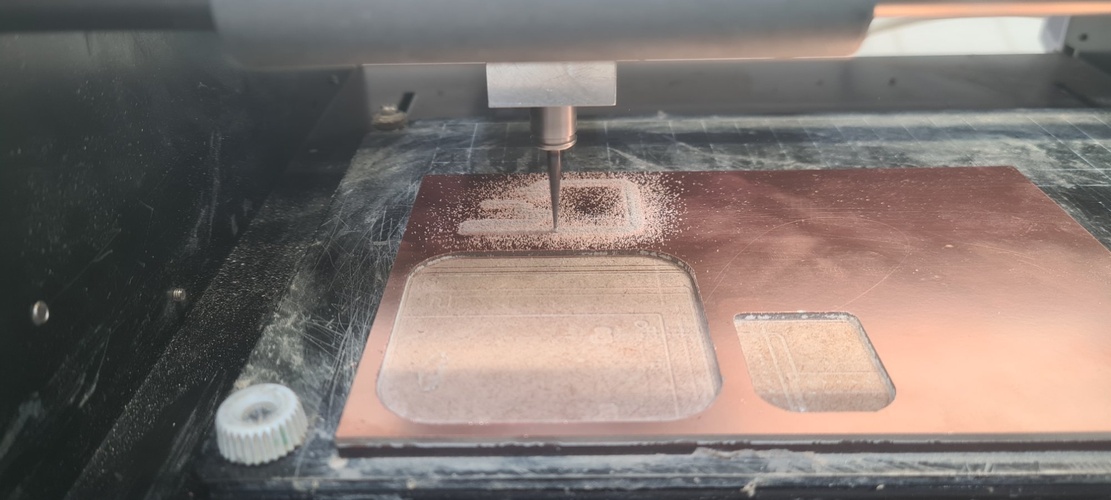
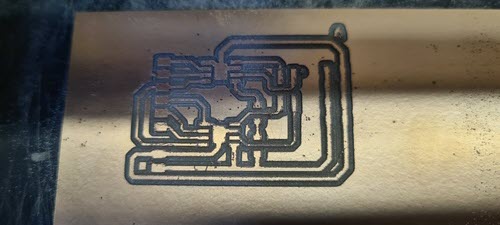
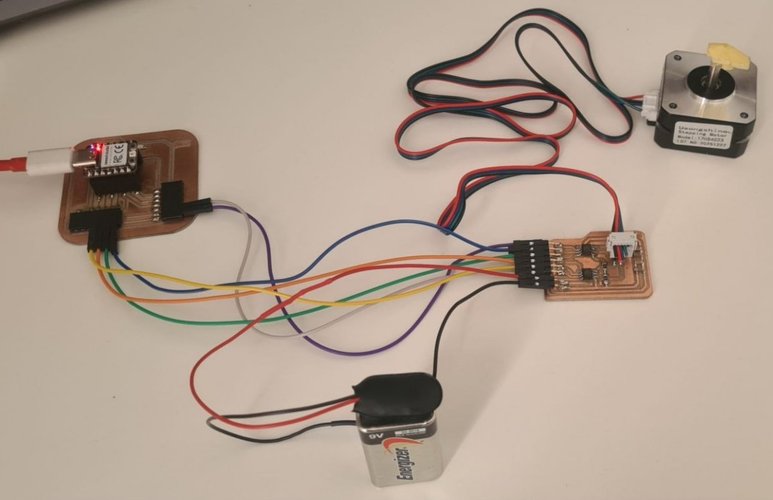
How I left the board — U1 still not working.
After soldering and a long troubleshooting session with the multimeter, here’s where I ended up:
- U2 works. It switches its outputs cleanly between 0 V and 9 V, so coil B of the motor would be driven correctly.
- U1 doesn’t switch its outputs, even though the IN1/IN2 control pins are receiving the right signals from the XIAO.
What I checked and what was fine in U1:
- VREF at 3.3 V. This pin tells the chip what current limit to apply — without it, the chip refuses to switch.
- VBB at 9 V. This is the motor power supply pin. At first it was reading 0 V because of a cold solder joint; once I reflowed it, the 9 V appeared. That fixed one symptom but the outputs still didn’t switch.
- LSS with continuity to GND. LSS stands for Low-Side Sense: it’s the pin where the motor current “comes back to ground” after going through the coil. The chip needs this path to know how much current is flowing — if it’s floating, the chip blocks the outputs as a safety measure. In my design I tied LSS directly to GND because for low currents (0.7 A) I don’t need to limit it precisely.
- Control wiring. I found that the cables between J2 of the stepper board and J2 of the XIAO board were swapped — the signals meant for U1 were physically reaching U2 and vice versa. After fixing that, U2 started switching correctly.
So everything around U1 looks right on paper, but the chip still doesn’t drive its outputs. My main suspicion is a bad solder joint on pins 6 (OUT1) or 8 (OUT2) of U1 — the kind of joint that gives you continuity when you measure it but doesn’t actually let real current through. SOIC-8 pins are tiny and it’s easy to leave one looking soldered when it’s barely touching the pad. The other possibility is that I damaged the chip itself while soldering it.
The next thing to try would be: magnifier lamp on those two pins, a drop of flux, and reflow them. If that doesn’t fix it, desolder U1 completely and put a new A4950 in its place.
Why I’m not doing that right now. I’m running out of time for this week and I have a working alternative. With one channel of the board confirmed working, the PCB design itself is validated — the schematic, the routing, the 0 Ω bridges, the firmware logic, all of that is fine. The remaining problem is purely a soldering issue on one chip. Rather than burn another evening on reflow attempts, I’m going to use a different output device — a WS2812B LED ring — on my Week 08 board to close the assignment. I’ll come back to U1 when I revisit the standing desk PoC, where I’ll be using a TMC2209 anyway.
spiral 3 — pivot to a WS2812B LED ring.
With the A4950 board partially working but not ready to drive a motor end-to-end, I needed a way to close the assignment without dragging the week into another session. Nuria had a 16-LED WS2812B ring sitting on the bench, and I already had my Week 08 board (XIAO RP2040 + button + LED) fully working. The two of them together cover everything the assignment asks for: an output device on a board I designed, doing something useful, with power consumption measured.
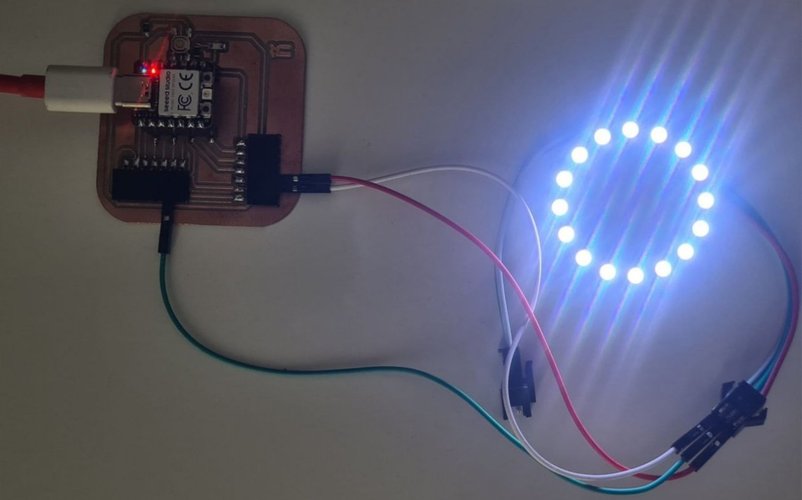
What’s a WS2812B and why it’s interesting.
The WS2812B is one of those parts that looks simple from the outside and turns out to be surprisingly clever. Each individual LED has its own tiny chip inside it, and all the LEDs in the ring share a single data line. You don’t address them with a bus or a chip select — you just send a long string of bits down the data line, and each LED grabs the first 24 bits (8 for red, 8 for green, 8 for blue), keeps them, and forwards the rest down the chain to the next LED. So with one data wire I can control 16 LEDs independently.
The catch is timing: the protocol runs at 800 kHz and each bit is encoded by how long the line stays high vs low (NRZ encoding). The tolerance is tight — a few hundred nanoseconds off and the LEDs see garbage. That’s why I’m using the Adafruit_NeoPixel library instead of writing the protocol by hand: on the RP2040 it uses the PIO (Programmable I/O) blocks to generate the timing perfectly without blocking the CPU.
The ring Nuria lent me.
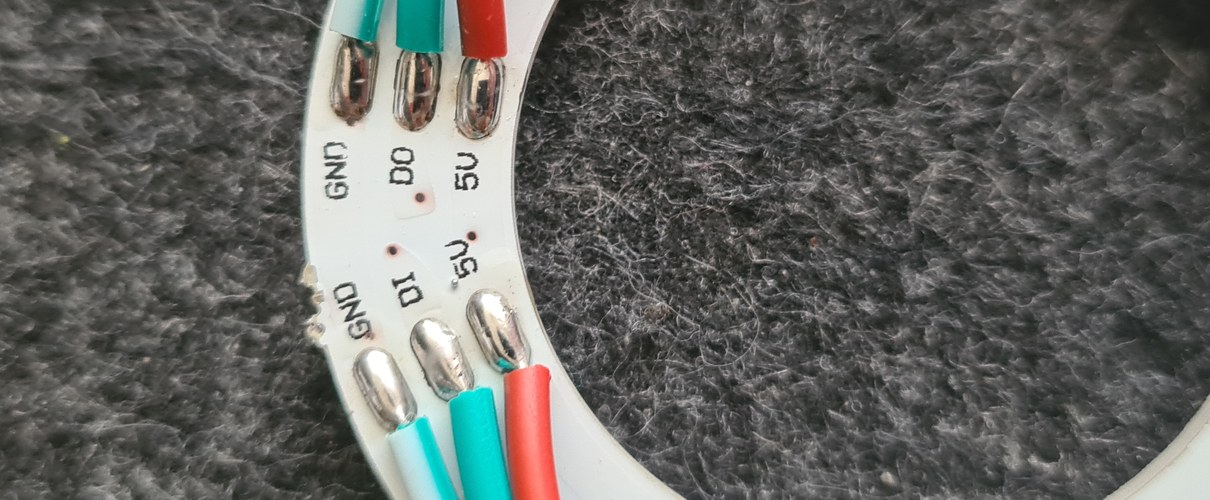
Wiring to the Week 08 board.
| Ring pin (input side) | Wire colour | XIAO RP2040 |
|---|---|---|
| GND | white | GND |
| DI | green | D2 |
| 5V | red | 5V |
D2 is free on my Week 08 board — D9 has the LED and D10 has the button, so D2 was the natural choice for the data line. The output side of the ring (DO) is left unconnected because I’m only using one ring.
Powering the ring from the XIAO USB.
A 16-LED WS2812B ring at full white, full brightness is often quoted as drawing 16 × 60 mA = 960 mA — almost twice what a USB 2.0 port officially provides (500 mA). I wanted to actually measure what this ring draws, not trust the worst-case rule of thumb, so I set up a current measurement with the Fab Lab’s Fluke 179 in series between the XIAO’s 5 V pin and the ring’s red wire.
This way I’m measuring only the ring’s consumption, not the XIAO’s own draw — clean isolation of the device under test.
The measurement sketch.
To take stable readings I needed full control over the ring’s state — number of LEDs lit, colour, brightness — without having to flash a new sketch for every combination. So I wrote a small Serial-driven sketch that listens for short commands and applies the corresponding pattern instantly:
n<count>— how many LEDs to light up (0–16)c<colour>—r,g,borwb<level>— brightness 0–255
Multiple commands can be sent in one line, e.g. n16 cw b255 lights all 16 LEDs in white at full brightness in a single command.
🤖 Claude (Anthropic) on the WS2812B power test sketch prompt:
I need a sketch for the XIAO RP2040 to drive a 16-LED WS2812B ring on D2 for power consumption measurements. It should accept Serial commands at 115200 baud to set the number of LEDs lit (n0 to n16), the colour (cr, cg, cb, cw for red, green, blue, white), and the brightness (b0 to b255). Multiple commands must be parsable on the same line so I can switch states quickly while keeping the multimeter reading stable. Use the Adafruit_NeoPixel library.
The sketch tokenizes each Serial line by spaces and processes each token as an independent command, so n16 cw b255 is parsed as three separate operations. The applyPattern() function follows the order required by Adafruit_NeoPixel: clear the buffer, set brightness, paint the pixels, then call show() — getting this order wrong (which I did in the first iteration) means brightness changes don’t take effect until the next pixel write.
tab: ws2812-power-test.ino | ws2812-power-test.ino
// week10-ws2812-power-test.ino
// WS2812B ring power consumption test sketch
// Sends fixed patterns to the ring via Serial commands so the multimeter
// can take stable readings.
//
// Board: XIAO RP2040
// Output: WS2812B LED ring (16 LEDs) on D2
//
// Serial commands (115200 baud, multi-command per line supported):
//   n<count>   set number of LEDs lit (0-16), e.g. n8
//   c<colour>  set colour: r=red, g=green, b=blue, w=white, e.g. cw
//   b<level>   set brightness 0-255, e.g. b128
//   s          re-apply current state
//   ?          print current state
//
// Example: "n16 cw b255" lights all 16 LEDs white at full brightness.

#include <Adafruit_NeoPixel.h>

#define LED_PIN     D2
#define LED_COUNT   16

Adafruit_NeoPixel ring(LED_COUNT, LED_PIN, NEO_GRB + NEO_KHZ800);

int   numLeds    = 0;
char  colourCode = 'w';
int   brightness = 30;

void setup() {
  Serial.begin(115200);
  ring.begin();
  ring.clear();
  ring.show();

  delay(500);
  Serial.println(F("=== WS2812B power test ==="));
  Serial.println(F("Commands: n<0-16>  c<r|g|b|w>  b<0-255>  s  ?"));
  printState();
}

void loop() {
  if (Serial.available()) {
    String line = Serial.readStringUntil('\n');
    line.trim();
    if (line.length() == 0) return;

    int start = 0;
    while (start < line.length()) {
      int spaceIdx = line.indexOf(' ', start);
      String token;
      if (spaceIdx == -1) {
        token = line.substring(start);
        start = line.length();
      } else {
        token = line.substring(start, spaceIdx);
        start = spaceIdx + 1;
      }
      token.trim();
      if (token.length() > 0) {
        processCommand(token);
      }
    }
  }
}

void processCommand(String cmd) {
  char op = cmd.charAt(0);
  String value = cmd.substring(1);

  switch (op) {
    case 'n':
      numLeds = constrain(value.toInt(), 0, LED_COUNT);
      Serial.print(F("LEDs lit: ")); Serial.println(numLeds);
      applyPattern();
      break;
    case 'c':
      if (value.length() > 0) {
        colourCode = value.charAt(0);
        Serial.print(F("Colour: ")); Serial.println(colourCode);
        applyPattern();
      }
      break;
    case 'b':
      brightness = constrain(value.toInt(), 0, 255);
      Serial.print(F("Brightness: ")); Serial.println(brightness);
      applyPattern();
      break;
    case 's':
      applyPattern();
      Serial.println(F("Pattern applied."));
      break;
    case '?':
      printState();
      break;
    default:
      Serial.print(F("Unknown command: ")); Serial.println(cmd);
  }
}

uint32_t getColour() {
  switch (colourCode) {
    case 'r': return ring.Color(255,   0,   0);
    case 'g': return ring.Color(  0, 255,   0);
    case 'b': return ring.Color(  0,   0, 255);
    case 'w': return ring.Color(255, 255, 255);
    default:  return ring.Color(255, 255, 255);
  }
}

void applyPattern() {
  // Order matters with Adafruit_NeoPixel:
  // clear -> setBrightness -> setPixelColor -> show
  ring.clear();
  ring.setBrightness(brightness);
  uint32_t c = getColour();
  for (int i = 0; i < numLeds; i++) {
    ring.setPixelColor(i, c);
  }
  ring.show();
}

void printState() {
  Serial.println(F("--- current state ---"));
  Serial.print(F("  LEDs lit  : ")); Serial.println(numLeds);
  Serial.print(F("  Colour    : ")); Serial.println(colourCode);
  Serial.print(F("  Brightness: ")); Serial.println(brightness);
}
tab: end
The measurement session — and a couple of things I learned the hard way.
Two things slowed me down before I got clean readings, and both are worth documenting because they’re the kind of mistake that’s easy to repeat:
Multimeter probes in the wrong terminal. My first attempt gave me 0.79 mA for what should have been a clearly visible LED. The Fluke 179 has a 400 mA terminal and a 10A terminal, separate from the COM and V/Ω terminals. I had the red probe in COM and the black one in 400 mA — physically possible to insert, electrically wrong. Once I swapped them (black in COM, red in 400 mA, which is the convention) I started reading sensible values. The wrong polarity also explains the negative sign I was seeing on the display.
Loose probe contact masquerading as real readings. Even after fixing the terminals, my first set of measurements kept saturating at exactly 73.7 mA no matter how many LEDs I lit or how bright they were. That’s physically impossible — three different brightness levels giving the same current is a giveaway that something is limiting the circuit externally. The cause was the probes resting against the wires rather than firmly clamping them; the contact resistance was acting as a current limiter. Once I made firm connections (twisting the wires together with the probe tip pinched between them), the readings jumped to their real values.
Both errors taught me to sanity-check measurements before trusting them: if values don’t change when conditions change, the measurement chain has a problem before the device under test does.
Test setup video.
Measurement results.
All measurements taken with the multimeter in series between the XIAO’s 5 V pin and the ring’s red (5V) wire. The XIAO itself is powered through USB and is not included in these readings — this is the ring’s draw alone.
| # | Command | Configuration | Approx. expected | Measured |
|---|---|---|---|---|
| 1 | n0 | Ring off (baseline) | ~5–6 mA | 8.27 mA |
| 2 | n1 cw b255 | 1 LED white, full brightness | ~25 mA | 44.53 mA |
| 3 | n4 cw b255 | 4 LEDs white, full brightness | ~80 mA | 149.5 mA |
| 4 | n8 cw b255 | 8 LEDs white, full brightness | ~160 mA | 268.6 mA |
| 5 | n16 cw b255 | 16 LEDs white, full brightness | ~320 mA or more | 423.6 mA |
| 6 | n16 cw b128 | 16 LEDs white, mid brightness | ~160 mA | 268.5 mA |
| 7 | n16 cw b30 | 16 LEDs white, low brightness | ~40 mA | 73.7 mA |
| 8 | n16 cr b255 | 16 LEDs red, full brightness | ~110 mA | 197.6 mA |
| 9 | n16 cg b255 | 16 LEDs green, full brightness | ~110 mA | 186.8 mA |
| 10 | n16 cb b255 | 16 LEDs blue, full brightness | ~110 mA | 194.8 mA |
What the numbers say.
A few observations from the data that are worth highlighting:
- The “off” state isn’t really off. Even with all LEDs unlit, the ring still draws 8.27 mA — the WS2812B controllers stay powered and listening for data. For battery-powered designs this matters: a “switched-off” ring would still drain a small battery overnight.
- Brightness scales the current almost linearly. At 16 white LEDs, the readings are 423.6 mA / 268.5 mA / 73.7 mA for brightnesses 255 / 128 / 30. The ratios match the PWM duty cycles closely (60% / 17%), confirming that the WS2812B’s brightness control is exactly what the datasheet describes.
- Single colours draw about half what white does. White lights all three internal RGB LEDs simultaneously (~423 mA), while red, green, or blue alone draw ~190 mA. Slightly more than 1/3 of white because the controller chip’s baseline draw is fixed regardless of how many channels are active.
- The “60 mA per LED” rule of thumb overestimates. My ring is drawing closer to 26 mA per LED at full white, less than half the conservative estimate. This could be because of the specific WS2812B variant, the fact that brightness 255 in software doesn’t correspond to 100% PWM duty cycle, or simply that this is a clone module rather than an Adafruit-branded NeoPixel. Either way, measuring beats assuming.
- USB 2.0 limit (500 mA) is enough for this ring at full brightness — barely. At 423.6 mA the XIAO + ring combination is well within USB spec, but with very little headroom. If I added a sensor or another peripheral pulling another 100 mA, the system would start to brown out. For anything more demanding than a 16-LED ring, an external 5 V supply is the correct answer.
Group assignment — power consumption of an output device.
The measurement table above is my contribution to the group assignment for this week, which asks each student to measure the consumption of an output device with a multimeter and document the results under varying conditions. The group page is linked at the top of this week.
Connection to the final project.
The LED ring isn’t going on the standing desk. But the underlying skill — driving a peripheral with strict serial timing through a single GPIO pin — is the same one I’ll need for the step/dir interface of the TMC2209 in the PoC. Same family of problem (timing-critical serial protocol on a single line), different output.
problems and solutions.
Pull-in rate limit at 9 V. Sending v1000 via Serial caused the motor to do nothing. Root cause: at 1000 steps/s the delay between steps is 1 ms, but the motor’s electrical time constant (L/R = 3.2 mH / 4 Ω = 0.8 ms) means the coil current barely reaches rated value before the next step fires. The motor can’t build enough torque. Solution: limit v command to 700 steps/s for cold starts; use the a command (ramp) to reach higher speeds.
Two trace crossings in PCB routing. The motor connector forced COIL_A and COIL_B traces to cross each other in the centre of the board — unavoidable on a single-layer PCB with this component arrangement. The green lines in the screenshot below are KiCad’s ratsnest showing the unrouted connections: two separate +9V paths that needed to reach their destination but had no clear route that didn’t cut through existing copper.
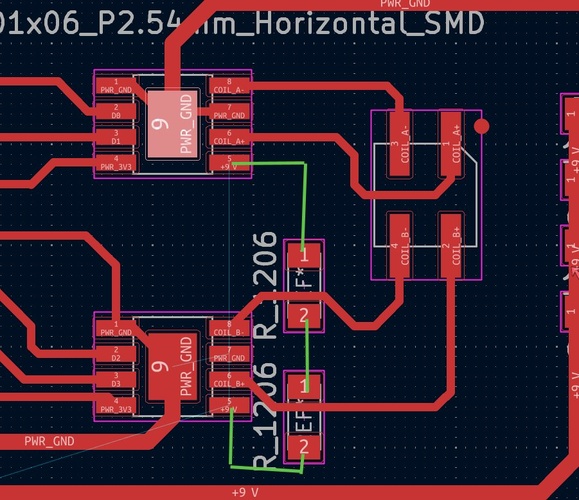
The 0 Ω bridge technique is the standard fix for single-layer routing conflicts: place a 1206 resistor footprint perpendicular to the blocking trace, route one net through the resistor pads, and let the other pass underneath in the gap between them.
PWR_FLAG ERC errors. Multiple PWR_FLAG symbols on the same net caused KiCad ERC to report “Pins of type Power output and Power output are connected.” Fix: one PWR_FLAG per power net maximum.
reflections.
This was the densest week so far — three spirals, two boards, one open issue, and a pivot. Looking back, a few things stand out.
SMD soldering has a much steeper curve than I expected.
Before this week I had only soldered through-hole components. Moving to SMD — and specifically to SOIC-8 packages like the A4950 — was a different sport. The pads are tiny, the pins are even tinier, and the difference between a good joint and a “looks good but doesn’t conduct properly” joint is invisible to the naked eye. I learned this the hard way with U1: every pin appeared soldered, the multimeter showed continuity everywhere I checked, and yet the chip wasn’t switching its outputs. The most likely explanation is that one of the OUT pins has a cold joint that conducts at the low currents of a multimeter probe but fails when real current tries to flow. That’s a failure mode I didn’t even know existed before this week.
The practical takeaways for next time: use the magnifier lamp from the start (not as a debugging tool after something fails), apply flux generously even when the joints look fine, and reflow each pin briefly after the initial pass. Soldering SOIC-8 is forgiving once you get the technique, but unforgiving while you’re learning it.
Pull-in rate vs slew rate is a real thing, not just a datasheet term.
On Adrián’s board with the A4953s, I measured the difference between starting a stepper cold from rest (~695 steps/s maximum before stalling at 9 V) and reaching higher speeds with a ramp (1200+ steps/s). The first time the motor refused to move at v1000 I thought something was broken with the driver. It wasn’t — the motor was being asked to do something physically impossible: build full coil current in less time than its electrical time constant allows. The fix was the a (acceleration) command that ramps up gradually. This concept — that motors have a maximum starting speed lower than their maximum running speed — is going to matter directly when I design the homing routine for the standing desk legs.
A partial success is still a real result, if you can articulate what was validated.
The A4950 board has one working H-bridge and one that doesn’t. My first instinct was to call this a failure. But sitting with the troubleshooting notes, the schematic, the routing decisions, and the firmware logic, I realised that the design is fully validated — the board layout works, the 0 Ω bridge technique resolved both single-layer trace crossings, the power and decoupling layout is clean, and U2 proves the topology works end-to-end. What’s not validated is one chip’s solder joints. That’s an important distinction: if I’d designed the board badly, both chips would fail the same way. The fact that one works and the other doesn’t is evidence pointing at workmanship on that specific chip, not at the design.
This reframing also made the pivot decision easier. Spending another evening reflowing U1 vs pivoting to a working alternative wasn’t a question of “give up vs persevere” — it was a question of marginal value. Reflowing might or might not fix one chip on a board whose design is already validated; the WS2812B path closes the assignment with new learning (Serial protocol, power measurement methodology, brightness vs current scaling). The pivot was the higher-information-density choice.
Measurement is harder than it looks.
The WS2812B power test taught me more about measuring than about LEDs. Two errors in a row — wrong multimeter terminal, then loose probe contact — gave me readings that looked plausible at first glance but were fundamentally wrong. The 73.7 mA reading repeating across three different brightness levels was the giveaway: when conditions change but the result doesn’t, the measurement chain has a problem before the device under test does. Sanity-checking measurements against expected behaviour is now part of how I’ll approach any electrical test going forward.
Tooling improvements worth carrying to next weeks.
Two infrastructure changes from this week that are paying off:
- Compressing video with ffmpeg. My first GoPro clip of the test was 409 MB for 84 seconds. After OpenShot exporting and an ffmpeg pass at CRF 26, the final file is 2.6 MB — a 150× reduction with no visible quality loss for the kind of content (multimeter screen + LED ring + IDE) that doesn’t need cinema-grade detail. This unlocks embedding video directly in the documentation rather than linking out.
- HTML5
<video>with poster. Instead of an animated GIF or an external link, the MP4 with a representative poster frame loads on demand and gives the reader proper playback controls including fullscreen. Cheaper, cleaner, and more accessible than alternatives.
Direct paths to the final project.
Three concrete things from this week feed into the standing desk PoC:
- The H-bridge architecture validated on this board scales directly to the TMC2209 I’ll use in the PoC — same step/dir interface, same coil-current logic, just a smarter chip.
- The pull-in rate concept will define how the homing routine behaves when each leg’s motor starts from rest at boot.
- The single-line serial timing experience from the WS2812B (PIO blocks on the RP2040) is the same family of problem as driving the TMC2209’s STEP signal at high frequencies without jitter.
The board with U1 unsolved isn’t going in the bin — I’ll come back to it as a soldering practice piece when I have a clearer head and a magnifier lamp dedicated to the workbench.
files and resources.
Assignment links:
- Neil’s output devices class page
- Fab Lab León 2026 Group Page
- Adrián Torres — output devices (2020)
- Adrián Torres — Adrianino outputs
- Allegro A4950 datasheet
- Usongshine 17HS4023 specifications
Referenced boards:
- Week 06 — Electronics Design (XIAO RP2040 breakout board)
- Week 08 — Electronics Production (milled and soldered board)
Design files:
- KiCad project: w10_stepper_motor_board_gfi.zip
- Traces PNG (1000 DPI): A4950-traces-top-layer-1000dpi.png
- Outline PNG (1000 DPI): A4950-outline-top-layer-1000dpi.png
- Source code: available via download buttons above