 gabriel stacey-chartrand
gabriel stacey-chartrand
gabriel stacey-chartrand
The assignment for this week is to write an application that interfaces a user with a device. I built a browser-based control interface for the alarm clock board from week 06.
It's a single HTML file. It connects to the alarm clock board over MQTT using the same broker and topics from week 11.
The interface connects to the same HiveMQ public broker as the alarm clock board, using mqtt.js loaded from a CDN, without the need for a server.
<script src="https://cdnjs.cloudflare.com/ajax/libs/mqtt/5.10.1/mqtt.min.js"></script>
const BROKER = 'wss://broker.hivemq.com:8884/mqtt';

client = mqtt.connect(BROKER, {
  clientId: 'gsc-' + Math.random().toString(16).slice(2, 8),
  ...
});
The client ID is randomly generated on each page load. That way multiple browser tabs can be open at once without kicking each other off the broker.
The interface publishes and subscribes to the same three topics as the board:
s_c/alarm/set, send a new alarm times_c/alarm/status, toggle alarm on/offs_c/alarm/pomodoro, control and receive pomodoro stateConnection state is shown as a coloured dot in the header. Green when connected, red if something goes wrong.

The interface has three sections: a live clock, a wake alarm panel, and a pomodoro timer.
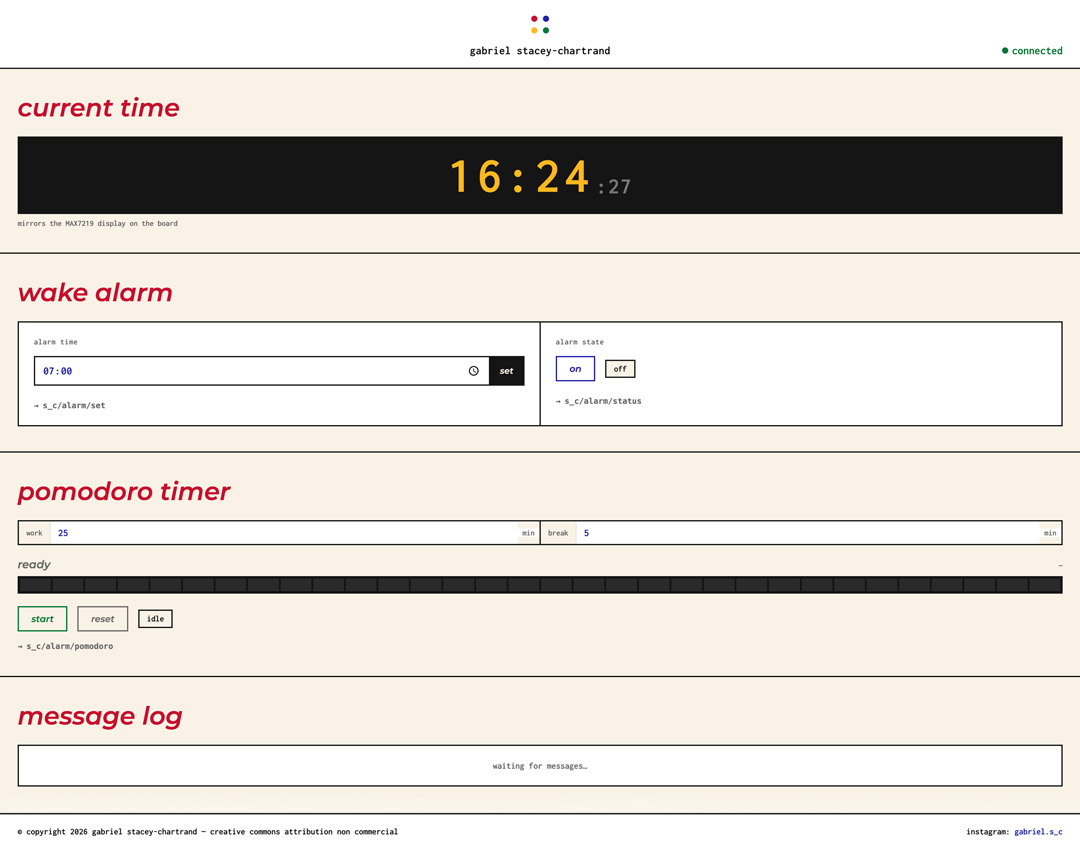
I wanted the clock display in the interface to look like the physical LED matrix: amber digits on a black background. The time comes from the browser's own clock, not from the board.

The alarm section has a time picker and an on/off toggle. Setting a new time publishes to s_c/alarm/set. The toggle publishes "ON" or "OFF" to s_c/alarm/status.
The toggle also listens for incoming status messages from the board, so if the alarm is turned on or off using the physical button, the interface updates to reflect that.

The pomodoro section has adjustable work and break durations, a start/pause/reset button, and a 32-segment progress bar (matching the amount of columns of LEDs in the MAX7219 display).
I made the progress bar 32 segments specifically because the physical display is 32 LED columns wide. The bar fills and drains the same way on both: a right-to-left shrinking bar during work, the full display pulsing during breaks.
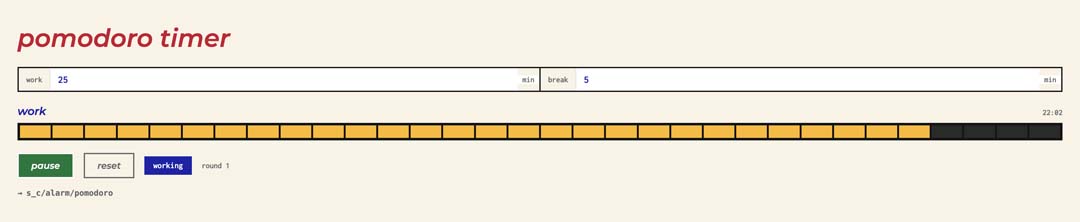
When the work timer runs out, the interface publishes BREAK_START:Xmin and switches to the break phase automatically. The board does the same thing on its end so both stay in sync.
There's a message log at the bottom that shows every MQTT message published or received, colour-coded by topic. It was useful during development for seeing exactly what was happening in real time, and I kept it in the final version.
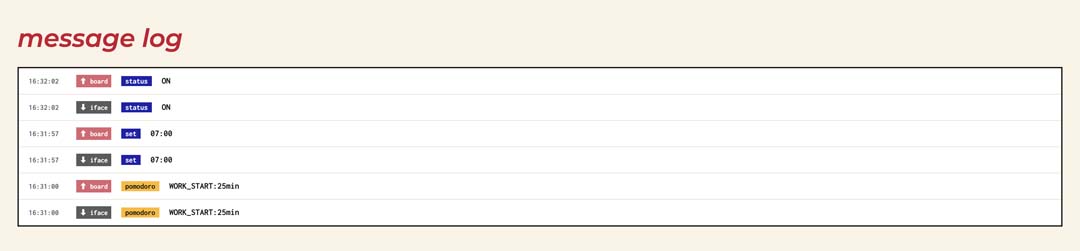
Both the interface and the board can trigger state changes. If I press the physical button to pause the pomodoro, the board publishes PAUSED to s_c/alarm/pomodoro, the interface receives it and updates. If I click pause in the interface, the same message goes out and the board reacts.
To avoid acting on messages it sent itself, the interface checks the current state before applying incoming messages. If the interface is already in work phase and receives WORK_START, it ignores it.
The trickiest issue was a phase transition bug. When a work timer ran out, the interface was sending a PAUSED message right before BREAK_START. The board was receiving PAUSED a fraction of a second after entering the break phase and immediately pausing it. The fix ended up being in the firmware: a 1.5 second guard that ignores PAUSED messages arriving right after a phase starts. I also cleaned up the interface's phase transition logic to avoid sending unnecessary messages.
Like the firmware for networking and communications week, this interface was coded by Claude. I designed what it should be and what it should do. Claude wrote the implementation.
Here's roughly the brief I was giving, built up across several rounds:
ALARM CLOCK INTERFACE, DESIGN BRIEF

Stack
  Single HTML file. No framework, no build step.
  mqtt.js from CDN.
  Same broker and topics as the board (week 11).

Styling
  Match my Fab Academy documentation site exactly:
    background: #f9f2e5 (cream/paper)
    body font: Inconsolata, monospace
    headings: Montserrat italic bold, red (#c8102e)
    accents: blue (#1e22aa)
    borders: 2px solid black

  Clock panel: amber/yellow digits on black.
  Should look similar to the physical LED matrix.

Layout
  Three sections, in order:
    1. Live clock
    2. Wake alarm
    3. Pomodoro timer
  Message log at the bottom.
  Connection status dot in the header.

Wake alarm section
  Time selection for alarm and an on/off toggle.
  Wording on the toggle: "on" / "off" (not arm/disarm, not enable/disable).
  Setting a time publishes to s_c/alarm/set.
  Toggle publishes "ON" or "OFF" to s_c/alarm/status.
  If the board button changes alarm state, the interface should update too.

Pomodoro section
  Adjustable work and break durations. Defaults: 25 min work, 5 min break.
  One button that acts as start / pause / resume / reset depending on state.
  Progress bar: 32 segments, to match the 32 LED columns of the physical display.
    Work phase: segments drain left to right, amber colour.
    Break phase: all segments on, pulsing green.
    Paused: dimmed.

Client ID
  Randomly generated on each page load.
  So multiple browser tabs don't kick each other off the broker.

Two-way sync
  Any state change triggered by the board's physical button must update
  the interface. Any state change from the interface must update the board.
  Neither is the single source of truth.
The main iteration was around state sync. Getting the interface to correctly reflect button presses on the board, ignore its own echoes, and not send redundant state-change messages during phase transitions took a few rounds of testing with both the board and the message log running at the same time.