
week9. Input Devices
Assignment
Group assignment
- probe an input device's analog levels and digital signals
Individual assignment
- measure something: add a sensor to a microcontroller board that you have designed and read it
Group assignment
For more information about group projects, please see the group project page on the FabLab Kannai website. Group assignment page is here
Microcontroller motion sensing and browser display using Node.js
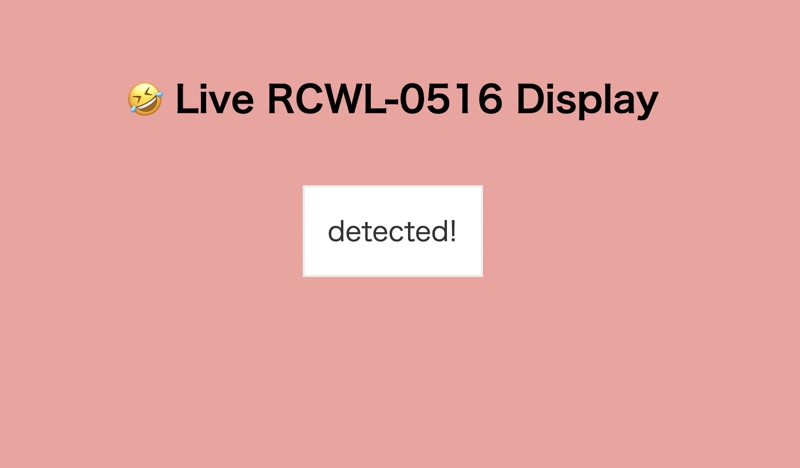
This application demonstrates how to use the XIAO ESP32-C3 as a wireless sensor node that detects motion using the RCWL-0516 microwave radar sensor. When motion is detected, the ESP32-C3 sends a message via the serial port to a Node.js server, which then displays the detection event in real-time in a web browser.
This system builds on the work from the week4 assignment page, and the ESP32-C3 is mounted on the custom development board created in week8.
1. Node and Sensor Integration
- The RCWL-0516 sensor is connected to a digital input pin (e.g. GPI10) on the ESP32-C3.
- When motion is detected, the sensor's OUT pin goes HIGH.
- The ESP32-C3 reads this signal and sends "Motion detected!" via the serial port.
2. Network Communication
- A Node.js server running on a connected computer reads the serial data from the ESP32-C3.
- The server uses Socket.IO to emit the motion detection message to the browser in real-time.
- The browser dynamically updates the screen with each detection event.
JavaScript
JavaScript is used on the client side to listen for motion events and update the DOM accordingly.
https://developer.mozilla.org/en-US/docs/Web/JavaScript
Node.js
Node.js acts as a server-side middleware, bridging the serial port input from the ESP32-C3 to a web client using Socket.IO.
Installing Node.js
For macOS:
brew install node
npm install
Start the server:
node index.jsNode.js Application Code Structure
realtime-motion-display/
├── node_modules/
├── public/
│   └── index.html
├── index.js
├── package.json
├── package-lock.json
index.js (Node.js Server)
const express = require("express");
const http = require("http");
const socketIo = require("socket.io");
const { SerialPort } = require("serialport");
const { ReadlineParser } = require("@serialport/parser-readline");

const app = express();
const server = http.createServer(app);
const io = socketIo(server);

app.use(express.static("public"));

async function findAndConnectSerialPort() {
 try {
  const ports = await SerialPort.list();

  const targetPort = ports.find((port) => {
   return (
           port.path.includes("usbmodem") || // macOS
           port.path.includes("usbserial")   // Windows/Linux fallback
   );
  });

  if (!targetPort) {
   console.error("No compatible serial port found.");
   return;
  }

  console.log(`✅ Found serial port: ${targetPort.path}`);

  const port = new SerialPort({ path: targetPort.path, baudRate: 9600 });
  const parser = port.pipe(new ReadlineParser({ delimiter: "\n" }));

  parser.on("data", (data) => {
   const trimmed = data.trim();
   console.log("Received:", trimmed);
   io.emit("sensorData", trimmed);
  });

  port.on("error", (err) => {
   console.error("SerialPort Error:", err.message);
  });
 } catch (err) {
  console.error("Failed to list serial ports:", err);
 }
}

server.listen(3000, () => {
 console.log("Server running at http://localhost:3000");
 findAndConnectSerialPort();
});
public/index.html
<!DOCTYPE html>
<html lang="en">
<head>
 <meta charset="UTF-8">
 <title>Joke Viewer</title>
 <script src="https://cdn.socket.io/4.7.2/socket.io.min.js"></script>
 <style>
  body {
   font-family: sans-serif;
   background-color: #f4a09c;
   text-align: center;
   padding: 50px;
  }

  h1 {
   font-size: 2rem;
  }

  #sensorData {
   font-size: 1.5rem;
   margin-top: 30px;
   color: #333;
   padding: 20px;
   border: 2px solid #eee;
   background: #fff;
   display: inline-block;
   max-width: 600px;
   white-space: pre-wrap;
   word-wrap: break-word;
   text-align: left;
  }
 </style>
</head>
<body>
<h1>🤣 Live RCWL-0516 Display</h1>
<div id="sensorData">Waiting for sensorData...</div>

<script>
 const socket = io();

 socket.on("sensorData", (data) => {
  document.getElementById("sensorData").textContent = data;
 });
</script>
</body>
</html>
ESP32-C3 Code (XIAO)
// Connect the output pin of RCWL-0516 to GPIO3 (D10)
#define MOTION_PIN 10

void setup() {
  Serial.begin(115200);

  pinMode(MOTION_PIN, INPUT);  // RCWL-0516 output pin
  delay(1000);
  Serial.println("Serial initialized");
}

void loop() {
  int val = digitalRead(MOTION_PIN);
  if (val == 1) {  // 1 is being detected!
    Serial.println("detected!");
  } else {
    Serial.println("not detected!");
  }
  delay(500);
}
Motion Detection Video
When the RCWL-0516 detects motion, the OUT pin immediately goes HIGH and remains HIGH for about 2 seconds, even if the motion stops. If the motion continues, the HIGH state is extended accordingly, and it only returns to LOW about 2 seconds after all motion has ceased. Therefore, the sensor continues to indicate detection for 2 seconds even after a person has left.
While this sensor is very convenient for use as a general motion detector, I found that it is not suitable for my final project, the "Golgo 13 Machine." This is because it continues to signal detection for 2 seconds after a person leaves, and it reacts to all kinds of movement, not just people. As a result, I realized that I will need to look for a different sensor specifically for my final project.
Afterthoughts
This assignment was a good opportunity to explore the integration of physical sensors, microcontroller GPIO, serial communication, and real-time browser output.
I was able to clearly visualize motion detection events through a custom networked pipeline using the ESP32-C3 and Node.js.
I found that the RCWL-0516 is a very convenient sensor to use as a motion detector for sensing human presence.