
Week 11
Networking and Communications
Controlling an LED on a XIAO ESP32-C6 PCB using WiFi, Blynk Cloud, and a virtual button
1. Checklist
- ✅ Linked to the group assignment page
- ✅ Documented the project and what I learned from networking and communication protocols
- ✅ Explained the programming process used
- ✅ Ensured and documented that addressing for boards works
- ✅ Designed, built, and connected a wireless node with a local output device
- ✅ Used a PCB developed in a previous assignment
- ✅ Used WiFi communication with the XIAO ESP32-C6
- ✅ Used Blynk Cloud as an IoT interface
- ✅ Controlled a physical LED through a virtual button
- ✅ Included the source code and downloadable file
- ✅ Included a video showing the communication working
- ✅ Reflected on the assignment and what I learned
2. Group Assignment
For the group assignment, we worked with three XIAO ESP32-C6 boards connected through WiFi and Blynk Cloud. The objective was to send messages between projects and demonstrate a communication workflow between different boards.
This individual assignment is related to that group work because it uses the same general idea of wireless communication, but focuses on controlling one local output device from an IoT dashboard.
3. Introduction to Networking, Communications, and IoT
Networking and communication systems allow electronic devices to exchange information. In embedded systems, this means that a microcontroller can send or receive data from another board, a computer, a mobile phone, a cloud platform, or a remote interface.
Communication can be wired or wireless. Wired communication includes protocols such as UART, I2C, SPI, USB, Ethernet, and CAN bus. Wireless communication includes technologies such as WiFi, Bluetooth, BLE, Zigbee, LoRa, NFC, and cellular networks. Each technology has different advantages depending on distance, speed, power consumption, cost, and complexity.
The Internet of Things, or IoT, refers to physical devices connected to a network that can collect data, send data, or receive commands. IoT devices can be used for remote monitoring, automation, sensing, control systems, dashboards, smart homes, industrial systems, and connected prototypes.
In this assignment, I used WiFi because the XIAO ESP32-C6 includes wireless connectivity and can connect to a local network. This allowed the board to communicate with Blynk Cloud and receive commands from a virtual button.
| Technology / Protocol | Type | Common use | Relevance for this assignment |
|---|---|---|---|
| UART / Serial | Wired | Communication between a board and a computer | Used for debugging through the Serial Monitor |
| I2C | Wired | Connecting sensors and modules using two wires | Useful for local sensor networks |
| SPI | Wired | Fast communication with displays, memory, and modules | Useful for high-speed peripherals |
| WiFi | Wireless | Internet connection, cloud dashboards, IoT systems | Main communication technology used in this assignment |
| Bluetooth / BLE | Wireless | Short-range communication with phones and devices | Alternative for local control |
| HTTPS | Internet protocol | Secure communication with web services and cloud platforms | Used by Blynk services to exchange data with devices |
4. Communication Protocols and Technologies
In embedded systems, communication protocols define how devices exchange information. Some protocols are designed for short-distance communication between components on the same PCB, while others are designed for wireless networks, cloud communication, or long-distance data transmission.
For this assignment, I focused mainly on WiFi because the XIAO ESP32-C6 can connect directly to a wireless network and communicate with Blynk Cloud. However, it is important to understand other common communication protocols because each one is useful for a different type of application.
4.1 Wired Communication Protocols
Wired protocols are commonly used when the devices are physically close to each other. They are reliable, simple to debug, and are often used to connect sensors, displays, memory modules, drivers, and other peripherals to a microcontroller.
For example, I2C uses two main lines: SDA for data and SCL for clock. It allows multiple devices to share the same bus, and each device is identified by an address. This is useful when connecting several sensors to the same microcontroller using only two pins.
SPI is usually faster than I2C and is used when higher data speed is needed, for example with displays, SD cards, or fast sensors. UART, also called Serial communication, is very useful for debugging and for simple board-to-board communication.
4.2 Wireless Communication Technologies
Wireless technologies allow devices to communicate without physical cables. This is useful for mobile systems, remote sensing, IoT devices, wearables, smart homes, and distributed networks.
WiFi is useful when the device needs internet access or cloud communication. It usually works in the 2.4 GHz and 5 GHz bands, but ESP32-based boards commonly use 2.4 GHz WiFi. In my project, WiFi was used to connect the XIAO ESP32-C6 to Blynk Cloud.
Bluetooth and BLE are normally used for short-range communication with phones, wearables, or nearby devices. BLE is optimized for low power consumption, making it useful for battery powered sensors. Other technologies such as Zigbee, LoRa, and Cellular can be used when the system needs mesh networking, long distance, or mobile internet coverage.
4.3 Comparative Table of Communication Protocols
| Protocol / Technology | Type | How it works | Typical frequency / signals | Range | Common use | Usefulness for this assignment |
|---|---|---|---|---|---|---|
| UART / Serial | Wired | Sends data asynchronously using TX and RX lines. It does not need a clock line and both devices must use the same baud rate. | Digital logic signals. Common baud rates: 9600, 115200 bps. | Short distance, usually inside a device or between nearby boards | Debugging, Serial Monitor, communication between microcontrollers, GPS modules, Bluetooth modules. | Used to debug the XIAO ESP32-C6 and verify that the board connected to WiFi and Blynk correctly. |
| I2C | Wired bus | Uses two lines: SDA for data and SCL for clock. Multiple devices can share the same bus using unique addresses. | Digital signals. Common speeds: 100 kHz, 400 kHz, and faster modes depending on hardware. | Short distance, usually on the same PCB or inside the same enclosure | Sensors, OLED displays, real-time clocks, expanders, IMUs. | Not used in this test, but useful for future IoT nodes with sensors connected to the XIAO ESP32-C6. |
| SPI | Wired bus | Uses separate lines for clock, data in, data out, and chip select. It is usually faster than I2C but requires more pins. | Digital clocked signals. Speeds can range from hundreds of kHz to several MHz. | Short distance, mostly PCB-level communication | SD cards, TFT displays, memory chips, fast sensors, radio modules. | Not used in this LED test, but useful when a project needs faster local data transfer. |
| WiFi | Wireless network | Connects the device to a local router or access point. Once connected, the device can communicate with local services or cloud platforms. | Commonly 2.4 GHz and 5 GHz. ESP32 boards commonly use 2.4 GHz WiFi. | Medium range, depending on antenna, router, walls, and signal quality | IoT devices, dashboards, web servers, cloud communication, remote monitoring, automation. | Main communication technology used in this assignment to connect the XIAO ESP32-C6 with Blynk Cloud. |
| Bluetooth Classic | Wireless | Creates a short-range wireless link between devices, usually for continuous data exchange or pairing with phones and computers. | 2.4 GHz ISM band | Short range, commonly around 10 m depending on environment | Audio devices, serial wireless modules, phone-to-device communication. | Could be used for local control, but it was not selected because this assignment required cloud-based WiFi communication. |
| BLE | Wireless low power | Sends small amounts of data using services and characteristics. It is designed for low power and periodic communication. | 2.4 GHz ISM band | Short to medium range, depending on antenna and power settings | Wearables, beacons, mobile sensors, battery-powered devices. | Useful for low-power IoT devices, but WiFi was better for this assignment because Blynk Cloud required internet communication. |
| Zigbee | Wireless mesh | Allows multiple low-power devices to create a mesh network where nodes can relay messages between each other. | Commonly 2.4 GHz ISM band | Short to medium range, extendable using mesh nodes | Smart home sensors, lighting systems, automation networks. | Interesting for future multi-node networks, especially because mesh communication can extend coverage. |
| LoRa | Wireless long range | Sends small packets of data over long distances using low data rates and low power transmission. | Sub-GHz bands depending on region, commonly 433 MHz, 868 MHz, or 915 MHz. | Long range, from hundreds of meters to several kilometers | Environmental monitoring, agriculture, remote sensors, low-data telemetry. | Not used here because the assignment focused on WiFi and Blynk, but useful for outdoor sensor networks. |
| Cellular / LTE-M / NB-IoT | Wireless wide-area network | Uses cellular infrastructure to connect devices to the internet without depending on a local WiFi router. | Licensed cellular bands depending on country and operator. | Very long range, wherever cellular coverage is available | Remote IoT devices, asset tracking, industrial monitoring, smart meters. | Useful when WiFi is not available, but it requires a cellular module, SIM, and data plan. |
| HTTPS / HTTP API | Internet application protocol | Sends requests between a device and a web or cloud server. HTTPS adds encryption for safer communication. | Runs over TCP/IP through WiFi, Ethernet, or cellular networks. | Global, as long as the device has internet access | Cloud APIs, IoT dashboards, web services, device-to-server communication. | Used indirectly through Blynk services to send and receive values between the dashboard and the XIAO ESP32-C6. |
4.4 Why WiFi Was Selected
WiFi was selected because the XIAO ESP32-C6 already includes WiFi capability and can connect directly to the same network used by the computer and Blynk dashboard. This makes the system suitable for IoT experiments because the board can exchange information with a cloud platform without requiring extra communication modules.
For my test, WiFi allowed the virtual button in Blynk to send a value to the XIAO ESP32-C6. The XIAO ESP32-C6 received the value through the virtual pin V0 and then changed the state of the physical LED connected to D10.
5. Board Used
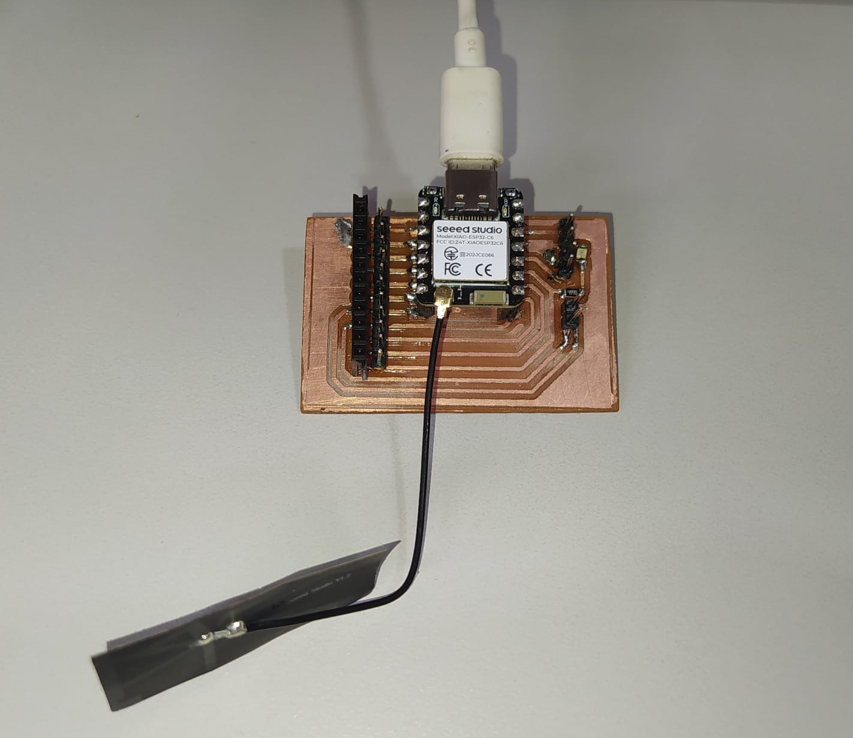
For this assignment, I used a PCB developed in a previous assignment. This board includes a XIAO ESP32-C6 and an LED connected to the physical pin D10. Using a board fabricated in a previous assignment allowed me to test networking and communications with my own hardware instead of using only a commercial development board.
The XIAO ESP32-C6 is a compact microcontroller board that includes WiFi connectivity, which makes it suitable for IoT applications. It can be used as a wireless node to control outputs, read sensors, communicate with cloud platforms, and interact with dashboards.
| Element | Description | Function in this assignment |
|---|---|---|
| XIAO ESP32-C6 | WiFi-enabled microcontroller module | Connects to Blynk Cloud through WiFi |
| Custom PCB | Board developed in a previous assignment | Provides access to the XIAO ESP32-C6 pins and includes the LED circuit |
| LED | Local output device | Turns on and off when the virtual button changes state |
| D10 | Physical GPIO pin | Controls the LED on the PCB |
| V0 | Blynk virtual pin | Receives the button value from the Blynk dashboard |
6. Blynk Cloud
Blynk is an IoT platform that allows microcontrollers to connect to the cloud and interact with web or mobile dashboards. It is useful because it provides an interface where buttons, switches, labels, sliders, gauges, and other widgets can be connected to variables called virtual pins.
In this assignment, Blynk was used to create a virtual button. This button sends a value through virtual pin V0. When the button is ON, Blynk sends a value of 1. When the button is OFF, Blynk sends a value of 0.
The XIAO ESP32-C6 receives this value using the function BLYNK_WRITE(V0). Inside this function, the value received from Blynk is written to the physical LED pin D10.
6.1 Device Creation
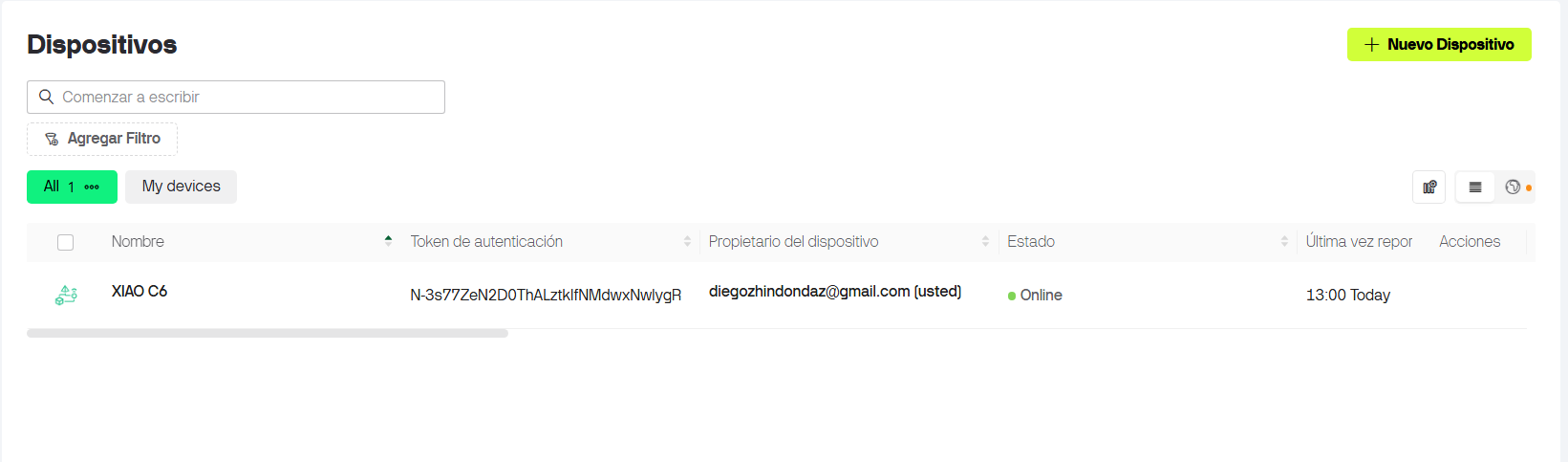
The first step was to create a device in Blynk. This device is important because it generates the authentication token required by the XIAO ESP32-C6 to connect correctly to the Blynk Cloud.
The token must match the real device created in Blynk. If the token is missing or incorrect, the XIAO ESP32-C6 may connect to WiFi but it will not appear online or will not communicate correctly with the dashboard.
7. Blynk Datastream
In Blynk, a datastream is a variable or data channel used to exchange information between the dashboard and the hardware. For this assignment, I created one datastream using the virtual pin V0.
This datastream represents the LED state. It works as a virtual variable: when V0 is 1, the LED turns on; when V0 is 0, the LED turns off.
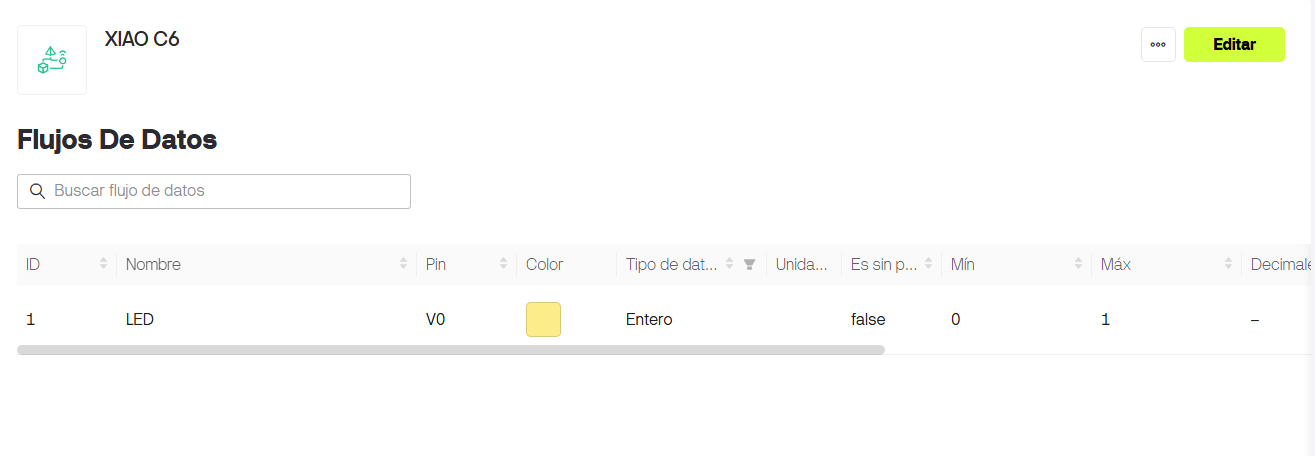
| Datastream name | Virtual pin | Data type | Minimum | Maximum | Function |
|---|---|---|---|---|---|
| LED | V0 | Integer | 0 | 1 | Represents the ON/OFF state of the LED connected to D10 |
8. Blynk Dashboard
After creating the datastream, I created a dashboard panel with an ON/OFF button. The button was connected to the virtual pin V0. This allows the user to control the physical LED from the Blynk interface.
The dashboard works as the user interface, while the XIAO ESP32-C6 works as the hardware node. When the button changes state, Blynk sends the new value to the board through WiFi.
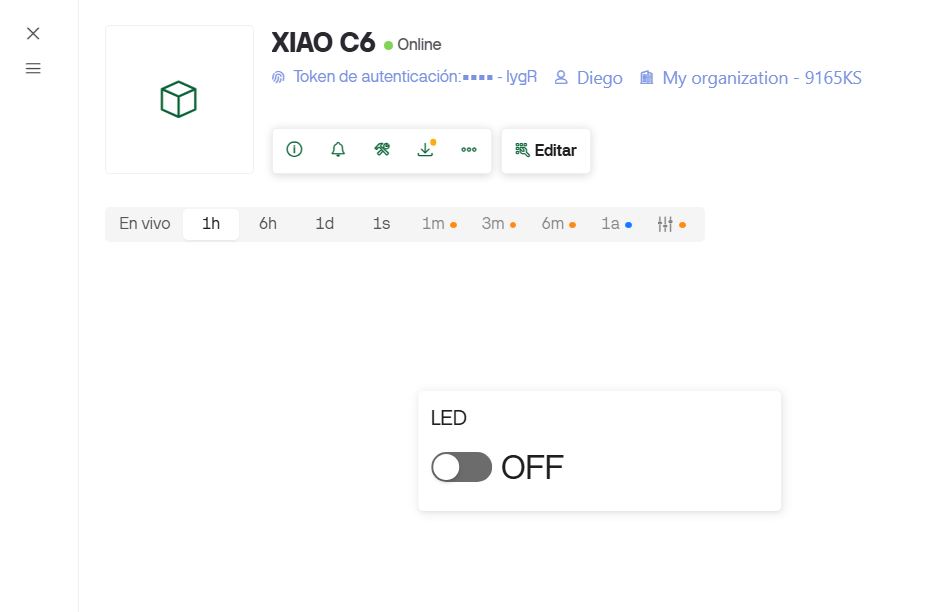
| Button state | Value sent through V0 | LED behavior |
|---|---|---|
| OFF | 0 | LED connected to D10 turns off |
| ON | 1 | LED connected to D10 turns on |
9. Code and Serial Monitor
The Arduino code connects the XIAO ESP32-C6 to the WiFi network and then connects it to Blynk Cloud using the device authentication token. The code must include the correct WiFi network name, WiFi password, Blynk Template ID, Blynk Template Name, and Blynk Auth Token.
The physical LED pin must also match the PCB connection. In this case, the LED is connected to D10. The virtual pin used in Blynk is V0, which is different from the physical pin.
- D10 is the physical pin connected to the LED and resistor on the PCB.
- V0 is the virtual pin created in Blynk to send the LED state.
- The Auth Token must come from the correct Blynk device.
- The SSID and password must match the WiFi network.
- The Serial Monitor was used to verify the connection status.
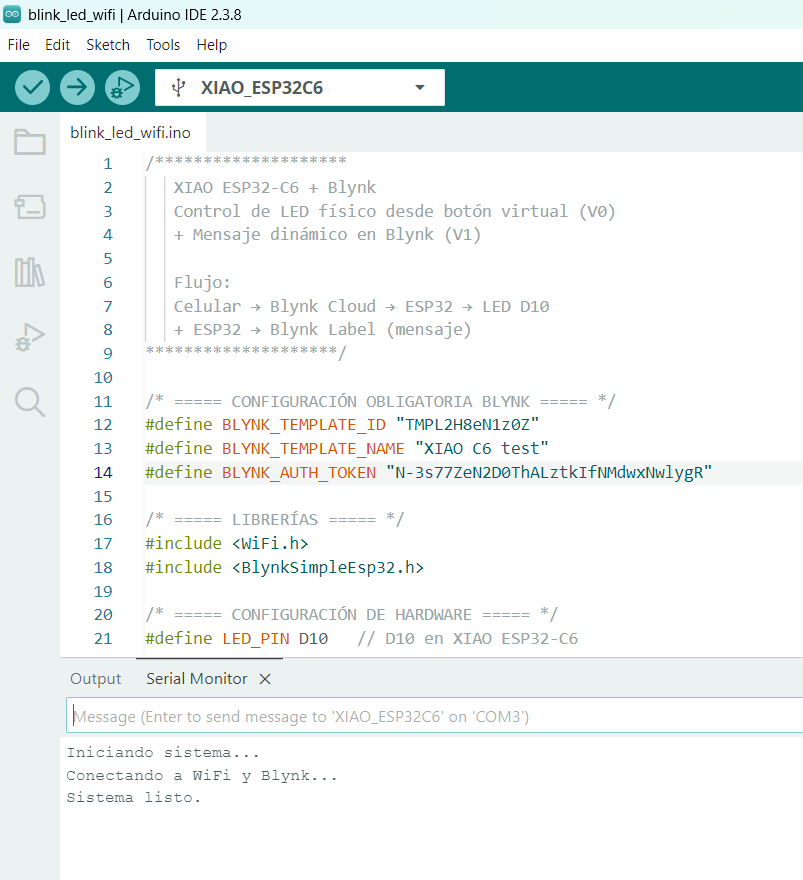
9.1 Arduino Code
This program receives the value from the Blynk button using BLYNK_WRITE(V0). If the value is 1, the LED turns on. If the value is 0, the LED turns off.
/* ===== CONFIGURACIÓN OBLIGATORIA BLYNK ===== */
#define BLYNK_TEMPLATE_ID "TMPL2H8eN1z0Z"
#define BLYNK_TEMPLATE_NAME "XIAO ESP32-C6 test"
#define BLYNK_AUTH_TOKEN "YOUR_BLYNK_AUTH_TOKEN"

/* ===== LIBRERÍAS ===== */
#include <WiFi.h>
#include <BlynkSimpleEsp32.h>

/* ===== CONFIGURACIÓN DE HARDWARE ===== */
#define LED_PIN D10   // D10 en XIAO ESP32-C6

/* ===== DATOS WIFI ===== */
char ssid[] = "YOUR_WIFI_NAME";
char pass[] = "YOUR_WIFI_PASSWORD";

/********************
   FUNCIÓN QUE SE EJECUTA CUANDO CAMBIA EL BOTÓN V0
********************/
BLYNK_WRITE(V0)
{
  int value = param.asInt();

  digitalWrite(LED_PIN, value);

  if (value == 1) {
    Blynk.virtualWrite(V1, "Hola Diego");
  } else {
    Blynk.virtualWrite(V1, " ");
  }
}

/********************
   SETUP – Se ejecuta UNA sola vez al arrancar
********************/
void setup()
{
  Serial.begin(115200);
  delay(1000);

  Serial.println("Iniciando sistema...");

  pinMode(LED_PIN, OUTPUT);

  Serial.println("Conectando a WiFi y Blynk...");
  Blynk.begin(BLYNK_AUTH_TOKEN, ssid, pass);

  Serial.println("Sistema listo.");
}

/********************
   LOOP – Se ejecuta constantemente
********************/
void loop()
{
  Blynk.run();   // Mantiene conexión activa
}10. WiFi Antenna
The XIAO ESP32-C6 uses an external antenna connection for wireless communication. This antenna is important because it improves WiFi signal reception and transmission, especially when the board is inside a project or mounted on a custom PCB.
The antenna used with the XIAO ESP32-C6 is designed for the 2.4 GHz wireless band, which is the frequency range used by WiFi networks compatible with ESP32 microcontrollers. The small connector on the XIAO ESP32-C6 board allows the antenna to be attached securely so the module can communicate more reliably.
For this assignment, the antenna helped the XIAO ESP32-C6 connect to the WiFi network and maintain communication with Blynk Cloud during the LED control test.
11. Functional Test
The final test shows the interaction between the Blynk virtual button and the physical LED on the PCB. When the button is turned ON in the Blynk dashboard, the XIAO ESP32-C6 receives a value of 1 through V0 and turns on the LED connected to D10. When the button is turned OFF, the XIAO ESP32-C6 receives a value of 0 and turns the LED off.
This demonstrates that the XIAO ESP32-C6 is connected to the WiFi network, authenticated with Blynk Cloud, and able to control a local output device through an IoT interface.
12. Problems and Fixes
- At the beginning, it was important to understand the difference between a physical pin and a virtual pin. D10 controls the real LED, while V0 is the Blynk communication channel.
- The Blynk Auth Token must be copied from the correct device, not only from the template information. If the token is incorrect, the board will not connect properly to Blynk.
- The WiFi network name and password must be written exactly as they are, including spaces, capital letters, and symbols.
- The XIAO ESP32-C6 requires the WiFi antenna to be connected correctly for better wireless communication.
- The Serial Monitor helped verify if the code reached the connection stage and if the system was ready.
13. Reflection
- This assignment helped me understand how a microcontroller can become part of an IoT system by connecting to WiFi and communicating with a cloud platform.
- I learned that WiFi is useful when a device needs to communicate with dashboards, cloud services, mobile apps, or other internet-connected systems.
- I understood the difference between a physical GPIO pin and a Blynk virtual pin. The physical pin controls hardware, while the virtual pin carries information through the network.
- The Blynk token is very important because it identifies the specific device in the cloud. If the token does not match the device, the system will not communicate correctly.
- I learned that the WiFi SSID and password are part of the network setup, and a small typing error can prevent the board from connecting.
- The Serial Monitor was very useful for debugging because it showed if the XIAO ESP32-C6 was starting correctly and if the connection process was running.
- Using Blynk made it easier to create an IoT interface without building a custom web server or mobile application from zero.
- The group assignment helped me understand that communication can also happen between multiple boards, not only between one board and a phone or computer.
- In the group work, the use of V10, V20, and V30 as virtual addresses showed the importance of assigning clear communication channels to each device.
- I learned that cloud-based communication is powerful, but it depends on correct authentication, internet access, and stable WiFi coverage.
- The WiFi antenna is an important part of the hardware setup because wireless communication depends not only on code but also on signal quality.
- This assignment is important for my final project because many interactive systems can benefit from remote monitoring, wireless control, and IoT dashboards.
- Overall, I learned how to connect hardware, software, and cloud services to create a simple but functional networked embedded system.