 FAB ACADEMY
FAB ACADEMY
FAB ACADEMY
The assignment for this week was to design, build, and connect wired or wireless nodes with network or bus addresses, as well as a local input and/or output device.
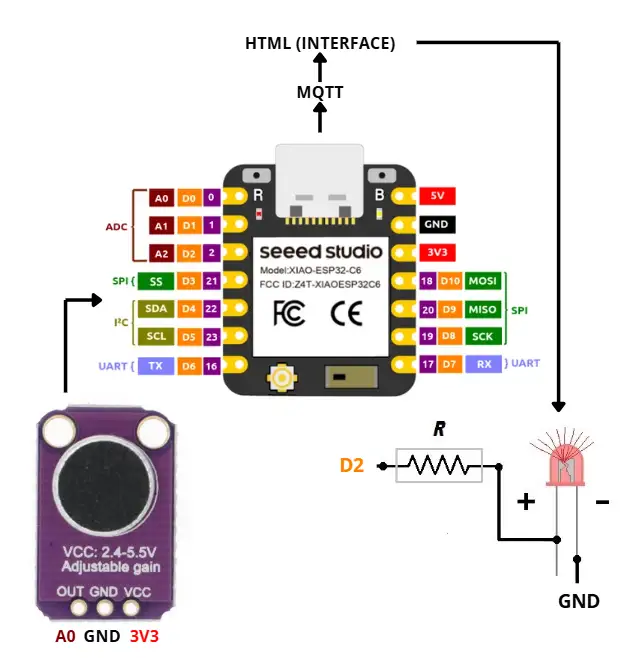
For this week, I used an IoT communication system that connects a XIAO ESP32-C6 to an HTML interface through the MQTT protocol. I reused the PCB that I designed in Week 10, with the ESP32-C6 version to gain access to Wi-Fi and Bluetooth connectivity.
Check here the group assignment for this week for more information about networking and communications.
MQTT (Message Queuing Telemetry Transport) is a lightweight messaging protocol designed for IoT devices. It allows different devices to exchange information efficiently over a network while using very little bandwidth and power.
The broker acts as the central server of the system. It receives messages from devices and distributes them to all clients subscribed to the corresponding topics.
A publisher is any device that sends information to the broker.
A subscriber is a device or application that receives information from the broker.
A topic is a communication channel used to organize messages.
Devices can publish or subscribe to specific topics depending on the information they need.
A message is the data being transmitted between devices.
Any device connected to the MQTT network is considered a client.
MQTT uses a small amount of bandwidth and system resources, making it ideal for embedded and IoT devices.
Messages are delivered quickly between devices through the broker, enabling near real-time communication.
MQTT is designed to minimize network traffic, helping battery-powered devices operate for longer periods.
Its lightweight architecture makes MQTT one of the most widely used communication protocols in IoT systems.
Devices can continuously send and receive information, allowing real-time monitoring and control.
MQTT remains reliable even when network conditions are unstable or bandwidth is limited.
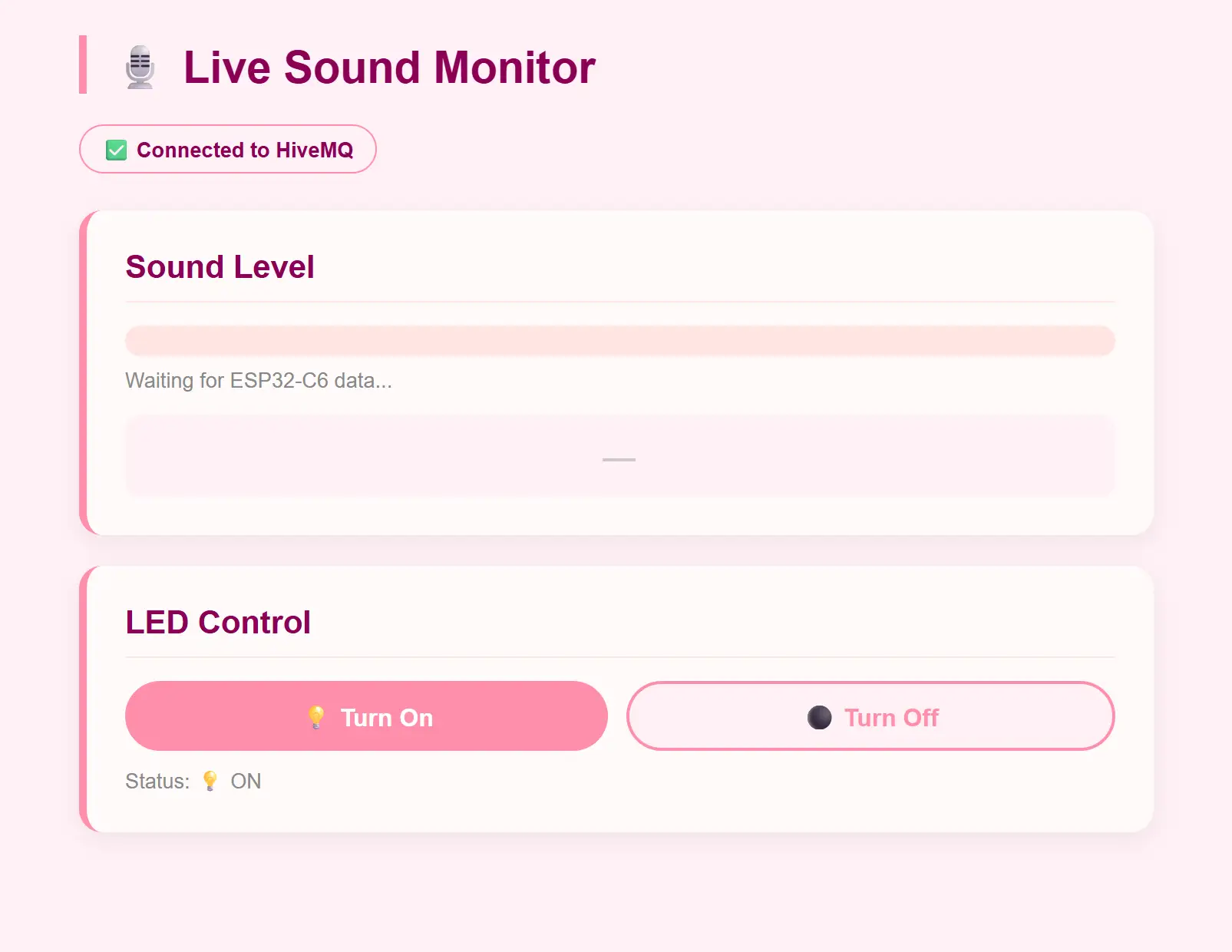
The project is based on three elements that communicate with each other through the internet using the MQTT protocol and the HiveMQ public broker.
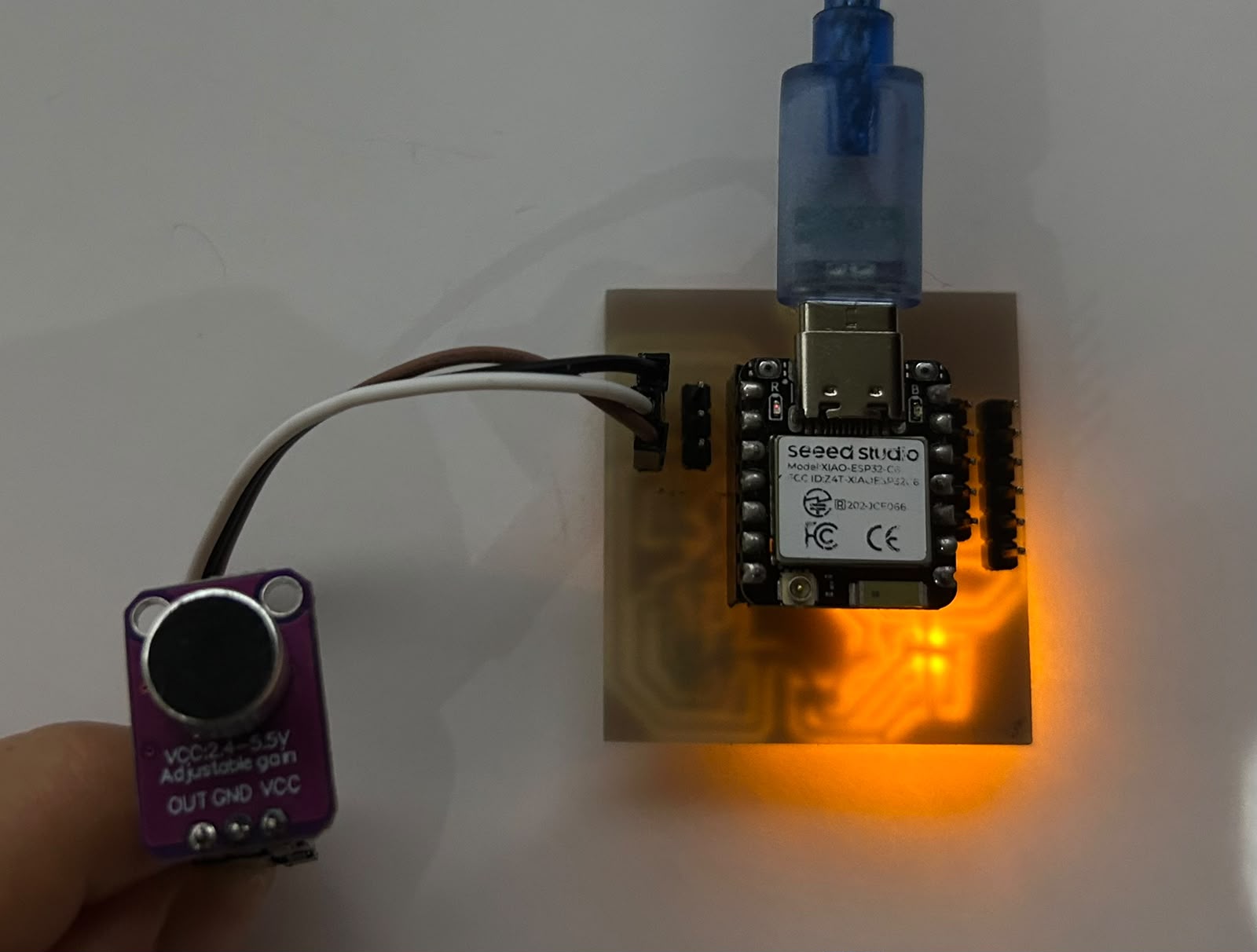
The ESP32-C6 as a data source, the microcontroller constantly reads the sound level from the microphone connected to pin A0. Instead of taking a single reading, it averages 100 samples to get a stable value, then converts it to a 0–100 scale and sends it to the broker every 300ms under the topic selene/microfono. At the same time, it listens for incoming commands on selene/led_onoff to turn the LED on pin D2 on or off.
                // Include the libraries required for Wi-Fi and MQTT communication
                #include <WiFi.h>
                #include <PubSubClient.h>

                // Wi-Fi credentials used to connect the ESP32-C6 to the internet
                const char* ssid     = "INFINITUM2B53_2.4";
                const char* password = "DxNHa3fZ4t";

                // MQTT broker address and communication topics
                const char* mqtt_server  = "broker.hivemq.com";
                const char* topic_mic    = "selene/microfono";
                const char* topic_led    = "selene/led_onoff";

                // Pin definitions
                #define MIC_PIN   A0    // Analog microphone input
                #define LED_PIN   D2    // LED output

                // Audio processing parameters
                #define SAMPLES      100     // Number of samples used to calculate RMS
                #define SEND_EVERY   300     // Time between MQTT messages (ms)
                #define THRESHOLD    50      // Threshold used to classify sound level

                // Create Wi-Fi and MQTT client objects
                WiFiClient espClient;
                PubSubClient client(espClient);

                unsigned long lastSend = 0;

                // Connect the ESP32-C6 to the local Wi-Fi network
                void setup_wifi() {
                Serial.print("Connecting to WiFi");

                WiFi.begin(ssid, password);

                // Wait until the connection is established
                while (WiFi.status() != WL_CONNECTED) {
                    delay(500);
                    Serial.print(".");
                }

                // Display the assigned IP address
                Serial.println("\nWiFi Connected");
                Serial.println(WiFi.localIP());
                }

                // Function executed whenever a message is received from MQTT
                void callback(char* topic, byte* payload, unsigned int length) {

                // Convert the received payload into a string
                String msg = "";

                for (unsigned int i = 0; i < length; i++) {
                    msg += (char)payload[i];
                }

                // Turn the LED on or off according to the received command
                if (msg == "ON") {
                    digitalWrite(LED_PIN, HIGH);
                }

                if (msg == "OFF") {
                    digitalWrite(LED_PIN, LOW);
                }
                }

                // Calculate the sound level using the RMS method
                int readMicLevel() {

                // Configure ADC resolution
                analogReadResolution(12);

                // Calculate the DC offset of the microphone signal
                long sum = 0;

                for (int i = 0; i < SAMPLES; i++) {
                    sum += analogRead(MIC_PIN);
                }

                int dcOffset = sum / SAMPLES;

                // Calculate the RMS value
                double sumSq = 0;

                for (int i = 0; i < SAMPLES; i++) {
                    float centered = analogRead(MIC_PIN) - dcOffset;
                    sumSq += centered * centered;
                }

                int rms = sqrt(sumSq / SAMPLES);

                // Convert the RMS value into a 0–100 scale
                int level = map(rms, 0, 600, 0, 100);

                return constrain(level, 0, 100);
                }

                // Main program loop
                void loop() {

                // Reconnect if MQTT connection is lost
                if (!client.connected()) {
                    reconnect();
                }

                client.loop();

                // Send microphone data periodically
                if (millis() - lastSend >= SEND_EVERY) {

                    lastSend = millis();

                    // Read sound level from the microphone
                    int level = readMicLevel();

                    // Publish the value through MQTT
                    char buf[8];
                    itoa(level, buf, 10);

                    client.publish(topic_mic, buf);
                }
                }
                <!DOCTYPE html>
                <html lang="en">
                <head>

                <!-- Character encoding -->
                <meta charset="UTF-8"/>

                <!-- Responsive design for mobile devices -->
                <meta name="viewport" content="width=device-width, initial-scale=1.0"/>

                <!-- Page title -->
                <title>Interface — Selene Román</title>

                <!-- MQTT JavaScript library -->
                <script src="https://cdnjs.cloudflare.com/ajax/libs/mqtt/4.3.7/mqtt.min.js"></script>

                <!-- External stylesheet -->
                <link rel="stylesheet" href="../style.css"/>

                </head>

                <body>

                <!-- Main container -->
                <main style="max-width: 700px; margin: 40px auto; padding: 0 20px;">

                    <!-- Page title -->
                    <h1 class="doc-section-title">🎙️ Live Sound Monitor</h1>

                    <!-- MQTT connection status -->
                    <div id="estado-conn">
                    Connecting to MQTT...
                    </div>

                    <!-- Sound Level Section -->
                    <div class="monitor-seccion">

                    <h2>Sound Level</h2>

                    <div class="barra-fondo">
                        <!-- Dynamic sound level bar -->
                        <div id="barra-nivel"></div>
                    </div>

                    <!-- Numeric sound level value -->
                    <div id="nivel-texto">
                        Waiting for ESP32-C6 data...
                    </div>

                    <!-- Close/Far sound indicator -->
                    <div id="prox-mensaje">—</div>

                    </div>

                    <!-- LED Control Section -->
                    <div class="monitor-seccion">

                    <h2>LED Control</h2>

                    <div class="monitor-btn-fila">

                        <!-- Button to turn the LED on -->
                        <button class="nav-btn"
                                onclick="sendLED('ON')">
                        💡 Turn On
                        </button>

                        <!-- Button to turn the LED off -->
                        <button class="nav-btn apagar"
                                onclick="sendLED('OFF')">
                        ⚫ Turn Off
                        </button>

                    </div>

                    <!-- Current LED status -->
                    <div id="led-estado">
                        Status: unknown
                    </div>

                    </div>

                </main>

                <script>

                // MQTT broker address
                const BROKER = 'wss://broker.hivemq.com:8884/mqtt';

                // Topic used to receive microphone data
                const TOPIC_MIC = 'selene/microfono';

                // Topic used to control the LED
                const TOPIC_LED = 'selene/led_onoff';

                // Threshold used to determine whether the sound is close or far
                const THRESHOLD = 50;

                // MQTT client object
                let client;

                // Function used to connect to the MQTT broker
                function connect() {

                    client = mqtt.connect(BROKER, {

                    // Generate a random client ID
                    clientId: 'web_selene_' +
                                Math.random().toString(16).slice(2, 8),

                    clean: true,

                    // Automatically reconnect every 3 seconds
                    reconnectPeriod: 3000,
                    });

                    // Executed when the connection is successful
                    client.on('connect', () => {

                    document.getElementById('estado-conn').textContent =
                        '✅ Connected to HiveMQ';

                    // Subscribe to microphone topic
                    client.subscribe(TOPIC_MIC);

                    // Subscribe to LED topic
                    client.subscribe(TOPIC_LED);
                    });

                }

                </script>

                </body>
                </html>