This week is more like a summary of the previous electronics-based weeks. Till now, I had designed a PCB
in which a light blinks with a button. This is the upgrade week, where we include sensors in our design.
Sensors perform many of the functions, while the microcontroller controls them.
How the week ended
The week ended with me being stuck in this 80-20 rule. I have used 3 input devices and could only test if they work, but I did tune the codes in Arduino to get the desired result.
Week 09’s Assignment
Group assignment:
Probe an input device’s analog levels and digital signals (at minimum, demonstrate the use of a multimeter and an oscilloscope).
Document your work on the group work page and reflect on your individual page what you learned.
Measure something: add a sensor to a microcontroller board that you have designed and read it :.
This week focuses on understanding sensors and how they function within a
system. Before exploring different types, it is important to understand the basic concept behind them. Sensors are input devices
that detect changes in the environment and convert them into signals that a microcontroller can read. Examples include light sensors
such as phototransistors, distance sensors, and gyroscopes. These devices do not perform actions but provide data based on environmental
conditions.
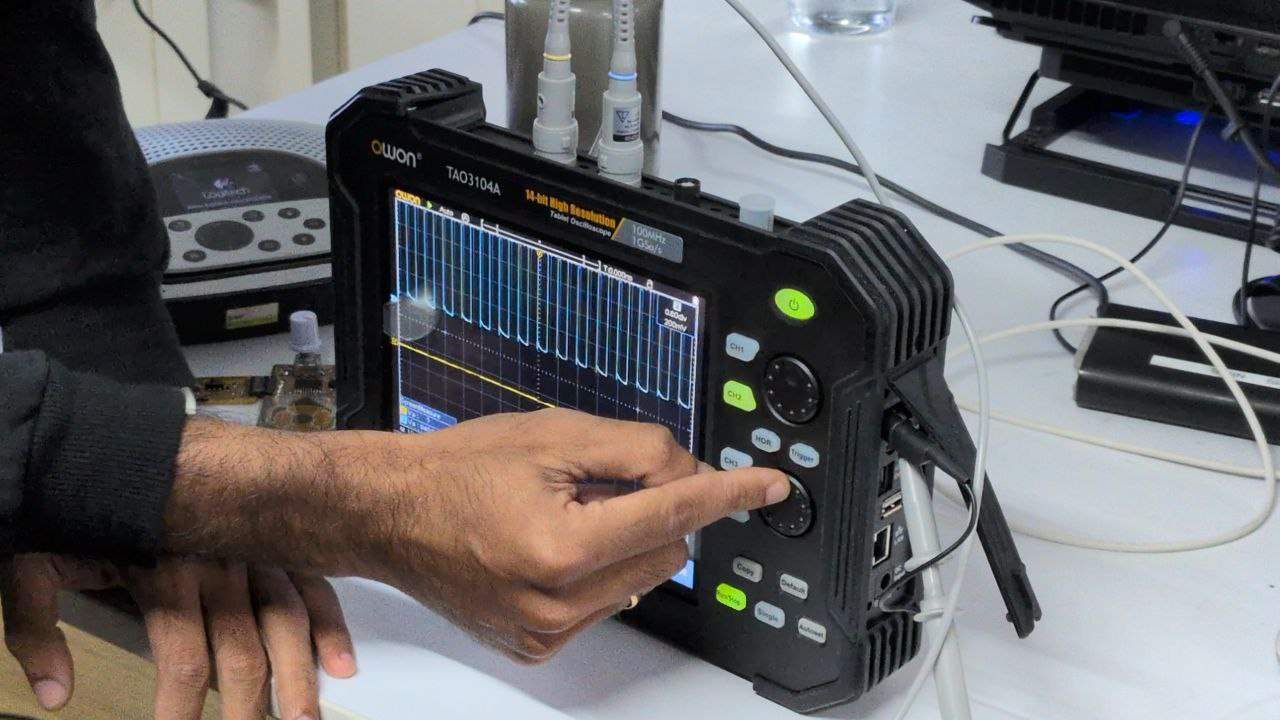
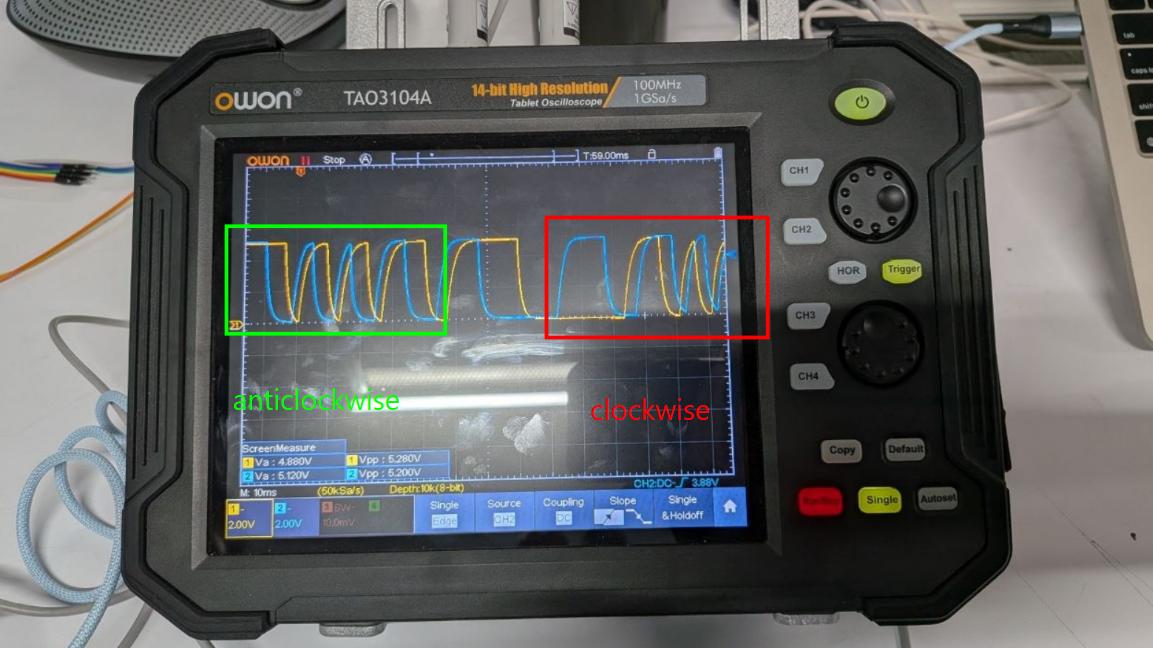
Owon TAO3104A was the model of oscilloscope used. An oscilloscope is an electronic test instrument that displays changes in electronic voltage over time. The Owon TAO3104A is a portable tablet oscilloscope designed for testing and analyzing electronic signals.
The device provides a visual display of changes in voltage and offers high precision output. The test was conducted on a rotary encoder. The oscilloscope has two probes with a clip on design. The S1 and S2 pinouts are connected to CH1 and CH2 of the oscilloscope, with a common ground provided. The shaft of the rotary encoder is rotated, and by observing how fast the signals change, we can determine the rotational speed. Although the waveform may appear somewhat analog due to the physical switching characteristics, the encoder effectively produces digital signals that switch between high and low states.
My understanding of Input devices
Until last week, I worked with microcontrollers, LEDs, buttons, programming, and PCB circuit design. This helped me understand the relationship between input and output.
Input devices are the means through which data is given to a system. They enable interaction between the user or the environment and the microcontroller.
For example, when I press the letter "h" on a keyboard, that action is the input. The display of "h" on the screen is the output.
In another scenario, I want a light to turn on when the surroundings are dim. To achieve this, I can use a phototransistor to sense light intensity and connect an LED to the circuit.
Image Prompt - Claude AI
For example, when I press the letter "h" on a keyboard, that action is the input. The display of "h" on the screen is the output.
In another scenario, I want a light to turn on when the surroundings are dim. To achieve this, I can use a phototransistor to sense light intensity and connect an LED to the circuit.
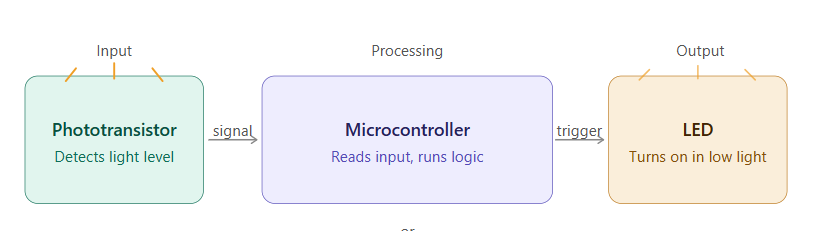
Here, the phototransistor acts as the input device by detecting light levels. The microcontroller reads this input, processes it based on programmed logic, and then controls the output.
The LED acts as the output device. When the sensor detects low light, it sends a signal to the microcontroller, which then turns on the LED. This behavior is programmed using Arduino or similar platforms.
his forms a simple system where the sensor is the input, the microcontroller handles processing, and the LED is the output.
Create image simple and minimal
Here, the phototransistor acts as the input device by detecting light levels. The microcontroller reads this input, processes it based on programmed logic, and then controls the output. The LED acts as the output device. When the sensor detects low light, it sends a signal to the microcontroller, which then turns on the LED. This behavior is programmed using Arduino or similar platforms.
This forms a simple system where the sensor is the input, the microcontroller handles processing, and the LED is the output.
I discussed my final project with instructor Sibin. He suggested the input devices required for the project.
The design involves a moving light that follows a path similar to the sun. The color changes based on time, and the time is set according to another location, such as a friend’s location.
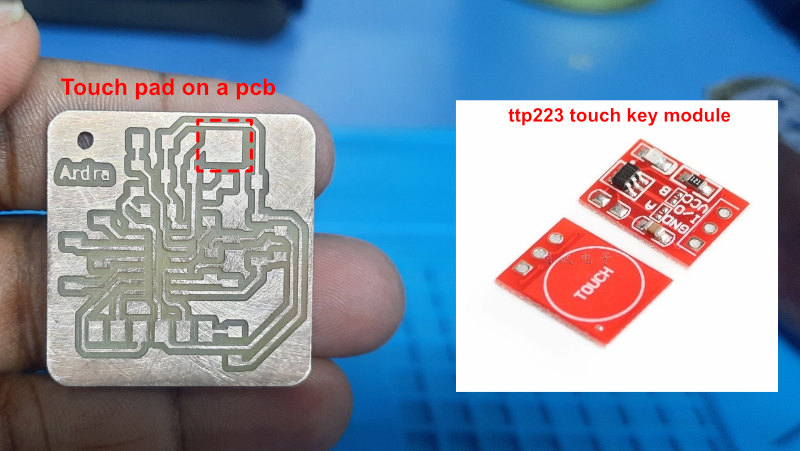
"Capacitive touch sensors are electronic components that detect changes in the electrical charge of conductive materials, such as the human body. When a finger or conductive object touches the surface, it disturbs the electrostatic field and changes the capacitance. This change is measured and interpreted to enable accurate touch detection."
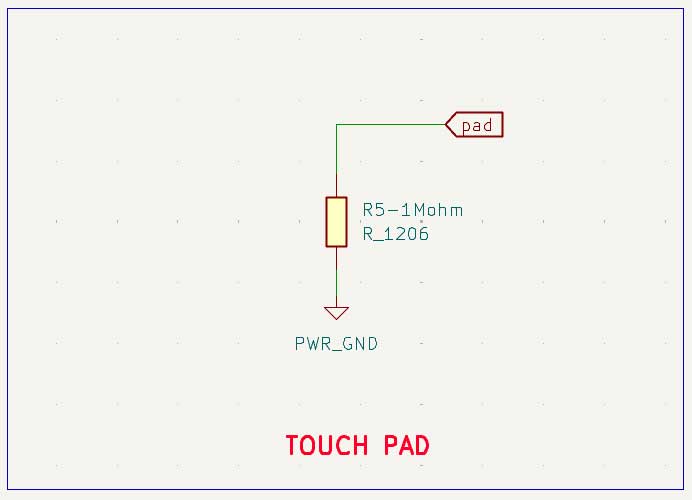
For a touch pad on pcb a 1M ohm resistor is added. If ttp223 touch module is added the 3 pins are to be connected.
VCC: Power supply (2.0 V to 5.5 V)
GND: Ground
SIG / OUT: digital input pin
"A phototransistor is a component that converts light into electrical signals. It works like a transistor, but uses light instead of a base current to switch on and off."
Use: Used to dim the LED when the surrounding light decreases, creating a night or dim mode when the room lights are turned off.
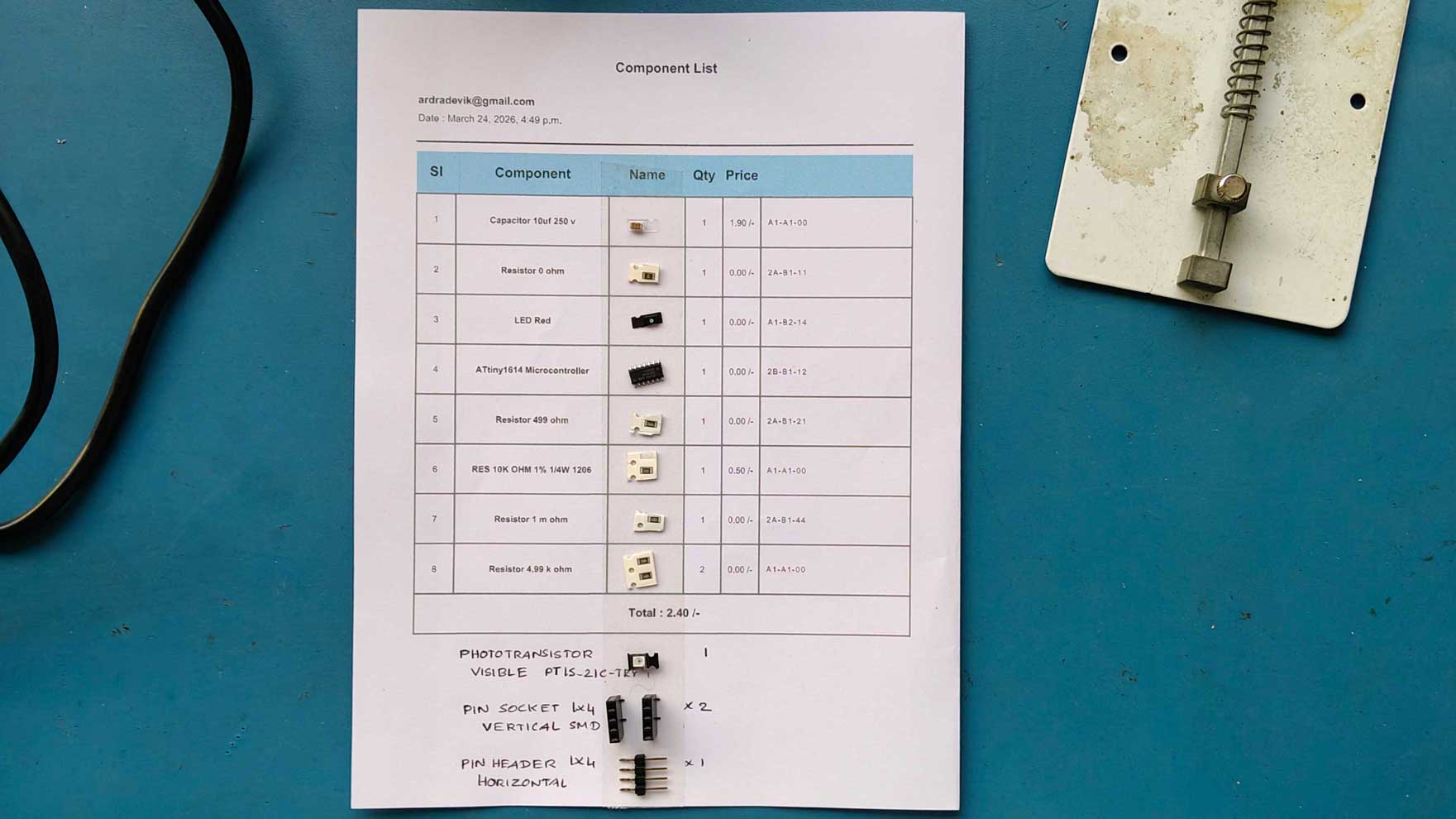
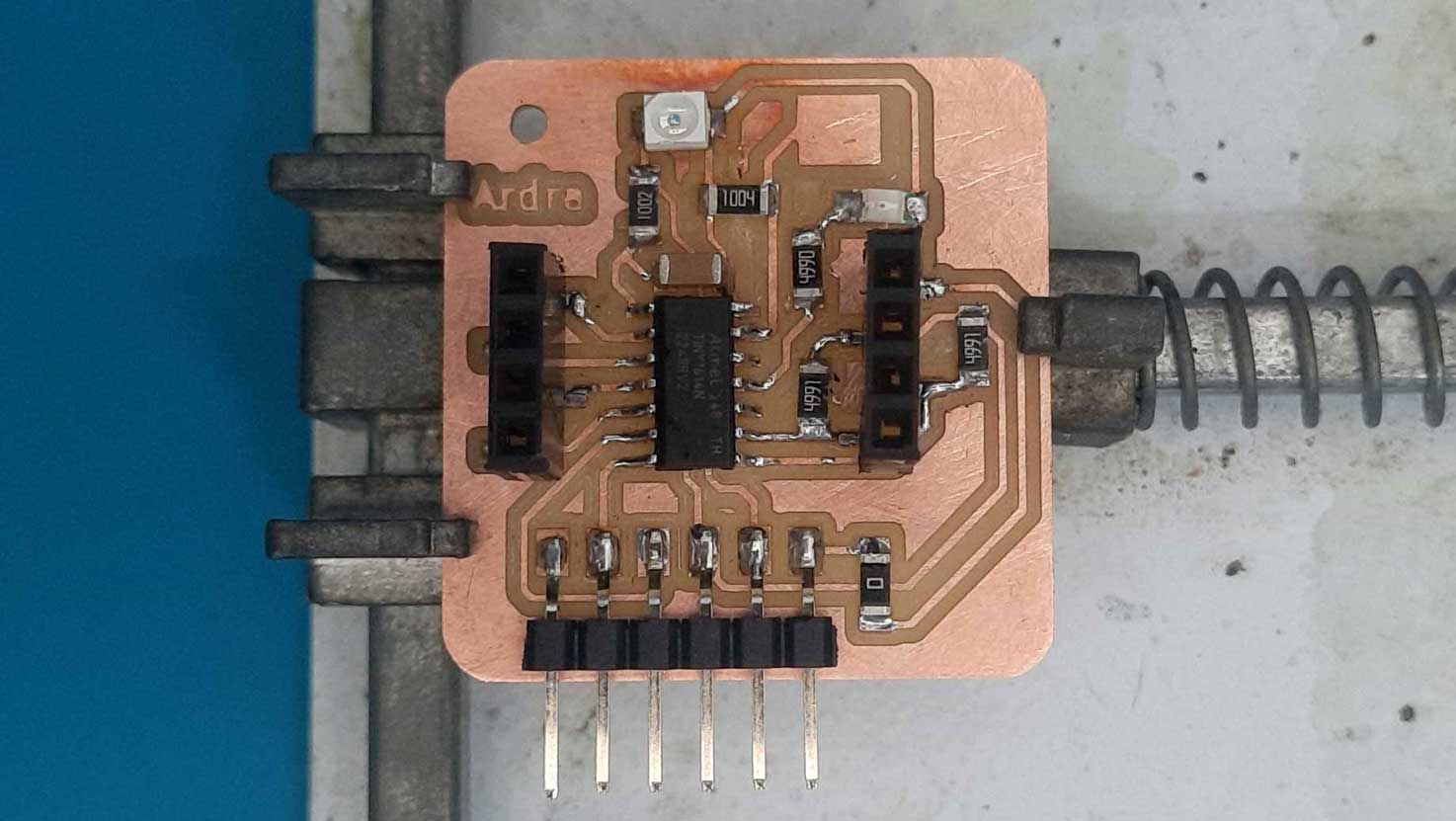
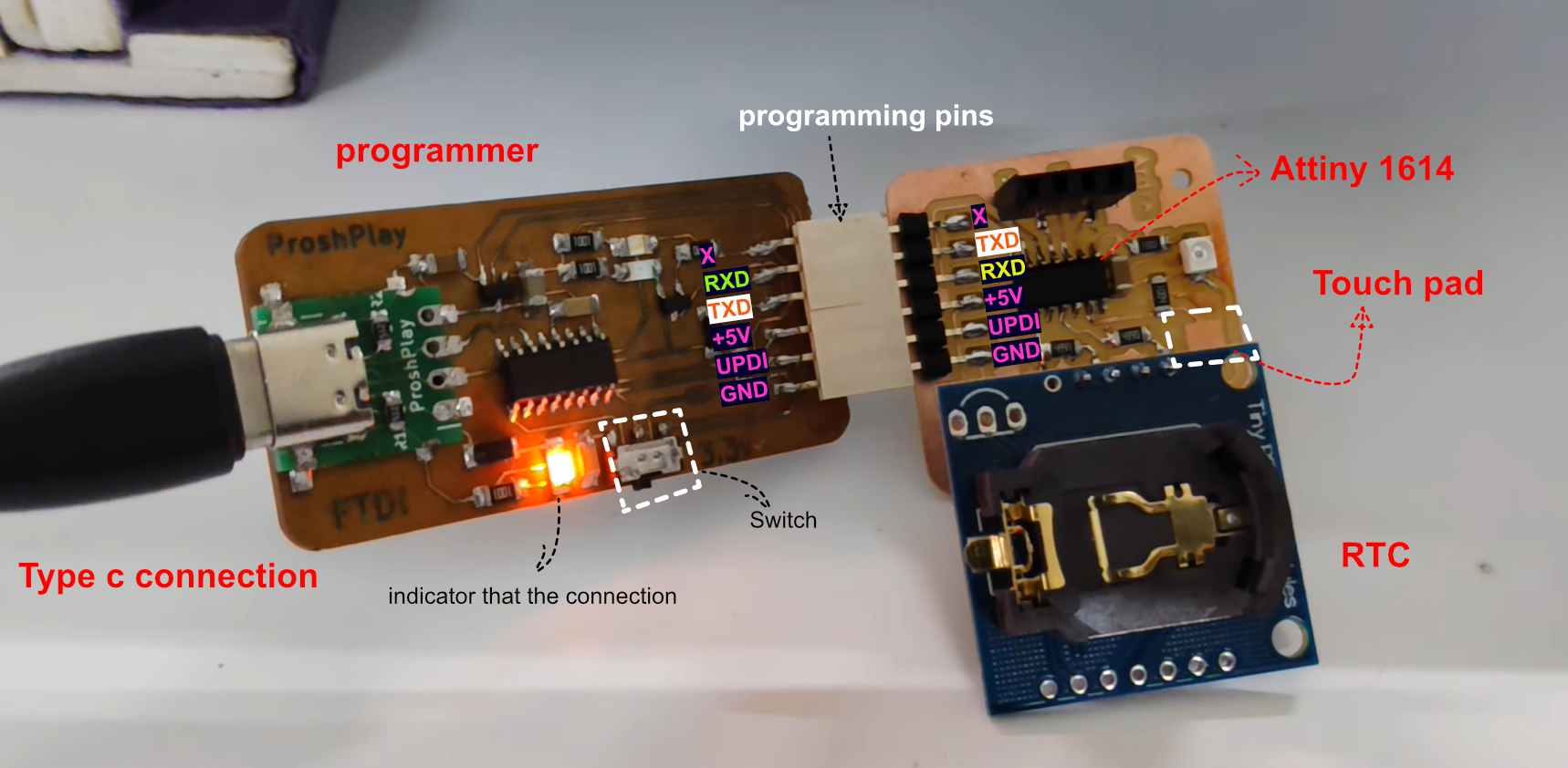
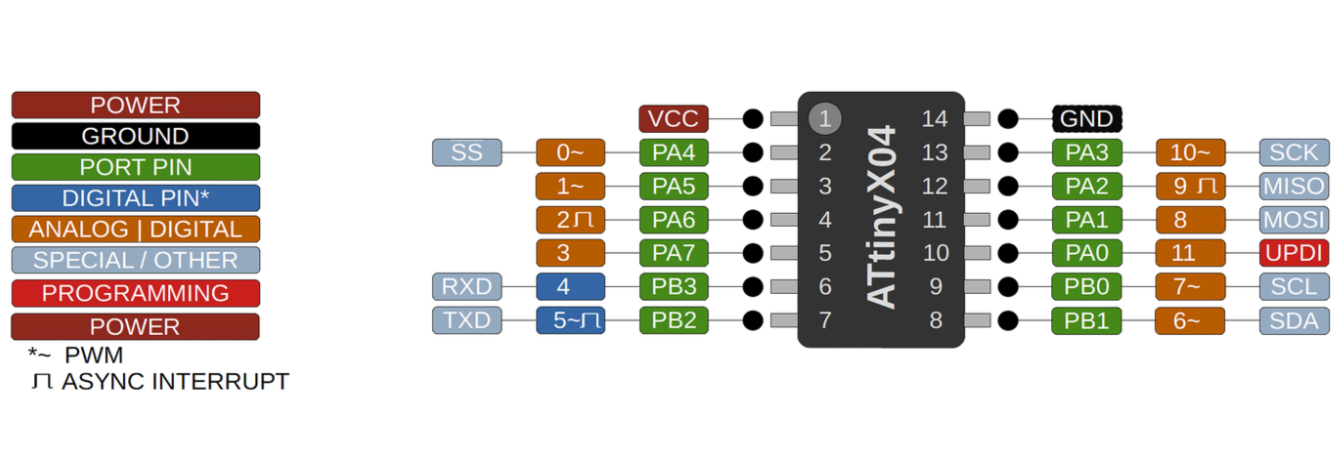
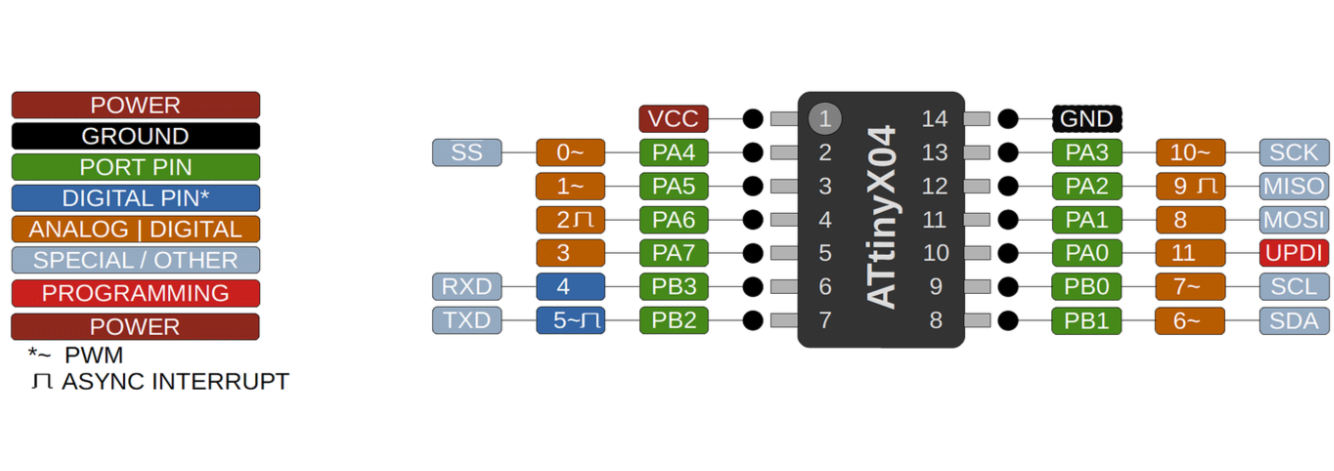
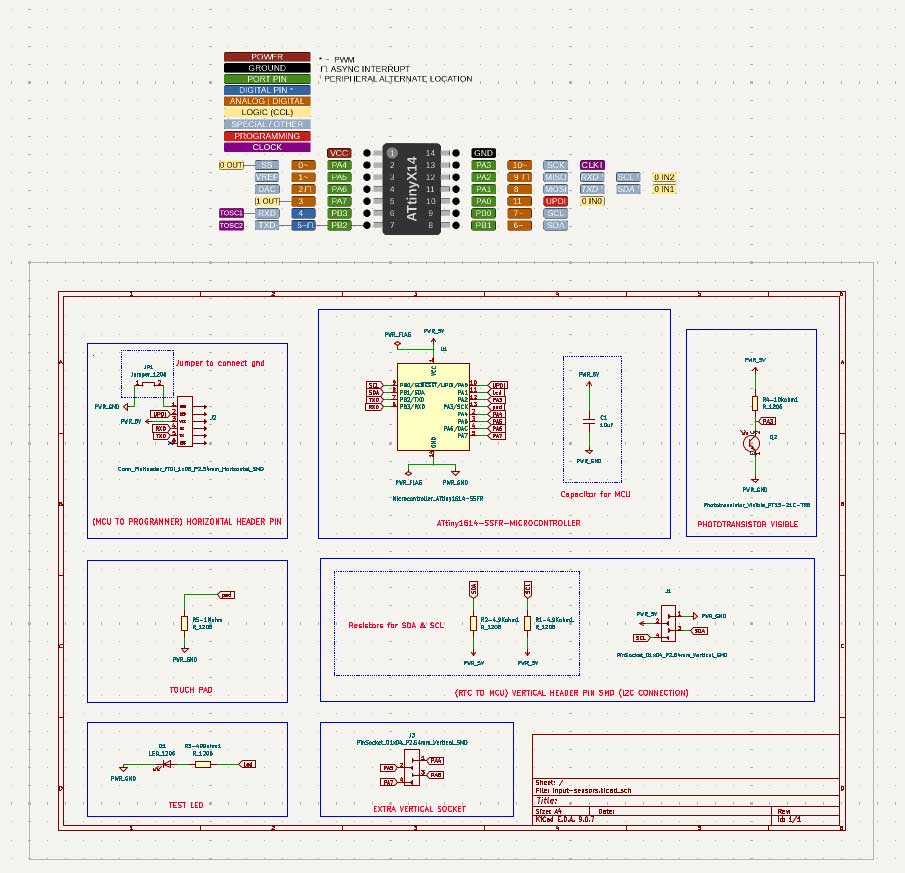
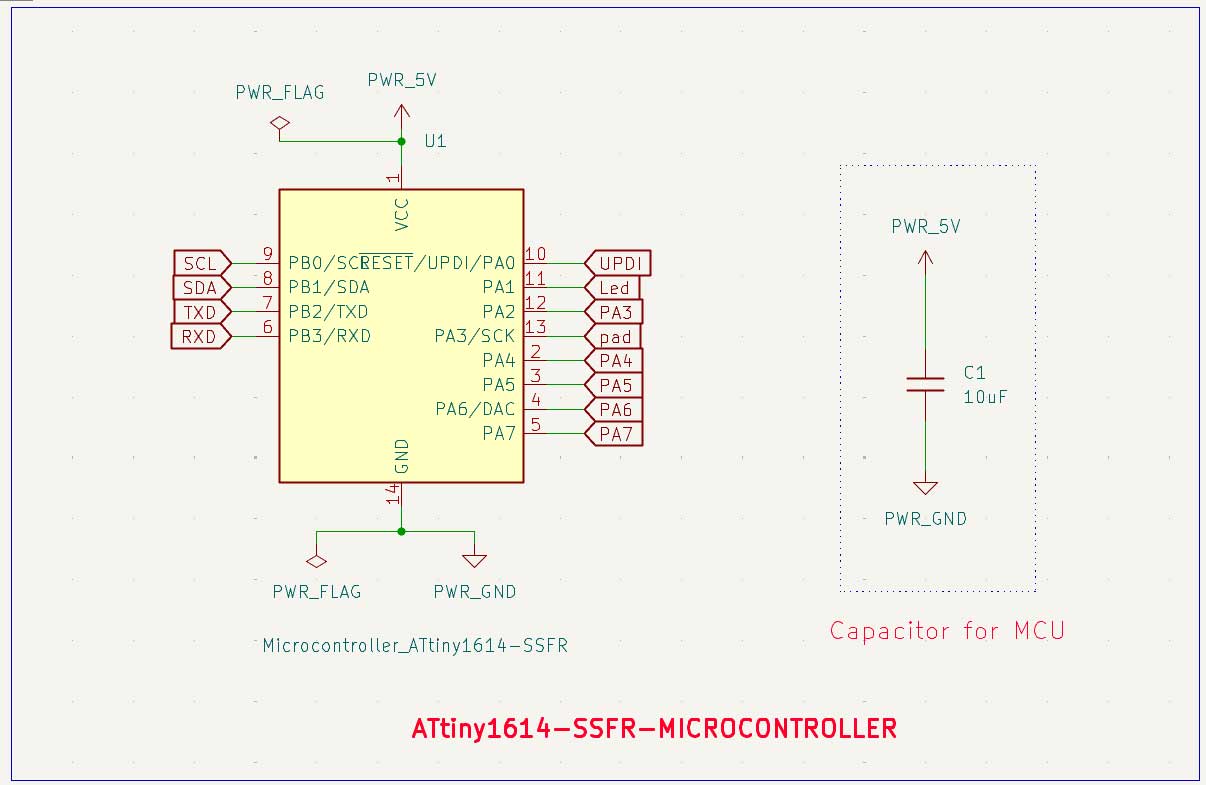
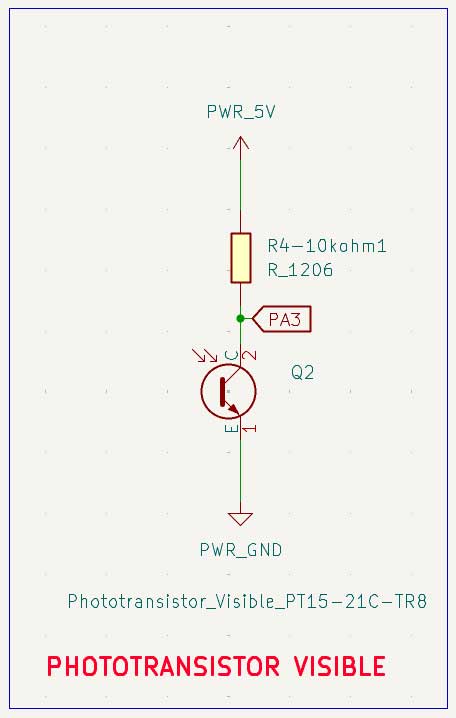
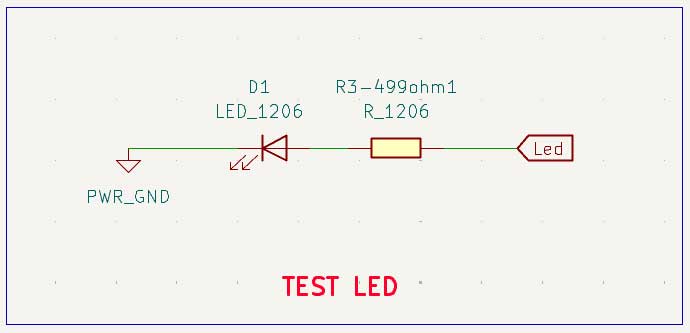
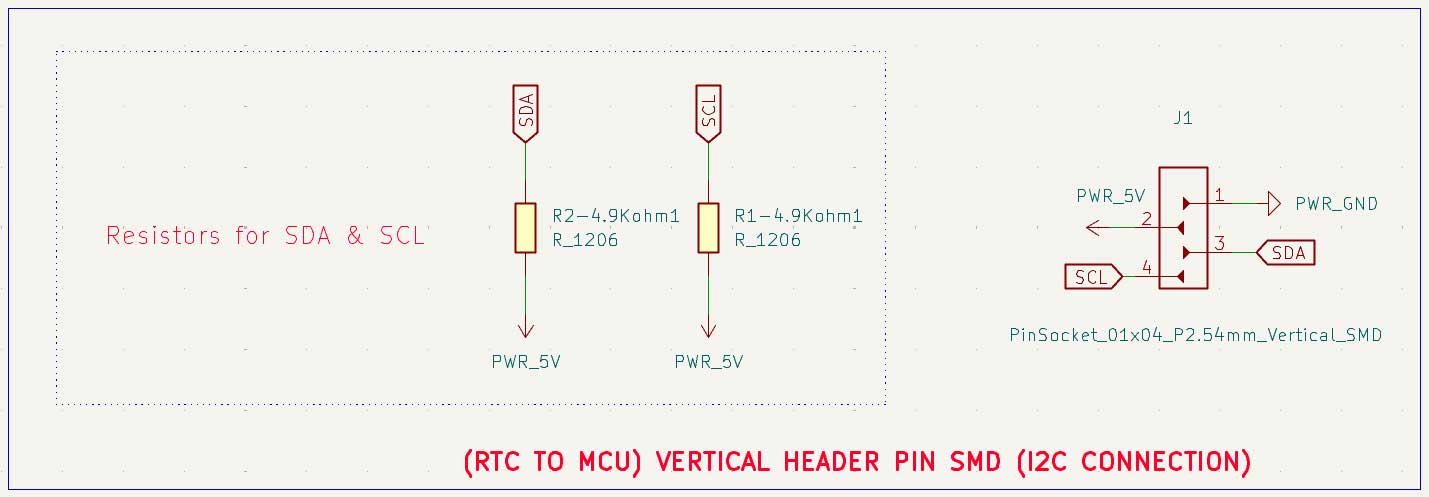
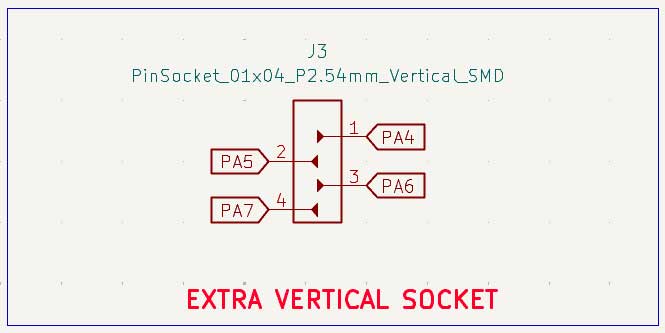
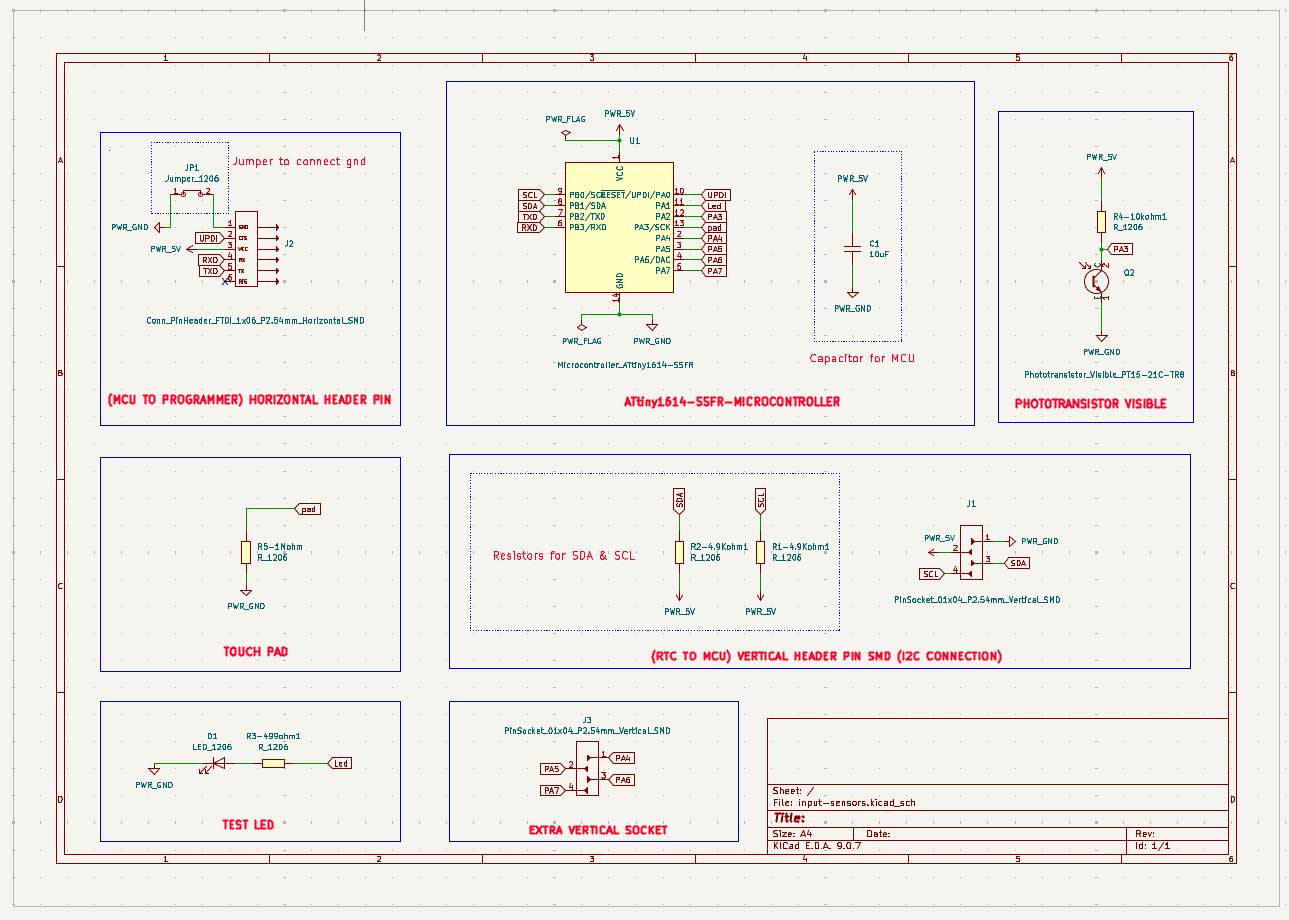
ATtiny1614 is used here. The phototransistor has a 10k ohm resistor connected to it. The capacitive touch pad has a 1M ohm resistor connected, making it a pull up resistor. RTC modules using I²C communication need pull up resistors on the SDA and SCL communication lines. One of the vertical pin connectors is added to account for the extra pins that might be connected for some use. I added an LED just to know if the board works. I would suggest it is better to add such an LED before the power reaches the microcontroller.
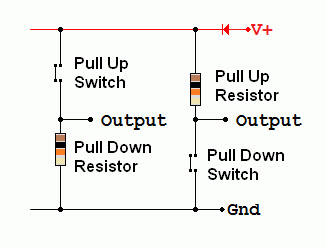
Here when the resistor is connected between power and the signal pin it is called a pull up resistor. Keeps the line HIGH by default
When it is connected between signal and GND it is called a pull down resistor. Keeps the line LOW by default. So this keeps the communication line in a known state.
If the resistor is not connected, the line is said to be in a floating state. Its voltage becomes undefined and can randomly change due to electrical noise. This can cause unreliable readings and communication errors, so we add resistors to keep the signal stable.
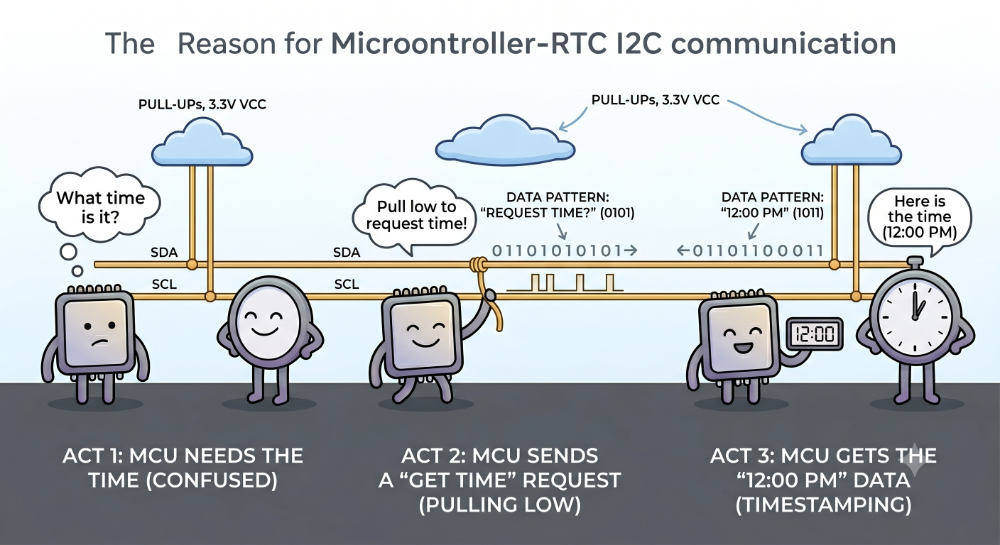
The pull up resistor connects SDA and SCL to VCC, so the lines are normally HIGH. The pull up resistor keeps the SDA and SCL lines HIGH when no device is using them. Both the MCU and RTC can pull the lines LOW, but neither device can actively drive the lines HIGH. When they release the line, the pull up resistor brings it back to HIGH. That is why I²C devices are said to be open drain . They can pull the line LOW, but they cannot drive it HIGH. The pull up resistor brings the line back to the HIGH state.
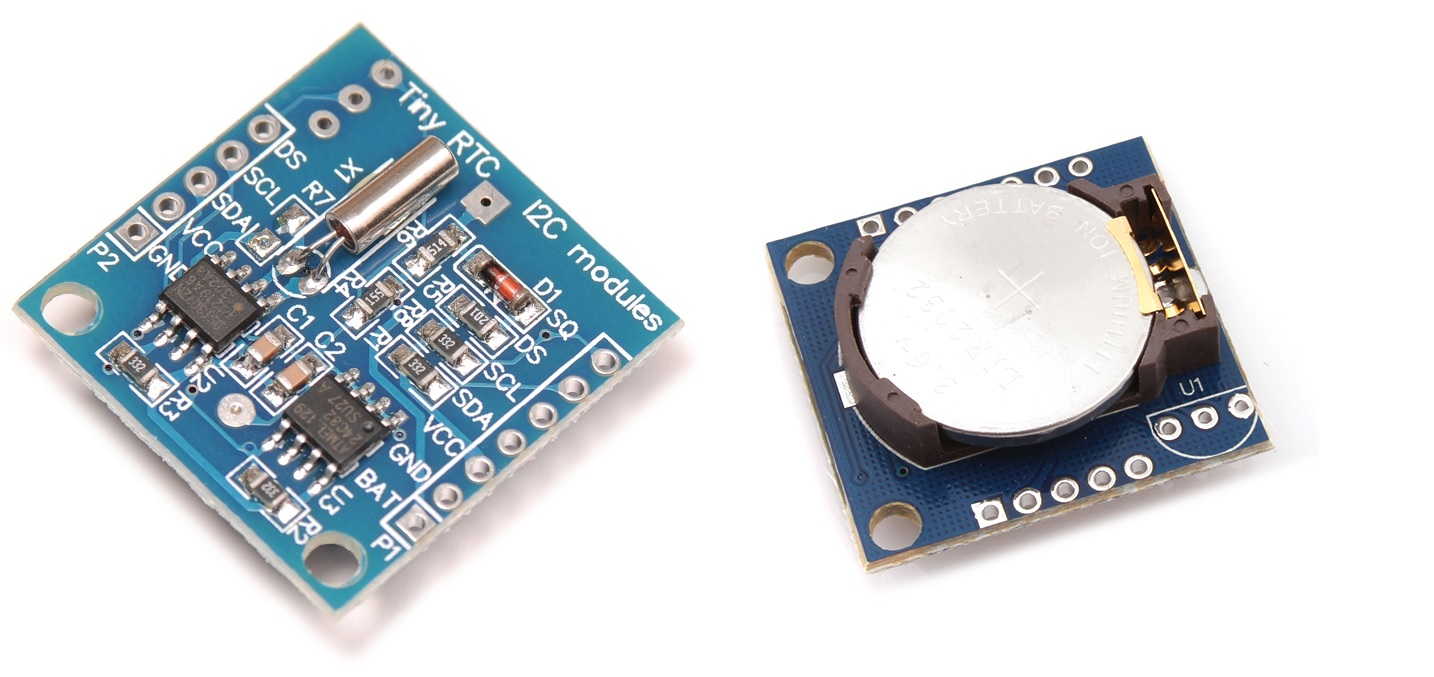
I²C communication requires pull up resistors on both the SDA and SCL lines. These resistors are connected between the signal line and VCC, keeping the lines HIGH when no device is using them. Common values are 4.7kΩ and 10kΩ. Many RTC modules already have these pull up resistors built into the board, so additional resistors may not be needed.
A 3-panel horizontal comic strip explaining I2C communication between a Microcontroller (MCU) and a Real-Time Clock (RTC). Minimalist, clean, cute vector illustration style with clear text labels.
Panel 1 (Left): An MCU character looks confused with a thought bubble saying 'What time is it?'. An RTC clock character stands nearby. Above them, two parallel wires labeled 'SDA' and 'SCL' are held up high in the sky by a friendly cloud labeled 'Pull-up Resistor (Default HIGH)'.
Panel 2 (Center): The MCU character physically pulls the SDA wire down into a low ditch, with a speech bubble saying 'Pulling low to request time!'. A digital square wave pattern (0s and 1s) travels down the wire toward the RTC.
Panel 3 (Right): The RTC clock character happily hands a digital display reading '12:00 PM' to the MCU, saying 'Here is the time!'. The lines return to the high sky.
Clean white background, clear readable English text, no clutter, educational and simple
RTC modules always need the SDA and SCL pins with 4.9k resistors connected to each of those pins between the signal line and the VCC. Rtc modeules when conencte4d by I2C communication needs pull up ressitors.
RTC modules always need the SDA and SCL pins with 4.9k resistors connected between the each signal line and the VCC. thsi keeps it in the hioght state. sicne the device could only pull theline down ot
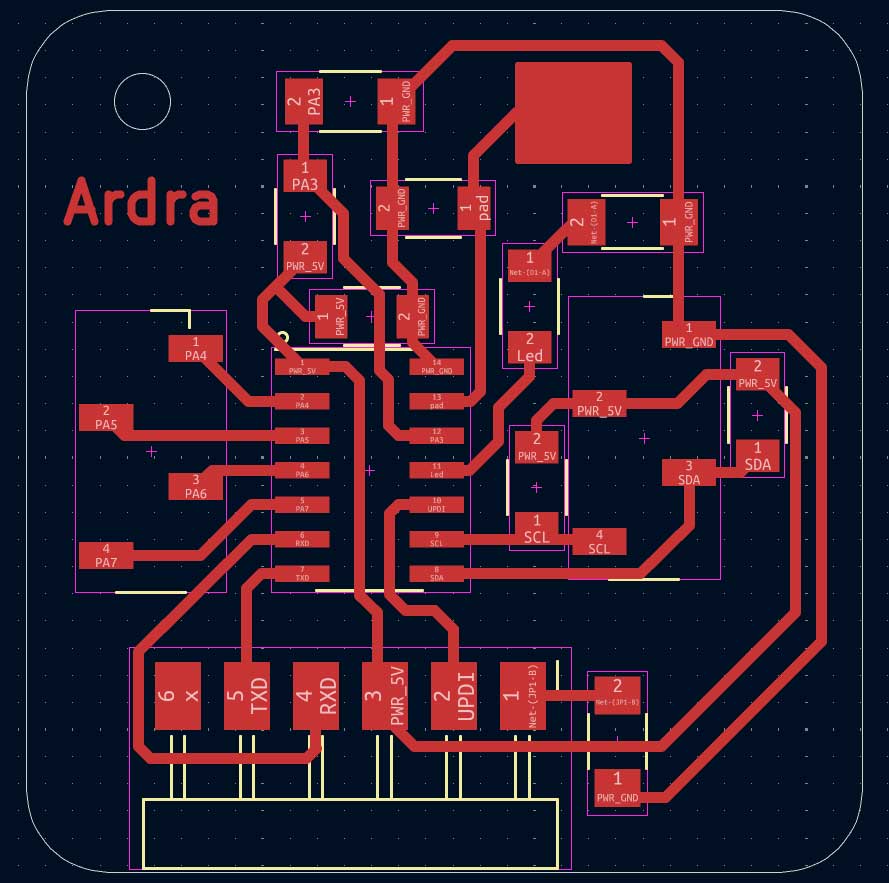
KiCAD PCB Editor - traces
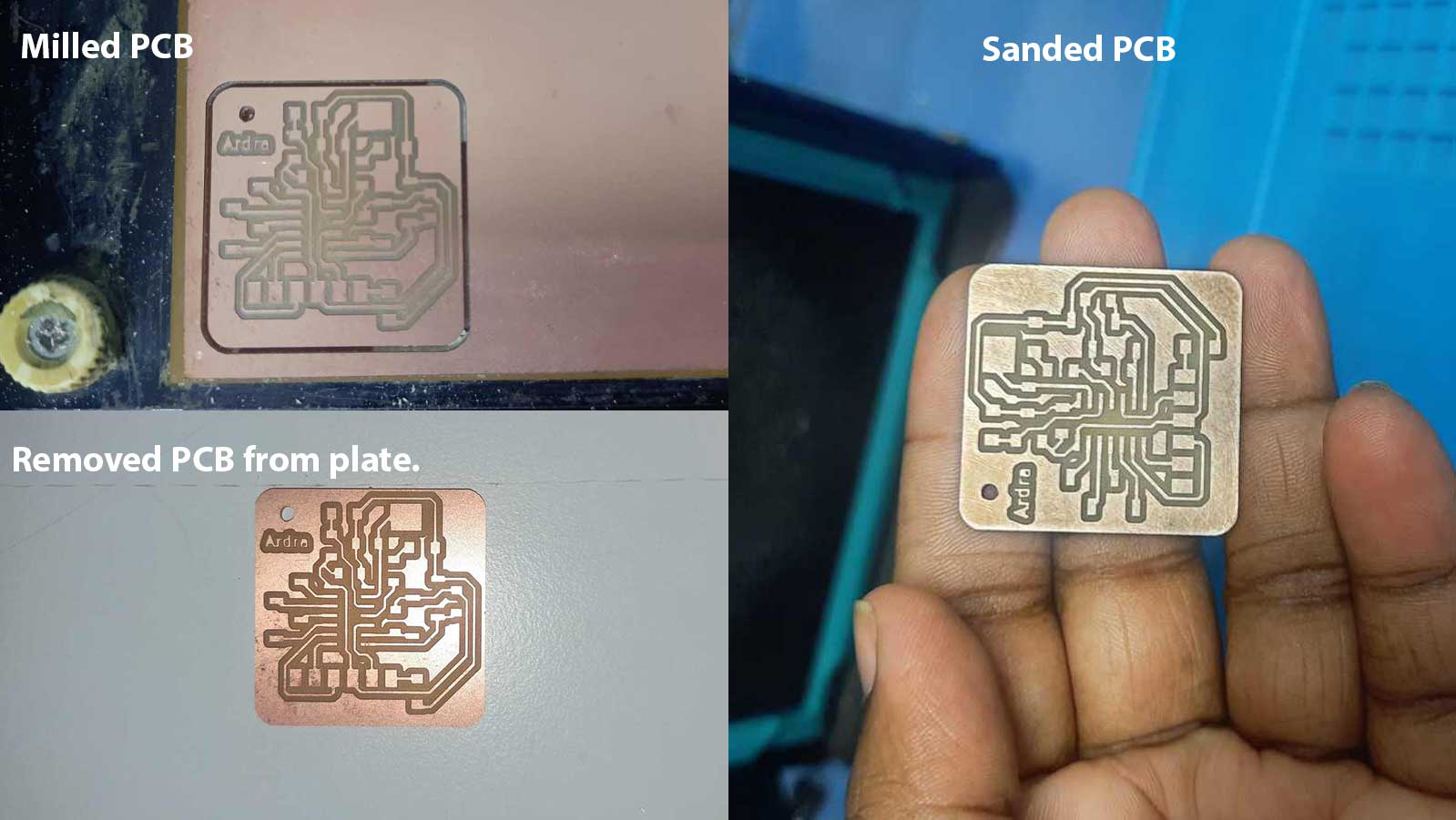
Since the microcontroller can't be directly connected for programming, the programming pins are connected to the side for easy connection, using SMD horizontal pins for that. I placed the microcontroller in the centre and placed the components around it.
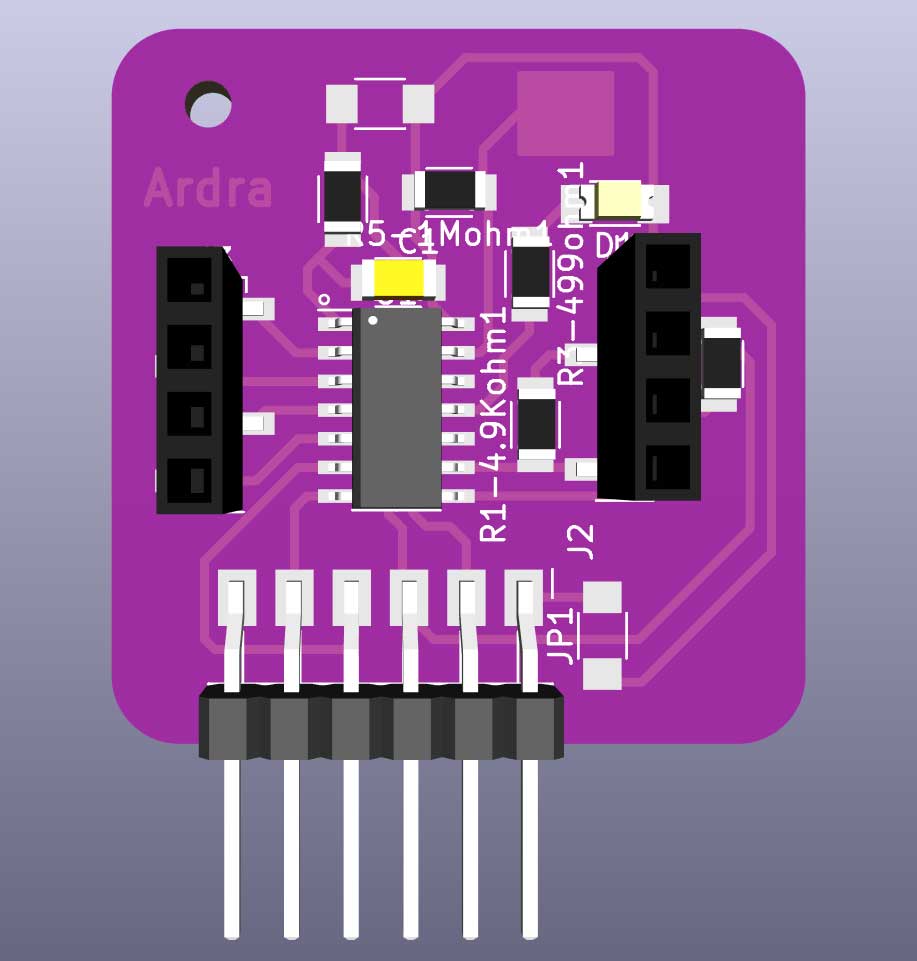
KiCAD 3D model
The 3D model also gives me an idea of whether the components can be placed or soldered.
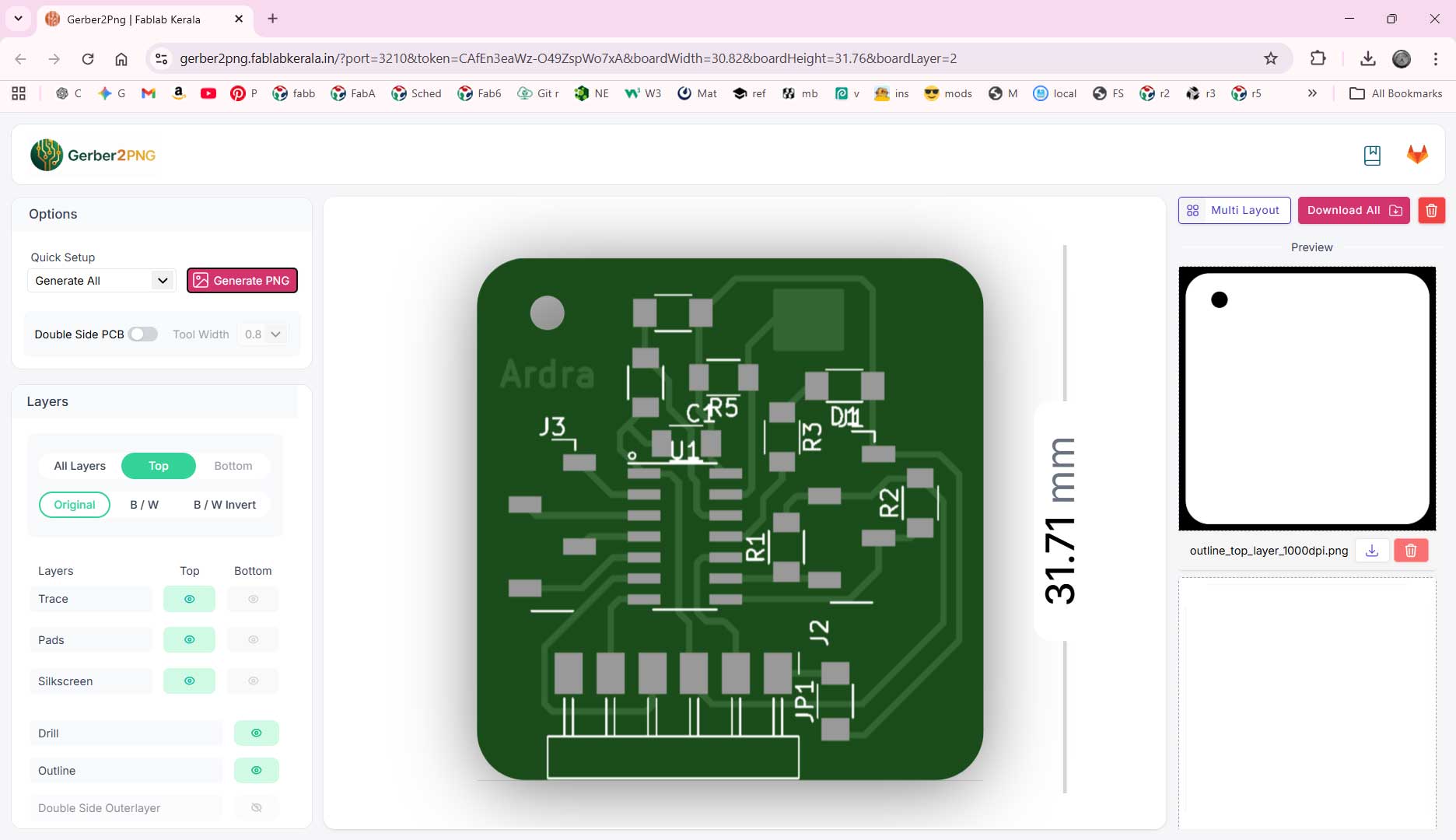
Gerber to Png
After drawing the traces, generate the gerber files. Click the installed Gerber2Png plug-in in KiCAD. Gerber2Png plugin
It opens into the site. Downloaded the 2 Gerber files generated.
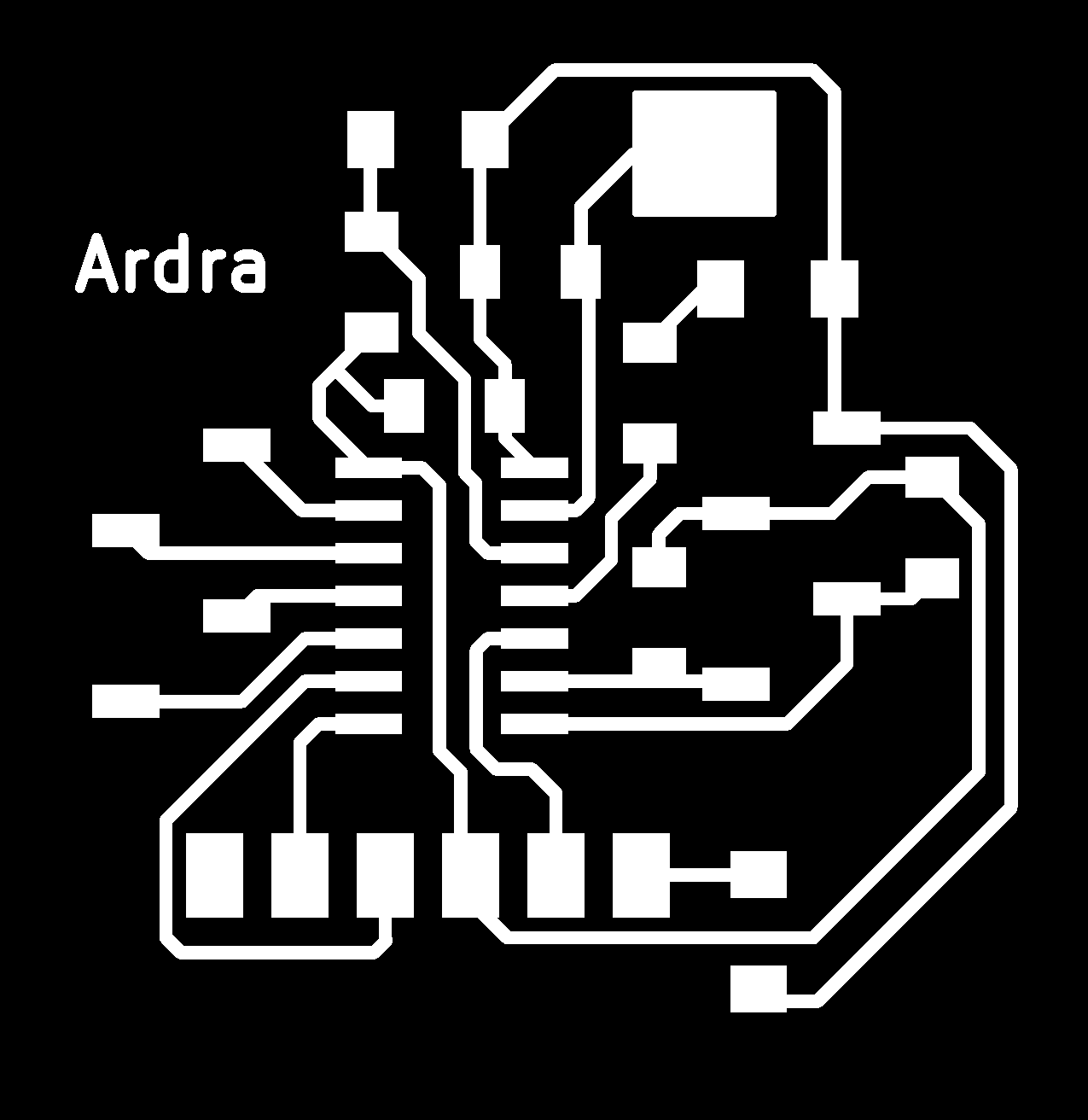
tracesoutline
No drill file - here the drills happen in the outline.
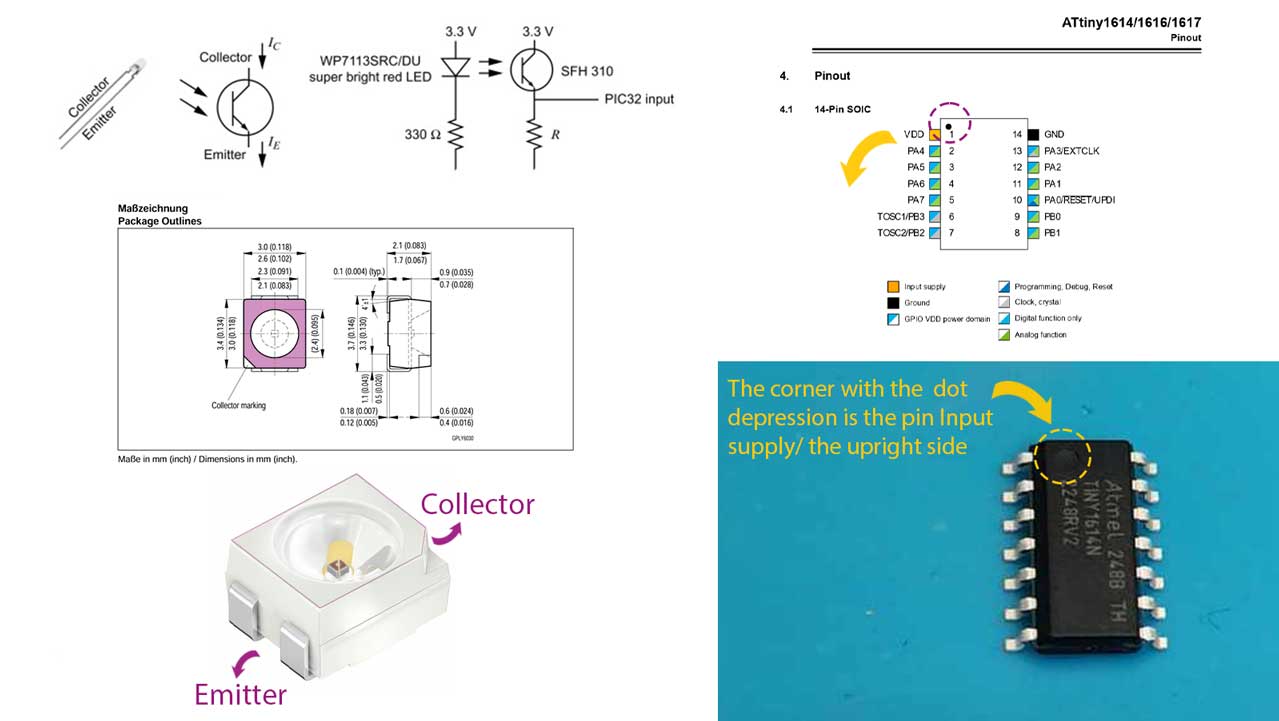
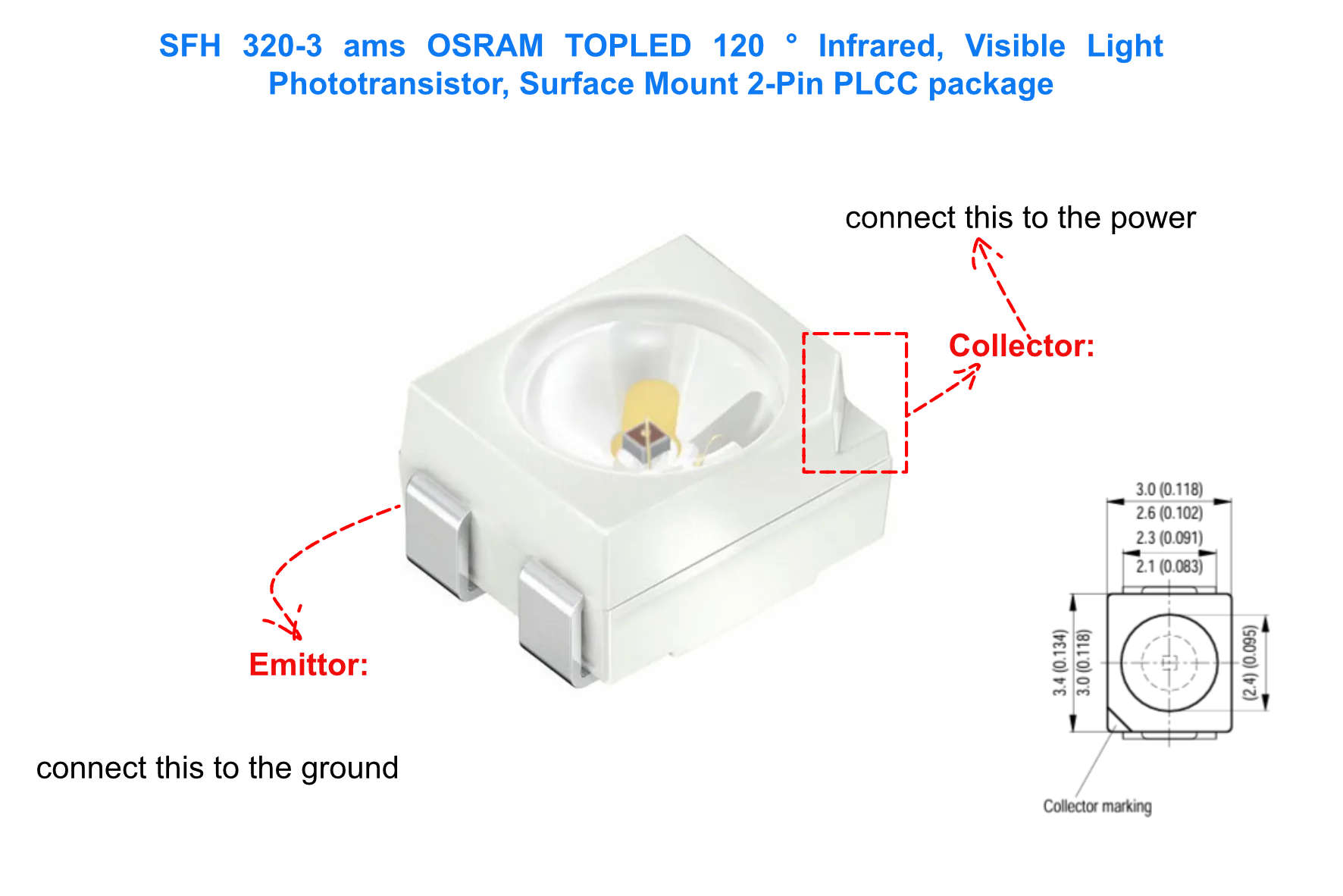
The phototransistor and the ATtiny have to be placed in a specific way. The indicators on the components help to place them properly. The phototransistor has to be placed with the chipped corner on the positive side. The ATtiny1614 has an indentation / dot / circular depression on the board that is near the power pin. Certain components have to be placed in a specific way, or else they might disrupt the power supply or even damage the board.
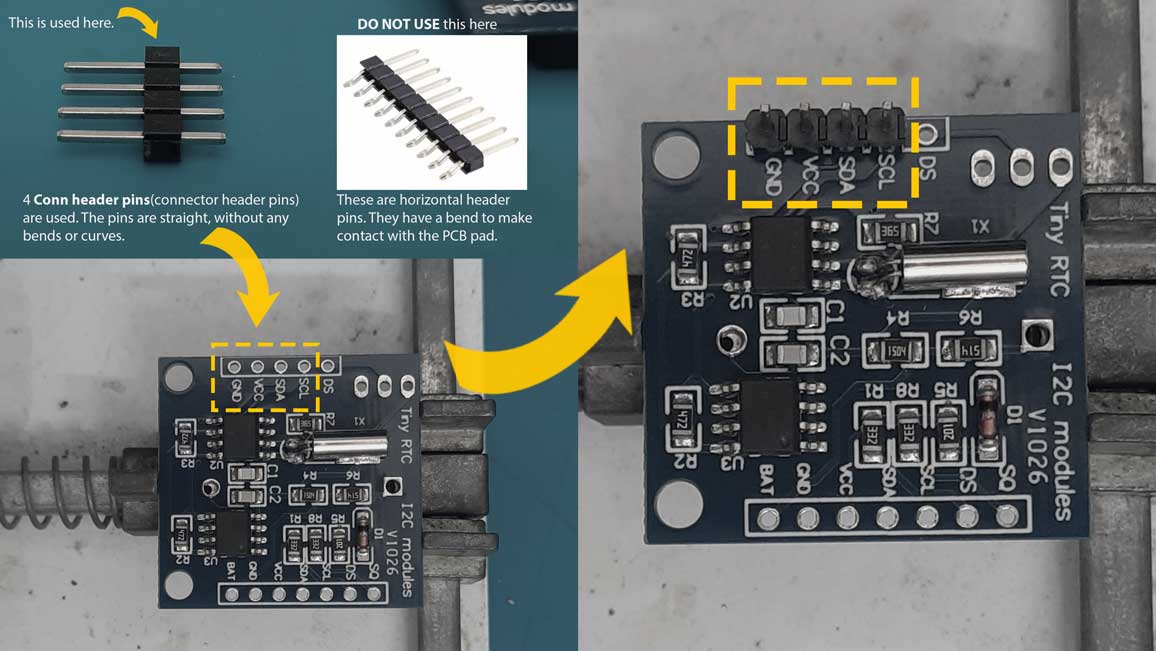
The RTC here can not be direclty soldered to the board so I used vertical connector pins
Obviously a high speed clip of me soldering the board, (Wish I had this super power) which might have actually taken more than an hour to solder. But I believe this is the painfully fun part too, something which you are actually doing and not a machine.
I referred Saheen Palayi's documentation to understand the collector and emitter in the phototransistor. I then viewed the datasheet provided and cross referenced it with a diagram to better understand how to correctly place the phototransistor.
Now to see if the board works!
Porsh play connection
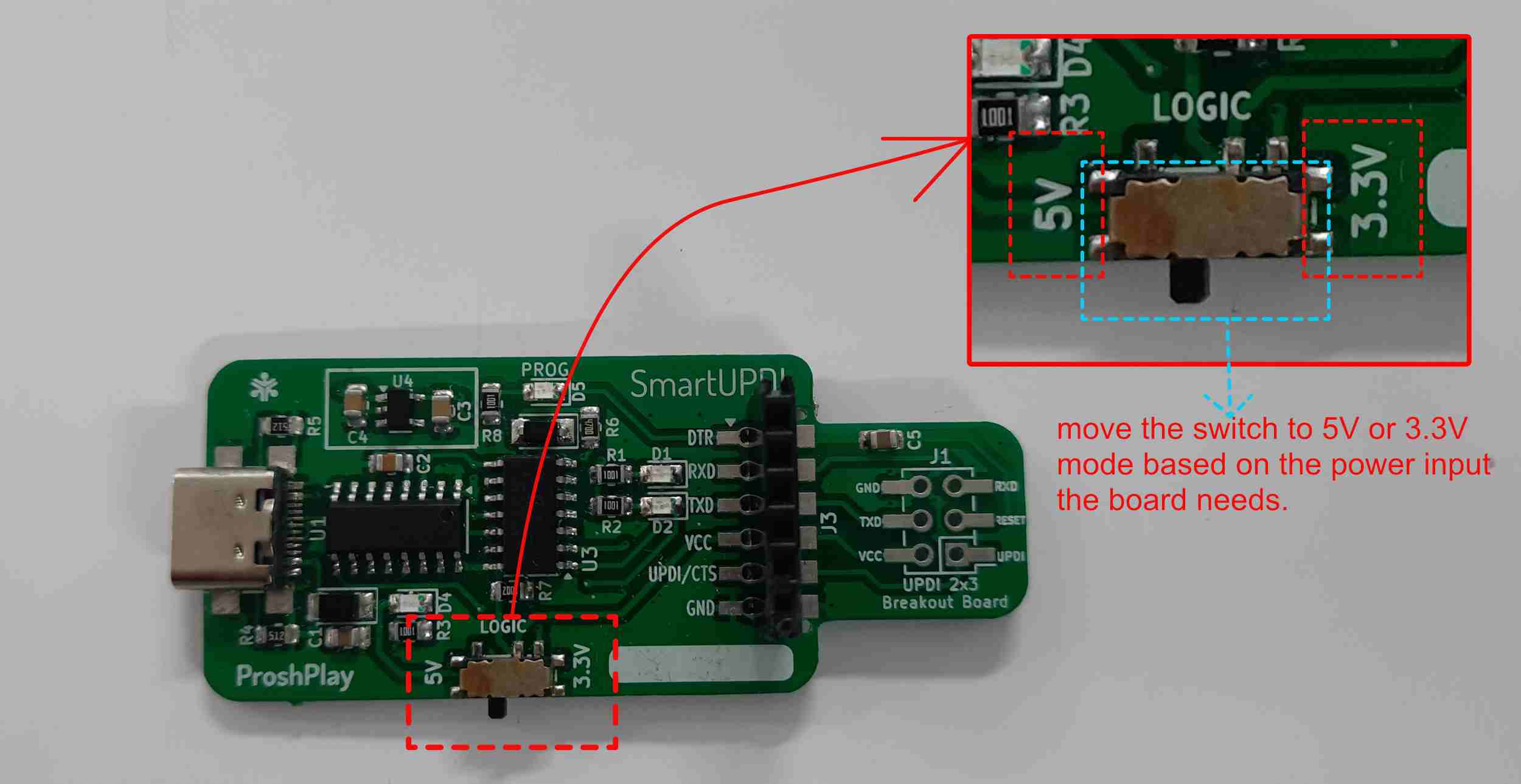
One mistake I was making was that I hadn't noticed this switch earlier, and I kept forgetting to change it. Later, the instructor told me about it.
I need help to text an led blink in th epcb design. attiny1614 mcu used. I am using arduino to program.
// LED Blink Test - Ardra PCB (ATtiny1614)
// LED connected to PA3 (Pin 0 in megaTinyCore)
#define LED_PIN PIN_PA1 // Change to PIN_PA1, PIN_PA2 etc. if needed
void setup() {
pinMode(LED_PIN, OUTPUT);
}
void loop() {
digitalWrite(LED_PIN, HIGH); // LED ON
delay(500);
digitalWrite(LED_PIN, LOW); // LED OFF
delay(500);
}
The led on the PCB blinks. The pin is defined in the code as PA1. The blink is in a loop with with being lit for 500 miliseconds and turned off for the same. This creates the visual of bliking
Phototransistor, RTC, Touch Pad
Write a code fro arduino so i can test the phototranssitor, rtc, and touch pad.
write induvidual codes for these and then codes together. also teach me
// Phototransistor Test - Ardra PCB (ATtiny1614)
// Phototransistor output connected to PA4 (analog input)
#define PHOTO_PIN PIN_PA2 // Analog pin
void setup() {
Serial.begin(115200); // Open Serial Monitor at 115200 baud
Serial.println("Phototransistor Test Started");
}
void loop() {
int lightValue = analogRead(PHOTO_PIN); // 0 = dark, 1023 = bright
Serial.print("Light Level: ");
Serial.print(lightValue);
if (lightValue < 200) Serial.println(" [DARK]");
else if (lightValue < 600) Serial.println(" [DIM]");
else Serial.println(" [BRIGHT]");
delay(500);
}
When testing the phototransistor, I am covering it with my thumb, and in the serial output you can see it reads dim. The code was to detect the elvels of light.
if (lightValue < 200) Serial.println(" [DARK]");
else if (lightValue < 600) Serial.println(" [DIM]");
else Serial.println(" [BRIGHT]");
"if" is to denote if that is the situation.
"else if" to denote if teh light intensity falls more than 200 but less than 600.
RTC
Library to install: RTClib by Adafruit
Installation: Sketch → Include Library → Manage Libraries.
Some devices need libraries added to Arduino to work.
This I am adding later as I didn't record the outputs I got when I tried it.
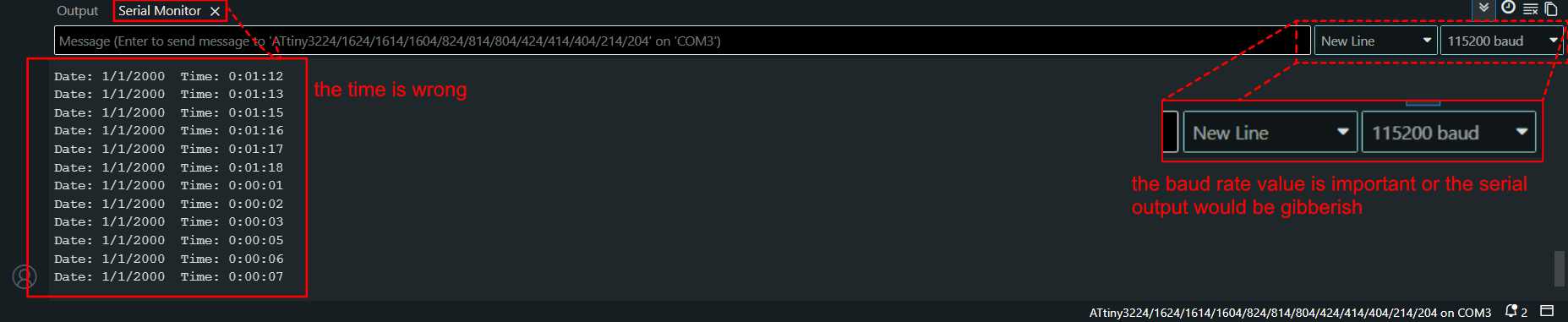
This was the output I got when I ran the code given by Claude. I was told by Sibin that we need to run the examples first, choose DS1307, and then run that code. This syncs the device's time.If the RTC is being programmed for the first time, the serial output would not be correct. The serial output was "Date: 1/1/2000 Time: 0:00:01". This is because the RTC does not have any source to get the time, and it syncs from its preset time.
We need to run 2 codes to get the correct time. One is the example code in Arduino the other can your code, here in my case the code given by claude. This helps the RTC get the real time from the computer. As long as the programmer is connected to the computer, the RTC is powered. The RTC needs a coin cell battery to keep track of the time when it is not connected to the programmer.
Without a coin cell battery, the RTC will forget the current time we fed it now. Unplug your programmer or RTC and run the code again. The RTC would still begin with "Date: 1/1/2000 Time: 0:00:01", so running the example code is important for the RTC to know the current time. Place a battery and run this example code. Then you are good for 2 to 5 years without having to change the battery and the time. (Unless you do need to change the timezone or time.)
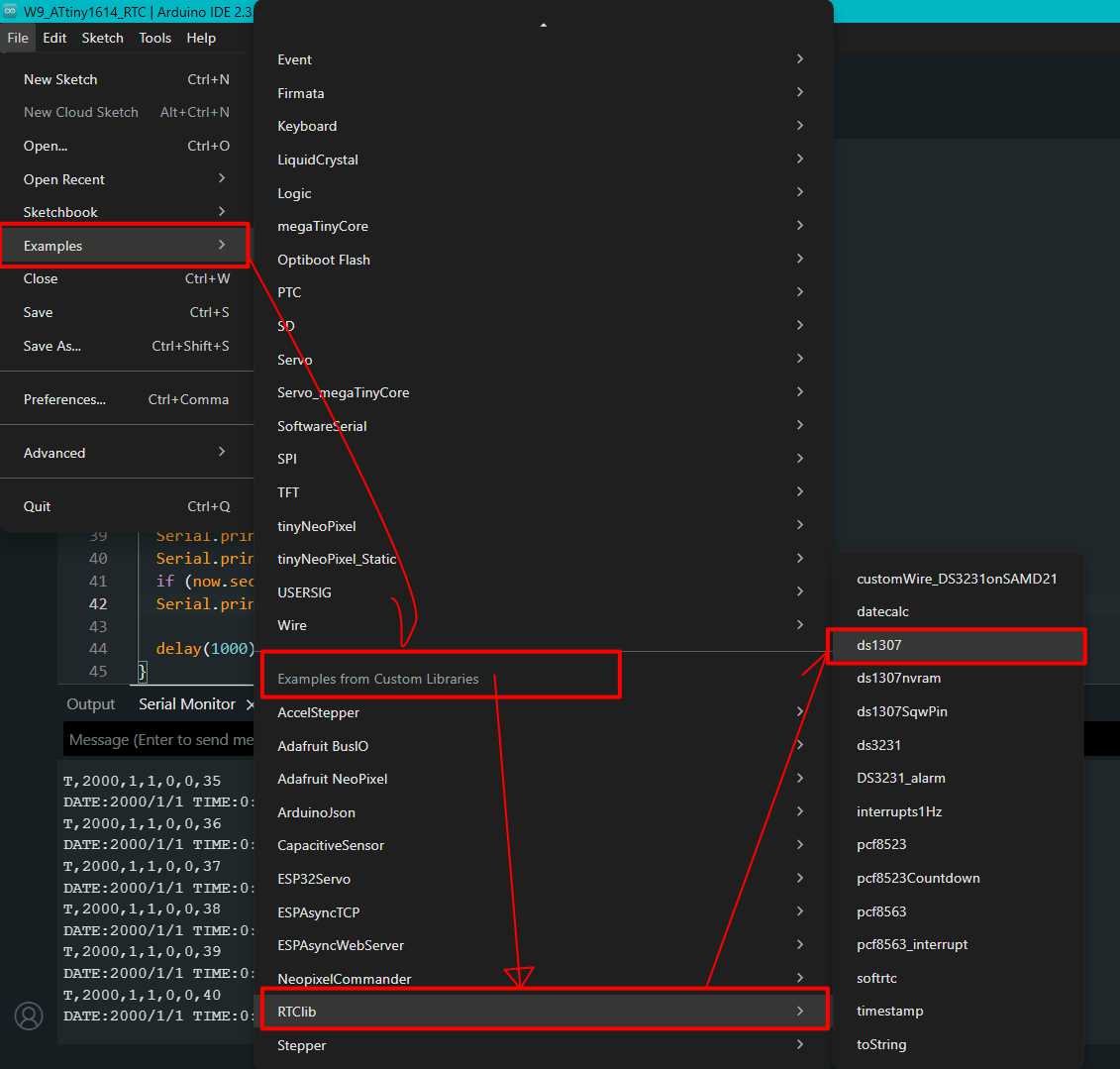
To get the examples for RTClib > DS1307, because we are using the DS1307 RTC.
Make sure the library is installed.
// Date and time functions using a DS1307 RTC connected via I2C and Wire lib
#include "RTClib.h"
RTC_DS1307 rtc;
char daysOfTheWeek[7][12] = {"Sunday", "Monday", "Tuesday", "Wednesday", "Thursday", "Friday", "Saturday"};
void setup () {
Serial.begin(57600);
#ifndef ESP8266
while (!Serial); // wait for serial port to connect. Needed for native USB
#endif
if (! rtc.begin()) {
Serial.println("Couldn't find RTC");
Serial.flush();
while (1) delay(10);
}
if (! rtc.isrunning()) {
Serial.println("RTC is NOT running, let's set the time!");
// When time needs to be set on a new device, or after a power loss, the
// following line sets the RTC to the date & time this sketch was compiled
rtc.adjust(DateTime(F(__DATE__), F(__TIME__)));
// This line sets the RTC with an explicit date & time, for example to set
// January 21, 2014 at 3am you would call:
// rtc.adjust(DateTime(2014, 1, 21, 3, 0, 0));
}
// When time needs to be re-set on a previously configured device, the
// following line sets the RTC to the date & time this sketch was compiled
// rtc.adjust(DateTime(F(__DATE__), F(__TIME__)));
// This line sets the RTC with an explicit date & time, for example to set
// January 21, 2014 at 3am you would call:
// rtc.adjust(DateTime(2014, 1, 21, 3, 0, 0));
}
void loop () {
DateTime now = rtc.now();
Serial.print(now.year(), DEC);
Serial.print('/');
Serial.print(now.month(), DEC);
Serial.print('/');
Serial.print(now.day(), DEC);
Serial.print(" (");
Serial.print(daysOfTheWeek[now.dayOfTheWeek()]);
Serial.print(") ");
Serial.print(now.hour(), DEC);
Serial.print(':');
Serial.print(now.minute(), DEC);
Serial.print(':');
Serial.print(now.second(), DEC);
Serial.println();
Serial.print(" since midnight 1/1/1970 = ");
Serial.print(now.unixtime());
Serial.print("s = ");
Serial.print(now.unixtime() / 86400L);
Serial.println("d");
// calculate a date which is 7 days, 12 hours, 30 minutes, and 6 seconds into the future
DateTime future (now + TimeSpan(7,12,30,6));
Serial.print(" now + 7d + 12h + 30m + 6s: ");
Serial.print(future.year(), DEC);
Serial.print('/');
Serial.print(future.month(), DEC);
Serial.print('/');
Serial.print(future.day(), DEC);
Serial.print(' ');
Serial.print(future.hour(), DEC);
Serial.print(':');
Serial.print(future.minute(), DEC);
Serial.print(':');
Serial.print(future.second(), DEC);
Serial.println();
Serial.println();
delay(3000);
}
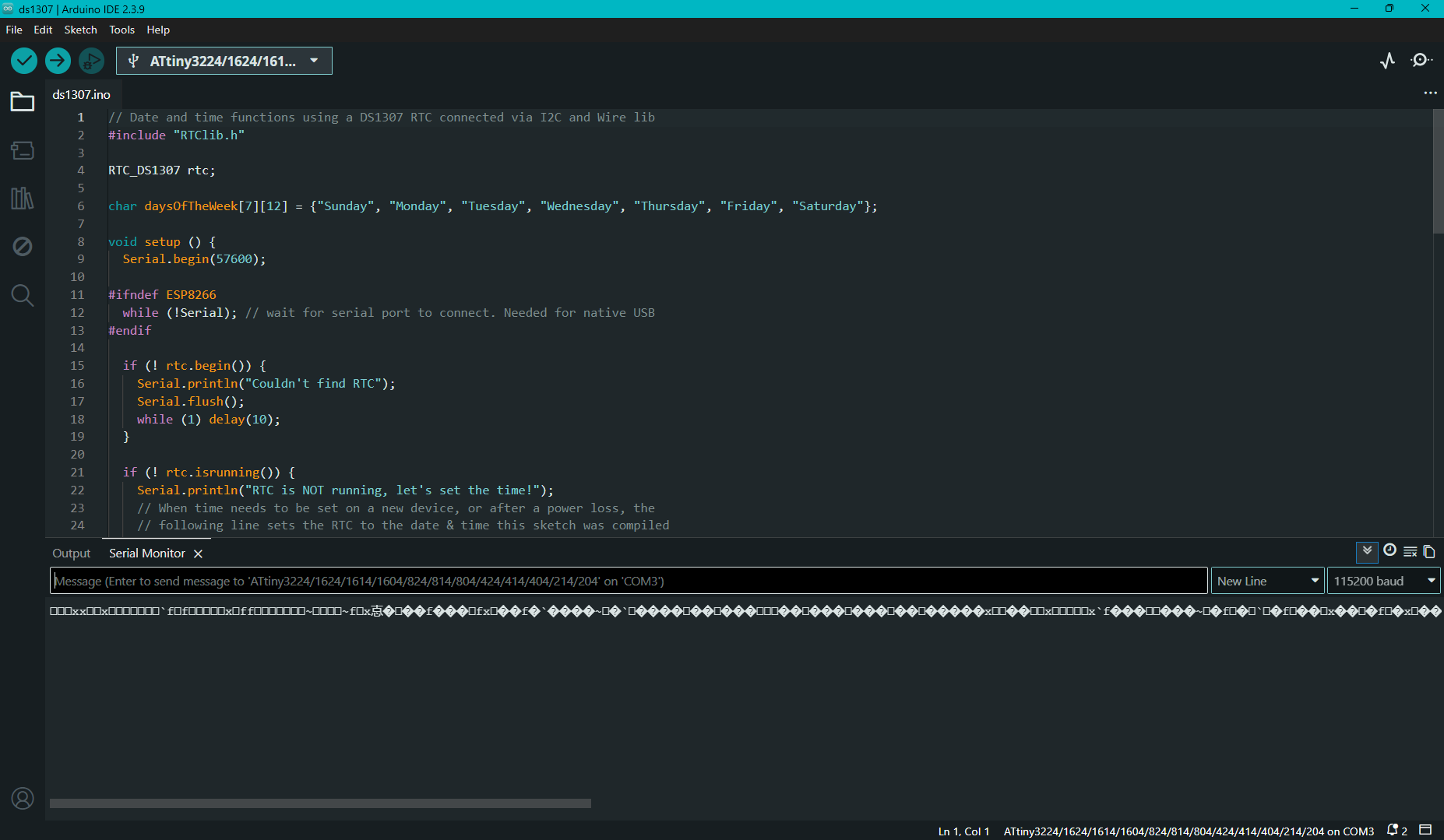
When I first ran the code the output was not readable.
Troubleshooting
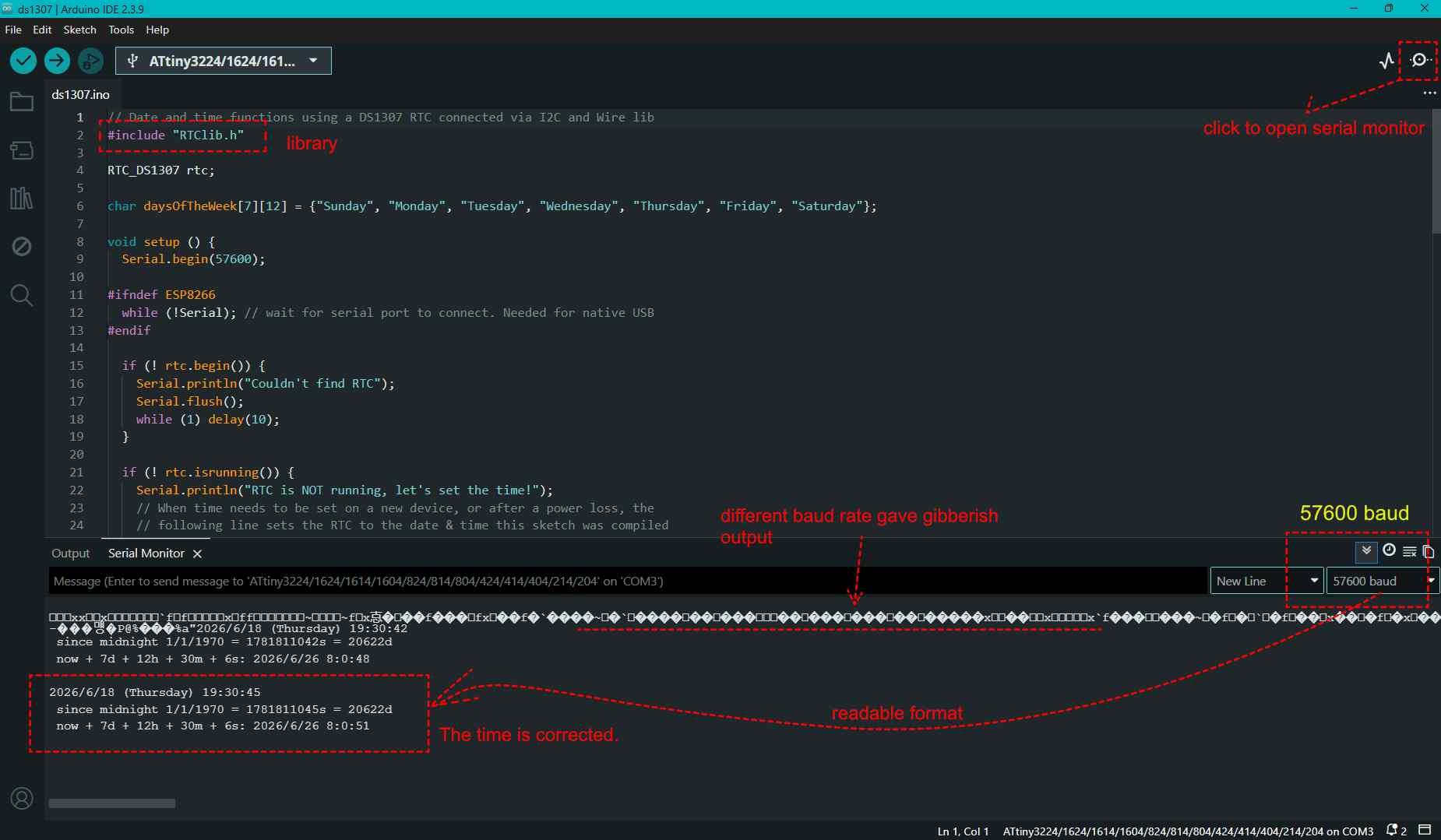
The baud rate was not correct then, so the output received was gibberish. On the top right corner, click and open the Serial Monitor.
Upload the code and open the Serial Monitor.
I changed it to 57600, and only then was the output visible. NOTE: The baud rate is the rate at which data is transferred over the communication channel. This has to be the same for the serial output to be readable.
// RTC Test - Ardra PCB (ATtiny1614)
// RTC connected via I2C: SDA = PA1, SCL = PA2
// Install library: "RTClib" by Adafruit
#include <Wire.h>
#include <RTClib.h>
RTC_DS1307 rtc; // Change to RTC_DS1307 if using DS1307
void setup() {
Serial.begin(115200);
Wire.begin();
if (!rtc.begin()) {
Serial.println("RTC not found! Check wiring.");
while (1);
}
// Uncomment below ONCE to set time, then re-comment and re-upload
// rtc.adjust(DateTime(F(__DATE__), F(__TIME__)));
Serial.println("RTC Test Started");
}
void loop() {
DateTime now = rtc.now();
Serial.print("Date: ");
Serial.print(now.day());
Serial.print("/");
Serial.print(now.month());
Serial.print("/");
Serial.print(now.year());
Serial.print(" Time: ");
Serial.print(now.hour());
Serial.print(":");
if (now.minute() < 10) Serial.print("0"); // leading zero
Serial.print(now.minute());
Serial.print(":");
if (now.second() < 10) Serial.print("0");
Serial.println(now.second());
delay(1000);
}
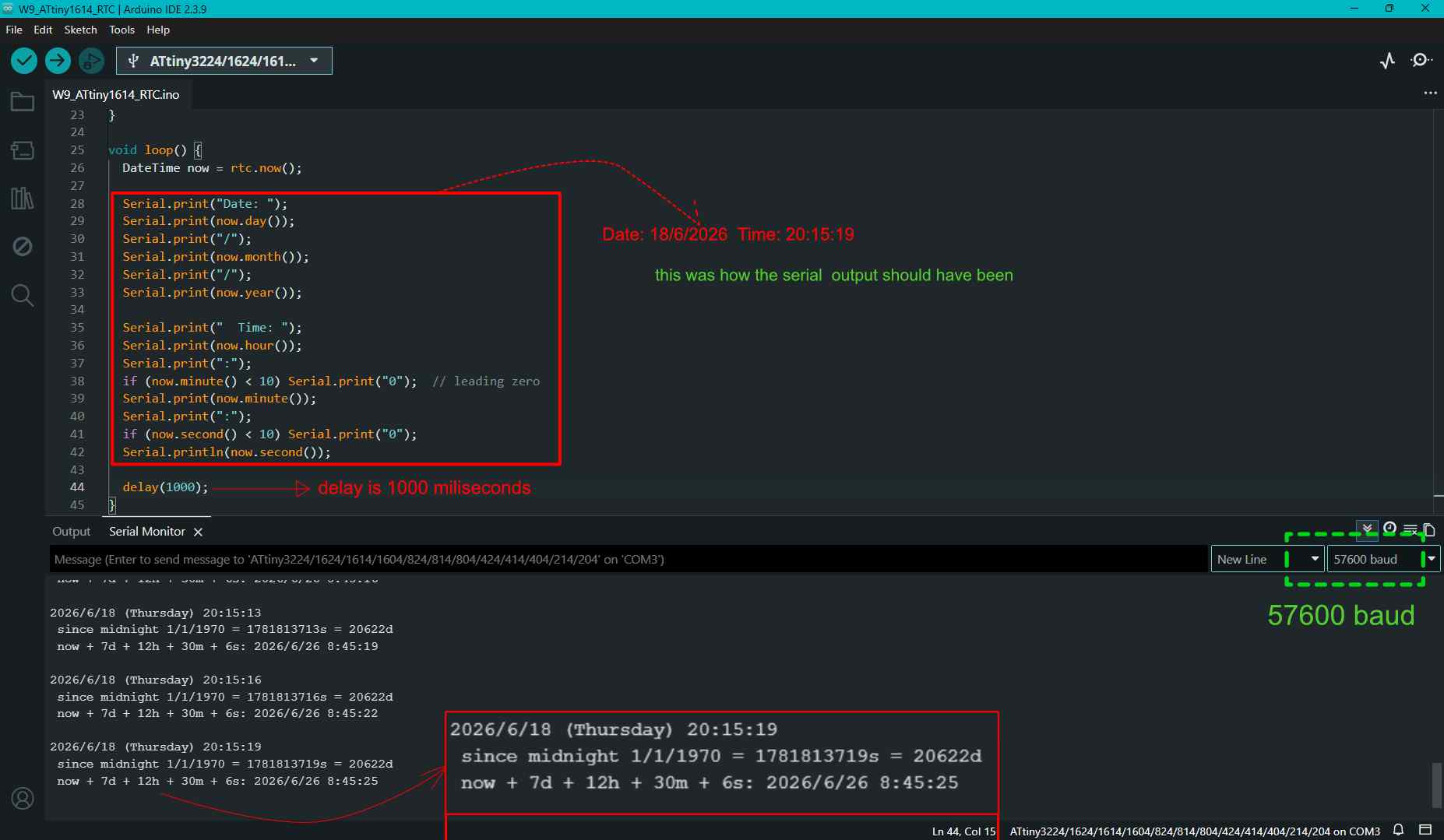
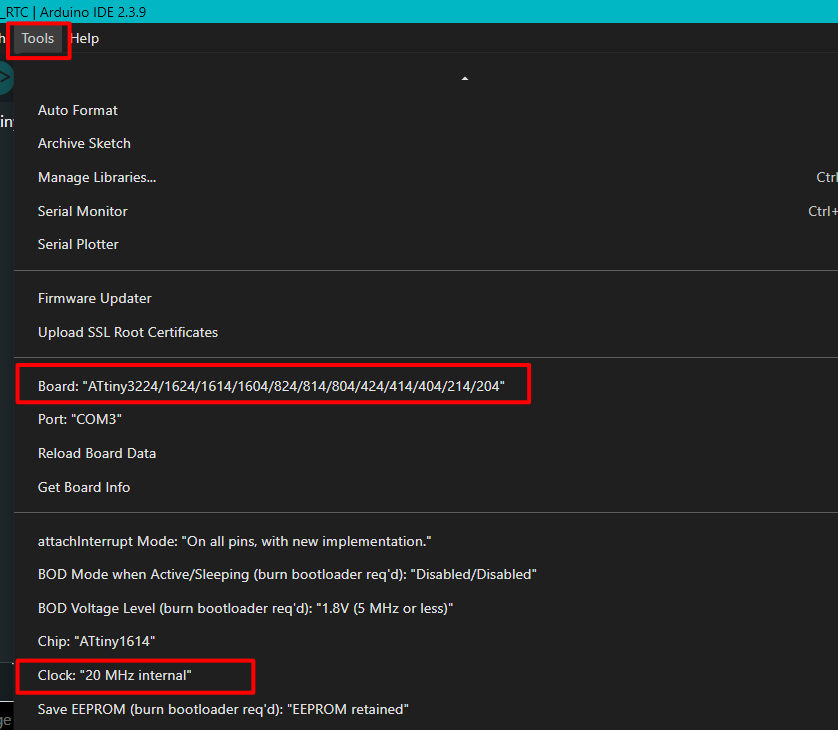
The code gave the correct time. but the serial output was not based on the order in the code. Arduino was using megaTinyCore board manager for Attiny1614. A clock speed mismatch was disrupting the output.
TOOLS > Clock(note the speed)
Tools > Burn Bootloader
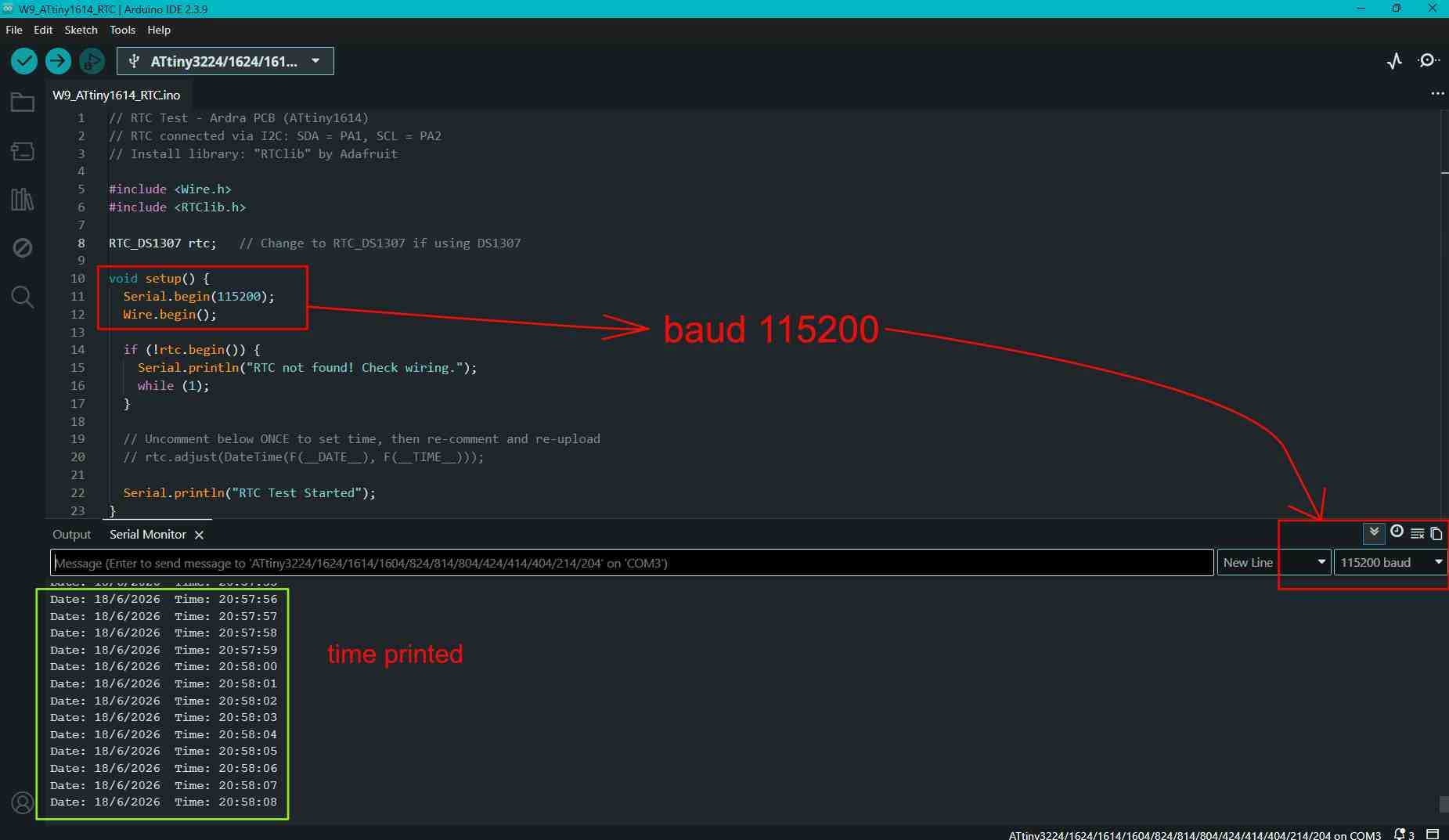
After rebooting the programmer, I changed the baud rate to the one in the code. Then the output changed to the same format as given in the code.
Final RTC output
rtc.adjust(DateTime(F(__DATE__), F(__TIME__)));
This code helps to give the updated time as output, such as "Date: 18/6/2026 Time: 19:00:50". In short, it sets the RTC to the computer's current date and time when the code is uploaded.
Now, let's say I wanted to manually enter the values and needed a specific date and time. Then, in the code below, we can manually enter the values.
rtc.adjust(DateTime(2014, 1, 21, 3, 0, 0));
In the code above, remove // rtc.adjust(DateTime(F(__DATE__), F(__TIME__))); and enter rtc.adjust(DateTime(2014, 1, 21, 3, 0, 0));. Manually enter the values. Upload and compile the code. The output will read as "Date: 21/1/2014 Time: 03:00:00".
After you get the output, replace rtc.adjust(DateTime(2014, 1, 21, 3, 0, 0)); with // rtc.adjust(DateTime(2014, 1, 21, 3, 0, 0));. In short, comment out the code. Otherwise, each time the board resets, you will have to enter the values again. This would also be the case if the battery is not installed.
Capacitive Touch
// Fixed Touch Pad - Pull-up version (Ardra PCB)
// Touch pulls pin LOW → delta goes NEGATIVE when touched
#define TOUCH_PIN PIN_PA3
#define NUM_SAMPLES 10
#define DELTA_THRESH 40 // Touch = delta drops BELOW negative of this
#define DRIFT_SPEED 0.02
float baseline = 0;
long measureOnce() {
long count = 0;
pinMode(TOUCH_PIN, OUTPUT);
digitalWrite(TOUCH_PIN, LOW);
delayMicroseconds(10);
pinMode(TOUCH_PIN, INPUT);
while (digitalRead(TOUCH_PIN) == LOW && count < 5000) count++;
return count;
}
float measureAvg() {
long total = 0;
for (int i = 0; i < NUM_SAMPLES; i++) {
total += measureOnce();
delayMicroseconds(200);
}
return (float)total / NUM_SAMPLES;
}
void setup() {
Serial.begin(115200);
Serial.println("Calibrating... do NOT touch pad!");
delay(500);
long cal = 0;
for (int i = 0; i < 50; i++) {
cal += measureOnce();
delay(10);
}
baseline = (float)cal / 50.0;
Serial.print("Baseline: ");
Serial.println(baseline);
Serial.println("Ready!");
}
void loop() {
float reading = measureAvg();
float delta = reading - baseline;
Serial.print("Raw="); Serial.print(reading, 1);
Serial.print(" Base="); Serial.print(baseline, 1);
Serial.print(" Delta="); Serial.print(delta, 1);
// *** KEY FIX: delta is NEGATIVE when touched (pull-up circuit) ***
if (delta < -DELTA_THRESH) {
Serial.println(" <<< TOUCHED >>>");
// Do NOT update baseline while touched
} else {
Serial.println("");
// Slowly track drift only when not touched
baseline = baseline + (reading - baseline) * DRIFT_SPEED;
}
delay(100);
}
The initial code that Claude had provided for the touch pad showed "TOUCHED" in the Serial Monitor output even when the pad was not being touched.
The ATtiny1614 does not have hardware capacitive touch support. The touch pad worked using a QTouch style method, where the code measures how long a pin takes to charge. This charging time changes when the pad is touched.
The issue was that the code would have worked correctly if I had not added a resistor to the touch pad. However, I had included a pull up resistor in the circuit.
Because the touch pad had a pull up resistor , touching the pad pulled the pin LOW instead of HIGH.
What exactly is a capacitive resistance?
A beautiful explanation of what a capacitor is, is that a capacitor is like a storage tank; the current has to fill it and only then it will be able to cross over. So this slows down the current and gives the ample current needed by a device. Sibin
Without a capacitor, electricity passes fast through the touch pad. If we touch the pad, the touch would not get registered. To slow the passage of current through the pad, we add a resistor. Now the current passing through it is slow. Let's say it takes 300 milliseconds to pass through, and when my finger touches it, it acts like a capacitor so the current passing through the pad has to fill the capacitance needed by the touch. Therefore, the current would take more time to pass through, say 500 milliseconds. Now there is a delay, and it is recognized by the MCU and detects this as a touch.
How resistor values change the touch sensitivity:
A 1M Ohm resistor: the touch pad detects direct touch.
A larger resistor like a 10M Ohm: the touch becomes more sensitive that even hovering over it can be detected.
Some microchips that have built-in hardware touch pins often use internal current sources or internal pull-up/pull-down resistors (usually 20k Ohm to 50k Ohm); therefore, external resistors sometimes aren't needed at all.
// Combined Test - Ardra PCB (ATtiny1614)
// Phototransistor + RTC + Touch + LED
// Touch uses pull-up resistor version
#include <Wire.h>
#include <RTClib.h>
#define LED_PIN PIN_PA1
#define PHOTO_PIN PIN_PA2
#define TOUCH_PIN PIN_PA3
#define NUM_SAMPLES 10
#define DELTA_THRESH 40
#define DRIFT_SPEED 0.02
RTC_DS3231 rtc;
float baseline = 0;
// ---------- Touch Functions ----------
long measureOnce() {
long count = 0;
pinMode(TOUCH_PIN, OUTPUT);
digitalWrite(TOUCH_PIN, LOW);
delayMicroseconds(10);
pinMode(TOUCH_PIN, INPUT);
while (digitalRead(TOUCH_PIN) == LOW && count < 5000) {
count++;
}
return count;
}
float measureAvg() {
long total = 0;
for (int i = 0; i < NUM_SAMPLES; i++) {
total += measureOnce();
delayMicroseconds(200);
}
return (float)total / NUM_SAMPLES;
}
void setup() {
Serial.begin(115200);
pinMode(LED_PIN, OUTPUT);
Wire.begin();
if (!rtc.begin()) {
Serial.println("ERROR: RTC not found!");
} else {
Serial.println("RTC OK");
// rtc.adjust(DateTime(F(__DATE__), F(__TIME__))); // Set once
}
// Touch calibration
Serial.println("Calibrating touch pad... Do NOT touch.");
long cal = 0;
for (int i = 0; i < 50; i++) {
cal += measureOnce();
delay(10);
}
baseline = (float)cal / 50.0;
Serial.print("Touch baseline = ");
Serial.println(baseline);
Serial.println("=== Ardra PCB Full Test ===");
Serial.println("Time | Light | Delta | LED");
}
void loop() {
// ---------- RTC ----------
DateTime now = rtc.now();
Serial.print(now.hour());
Serial.print(":");
if (now.minute() < 10) Serial.print("0");
Serial.print(now.minute());
Serial.print(":");
if (now.second() < 10) Serial.print("0");
Serial.print(now.second());
Serial.print(" | ");
// ---------- Phototransistor ----------
int light = analogRead(PHOTO_PIN);
Serial.print("Light=");
Serial.print(light);
Serial.print(" | ");
// ---------- Touch ----------
float reading = measureAvg();
float delta = reading - baseline;
bool touched = (delta < -DELTA_THRESH);
Serial.print("Delta=");
Serial.print(delta, 1);
// ---------- LED ----------
if (touched) {
digitalWrite(LED_PIN, HIGH);
Serial.println(" | TOUCHED -> LED ON");
} else {
digitalWrite(LED_PIN, LOW);
Serial.println(" | LED OFF");
// Update baseline only when not touched
baseline = baseline + (reading - baseline) * DRIFT_SPEED;
}
delay(200);
}
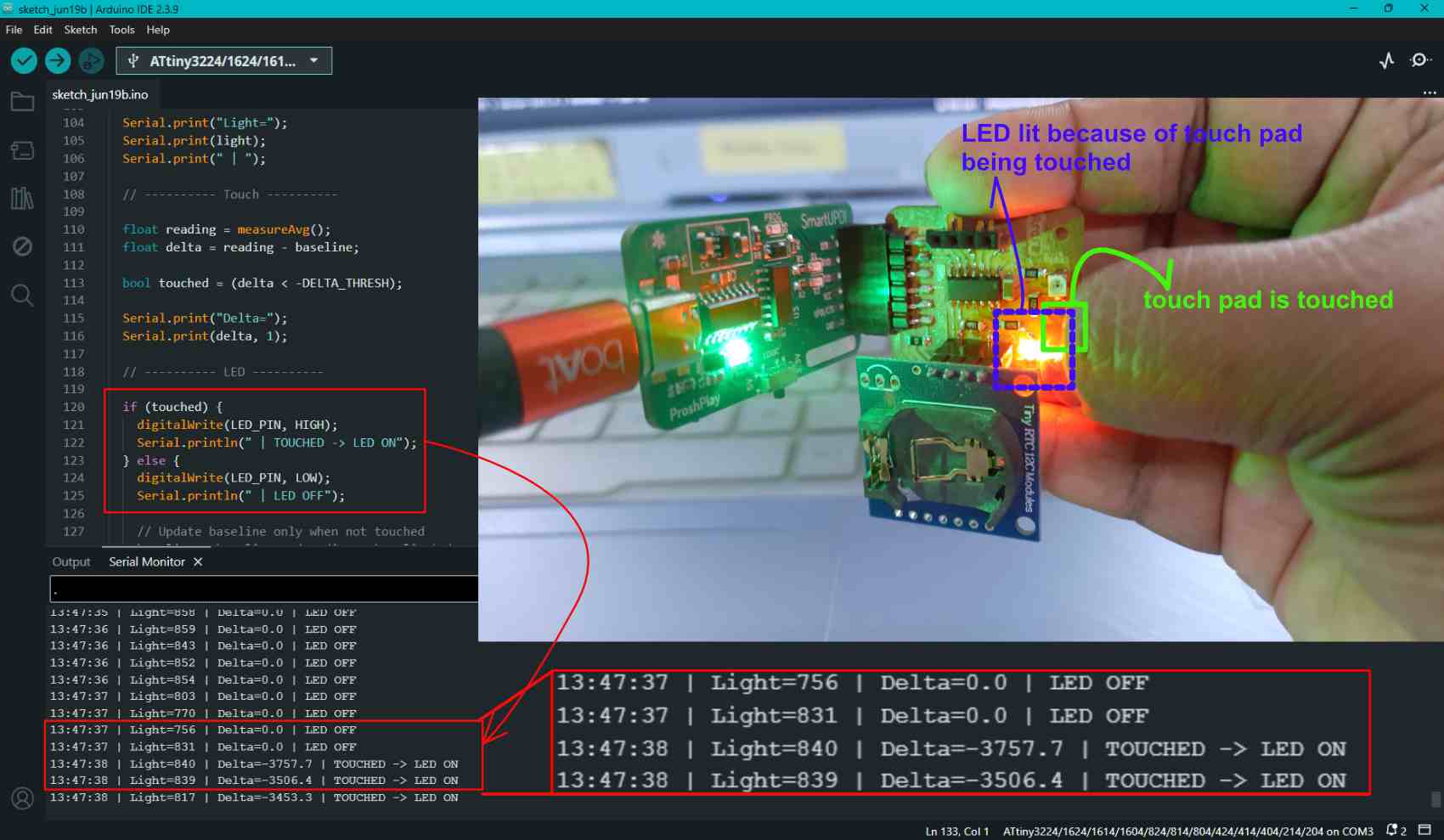
The combination of touch, LED, rtc and phototransistor. .
The RTC output is given.
The light intensity is detected by the phototransistor and the value is being printed in the serial output.
The LED is set to turn on when the touch pad is touched.
The touch is detected only when it is touched and the LED changes from LED OFF to LED ON in the serial output.
 Complete image generation interaction - Gemini