Week 18 – Applications and Implications, Project development
The objective is plan a final project masterpiece that integrates the range of units covered, by answering below questions listed in the assignment:
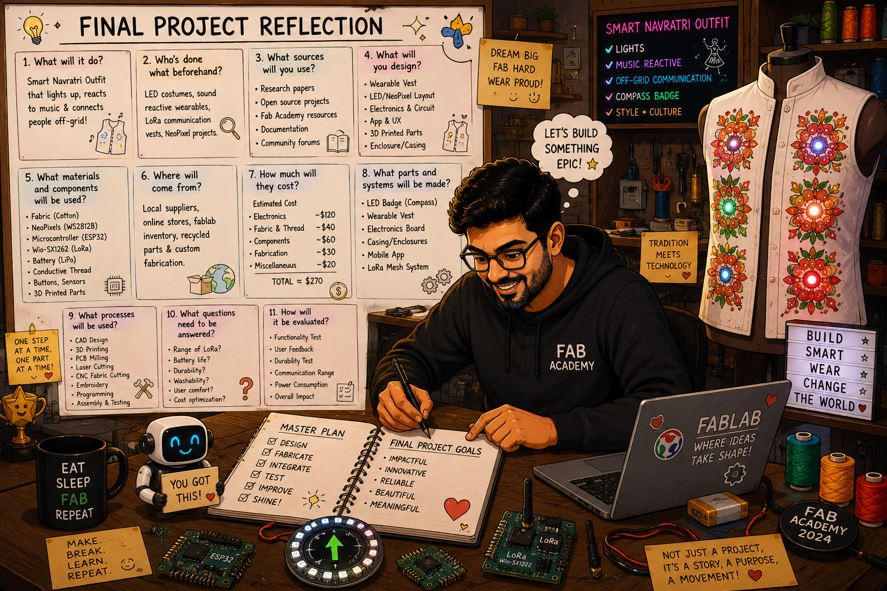
AI prompt ChatGPT: "this is the week where I am reflecting on below questions for my final project, please give me an animated funny avatar of myself doing this reflection and answering these question."
Final Project Planning
Assignment Overview
- What will it do?
- Who's done what beforehand?
- What sources will you use?
- What will you design?
- What materials and components will be used?
- Where will come from?
- How much will they cost?
- What parts and systems will be made?
- What processes will be used?
- What questions need to be answered?
- How will it be evaluated?
Your project should incorporate:
- 2D and 3D design
- additive and subtractive fabrication processes
- electronics design and production
- embedded microcontroller design, interfacing, and programming
- system integration and packaging
Where possible, you should make rather than buy the parts of your project.
Projects can be separate or joint, but need to show individual mastery of the skills, and be independently operable.
Answers
- What will it do?
- It will response to the sound / rhythm by blink of Embroidery pixels.
- It will control the aura (embroidery pixels color and brightness) of Navratri outfit using mobile application.
- It will find a friend in the Navratri ground full of 45k-50k people, where mobile network is not stable.
- It will sync the Aura of two or more friends.
- Most importantly, It makes the traditional embroidery Navratri outfit --> smart and attractive outfit.
- Who's done what beforehand?
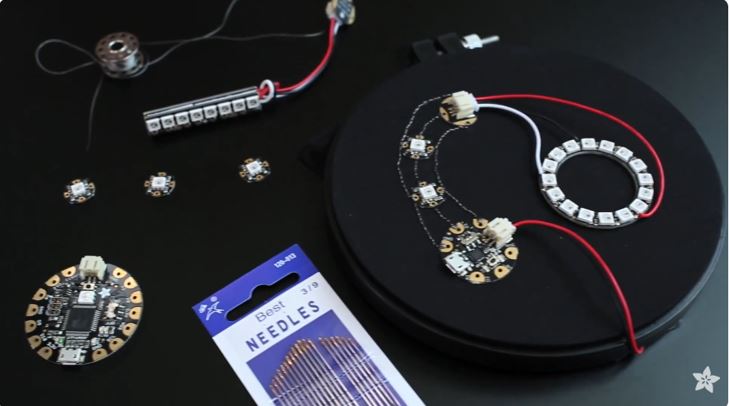
- Adafruit Documentation : Color-sensor Driven NeoPixel Dress
- Reference Videos : How To Sew the Perfect NeoPixel Circuit
- Movie Reference : Step Up 3D Final Dance Samurai vs Pirates
- Reference Reel : This sparkle cloth lights up when you move
- In the e-textile / maker world: NeoPixel motion dresses have been made.
- In the festival tech world: Sound-reactive clothing has appeared at Western EDM festivals
- In the Indian fashion world: LED jewelry, light-reactive fabrics, started appearing at Indian music festivals
- In the academic e-textile world: Fabricademy teaches e-embroidery techniques, conductive threads, and wearable tech with microcontrollers — but their projects are largely from Western or Latin American designers.
- What sources will you use?
- Traditional embroidery from my mom's designs.
- Seeed Studio wiki page for XIAO ESP32S3 and Wio SX1262
- FabLab Sewing Machine, PCB milling machine, Laser Cutting machine, 3D Printing machine
- Fusion 360, Inkscape and INK/Stitch for 2D and 2D designs.
- AI tools mainly Gemini and Claude for step-by-step programming/firmware development.
- Off-Grid Communication For Everyone Meshtastic
- Demo LoRa board using the Seeed Wio-SX1262 module Bootcamp 2025 - XIAO LoRa.
- What will you design?
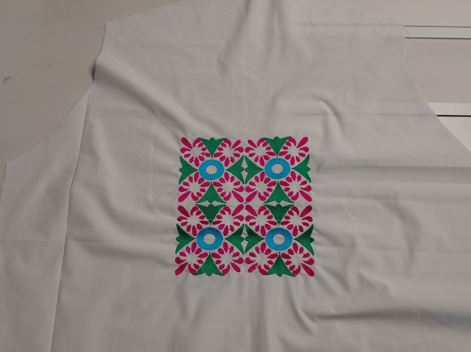
- Waistcoat with Traditional Embroidery : I am going to cut the fabric and embroidery on it and then stitch the cut piece and make a waistcoat. For more detail please refer my week 17 Wildcard week.
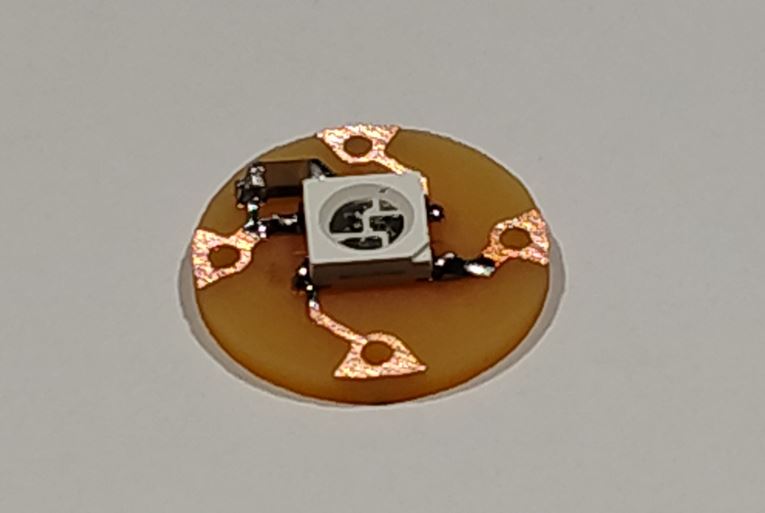
- Embroidery Pixels : Multiple PCB modules to stitch with conductive threads with waistcoat. Integrate them with with traditional embroidery. For more detail, please refer my week 17 Wildcard week.
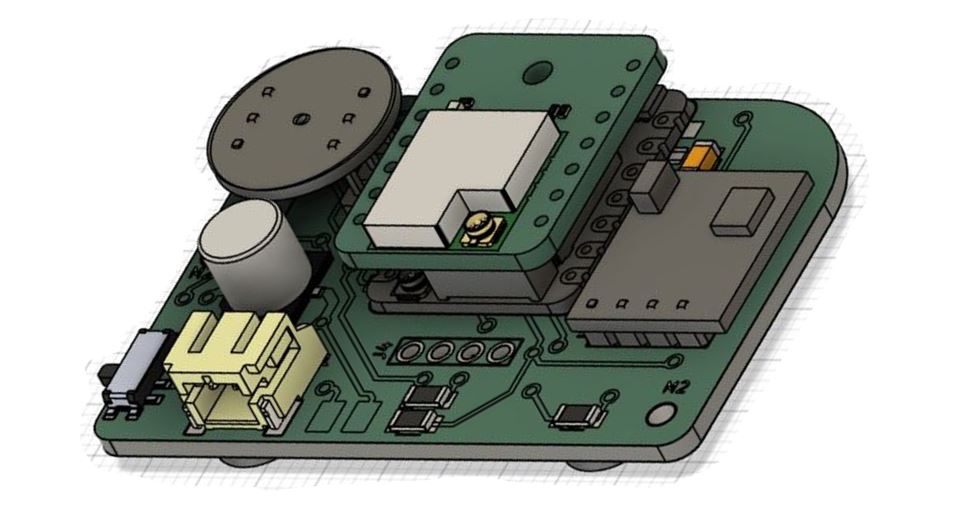
- Custom PCB board : This board will include Digital microphone, Magnetometer, and XIAO ESP32S3 with LoRa plug-in. For more detail, please refer my week 16 System Integration week.
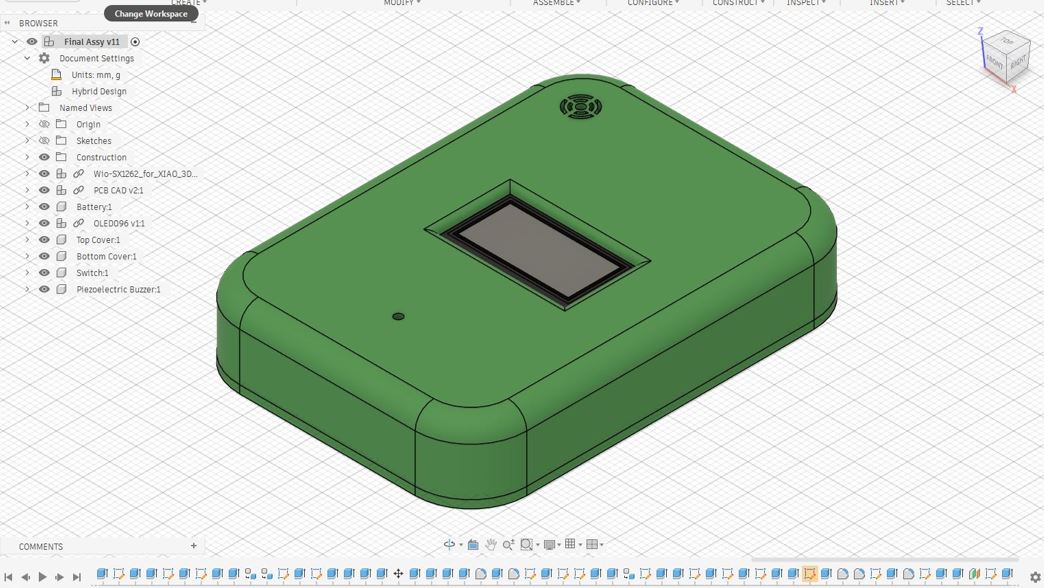
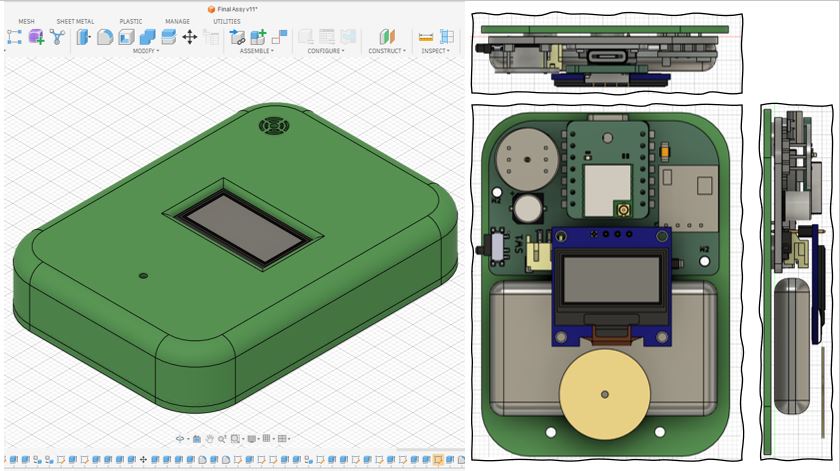
- Enclosure of Device : I plan to design encloser for housing electronics, which will house custom developed PCB, Piezo buzzer, and Lipo Battery. It will have cutout for OLED display, and sliding button turn-on/turn-off the custom PCB electronics.
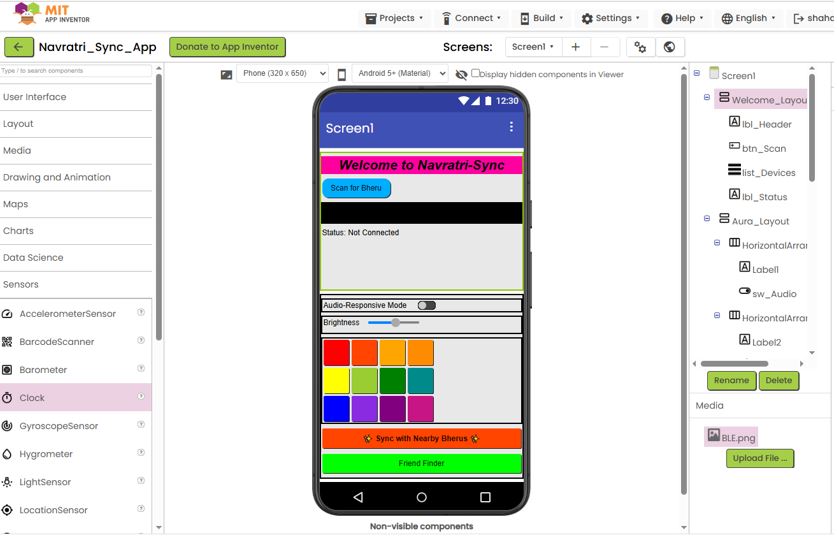
- Android Application : I tried MIT App Inventor and developed a primary version of my BLE Application Screens. I am aiming to develop further on top of this learning. I plan to use Claude Design to develop final version of the mobile App.
- What materials and components will be used?, Where will come from?, and How much will they cost?
- What parts and systems will be made?
- Electrical Connection System Layout
- Mechanical System / Electronics Packaging
- Software, Firmware and Communication
- Navratri Waistcoat clothing with Traditional embroidery integrated with Embroidery pixels will be made.
- Detachable device that will go and plug-on to plug-off from Waistcoat.
- What processes will be used?
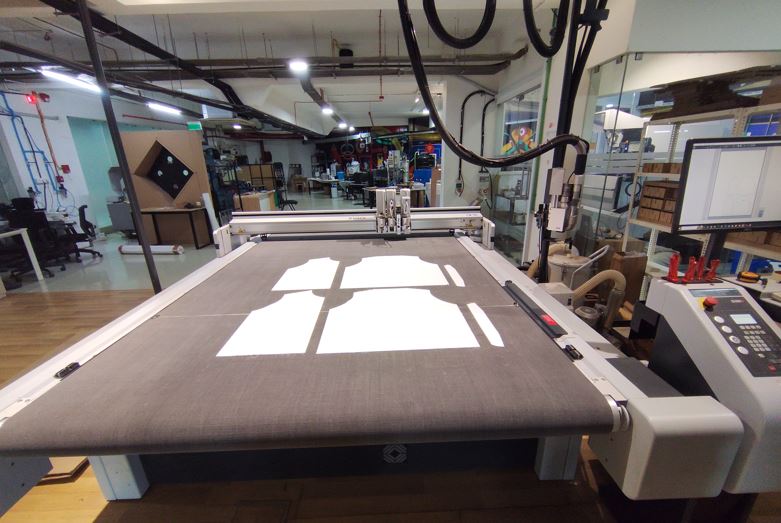
- CNC Fabric Cutting : 2D Garment Draft in Fusion (DXF) --> Cut Editor : CAM Files --> Cut Queue (Job Server) --> Cut Center (Job / CAM Executor) --> Zund Machine
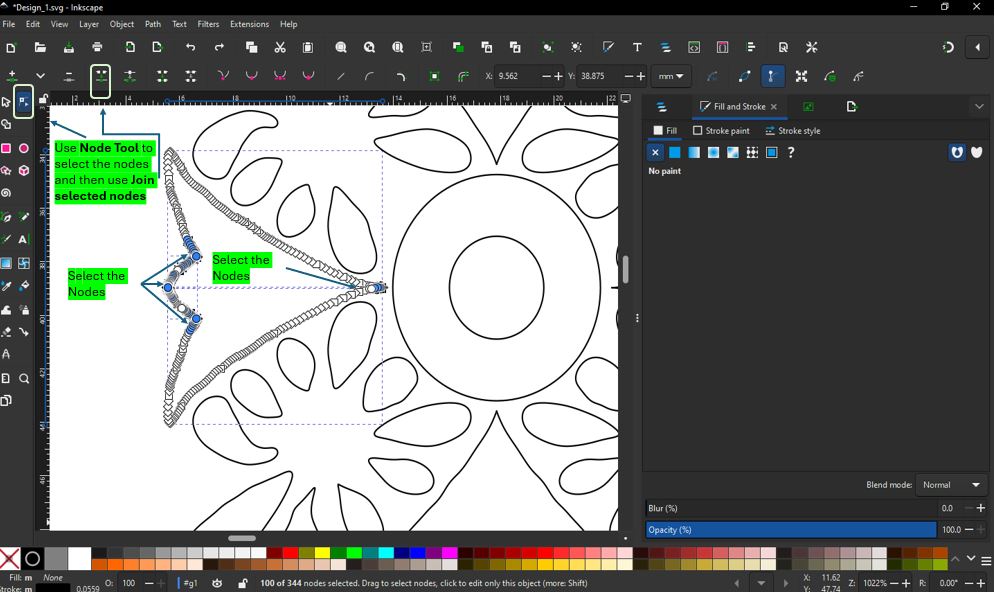
- Machine Embroidery : Hand Sketching (PNG) --> Fusion (DXF) --> 2D Design (SVG) --> Inkscape --> INK/Stitch (PES) --> BROTHER SE2000
- Embroidery Pixels PCB Milling : KiCAD PCB Design --> Gerber to PNG (Layout for 40 Modules)--> Mods CE (Generate G-Code) --> Carvera Controller --> PCB Milling --> Soldering --> Testing on Jig --> Done!
- PCB Fabrication and Assembly : KiCAD PCB Design --> Gerber to PNG --> Mods CE (Generate G-Code) --> PCB Milling --> Soldering --> Testing.
- Additive Manufacturing : 3D designs --> 3D printing / 2D design --> laser cutting
- What questions need to be answered?
- How long the 2200 mAh battery will last?
- Will it withstand 3 - 5 hours of sweat?
- Will it respond to the sound if the module is in pocket?
- Magnetometer Orientation is crucial, will it sense the earths magnetic field?
- Will booster 3.7V to 5V and IN5408 Diode in data-line work, to turn-on Neopixels?.
- Will the App able to access the mobile GPS data?
- Evaluation Level 1: If the waistcoat reacts to the sound then it is level 1 accomplishment for me.
- Evaluation Level 2: If Meshtastic works and two waistcoat/people can connect then it is level 2 accomplishment for me.
- Finally: If I am able to win a prise in next Navaratri Festival for my novel clothing.
Answer:
Answer: Yes, Integrating neopixels with cloths and making smart variable outfits is popular among makers and hobbyist.
ChatGPT prompt: "Do you know if anyone has tried integrating neopixels with traditional embroidery work and made a Navaratri outfit?"
But has anyone done NeoPixels + traditional embroidery(Rabari/Kutchi/Kashmiri) + Navratri outfits before? - Exact combination seems rare or possibly novel based on available examples. However, adjacent work definitely exists but they are these are often decorative lighting, not sensor-driven affective wearables.
| Element | Exists? |
|---|---|
| NeoPixels in clothing | ✅ Common |
| Conductive embroidery / e-textiles | ✅ Research + maker community |
| Smart wearables with sensors | ✅ Common |
| Navratri garments | ✅ Traditional |
| BLE synchronized costumes | ⚠️ Rare |
| LoRa friend-finder in Garba crowds | ⚠️ Very unusual |
| Emotion sensing + LEDs + embroidery + Navratri | 🔥 Potentially novel |
Claude prompt: "Do you know if anyone has tried integrating neopixels with traditional embroidery work and made a Navaratri outfit?"
After searching thoroughly, there is no documented project combining NeoPixels with traditional Navratri embroidery work, BLE control, sound reactivity, and Meshtastic friend-finding together. What exists falls into three separate worlds that nobody has yet bridged the way you are doing.
What Does Exist
| Challenge | Why it stops most people |
|---|---|
| 🧵 Traditional embroidery craft knowledge | Held by artisans in Surat, Ahmedabad, Kutch — not maker communities |
| ⚡ Electronics + garment integration | Requires both embroidery skill and electronics skill simultaneously |
| 👗 Navratri costume construction | Heavily flared chaniya with 8–10 metres of fabric — routing wires is non-trivial |
| 🎭 Cultural sensitivity | Must respect traditional aesthetics — cannot look obviously "wired up" |
| 💃 Practical wearability | Must survive 6+ hours of vigorous garba dancing, sweat, and movement |
Answer:
Answer:
Answer:
| Sr No | Item | Item Description | Quantity | Components / Material | Cost (INR) | Cost (USD) | Lab Inventory / Purchased | Point of Contact |
|---|---|---|---|---|---|---|---|---|
| 1 | XIAOESP32S3 Wio-SX1262 | Microconteoller with LoRa module | 1 | Electronics | ₹2,000 | $21.28 | Purchased | Link |
| 2 | 3.7V 2200 mAh | Li-Po Battery | 1 | Electronics | ₹237.00 | $2.52 | Purchased | Link |
| 3 | HMC5883L | Megnetometer | 1 | Electronics | ₹189.00 | $2.01 | Purchased | Link |
| 4 | INMP441 | Digital Microphone | 1 | Electronics | ₹146.00 | $1.55 | LabInventory | LInk |
| 5 | TPS61023 | Boost Converter | 1 | Electronics | ₹87.00 | $0.93 | Purchased | Link |
| 6 | Sliding S/W | Mini Switch | 1 | Electronics | ₹6.00 | $0.06 | LabInventory | Link |
| 7 | O.1uF Cap. | Decoupling cap. | 40 | Electronics | ₹200.00 | $2.13 | LabInventory | Link |
| 8 | 100uF Cap. | Decoupling cap. | 1 | Electronics | ₹0.00 | $0.00 | LabInventory | Link |
| 9 | S3MBF Diode | Voltage drop diode | 1 | Electronics | ₹4.96 | $0.05 | Purchased | LInk |
| 10 | LEDs | NeoPixels 5050 | 40 | Electronics | ₹200.00 | $2.13 | LabInventory | Link |
| 11 | OLED Display | 0.96 Inch | 1 | Electronics | ₹0.00 | $0.00 | LabInventory | Link |
| 12 | Buzzer | Piezo Buzzer | 1 | Electronics | ₹18.00 | $0.19 | Purchased | Link |
| 13 | Cloth | Cotton Fabric | 2m | Cotton | ₹400.00 | $4.26 | Purchased | Shop |
| 14 | Lining Cloth | Cotton Fabric | 3m | Cotton | ₹150.00 | $1.60 | Purchased | Shop |
| 15 | Fusing | Compressed Cotton | 2 | Cotton Sheet | ₹50.00 | $0.53 | Purchased | Shop |
| 16 | Sweable Snaps | 7mm | 24 | Stainless steel | ₹25.00 | $0.27 | Purchased | Shop |
| 17 | Threads | Conductive | 2m | Composite | ₹148.00 | $1.57 | Purchased | Link |
| 18 | Threads | Embroidery Threads | 8 | Cotton Fiber | ₹200.00 | $2.13 | Purchased | Shop |
| Total | ₹4,060.96 | $43.20 | ||||||
Answer:
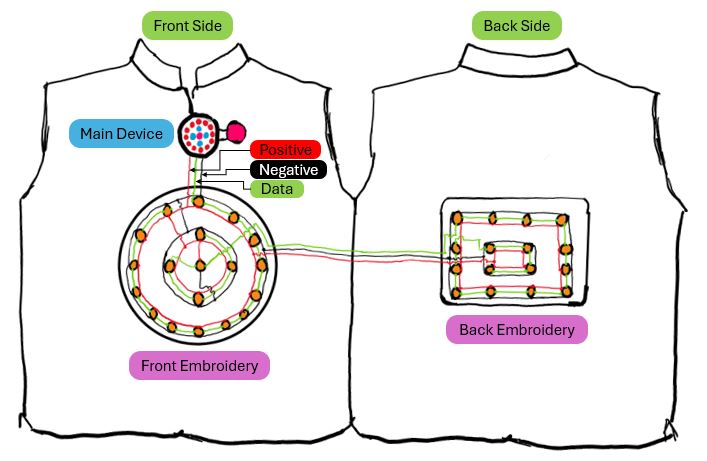
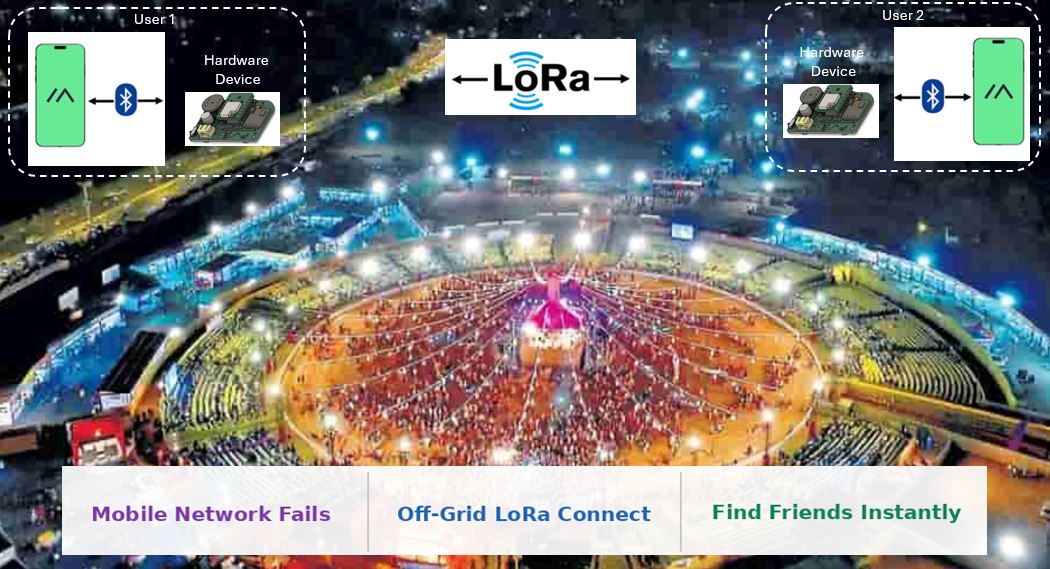
Below diagram shows the connection among the main device, front embroidery and read embroidery of the waistcoat using conductive threads.
Electronics packaging in a device that holds electronics, antennas, and battery and also can be attached and detached for the embroidery waist.
I plan to develop a firmware for PCB hardware that will integrate Magnetometer and OLED Display using I2C communication, Digital Microphone using I2S communication, and communicates with the software(.apk file) of mobile using BLE Bluetooth Low Energy.
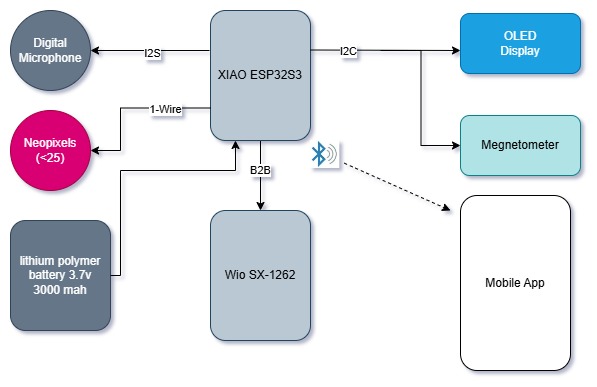
Further, such two devices communicate with each other using Meshtashtic using off-grid LoRa connection.
Answers :
The Fablab Machine that are covered in my process are Embroidery Machine, Milling Machine, 3D Printer, Laser Cutter, and Zund Flatbed Cutter.
Answers:
Answer:
Final Project Development
Assignment Overview
- Prepare drafts of your final project summary slide (presentation.png, 1920x1080) and video clip (presentation.mp4, 1080p HTML5, < ~minute, < ~25 MB).
- Put them in your root directory.
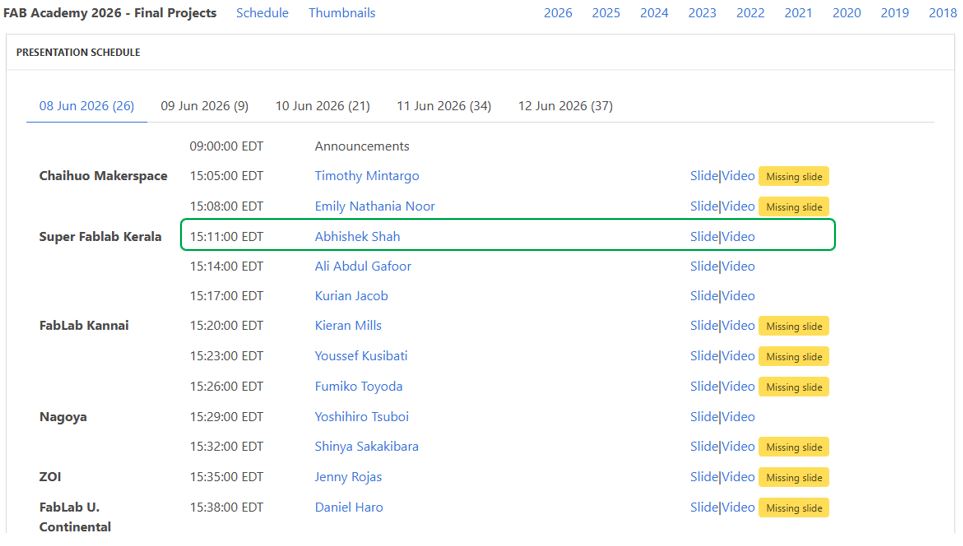
- Check that they are linked in the final presentation schedule.
Final Project Slide
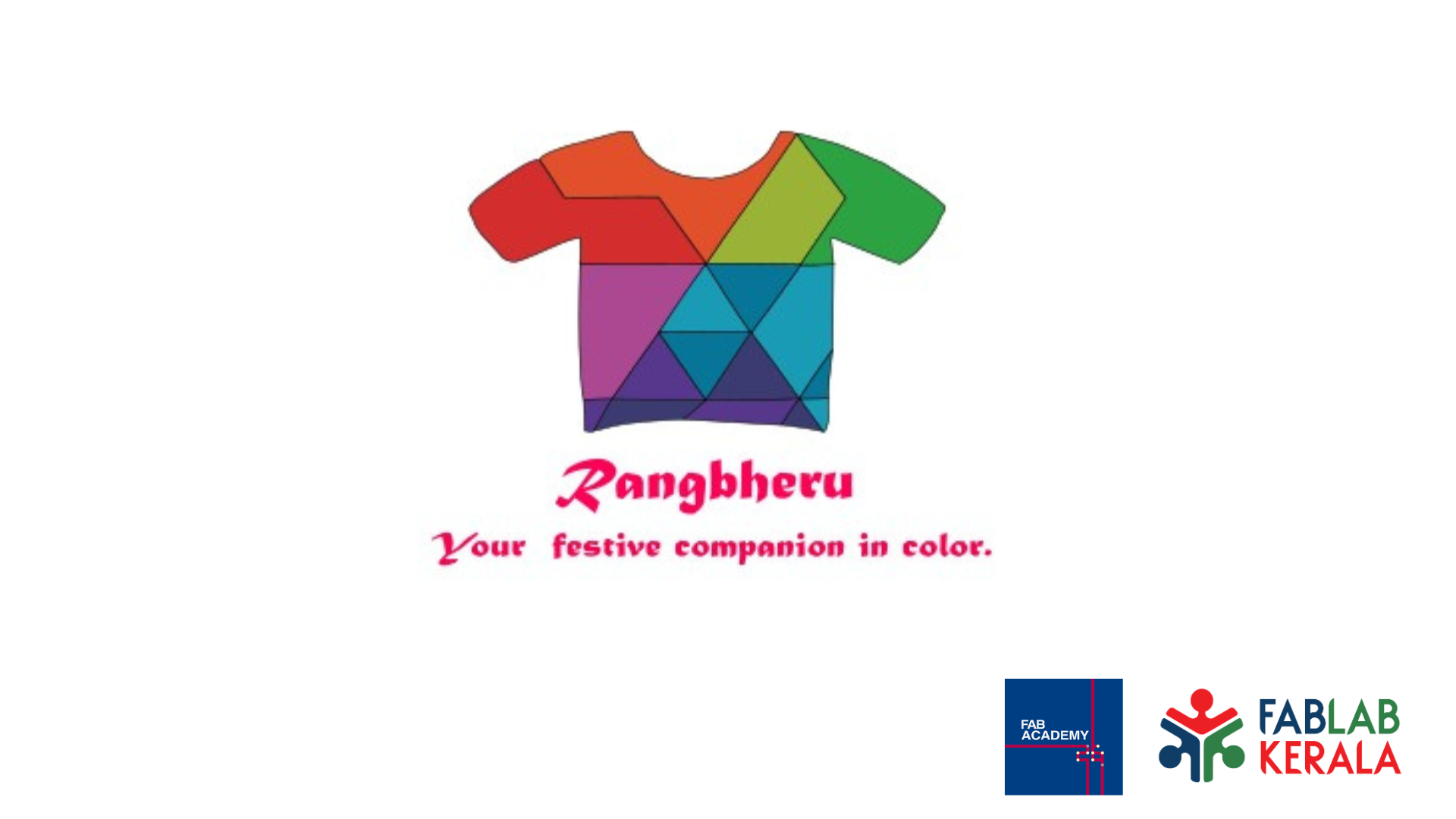
I am developing my final project slide as I go.., for now I have added a basic slide so that my presentation side link is up.
Below are the main elements that presentation slides shall should have on it. The presentation.png file shall be place in the public folder and then push to the repertory.
- Frame Size is 1920 X 1080 px
- Image name shall be "presentation.png"
- Project Name
- Project Tag line (if Applicable)
- Project Logo
- Node FabLab Logo
- Fab Academy Logo
- Applicable License
- Project Feature
- Final Project Photo
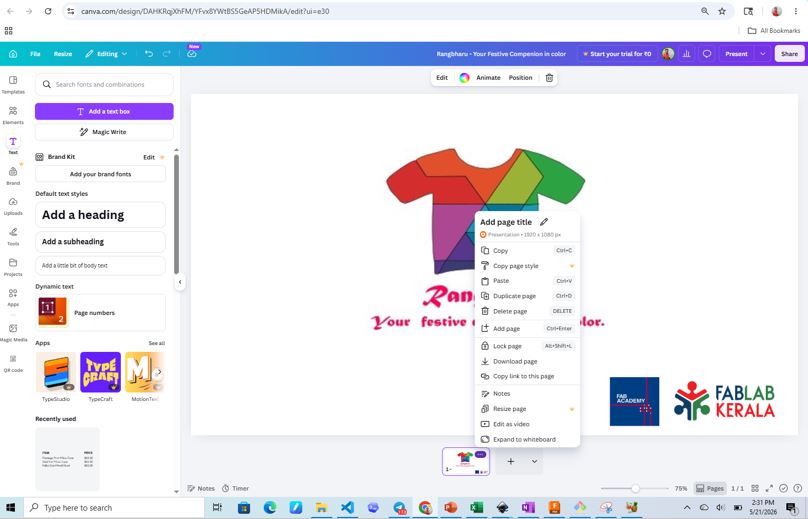
I am using canva for my project slide development.
Final Project Video
I am developing my final project video as I go.., for now I am using a sample video from my wildcard week to do this process and have a video up on my page.
Below are the few things, we shall keep in mind for final video
- The video size limit 25 MB
- It shall be 1080p resolution
- It shall be about ~1 min duration
- It shall not have water mark
- Show Project Working
- Show Production technics and methods
- Show Project Assembly
- Show Cultural Context
- Show Story or movie context
- Time Laps
For video editing (trim, cut, join, etc..), I am using a open source mobile app YouCut and it does not create water mark on the final video.
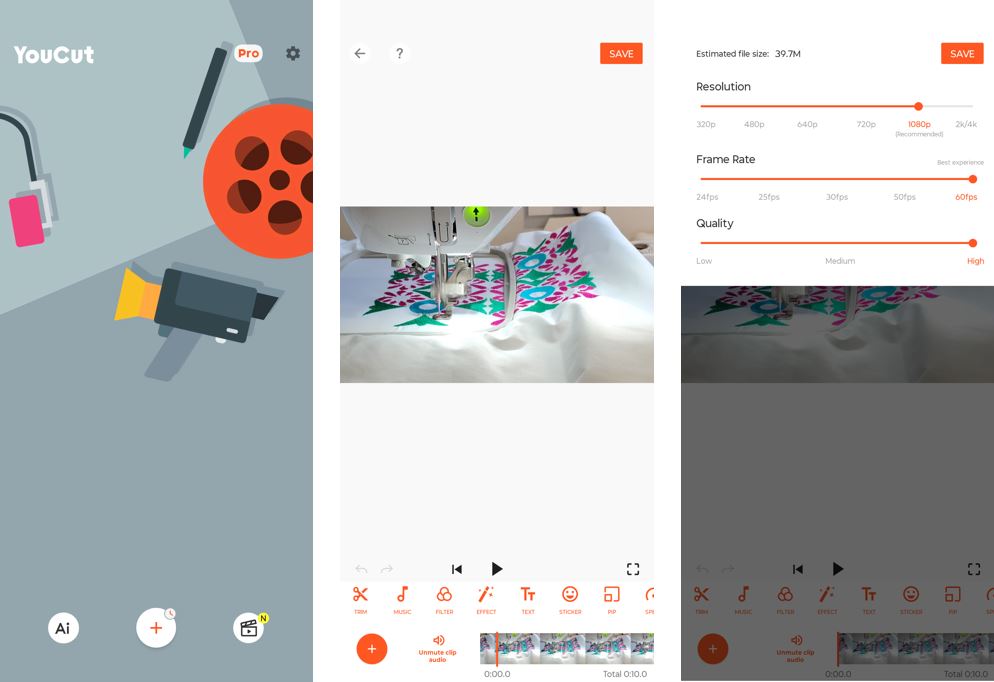
To ensure the video size and resolution, I am using HandBrake this is open source and freely available tool for video resizing.
We received a handbrake setting file form our instructor Saheen that ensure the resized video is of 1080p resolution and and compressed adequately to stay below 25 MB. The handbrake setting file can be downloaded from here : fabacademy-final-video.json
Click Open Source and import the Video --> click presets tab --> Import from File --> select fabacademy-final-video --> Open source --> Select the video --> Start Encode.
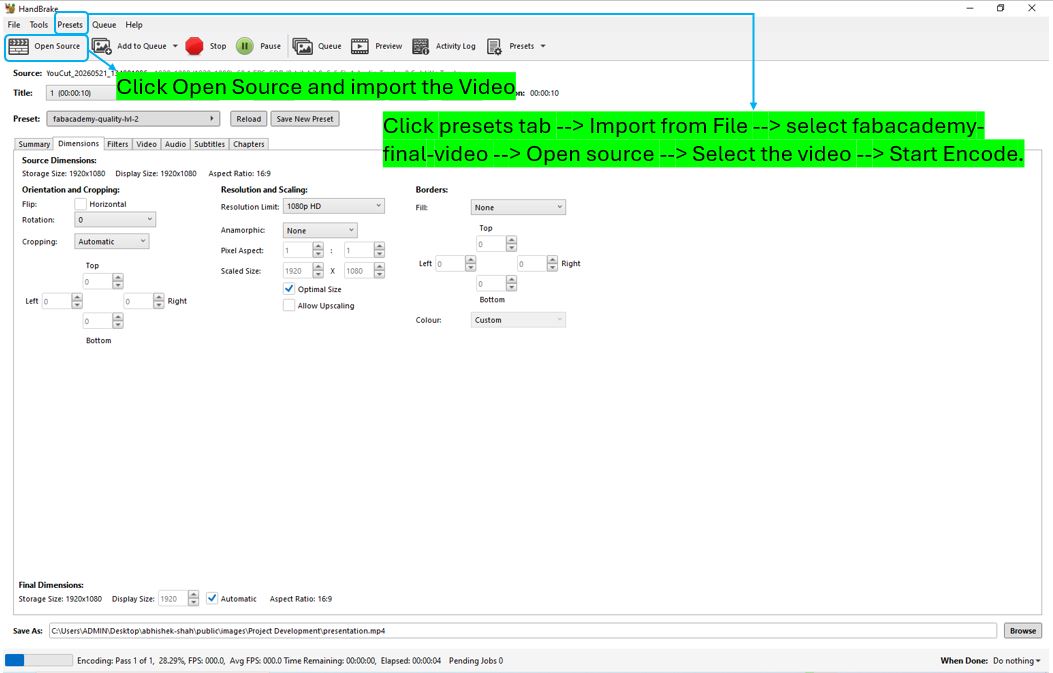
We can also verify and select this preset every time we resize the video in future. We no need to do manual settings, we can use below preset option.
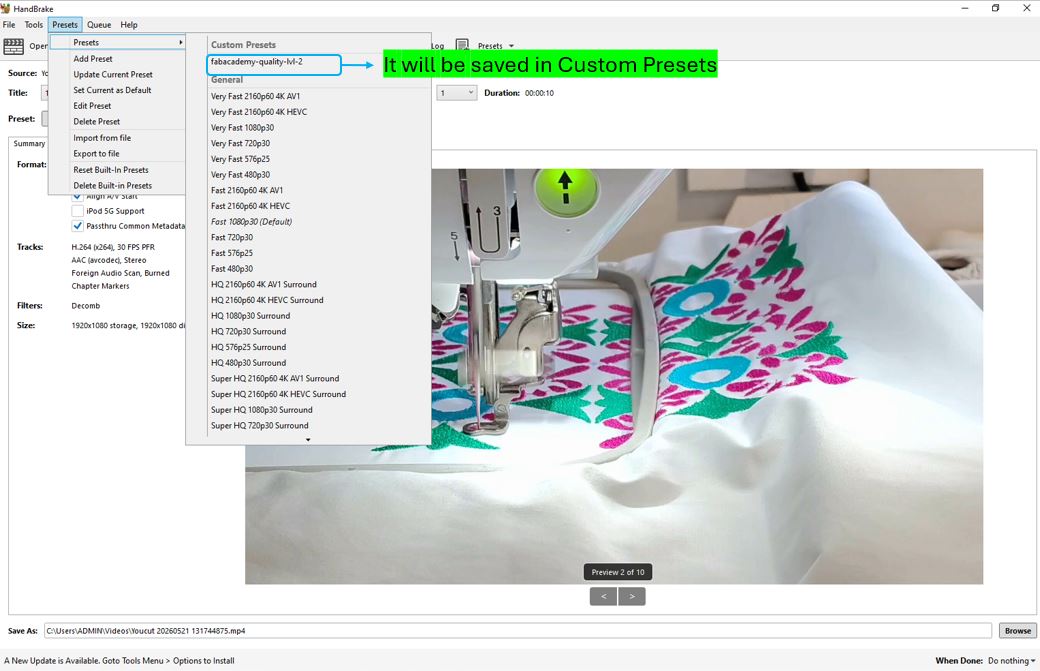
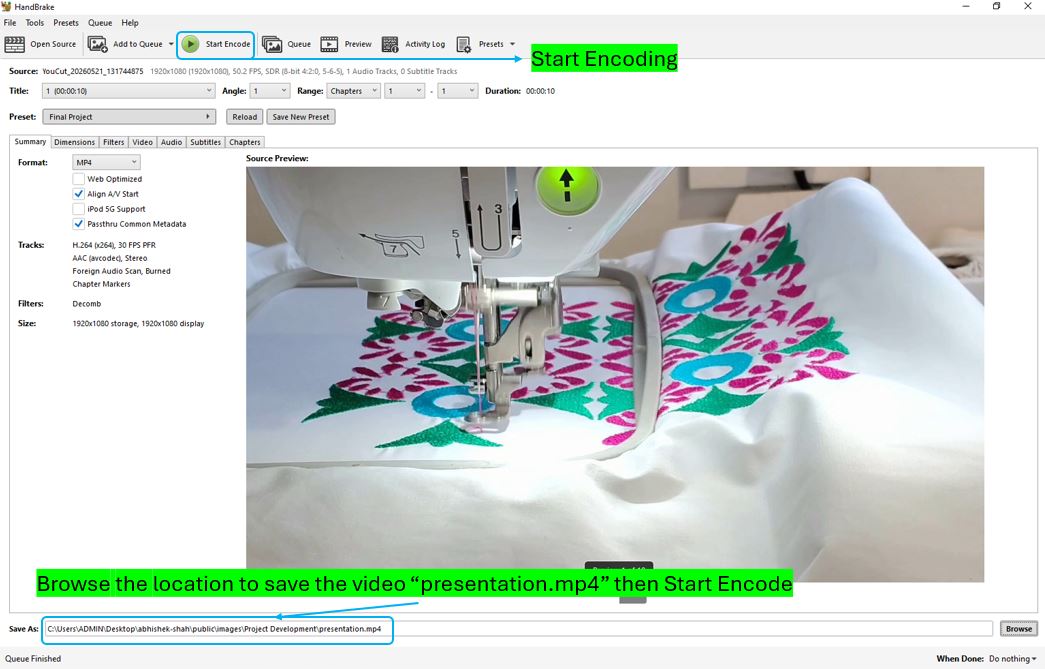
With above steps, the video size was reduces from about 13 MB to 5 MB, then I placed my both the project slide and project video into the repository into the public folder and pushed to my git repository.
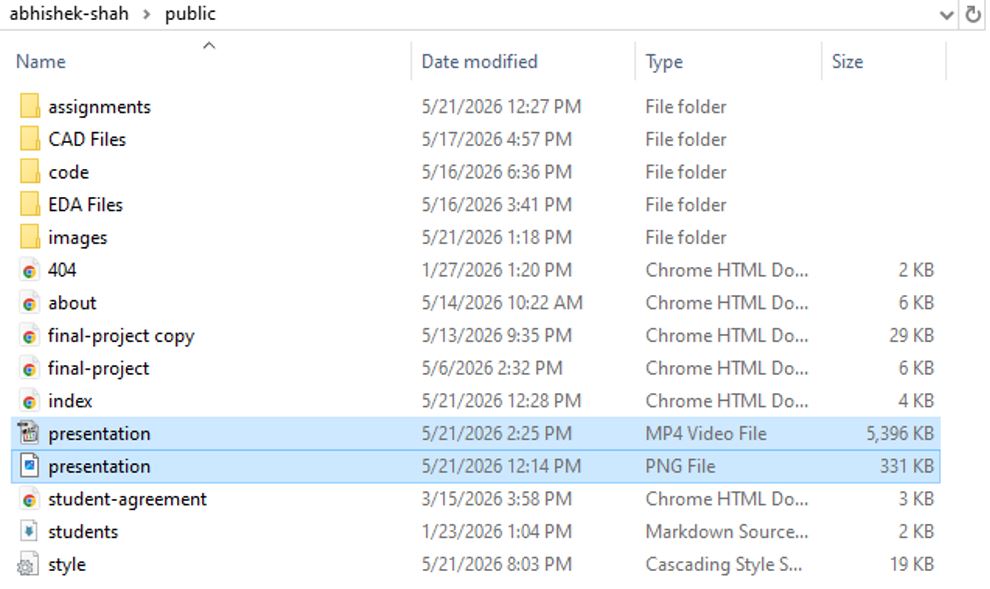
We can verify the status at Presentation Schedule page.
Project Development
Design & fabrication progression, electronics integration, and iterative development of the final project.