System overview / architecture
Note
Started in week 09 with a large update in week 11. I'll update this page to reflect more on the sub systems that make up RoboDuck 3000 (mentioned as the device). Meaning that this page will as much as possible reflect the latest ideas I have on how the system should look like. The latests version can always be found on top!
Last updates based on insights in week 16
C4
I'm used to layout a software system using the C4 model. C4 model can be used to visualize a software architecture and was developed Simon Brown. The C4 model breaks architecture down into four simple levels (context (C1), container (C2), component (C3), and code (C4)), making it easier to see the big picture and the details.
System context
System context provides a quick overview of the whole system architecture. A deeper dive shows that this system is made up out of several sub systems/ containers (C2-level). Each container lives/ depends on a particular technology that is described inside the containers themselves.
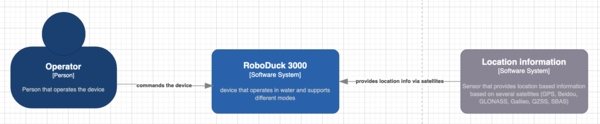
System context (C1) of RoboDuck 3000
Sub systems
RoboDuck is made up out of several sub systems. They are described below as much as possible to give an idea of it's functionality. It does not mean that they all will be made.
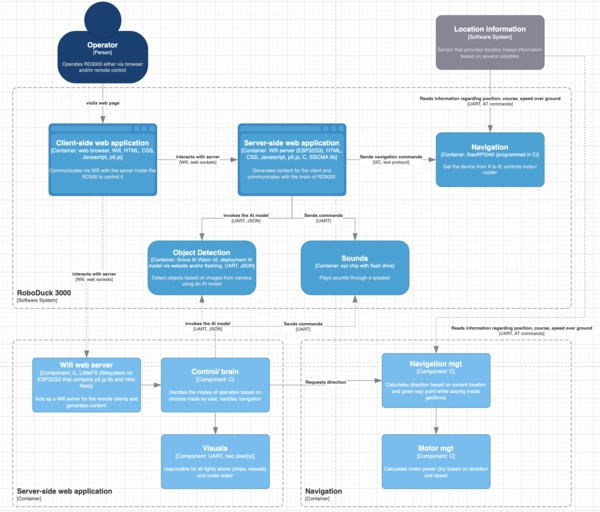
Containers (C2 level) which shows the several sub systems that are described below in more detail. Two of those containers have been further split into components (C3 level).
Navigation
Summary:
- Goal: to get the device from A to B.
- Output: 2 motors via PWM on different GPIO pins
- Input: Info from geo-location sensor
- Power: via
Server/ brain(5V, GND, I2C) - Input: Commands from
Server/ brainvia I2C
Commands:
- in:
STATUS-> out:READY(before the start),OKorNOK(during) - in:
NAV_LEFT,NAV_RIGHT--> out:ACK(free navigation during game) - in:
WP_<coordinate>--> out:ACK(a waypoint) - in:
SPD_<number>--> out:ACK(speed between 0 and 11; 0 no speed; 10 max speed) - in:
GEO_<coordinate>_<radius>--> out:ACK(coordinate of circle with radius in meters) - in:
STOP--> out:ACK(stops everything) - in:
HOME--> out:ACK(goes to the HOME position)
Tasks:
- startup: when the geo-location sensor provides a position store it as (default)
HOMEposition - it loops and scans for incoming messages
- in the mean time it keeps track of where it is, how fast it's going over ground (SOG) and course over ground (COG)
- it calculates the thrust for both motors based on the direction and speed it has to reach
- it does not move outside it's geofenced area (circle based)
- if the last received position has been reached it will stay there (margin is 5 meters)
- IF no request for update was received in the last minute THEN it will just STOP!
Object detection
Summary:
- Goal: to detect/ classify objects based on images (depends on the uploaded model(s))
- Output: JSON via UART (bounding box, class id and probability)
- Input: from camera inside the duck
- Input: Commands from
Server/ brainvia UART usingSSCMAlibrary likeinvoke= go ahead and detect - Power: via
Server/ brainPCB (5V, GND, UART)
Tasks:
- Listen for
invokecommand - Based on the most likely implementation (like using a vision AI model) detect zero or more objects using camera images.
Even if I use Sensecraft it will listen to commands like invoke and stop. If I'm able to have complete control over it, using other techniques like using a Tensorflow Lite model for instance, than I could implement a similar public interface by myself. So for now I assume this syb system will have some kind of interface.
Server-side web application
Summary:
- Goal: interacts with the user and manages all subsystems like navigation, ..
- Output: UI based on HTML, Javascript, CSS, p5.js via Wifi
- Input: Oject info from AI module via UART (after invoking it)
- Input: Commands from user via the UI coming in via websockets (Wifi)
- Power: directly from power bank
Tasks:
- after startup it checks all subsystems by sending
STATUSmessage - if everything sybsystem has send
READYback then continue - send
GEO_<coordinate>_<radius>to the navigation module - default mode of operation (MOP) is
STEALTH
In loop:
- it will ask for status update each minute
-
it will wait for a command from the user; this can be:
- mode of operation (STEALTH, FOLLOW, GAME, HOME)
STOP(stop everything)HOME(come to the home/ starting position)
-
STEALTH?: send
WP_<coordinate>_<radius>to the navigation module - FOLLOW?: send 1st position of the route to the navigation module
- GAME?:
- invoke the object recognizition module
- decide left, center or right of the camera view point
- send either
NAV_LEFT,NAV_RIGHTto the navigation module
- STOP?: send
STOPto the navigation module - HOME?: send
HOMEto the navigation module
Older version (before week 16)
System context (old)
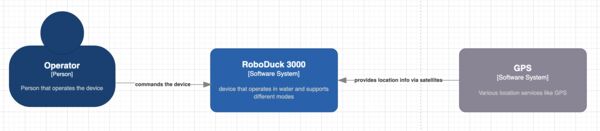
System context (C1) of RoboDuck 3000 www.c4
Sub systems (old)
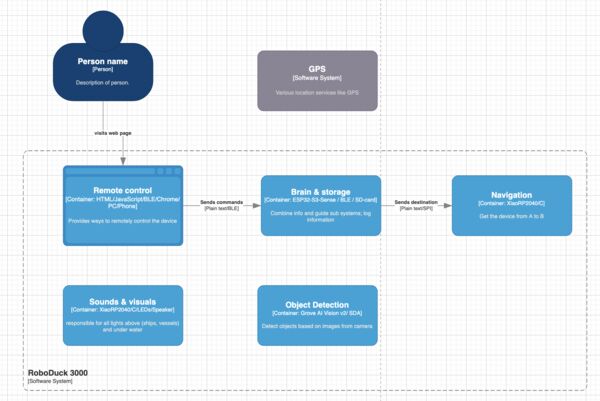
Navigation (old)
Goal: to get the device from A to B.
Controls: motor, rudder
Public interfaces
void upd_CurrentLocation (gps location) {
    // stores current location as current location
}

void navigate(gps destination, int max_speed, bool geofenced) {
    // loop
    // calculate speed/ direction to reach destination based on current location
    // ERROR: if geofenced AND destination is outside geofenced
    // set power of the motor not exceeding max speed
    // set position of ruddder
    // end loop
}

void set_Geofence (geofence (list of gps coordinates)) {
    // stores geofence
}
Interrupts: none
Object detection (old)
Goal: to detect objects based on image(s)
The objects are: boey, duck, human head in water, boat, swan, ...
Based on the most likely implementation (like using a vision AI model) this module will detect zero or more objects using camera images. Each object will be described by a bounding box, class id and probability.
Even if I use Sensecraft it will listen to commands like invoke and stop. If I'm able to have complete control over it, using other techniques like using a Tensorflow Lite model for instance, than I could implement a similar public interface by myself. So for now I assume this syb system will have some kind of interface.
Public interfaces:
void activate_ObjectDetection(bool logClassification, bool logImages) {
    // initializes the vision model and starts interpreting images from the camera
    // when log is enabled it means the image and/or classification is stored
}

void stop_ObjectDetection() {
    // pretty obvious; stops interpretation of the images
}
Private functions:
void detectObjects() {
    // based on the output of the AI model it decides per possible object on
    // - probability as integer number (between 0 and 100)
    // - distance in meters (which depends on the part of the object inside the image)
}
Interrupts: calls function detectedObjects() from the Control Room sub system when something is found
Sound & Visuals (old)
Goal: responsible for all lights above (ships, vessels) and under water
Public interfaces:
void makeQuackSound() {
    // makes a quack sound
}

void flashBack() {
    // shows a bright light inside the duck that flashes for 4 seconds
}

(optional)
void enable/disableNavigationLights() {
}

void enable/disableGuidanceLights() {

}

void enableLowBatteryWarning() {

}
The brain (old)
Goal: Combine information and guide the different sub systems
Public interfaces:
void detectedObjects(objects) {
    // objects is an array/list each with bounding boxes and probablity
    // The objects are: boey, duck, human head in water, boat, swan, ...
}

void processCommand(String cmd) {
    // starts to behave according to the command
    // cmd contains a pre defined command like
    // as a general acknowledgement it will flahs the back of the duck

    // GENERAL
    // `stop` = stops everything; no movement; no images etc; just floats
    // `come home` = stops everything; navigates to the home coordinates
    // `update geofence c1, c2, c3, c4, ..., cz`
    // `

    // STEALTH MODE
    // '
    // `follow route` = stops everything; navigates according to predefined route
    // `...`

}
Storage (old)
Goal: responsible for storing and retrieving different kind of data
Public interfaces:
void logImage (binary image, coordinates) {
    // logs image with date, time, coordinates
    // maybe that's possible inside the image or a seperate log file is necessary
}
Remote control (old)
Goal: provides a way to give commands to the duck from a distance.
***assumption is that there is already a connection with the device
Public interfaces: