Networking and Communications
This week I explored how to connect microcontrollers wirelessly. I chose the ESP-NOW protocol to establish a fast, connectionless, unidirectional communication link between a Seeed Studio XIAO ESP32-C3 and a XIAO ESP32-C6.
In the group assignment, the team successfully tested five communication protocols BLE, ESP-NOW, HTTP, I2C, and MQTT using ESP32-c6 microcontrollers and sensors. They evaluated different architectures (local connections, wired networks, mesh networks, and cloud networks) and confirmed that all are reliable and fully functional for integration into their respective projects.
Group Assignment Week 11
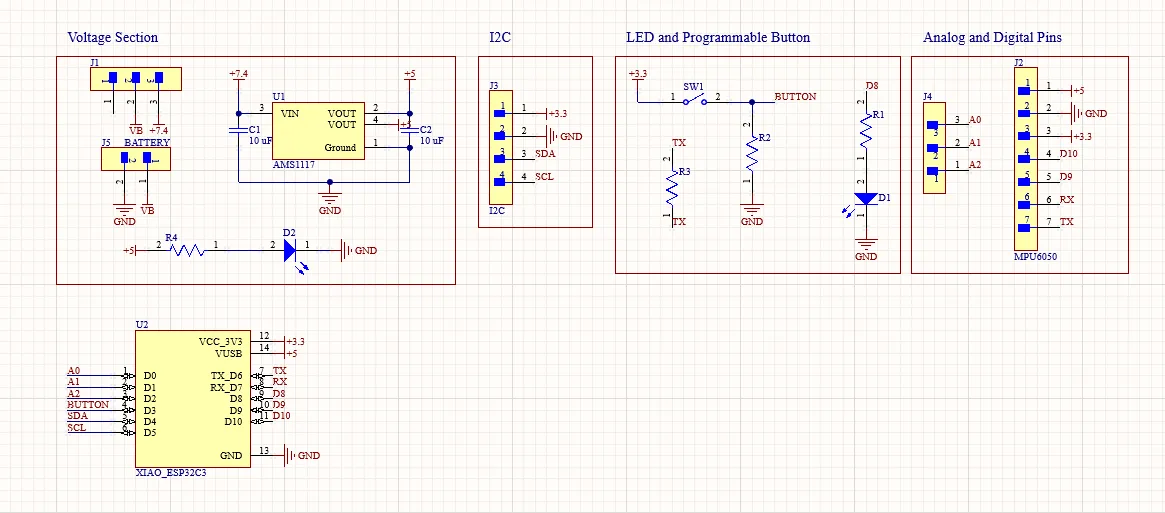
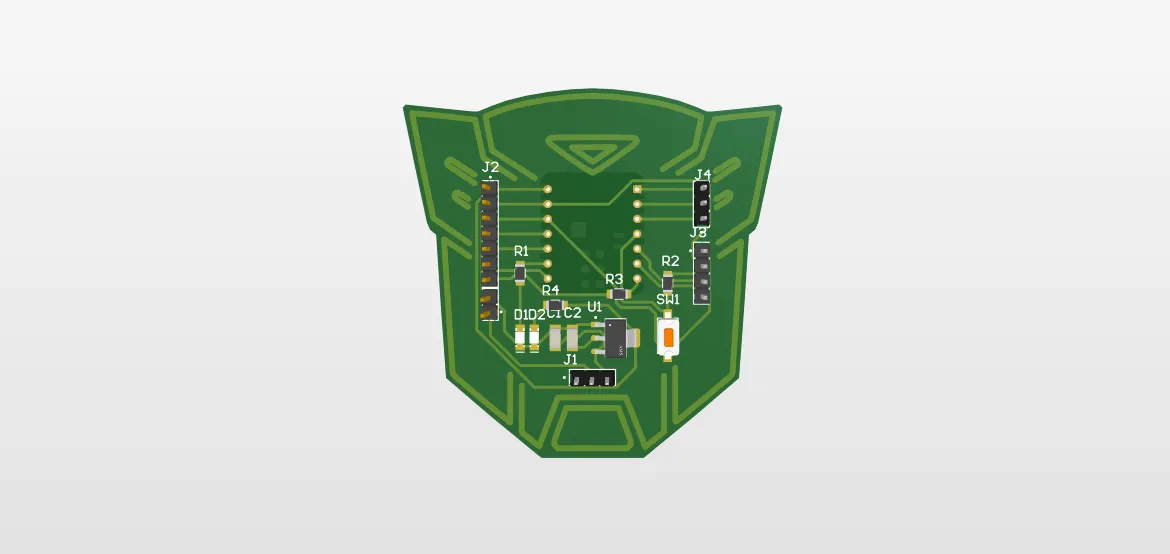
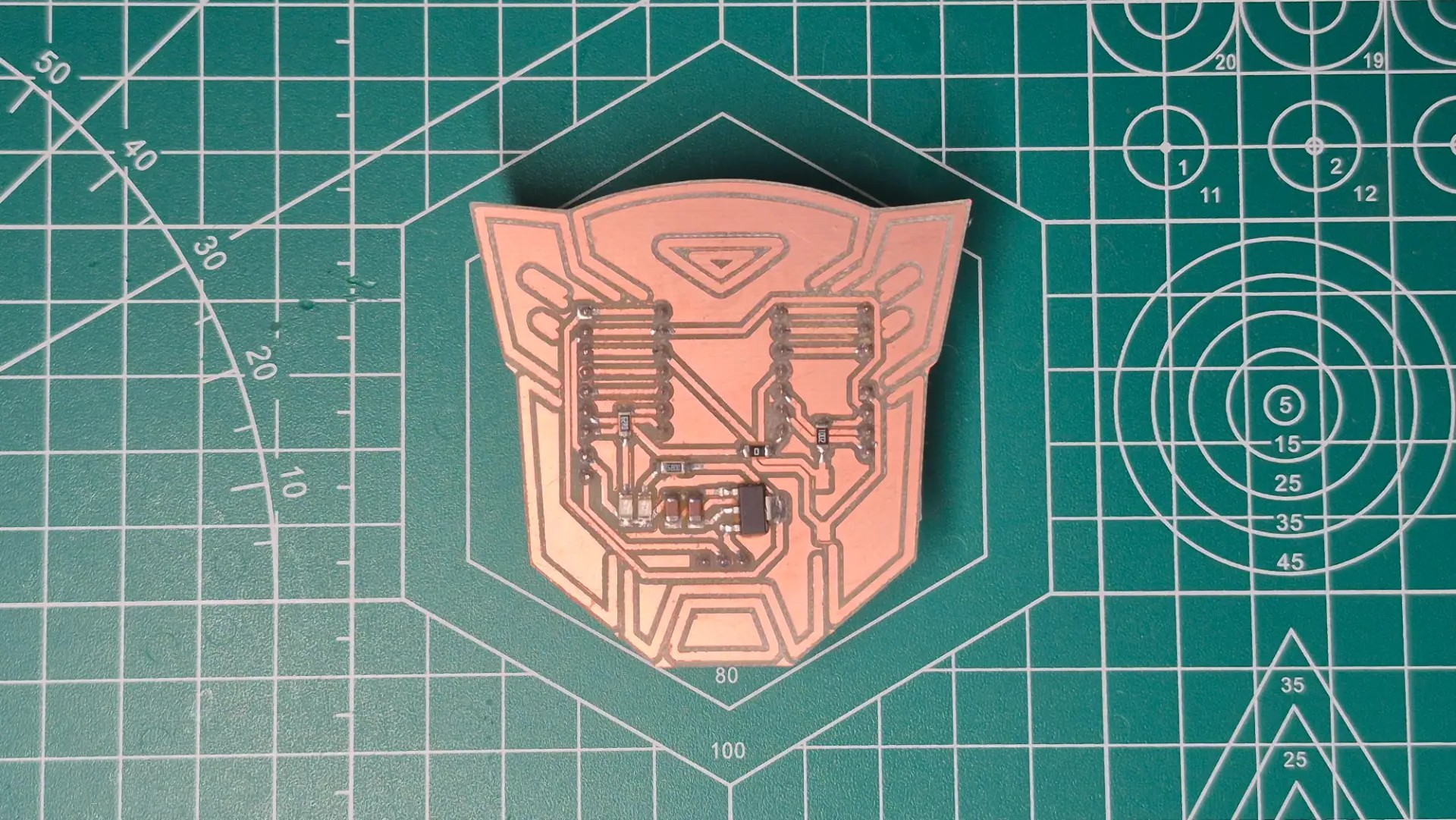
For this week's assignment, I made another custom PCB using the XIAO ESP32-C6 as the main controller. I based the design on my Electronic Design week work, but this time I installed female connectors instead of soldering the microcontroller directly. This modular design allows me to easily remove or change the XIAO at any time.
Micro-Bot-C6 PCB
In this setup, the ESP32-C3 acted as the transmitter, reading analog values from a flex sensor and wirelessly transmitting that data. Meanwhile, the ESP32-C6 functioned as the receiver, instantly listening for incoming packets and using those values to control a servo motor, successfully translating a physical input on one board into a mechanical response on the other.
Applying ESP-NOW
Before establishing an ESP-NOW connection, I needed to identify my receiving device. To do this, I used the MAC, or Media Access Control, address. A MAC address is a unique hardware-level identifier, physically etched into the silicon of each network interface controller during manufacturing. Therefore, every Xiaomi ESP32 board has a permanent and unique fingerprint. This ensures that when the transmitter sends a wireless packet, it is directed to the intended hardware and ignored by all other nearby devices.
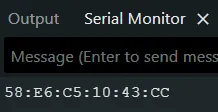
Identifying the Receiver's MAC Address
To find the unique address of my receiver board, I uploaded a small diagnostic program to the microcontroller. This script simply starts the internal Wi-Fi radio and queries the chip to obtain its factory-assigned MAC address string.
#include <WiFi.h>

void setup() {
  Serial.begin(115200);
  WiFi.mode(WIFI_STA);
  Serial.println(WiFi.macAddress());
}

void loop() {
}
 Transmitter
 Receiver
#include <Arduino.h>
#include <WiFi.h>
#include <esp_now.h>

#define Flex_Sensor 2

uint8_t Receiver_Address[] = {0x58, 0xE6, 0xC5, 0x10, 0x43, 0xCC};

typedef struct Struct_Message {
  int Angle;
} Struct_Message;

Struct_Message Out_Going_Data;

float Filter_Value = 0;
float Smooth_Factor = 0.3;

void On_Data_Sent(const wifi_tx_info_t* info,
esp_now_send_status_t status) {
}

void setup() {
  Serial.begin(115200);

  WiFi.mode(WIFI_STA);
  if (esp_now_init() != ESP_OK) {
    Serial.println("Error at startup ESP-NOW");
    return;
  }

  esp_now_register_send_cb(On_Data_Sent);

  esp_now_peer_info_t peerInfo = {};
  memcpy(peerInfo.peer_addr, Receiver_Address, 6);
  peerInfo.channel = 0;
  peerInfo.encrypt = false;

  if (esp_now_add_peer(&peerInfo) != ESP_OK) {
    Serial.println("Error adding the receiver");
    return;
  }
}

void loop() {
  int Flex_Value = analogRead(Flex_Sensor);
  Filter_Value = Filter_Value * (1 - Smooth_Factor) + Flex_Value *
  Smooth_Factor;

  float Normalized_Value = Filter_Value / 3370.0;
  Normalized_Value = constrain(Normalized_Value, 0, 1);
  float Normalized_Value_Corrected = pow(Normalized_Value, 10.0);

  int Servo_Angle = Normalized_Value_Corrected * 270;

  Serial.print("Flex: ");
  Serial.print(Flex_Value);
  Serial.print(" | Angle Sent: ");
  Serial.println(Servo_Angle);

  Out_Going_Data.Angle = Servo_Angle;
  esp_now_send(Receiver_Address, (uint8_t *) &Out_Going_Data,
  sizeof(Out_Going_Data));

  delay(50);
}
ESP-NOW is a fast, connectionless wireless communication protocol developed by Espressif. In this architecture, the sender node is configured to capture a physical analog input, process it into a target mechanical angle, and wirelessly broadcast this payload directly to a paired receiver device's MAC address without routing through a standard Wi-Fi network.
Libraries and Definitions
#include <esp_now.h>and<WiFi.h>: Essential libraries that expose the underlying Wi-Fi radio peripheral of the ESP32. They are necessary to bypass standard network protocols and establish a direct MAC-to-MAC communication layer.uint8_t Receiver_Address[]: It permanently stores the unique MAC or Media Access Control address of the destination receiving node. This hexadecimal array acts as the final routing destination for all outgoing data packets.typedef struct Struct_Message: Define a strictly typed data payload. By encapsulating the target integer angle within a structured format, the compiler ensures identical memory alignment and size allocation between the transmitting and receiving devices, preventing data corruption during byte-level transfer.
Hardware Setup and Configuration
WiFi.mode(WIFI_STA): It forces the internal Wi-Fi radio to operate exclusively in Station mode. This is a prerequisite for the ESP-NOW protocol, as it activates the wireless hardware without actively searching for or connecting to a local internet router.esp_now_init(): Initializes the low-level communication protocols within the ESP32 network, verifying radio availability and allocating the necessary memory buffers for packet transmission.esp_now_add_peer(&peerInfo): Register the specific receiving microcontroller as a valid communication endpoint. Link the destination MAC address to the transmitter's internal peer array, thus establishing the connectionless broadcast tunnel.
Data Transmission
- Signal Obtainment: The raw analog reading, mathematical normalization, and exponential curve correction used to convert the physical resistance of the flex sensor into a usable angle of 0 to 270 degrees are identical to those in my previous work with sensors. For a detailed analysis of this specific filtering and mapping logic, see the documentation for week 9.
- Packet Injection:
esp_now_send()takes the final computedServo_Angle, serializes the data structure into a raw byte array, and directly injects it into the 2.4GHz RF spectrum, targeting exclusively the registered receiver MAC address. - Transmission Pacing:
delay(50)introduces a brief, mandatory 50-millisecond blocking pause at the end of the execution cycle. This crucial governor prevents the main loop from flooding the wireless spectrum and exhausting the microcontroller's internal transmission buffers.
Inputs Devices
#include <Arduino.h>
#include <WiFi.h>
#include <esp_now.h>
#include <ESP32Servo.h>

#define Servo_Pin 20

Servo Servo_I;

typedef struct Struct_Message {
  int Angle;
} Struct_Message;

Struct_Message Incoming_Data;

void On_Data_Received(const esp_now_recv_info_t* info,
const uint8_t* data, int dataLen) {
  memcpy(&Incoming_Data, data, sizeof(Incoming_Data));

  Serial.print("Angle Received: ");
  Serial.print(Incoming_Data.Angle);
  Serial.println("°");

  int pulseWidth = map(Incoming_Data.Angle, 0, 270, 500, 2500);

  Servo_I.writeMicroseconds(pulseWidth);
}

void setup() {
  Serial.begin(115200);

  Servo_I.attach(Servo_Pin, 500, 2400);
  Servo_I.write(0);

  WiFi.mode(WIFI_STA);
  Serial.print("MAC Address from this Receiver: ");
  Serial.println(WiFi.macAddress());

  if (esp_now_init() != ESP_OK) {
    Serial.println("Error starting ESP-NOW");
    return;
  }

  esp_now_register_recv_cb(On_Data_Received);
}

void loop() {
  delay(10);
}
In an ESP-NOW unidirectional communication architecture, the receiving node acts as a dedicated listener. Its primary function is to continuously monitor the 2.4 GHz wireless spectrum for incoming packets from a designated MAC address, decode the structured data, and translate the incoming sensor values into proportional mechanical movements.
Libraries and Definitions
typedef struct Struct_Message: It reflects the exact data structure defined in the transmitter. Maintaining identical memory alignment is critical to ensuring that received bytes are parsed correctly without data corruption. It is important that the structure in the transmitter and the receiver has the same name
Hardware Setup and Configuration
WiFi.mode(WIFI_STA): Configure the internal radio exclusively in Station mode. This is an essential prerequisite for the ESP-NOW protocol to function without attempting to connect to a traditional Wi-Fi router.esp_now_register_recv_cb(On_Data_Received): Link a custom callback function to the ESP-NOW controller. This ensures that, as soon as a valid packet arrives, the processor immediately interrupts its idle state to handle the incoming data flow.
Data Reception and Mapping
- Memory Allocation:
memcpy(&Incoming_Data, data, sizeof(Incoming_Data))is a low-level operation that safely copies the raw incoming byte array directly into the structured variable, instantly restoring the integer angle sent by the transmitter. - Sensor to Actuator Mapping:
map(Incoming_Data.Angle, 0, 270, 500, 2500)It uses a linear interpolation function to seamlessly translate received sensor data, calculated on the emitter side as a target angle of 0° to 270°, into the precise microsecond pulse width needed to move the physical hardware. - Actuation Note: Once the sensor data is mathematically mapped, the processor directly executes the mechanical movement based on those values. For a comprehensive in-depth breakdown of the servomotor configuration, library implementation, and pulse width initialization, see the documentation for week 10.
Outputs Devices