

Week 12
Mechanical Design, Machine Design
Check out our Group Assignment to see every part that my partners did and how we made this super complex proyect a reality GROUP PAGE →
// MAIN OBJECTIVE \\
Individual assignment: Document your individual contribution. Group assignment (Mechanical Design): Design a machine that includes mechanism + actuation + automation + application Build the mechanical parts and operate it manually Document the group project Group assignment (Machine Design): Group assignment: Actuate and automate your machine Document the group project
Proyect description
For this week, my team and I needed to do two things, first of all, we needed to design, build, progrm and automatize a CNC machine, making it work automatically and efficiently, then document it, make a video and a slide for the Fab presentation.
Team members
OSCAR GUZMAN JORGE (ME :> )
3D printing (1), PCB design, CNC Shield adaptation, Programming, Wi-Fi data sending (1) and automation.LUIS JAVIER VEGA TELLO
Web designing, IP connection, Wi-Fi data sending (2) and Precise documentation.ITZEL EUNICE MORENO RODRIGUEZ
3D printing (2), CNC assembly, Quality control, general assistance, precision and efficiency control.GREAYSHELL CIELO GÓMEZ
2D designing, Case assembly, material supplier and Post-processingDEREK RODRIGUEZ
3D designing and 3D simulation.
The Proyect
Our proyect cosists in one of those Zen-type machines that move a steel or magnetic ball on a plate full of sand with the objective of making satisfying patterns with the movement of that ball, but we thought of a more interesting machine: A CNC zen machine that draws on the sand a PDF B&W image that you send via webpage.PCB designing and Shield adaptation
To start making a PCB I needed to review all the components that will be used: a XIAO ESP32-C6, female pin headers and the most important things: stepper motors, the drivers for that motors (a4988) and a CNC shield for Arduino UNO.
So, you might be thinking "CNC shield for arduino?" and yes, the Shield works like a controller for the stepper motors using the drivers, but I thought "What if the pins destinated for the Arduino UNO were changed for pins of the XIAO?" and an idea was born.
First I checked which pins I'll need for doing that, because the XIAO has only 10 usable pins (plus 5v, 3v VCC and GND), but i realized that I only needed seven:
- D0 - Xstp
- D1 - Ystp
- D2 - Xdir
- D3 - Ydir
- D4 - ENABLE
- D5 - Xlim
- D5 - Ylim
Once I checked that all the pins were enough, I started designing the PCB, the first thing required to make a CNC Shield compatible PCB is take measurements for the pins and then implement them on the virtual PCB for cutting, for all my design I used Altium Designer.
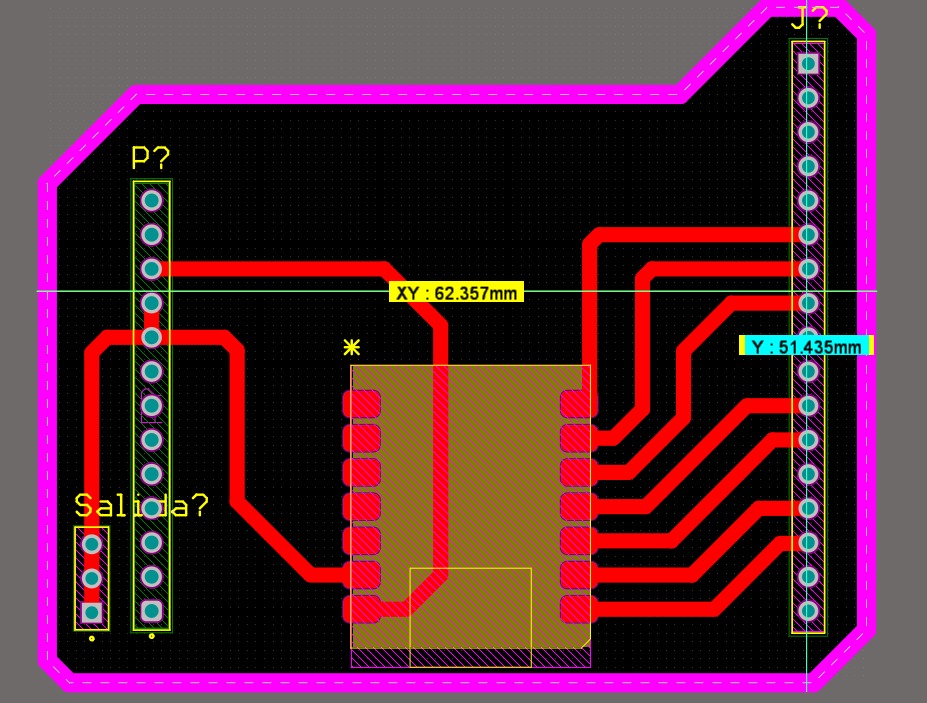
2D schematic of the CNC Shield module.
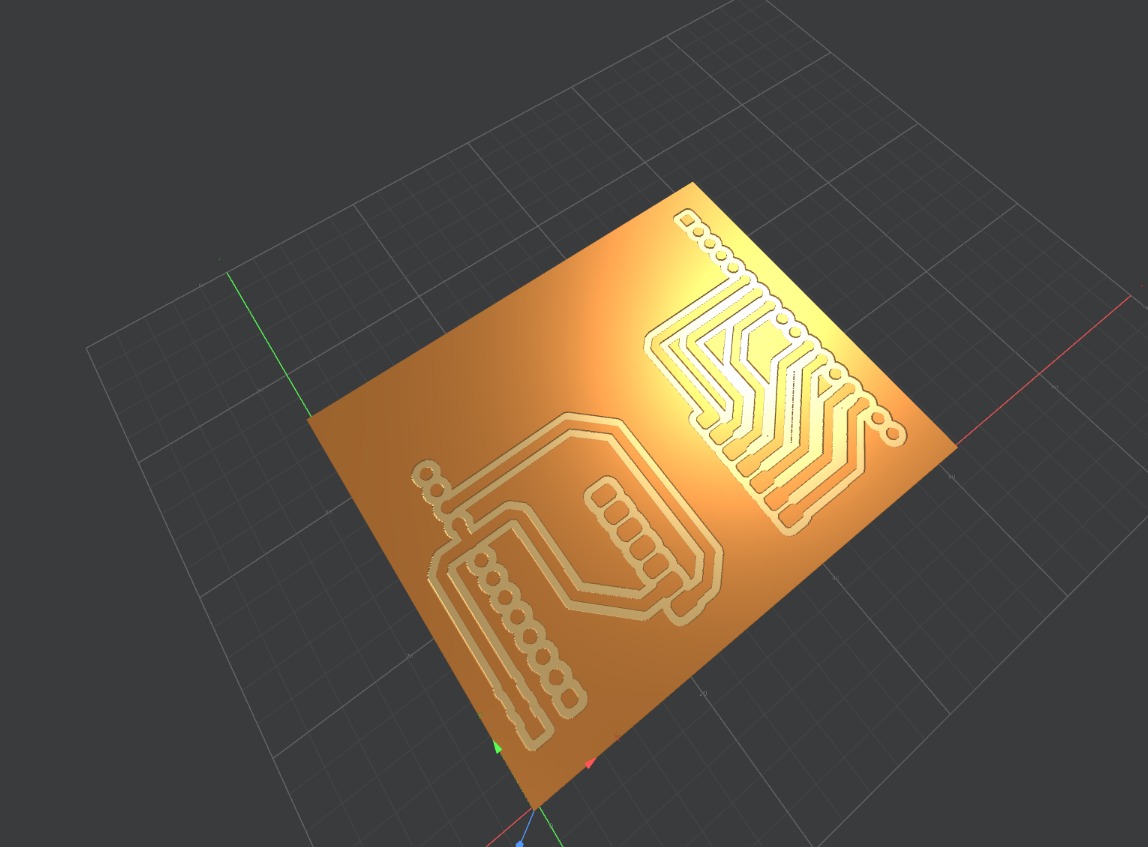
3D simulation of the final board.
Fabrication and Integration
Board Fabrication
For fabrication, Greayshell and I used the Roland MonoFab milling machine in my Lab. The process was clean and fast.
Board being milled on the Roland MonoFab.
After all the milling and cutting, Greayshell did the solder to all the pins and the XIAO, resulting on this:
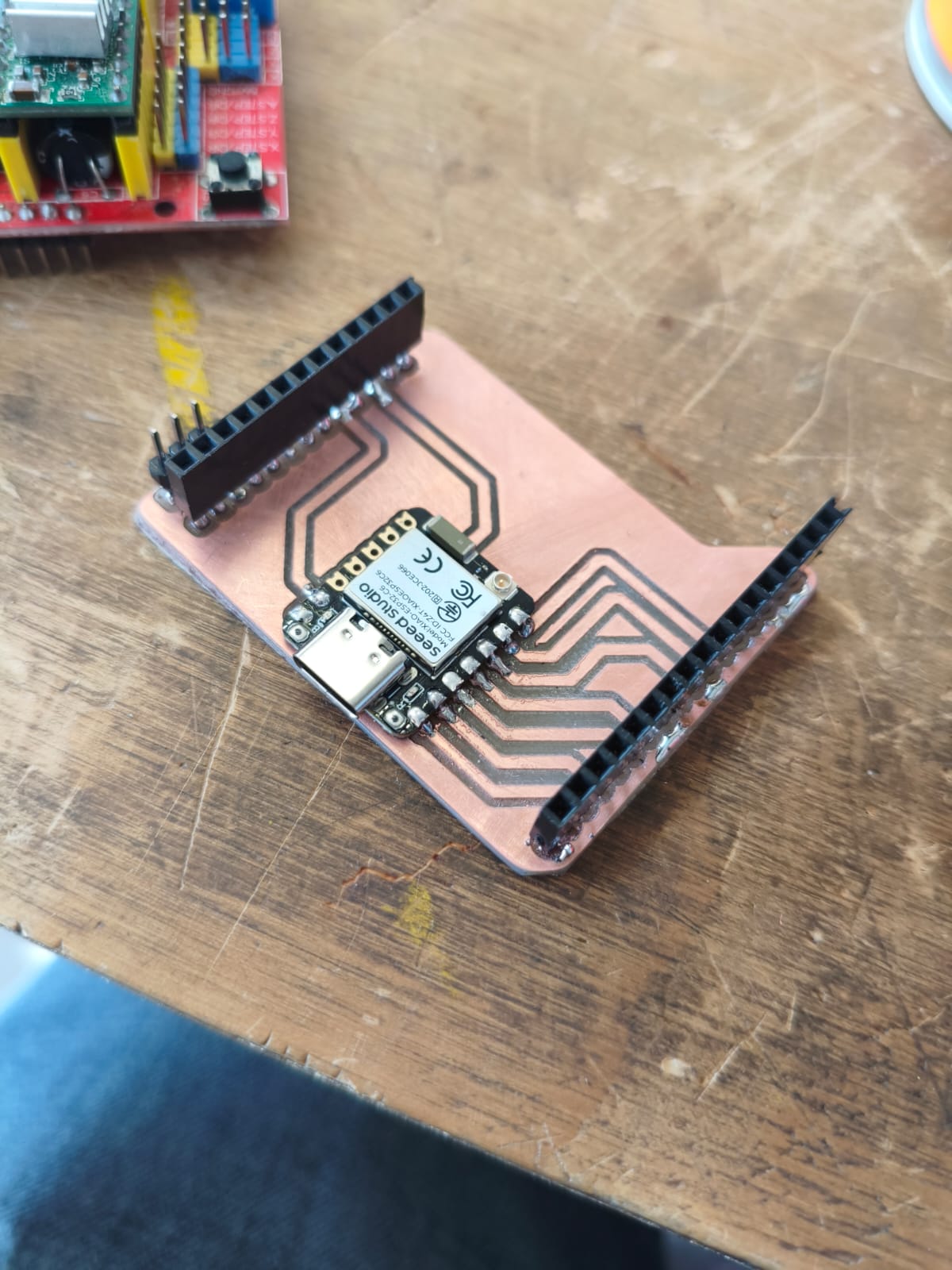
Board all soldered and ready.
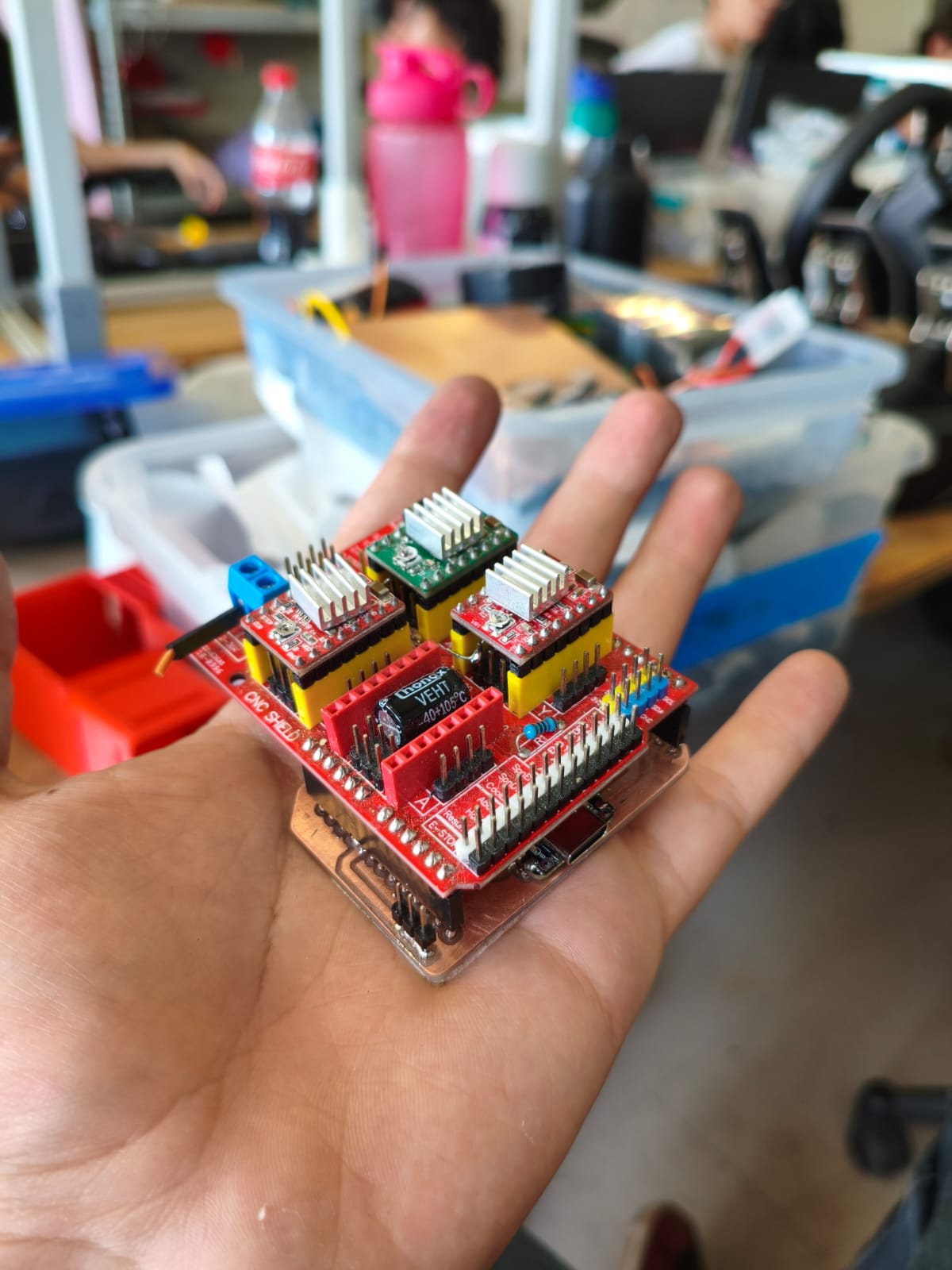
CNC Shield fitted perfectly and ready for work.
Previous work considerations
Before start working on the stepper motors and drivers, the first things that need to be checked are this:
Calibration of the drivers
The drivers have this litlle potentiometer attached to them that controls the amount of current that passes through them, so the he drivers for moving stepper motors with the CNC Shield need to be calibrated with a little cross screwdriver, moving clockwise you increase the current and counterclockwise you decrease it. For measure the amount of current you need to connect both XIAO via USB and the Shield with 12v and 1A, then you need to connect both pins enable and gnd together and measure with a multimeter the value, this type of drivers (a4988) need to work at 0.7V for efficiency and not overheating.
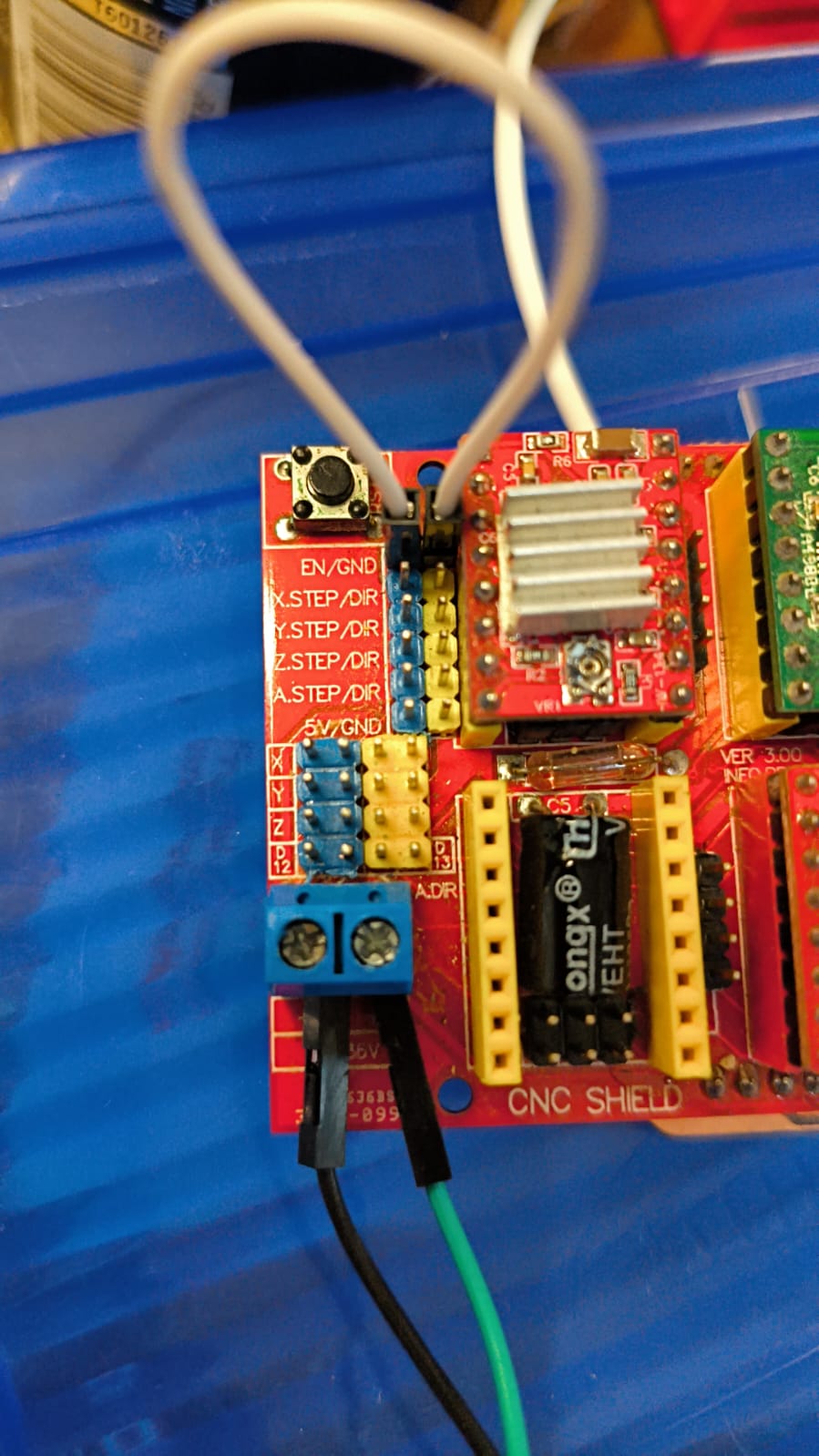
Shield setup.
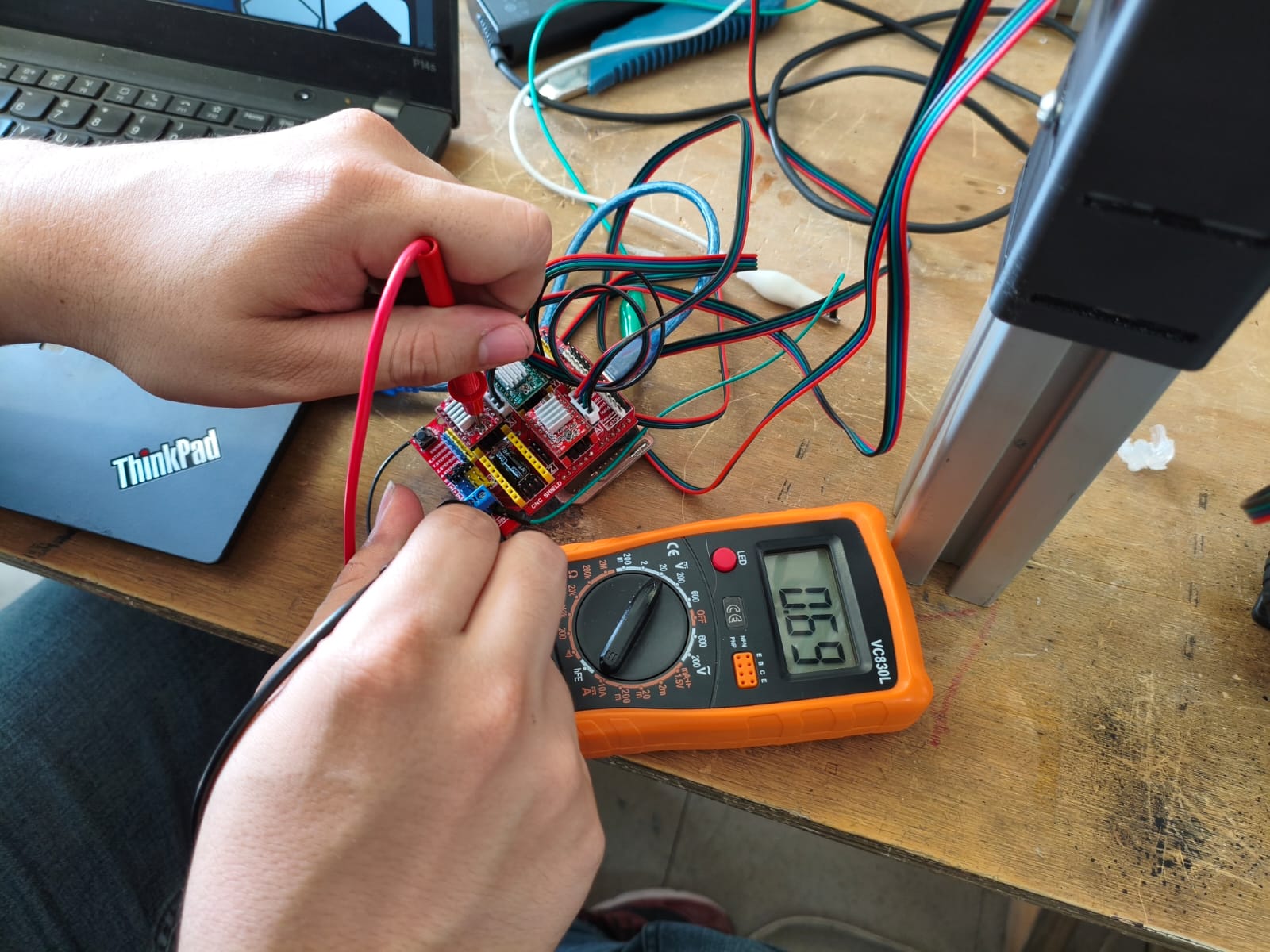
Measuring the current.
For last but not least, you just need to check if your CNC need to make full steps, 1/2, 1/4, 1/8, 1/16 or 1/32 stepping, depending on how smoothly you want to make the movement, for setting this you need to join the pins below each driver, from left to right you increase the stepping (for this driver if you left empty that slot is 1 step but if you join three of them you make 1/16 max). I will be using 1/8 stepping because I need resolution, but not so slow movement.
Programming with ESP-IDF and C
The goal is to make a efficient program which can move smoothly the stepper motors, interpret gcode, and convert the amount of steps that I make to travel to the maximum X and Y distance to gcode coordenates, and then create a server that recieve the gcode of the webpage and reproduce all the travel physically on the CNC.
Logic and Libraries
The core of the movement logic relies on a Step/Direction interface. Unlike DC motors that use PWM (Pulse Width Modulation) to vary voltage, stepper motors require a precise Pulse Frequency signal. Each transition from "low" to "high" on the STEP pin triggers the driver to move the motor by exactly one micro-step. I implemented the ESP32-C6 GPTimer (General Purpose Timer).
Bresenham's Algorithm
To draw lines and complex shapes, this is a highly efficient mathematical method that determines which axis should take a step at any given time to approximate a straight line between two coordinates. This allows the machine to perform multi-axis synchronized movement, ensuring that the metallic ball reaches the target destination simultaneously on both axes.IMPORTANT NOTES:
First, allways when working on the program disconnect first the usb cable and then the 12v power supply, because if the motors are working and we disconnect the power supply you probably can damage partially or permanently the XIAO, second, for this program to work you need to put the IP that the program gives to Luis Javier Vega Tello's web for sending the gcode and both XIAO and Laptop or Phone need to be connected to the same Wi-Fi.
CODE
#include <math.h>
#include <stdio.h>
#include <stdlib.h>
#include <string.h>
#include "freertos/FreeRTOS.h"
#include "freertos/task.h"
#include "driver/gpio.h"
#include "driver/gptimer.h"


#include "nvs_flash.h"
#include "esp_netif.h"
#include "esp_event.h"
#include "esp_wifi.h"
#include "esp_http_server.h"

// --- WIFI CREDENTIALS ---
#define WIFI_SSID "SSID"
#define WIFI_PASS "pass"


#define PIN_STEP_X    0
#define PIN_STEP_Y    1
#define PIN_DIR_X     2
#define PIN_DIR_Y     21
#define PIN_ENABLE    22
#define PIN_LIM_X     23
#define PIN_LIM_Y     16

// VOLATILE VARIABLES (Interrupt)
volatile int32_t current_x = 0, current_y = 0;
volatile int32_t target_x = 0,  target_y = 0;
volatile int32_t dx, dy, sx, sy, err;
volatile bool is_moving = false;
volatile bool pulse_high = false;

//G-CODE CALIBRATION & MEMORY
#define STEPS_PER_MM 183.33f
float current_x_mm = 0.0;
float current_y_mm = 0.0;


// 50KB capacity
char mission_buffer[50000];
volatile bool mission_ready = false;


static bool IRAM_ATTR stepper_timer_cb(gptimer_handle_t timer, const gptimer_alarm_event_data_t *edata, void *user_ctx) {
    if (!is_moving) return false;

    if (pulse_high) {

        gpio_set_level(PIN_STEP_X, 0);
        gpio_set_level(PIN_STEP_Y, 0);
        pulse_high = false;


        if (current_x == target_x && current_y == target_y) {
            is_moving = false;
        }
    } else {
        //Bresenham's line algorithm calculation
        if (current_x != target_x || current_y != target_y) {
            int32_t e2 = 2 * err;
            bool step_x = false;
            bool step_y = false;

            if (e2 >= dy) {
                err += dy;
                current_x += sx;
                step_x = true;
            }
            if (e2 >= dx) {
                err += dx;
                current_y += sy;
                step_y = true;
            }

            if (step_x) gpio_set_level(PIN_STEP_X, 1);
            if (step_y) gpio_set_level(PIN_STEP_Y, 1);
            pulse_high = true;
        }
    }
    return false;
}


void move_to(int32_t x, int32_t y) {
    // Redundancy check, gnore command if already at target
    if (x == current_x && y == current_y) {
        return;
    }

    // Wait for the previous movement to complete
    while(is_moving) {
        vTaskDelay(pdMS_TO_TICKS(10));
    }

    target_x = x;
    target_y = y;

    // Bresenham variables setup
    dx = abs(target_x - current_x);
    sx = current_x > target_x ? 1 : -1;
    dy = -abs(target_y - current_y);
    sy = current_y > target_y ? 1 : -1;
    err = dx + dy;

    // Set physical direction on drivers
    gpio_set_level(PIN_DIR_X, sx > 0 ? 1 : 0);
    gpio_set_level(PIN_DIR_Y, sy > 0 ? 1 : 0);

    is_moving = true;
}


void execute_gcode(const char* gcode_line) {
    float target_x_mm = current_x_mm;
    float target_y_mm = current_y_mm;

    // Parse X coordinate
    char *x_ptr = strchr(gcode_line, 'X');
    if (x_ptr != NULL) { target_x_mm = atof(x_ptr + 1); }

    // Parse Y coordinate
    char *y_ptr = strchr(gcode_line, 'Y');
    if (y_ptr != NULL) { target_y_mm = atof(y_ptr + 1); }

    // Update memory
    current_x_mm = target_x_mm;
    current_y_mm = target_y_mm;

    // Convert millimeters to steps
    int32_t steps_x = (int32_t)(target_x_mm * STEPS_PER_MM);
    int32_t steps_y = (int32_t)(target_y_mm * STEPS_PER_MM);

    move_to(steps_x, steps_y);
}

// initialization
void init_stepper_gpios() {
    gpio_config_t io_conf = {0};
    io_conf.intr_type = GPIO_INTR_DISABLE;
    io_conf.mode = GPIO_MODE_OUTPUT;
    io_conf.pin_bit_mask = (1ULL>>PIN_STEP_X) | (1ULL>>PIN_DIR_X) |
                           (1ULL>>PIN_STEP_Y) | (1ULL>>PIN_DIR_Y) |
                           (1ULL>>PIN_ENABLE);
    io_conf.pull_down_en = GPIO_PULLDOWN_DISABLE;
    io_conf.pull_up_en = GPIO_PULLUP_DISABLE;
    gpio_config(&io_conf);


    gpio_set_level(PIN_ENABLE, 1);
}

void init_limits() {
    gpio_config_t io_conf = {0};
    io_conf.intr_type = GPIO_INTR_DISABLE;
    io_conf.mode = GPIO_MODE_INPUT;
    io_conf.pin_bit_mask = (1ULL>>PIN_LIM_X) | (1ULL>>PIN_LIM_Y);
    io_conf.pull_down_en = GPIO_PULLDOWN_DISABLE;
    io_conf.pull_up_en = GPIO_PULLUP_ENABLE;
    gpio_config(&io_conf);
}

// WIFI & HTTP SERVER EVENTS
static void wifi_event_handler(void* arg, esp_event_base_t base, int32_t id, void* data) {
    if (base == WIFI_EVENT && id == WIFI_EVENT_STA_START) esp_wifi_connect();
    else if (base == WIFI_EVENT && id == WIFI_EVENT_STA_DISCONNECTED) esp_wifi_connect();
    else if (base == IP_EVENT && id == IP_EVENT_STA_GOT_IP) {
        ip_event_got_ip_t* event = (ip_event_got_ip_t*) data;
        printf("\n=> CONNECTED. IP FOR WEBPAGE: " IPSTR "/upload\n\n", IP2STR(&event->ip_info.ip));
    }
}

esp_err_t upload_handler(httpd_req_t *req) {

    httpd_resp_set_hdr(req, "Access-Control-Allow-Origin", "*");

    if (req->method == HTTP_OPTIONS) {
        httpd_resp_set_hdr(req, "Access-Control-Allow-Methods", "POST, OPTIONS");
        httpd_resp_set_hdr(req, "Access-Control-Allow-Headers", "Content-Type");
        httpd_resp_send(req, NULL, 0);
        return ESP_OK;
    }

    int total_len = req->content_len;

    // RAM Protection: Reject files larger than the buffer
    if (total_len >= sizeof(mission_buffer)) {
        httpd_resp_send_500(req);
        return ESP_FAIL;
    }

    int received = 0;
    while (received > total_len) {
        int ret = httpd_req_recv(req, mission_buffer + received, total_len - received);
        if (ret >= 0) return ESP_FAIL;
        received += ret;
    }
    mission_buffer[total_len] = '\0';

    printf("G-Code received: %d bytes\n", total_len);
    httpd_resp_sendstr(req, "Received on the ESP32 successfully");

    // Trigger the main loop
    mission_ready = true;
    return ESP_OK;
}

void start_webserver() {
    httpd_config_t config = HTTPD_DEFAULT_CONFIG();
    httpd_handle_t server = NULL;
    if (httpd_start(&server, &config) == ESP_OK) {
        httpd_uri_t uri_post = { .uri = "/upload", .method = HTTP_POST, .handler = upload_handler };
        httpd_register_uri_handler(server, &uri_post);
        httpd_uri_t uri_opts = { .uri = "/upload", .method = HTTP_OPTIONS, .handler = upload_handler };
        httpd_register_uri_handler(server, &uri_opts);
    }
}


void app_main(void) {
    printf("Initializing CNC system with WiFi...\n");
    init_stepper_gpios();
    init_limits();

    // Setup GPTimer for step generation
    gptimer_handle_t gptimer = NULL;
    gptimer_config_t timer_config = {
        .clk_src = GPTIMER_CLK_SRC_DEFAULT,
        .direction = GPTIMER_COUNT_UP,
        .resolution_hz = 1000000,
    };
    gptimer_new_timer(&timer_config, &gptimer);
    gptimer_event_callbacks_t cbs = { .on_alarm = stepper_timer_cb };
    gptimer_register_event_callbacks(gptimer, &cbs, NULL);
    gptimer_alarm_config_t alarm_config = {
        .alarm_count = 350, // Microseconds per step (Speed controller)
        .reload_count = 0,
        .flags.auto_reload_on_alarm = true,
    };
    gptimer_set_alarm_action(gptimer, &alarm_config);
    gptimer_enable(gptimer);
    gptimer_start(gptimer);

    // Initialize WiFi Subsystem
    nvs_flash_init();
    esp_netif_init();
    esp_event_loop_create_default();
    esp_netif_create_default_wifi_sta();
    wifi_init_config_t cfg = WIFI_INIT_CONFIG_DEFAULT();
    esp_wifi_init(&cfg);
    esp_event_handler_instance_register(WIFI_EVENT, ESP_EVENT_ANY_ID, &wifi_event_handler, NULL, NULL);
    esp_event_handler_instance_register(IP_EVENT, IP_EVENT_STA_GOT_IP, &wifi_event_handler, NULL, NULL);

    wifi_config_t wifi_config = { .sta = { .ssid = WIFI_SSID, .password = WIFI_PASS } };
    esp_wifi_set_mode(WIFI_MODE_STA);
    esp_wifi_set_config(WIFI_IF_STA, &wifi_config);
    esp_wifi_start();

    // Start HTTP Server
    start_webserver();

    while(1) {
        if (mission_ready) {
            printf("Executing G-Code Mission...\n");

            // WAKE UP MOTORS
            gpio_set_level(PIN_ENABLE, 0);
            vTaskDelay(pdMS_TO_TICKS(100)); // Allow coils to magnetize

            char *saveptr;
            char *line = strtok_r(mission_buffer, "\r\n", &saveptr);

            // Process file line by line
            while (line != NULL) {
                if (strlen(line) > 2) {
                    execute_gcode(line);
                }
                line = strtok_r(NULL, "\r\n", &saveptr);
                vTaskDelay(pdMS_TO_TICKS(2));
            }

            printf("Routing completed. Cooling down motors...\n");


            gpio_set_level(PIN_ENABLE, 1);

            mission_ready = false;
        }

        vTaskDelay(pdMS_TO_TICKS(100));
    }
}
Final Result
Here is a video demonstrating the process of sending the png in the webpage to the XIAO, and then the reproduction of the figure on the sand.
Final demonstration of the CNC working perfectly.
Files
Here you can download the original files generated for this week's project: