Week 11
Networking and Communications
ASSIGNMENT
This week's assignment focuses on generating communication between two custom PCBs.
TOOLS
XIAO ESP32-C6 · XIAO RP2350 · MPU-6050 · OLED SSD1306
Personal and Group Assignment
This week's personal assignment was to design two custom PCBs that communicate with each other, document the process, and demonstrate a working protocol between them.
Group Assignment
Here's the link to our group assignment of this week.
What is UART?
Universal Asynchronous Receiver-Transmitter
UART is one of the oldest and most widely used serial communication protocols in embedded systems. Unlike I2C or SPI, it is asynchronous — there is no shared clock line. Both devices must agree on the same baud rate beforehand, and data is framed with start and stop bits.
It requires only two data lines: TX (transmit) and RX (receive), plus a shared GND reference. Communication is full-duplex — both devices can send and receive simultaneously.
TX Line
TransmitData flows out of this pin. The TX of one device must connect to the RX of the other — this cross-connection is essential for UART to work.
RX Line
ReceiveData enters through this pin. Each byte is framed with a start bit (LOW), 8 data bits, and a stop bit (HIGH). Baud rate on both sides must match — we use 9600 bps.
Why UART for Krypto's wearable?
The XIAO ESP32-C6 only supports BLE (Bluetooth Low Energy), not Bluetooth Classic — so the HC-05 module (which uses Bluetooth Classic) is not compatible. UART over cable is the simplest and most reliable solution for this project: no pairing, no latency, no configuration. The wearable sends status strings directly to the display board every second.
Hardware
Components
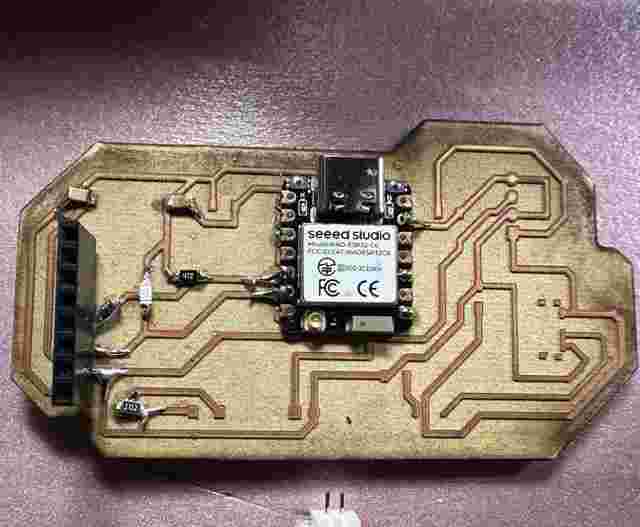
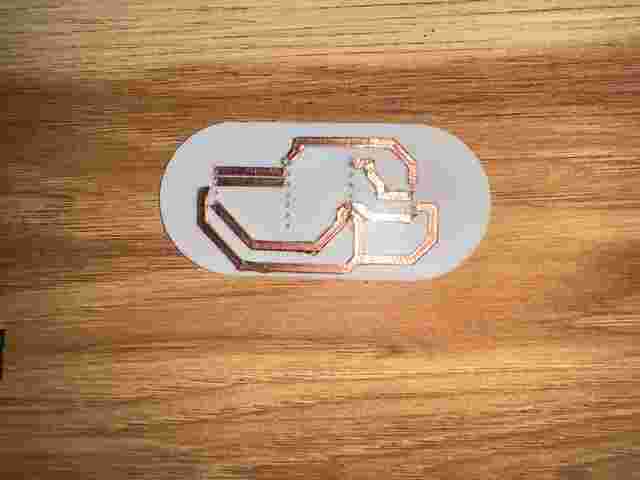
Two custom PCBs were designed and fabricated for this project. The wearable board was milled on a CNC machine, and the display board housing was fabricated using 3D printing.
| Component | Model | Role | UART Pins |
|---|---|---|---|
| Wearable Microcontroller | XIAO ESP32-C6 | Reads MPU-6050 → sends status via UART | TX: D6 / RX: D7 |
| Display Microcontroller | XIAO RP2350 | Receives status → shows on OLED | TX: D6 / RX: D7 |
| Accelerometer / IMU | MPU-6050 (GY-521) | Detects movement, impact, rest | I2C: SDA D4 / SCL D5 |
| Display | OLED SSD1306 128×64 | Shows Krypto's status alerts | I2C: SDA D4 / SCL D5 |
Wearable PCB — XIAO ESP32-C6
This board was designed from scratch in KiCad 9. It includes the XIAO ESP32-C6 soldered directly (SMD), a GY-521 MPU-6050 module on headers, a TP4056 LiPo charging module, a BAT54 protection diode, pull-up resistors for I2C, decoupling capacitors, an LED indicator, and an on/off switch. The board was fabricated on a CNC milling machine.
The ESP32-C6 reads the MPU-6050 over I2C and classifies Krypto's movement into three states: REPOSO (resting), MOVIMIENTO (moving), and IMPACTO (impact detected). It then transmits the status string over UART every second.
Display Board — XIAO RP2350
The display board features the XIAO RP2350 connected to an OLED SSD1306 128×64 screen over I2C. The board receives UART data from the wearable and renders the appropriate alert on screen. This board was fabricated using 3D printing and made the circuit possible with conductive tape over the 3d printed tracks.
Wiring
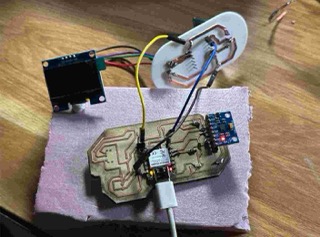
Physical Connection Scheme
Only 3 wires connect the two boards. The TX/RX lines are crossed — the transmitter of one board connects to the receiver of the other. Both boards share the same GND reference.
| From | Pin | To | Pin | Signal |
|---|---|---|---|---|
| XIAO ESP32-C6 | D6 (TX) | XIAO RP2350 | D7 (RX) | UART TX→RX |
| XIAO ESP32-C6 | D7 (RX) | XIAO RP2350 | D6 (TX) | UART RX←TX |
| XIAO ESP32-C6 | GND | XIAO RP2350 | GND | Common GND |
| MPU-6050 (GY-521) | SDA | XIAO ESP32-C6 | D4 | I2C SDA |
| MPU-6050 (GY-521) | SCL | XIAO ESP32-C6 | D5 | I2C SCL |
| OLED SSD1306 | SDA | XIAO RP2350 | D4 | I2C SDA |
| OLED SSD1306 | SCL | XIAO RP2350 | D5 | I2C SCL |
Code
🐕 XIAO ESP32-C6 — Wearable Sender (Arduino)
Wearable Logic
The ESP32-C6 reads the MPU-6050 accelerometer over I2C and computes the total acceleration magnitude. Based on thresholds, it classifies Krypto's state and sends a status string over UART every second. The Serial Monitor also prints the state for debugging.
#include <Wire.h>
#include <MPU6050.h>

MPU6050 mpu;

void setup() {
  Serial.begin(115200);
  Serial1.begin(9600, SERIAL_8N1, 20, 21); // RX=D7, TX=D6
  Wire.begin();
  mpu.initialize();
  Serial.println("Krypto Wearable iniciado");
}

void loop() {
  int16_t ax, ay, az, gx, gy, gz;
  mpu.getMotion6(&ax, &ay, &az, &gx, &gy, &gz);

  // Compute total acceleration in g
  float accel = sqrt((float)ax*ax + (float)ay*ay + (float)az*az) / 16384.0;

  if (accel > 2.0) {
    Serial1.println("IMPACTO");
    Serial.println("Enviando: IMPACTO");
  } else if (accel > 1.2) {
    Serial1.println("MOVIMIENTO");
    Serial.println("Enviando: MOVIMIENTO");
  } else {
    Serial1.println("REPOSO");
    Serial.println("Enviando: REPOSO");
  }

  delay(1000);
}
📺 XIAO RP2350 — Display Receiver (Arduino)
Display Logic
The RP2350 listens on Serial1 for incoming UART strings from the wearable. When a message arrives, it updates the OLED screen with the appropriate alert for Krypto's current state using the U8g2 library.
#include <Wire.h>
#include <U8g2lib.h>

U8G2_SSD1306_128X64_NONAME_F_HW_I2C u8g2(U8G2_R0, U8X8_PIN_NONE);

String mensaje = "Esperando...";

void setup() {
  Serial.begin(115200);
  Serial1.begin(9600); // RX=D7, TX=D6

  u8g2.begin();
  u8g2.clearBuffer();
  u8g2.setFont(u8g2_font_ncenB08_tr);
  u8g2.drawStr(0, 20, "Krypto Monitor");
  u8g2.sendBuffer();
  delay(2000);
}

void loop() {
  if (Serial1.available()) {
    mensaje = Serial1.readStringUntil('\n');
    mensaje.trim();
    Serial.println("Recibido: " + mensaje);
  }

  u8g2.clearBuffer();
  u8g2.setFont(u8g2_font_ncenB08_tr);
  u8g2.drawStr(0, 15, "Krypto:");

  if (mensaje == "IMPACTO") {
    u8g2.setFont(u8g2_font_ncenB10_tr);
    u8g2.drawStr(0, 35, "! IMPACTO !");
    u8g2.drawStr(0, 55, "detectado");
  } else if (mensaje == "MOVIMIENTO") {
    u8g2.setFont(u8g2_font_ncenB10_tr);
    u8g2.drawStr(0, 35, "En movimiento");
  } else if (mensaje == "REPOSO") {
    u8g2.setFont(u8g2_font_ncenB10_tr);
    u8g2.drawStr(0, 35, "En reposo");
  } else {
    u8g2.drawStr(0, 35, mensaje.c_str());
  }

  u8g2.sendBuffer();
  delay(100);
}
Communication Flow
Step-by-step protocol walkthrough
Here is exactly what happens every second between the wearable and the display board:
- 1 The ESP32-C6 reads raw acceleration data from the MPU-6050 over I2C (address 0x68).
-
2
It computes the total acceleration magnitude:
√(ax² + ay² + az²) / 16384.0 - 3 Based on thresholds, it classifies the state: REPOSO (<1.2g), MOVIMIENTO (1.2–2.0g), or IMPACTO (>2.0g).
-
4
The status string is sent over UART at 9600 bps via
Serial1.println()from pin D6 (TX). -
5
The RP2350 receives the string on pin D7 (RX) via
Serial1.readStringUntil('\n'). - 6 The U8g2 library renders the corresponding alert on the OLED screen in real time.
Krypto está en movimiento
This message appears on the OLED every time the MPU-6050
detects movement above 1.2g on Krypto's wearable
Protocol Details
Typical UART Frame
Each byte is transmitted asynchronously with this structure:
- SStart bit — line pulled LOW
- 8 bitsData byte (LSB first)
- PStop bit — line returns HIGH
Protocol Advantages
2 wires
Only TX and RX needed for full-duplex communication
9600 bps
Reliable baud rate for short cable distances
No pairing
No handshake or addressing needed — plug and play
String based
Human-readable messages easy to debug via Serial Monitor