15. Interface and Application Programming
- Group assignment
- Compare as many tool options as possible.
- Document your work on the group work page and reflect on your individual page what you learned.
- Individual assignment
- Write an application for the embedded board that you made. that interfaces a user with an input and/or output device(s)
Individual Assignment
This week focused on building an application interface that communicates with physical hardware. I decided to reuse the output board I designed earlier instead of building a new device. The idea was simple. A physical interaction performed on a microcontroller should immediately affect something inside a software application. My final project does not really require a traditional GUI interface, so instead of designing menus or dashboards I decided to build a small interactive game running locally on a computer. I chose Python with Pygame CE and Pyserial. The development process was heavily iterative and AI assisted.
Concept
The idea comes from Tamagotchi style virtual pets. A plant grows in the middle of the screen. The plant slowly loses water over time. If nothing happens, the plant dies. Turning a rotary encoder waters the plant and keeps it alive. One input controls the entire system. You use the rotary switch to reset the game.
Overview
The project consists of two parts running simultaneously. The ATtiny3226 board reads physical input and sends serial messages. The Python application runs the simulation, visuals, and game logic. Both systems continuously exchange simple characters over UART.
"W", "D" and "R"
Hardware sends W when watering occurs. Software sends D when the plant dies. Hardware sends R when restart is pressed. It's a two way communication loop.
Hardware
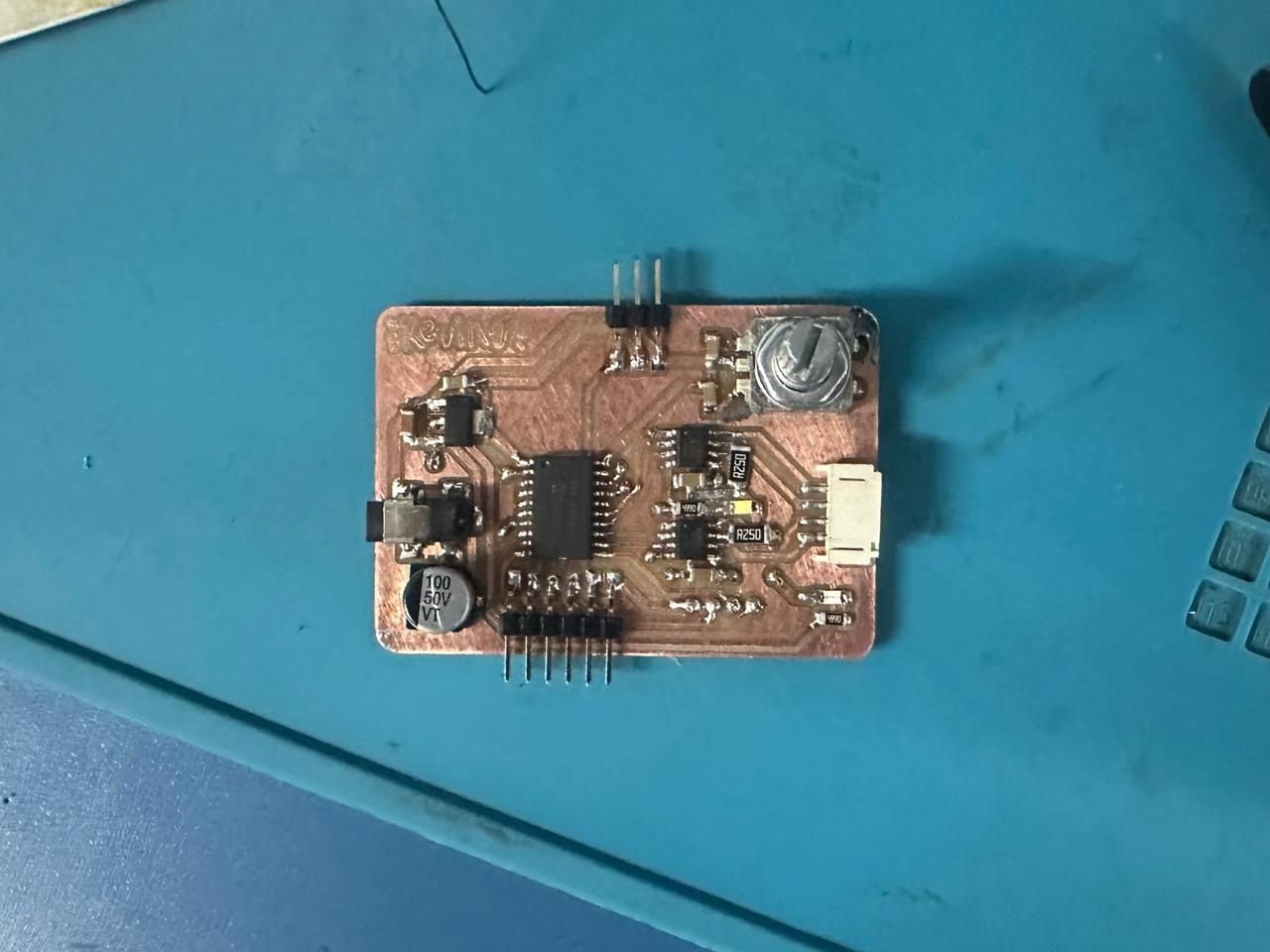
The board I used as hardware for this week was the board I developed during Output Week.
Below is the schematic of the output week board.
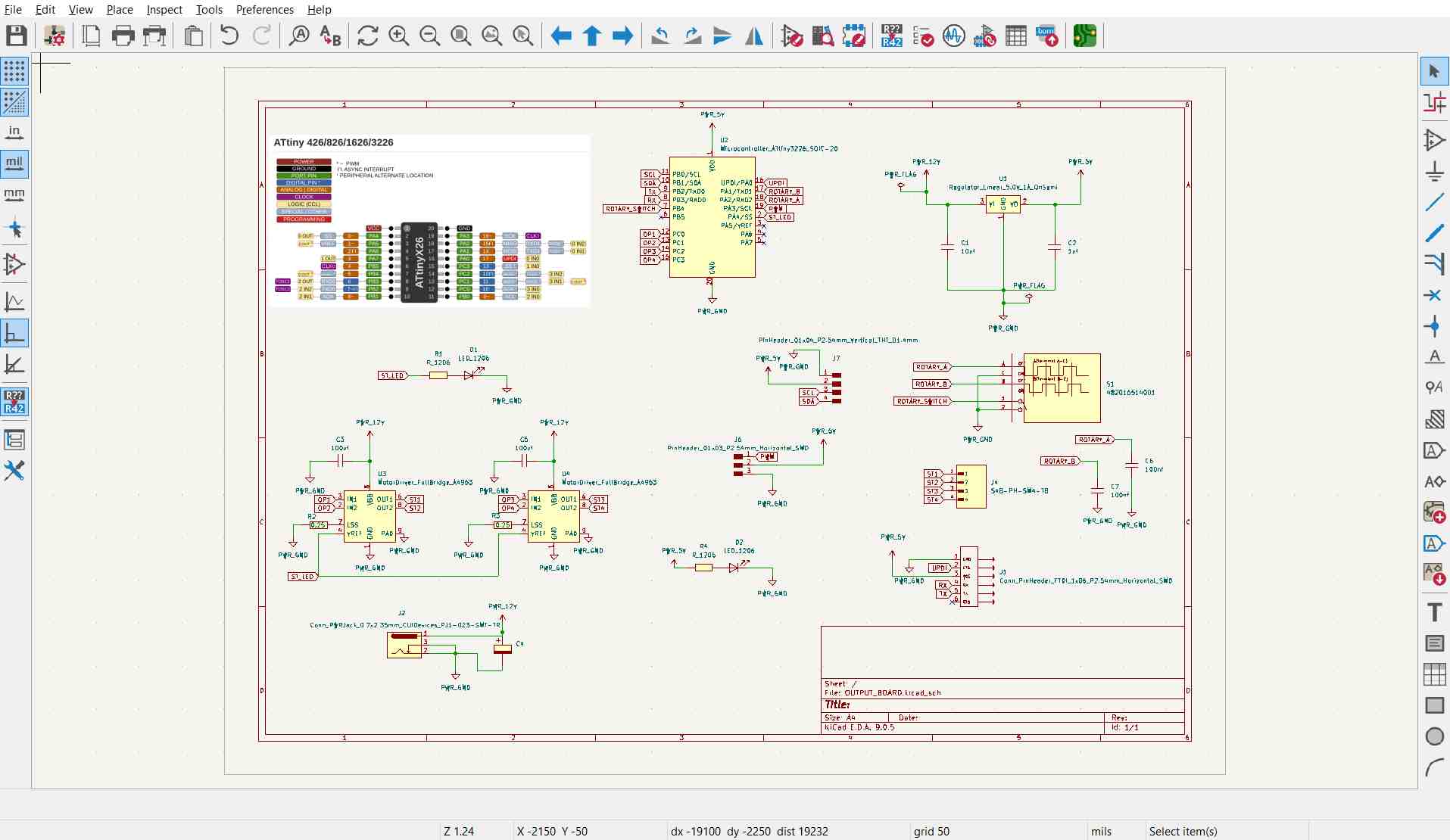
The interaction device is the output board built earlier using an ATtiny3226. A rotary encoder acts as the main controller. The encoder outputs quadrature signals which allow direction detection. Only clockwise rotation is accepted as watering input.
Originally I planned to display plant state on an OLED connected to the board. During implementation the OLED repeatedly failed whenever serial communication was active. After spending too much time debugging I simplified the design and removed the display completely. Instead an onboard LED blinks when the plant dies. This gave physical feedback without introducing extra complexity. The hardware therefore became an input device plus a simple status indicator.
Microcontroller Firmware
The microcontroller firmware was developed using the Arduino IDE and programmed onto the ATtiny3226. The Arduino environment provided a simple framework for configuring the GPIO pins, monitoring the rotary encoder inputs, handling serial communication, and controlling the status LED. The completed firmware was uploaded to the microcontroller using a UPDI programmer before being integrated with the Python game. The Arduino IDE can be downloaded from the official website: https://www.arduino.cc/en/software.
.jpg)
The firmware is structured as small independent handlers running inside loop. The encoder handler detects rotation edges and sends "W" over serial. Edge detection prevents multiple triggers from a single detent. When Python sends "D" the board enters a dead state. Encoder input is ignored and the LED begins blinking using a millis timer instead of delay. The encoder push button becomes a restart control. Pressing it sends "R" back to Python and clears the dead state locally.
The firmware never blocks execution. Every behaviour runs continuously so serial communication always remains responsive. The board is not running the game. It only translates physical actions into events.
Code
All the code was done in python using the pygame library. To download the latest version of python click here.
To install pygame, open a command prompt and type python3 -m pip install -U pygame --user. To install pyserial, type python -m pip install pyserial. I followed these tutorials: How to install pygame? How to install pyserial?
I used VScode as a code editor for this project, to download VScode click here.
.jpg)
I moved toward a locally running application instead of a web interface. Pygame allowed direct rendering, timing control, and easy hardware integration. All visuals were drawn manually using pixel grids. No images or fonts are loaded externally. Everything is generated in code.
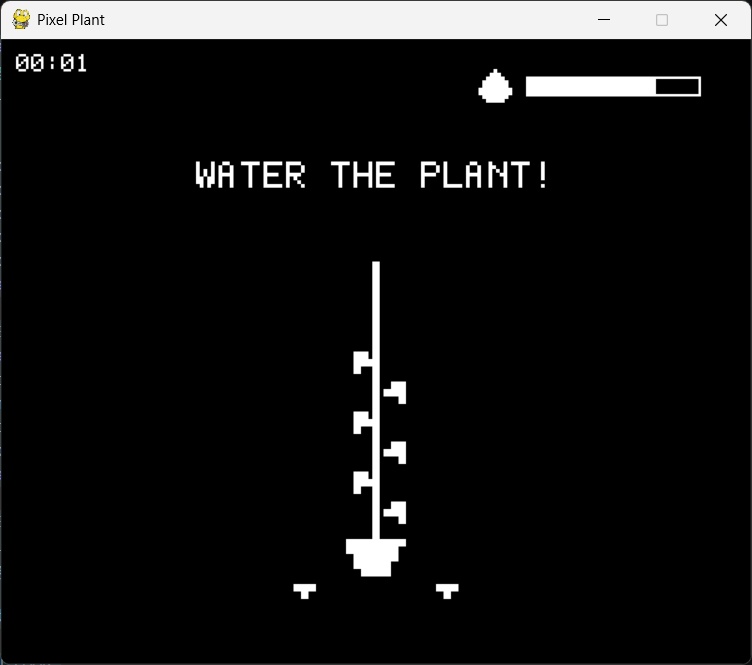
The screen contains a centered plant, a water bar, and a survival timer. The program runs at 60 FPS using:
dt = clock.tick(60)Serial Communication
Serial communication runs inside a background thread. Serial reads are blocking operations. If they run in the main loop the entire window freezes while waiting for data. Running serial inside a thread allows the game to continue rendering while hardware messages arrive asynchronously. The thread continuously listens:
def _serial_reader():
          global water_event
          while True:
              line = ser.readline().decode().strip()
              if line == "W":
                  water_event = True
The thread does not modify game logic directly. It only sets flags. The main loop consumes those flags safely every frame.
Pygame Setup Issues
I used Pygame CE instead of standard Pygame since it is actively maintained. Had to install Pygame CE by inputting:
pip install pygame-ce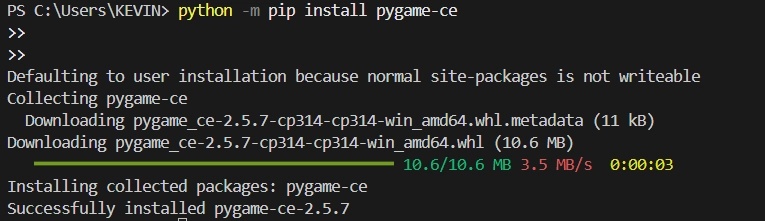
Had to install Pyserial by inputting:
pip install pyserial
Windows initially could not find installed scripts. The fix was adding the following to the system PATH environment variable:
C:\Users\KEVIN\AppData\Roaming\Python\Python314\Scripts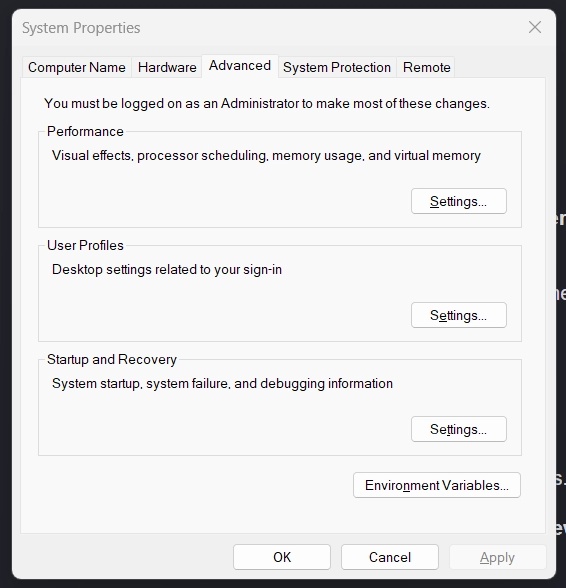
After this, pygame installation warnings disappeared.
Game Simulation
The plant state is defined by a small set of variables.
water_level = MAX_LEAVES
      decay_accum = 0
      dead = False
      elapsed_ms = 0
Every frame increases decay accumulation.
decay_accum += dtWhen decay exceeds a threshold:
if decay_accum >= LEAF_MS:
          water_level -= 1
The plant loses water periodically. With LEAF_MS set to 500 ms the plant loses two units per second. Rotating the encoder triggers watering.
water_level += WATER_TICKEach encoder click adds only a small amount of water so continuous interaction is required. If water reaches zero:
dead = True
      Python immediately sends:
      ser.write(b"D\n")
The b prefix converts text into raw bytes because serial communication operates on binary data rather than Unicode strings.
Visual Design
Everything on screen is pixel based. The plant is procedurally drawn. Leaves appear or disappear depending on water level. No sprites are stored as images. Each shape is defined as coordinate offsets. When leaves are lost they fall to the ground beside the pot instead of vanishing. Fallen leaves alternate left and right and spread outward. Watering the plant restores leaves and removes fallen ones automatically.
The prompt I used for the design and the images I used for reference are shown below.
I want the game to display a white pixel-art vine plant in the center of the OLED screen on a black background. The vine should have a fixed number of leaves.

In the top-right corner, display a white water level bar that continuously depletes over time. Place a small pixel-art water bucket icon next to the bar. The player must rotate the rotary encoder clockwise to refill the water bar.

As the water level decreases, the plant should gradually wilt by losing its leaves one at a time. Each leaf should disappear at specific water level thresholds until no leaves remain.

If the water bar becomes completely empty, the OLED should clear the screen and display a large pixel-art message:

**DEAD**

Between the plant and the water bar, display the text:

**Water The Plant!**

using a pixel-art font that matches the rest of the game's style.

The overall visual style should be monochrome (white on a black background), clean, retro, and consistent throughout.

Please provide the complete source code with no missing sections.

Also, create a `CLAUDE.md` file that contains all of my recurring project requirements and coding preferences. Before responding to any new prompt, always check this file to avoid repeating work or forgetting previous requirements. Keep the file updated whenever I add new recurring instructions.
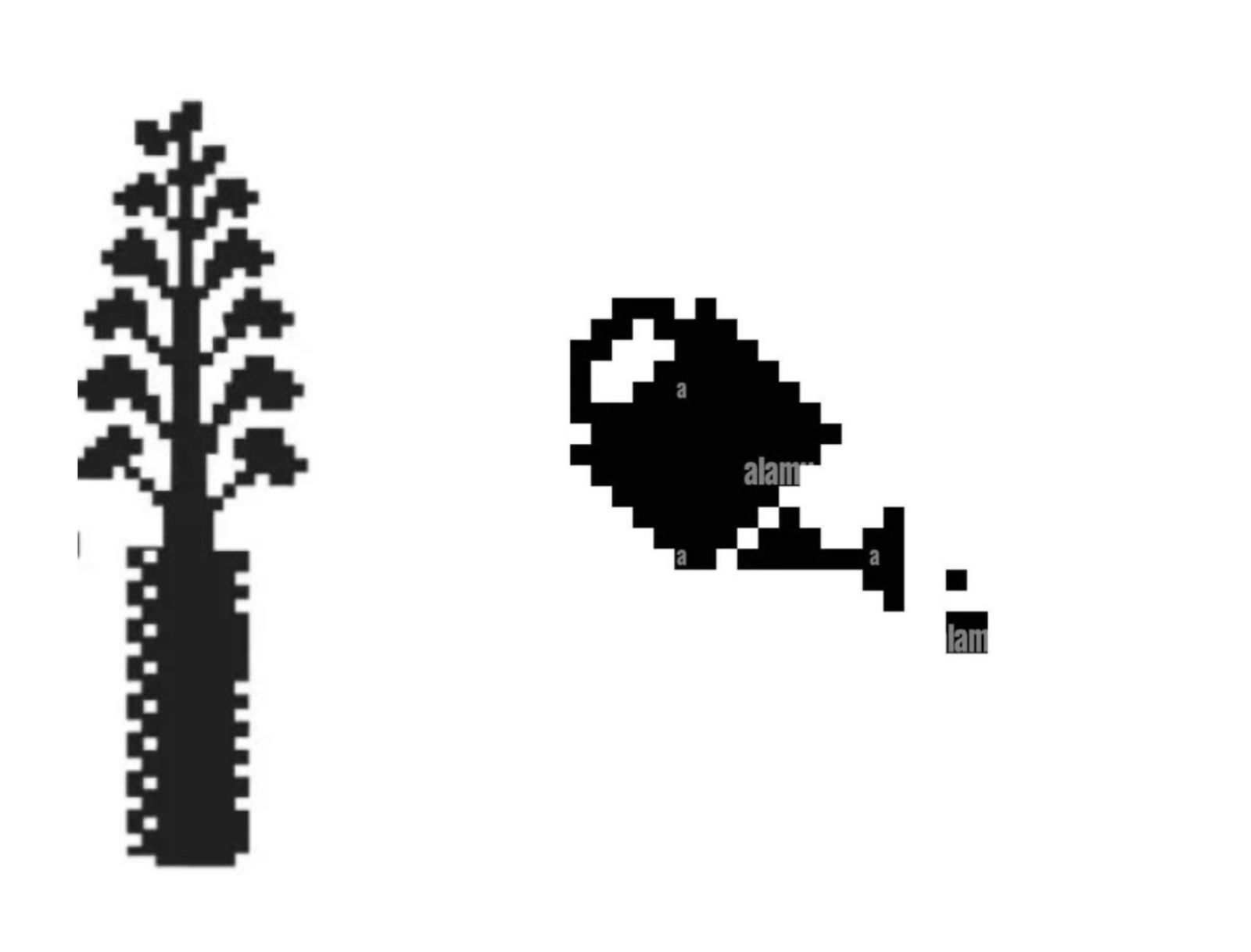
Image Credits: Plant Reference
Image Credits: Watering Can Reference
Custom Bitmap Font
System fonts were avoided entirely. Each character is defined as a small grid describing filled pixels. Text rendering simply draws rectangles wherever a bit exists.
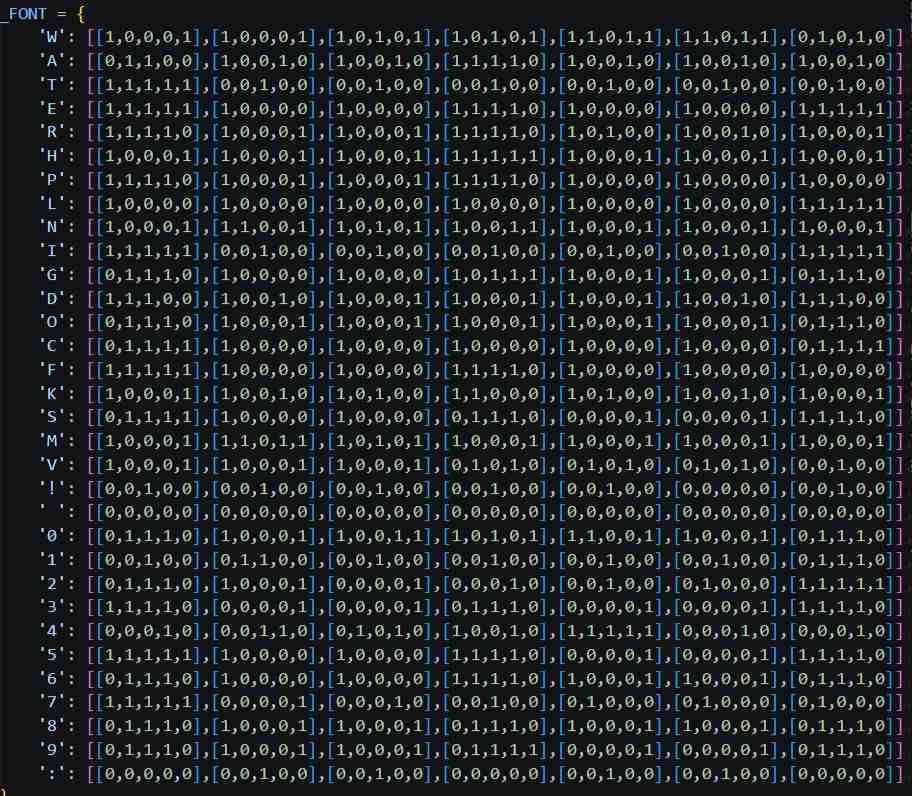
This kept visual style consistent and avoided dependency issues across machines. All UI text including timer and messages uses this renderer.
Water Bar
The water bar represents plant health directly. Its fill level scales with water_level.
BAR_X  = W - 180
      BAR_Y  = 30
      BAR_W  = 140
      BAR_H  = 16

      def draw_water_bar(surf, level_float):
          pygame.draw.rect(surf, WHITE, (BAR_X, BAR_Y, BAR_W, BAR_H), 2)
          fill = int((level_float / MAX_LEAVES) * (BAR_W - 4))
          if fill > 0:
              pygame.draw.rect(surf, WHITE, (BAR_X+2, BAR_Y+2, fill, BAR_H-4))
          drop_scale = 3
          drop_w     = 10 * drop_scale
          drop_h     = 9  * drop_scale
          drop_x     = BAR_X - drop_w - 8
          drop_y     = BAR_Y + (BAR_H - drop_h) // 2
          draw_water_droplet(surf, drop_x, drop_y, scale=drop_scale)
Time System
A survival timer runs while the plant is alive. The timer freezes at death and becomes the final score.
def draw_game_timer(surf, elapsed_ms):
          total_s = elapsed_ms // 1000
          mins    = total_s // 60
          secs    = total_s % 60
          label   = f"{mins:02d}:{secs:02d}"
          draw_pixel_text(surf, label, 12, 12, scale=2)
Serial Communication
1. Initialising the Serial Connection
The ATtiny and Python game both use a baud rate of 115200 to establish serial communication.
// ATtiny
void setup() {
    Serial.begin(115200);
}
# Python
SERIAL_PORT = "COM3"
BAUD = 115200

ser = serial.Serial(SERIAL_PORT, BAUD)
2. Sending Water Commands from the Rotary Encoder
Whenever the rotary encoder is rotated clockwise, the ATtiny sends the character "W" to the Python game.
void handleEncoder() {

    if(dead) return;

    int a = digitalRead(ROTARY_A);

    if(a == LOW && lastA == HIGH) {
        if(digitalRead(ROTARY_B) == LOW) {
            Serial.println("W");
        }
    }

    lastA = a;
}
3. Receiving Water Commands in Python
The Python game continuously reads incoming serial data in a background thread. When "W" is received, it sets a flag to refill the water bar.
def _serial_reader():
    global water_event, restart_event

    while True:
        try:
            line = ser.readline().decode().strip()

            if line == "W":
                water_event = True

            elif line == "R":
                restart_event = True

        except Exception:
            pass

threading.Thread(target=_serial_reader, daemon=True).start()
4. Increasing the Water Level
The game checks whether a water event has occurred and increases the water level accordingly.
if water_event:
    water_level = min(MAX_LEAVES, water_level + WATER_TICK)
    water_event = False
5. Sending the Death Message
When the water level reaches zero, the Python game notifies the ATtiny by sending the character "D".
if water_level <= 0.0:
    dead = True

    if not TEST_MODE and ser:
        ser.write(b"D\n")
6. Receiving the Death Message
The ATtiny listens for incoming serial messages. When it receives "D", it enters the dead state.
void handleGameMessages() {

    if(Serial.available()) {

        String msg = Serial.readStringUntil('\n');
        msg.trim();

        if(msg == "D") {
            dead = true;
        }
    }
}
7. Sending the Restart Command
After the player presses the rotary encoder button, the ATtiny sends "R" to restart the game.
if(sw == LOW && lastSwitch == HIGH) {

    if(dead) {
        Serial.println("R");
        dead = false;

        digitalWrite(DEATH_LED, LOW);
        ledState = false;
    }
}
8. Restarting the Game in Python
When the Python game receives the restart command, it restores the game to its initial state.
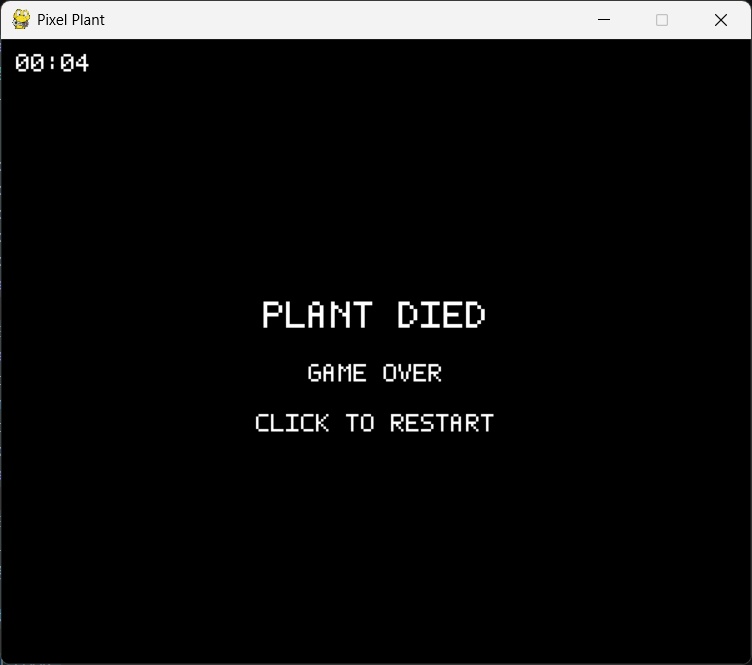
When dead, the screen displays a restart message. Pressing the encoder button sends "R" to Python. Python resets all variables and the plant grows again from full health. Restarting never reloads the program. Only state variables change.
if restart_event:
    dead        = False
    water_level = float(MAX_LEAVES)
    decay_accum = 0.0
    elapsed_ms  = 0
    restart_event = False
Claude Prompt Evolution
Project: Pixel Plant (Pygame + ATtiny/OLED)
I used claude in browser, code had to go through a few iterations to get right. The logs of each iteration has been given below. The entire chat can be viewed here.
.jpg)
Requirements logged (Session 1)
- Black backdrop, white pixel art throughout
- Pixel plant centered on screen — VINE style with a fixed number of leaves
- If not watered, leaves disappear one by one
- Water bar on top-right: depletes over time; filled by rotating encoder CLOCKWISE
- Water bar has a pixel watering-can icon next to it (like the reference image)
- "Water The Plant!" text in pixel art between the plant and the water bar
- If bar empties → OLED displays "DEAD"
- TEST_MODE: SPACE = one watering increment; encoder sim via arrow keys or similar
- Serial: rotary encoder sends CW pulses over UART; ATtiny OLED receives "D\n" on death
- Code must be clean, modular, and improved over the ChatGPT original
Requirements logged (Session 2)
- Replace watering-can icon with a pixel water-droplet sprite (teardrop shape)
- "WATER THE PLANT!" text scale increased to 3 (larger, fills space between plant and bar)
- Bar depletes faster: LEAF_MS = 1500 ms per leaf (was 4000)
- claude.md kept updated between sessions
Decisions made (Session 2)
- Droplet sprite: 10×13 pixel grid, classic teardrop, rendered at scale=3 → ~30×39 px
- Droplet centred vertically alongside the water bar
- Text at scale=3 gives ~21px tall characters, fits cleanly below the bar
Requirements logged (Session 3)
- Game counter top-left corner: "GAME:N" increments each death+restart
- Simplify code as much as possible without breaking functionality
- User updated LEAF_MS=500, WATER_TICK=0.1, TEST_MODE=False, SERIAL_PORT=COM3
- claude.md kept updated between sessions
Decisions made (Session 3)
- Game counter rendered with pixel font at scale=2, position (12,12)
- R key restarts the game from dead screen, increments counter
- Dead screen now shows "PRESS R TO RESTART" instead of "GAME OVER"
- draw_plant/draw_bar/draw_droplet simplified to use screen directly (no surf arg)
- Font dict flattened to one-liners per character for compact reading
- _px() helper no longer takes surf argument
- All draw calls consolidated, redundant comments stripped
- Line count reduced ~30% vs v3 with zero feature loss
Requirements logged (Session 4)
- Revert v4 simplification — restore user's own v3 code as the base
- "Game counter" clarified: it is a GAME TIMER (MM:SS elapsed), not a round counter
- Timer counts up top-left while plant is alive; freezes on death screen showing final time
- claude.md updated
Decisions made (Session 4)
- elapsed_ms accumulates dt only while not dead
- draw_game_timer() formats MM:SS using pixel font digits (0–9 and : added to _FONT)
- Timer shown on both alive screen and dead screen (frozen at death time)
- No restart mechanic added (not requested)
- Code structure identical to user's v3 — only additions are digit glyphs + timer function
Requirements logged (Session 5)
- User pasted their own updated code as the new base (includes restart_event via serial "R", CLICK TO RESTART text, W=600 H=500, font cleanup)
- When a leaf is lost, it should appear on the ground beside the pot
- Fallen leaves spread outward alternating left/right: left-1, right-1, left-2, right-2 …
- If the plant is watered back up, ground leaves disappear (leaves return to plant)
- claude.md updated
Decisions made (Session 5)
- fallen_count = MAX_LEAVES - int(water_level), computed each frame — no extra state needed
- draw_fallen_leaves(surf, fallen_count) renders a flat 3-wide pixel cluster per fallen leaf
- Ground y position = just below pot bottom (bot + pot_h*PX + PX)
- Slots spread using _GROUND_OFFSETS list: alternating sign, increasing distance from pot edge
- Leaves return to plant automatically when water_level rises (fallen_count decreases)
- No new state variables added — purely derived from water_level
Full Code
Python Pygame Code
import pygame
      import threading

      #  CONFIG
      TEST_MODE   = True
      SERIAL_PORT = "COM3"
      BAUD        = 115200

      #  SERIAL  (skipped in TEST_MODE)
      water_event = False
      ser         = None

      if not TEST_MODE:
          import serial
          ser = serial.Serial(SERIAL_PORT, BAUD)

          restart_event = False

          def _serial_reader():
              global water_event, restart_event
              while True:
                  try:
                      line = ser.readline().decode().strip()
                      if line == "W":
                          water_event = True
                      elif line == "R":
                          restart_event = True
                  except Exception:
                      pass

          threading.Thread(target=_serial_reader, daemon=True).start()
      else:
          restart_event = False

      #  PYGAME INIT
      pygame.init()

      W, H        = 600, 500
      screen      = pygame.display.set_mode((W, H))
      pygame.display.set_caption("Pixel Plant")
      clock       = pygame.time.Clock()

      #  PALETTE
      BLACK = (0,   0,   0)
      WHITE = (255, 255, 255)
      GREY  = (120, 120, 120)

      #  GAME CONSTANTS
      PX          = 6
      MAX_LEAVES  = 8
      LEAF_MS     = 500
      WATER_TICK  = 1

      #  PIXEL-BITMAP FONT (uppercase + punctuation + digits)
      _FONT = {
          'W': [[1,0,0,0,1],[1,0,0,0,1],[1,0,1,0,1],[1,0,1,0,1],[1,1,0,1,1],[1,1,0,1,1],[0,1,0,1,0]],
          'A': [[0,1,1,0,0],[1,0,0,1,0],[1,0,0,1,0],[1,1,1,1,0],[1,0,0,1,0],[1,0,0,1,0],[1,0,0,1,0]],
          'T': [[1,1,1,1,1],[0,0,1,0,0],[0,0,1,0,0],[0,0,1,0,0],[0,0,1,0,0],[0,0,1,0,0],[0,0,1,0,0]],
          'E': [[1,1,1,1,1],[1,0,0,0,0],[1,0,0,0,0],[1,1,1,1,0],[1,0,0,0,0],[1,0,0,0,0],[1,1,1,1,1]],
          'R': [[1,1,1,1,0],[1,0,0,0,1],[1,0,0,0,1],[1,1,1,1,0],[1,0,1,0,0],[1,0,0,1,0],[1,0,0,0,1]],
          'H': [[1,0,0,0,1],[1,0,0,0,1],[1,0,0,0,1],[1,1,1,1,1],[1,0,0,0,1],[1,0,0,0,1],[1,0,0,0,1]],
          'P': [[1,1,1,1,0],[1,0,0,0,1],[1,0,0,0,1],[1,1,1,1,0],[1,0,0,0,0],[1,0,0,0,0],[1,0,0,0,0]],
          'L': [[1,0,0,0,0],[1,0,0,0,0],[1,0,0,0,0],[1,0,0,0,0],[1,0,0,0,0],[1,0,0,0,0],[1,1,1,1,1]],
          'N': [[1,0,0,0,1],[1,1,0,0,1],[1,0,1,0,1],[1,0,0,1,1],[1,0,0,0,1],[1,0,0,0,1],[1,0,0,0,1]],
          'I': [[1,1,1,1,1],[0,0,1,0,0],[0,0,1,0,0],[0,0,1,0,0],[0,0,1,0,0],[0,0,1,0,0],[1,1,1,1,1]],
          'G': [[0,1,1,1,0],[1,0,0,0,0],[1,0,0,0,0],[1,0,1,1,1],[1,0,0,0,1],[1,0,0,0,1],[0,1,1,1,0]],
          'D': [[1,1,1,0,0],[1,0,0,1,0],[1,0,0,0,1],[1,0,0,0,1],[1,0,0,0,1],[1,0,0,1,0],[1,1,1,0,0]],
          'O': [[0,1,1,1,0],[1,0,0,0,1],[1,0,0,0,1],[1,0,0,0,1],[1,0,0,0,1],[1,0,0,0,1],[0,1,1,1,0]],
          'C': [[0,1,1,1,1],[1,0,0,0,0],[1,0,0,0,0],[1,0,0,0,0],[1,0,0,0,0],[1,0,0,0,0],[0,1,1,1,1]],
          'F': [[1,1,1,1,1],[1,0,0,0,0],[1,0,0,0,0],[1,1,1,1,0],[1,0,0,0,0],[1,0,0,0,0],[1,0,0,0,0]],
          'K': [[1,0,0,0,1],[1,0,0,1,0],[1,0,1,0,0],[1,1,0,0,0],[1,0,1,0,0],[1,0,0,1,0],[1,0,0,0,1]],
          'S': [[0,1,1,1,1],[1,0,0,0,0],[1,0,0,0,0],[0,1,1,1,0],[0,0,0,0,1],[0,0,0,0,1],[1,1,1,1,0]],
          'M': [[1,0,0,0,1],[1,1,0,1,1],[1,0,1,0,1],[1,0,0,0,1],[1,0,0,0,1],[1,0,0,0,1],[1,0,0,0,1]],
          'V': [[1,0,0,0,1],[1,0,0,0,1],[1,0,0,0,1],[0,1,0,1,0],[0,1,0,1,0],[0,1,0,1,0],[0,0,1,0,0]],
          '!': [[0,0,1,0,0],[0,0,1,0,0],[0,0,1,0,0],[0,0,1,0,0],[0,0,1,0,0],[0,0,0,0,0],[0,0,1,0,0]],
          ' ': [[0,0,0,0,0],[0,0,0,0,0],[0,0,0,0,0],[0,0,0,0,0],[0,0,0,0,0],[0,0,0,0,0],[0,0,0,0,0]],
          '0': [[0,1,1,1,0],[1,0,0,0,1],[1,0,0,1,1],[1,0,1,0,1],[1,1,0,0,1],[1,0,0,0,1],[0,1,1,1,0]],
          '1': [[0,0,1,0,0],[0,1,1,0,0],[0,0,1,0,0],[0,0,1,0,0],[0,0,1,0,0],[0,0,1,0,0],[0,1,1,1,0]],
          '2': [[0,1,1,1,0],[1,0,0,0,1],[0,0,0,0,1],[0,0,0,1,0],[0,0,1,0,0],[0,1,0,0,0],[1,1,1,1,1]],
          '3': [[1,1,1,1,0],[0,0,0,0,1],[0,0,0,0,1],[0,1,1,1,0],[0,0,0,0,1],[0,0,0,0,1],[1,1,1,1,0]],
          '4': [[0,0,0,1,0],[0,0,1,1,0],[0,1,0,1,0],[1,0,0,1,0],[1,1,1,1,1],[0,0,0,1,0],[0,0,0,1,0]],
          '5': [[1,1,1,1,1],[1,0,0,0,0],[1,0,0,0,0],[1,1,1,1,0],[0,0,0,0,1],[0,0,0,0,1],[1,1,1,1,0]],
          '6': [[0,1,1,1,0],[1,0,0,0,0],[1,0,0,0,0],[1,1,1,1,0],[1,0,0,0,1],[1,0,0,0,1],[0,1,1,1,0]],
          '7': [[1,1,1,1,1],[0,0,0,0,1],[0,0,0,1,0],[0,0,1,0,0],[0,1,0,0,0],[0,1,0,0,0],[0,1,0,0,0]],
          '8': [[0,1,1,1,0],[1,0,0,0,1],[1,0,0,0,1],[0,1,1,1,0],[1,0,0,0,1],[1,0,0,0,1],[0,1,1,1,0]],
          '9': [[0,1,1,1,0],[1,0,0,0,1],[1,0,0,0,1],[0,1,1,1,1],[0,0,0,0,1],[0,0,0,0,1],[0,1,1,1,0]],
          ':': [[0,0,0,0,0],[0,0,1,0,0],[0,0,1,0,0],[0,0,0,0,0],[0,0,1,0,0],[0,0,1,0,0],[0,0,0,0,0]],
      }

      def draw_pixel_text(surf, text, x, y, scale=2, color=WHITE):
          cx = x
          for ch in text.upper():
              bitmap = _FONT.get(ch, _FONT[' '])
              for row, bits in enumerate(bitmap):
                  for col, bit in enumerate(bits):
                      if bit:
                          pygame.draw.rect(surf, color, (cx + col*scale, y + row*scale, scale, scale))
              cx += (len(bitmap[0]) + 1) * scale

      def pixel_text_width(text, scale=2):
          total = 0
          for ch in text.upper():
              bitmap = _FONT.get(ch, _FONT[' '])
              total += (len(bitmap[0]) + 1) * scale
          return total

      #  VINE PLANT
      _LEAF_RIGHT = [(0,0),(1,0),(2,0),(1,-1),(2,-1),(2,1)]
      _LEAF_LEFT  = [(0,0),(-1,0),(-2,0),(-1,-1),(-2,-1),(-2,1)]

      def _px(surf, x, y, color=WHITE):
          pygame.draw.rect(surf, color, (x, y, PX, PX))

      def draw_vine_plant(surf, visible_leaves):
          cx  = W // 2
          bot = H - 100

          stem_blocks = MAX_LEAVES * 4 + 6
          for i in range(stem_blocks):
              _px(surf, cx - PX//2, bot - i*PX)

          pot_w, pot_h = 8, 5
          pot_top = bot
          for row in range(pot_h):
              w = pot_w - row
              ox = (pot_w - w) // 2
              for col in range(w):
                  _px(surf, cx - (pot_w//2)*PX + (ox+col)*PX, pot_top + row*PX)

          for i in range(visible_leaves):
              ly = bot - (i * 4 + 4) * PX
              if i % 2 == 0:
                  for dx, dy in _LEAF_RIGHT:
                      _px(surf, cx + PX + dx*PX, ly + dy*PX)
              else:
                  for dx, dy in _LEAF_LEFT:
                      _px(surf, cx - PX + dx*PX, ly + dy*PX)

      _GROUND_LEAF = [
          (0, 0), (1, 0), (2, 0),
          (1, 1),
      ]

      def _ground_leaf_x_offsets():
          offsets = []
          for i in range(MAX_LEAVES):
              dist  = (i // 2 + 1)
              side  = -1 if i % 2 == 0 else 1
              offsets.append((side, dist))
          return offsets

      _GROUND_OFFSETS = _ground_leaf_x_offsets()

      def draw_fallen_leaves(surf, fallen_count):
          cx  = W // 2
          bot = H - 100
          pot_half_w = 4 * PX

          ground_y = bot + 5 * PX + PX

          for i in range(fallen_count):
              side, dist = _GROUND_OFFSETS[i]
              lx = cx + side * (pot_half_w + dist * 4 * PX)
              if side == -1:
                  lx -= 3 * PX

              for dx, dy in _GROUND_LEAF:
                  _px(surf, lx + dx * PX, ground_y + dy * PX)

      def draw_water_droplet(surf, ox, oy, scale=4):
          sprite = [
              "0000100000",
              "0001110000",
              "0011111000",
              "0111111100",
              "0111111100",
              "1111111110",
              "1111111110",
              "0111111100",
              "0011111000",
          ]
          for row, line in enumerate(sprite):
              for col, ch in enumerate(line):
                  if ch == '1':
                      pygame.draw.rect(surf, WHITE, (ox + col*scale, oy + row*scale, scale, scale))

      BAR_X  = W - 180
      BAR_Y  = 30
      BAR_W  = 140
      BAR_H  = 16

      def draw_water_bar(surf, level_float):
          pygame.draw.rect(surf, WHITE, (BAR_X, BAR_Y, BAR_W, BAR_H), 2)
          fill = int((level_float / MAX_LEAVES) * (BAR_W - 4))
          if fill > 0:
              pygame.draw.rect(surf, WHITE, (BAR_X+2, BAR_Y+2, fill, BAR_H-4))
          drop_scale = 3
          drop_w     = 10 * drop_scale
          drop_h     = 9  * drop_scale
          drop_x     = BAR_X - drop_w - 8
          drop_y     = BAR_Y + (BAR_H - drop_h) // 2
          draw_water_droplet(surf, drop_x, drop_y, scale=drop_scale)

      def draw_game_timer(surf, elapsed_ms):
          total_s = elapsed_ms // 1000
          mins    = total_s // 60
          secs    = total_s % 60
          label   = f"{mins:02d}:{secs:02d}"
          draw_pixel_text(surf, label, 12, 12, scale=2)

      water_level  = float(MAX_LEAVES)
      decay_accum  = 0.0
      dead         = False
      elapsed_ms   = 0

      print("TEST MODE — SPACE to water" if TEST_MODE else "Running with serial")

      running = True
      while running:

          dt = clock.tick(60)

          if restart_event:
              dead        = False
              water_level = float(MAX_LEAVES)
              decay_accum = 0.0
              elapsed_ms  = 0
              restart_event = False

          for event in pygame.event.get():
              if event.type == pygame.QUIT:
                  running = False
              if TEST_MODE and event.type == pygame.KEYDOWN:
                  if event.key == pygame.K_SPACE:
                      water_event = True

          if not dead:
              elapsed_ms  += dt
              decay_accum += dt

              if decay_accum >= LEAF_MS:
                  lost         = int(decay_accum // LEAF_MS)
                  water_level -= lost
                  decay_accum -= lost * LEAF_MS

              if water_event:
                  water_level = min(MAX_LEAVES, water_level + WATER_TICK)
                  water_event = False

              water_level = max(0.0, water_level)

              if water_level <= 0.0:
                  dead = True
                  if not TEST_MODE and ser:
                      ser.write(b"D\n")

          screen.fill(BLACK)

          if dead:
              msg  = "PLANT DIED"
              msg2 = "GAME OVER"
              msg3 = "CLICK TO RESTART"
              draw_pixel_text(screen, msg,  (W - pixel_text_width(msg,  3))//2, H//2 - 40, scale=3)
              draw_pixel_text(screen, msg2, (W - pixel_text_width(msg2, 2))//2, H//2 + 10, scale=2)
              draw_pixel_text(screen, msg3, (W - pixel_text_width(msg3, 2))//2, H//2 + 50, scale=2)
              draw_game_timer(screen, elapsed_ms)
          else:
              visible_leaves = int(water_level)
              fallen_count   = MAX_LEAVES - visible_leaves

              draw_vine_plant(screen, visible_leaves)
              draw_fallen_leaves(screen, fallen_count)
              draw_water_bar(screen, water_level)

              label = "WATER THE PLANT!"
              draw_pixel_text(screen, label,
                              (W - pixel_text_width(label, 3))//2,
                              BAR_Y + BAR_H + 52, scale=3)
              draw_game_timer(screen, elapsed_ms)

          pygame.display.flip()

      pygame.quit()
Serial Connection with Output Board
      //  PINS
      #define ROTARY_A  PIN_PA2
      #define ROTARY_B  PIN_PA1
      #define ROTARY_SW PIN_PB4

      #define DEATH_LED PIN_PA4

      // STATE
      int lastA;
      bool dead = false;
      bool lastSwitch = HIGH;

      unsigned long lastBlink = 0;
      bool ledState = false;

      void setup() {

        Serial.begin(115200);

        pinMode(ROTARY_A, INPUT_PULLUP);
        pinMode(ROTARY_B, INPUT_PULLUP);
        pinMode(ROTARY_SW, INPUT_PULLUP);

        pinMode(DEATH_LED, OUTPUT);
        digitalWrite(DEATH_LED, LOW);

        lastA = digitalRead(ROTARY_A);
      }

      void loop() {
        handleEncoder();
        handleGameMessages();
        handleDeathBlink();
        handleRestartButton();
      }

      //  WATER INPUT
      void handleEncoder() {

        if(dead) return;

        int a = digitalRead(ROTARY_A);

        if(a == LOW && lastA == HIGH) {
          if(digitalRead(ROTARY_B) == LOW) {
            Serial.println("W");
          }
        }

        lastA = a;
      }

      //  SERIAL FROM PYTHON
      void handleGameMessages() {

        if(Serial.available()) {

          String msg = Serial.readStringUntil('\n');
          msg.trim();

          if(msg == "D") {
            dead = true;
          }
        }
      }

      //  BLINK LED WHEN DEAD
      void handleDeathBlink() {

        if(!dead) return;

        unsigned long now = millis();

        if(now - lastBlink > 500) {
          lastBlink = now;
          ledState = !ledState;
          digitalWrite(DEATH_LED, ledState);
        }
      }

      //  RESTART BUTTON
      void handleRestartButton() {

        int sw = digitalRead(ROTARY_SW);

        if(sw == LOW && lastSwitch == HIGH) {

          if(dead) {
            Serial.println("R");
            dead = false;

            digitalWrite(DEATH_LED, LOW);
            ledState = false;
          }
        }

        lastSwitch = sw;
      }
Final Result
A physical rotary encoder controls a virtual plant. Turning the encoder keeps the plant alive. Ignoring it causes decay and death. The computer simulation and microcontroller remain synchronized through simple serial messages.
Group Assignment
Results can be found on the group assignment page of our lab.
Comparison of Interface and Application Programming Tools
As part of the group assignment, each of us explored a different way of creating an interface and communicating with hardware. This allowed us to compare several tools and communication methods such as WebSocket, HTTP, USB HID, Serial Communication, BLE, and Firebase.
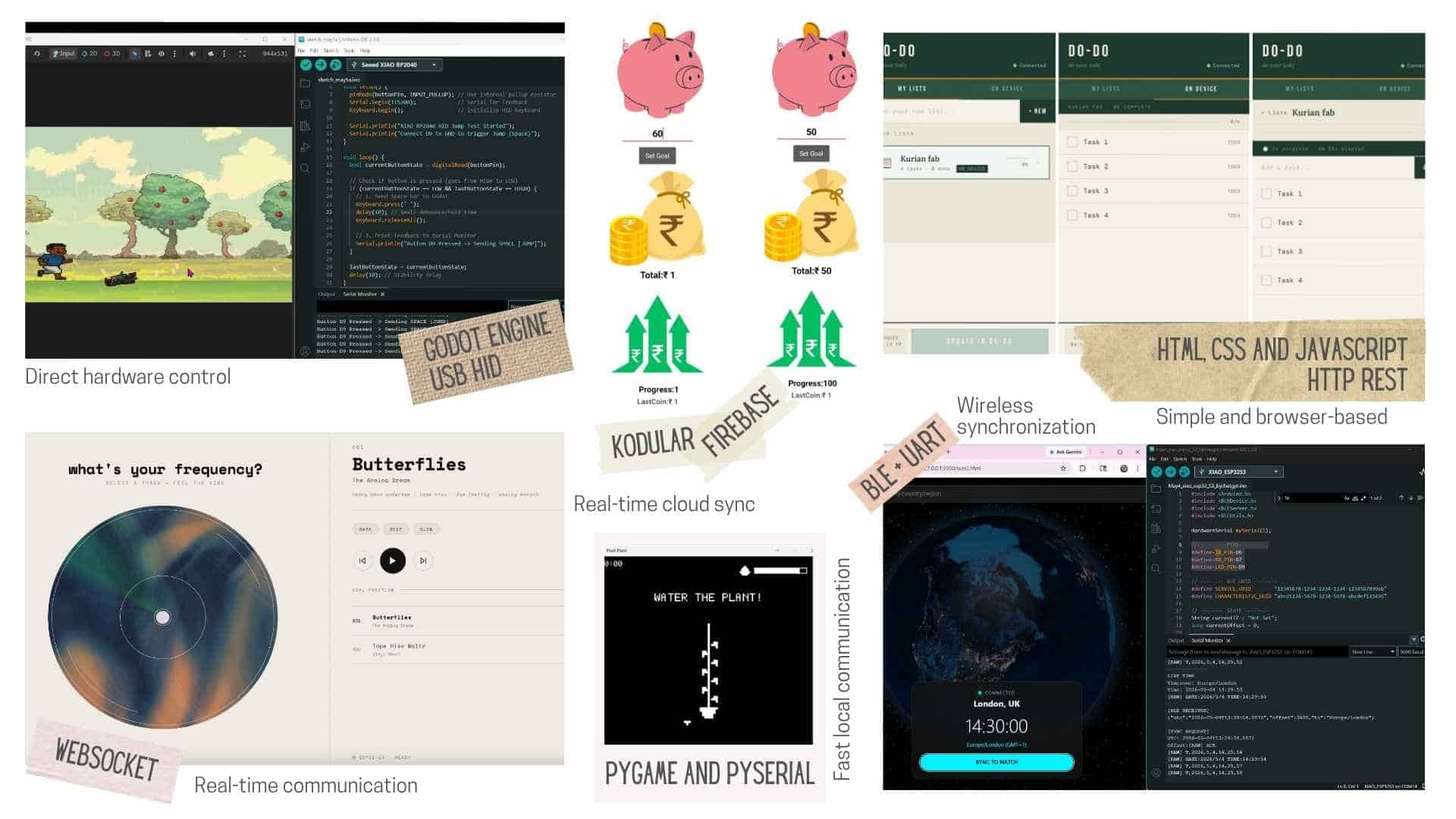
| Project | Interface Tool | Communication | Advantages |
|---|---|---|---|
| Butterflies | HTML / CSS / JavaScript | WebSocket | Real-time communication |
| DO-DO | HTML / CSS / JavaScript | HTTP REST | Simple and browser-based |
| Pixel Game | Godot Engine | USB HID | Direct hardware control |
| Pixel Plant (My Project) | Pygame + PySerial | Serial (USB UART) | Fast local two-way communication with real-time hardware interaction |
| Smart Piggy | Kodular | Firebase Realtime Database | Cloud synchronization and persistent data storage |
| Time Sync | Web App | BLE + UART | Wireless synchronization |
Evaluation
For my project, I developed a local game interface using Pygame and PySerial. Pygame was used to create an interactive pixel-art game, while PySerial provided real-time serial communication between the Python game and the ATtiny3226 microcontroller. The microcontroller sends user inputs, such as rotary encoder rotations and button presses, to the game, while the game sends status updates, including death and restart events, back to the hardware. This simple serial protocol enabled responsive two-way communication with minimal latency, making it well suited for a desktop game controlled by physical hardware.
Comparing the different approaches demonstrated that the choice of interface and communication method depends on the requirements of the application. For this project, a locally running Pygame application with PySerial was the most appropriate solution because it provided fast, reliable, and straightforward communication without requiring a network connection or cloud services.