Smart Cushion
A pressure-sensing smart cushion for short screen-free rest.
Smart Cushion supports a short moment of screen-free rest through sitting support, pressure sensing, warm light feedback, and a light scent cue.
Project Introduction
Smart Cushion is a pressure-responsive cushion designed for short screen-free rest.
Its form combines an angled foam surface and a center cutout. The angled surface gently lifts the pelvis, while the cutout gives the legs and feet more space, supporting a more comfortable and naturally upright sitting position.
Two FSR sensors read left and right pressure values. The system uses these values to understand pressure balance and sitting stability.
When the user sits down, the aroma atomizer turns on and releases a light scent mist as a soft cue. When the user gets up, the atomizer turns off.
At the same time, the warm LED gives gentle feedback. When the pressure is still changing, the light stays in a soft responsive mode. When the pressure becomes more stable, the LED switches into a slow breathing-like rhythm: 4 seconds fading in and 6 seconds fading out.
This slow rhythm, together with the light scent mist and stable sitting position, gives a simple cue to breathe slower, move attention away from the screen, and enter a short rest state.
What does it do?
Smart Cushion combines four parts:
- angled foam support
- left and right pressure sensing
- warm LED light feedback
- aroma atomizer feedback
The user sits on the cushion. The foam structure supports the pelvis and helps the body settle into a more stable and comfortable position.
The FSR sensors read changes in pressure on both sides. If the pressure is uneven or constantly changing, it indicates that the body is still adjusting. If the left and right pressure becomes more balanced and stable, it indicates a settled sitting state.
When the user sits down and pressure is detected, the aroma atomizer turns on and releases a light scent mist. When the user gets up and the pressure disappears, the atomizer turns off.
When the posture is unstable, the LED stays in a soft feedback mode.
When the posture becomes stable, the LED enters a slower light rhythm.
The basic interaction is:
Sit down
-> pressure detected
-> aroma atomizer turns on
-> left / right pressure measured
-> pressure balance evaluated
-> posture becomes more stable
-> LED enters slow rhythm
-> user follows light cue
-> short screen-free rest
-> user gets up
-> pressure disappears
-> aroma atomizer turns off
This system turns sitting stability into a calm, light- and scent-based rest interface.
The Story Behind the Design
Most of my daily work happens in front of screens.
When I feel tired, I often continue looking at my phone. This kind of break keeps my attention on a screen, even when I am trying to rest.
So I wanted to design a screen-free rest object. It does not require interaction, apps, or input. The only action is sitting down and letting the body settle.
The form of the cushion also comes from a personal need. I enjoy sitting as a way to rest, but sitting cross-legged on a flat surface is not always comfortable for me. My legs do not easily relax fully, and over time the posture becomes unstable.
Instead of designing a product that requires a "correct posture," I focused on creating a structure that supports a more comfortable and natural sitting position. The slight elevation of the pelvis helps the legs relax and allows the upper body to stay more naturally upright.
Smart Cushion combines physical support, pressure sensing, warm light, and scent feedback. The cushion helps the body sit comfortably, the sensors read stability, the atomizer marks the start of rest, and the light provides a slow cue to settle down.
How the Light Guides the User
The LED is the main visual feedback layer of the cushion.
No sitting -> light off or very dim
Sitting detected -> soft warm light turns on
Pressure changing -> responsive light feedback
Pressure becoming balanced -> transition into slower rhythm
Pressure stable -> slow breathing-like rhythm
Leaving cushion -> light fades out
The light is placed under the cushion, so the glow stays low, warm, and indirect. It is not meant to work like a screen or notification. Instead, it gives a quiet environmental signal around the body.
When the pressure is still changing, the light can respond more directly to the sitting state. This helps show that the system has detected the user and is reading the pressure difference between the left and right sides.
When the pressure becomes more balanced and stable, the light slows down. The 4-second fade-in and 6-second fade-out rhythm works as a simple breathing cue.
The feedback is not forceful. It does not interrupt the user. It only gently marks the transition into rest.
Light Parameters
The light rhythm is controlled in code.
The breathing reference is translated into LED timing:
4s inhale  -> 4s LED fade in
6s exhale -> 6s LED fade out
One full breathing-like cycle is about 10 seconds.
In the prototype, I also tested B:5600, which means one full cycle is about 5.6 seconds. This value was used to evaluate whether the LED transitions were smooth and responsive before tuning the final rhythm.
Main parameters:
B:5600- prototype test cycle duration- fade-in time - LED gradually increases brightness
- fade-out time - LED gradually decreases brightness
- brightness range - keeps light warm and low
- pressure stability threshold - determines when to enter slow rhythm
- sitting threshold - detects when the user sits down or gets up
How it works
Body pressure
-> FSR sensors
-> XIAO ESP32-C3
-> pressure balance and stability logic
-> PWM signal
-> MOSFET
-> 24V warm COB LED
Body pressure detected
-> XIAO ESP32-C3
-> atomizer control signal
-> aroma atomizer turns on

Pressure disappears
-> atomizer turns off
The two FSR sensors read left and right pressure values.
The XIAO ESP32-C3 processes sensor input and evaluates pressure balance and stability.
The MOSFET controls the 24V warm COB LED, translating body pressure into visible light feedback.
The aroma atomizer is linked to the sitting state. It turns on when the user sits down and turns off when the user leaves the cushion. This adds a soft scent cue to the start and end of the rest interaction.
How to Follow My Journey
Full Final Process Documentation
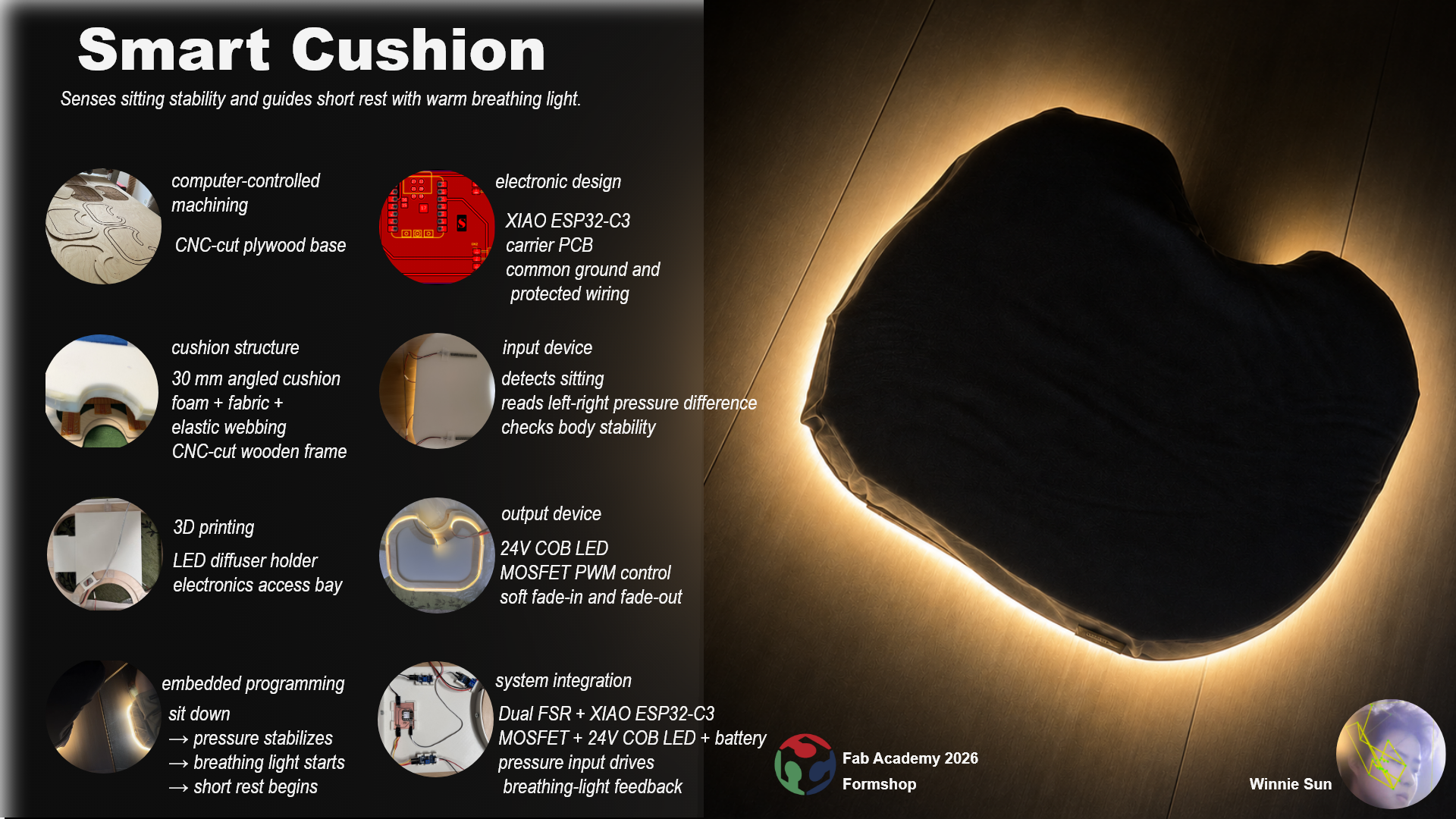
This page records the full development process, including form research, sitting posture observation, LED diffuser testing, pressure sensor testing, MVP circuit, CNC base fabrication, foam cutting, PCB testing, wiring, programming, atomizer testing, and assembly.
Slide
Video
The final video focuses on the use scenario, body interaction, system response, and functional proof.
The fabrication process appears as a short supporting montage.
Stage
Idea Development: Explore the initial idea, form research, sitting references, sketches, and final cushion direction.
Bill of Material List: A list of the main components, estimated costs, and integration status for making the smart cushion.
Structure Design and Production: Documentation of the cushion structure, LED groove, CNC wooden base, foam cutting, elastic webbing, and bottom light route.
Electronic Design and Production: Details on pressure sensing, 24V LED control, electronics compartment, PCB design, milling, soldering, and debugging.
Programming: Documenting the pressure-to-light interaction logic, threshold tuning, breathing-light timing, atomizer trigger, and MVP test.
Assembly: How the foam, FSR sensors, PCB, wiring, LED route, electronics compartment, atomizer logic, and fabric cover came together.
MIT License
Copyright 2026 Winnie Sun