This week I worked on defining my final project idea and started getting used to the documentation process. The assignment focused on two main parts: Principles and Practices (sketching a potential final project) and Project Management (building a personal website and setting up version control).
Website Development Process
I used Kiro AI assistant to build this website, which significantly streamlined the development process. Kiro helped me set up a modern, responsive website with proper documentation structure and version control integration.
Setting Up Kiro
Kiro is an AI-powered IDE created by Amazon Web Services (AWS) that helps developers build applications more efficiently. It provides intelligent code generation, debugging assistance, and project management capabilities. You can read more in the Kiro documentation.
Installed and opened Kiro — it runs as a standalone IDE
Signed in with my AWS Builder ID (free to create)
Installed Homebrew package manager for macOS to manage development dependencies
Set up Node.js and modern web tools through Homebrew
Opened my cloned GitLab repository folder in Kiro as a workspace
Started building the website by describing what I wanted in natural language — Kiro generated the HTML, CSS, and JavaScript
What is Kiro?
Kiro is Amazon's AI-powered IDE that integrates directly into development workflows. It can understand natural language descriptions of what you want to build and generate appropriate code, handle complex project setups, and provide intelligent suggestions throughout the development process. Unlike a chatbot, Kiro works inside a full code editor — it can read your files, create new ones, run terminal commands, and make edits across your entire project. This made it particularly valuable for setting up a comprehensive website with modern web standards and responsive design.
Development Workflow
Working with Kiro allowed me to focus on content and design while the AI handled much of the technical implementation:
Used natural language to describe website requirements
Implemented modern web standards and accessibility features
Set up automated build and deployment processes
How I Update the Website
All changes to this website go through Kiro. I don't manually edit HTML files — instead, I describe what I want to add or change in Kiro's chat, and it writes and edits the code for me. Here's my typical workflow:
Adding Text / Documentation
I type my notes into Kiro's chat — usually rough descriptions of what I did that week, sometimes with typos and stream-of-consciousness writing
Kiro takes my notes and generates clean HTML with proper formatting, headings, and structure
I review the result in the browser using a local server (python3 -m http.server 8000 from the public/ folder)
If something needs tweaking, I tell Kiro and it makes the edit
Adding Images
I drop the image files into the correct folder (e.g., public/images/week-7/)
I tell Kiro the filename and where I want it on the page
Kiro adds the <img> tag with proper sizing, alt text, and a centered caption
Adding Videos
Same process as images — I drop the video file into public/videos/ and tell Kiro to add it with a caption.
Pushing to GitLab
When I'm happy with the changes, I tell Kiro to push. It handles the Git commands — committing, creating a branch, pushing, and creating a merge request. Because the GitLab repo has a 50MB pack size limit, Kiro uses a shallow clone workflow: it clones the repo with --depth 1 into a temp folder, copies the changed files over, commits, and pushes from there.
I don't use any other software to edit the website — everything goes through Kiro. The only other tools involved are the browser for previewing and Finder for dropping image/video files into the project folders.
Challenges and Solutions
During the website development process, we encountered several challenges:
Challenge 1: GitLab Integration
Initially had difficulty connecting the local development environment to the GitLab repository. This was resolved by properly configuring SSH keys and setting up the remote repository connection.
Challenge 2: Responsive Design
Ensuring the website worked well on all device sizes required careful CSS media query implementation. Kiro helped create a mobile-first responsive design system.
Challenge 3: Performance Optimization
The initial website was loading slowly due to large images and unoptimized code. We implemented image compression, CSS/JS minification, and lazy loading to improve performance.
Server Configuration & The Service Workers Problem
A critical lesson learned during this project was dealing with service workers and implementing a proper development server configuration.
The Service Workers Issue
What are service workers? A service worker is a JavaScript file that runs in the background of your browser, separate from the web page. Its main job is to intercept network requests and cache resources so a website can load faster or even work offline. Think of it as a middleman between your browser and the server — when you visit a page, the service worker can serve a cached copy instead of fetching it from the network every time.
Initially, service workers were added to this website for caching and offline functionality. However, this created major problems during development and testing:
Aggressive Caching: Service workers cached resources so aggressively that changes to the website weren't visible even after refreshing
Development Nightmare: Made it nearly impossible to see updates during development, requiring constant cache clearing
User Experience Issues: Visitors would see old versions of the site even after updates were deployed
Debugging Complexity: Added unnecessary complexity to the debugging process
The Solution: No-Cache Server Implementation
The solution was to completely remove all service workers and create a simple server configuration that explicitly disables caching with headers:
Immediate Updates: Changes to the website are visible instantly without cache clearing
Simplified Development: No complex cache invalidation strategies needed
Better User Experience: Visitors always see the most current version
Easier Debugging: No hidden caching layers interfering with troubleshooting
Key Lesson: Service workers should never be used in development or educational projects where frequent updates are expected. They're better suited for production applications with stable, infrequently-changing content. This approach is particularly important for Fab Academy documentation where content updates frequently and users need to see changes immediately.
Git Repository Setup
The GitLab repository was already set up for me as part of the Fab Academy program. I only needed to configure SSH keys to connect my local development environment to the remote repository.
SSH Key Configuration
Setting up SSH authentication was essential for secure communication with the GitLab repository. GitLab has a detailed guide on this: GitLab SSH Key Documentation. Here's the process I followed:
Step 1: Generate SSH Key Pair
On my Mac M4 Pro, I opened Terminal and generated a new SSH key pair using the following command:
ssh-keygen -t ed25519 -C "your-email@example.com"
This created two files in my ~/.ssh/ directory:
id_ed25519 - Private key (kept secret on my computer)
id_ed25519.pub - Public key (shared with GitLab)
Step 2: Add Public Key to GitLab
I copied the public key to my clipboard using:
cat ~/.ssh/id_ed25519.pub | pbcopy
Then I navigated to GitLab Fab Cloud, went to my profile settings, selected "SSH Keys," and pasted the public key. I gave it a descriptive title like "Mac M4 Pro - Fab Academy 2026" so I could identify it later.
Step 3: Test SSH Connection
To verify the SSH connection was working, I ran:
ssh -T git@gitlab.fabcloud.org
A successful connection returned a welcome message confirming authentication.
Git Configuration
Before making my first commit, I configured Git with my identity:
This created a local copy of the repository where I could work on my website and documentation.
GitLab Workflow
I'm using GitLab for version control and continuous integration:
Repository: Hosted on gitlab.fabcloud.org
Branching Strategy: Main branch for production, feature branches for development
Commit Messages: Following conventional commit format (e.g., "feat: add week 1 documentation")
CI/CD: Automated testing and deployment pipeline
Basic Git Commands I Use
Here are the essential Git commands I use regularly:
# Check status of files
git status

# Add files to staging area
git add .

# Commit changes with a message
git commit -m "Add week 1 documentation"

# Push changes to GitLab
git push origin main

# Pull latest changes from GitLab
git pull origin main
File Management
All project files are stored in the GitLab repository following the Fab Academy structure:
HTML files in the root and assignments directories
Images compressed and stored locally (no external hosting)
CSS and JavaScript organized in assets directory
Documentation files in markdown format
Final Project Proposal
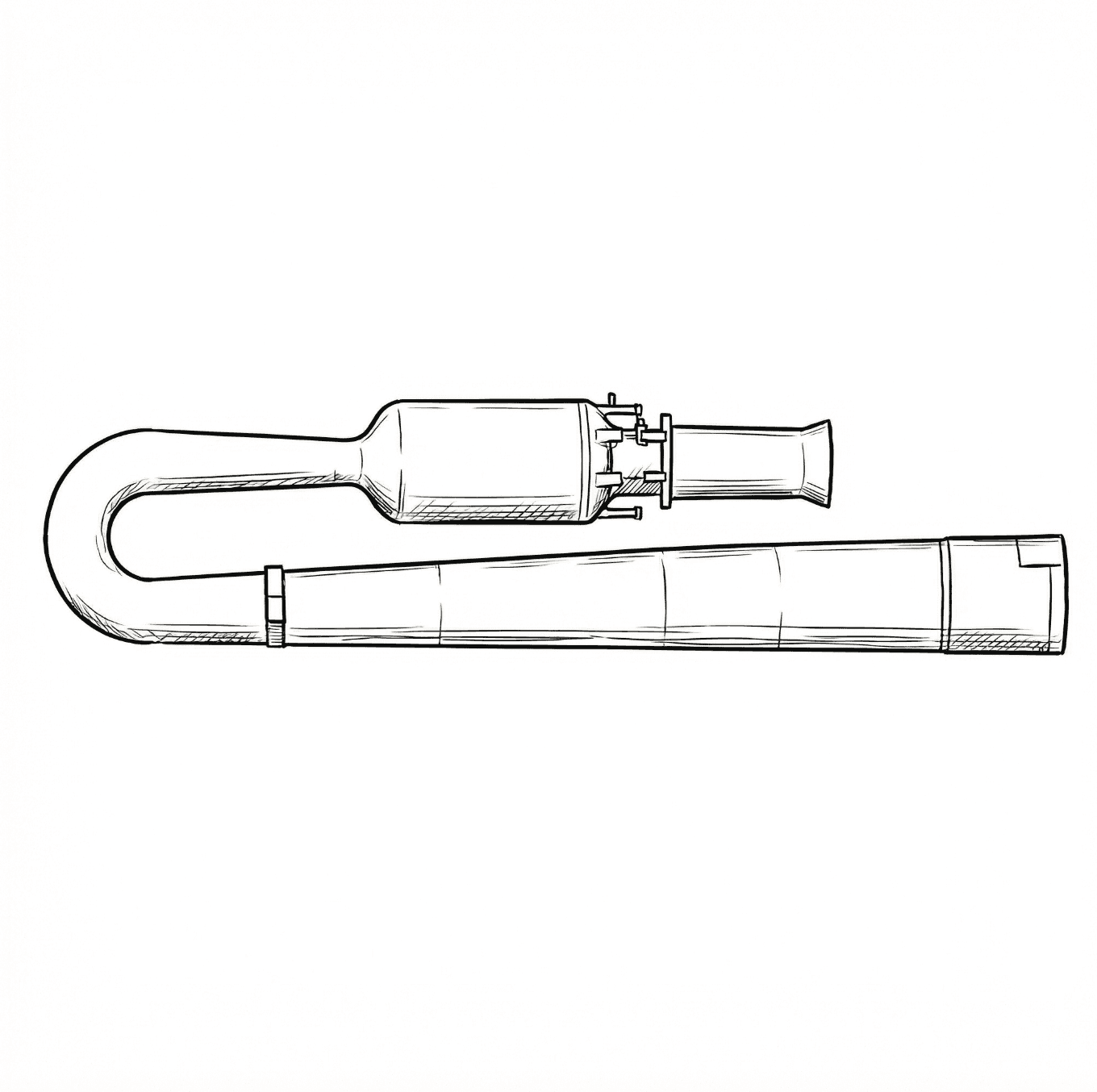
My final project idea is a Pulse Jet Engine that explores the principles of pulse jet propulsion through proper engineering design and testing methodologies.
Initial Design Sketch
Technical sketch showing the Lockwood-Hiller inspired valveless pulse jet design with characteristic U-shaped intake and straight exhaust tailpipe. Drawn on iPad and compressed by 91% using imagecompressor.com.
Project Description
The pulse jet engine project focuses on understanding the fundamental principles of intermittent combustion propulsion. The design will incorporate proper safety measures and testing protocols while exploring the thermodynamics and mechanical aspects of pulse jet operation.
Who Will Use It
This pulse jet engine system is designed as a propulsion technology with applications across multiple sectors:
Transportation: Alternative propulsion for specialized vehicles and experimental aircraft
Aerospace: Propulsion systems for unmanned aerial vehicles and research platforms
Military Applications: Drone propulsion systems and tactical missile applications
Research & Development: Academic institutions studying propulsion technologies
Industrial Applications: Specialized propulsion needs in manufacturing and testing
Design Approach
The project will follow standard engineering practices:
Comprehensive design analysis and material selection
Proper testing protocols with appropriate safety measures
Iterative design improvements based on testing results
Complete documentation of the design and testing process
Tools and Technologies Used
Kiro AI Assistant
AWS-powered AI development tool for website creation and intelligent code generation
GitLab
Version control and repository hosting on Fab Cloud infrastructure
Web Technologies
HTML, CSS, and JavaScript for responsive design and modern web standards
Simple Server Setup
No-cache server configuration that ensures immediate updates without service workers
Learning Outcomes
This week provided valuable experience in:
Modern web development workflows using AI assistance
Version control best practices with Git and GitLab
Project planning and documentation strategies
Responsive web design principles
Server configuration and caching strategies
Critical lesson: Why service workers should be avoided in development and educational projects
The importance of immediate feedback in development workflows
Fab Academy Student Agreement
The Fab Academy is responsible for:
Teaching principles and practices of digital fabrication
Arranging lectures, recitations, meetings, and events for the class
Evaluating and providing feedback on student work
Offering clear standards for completing assignments
Certifying and archiving student progress
Supervising class preparation
Reviewing prospective students, instructors, and labs
Providing central staff and infrastructure for students, instructors, and labs
Fund-raising for costs not covered by student tuition
Managing and reporting on the program's finances, results, and impacts
Publicizing the program
Promoting a respectful environment free of harassment and discrimination
Encourage a diverse, accessible, and equitable community
I am a Fab Academy student, responsible for:
Attending class lectures and participating in reviews
Developing and documenting projects assigned to introduce and demonstrate skills, in enough detail to be able to reproduce them
Honestly reporting on my work, and appropriately attributing the work of others (both human and machine, including AI prompts)
Being prepared to answer questions about my work
Allowing the Fab Academy to share my work (with attribution) in the class for purposes compatible with its mission
Working safely
Leaving workspaces in the same (or better) condition than I found them
Participating in the upkeep of my lab
Ensuring that my tuition for local and central class costs is covered
Following locally applicable health and safety guidance
Recognizing limits on lab and staff time
Promoting a respectful environment free of harassment and discrimination
Signed by committing this file in my repository,
Oliver Abbott
AI Usage & Credits
This website was built almost entirely with the help of Kiro, an AI-powered IDE by AWS. I used Kiro throughout the Fab Academy to generate HTML, CSS, and JavaScript, write documentation, debug issues, and manage Git operations. Here's how I typically use it:
Website structure: I described the layout I wanted in plain English (e.g., "create a responsive page with dropdowns for each section") and Kiro generated the code
Content writing: I provided rough notes and descriptions of my work, and Kiro helped clean them up into readable documentation while keeping my voice
Debugging: When something broke (like the service worker caching issue), I described the problem and Kiro diagnosed and fixed it
Git operations: Kiro handled commits, pushes, and merge requests through its built-in terminal
All AI-generated code and text was reviewed and approved by me before being committed. The content reflects my actual work, experiences, and decisions — Kiro helped with the writing and coding, not the fabrication or design work itself.