Group assignment Compare as many tool options as possible
Individual assignment Write an application that interfaces a user with an input and/or output device that you made.
What I knew beforehand
The interface is the product from the user's perspective. A poor user experience — even with brilliant underlying technology — can doom a product to failure. I have seen this repeatedly in the entrepreneurship world: technically excellent solutions that no one adopts because the interaction layer is confusing, slow, or unintuitive.
Adding a software layer and a graphical interface significantly increases the perceived value and utility of a physical device, because it gives non-technical users a way to interact with the system without needing to understand what is happening at the hardware level.
This documentation was produced in June 2026 and represents entirely new work. I came to this week with a firm conviction from my work that a technically brilliant device that is confusing to operate will not be adopted. This week I built three distinct interfaces for the same underlying hardware — a hand-gesture web app via MediaPipe, a Web Serial extension connecting that app to the XIAO RP2040, and a Python GUI with explicit buttons — and comparing them made concrete something I had only understood conceptually: different interaction paradigms serve different users. The gesture interface is novel and impressive; the button interface is immediately usable by anyone. For my target audience of entrepreneurs, simplicity always wins.
Group assignment I worked with my colleague Jhasmin Ayala
This week I worked on two types of interfaces that communicate with the XIAO RP2040 board I fabricated in previous weeks. The work is organized in three stages:
Version 1 (Group work baseline): A hand-tracking web interface built with Lovable using MediaPipe Hands — detects finger states and hand gestures in real time via webcam.
Version 2 (Individual work — web serial): The same interface extended to communicate with the XIAO RP2040 over Web Serial, controlling an LED on pin D8 via hand gestures (open hand → LED off, closed fist → LED on).
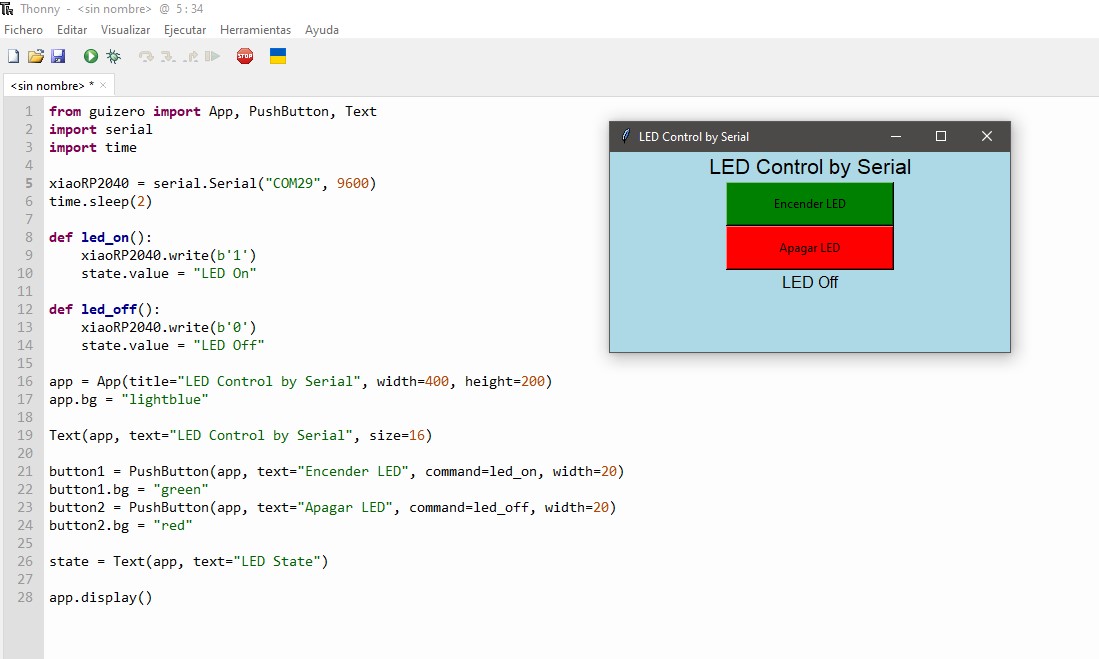
Version 3 (Individual work — Python GUI): A standalone Python application using guizero and pyserial that controls the same LED via two on-screen buttons.
Version 1 — Hand Tracking Interface (Group Work Baseline)
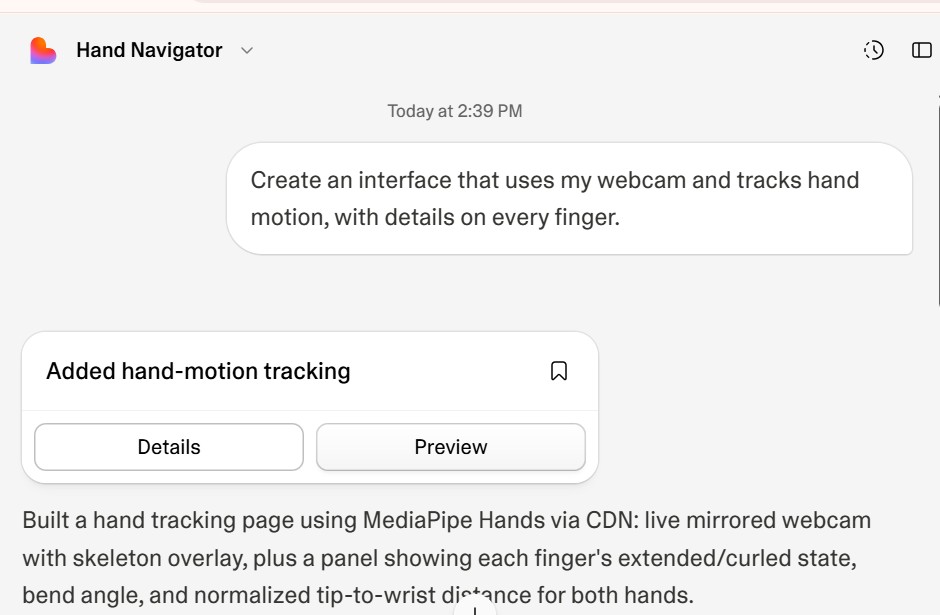
As a starting point for the group assignment, I used Lovable to generate a hand-tracking interface from a natural language prompt. The prompt asked for a webcam-based page that tracks hand motion and displays information for every finger.
The Lovable prompt requesting a hand-tracking page with per-finger details.
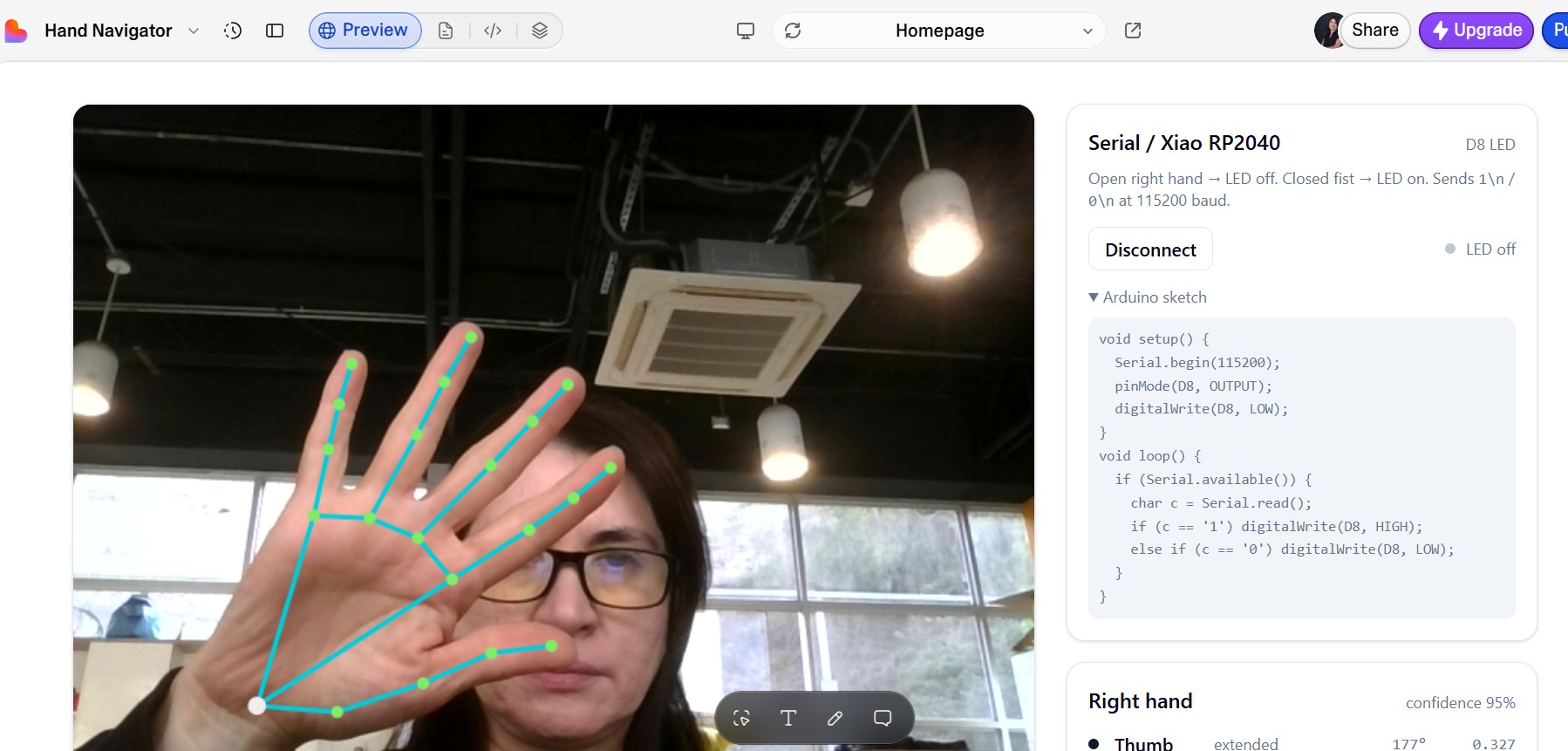
The generated interface — live mirrored webcam with a skeleton overlay on the hand and a panel showing each finger's state.
Lovable built a hand-tracking page using MediaPipe Hands loaded via CDN. The output includes:
- A live mirrored webcam feed with a cyan skeleton overlay drawn over the detected hand landmarks.
- A side panel displaying each finger's extended or curled state, bend angle, and normalized tip-to-wrist distance for both hands.
- Confidence percentage per hand detected.
Version 2 — Web Serial Interface Connected to XIAO RP2040 (Individual Work)
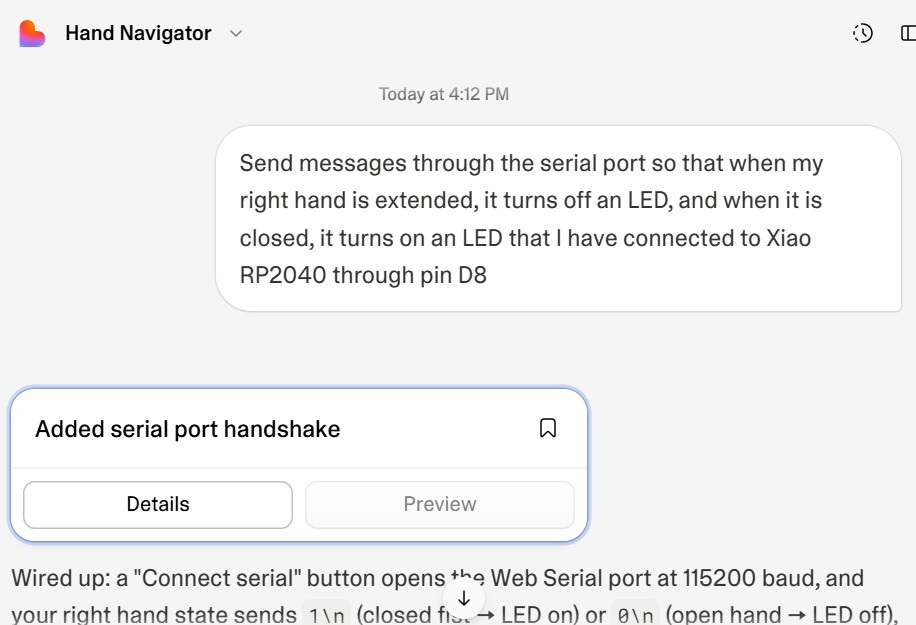
For the individual assignment, I extended the group interface to communicate with my XIAO RP2040 board over the browser's Web Serial API. The logic is simple: when the right hand is open (fingers extended), the interface sends 0\n over serial, turning the LED off. When the right hand is closed (fist), it sends 1\n, turning the LED on.
The follow-up prompt asking Lovable to add Web Serial communication at 115200 baud, controlling the LED on pin D8.
Updated interface — a "Connect Serial" button opens the port; the right panel shows the connection status, LED state, and the Arduino sketch required on the board.
The updated interface adds a Connect Serial button. Once the user selects the correct port, the interface:
Detects the right hand's state on every frame using MediaPipe.
Sends 1\n when the hand is closed (fist detected) — LED turns on.
Sends 0\n when the hand is open — LED turns off.
Displays the current LED state ("LED on" / "LED off") in the panel.
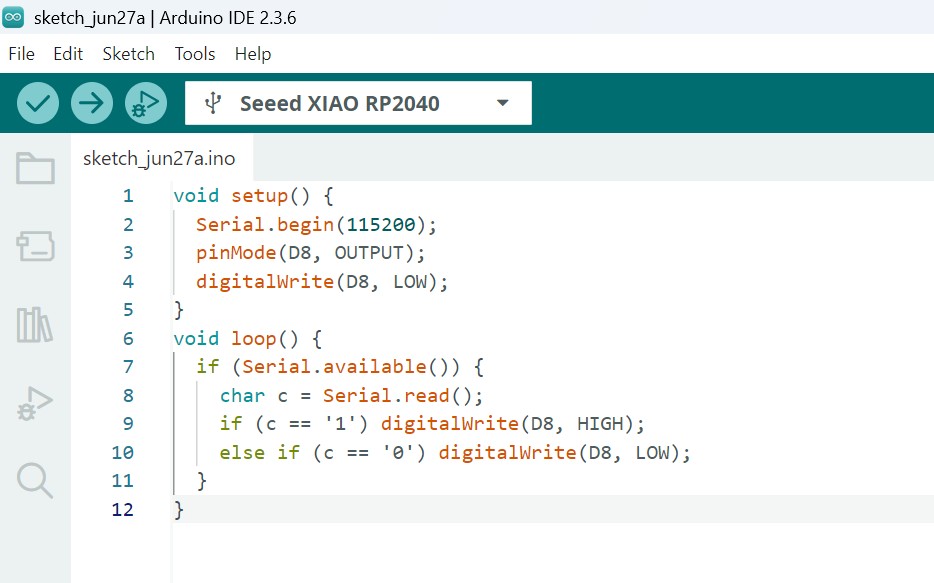
Arduino Sketch — XIAO RP2040 (Version 2)
The board listens on the serial port at 115200 baud and toggles the LED on pin D8 based on the received character:
void setup() {
Serial.begin(115200);
pinMode(D8, OUTPUT);
digitalWrite(D8, LOW);
}
void loop() {
if (Serial.available()) {
char c = Serial.read();
if (c == '1') digitalWrite(D8, HIGH);
else if (c == '0') digitalWrite(D8, LOW);
}
}
Arduino IDE 2.3.6 with the sketch loaded and the Seeed XIAO RP2040 selected as the target board.
Testing in the Fab Lab
I tested the complete system at the ESAN Fab Lab with the XIAO RP2040 connected via USB. The photo below shows the setup: the board is connected to the laptop, and the interface is visible in the browser reacting to hand gestures in real time.
ESAN Fab Lab setup — XIAO RP2040 connected via USB, hand gesture interface running in the browser. A closed fist (left) turns the LED on; an open hand (right) turns it off.
Version 2 in action
The following video shows the hand gesture interface controlling the LED on the XIAO RP2040 board in real time over Web Serial:
Version 2 — Hand gesture controls the LED on the XIAO RP2040 via Web Serial. Open hand → LED off. Closed fist → LED on.
Version 3 — Python GUI with Buttons
As a second individual interface, I built a desktop Python application that controls the same LED using two on-screen buttons instead of gestures. This approach is simpler and more accessible for users who do not have a webcam or prefer direct manual control.
The application was written in Thonny using two libraries:
guizero — for the graphical interface (buttons and text labels).
pyserial — for serial communication with the XIAO RP2040 at 9600 baud.
Python Code
from guizero import App, PushButton, Text
import serial
import time
The interface opens a light-blue window with a title, a green "Encender LED" (Turn on LED) button, a red "Apagar LED" (Turn off LED) button, and a status label that updates when each button is pressed. Pressing a button sends a single byte (b'1' or b'0') over the serial port to the XIAO RP2040.
The Python application running in Thonny — the "LED Control by Serial" window with the green and red buttons, and the LED state label showing "LED Off".
Video — Version 3 in Action
The following video shows the Python GUI controlling the LED on the XIAO RP2040 via serial communication:
Version 3 — Python GUI with buttons controlling the LED on the XIAO RP2040 over serial at 9600 baud.
Comparison of the Three Interfaces
Feature
Version 1 — Hand Tracking (Group)
Version 2 — Web Serial (Individual)
Version 3 — Python GUI (Individual)
Technology
MediaPipe Hands / Lovable
MediaPipe + Web Serial API
Python / guizero / pyserial
Input
Webcam — hand gestures
Webcam — hand gestures
Mouse — button click
Controls board
No
Yes — XIAO RP2040 via Web Serial
Yes — XIAO RP2040 via pyserial
Baud rate
—
115200
9600
Platform
Browser
Browser (Chrome / Edge)
Desktop (Thonny / Python)
Requires webcam
Yes
Yes
No
Reflections
Closing the loop between a physical device and a visual interface on a screen is what makes technology genuinely accessible to people. When a user can see what a device is doing, control it intuitively, and receive clear feedback, the device stops being a technical object and becomes a tool.
For PitchLight, the Nextion touch display is exactly this layer: it gives the entrepreneur a clear, immediate way to select a timer mode and start the countdown — no buttons to decode, no technical knowledge required. The interface is the experience.
Resources
Download the files used in this assignment