01. GROUP ASSIGNMENT
COMPARED!
MISSION LOG: ARCHITECTURE COMPARISON AND EMBEDDED PROGRAMMING
Read the full group report here:
📂 OPEN GROUP ASSIGNMENTAwakening the Machine: Logic, Datasheets & Silicon
Read the full group report here:
📂 OPEN GROUP ASSIGNMENT| FEATURE | ESP32-WROOM-32 | ESP32-S3 (My Choice) |
|---|---|---|
| 🧠 SRAM | 520 KB | 512 KB + Ext. PSRAM |
| 🔌 GPIO Pins | ~34 Pines | 45 Pines (More sensors!) |
| 🎛️ ADC (Analog) | 12 Channels (Old) | 20 Channels (New) |
| 📡 Connectivity | BT 4.2 / No USB | BT 5.0 / Native USB |
| 💻 Languages | C++, MicroPython | C++, CircuitPython, Rust |
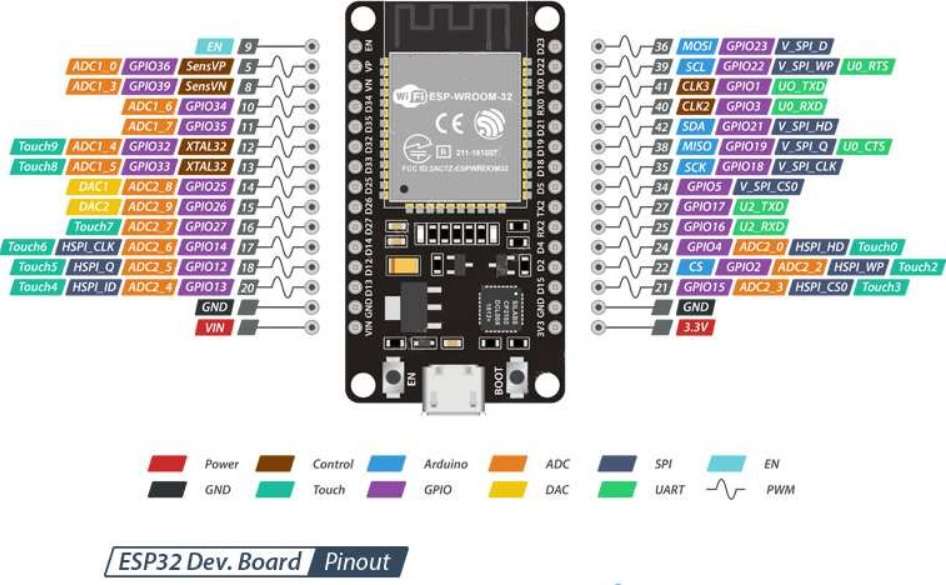
VS 1. The Classic ESP32-WROOM
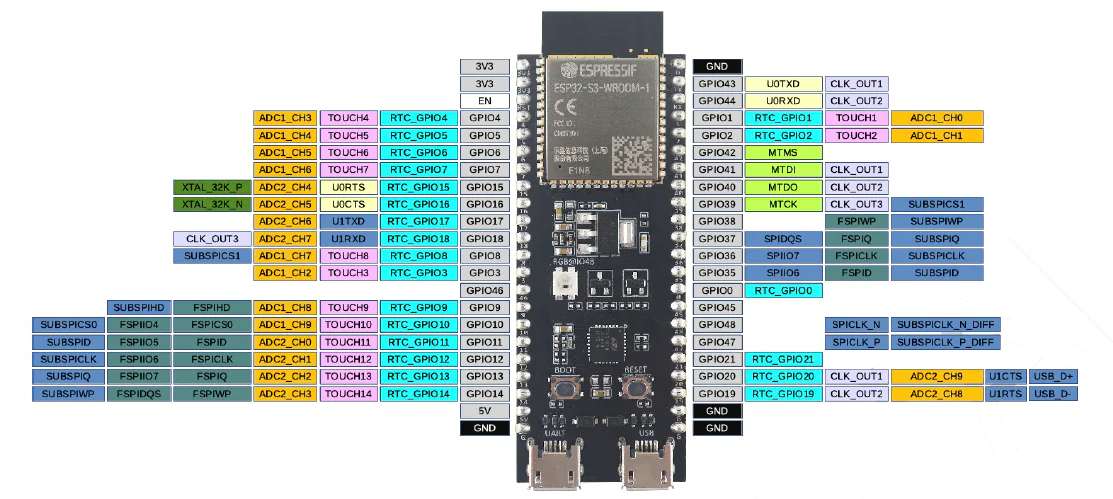
VS 2. The Modern ESP32-S3 (Winner)
INPUT_PULLUP to use the internal resistor, ensuring a stable HIGH signal when idle.
main.cpp file deployed to the board.
#include

const int ALERT_PIN = 5;
const int SENSOR_PIN = 4;

void setup() {
  Serial.begin(115200);

  pinMode(SENSOR_PIN, INPUT_PULLUP);
  pinMode(ALERT_PIN, OUTPUT);

  Serial.println(">>> HARDWARE READY: push the button to simmulate a goal");
}

void loop() {

  if (digitalRead(SENSOR_PIN) == LOW) {

    digitalWrite(ALERT_PIN, HIGH);
    Serial.println("Goal detected");

    delay(1000);

    digitalWrite(ALERT_PIN, LOW);
  }
}
Video 2. PHYSICAL DEPLOYMENT OF THE CIRCUIT
Video 3. Testing the Input/Output loop. The Serial Monitor displays the "Goal" data in real-time.
#includeconst int PIN_BOTON = 4; const int PIN_LED = 5; const int MAX_HISTORIAL = 50; float historialVelocidades[MAX_HISTORIAL]; int indiceActual = 0; int totalTiros = 0; bool botonPresionado = false; void setup() { Serial.begin(115200); pinMode(PIN_BOTON, INPUT_PULLUP); pinMode(PIN_LED, OUTPUT); randomSeed(analogRead(0)); Serial.println(">>> READY <<<"); Serial.println("1. PRESS BUTTON TO SIMULATE A SHOOT."); Serial.println("2. WRITE A NUMBER (example: '5') to check the average of the last 5 shots"); Serial.println("----------------------------------------------------------------"); } void loop() { if (digitalRead(PIN_BOTON) == LOW) { if (!botonPresionado) { botonPresionado = true; digitalWrite(PIN_LED, HIGH); float velocidad = random(400, 950) / 10.0; float posX = random(-350, 350) / 100.0; float posY = random(10, 240) / 100.0; historialVelocidades[indiceActual] = velocidad; indiceActual = (indiceActual + 1) % MAX_HISTORIAL; totalTiros++; Serial.print("(!) GOAL #" + String(totalTiros) + " | "); Serial.print("Speed: " + String(velocidad, 1) + " km/h | "); Serial.println("Pos: (" + String(posX) + "m, " + String(posY) + "m)"); delay(200); } } else { botonPresionado = false; digitalWrite(PIN_LED, LOW); } if (Serial.available() > 0) { String texto = Serial.readStringUntil('\n'); int cantidad = texto.toInt(); if (cantidad > 0 && cantidad <= 50) { if (cantidad > totalTiros) { Serial.println(">> ERROR: " + String(totalTiros) + " shots registered."); } else { float suma = 0; int contados = 0; int idx = indiceActual - 1; while (contados < cantidad) { if (idx < 0) idx = MAX_HISTORIAL - 1; suma += historialVelocidades[idx]; idx--; contados++; } float promedio = suma / cantidad; Serial.println("--------------------------------"); Serial.println(">> AVERAGE:"); Serial.println(" LAST " + String(cantidad) + " SHOTS."); Serial.println(" AVERAGE SPEED: " + String(promedio, 1) + " km/h"); Serial.println("--------------------------------"); } } else { Serial.println(">> Please write a number between 2 and 50."); } } }
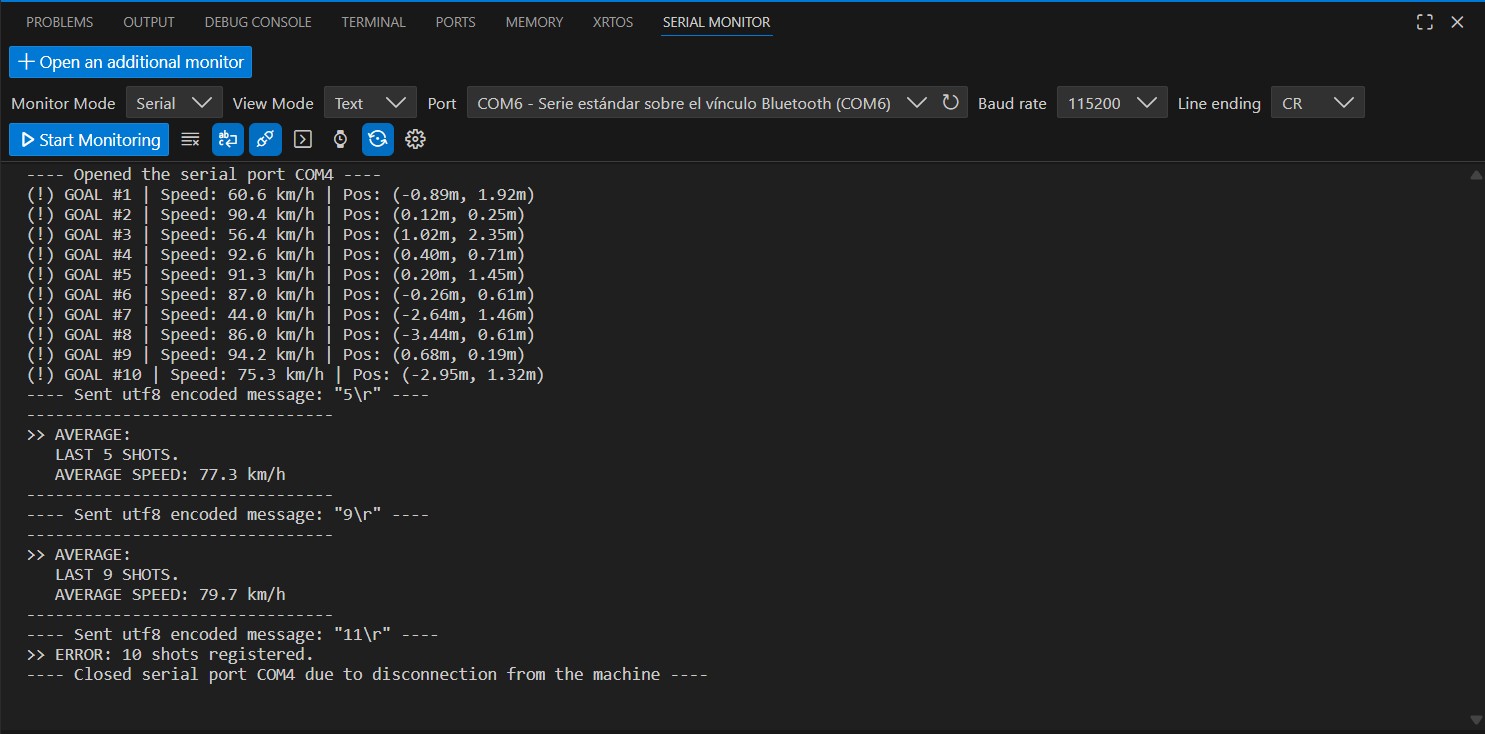
The Serial Monitor shows real-time data of each "goal". When I input a number, it calculates the average speed of the last shots, demonstrating a two-way communication link. Even if the number exceeds the total shots, it handles the error gracefully.