Group Assignment
Click to view the group assignment.Individual Assignment
For this week's assignment, I am planning to create a music player interface that allows users to play audio files stored on an SD card using an ESP32-S3 microcontroller. It sends commands to the ESP32-S3 over Wi-Fi. The ESP32-S3 processes the audio files and plays them through a speaker integrated into a custom-designed PCB.
The user interface will include song selection segment and buttons for play, pause, next, and previous track controls. I am also planning to create a jammer as in a DJ setup, where users can mix and manipulate the audio in real-time using a touch interface on a smartphone or tablet. The ESP32-S3 will handle the audio processing and output, while the user interface will provide an intuitive way for users to interact with their music collection.
The following is the skeleton for the user interface that I have designed in Figma:
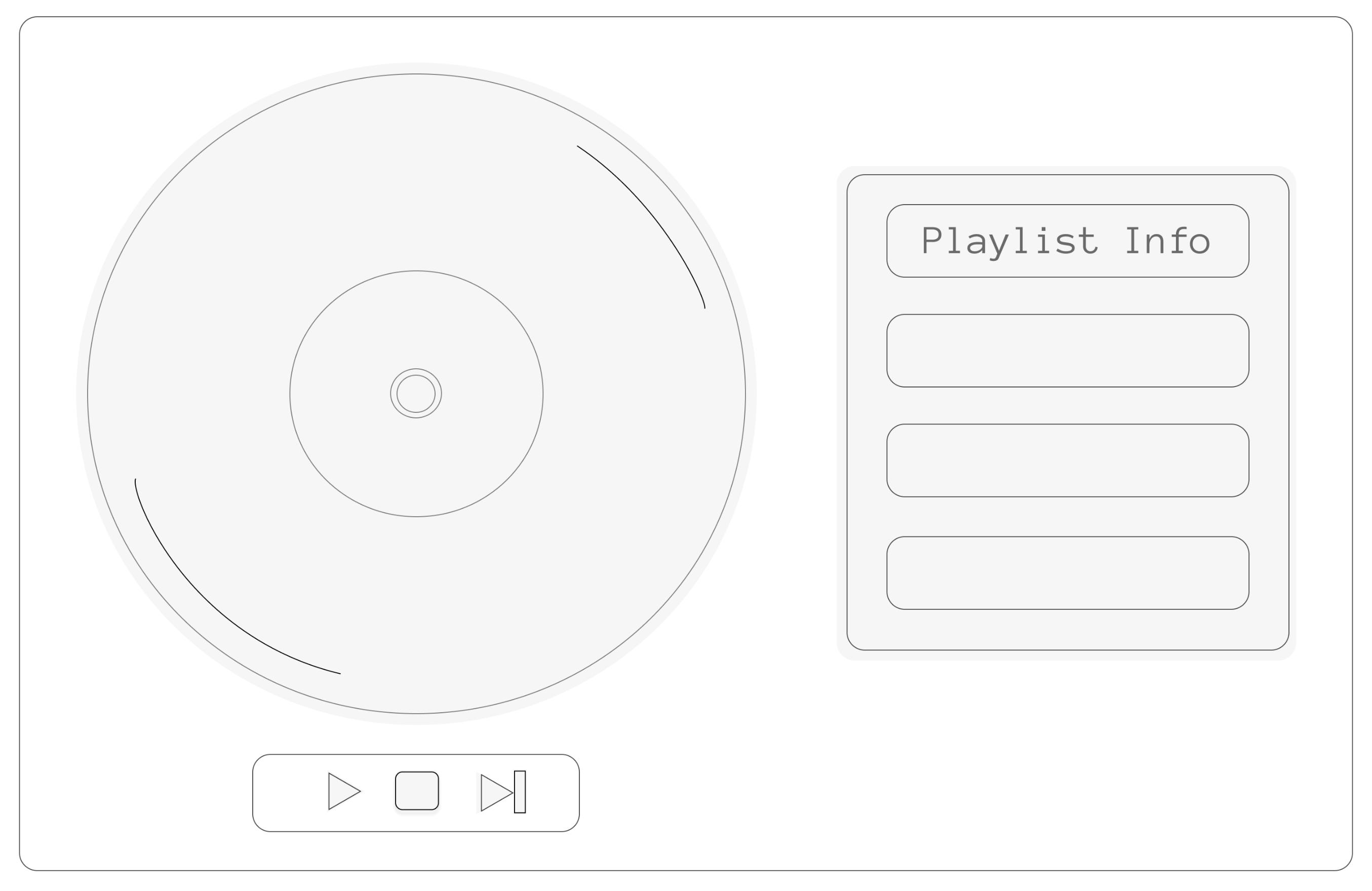 The output board used in this assignments was made in Output week
The board was used to read the audio files through the SD Card mounted on the microcontroller and to output audio though the speaker according to the movement of the disk.
Building the UI
First i asked claude to generate the HTML, CSS, and JavaScript code for the interface based on the website skeleton that i made.Thi is the prompt that i used " I am currently trying to run or make a UI interface for the same, in which I will attach the skeleton of the website. All I need is for you to code. How it's done. I will also attach the reference pinterest link for it:Pinterest Reference. i want the disc to rotate like the one in this." and attached the image of the ui skeleton
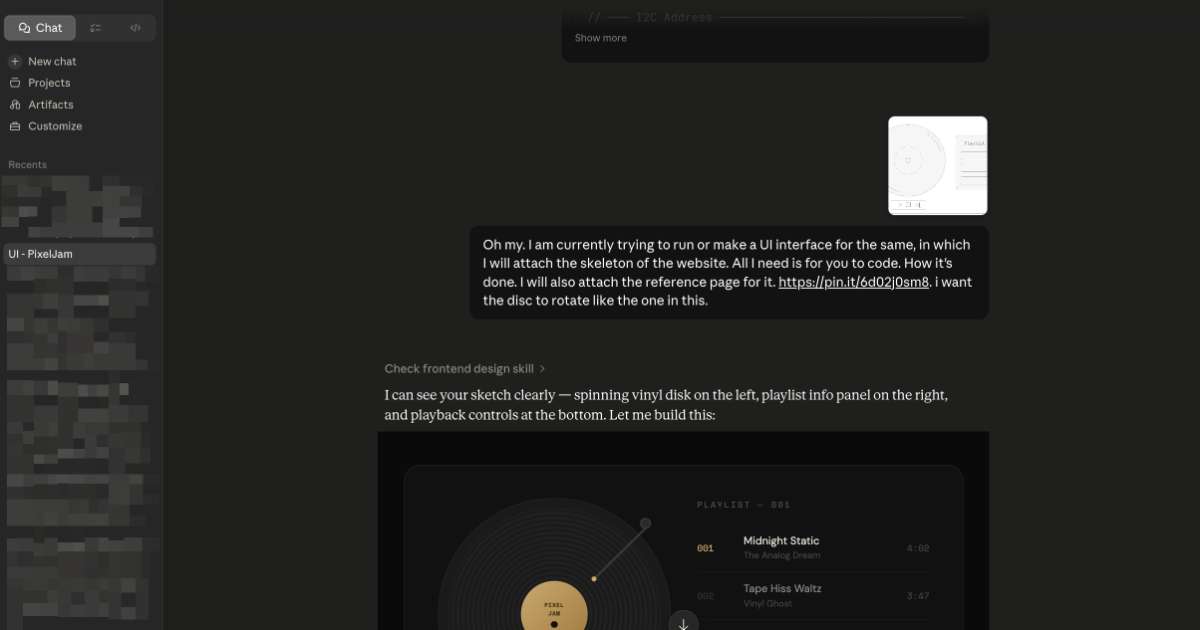
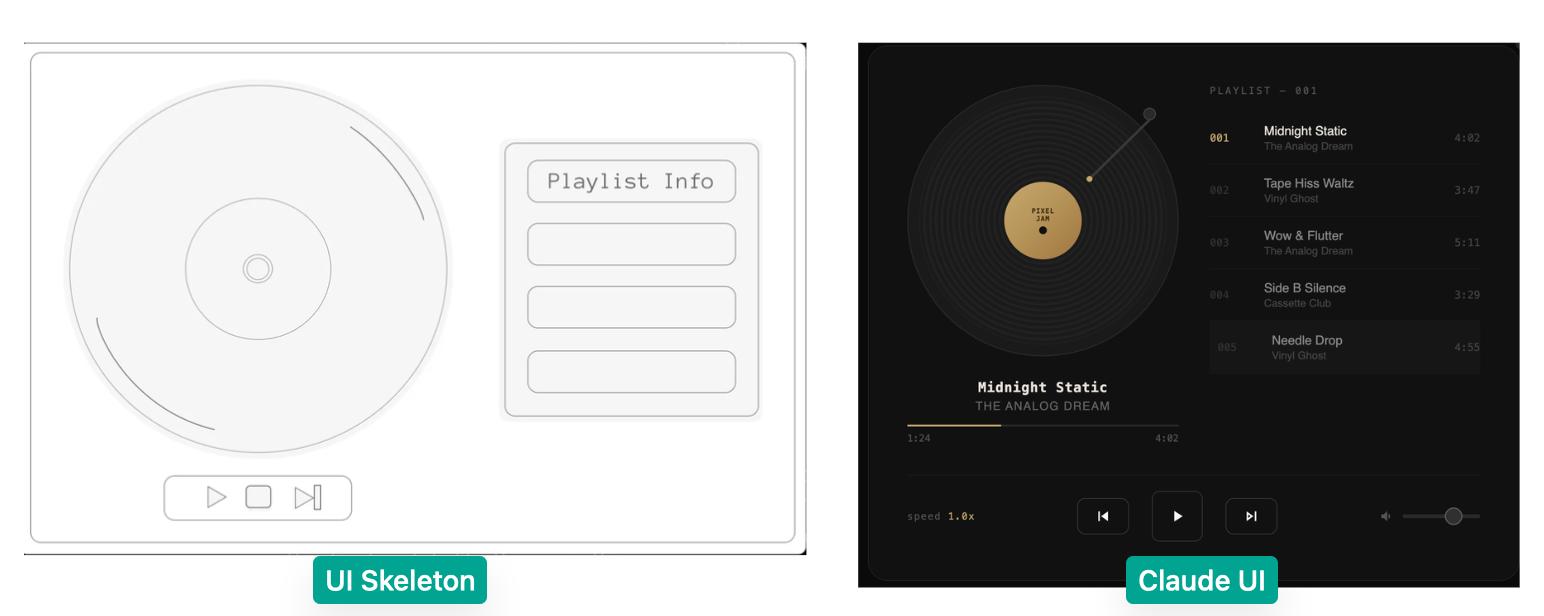
I did not like the UI that claude generated, so i tried giving it a different reference from pinterest and different prompt some iterations are :
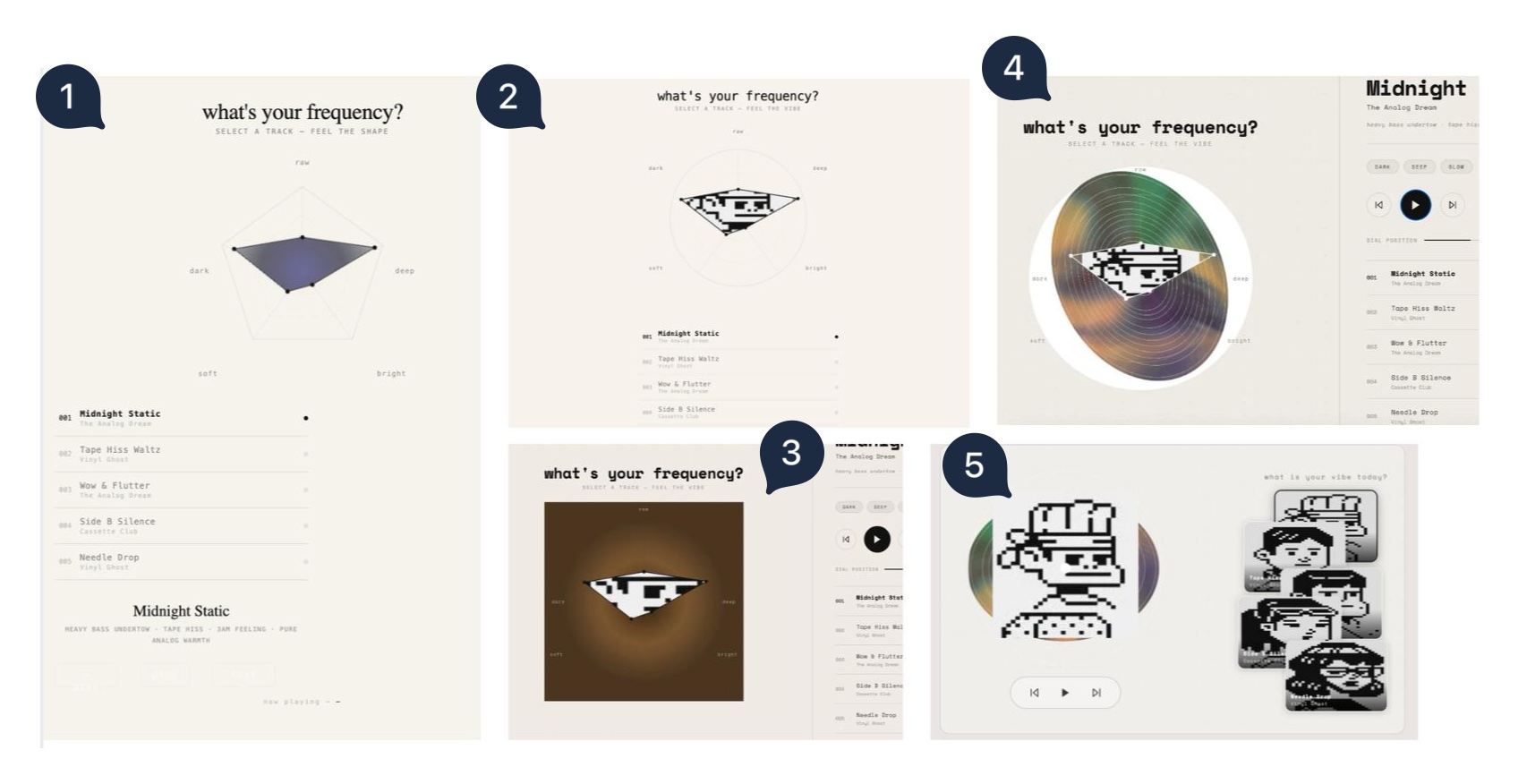 How claude responds
Claude generated the UI as a single self-contained HTML file each iteration, with all CSS and JavaScript inline. The tech stack is: plain HTML5, CSS3 (flexbox/grid layout), and vanilla JavaScript using the Canvas API for all drawing — the radar chart, the rotating disk, and the character clipping are all drawn programmatically on a "canvas" element. No frameworks, no npm, no build step. Final version was refactored into three separate files (index.html, style.css, script.js) for deployment.
How i deployed it
The UI files were served locally using VS Code's Live Server extension (127.0.0.1:5500). This was necessary because Chrome blocks WebSocket connections from file:// URLs — the page must be served over HTTP for the WebSocket to the ESP32 to connect. The ESP32 serves its own WebSocket server on port 81, and the browser connects to it using the ESP32's local WiFi IP address.
Then i decided to design different elements in Figma and then uploaded it to claude:
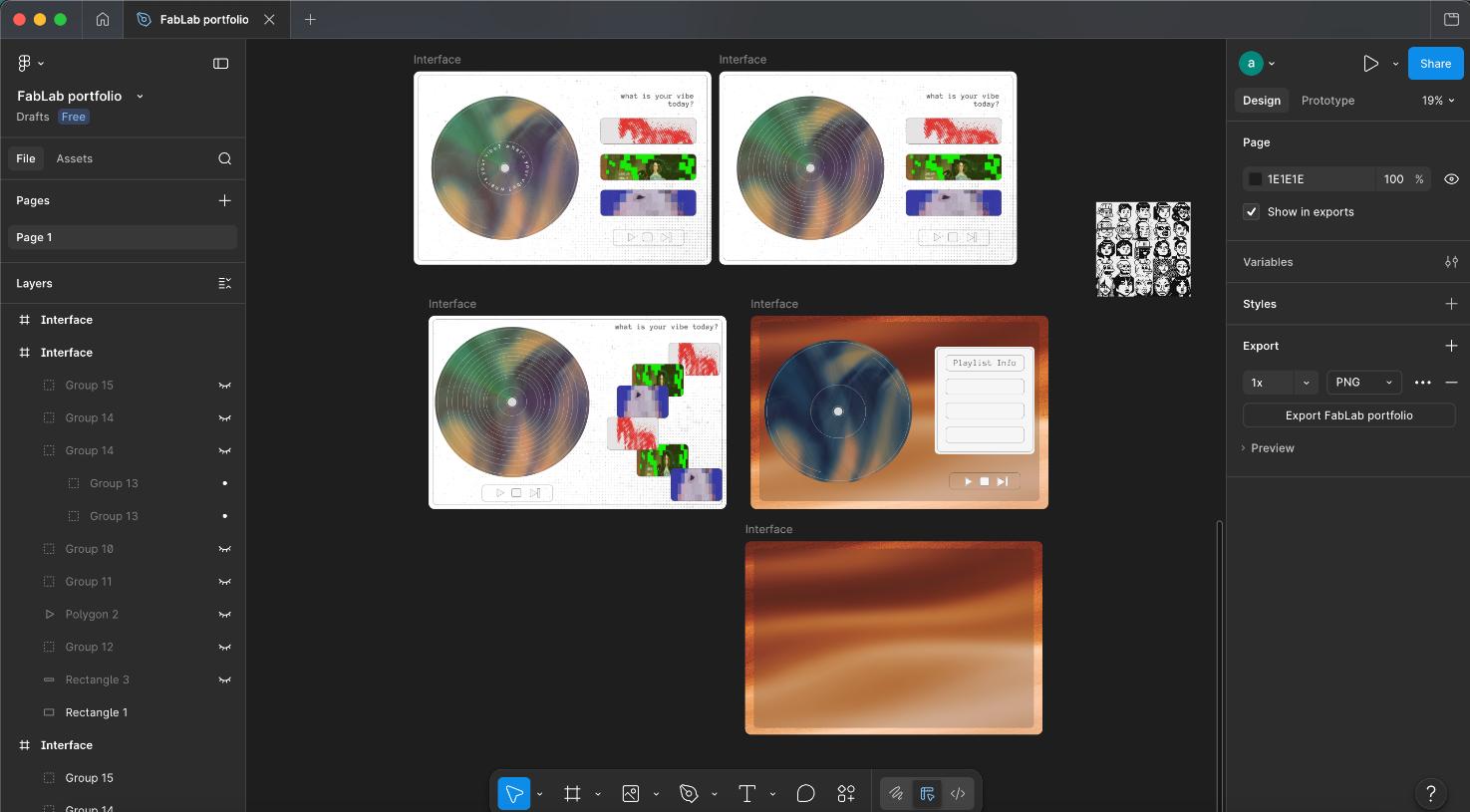
Finally, after 4-5 iterations i got something halfway decent.
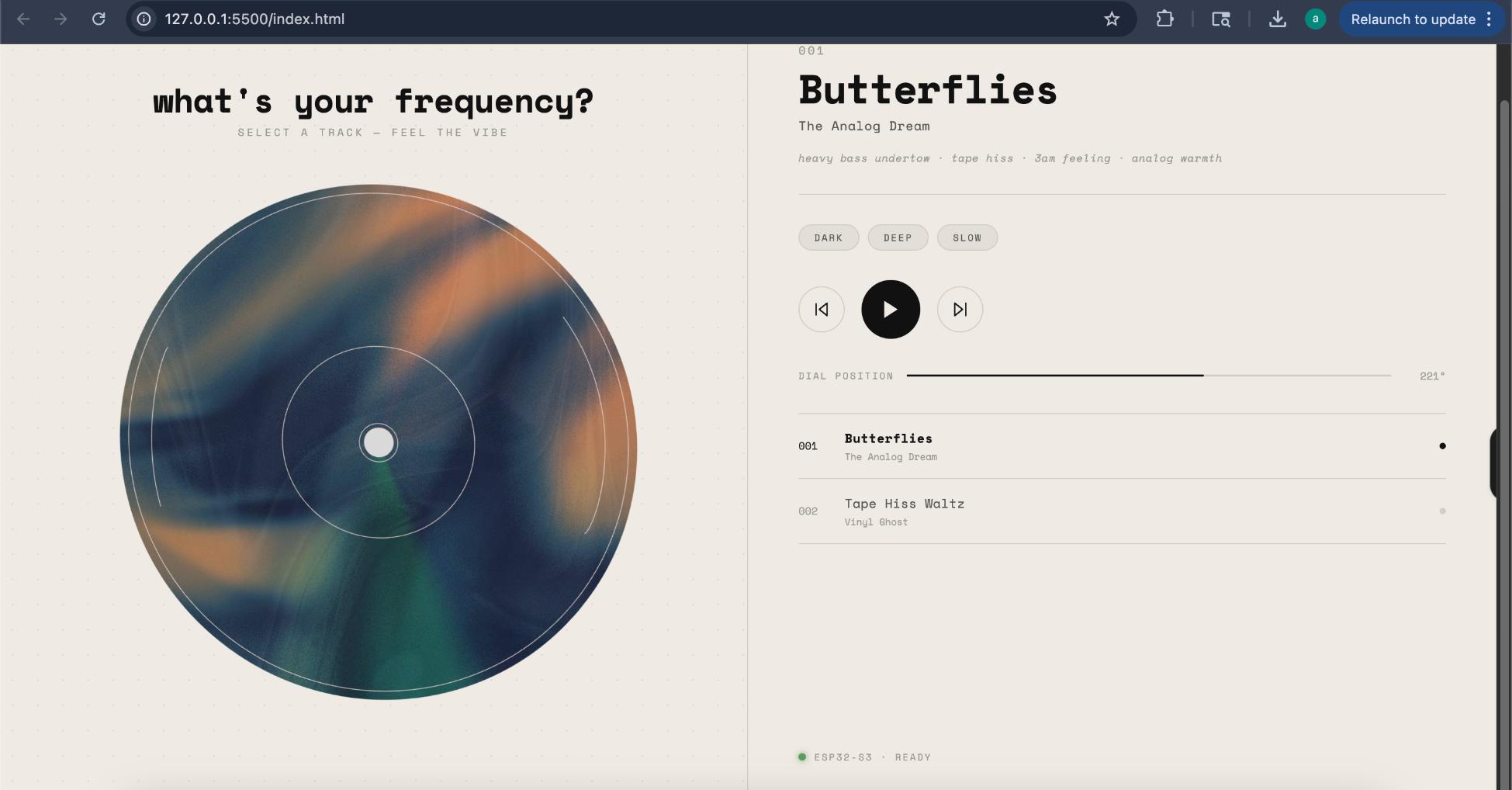 The following is how the File structure looks:
 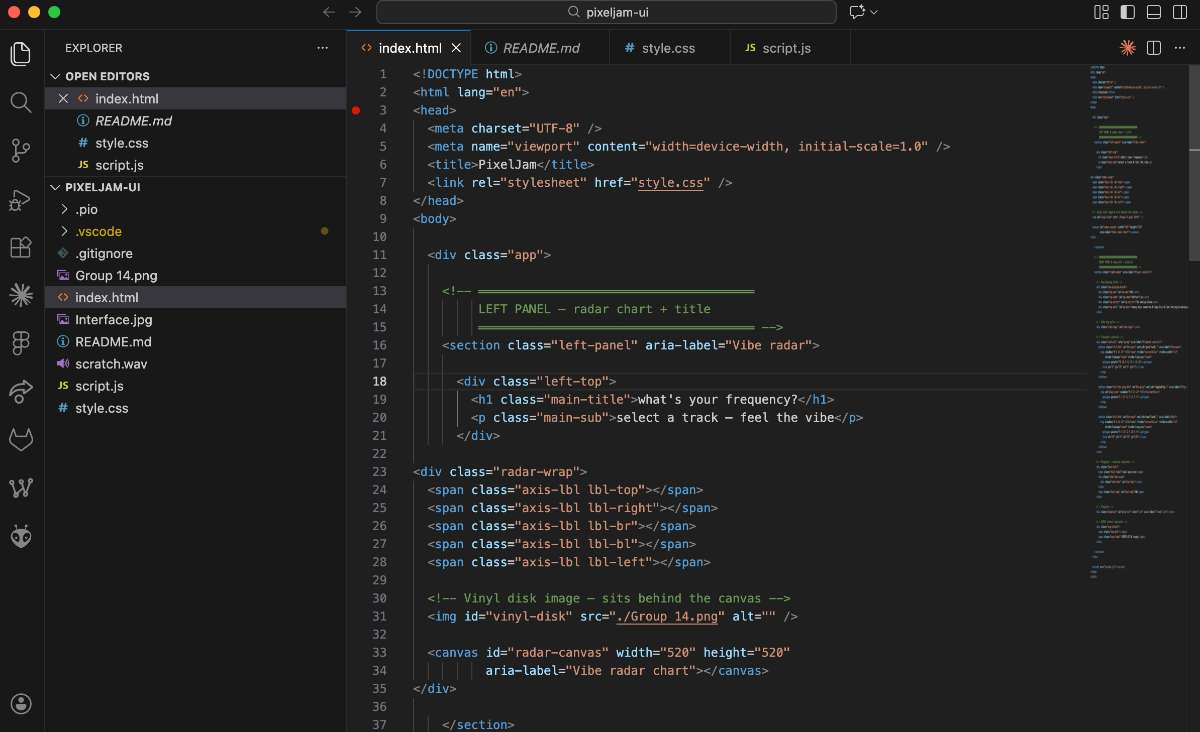 The Website Link is given towards the end of the documentation.
Major changes from the first iteration would be replacing the rotating disk with my own design rather than depending on the iterations that claude made.
code for the UI can be found in the final files section below.
System Architecture
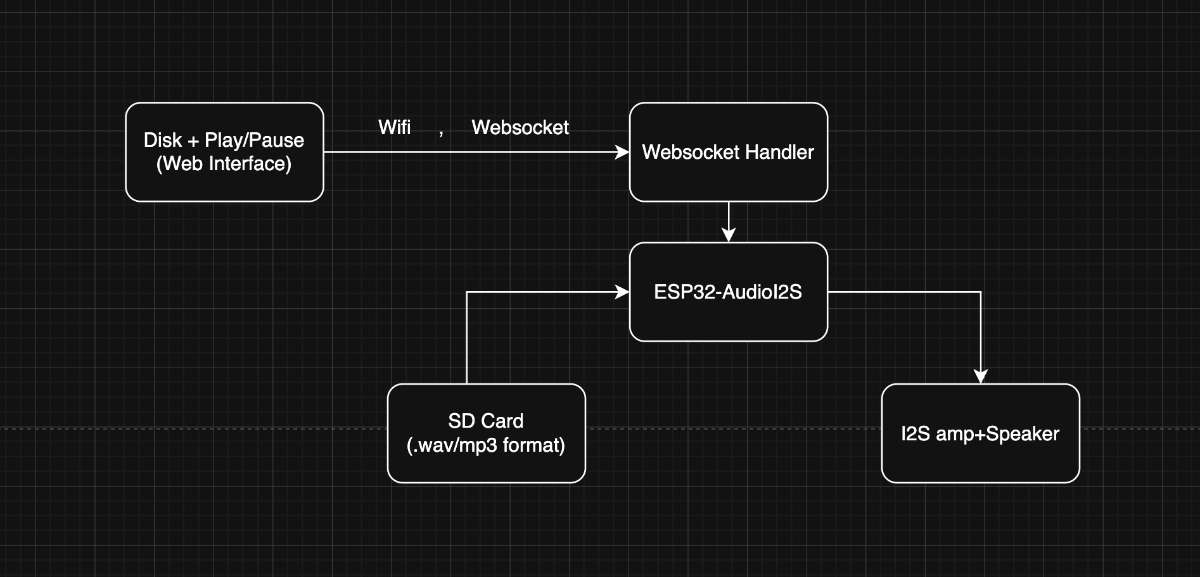 The system has two main parts that communicate over WiFi:
• Browser UI — sends commands (PLAY, PAUSE, NEXT, PREV, TRACK:n, DIAL:angle)
• ESP32-S3 — receives commands via WebSocket, streams audio from SD card through I2S to speaker
Arduino IDE Board Setup>
• Board: XIAO_ESP32S3>
• Core version: esp32 by Espressif v3.3.7 or newer (required for I2S headers)
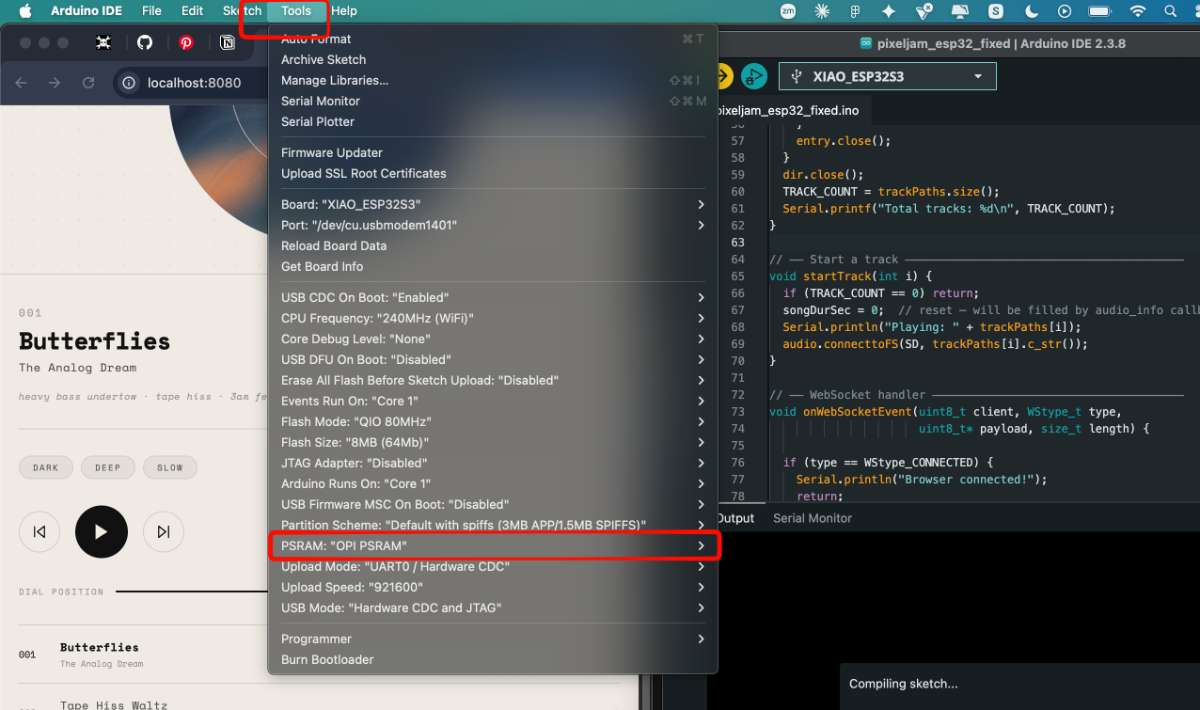
• PSRAM: OPI PSRAM — must be enabled or audio buffer allocation fails
• Upload speed: 921600
SD Card Setup
• Format: FAT32
• Folder structure: /audio/001.wav, /audio/002.wav etc.
• Audio format: 16-bit PCM, 44100 Hz, mono or stereo WAV
Why I Used WebSocket
WebSocket enables two devices to maintain a continuous, two-way connection instead of repeatedly sending individual requests like HTTP. This was important for my project because the web interface continuously sends the vinyl dial's rotation angle to the ESP32 while the user is scrubbing through a track. Using HTTP would have required hundreds of requests per second, introducing unnecessary overhead and latency. With WebSocket, all communication happens through a single open connection, making the scrub interaction smooth and responsive. Another advantage is bidirectional communication. The browser can send dial positions to the ESP32, while the ESP32 can immediately send information back, such as track duration and playback status updates, without requiring additional requests.
Running PlatformIO
Now initially i had decided to run the framework in platformio, but repeated failures occurred during toolchain downloads in PlatformIO, i tried using the ESPSynth library and the ESP32 Board Core version needs 3.0.0 or newer version to run which was initially missed out. Now the fix required forcing Platform IO to use arduino-esp32 v3.x by adding platform_packages override, which meant a fresh toolchain download, several gigabytes in total. PlatformIO kept failing to download the toolchain, and even after multiple attempts, it was not successful.

After spending a lot of time trying to fix the issue,I decided to switch to Arduino IDE as it had an already installed ESP32 core 3.3.7 installed.
Now, after switching to Arduino another problem surfaced, this time it was the ESP32Synth.
ESP32Synth is a polyphonic synthesizer library for ESP32. Its primary purpose is real-time audio synthesis — generating waveforms (sine, sawtooth, pulse, triangle, noise), applying envelopes, wavetables, arpeggios, and effects entirely in software. It also has a streaming feature that can play WAV files from an SD card. For the PixelJam project, only the streaming feature was needed. This turned out to be where the library's limitations were most apparent.
The streaming system in ESP32Synth uses a ring buffer — a fixed-size memory area where the SD reader writes audio data and the audio task reads from it. The size of this buffer is set by a compile-time constant in ESP32Synth.h.
The fix was straightforward — switch to the low-RAM preset by commenting out the default block and uncommenting the low-RAM block. However this required editing the library source file directly, which is fragile — any library update would overwrite the change.
So i switched to another library which i had used in my output week, ESP32-audioI2S, IT is purpose-built for streaming audio files from SD card or the internet to an I2S DAC.
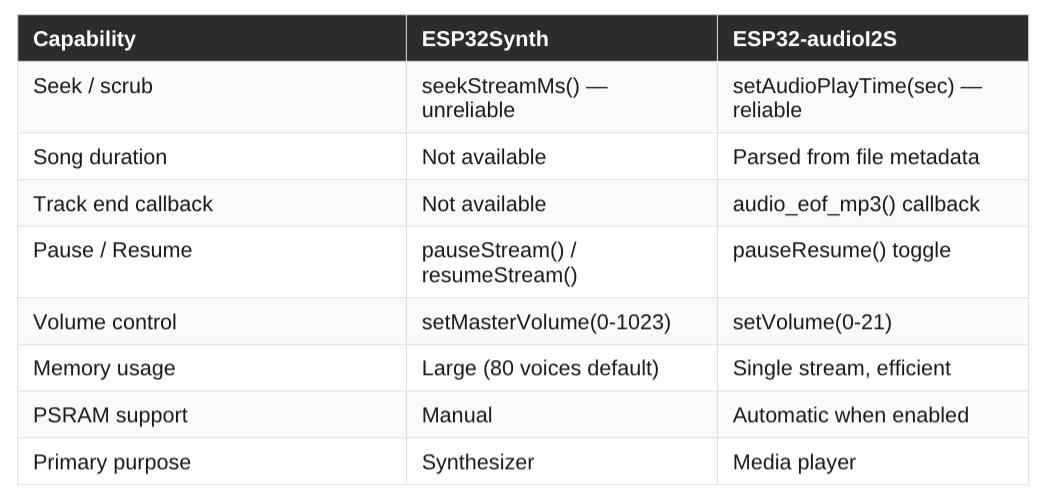 (this image was taken from the Challenges PDF attached below)
Challenges has a detailed list of the challenges faced during the development process and how they were resolved. - put together by claude(prompt-"can you in detail explain the challenges faced while operating in platform IDE using the library ESP32Synth and then why we switched to Arduino and to another library I2SAudio")
After switching the library's it began running more efficiently.
Also remember to enable PSRAM in the board settings, otherwise the audio buffer allocation will fail and the music won't play.
Now the next problem i faced was that my ESP32-S3 was not connecting to my web application, i had done this through wifi, initially i though the wifi was weak so i switched to another one but it was still not getting connected.So i inspected the web page: left click -> Inpect -> Sources.
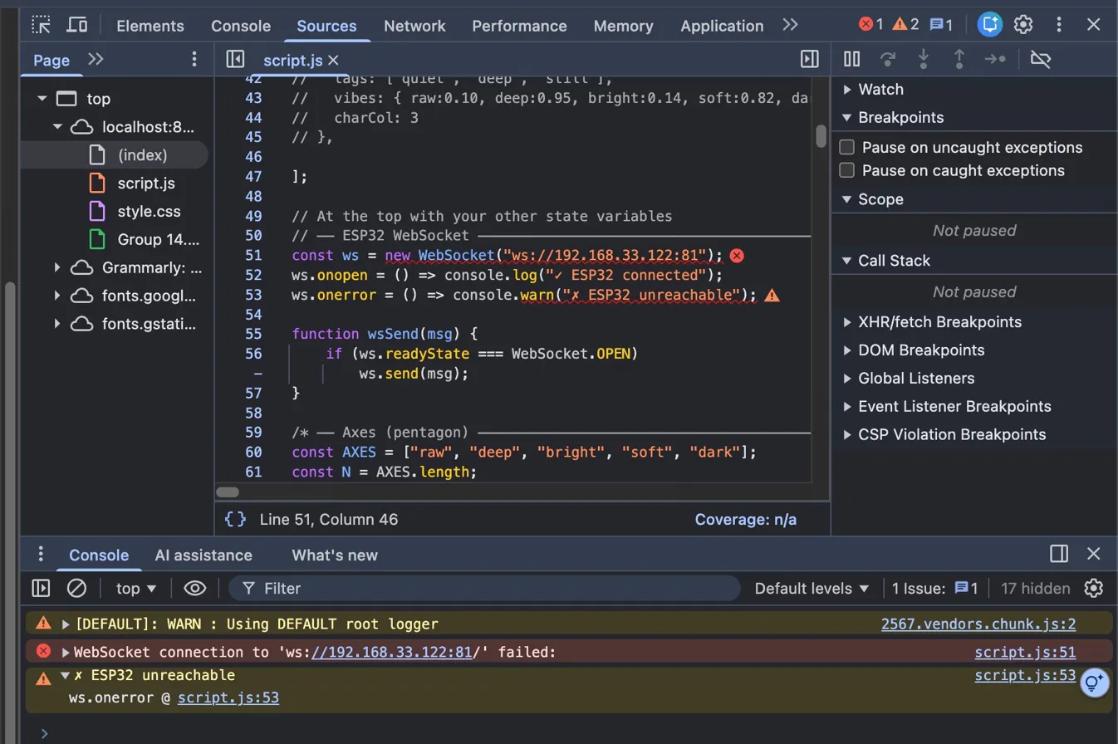 Then i asked claude why this was happening and turns out i had to run the website over a local HTTP server
or Chrome blocks WebSocket connections from file:// URLs for security reasons. Running the website on a local HTTP server allows the WebSocket connection to be established successfully.
Then i asked claude why this was happening and turns out i had to run the website over a local HTTP server
or Chrome blocks WebSocket connections from file:// URLs for security reasons. Running the website on a local HTTP server allows the WebSocket connection to be established successfully.  After this the connection was successful and the website was running smoothly!
 Seek and Scrub Effect
What i was trying to build was a vinyl turntable scrubbing effect. To rotate the disk forward and the song fast-forwards, rotate it backward and it rewinds, release and it plays from exactly that point. Simple in concept, surprisingly tricky in practice.
So i implemented the seek and scrub effect by sending DIAL:angle commands from the UI to the ESP32-S3 whenever the user interacts with the dial. The ESP32-S3 then calculates the corresponding position in the audio track based on the angle and seeks to that position in the audio file. This allows for real-time scrubbing through the track as the user rotates the dial, creating a vinyl turntable-like experience.
But turns out it was not as easy as it thought. Initial challenge was that the canvas dial tracks rotation as an angle between 0° and 360°. Every time it crossed the 360°/0° boundary it reset, so the ESP32 would receive DIAL:350 then suddenly DIAL:5.
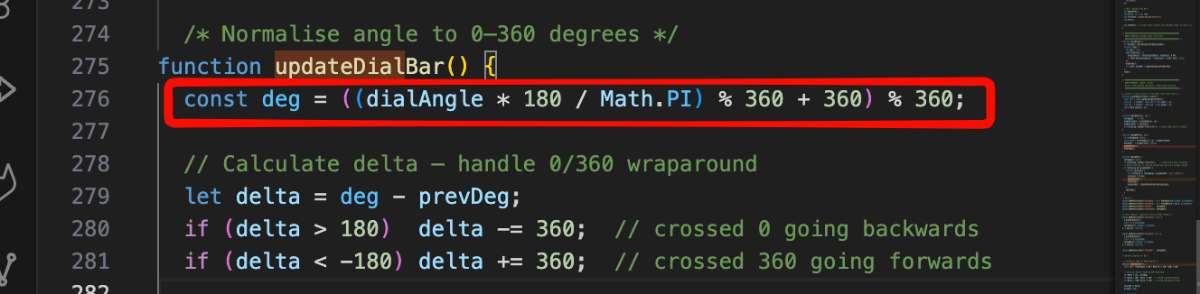
To correct this i implemented track accumulated total rotation instead of raw angle. Every frame we calculate the change from the previous frame and add it to a running total. i.e 360+360+... , So spinning two full turns gives totalDeg = 720, not DIAL:360 reset to DIAL:0.
Also to find the song's length what we did is before playing each track we opened the file on SD card, read its file size and calculated the total duration using the mathematically. For a 16-bit mono 44100Hz WAV file, every second of audio is exactly 88200 bytes. So duration = (fileSize - 44) / 88200 — the 44 being the WAV header size. No callback needed, no parsing, always accurate.
Now, when it came to the actual scrub and seek implementation, everytime this was triggered, the music just continued from where it was initially paused from, completely ignoring the commands and no error was given as output.
So then i asked claude to simplify it to a direct 1:1 mapping where 1 degree = 1 second.
(prompt - The song pauses and all but its not rewinding when i scrub, i.e, the song is not moving according to the disk angle and does not give out outputs from where the disk is being rotated to whether it be forward or backward. let each rotating angle be 1s of the song and when you scrub back the esp shouldbe able to detect which timing of the song is to be played and then should start from there)
What I wrote vs what Claude generated
I want to be honest about this, because my instructor rightly asked where the line is. I did use Claude a lot this week, especially for the first drafts of the UI code and the firmware boilerplate. But using it wasn't "type a prompt, paste the answer." The parts that actually made this project work came from me noticing what was wrong and directing the fix. Here's the split:
- AI-generated (starting point): the initial HTML/CSS/JS for the interface, the WebSocket boilerplate, and the first version of the scrub logic. Left on its own, none of it actually worked for my hardware, the UI needed many rounds of my own references and rejections before it looked right, and the scrub code ignored the dial completely.
- My own diagnosis and decisions: I was the one who figured out which layer each bug lived in. When PlatformIO kept failing its toolchain download, I made the call to abandon it and move to Arduino IDE. When ESP32Synth needed me to edit its source file directly — which I could see was fragile, I decided to drop it and switch to ESP32-audioI2S instead. Those were judgment calls, not generated answers.
- The bug I actually solved myself: the dial resetting at the 360°/0° boundary. I could see from the values (DIAL:350 then suddenly DIAL:5) that the raw angle was the problem, and I worked out that I needed to accumulate total rotation across frames instead. Once I understood that, the accumulation was the real fix — Claude only helped me tidy the mapping afterwards.
- The maths I reasoned out: calculating track length from file size —
duration = (fileSize - 44) / 88200for 16-bit mono 44.1kHz WAV. I understood why (88200 bytes per second, 44-byte header) rather than asking for a black-box function, which is why I could trust it was always accurate. - How I used the generated code: I treated Claude's output as a rough draft to read and understand, not a final answer. Every time something didn't work I traced it back to the layer responsible, then either fixed it myself or asked a much more specific question because I now knew what was actually wrong.
So the honest answer to "when is AI acceptable?" for me this week is: it was fine for boilerplate and first drafts, but the project only came together because I understood the system well enough to know when the generated code was wrong and what to do instead.
Code Snippet:
In Arduino .ino file
// ── Scrub / seek state ────────────────────────────────────
uint32_t songDurSec  = 0;    // total track duration in seconds
bool     isScrubbing = false; // true while user is dragging the dial
The seek command handler (inside onWebSocketEvent, after other else if blocks):
else if (msg == "SCRUB_START") {
  // User grabbed the dial in the UI
  // Pause audio immediately so scrubbing feels responsive
  isScrubbing = true;
  if (audio.isRunning()) audio.pauseResume();
}

else if (msg == "SCRUB_END") {
  // User let go of the dial
  // Resume playback from wherever the last DIAL: command seeked to
  isScrubbing = false;
  if (!audio.isRunning()) audio.pauseResume();
}

else if (msg.startsWith("DIAL:")) {
  // Only process dial messages while user is actively scrubbing
  if (!isScrubbing) return;

  // The UI sends ACCUMULATED degrees — not raw 0-360.
  // Spinning past 360° keeps counting: 361, 362 ... 720 etc.
  // This avoids the jump-back-to-zero problem at the boundary.
  //
  // Mapping is simple: 1 degree = 1 second of audio.
  // DIAL:0   → start of song
  // DIAL:90  → 90 seconds in
  // DIAL:300 → 300 seconds in

  float   accumulatedDeg = msg.substring(5).toFloat();
  int32_t seekSec        = (int32_t)(accumulatedDeg);

  // Clamp so we never seek before 0 or past the end
  seekSec = constrain(seekSec, 0, (int32_t)songDurSec);

  Serial.printf("Seek → %d / %d sec\n", seekSec, songDurSec);

  // connecttoFS with a third argument restarts decoding
  // from that second offset — this is the actual seek call
  audio.connecttoFS(SD, trackPaths[currentTrack].c_str(), seekSec);
}
Duration calculation (inside startTrack(), before calling audio.connecttoFS):
// Calculate track duration from file size BEFORE playing.
// This lets the UI know total length immediately on track load
// without waiting for the decoder to report it.
//
// Formula: (fileSize - 44) / 88200
//   44     = WAV header size in bytes (always fixed)
//   88200  = bytes per second for mono · 16-bit · 44100 Hz WAV

File f = SD.open(trackPaths[i].c_str());
if (f) {
  uint32_t fileSize = f.size();
  f.close();
  if (fileSize > 44) {
    songDurSec = (fileSize - 44) / 88200;
    // Send duration to browser so dial knows its full range
    String msg = "DURATION:" + String(songDurSec);
    webSocket.broadcastTXT(msg);
    Serial.printf("Duration: %d sec\n", songDurSec);
  }
}
script.js file — the dial side that sends these commands:
// Track accumulated rotation (never resets at 360°)
let totalDeg = 0;
let prevDeg  = 0;

canvas.addEventListener("mousedown", e => {
  prevDeg = getCurrentAngleDeg(e);  // record starting angle
  ws.send("SCRUB_START");           // tell ESP32 to pause
});

canvas.addEventListener("mousemove", e => {
  if (!isDragging) return;
  const cur   = getCurrentAngleDeg(e);
  let   delta = cur - prevDeg;

  // Handle the 360→0 wrap: if jump > 180 it crossed the boundary
  if (delta >  180) delta -= 360;
  if (delta < -180) delta += 360;

  totalDeg += delta;   // accumulate — never resets
  prevDeg   = cur;

  ws.send("DIAL:" + totalDeg.toFixed(1));  // send to ESP32
});

canvas.addEventListener("mouseup", () => {
  ws.send("SCRUB_END");   // tell ESP32 to resume from seeked position
});

// Helper: get pointer angle in degrees from canvas centre
function getCurrentAngleDeg(e) {
  const rect = canvas.getBoundingClientRect();
  const dx   = e.clientX - (rect.left + rect.width  / 2);
  const dy   = e.clientY - (rect.top  + rect.height / 2);
  return Math.atan2(dy, dx) * (180 / Math.PI);
}
Hero Shot
Simple, intuitive, and easy to reason about.
Click below to experience the Interface:
▶ Launch PixelJam UI
What I Learned
- Know when to switch tools. PlatformIO and ESP32Synth were fine on paper but wrong for my situation, letting go of them earlier would have saved hours.
- Debug by layer. Embedded work is less about fixing code and more about isolating which layer the bug lives in : hardware, firmware, library, browser or network. Once I knew the layer, the fix was usually small.
- Understand the code, don't just run it. Working with AI-generated code taught me that I have to actually read and understand it, because I'm the one who has to spot when it's wrong (like the scrub ignoring the dial).
- Small protocols beat clever ones. Sending simple text commands (DIAL:angle) and a clean 1:1 mapping of 1° = 1 second was far easier to reason about and debug than anything fancier.
- Browser security is real. Chrome blocks WebSocket connections from file:// URLs, so the site has to run on a local HTTP server.
Conclusion
My first realisation was that the most useful skill in this kind of project is knowing when to stop fighting something and switch to a different approach.Staying in PlatformIO and sticking with ESP32Synth, both were the right tools on paper but the wrong tools for this specific situation at this specific moment. Letting go of them earlier would have saved hours.debugging embedded systems is less about fixing code and more about isolating which layer the problem lives in. Is it the hardware? The firmware? The library? The browser? The network? Once you know which layer, the fix is usually simple. Getting there is the hard part.
The scrub and seek feature, rotating the disk to move through a song like a real vinyl record was the most satisfying thing to get working. Not because it's technically complex, but because it required understanding the entire chain from finger movement on screen, to angle calculation in JavaScript, to WebSocket message, to file position calculation. Every single layer had to be right at the same time.
What i have done is not perfect. The background texture isn't quite right, the scrub could be smoother, and the track names are still hardcoded. But it plays music from a card through a speaker I soldered onto a board I designed, controlled by a website I built, communicating over WiFi in real time. For week 14, that feels like enough.
Final Files
pixeljam-arduino.zip
pixeljam-ui.zip
Audio Files