15.1.0
INTRODUCTION
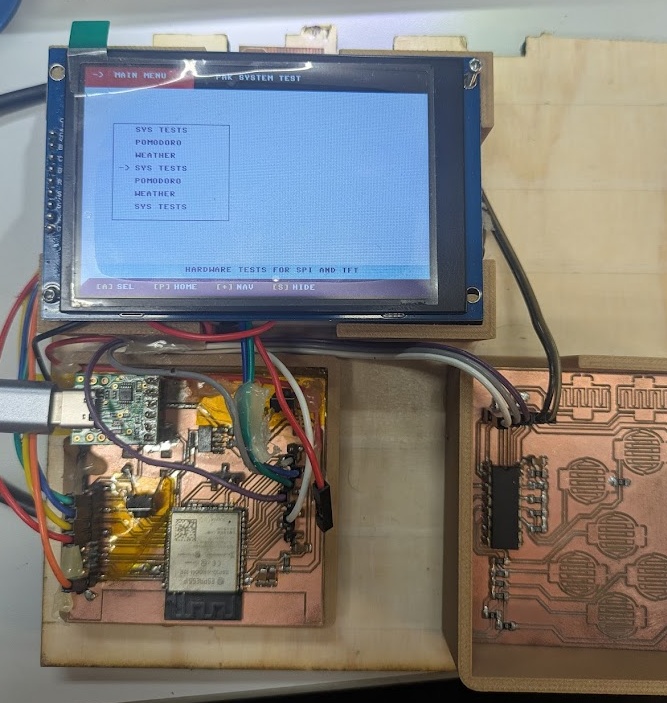
It's Golden Week here in Japan, and my classmates and I took a quick trip out to Okayama for the weekend to help on a renovation project on an old Japanese house. This was a perfect opportunity to test out my now semi-portable dev kit and write some software! After gluing all of my components down and packing it up in a cardboard box with some bubblewrap, I caught the Shinkansen to Okayama!
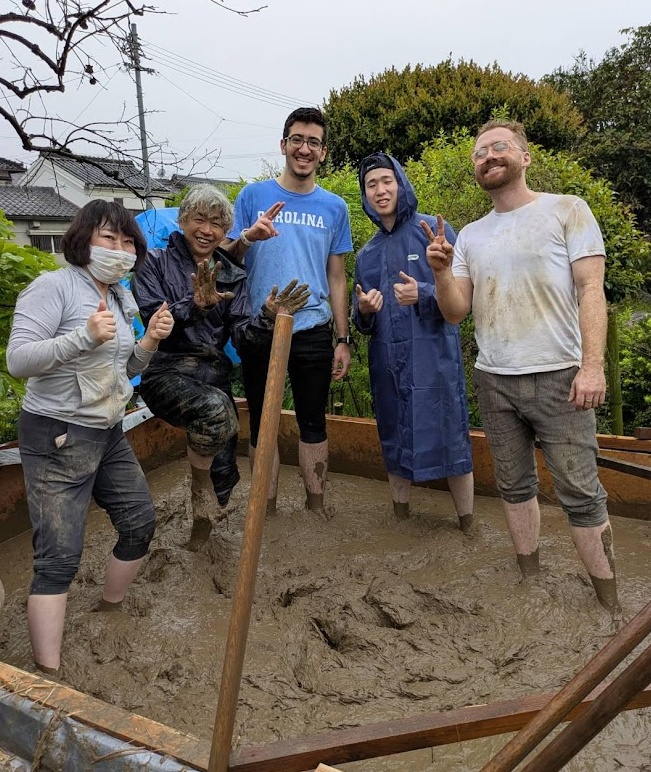
Thanks to my portable PAK station, this week marked a big jump forward on getting my final project fully realized. I successfully built a complete Hardware Abstraction Layer (HAL), a modular UI component library that will form the basis of the UI/UX, and three distinct applications that prove the viability of my final project and hopefully lay the ground work for getting this thing done in 5 weeks!
You can read about what my group members did at Kannai in other programming environments over on the group assignment page.
[] Group Assignment: Compare as many tool options as possible.
[] Document your work on the group work page and reflect on your individual page what you learned.
[x] Write an application for the embedded board that you made. that interfaces a user with an input and/or output device(s)
Development Stack
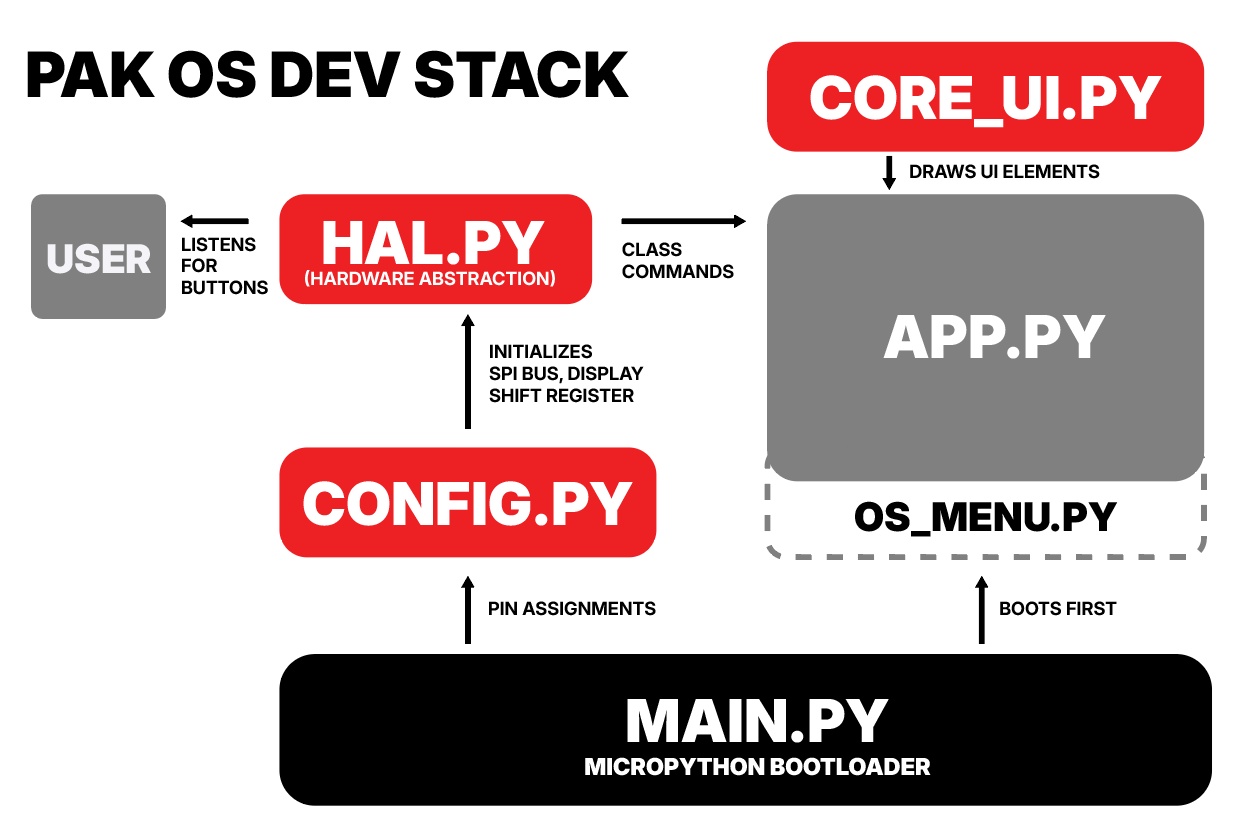
My final project is meant to be a fully fledged device, and although the concept is about keeping it a dumb device, we still need quite a lot of software running to get it all working. For Fab Academy, I really wanted to push my understanding of Object Oriented Programming, and develop the PAK around a series of classes and objects that could be reused across the applications I design and updated easily in future spirals. After doing a lot of YouTube watching and chatting with Gemini, I determined that this would be the software stack needed to get things running on the device.
➔ "EMULATION"
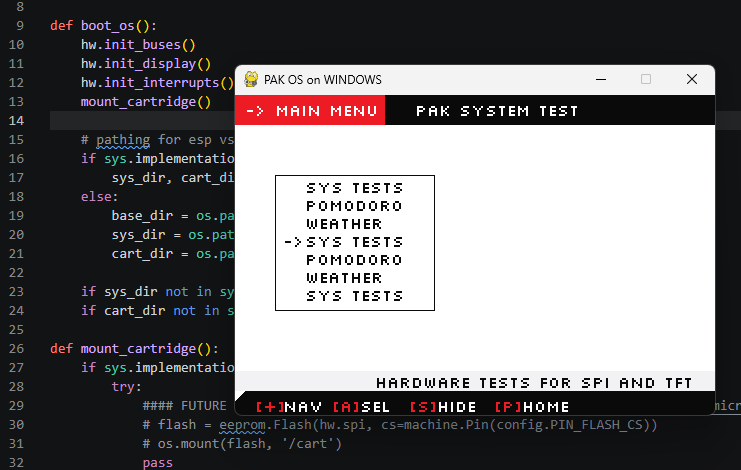
Because my second spiral board is essentially just a breadboard on steroids, I've already run into a lot of issues with solder joints and pins becoming unreliable or completely breaking. Seeing as my board barely survived my trip to Okayama, I decided that I would want to create a way that I could test and dev the UI and UX on my PC instead of always on the ESP32. The way this is done is very simple, there's just a duplicate set of classes in my Hardware Abstraction Layer that defines where data should be sent if I'm running the script on a PC versus running it on the ESP. At the start, the script checks to see what environment it's in, if it's on a PC, it spins up a Pygame window and maps my keyboard to the hardware bitmasks.
 15.3.0
MicroPython
As a reminder, I'm using MicroPython to create applications, as Python is the language I'm most comfortable with and the language I teach my students at work - so again, I want to become more proficient. Let's break down each script and what it does.
➔ MAIN.PY
main.py is the default script that is run in MicroPython flashed devices. This script is the shortest, and essentially exists just to hand off the CPU to the different scripts loaded on the device. The default app it runs is the os_menu.py app that essentially runs like any other application and is flushed from the memory when we boot another script. Before the os_menu.py script is run, this script quickly checks the directories to find any other python scripts to list in the home screen. This is something I will revisit once I get my third spiral board milled and completed, since I will be saving and loading a lot of this data off the W25Q128JV SPI flash memory chips I ordered.
import gc
import sys
import os
from hal import hw, QuitToMenuException
import os_menu
import ui_core

def boot_os():
    hw.init_buses()
    hw.init_display()
    hw.init_interrupts()
    mount_cartridge()

    # pathing for esp vs pc
    if sys.implementation.name == 'micropython':
        sys_dir, cart_dir = '/sys_apps', '/cart'
    else:
        base_dir = os.path.dirname(os.path.abspath(__file__))
        sys_dir = os.path.join(base_dir, 'sys_apps')
        cart_dir = os.path.join(base_dir, 'cart')

    if sys_dir not in sys.path: sys.path.append(sys_dir)
    if cart_dir not in sys.path: sys.path.append(cart_dir)

def mount_cartridge():
    if sys.implementation.name == 'micropython':
        try:
            #### FUTURE CODE FOR THE FLASH MEMORY USING https://github.com/peterhinch/micropython_eeprom/tree/master/flash
            # flash = eeprom.Flash(hw.spi, cs=machine.Pin(config.PIN_FLASH_CS))
            # os.mount(flash, '/cart')
            pass
        except Exception as e:
            print(f"Cartridge mount failed: {e}")

def run_application(app_name):
    if sys.implementation.name == 'micropython':
        os.chdir('/')

    try:
        app_module = __import__(app_name)
        app_module.main()
    except QuitToMenuException:
        pass
    except ImportError as e:
        print(f"Could not load app '{app_name}': {e}")
    except Exception as e:
        print(f"App error: {e}")
    finally:
        if app_name in sys.modules:
            del sys.modules[app_name]
        gc.collect()

boot_os()

while True:
    hw.p_interrupts_enabled = False
    hw.overlay_hook = None

    selected_app = os_menu.run()

    if selected_app:
        hw.p_interrupts_enabled = True
        hw.overlay_hook = ui_core.SystemOverlay.show_quit_dialog
        run_application(selected_app)
➔ HAL.PY
HAL stands for Hardware Abstraction Layer. This script detects the environment and initializes the buses and pins that I have defined in the config.py script. If it's on the ESP32, it initializes the SPI bus, ST7796 display, and the 74HC165 shift register for the controls. If on a PC, it spins up a Pygame window and maps my keyboard to the hardware bitmasks.
import sys

class QuitToMenuException(Exception):
    pass

#esp MODE
if sys.implementation.name == 'micropython':
    import machine
    import micropython
    import framebuf
    from st7796 import ST7796
    import config

    class Canvas:
        def __init__(self, width, height):
            self.width = width
            self.height = height
            self.buf = bytearray(width * height * 2)
            self.fb = framebuf.FrameBuffer(self.buf, width, height, framebuf.RGB565)

        def _to_int(self, c):
            return int.from_bytes(c, 'big') if isinstance(c, bytes) else c

        def fill(self, color): self.fb.fill(self._to_int(color))
        def rect(self, x, y, w, h, color): self.fb.rect(x, y, w, h, self._to_int(color))
        def hline(self, x, y, w, color): self.fb.hline(x, y, w, self._to_int(color))
        def text(self, txt, x, y, color): self.fb.text(txt, x, y, self._to_int(color))

    class HardwareManager:
        def __init__(self):
            self.spi = None
            self.display = None
            self.sr_latch = None
            self.sr_clock = None
            self.sr_data = None
            self.sys_timer = None
            self._quit_exc = QuitToMenuException()
            self.overlay_hook = None
            self._is_in_overlay = False
            self.p_interrupts_enabled = False

            self.c_bg = b'\x00\x00'
            self.c_wire = b'\x00\x00'
            self.c_hl = b'\x00\x00'
            self.c_wht = b'\x00\x00'

        def init_buses(self):
            self.spi = machine.SPI(
                2, baudrate=80000000, polarity=0, phase=0,
                sck=machine.Pin(config.PIN_SPI_CLK),
                mosi=machine.Pin(config.PIN_SPI_MOSI),
                miso=machine.Pin(config.PIN_SPI_MISO)
            )
            self.sr_latch = machine.Pin(config.PIN_SR_LATCH, machine.Pin.OUT)
            self.sr_clock = machine.Pin(config.PIN_SR_CLOCK, machine.Pin.OUT)
            self.sr_data  = machine.Pin(config.PIN_SR_DATA, machine.Pin.IN)
            self.sr_latch.value(1)
            self.sr_clock.value(0)

        def init_display(self):
            tft_cs = machine.Pin(config.PIN_TFT_CS, machine.Pin.OUT)
            tft_dc = machine.Pin(config.PIN_TFT_DC, machine.Pin.OUT)
            tft_rst = machine.Pin(config.PIN_TFT_RST, machine.Pin.OUT)

            self.display = ST7796(
                self.spi, width=config.TFT_WIDTH, height=config.TFT_HEIGHT,
                reset=tft_rst, dc=tft_dc, cs=tft_cs
            )
            self.display.init(landscape=True, mirror_x=False, is_bgr=True)

            self.c_bg   = self.display.color(*config.COLOR_BG)
            self.c_wire = self.display.color(*config.COLOR_WIRE)
            self.c_hl   = self.display.color(*config.COLOR_HL)
            self.c_wht  = self.display.color(*config.COLOR_WHITE)

        @micropython.native
        def read_buttons(self):
            self.sr_latch.value(0)
            self.sr_latch.value(1)
            state = 0
            for i in range(8):
                bit = not self.sr_data.value()
                state |= (bit << i)
                self.sr_clock.value(1)
                self.sr_clock.value(0)
            return state

        def init_interrupts(self):
            self.sys_timer = machine.Timer(0)
            self.sys_timer.init(period=50, mode=machine.Timer.PERIODIC, callback=self._timer_isr)

        def _timer_isr(self, timer):
            if self.read_buttons() & config.BTN_P:
                micropython.schedule(self._trigger_quit, 0)

        def _trigger_quit(self, _):
            if not self.p_interrupts_enabled or self._is_in_overlay:
                return
            self._is_in_overlay = True
            if self.overlay_hook:
                should_quit = self.overlay_hook()
                self._is_in_overlay = False
                if should_quit:
                    raise self._quit_exc
            else:
                self._is_in_overlay = False
                raise self._quit_exc

        def draw_canvas(self, canvas, x, y):
            self.display.set_window(x, y, x + canvas.width - 1, y + canvas.height - 1)
            self.display.write(None, canvas.buf)

#PC MODE
else:
    import pygame
    import time
    import config
    pygame.init()

    if not hasattr(time, 'ticks_ms'):
        time.ticks_ms = lambda: int(time.time() * 1000)
        time.ticks_diff = lambda t1, t2: t1 - t2

    class Canvas:
        def __init__(self, width, height):
            self.width = width
            self.height = height
            self.surface = pygame.Surface((width, height))
            self.font = pygame.font.SysFont('silkscreen', 16, bold=False)

        def _to_rgb(self, c):
            return (c[0], c[1], c[2]) if isinstance(c, (bytes, bytearray, list, tuple)) else (0,0,0)

        def fill(self, color):
            self.surface.fill(self._to_rgb(color))

        def rect(self, x, y, w, h, color):
            pygame.draw.rect(self.surface, self._to_rgb(color), (x, y, w, h), 1)

        def hline(self, x, y, w, color):
            pygame.draw.line(self.surface, self._to_rgb(color), (x, y), (x + w - 1, y))

        def text(self, txt, x, y, color):
            surf = self.font.render(txt, False, self._to_rgb(color))
            self.surface.blit(surf, (x, y))

    class DisplayEmulator:
        def __init__(self):
            self.width = config.TFT_WIDTH
            self.height = config.TFT_HEIGHT
            self.screen = pygame.display.set_mode((self.width, self.height))
            pygame.display.set_caption("PAK OS on WINDOWS")
            self.font = pygame.font.SysFont('silkscreen', 16, bold=False)

        def init(self, **kwargs):
            self.screen.fill((0, 0, 0))
            pygame.display.flip()

        def color(self, r, g, b):
            return (r, g, b)

        def fill(self, color):
            self.screen.fill(tuple(color))
            pygame.display.flip()

        def rect(self, x, y, w, h, color, fill=False):
            if fill:
                pygame.draw.rect(self.screen, tuple(color), (x, y, w, h))
            else:
                pygame.draw.rect(self.screen, tuple(color), (x, y, w, h), 1)
            pygame.display.update(pygame.Rect(x, y, w, h))

        def hline(self, x0, x1, y, color):
            pygame.draw.line(self.screen, tuple(color), (x0, y), (x1, y))
            pygame.display.update(pygame.Rect(min(x0, x1), y, abs(x1 - x0) + 1, 1))

        def text(self, x, y, txt, fgcolor, bgcolor):
            surf = self.font.render(txt, False, tuple(fgcolor), tuple(bgcolor))
            self.screen.blit(surf, (x, y))
            pygame.display.update(pygame.Rect(x, y, surf.get_width(), surf.get_height()))

    class HardwareManager:
        def __init__(self):
            self.display = None
            self._quit_exc = QuitToMenuException()
            self.overlay_hook = None
            self._is_in_overlay = False
            self.p_interrupts_enabled = False

            # Default emulator colors
            self.c_bg = (0,0,0)
            self.c_wire = (200,200,200)
            self.c_hl = (255,0,0)
            self.c_wht = (255,255,255)

        def init_buses(self): pass

        def init_display(self):
            self.display = DisplayEmulator()
            self.display.init()
            self.c_bg   = self.display.color(*config.COLOR_BG)
            self.c_wire = self.display.color(*config.COLOR_WIRE)
            self.c_hl   = self.display.color(*config.COLOR_HL)
            self.c_wht  = self.display.color(*config.COLOR_WHITE)

        def read_buttons(self):
            pygame.event.pump()
            for event in pygame.event.get():
                if event.type == pygame.QUIT:
                    pygame.quit()
                    sys.exit()
            keys = pygame.key.get_pressed()
            state = 0
            if keys[pygame.K_UP]:    state |= config.BTN_UP
            if keys[pygame.K_DOWN]:  state |= config.BTN_DOWN
            if keys[pygame.K_LEFT]:  state |= config.BTN_LEFT
            if keys[pygame.K_RIGHT]: state |= config.BTN_RIGHT
            if keys[pygame.K_a]:     state |= config.BTN_A
            if keys[pygame.K_b]:     state |= config.BTN_B
            if keys[pygame.K_s]:     state |= config.BTN_START
            if keys[pygame.K_p]:
                state |= config.BTN_P
                if self.p_interrupts_enabled and not self._is_in_overlay:
                    self._is_in_overlay = True
                    if self.overlay_hook:
                        should_quit = self.overlay_hook()
                        self._is_in_overlay = False
                        if should_quit:
                            raise self._quit_exc
                    else:
                        self._is_in_overlay = False
                        raise self._quit_exc
            return state

        def init_interrupts(self): pass

        def draw_canvas(self, canvas, x, y):
            self.display.screen.blit(canvas.surface, (x, y))
            pygame.display.update(pygame.Rect(x, y, canvas.width, canvas.height))

hw = HardwareManager()
I also implemented a global system interrupt. Pressing the physical "P" button instantly pauses the active application's execution thread and overlays a dialog box asking the user to confirm if they want to quit. If confirmed, it cleanly shatters the app and drops back to the OS menu.
➔ UI_CORE.PY
If you've been following my journey so far, or have gathered by the aesthetics of this page, I am really into graphic design - and designing a sleek and consistent UI for the PAK has always been a top priority for the final project, even if it looks a little rough around the edges at first. I started by creating some mockup screens in Illustrator and then starting piecing objects in Python using a Canvas class that is defined in hal.py which can draw simple shapes on the screen given x, y coordinates, width and height and a colour.
.png)
.png)
.png)
.png)
.png)
I built reusable object-oriented UI classes in a script called ui_core.py that other applications can call from. This includes the ControlsBar (showing dynamic button mappings), the ContextBar (for descriptions), and the NavCarousel (a sliding menu that loops around, if you notice duplicates - it's intentional!).
The NavCarousel class is designed to intentionally to slide in from the left side of the screen when the 'Start' button is pressed, rendering over the active application.
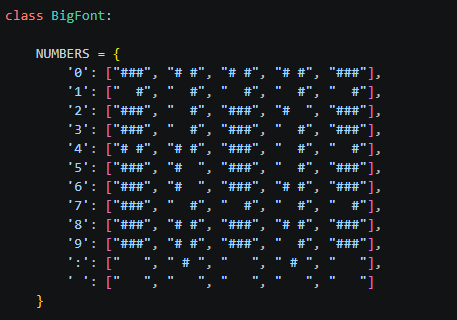
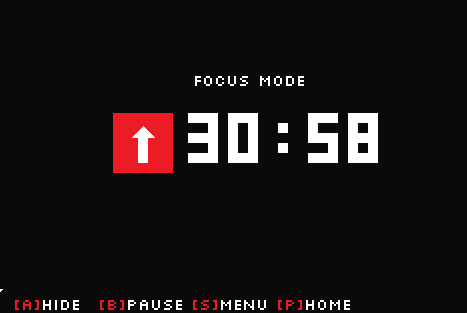
I also built a custom BigFont rendering engine to draw chunky, scalable LCD-style digits without needing to load external .ttf files. I did this by just creating an array of 3 pixel rows and drawing them equal distant apart.
from hal import hw, Canvas
import config

class ControlsBar:
    def __init__(self):
        self.height = 24
        self.y = config.TFT_HEIGHT - self.height
        self.width = config.TFT_WIDTH
        self.canvas = Canvas(self.width, self.height)

    def draw(self, button_dict):
        self.canvas.fill(hw.c_bg)
        for i in range(10):
            self.canvas.hline(0, i, 10 - i, hw.c_wht)

        x_offset = 20
        for btn, label in button_dict.items():
            self.canvas.text(f"[{btn}]", x_offset, 8, hw.c_hl)
            x_offset += (len(btn) * 8) + 20

            self.canvas.text(label, x_offset, 8, hw.c_wht)
            x_offset += (len(label) * 8) + 25

        # blast it to this friggen crappy screen
        hw.draw_canvas(self.canvas, 0, self.y)


## CONTEXT BAR ##
## GREY BAR FOR SUBTITLE TEXT ON CAROUSEL NAV OR OTHER MENUS ##
## TO DO: add scrolling text ##

class ContextBar:
    def __init__(self):
        self.height = 20
        self.y = config.TFT_HEIGHT - 24 - self.height
        self.width = config.TFT_WIDTH
        self.canvas = Canvas(self.width, self.height)

    def draw(self, text):
        self.canvas.fill(hw.c_wire)
        if text:
            text_w = len(text) * 8
            x_pos = self.width - text_w - 100
            self.canvas.text(text, x_pos, 4, hw.c_bg)
        hw.draw_canvas(self.canvas, 0, self.y)

class NavCarousel:
    def __init__(self, x, y, width):
        self.default_x = x
        self.x = x
        self.y = y
        self.width = width
        self.item_height = 18
        self.visible_items = 7
        self.height = self.visible_items * self.item_height + 10
        self.canvas = Canvas(self.width, self.height)
        self.is_open = True

    def get_view(self, items, center_idx):
        view = []
        half = self.visible_items // 2
        for i in range(-half, half + 1):
            wrapped_idx = (center_idx + i) % len(items)
            view.append(items[wrapped_idx])
        return view

    def draw(self, items, current_idx):
        self.canvas.fill(hw.c_wht)
        self.canvas.rect(0, 0, self.width, self.height, hw.c_bg)
        view = self.get_view(items, current_idx)

        for i, item_name in enumerate(view):
            y_pos = 5 + (i * self.item_height)
            if i == 3:
                self.canvas.text("->", 8, y_pos, hw.c_bg)
            self.canvas.text(item_name, 30, y_pos, hw.c_bg)

        hw.draw_canvas(self.canvas, self.x, self.y)


    #animation - need to debug this on real hardware
    def toggle(self, items, current_idx, bg_color):
        half_x = self.default_x // 2

        if self.is_open:
            #f1
            hw.display.rect(half_x + self.width, self.y, self.default_x - half_x, self.height, bg_color, fill=True)
            self.x = half_x
            self.draw(items, current_idx)

            #f2
            hw.display.rect(self.width, self.y, half_x, self.height, bg_color, fill=True)
            self.x = 0
            self.draw(items, current_idx)

            #f3
            hw.display.rect(0, self.y, self.width, self.height, bg_color, fill=True)
            self.is_open = False
        else:
            #f1
            self.x = 0
            self.draw(items, current_idx)

            #f2
            hw.display.rect(0, self.y, half_x, self.height, bg_color, fill=True)
            self.x = half_x
            self.draw(items, current_idx)

            #f3
            hw.display.rect(half_x, self.y, self.default_x - half_x, self.height, bg_color, fill=True)
            self.x = self.default_x
            self.draw(items, current_idx)
            self.is_open = True


### BIG FONT
### TEMPORARY until we bitmap out fonts for the system

class BigFont:

    NUMBERS = {
        '0': ["###", "# #", "# #", "# #", "###"],
        '1': ["  #", "  #", "  #", "  #", "  #"],
        '2': ["###", "  #", "###", "#  ", "###"],
        '3': ["###", "  #", "###", "  #", "###"],
        '4': ["# #", "# #", "###", "  #", "  #"],
        '5': ["###", "#  ", "###", "  #", "###"],
        '6': ["###", "#  ", "###", "# #", "###"],
        '7': ["###", "  #", "  #", "  #", "  #"],
        '8': ["###", "# #", "###", "# #", "###"],
        '9': ["###", "# #", "###", "  #", "###"],
        ':': ["   ", " # ", "   ", " # ", "   "],
        ' ': ["   ", "   ", "   ", "   ", "   "]
    }

    @staticmethod
    def draw(canvas, text, start_x, start_y, color, scale=5):
        x_offset = start_x
        for char in text:
            if char in BigFont.NUMBERS:
                matrix = BigFont.NUMBERS[char]
                for row_idx, row in enumerate(matrix):
                    for col_idx, pixel in enumerate(row):
                        if pixel == '#':
                            for dy in range(scale):
                                canvas.hline(
                                    x_offset + (col_idx * scale),
                                    start_y + (row_idx * scale) + dy,
                                    scale,
                                    color
                                )
                x_offset += (4 * scale)
            else:
                x_offset += (4 * scale)


## P BUTTON OVERLAY
## OPENS MENU WHEN P BUTTON IS PRESSED

class SystemOverlay:
    @staticmethod
    def show_quit_dialog():
        import time

        #debounce
        while hw.read_buttons() & config.BTN_P:
            time.sleep(0.05)

        box_w, box_h = 260, 100
        x = (config.TFT_WIDTH - box_w) // 2
        y = (config.TFT_HEIGHT - box_h) // 2

        #box
        canvas = Canvas(box_w, box_h)
        canvas.fill(hw.c_bg)
        canvas.rect(0, 0, box_w, box_h, hw.c_wht)
        canvas.text("PAK SYSTEM", 60, 20, hw.c_hl)
        canvas.hline(20, 35, box_w - 40, hw.c_wht)
        canvas.text("QUIT APPLICATION?", 55, 50, hw.c_wht)
        canvas.text("[A] YES    [B] NO", 55, 75, hw.c_wire)

        hw.draw_canvas(canvas, x, y)

        while True:
            state = hw.read_buttons()
            if state & config.BTN_A:
                return True
            if state & config.BTN_B:
                return False
            time.sleep(0.05)


controls = ControlsBar()
context = ContextBar()
Applications
With the foundation of my "operating system" ready to go, I could start building applications. I set my goal of coding 2 apps this week, and I more or less met that goal depending on how you define "complete".
➔ POMODORO
This is the first true "productivity" cartridge for the PAK, and it's a revisit of an application I already developed back in Week 4. It is built on a Finite State Machine (FSM) that manages transitions between focusing and resting.
Users can set custom durations for both "Focus" (in 5-minute increments) and "Break" (in 1-minute increments). These configurations are saved directly to the device using local JSON storage (pomodoro_cfg.json). To minimize distractions, the user can press 'A' to hide the countdown, leaving only a black screen with a small "FOCUS MODE ACTIVE" indicator.
APP_DESC = "Take Breaks from Hyperfocus"

import time
import json
import os
from hal import hw, Canvas, QuitToMenuException
import ui_core
import config

CONFIG_FILE = "pomodoro_cfg.json"

class PomodoroApp:
    def __init__(self):
        self.cfg = self.load_config()

        # carousel
        self.menu_items = ["START", "FOCUS SET", "BREAK SET", "SAVE", "QUIT"]
        self.carousel = ui_core.NavCarousel(40, 80, 160)
        self.menu_sel = 0

        # timer states
        self.mode = "FOCUS" # "FOCUS", "BREAK"
        self.state = "MENU" # "MENU", "TIMER", "SET_FOCUS", "SET_BREAK", "ALARM"
        self.time_left = self.cfg['focus'] * 60
        self.is_paused = True
        self.is_hidden = False
        self.last_tick = time.ticks_ms()
        self.alarm_flash = False
        self.last_flash = time.ticks_ms()

    #loading configs from file
    def load_config(self):
        try:
            with open(CONFIG_FILE, 'r') as f:
                return json.load(f)
        except Exception:
            return {"focus": 40, "break": 5}

    def save_config(self):
        try:
            with open(CONFIG_FILE, 'w') as f:
                json.dump(self.cfg, f)
        except Exception as e:
            print(f"Save failed: {e}")

    def get_menu_desc(self):
        descs = [
            f"START {self.cfg['focus']}M FOCUS / {self.cfg['break']}M BREAK",
            f"SET FOCUS DURATION (CURRENT: {self.cfg['focus']}M)",
            f"SET BREAK DURATION (CURRENT: {self.cfg['break']}M)",
            "SAVE SETTINGS TO LOCAL MEMORY",
            "EXIT TO MAIN MENU"
        ]
        return descs[self.menu_sel]

    def draw_timer_icon(self, x, y, is_focus):
        """Draws the red rounded-square with the UP or DOWN arrow."""
        hw.display.rect(x, y, 60, 60, hw.c_hl, fill=True)

        if is_focus:
            hw.display.rect(x + 25, y + 25, 10, 25, hw.c_wht, fill=True)
            for i in range(12):
                hw.display.hline(x + 30 - i, x + 30 + i, y + 13 + i, hw.c_wht)
        else:
            hw.display.rect(x + 25, y + 10, 10, 25, hw.c_wht, fill=True)
            for i in range(12):
                hw.display.hline(x + 30 - i, x + 30 + i, y + 47 - i, hw.c_wht)

    def render(self):

        # bg
        bg_color = hw.c_bg if self.mode == "FOCUS" else hw.c_wire
        fg_color = hw.c_wht if self.mode == "FOCUS" else hw.c_bg

        if self.state == "ALARM":
            bg_color = hw.c_hl if self.alarm_flash else bg_color
            fg_color = hw.c_wht if self.alarm_flash else fg_color

        hw.display.fill(bg_color)

        # timer/text
        if self.state == "ALARM":
            hw.display.text(200, 150, "TIME IS UP", fg_color, bg_color)

        elif self.state in ["TIMER", "MENU"]:
            if self.is_hidden and not self.carousel.is_open:
                # hidden mode
                msg = "FOCUS MODE ACTIVE" if self.mode == "FOCUS" else "BREAK TIME ACTIVE"
                hw.display.text(20, config.TFT_HEIGHT - 60, msg, fg_color, bg_color)
            else:
                title = "FOCUS MODE" if self.mode == "FOCUS" else "BREAK TIME"
                hw.display.text(200, 80, title, fg_color, bg_color)
                self.draw_timer_icon(120, 120, self.mode == "FOCUS")

                mins = self.time_left // 60
                secs = self.time_left % 60
                time_str = f"{mins:02d}:{secs:02d}"


                scale = 10
                tc_w = len(time_str) * (4 * scale)
                tc_h = 5 * scale

                #buffer
                timer_canvas = Canvas(tc_w, tc_h)
                timer_canvas.fill(bg_color)
                ui_core.BigFont.draw(timer_canvas, time_str, 0, 0, fg_color, scale)
                hw.draw_canvas(timer_canvas, 195, 120)

                if self.is_paused and self.state == "TIMER":
                    hw.display.text(200, 180, "PAUSED", hw.c_hl, bg_color)

        elif self.state in ["SET_FOCUS", "SET_BREAK"]:
            title = "SET FOCUS TIME" if self.state == "SET_FOCUS" else "SET BREAK TIME"
            val = self.cfg['focus'] if self.state == "SET_FOCUS" else self.cfg['break']
            hw.display.text(200, 100, title, fg_color, bg_color)
            hw.display.text(200, 140, f"<  {val} MIN  >", hw.c_hl, bg_color)

        # navcarousel ( from ui_core)
        if self.carousel.is_open:
            self.carousel.draw(self.menu_items, self.menu_sel)
            ui_core.context.draw(self.get_menu_desc())

        # controlsbar ( from ui_core)
        controls = {}
        if self.state == "ALARM":
            controls = {"A": "DISMISS"}
        elif self.state in ["SET_FOCUS", "SET_BREAK"]:
            controls = {"+": "ADJUST", "A": "CONFIRM", "B": "CANCEL"}
        elif self.carousel.is_open:
            controls = {"+": "NAV", "A": "SEL", "S": "HIDE", "P": "HOME"}
        else: # Normal Timer running
            hide_txt = "SHOW" if self.is_hidden else "HIDE"
            pause_txt = "RESUME" if self.is_paused else "PAUSE"
            controls = {"A": hide_txt, "B": pause_txt, "S": "MENU", "P": "HOME"}

        ui_core.controls.draw(controls)

    def run(self):
        self.render()
        last_input_time = time.ticks_ms()

        while True:
            now = time.ticks_ms()
            btn = hw.read_buttons()
            input_allowed = time.ticks_diff(now, last_input_time) > 150

            #alarm math
            if self.state == "ALARM":
                if time.ticks_diff(now, self.last_flash) > 500:
                    self.alarm_flash = not self.alarm_flash
                    self.last_flash = now
                    self.render()

                if btn & config.BTN_A and input_allowed:
                    self.mode = "BREAK" if self.mode == "FOCUS" else "FOCUS"
                    self.time_left = self.cfg[self.mode.lower()] * 60
                    self.state = "TIMER"
                    self.is_paused = True
                    self.render()
                    last_input_time = now
                continue

            if not self.is_paused and self.state == "TIMER":
                if time.ticks_diff(now, self.last_tick) >= 1000:
                    self.time_left -= 1
                    self.last_tick = now
                    if self.time_left <= 0:
                        self.state = "ALARM"
                    self.render()

            #UI state machine
            if input_allowed:
                if self.state in ["SET_FOCUS", "SET_BREAK"]:
                    key = 'focus' if self.state == "SET_FOCUS" else 'break'
                    inc = 5 if self.state == "SET_FOCUS" else 1

                    if btn & config.BTN_UP:
                        self.cfg[key] = min(120, self.cfg[key] + inc)
                        self.render()
                        last_input_time = now
                    elif btn & config.BTN_DOWN:
                        self.cfg[key] = max(1, self.cfg[key] - inc)
                        self.render()
                        last_input_time = now
                    elif btn & config.BTN_A:
                        if self.mode.lower() == key:
                            self.time_left = self.cfg[key] * 60
                        self.state = "MENU"
                        self.carousel.is_open = True
                        self.render()
                        last_input_time = now
                    elif btn & config.BTN_B:
                        self.state = "MENU"
                        self.carousel.is_open = True
                        self.render()
                        last_input_time = now

                elif self.carousel.is_open:
                    if btn & config.BTN_START:
                        self.carousel.toggle(self.menu_items, self.menu_sel, hw.c_bg if self.mode == "FOCUS" else hw.c_wire)
                        self.state = "TIMER"
                        self.render()
                        last_input_time = now
                    elif btn & config.BTN_DOWN:
                        self.menu_sel = (self.menu_sel + 1) % len(self.menu_items)
                        self.render()
                        last_input_time = now
                    elif btn & config.BTN_UP:
                        self.menu_sel = (self.menu_sel - 1) % len(self.menu_items)
                        self.render()
                        last_input_time = now
                    elif btn & config.BTN_A:
                        sel = self.menu_items[self.menu_sel]
                        if sel == "START":
                            self.state = "TIMER"
                            self.is_paused = False
                            self.carousel.toggle(self.menu_items, self.menu_sel, hw.c_bg if self.mode == "FOCUS" else hw.c_wire)
                        elif sel == "FOCUS SET":
                            self.state = "SET_FOCUS"
                            self.carousel.is_open = False
                        elif sel == "BREAK SET":
                            self.state = "SET_BREAK"
                            self.carousel.is_open = False
                        elif sel == "SAVE":
                            self.save_config()
                            ui_core.context.draw("SAVED SUCCESSFULLY")
                            time.sleep(1)
                        elif sel == "QUIT":
                            if ui_core.SystemOverlay.show_quit_dialog():
                                raise QuitToMenuException()
                        self.render()
                        last_input_time = now

                elif self.state == "TIMER":
                    if btn & config.BTN_START:
                        self.carousel.toggle(self.menu_items, self.menu_sel, hw.c_bg if self.mode == "FOCUS" else hw.c_wire)
                        self.state = "MENU"
                        self.render()
                        last_input_time = now
                    elif btn & config.BTN_A:
                        self.is_hidden = not self.is_hidden
                        self.render()
                        last_input_time = now
                    elif btn & config.BTN_B:
                        self.is_paused = not self.is_paused
                        self.render()
                        last_input_time = now

def main():
    app = PomodoroApp()
    app.run()
➔ WEATHER
This is the app that is kind of not really finished, but it exists as a proof of concept and an opportunity to keep playing with the UI. It technically works, but all of the weather data displayed is pre-written by myself and there are no actual API calls being done. That's one of my next goals.
The app features distinct views for "TODAY", "3 DAY", and a "7 DAY" list forecast. I wrote a custom procedural drawing function to generate pixel-art weather icons (suns, clouds, rain) directly using the display's rect and line tools. They don't look that great but they run very fast. I'm going to look into importing bitmaps for a future revision.
The "ROOM" option taps into a physical DHT11 sensor (that will be on board the physical cartridge) to read the ambient temperature and relative humidity of the user's immediate environment. Because I don't have said cartridge finished yet, if the code is running on Windows (or if the physical sensor fails to read), it just displays -- in the UI.
APP_DESC = "Check local and online weather"

import time
import sys
from hal import hw, Canvas, QuitToMenuException
import ui_core
import config

if sys.implementation.name == 'micropython':
    try:
        import dht
        import machine
    except ImportError:
        pass

class WeatherApp:
    def __init__(self):
        self.menu_items = ["TODAY", "3 DAY", "7 DAY", "ROOM", "LOCATION", "QUIT"]
        self.carousel = ui_core.NavCarousel(40, 80, 160)
        self.menu_sel = 0
        self.state = "MENU"

        self.locations = ["Toronto, Canada", "Lima, Peru", "Yokohama, Japan"]
        self.loc_sel = 0

        # mock data to be replaced with API requests later on
        self.mock_data = {
            "current_temp": 24,
            "high": 27,
            "low": 19,
            "condition": "sun",
            "hourly": [
                {"time": "11 AM", "cond": "sun"},
                {"time": "2 PM", "cond": "cloud_sun"},
                {"time": "5 PM", "cond": "rain"}
            ],
            "forecast_3d": [
                {"date": "5.16", "day": "(W)", "high": 27, "low": 19, "cond": "sun"},
                {"date": "5.17", "day": "(T)", "high": 24, "low": 17, "cond": "cloud_sun"},
                {"date": "5.18", "day": "(F)", "high": 21, "low": 12, "cond": "rain"}
            ],
            "forecast_7d": [
                {"day": "WED", "cond": "SUNNY", "temps": "27 / 19"},
                {"day": "THU", "cond": "CLOUDS", "temps": "24 / 17"},
                {"day": "FRI", "cond": "RAIN", "temps": "21 / 12"},
                {"day": "SAT", "cond": "RAIN", "temps": "18 / 10"},
                {"day": "SUN", "cond": "CLOUDS", "temps": "20 / 11"},
                {"day": "MON", "cond": "SUNNY", "temps": "23 / 14"},
                {"day": "TUE", "cond": "SUNNY", "temps": "25 / 15"}
            ]
        }

        self.room_temp = None
        self.room_hum = None
        self.last_sensor_read = 0

    def read_dht_sensor(self):
        if sys.implementation.name == 'micropython':
            try:
                sensor = dht.DHT11(machine.Pin(4)) #update to new cartridge pin when ready
                sensor.measure()
                return sensor.temperature(), sensor.humidity()
            except Exception:
                return None, None
        return None, None

    def draw_icon(self, x, y, cond):
        """Procedural pixel-art weather icons."""
        color = hw.c_bg

        if cond == "sun":
            hw.display.rect(x + 8, y + 8, 14, 14, color, fill=True)
            hw.display.rect(x + 13, y, 4, 5, color, fill=True)
            hw.display.rect(x + 13, y + 25, 4, 5, color, fill=True)
            hw.display.rect(x, y + 13, 5, 4, color, fill=True)
            hw.display.rect(x + 25, y + 13, 5, 4, color, fill=True)
            hw.display.rect(x + 3, y + 3, 4, 4, color, fill=True)
            hw.display.rect(x + 23, y + 3, 4, 4, color, fill=True)
            hw.display.rect(x + 3, y + 23, 4, 4, color, fill=True)
            hw.display.rect(x + 23, y + 23, 4, 4, color, fill=True)

        elif cond == "cloud":
            hw.display.rect(x + 5, y + 15, 20, 10, color, fill=True)
            hw.display.rect(x + 10, y + 8, 12, 10, color, fill=True)

        elif cond == "cloud_sun":
            hw.display.rect(x + 16, y + 2, 10, 10, color, fill=True)
            hw.display.rect(x + 20, y, 2, 4, color, fill=True)
            hw.display.rect(x + 26, y + 6, 4, 2, color, fill=True)
            hw.display.rect(x + 12, y + 6, 4, 2, color, fill=True)
            hw.display.rect(x + 2, y + 12, 18, 10, hw.c_wht, fill=True)
            hw.display.rect(x + 2, y + 12, 18, 10, color, fill=True)
            hw.display.rect(x + 6, y + 6, 10, 10, color, fill=True)

        elif cond == "rain":
            hw.display.rect(x + 5, y + 10, 20, 10, color, fill=True)
            hw.display.rect(x + 10, y + 4, 12, 10, color, fill=True)
            hw.display.hline(x + 8, x + 10, y + 22, color)
            hw.display.hline(x + 14, x + 16, y + 24, color)
            hw.display.hline(x + 20, x + 22, y + 22, color)

    def render(self):

        hw.display.fill(hw.c_wht)

        hw.display.rect(0, 0, config.TFT_WIDTH, 30, hw.c_bg, fill=True)
        hw.display.rect(0, 0, 100, 30, hw.c_hl, fill=True)
        hw.display.text(10, 8, "WEATHER", hw.c_wht, hw.c_hl)

        loc_name = self.locations[self.loc_sel].upper()
        hw.display.text(120, 8, loc_name, hw.c_wht, hw.c_bg)

        if self.state == "TODAY":
            hw.display.text(190, 40, "TODAY", hw.c_bg, hw.c_wht)
            self.draw_icon(130, 80, self.mock_data["condition"])

            temp_str = str(self.mock_data["current_temp"])
            tc_w = len(temp_str) * 24
            timer_canvas = Canvas(tc_w, 30)
            timer_canvas.fill(hw.c_wht)
            ui_core.BigFont.draw(timer_canvas, temp_str, 0, 0, hw.c_bg, 6)
            hw.draw_canvas(timer_canvas, 180, 75)
            hw.display.text(180 + tc_w + 5, 75, "C", hw.c_bg, hw.c_wht)

            hl_str = f"HIGH: {self.mock_data['high']}C | LOW: {self.mock_data['low']}C"
            hw.display.text(140, 125, hl_str, hw.c_bg, hw.c_wht)

            for i, h in enumerate(self.mock_data["hourly"]):
                x_off = 130 + (i * 60)
                self.draw_icon(x_off, 160, h["cond"])
                hw.display.text(x_off - 5, 200, h["time"], hw.c_bg, hw.c_wht)

        elif self.state == "3DAY":
            hw.display.text(210, 40, "3 DAY", hw.c_bg, hw.c_wht)
            for i, d in enumerate(self.mock_data["forecast_3d"]):
                x_off = 120 + (i * 70)
                hw.display.text(x_off, 70, d["date"], hw.c_bg, hw.c_wht)
                hw.display.text(x_off, 85, d["day"], hw.c_bg, hw.c_wht)
                self.draw_icon(x_off, 110, d["cond"])
                hw.display.text(x_off - 10, 160, f"H: {d['high']}C", hw.c_bg, hw.c_wht)
                hw.display.text(x_off - 10, 175, f"L: {d['low']}C", hw.c_bg, hw.c_wht)

        elif self.state == "7DAY":
            hw.display.text(210, 40, "7 DAY FORECAST", hw.c_bg, hw.c_wht)
            for i, d in enumerate(self.mock_data["forecast_7d"]):
                y_off = 70 + (i * 20)
                hw.display.text(140, y_off, d["day"], hw.c_bg, hw.c_wht)
                hw.display.text(190, y_off, d["cond"], hw.c_bg, hw.c_wht)
                hw.display.text(260, y_off, d["temps"], hw.c_bg, hw.c_wht)

        elif self.state == "ROOM":
            hw.display.text(180, 40, "ROOM SENSOR", hw.c_bg, hw.c_wht)

            t_str = str(self.room_temp) if self.room_temp is not None else "--"
            h_str = str(self.room_hum) if self.room_hum is not None else "--"

            t_canvas = Canvas(120, 30)
            t_canvas.fill(hw.c_wht)
            ui_core.BigFont.draw(t_canvas, t_str, 0, 0, hw.c_bg, 6)
            hw.draw_canvas(t_canvas, 140, 90)
            hw.display.text(240, 90, "C", hw.c_bg, hw.c_wht)
            hw.display.text(140, 130, "AMBIENT TEMP", hw.c_wire, hw.c_bg)

            h_canvas = Canvas(120, 30)
            h_canvas.fill(hw.c_wht)
            ui_core.BigFont.draw(h_canvas, h_str, 0, 0, hw.c_bg, 6)
            hw.draw_canvas(h_canvas, 140, 160)
            hw.display.text(240, 160, "%", hw.c_bg, hw.c_wht)
            hw.display.text(140, 200, "RELATIVE HUMIDITY", hw.c_wire, hw.c_bg)

        elif self.state == "LOCATION":
            hw.display.text(180, 40, "SET LOCATION", hw.c_bg, hw.c_wht)
            for i, loc in enumerate(self.locations):
                y_off = 90 + (i * 30)
                prefix = "-> " if i == self.loc_sel else "   "
                color = hw.c_hl if i == self.loc_sel else hw.c_bg
                hw.display.text(140, y_off, prefix + loc, color, hw.c_wht)

        if self.carousel.is_open:
            self.carousel.draw(self.menu_items, self.menu_sel)

            desc_map = {
                "TODAY": "CURRENT WEATHER AND DAILY HIGHS",
                "3 DAY": "SHORT TERM FORECAST",
                "7 DAY": "EXTENDED WEEKLY FORECAST",
                "ROOM": "READ LOCAL DHT11 SENSOR DATA",
                "LOCATION": "CHANGE TARGET API CITY",
                "QUIT": "RETURN TO OS SYSTEM MENU"
            }
            ui_core.context.draw(desc_map[self.menu_items[self.menu_sel]])

        if self.carousel.is_open:
            ui_core.controls.draw({"+": "NAV", "A": "SEL", "S": "HIDE", "P": "HOME"})
        elif self.state == "LOCATION":
            ui_core.controls.draw({"+": "MOVE", "A": "SET", "B": "BACK", "S": "MENU"})
        else:
            ui_core.controls.draw({"S": "MENU", "P": "HOME"})

    def run(self):
        self.render()
        last_input_time = time.ticks_ms()

        while True:
            now = time.ticks_ms()
            btn = hw.read_buttons()
            input_allowed = time.ticks_diff(now, last_input_time) > 150
            if self.state == "ROOM" and time.ticks_diff(now, self.last_sensor_read) > 2000:
                self.room_temp, self.room_hum = self.read_dht_sensor()
                self.last_sensor_read = now
                self.render()

            if input_allowed:
                if self.state == "LOCATION" and not self.carousel.is_open:
                    if btn & config.BTN_UP:
                        self.loc_sel = (self.loc_sel - 1) % len(self.locations)
                        self.render()
                        last_input_time = now
                    elif btn & config.BTN_DOWN:
                        self.loc_sel = (self.loc_sel + 1) % len(self.locations)
                        self.render()
                        last_input_time = now
                    elif btn & config.BTN_A or btn & config.BTN_B:
                        self.state = "MENU"
                        self.carousel.is_open = True
                        self.render()
                        last_input_time = now

                elif self.carousel.is_open:
                    if btn & config.BTN_START:
                        if self.state != "MENU":
                            self.carousel.toggle(self.menu_items, self.menu_sel, hw.c_wht)
                            self.render()
                            last_input_time = now
                    elif btn & config.BTN_DOWN:
                        self.menu_sel = (self.menu_sel + 1) % len(self.menu_items)
                        self.render()
                        last_input_time = now
                    elif btn & config.BTN_UP:
                        self.menu_sel = (self.menu_sel - 1) % len(self.menu_items)
                        self.render()
                        last_input_time = now
                    elif btn & config.BTN_A:
                        sel = self.menu_items[self.menu_sel]
                        if sel == "QUIT":
                            if ui_core.SystemOverlay.show_quit_dialog():
                                raise QuitToMenuException()
                        else:
                            self.state = sel.replace(" ", "")
                            self.carousel.toggle(self.menu_items, self.menu_sel, hw.c_wht)

                            if self.state == "ROOM":
                                self.room_temp, self.room_hum = self.read_dht_sensor()
                                self.last_sensor_read = now

                        self.render()
                        last_input_time = now

                elif self.state not in ["MENU", "LOCATION"]:
                    if btn & config.BTN_START or btn & config.BTN_B:
                        self.carousel.toggle(self.menu_items, self.menu_sel, hw.c_wht)
                        self.render()
                        last_input_time = now

def main():
    app = WeatherApp()
    app.run()
➔ DEBUGGING APP
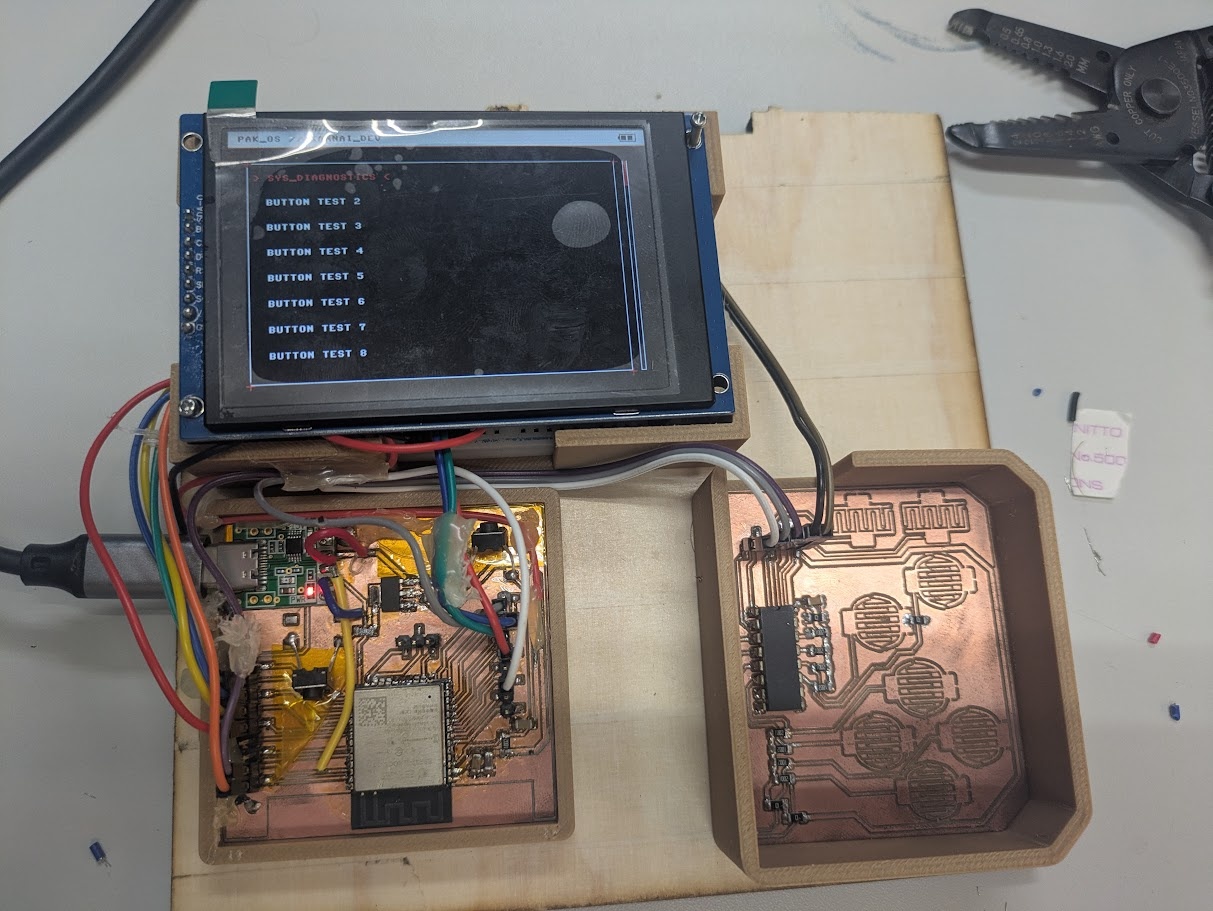
Before building the two "complex" apps above, I needed a tool to validate the custom PCB pins and the display driver I found online. The application created was basically just a bare-bones hardware torture test. There's one test that rapidly draws contrasting blocks across the screen to check for vertical tearing and SPI bus bottlenecks. Another cycles through the master color palette (Red, Grey, White, Black) while calculating and displaying the hardware Frames Per Second (FPS). And because my crappy control board PCB is so finicky, I'm constantly using another "app" that reads the raw integer and binary bitmask from the 74HC165 shift register to verify all physical buttons are triggering correctly.