Week 17 - Wildcard (local speech commands)
Fab Academy Wildcard week asks for a digital process not covered in another assignment. I already documented cloud Mandarin speech for Forest Fairy on Week 15 §11 (Alibaba Bailian ASR → LLM → TTS over WebSocket). This week I tried something different: offline fixed-command speech recognition on an ESP32-S3 with Espressif ESP-SR: hold a button, say a command in Chinese, release, read the result on serial. No WiFi, no cloud round-trip.
Individual assignment
Official checklist I used
| Fab Academy question | Where I answer it on this page |
|---|---|
| Did I document the workflow and process? | Motivation, ESP-SR stack, build / flash, and demo. |
| Is this process not covered in other assignments? | Comparison with cloud voice on Week 15: embedded MultiNet command models vs Bailian WebSocket ASR. |
| Problems encountered and fixes? | Mic wiring, gain, and push-to-talk timing. |
| Original design files and source code? | code/week17-individual/localASR/ (ESP-IDF project + README). |
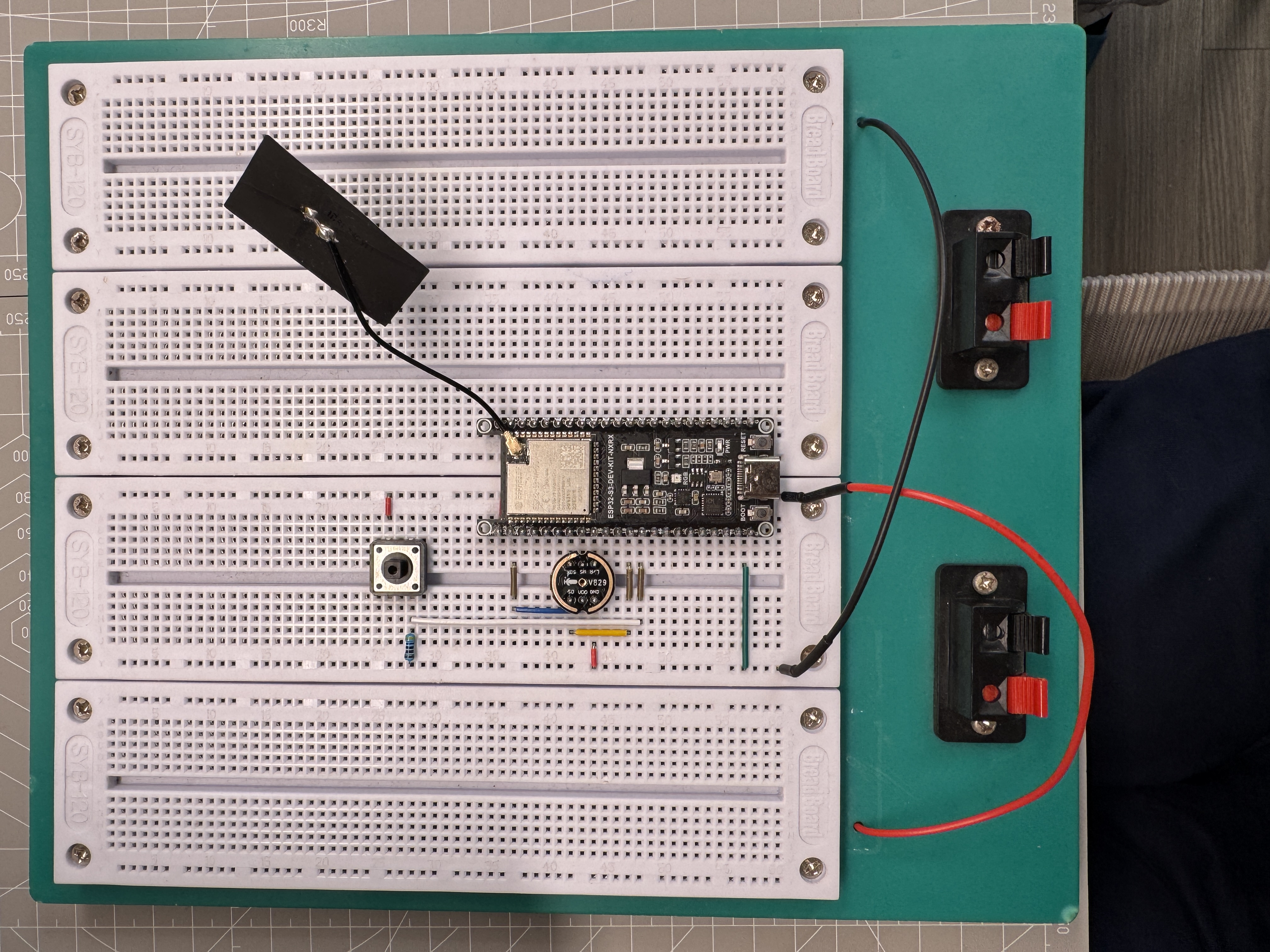
| Hero shot of the result? | Wiring photo above; serial log and demo video under Demo. |
1) Why I tried local speech this week
While I was building the Alibaba Bailian voice path for Forest Fairy I kept hitting practical limits: network latency, session management, API keys and workspace setup, and the feeling that every utterance had to leave the board before anything useful happened. For a plant companion that should react quickly, that bothered me. I wanted to see whether I could move at least part of the speech chain onto the MCU.
Before writing firmware I sorted ASR into three routes in my notes. Cloud ASR sends PCM to a remote service, which is the route I already built in Week 15. A local keyword or fixed-command model runs on the chip and only matches a limited phrase list. A separate local ASR module uses a dedicated speech chip and returns text or command IDs over a bus such as UART or SPI. Writing that comparison down helped me choose a small enough Wildcard task instead of rebuilding the whole dialogue system.
For Wildcard week I picked the middle path: Espressif’s ESP-SR stack on ESP32-S3, specifically MultiNet for a fixed set of Mandarin command phrases. This is not open dictation. It is “say one of these six commands and print the ID on serial.” That is enough to prove the workflow and to compare latency with the cloud route.
Why this is not another assignment
Week 15 and Week 16 document network speech: I²S mic capture, WebSocket to DashScope, LLM reply, TTS playback on the Forest Fairy display board. None of that runs if WiFi is down, and the speech models live in the cloud.
This Wildcard project is a separate ESP-IDF firmware tree. Speech models are flashed into a dedicated
model partition on the chip. Recognition happens in FreeRTOS tasks on the S3: AFE audio front-end,
MultiNet inference, GPIO push-to-talk. The output is a serial log line, not a chat UI. That combination (embedded
SR model partition + MultiNet command table + bench mic wiring) is what I am submitting for Week 17; the Bailian
console screenshots in images/week17-individual/ stay linked from Week 15 as cloud evidence.
2) What I learned: ESP-SR on ESP32-S3
I read Espressif’s ESP-SR docs and the example flow for command recognition, then kept only the parts I needed for a bench test. The AFE audio front end takes 16 kHz, 16-bit mono PCM from I²S and prepares it before recognition. MultiNet does the offline command matching, with each Chinese phrase registered in code as pinyin tokens rather than raw hanzi. WakeNet is part of the stack, but I disabled it here because a GPIO push-to-talk button gave me a simpler way to control when the recognizer should listen.
  INMP441 I²S mic          ESP32-S3 (ESP-SR)                Host serial
  16 kHz mono PCM   ──▶   AFE feed task  ──▶  MultiNet     ──▶  command_id,
  GPIO3 button HIGH       detect task        detect           label, prob
  (hold to record)
Default hardware target: ESP32-S3-WROOM-1U-N16R8 (16 MB flash, 8 MB PSRAM) and an INMP441-class I²S microphone. Default wiring from the project README:
| Microphone pin | ESP32-S3 GPIO |
|---|---|
| SCK / BCLK | GPIO7 |
| WS / LRCLK | GPIO15 |
| SD / DOUT | GPIO8 |
| L/R (left channel) | GPIO16 → LOW |
| Push-to-talk (active HIGH) | GPIO3 |
Built-in Mandarin commands (pinyin to label) in
app_main.c:
da kai deng / guan bi deng, fan on/off, volume up/down, each with alternate phrase
spellings so recognition is less brittle.
3) Plan
I kept the scope narrow on purpose: one bare WROOM module, one mic, one button, and the serial monitor only. I
soldered the mic module first, wired I²S and the button, adapted the ESP-IDF localASR project, set the
target with idf.py set-target esp32s3, flashed both the app and model partition, then tested each command
through the button workflow. I did not merge this into the Forest Fairy display firmware yet; that belongs after the
Wildcard evidence is documented.
4) Hardware and wiring
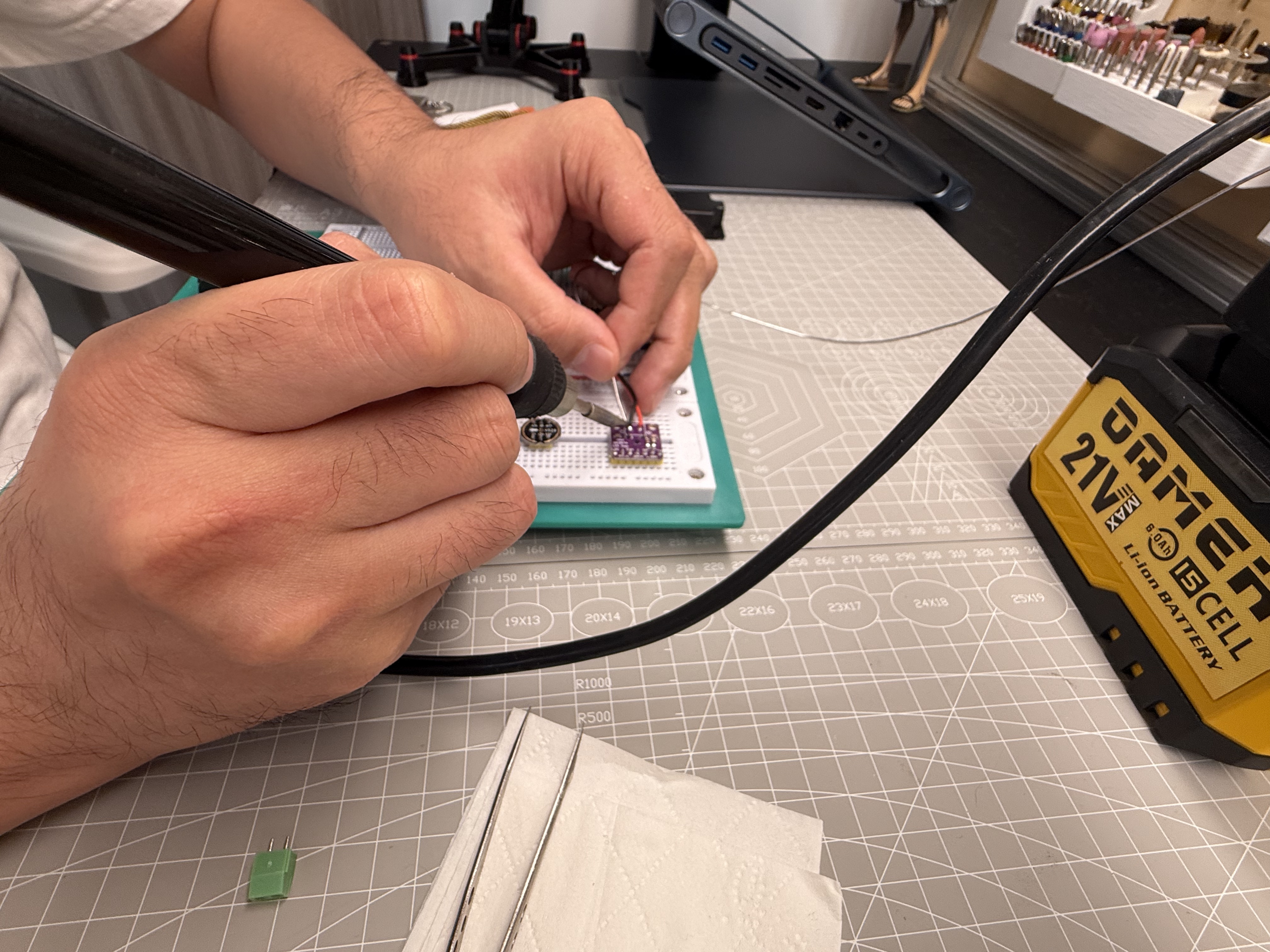
I reused the same INMP441-style mic module I had been using for the cloud voice bench, but this time I soldered the header pins properly instead of loose jumper wires. Long dupont leads picked up noise and made level checks hard to read on serial.
Build, flash, and serial workflow
Source archive:
code/week17-individual/localASR/
is copied from my working tree, with the full command sequence in
README.md. I used ESP-IDF v5.x and targeted
esp32s3.
cd code/week17-individual/localASR
idf.py set-target esp32s3
idf.py build
idf.py -b 2000000 flash monitor
Important detail I missed once: after changing ESP-SR model config you need a full idf.py flash, not
only app-flash, or the model partition stays stale. On boot the monitor lists the MultiNet
model and registered commands. My test rhythm became simple: hold GPIO3 high until the firmware logs
button pressed, start recording, speak the command clearly toward the mic, then release the button so the
firmware runs one final detect pass and prints command_id, label, probability, or
no command detected.
Problems and fixes
The first problem was loose mic wiring. The serial avg_abs value peaked too low, so I soldered the module,
shortened the ground path, and checked the L/R strap on GPIO16 for left channel. The second problem was timing:
if I released the push-to-talk button too early, the last syllable disappeared, so I learned to hold the button
through the whole phrase and release only after speaking. I also lost time on phrase format because MultiNet Chinese
commands must be pinyin tokens in code, not hanzi. I copied the Espressif example style and added shorter aliases such
as kai deng beside da kai deng. The final boundary is scope. This stack cannot transcribe a
free conversation, and I am treating that as a design choice: local ASR is for device control, while Bailian stays on
the TFT chat page for open dialogue.
Demo: serial log and video
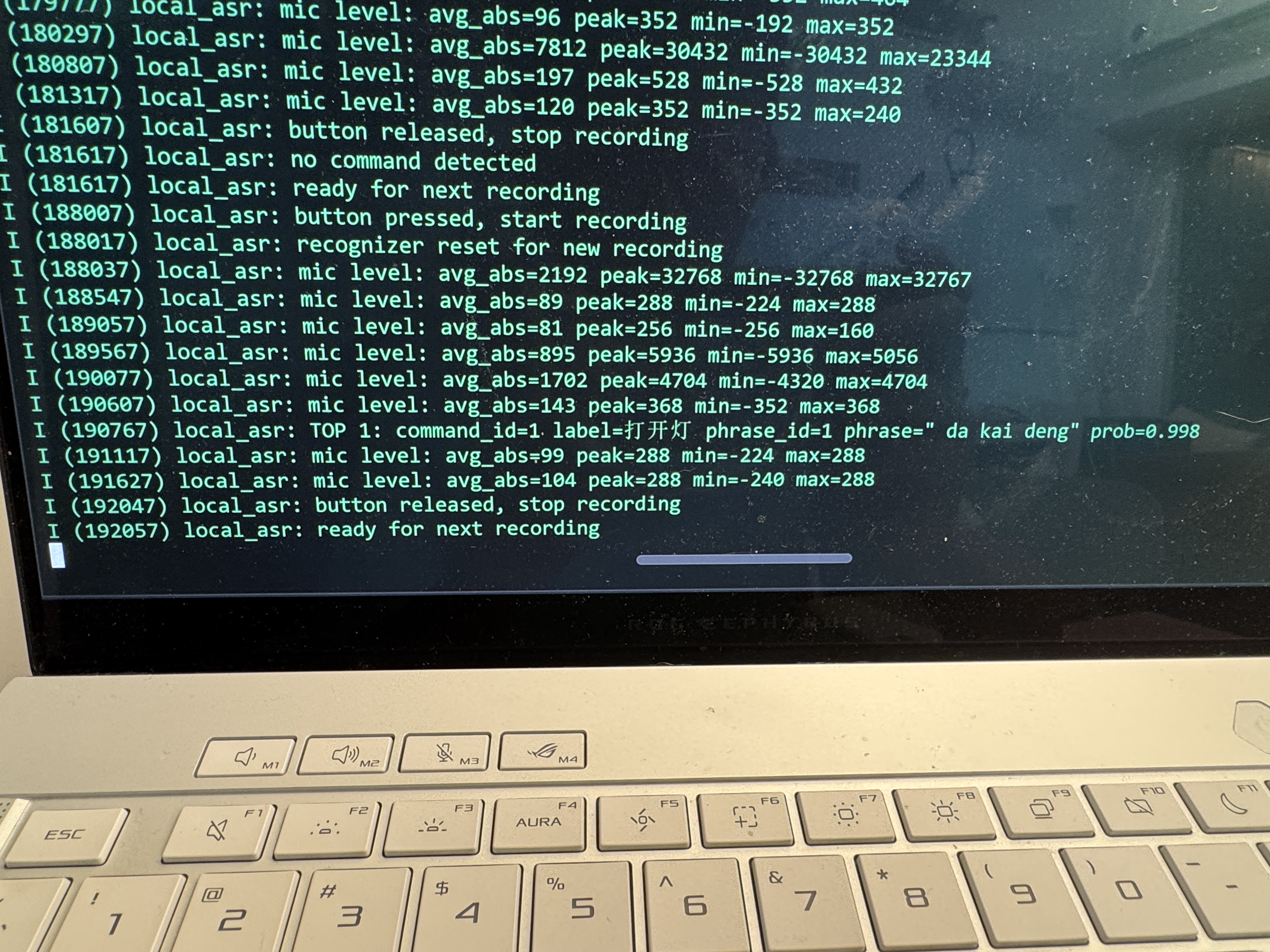
command_id, the Chinese label, and a probability score.
Source files
The ESP-IDF project for this assignment is archived in
code/week17-individual/localASR/; it contains the AFE and
MultiNet setup, I²S driver, command table, and partition layout. The cloud voice counterpart is not the Week 17
submission, but its Bailian client sources remain in
code/week17-individual/ and are referenced from
Week 15 §11.
5) Conclusion
I used Cursor to code the ESP-IDF local ASR project in
code/week17-individual/localASR/: I²S capture,
MultiNet command table, and button-triggered detect loop in app_main.c. I still ran full
idf.py flash after model partition changes and checked serial logs before touching the TFT path.
Wildcard week let me compare two speech strategies on the same mic hardware. Cloud Bailian still wins for open Mandarin chat on the Forest Fairy screen because that needs an LLM and TTS I am not going to embed in flash. Local MultiNet wins on latency and offline control: GPIO3, recognize, act, with no API key and no WiFi dependency.
For the final project I will probably keep both: Bailian for dialogue pages when online, and fixed commands for
fast actions (lights, fan, volume) if I merge this firmware path into the WROOM upload tree. Next step before that
merge is to map command_id to actual GPIO outputs on the carrier board and test with the shell closed
(single mic, no reference channel; accuracy will drop if I play TTS from the same speaker without an AEC reference).
My note for next time is plain: solder the mic first, run a full flash after model changes, hold the
button through the whole phrase, and verify the serial log before touching the UI.