9. Input Devices


Assignments and Assessment this week
Group assignment:
Probe an input device(s)’s analog levels and digital signals (As a minimum, you should demonstrate the use of a multimeter and an oscilloscope.) Document your work on the group work page and reflect on your individual page what you learned
Individual assignment:
Measure something: add a sensor to a microcontroller board that you have designed and read it.
Learning outcomes
Demonstrate workflows used in sensing something with input device(s) and MCU board
Have you answered these questions?
Linked to the group assignment page. Documented what you learned from interfacing an input device(s) to your microcontroller and optionally, how the physical property relates to the measured results. Documented your design and fabrication process or linked to the board you made in a previous assignment. Explaind how your code works. Explained any problems you encountered and how you fixed them. Included original design files and source code. Included a ‘hero shot’ of your board.
Group Assignment
Here is a group assignment page
Research
This week, we experimented with variable resistor sliders (faders) and switches, which are key input devices in the final project, as well as rotary encoders, which are commonly used in other lighting controllers.
Switches
As explained in Week 4, we’ll explain them in more detail here.
Variable Resistors
There are rotary potentiometers (rotary type) and slide potentiometers (slide type). A rotary potentiometer is a resistor whose resistance value can be changed by rotating a knob by hand. On the other hand, a slide potentiometer has a long, slender shape, and its resistance value can be changed by sliding it.

Megan Tung by Jameco Electronics
Both methods allow for voltage or current adjustment by moving a slider over a carbon resistor. (The slider will last longer if it is positively oriented.) The method used for voltage adjustment is called the potentiometer method, and the method used for current adjustment is called the rheostat method.
When used for current adjustment, the slider’s terminal 2 is short-circuited to the resistor’s terminal 1 or 3.
ABCtaper
A (Audio/Log) taper Resistance changes in a curve, matching how the human ear perceives sound, making it ideal for volume.
B (Linear) taper Resistance changes uniformly, useful for applications where a smooth, predictable change is needed, such as tone controls or some effect pedals.
C (Reverse Audio/Log) taper Resistance changes in an inverse curve of the A-taper; it changes rapidly at the beginning of the turn, often used for specific effect parameters like delay time or gain in certain circuits.

Megan Tung by Jameco Electronics
make slide potentiometers board
 This time, I brought a prototype with temporary soldered wiring, but the wires broke.
Also, there were wiring mistakes during the group work, so I created a circuit board. First, I created the fader footprint.

I found a PH connector in the library, so I decided to implement it.
Circuit diagram

The completed circuit board.
Wiring diagram

3D

kicad files1

gerber File2 ping File3 rml File4
I actually intended to implement it on the back, but I got the front and back mixed up.
milling

finish

cleaning PCB

put slider

I mixed up the top and bottom.

However, it seems to be usable without problems, so I soldered it as is and performed a function check.
*After this, I mirrored the footprint and redrew the wiring diagram, but I ran out of time to proceed with the machining.
use rp2040 programs
const int VOL_PIN = 26;

void setup(){
    Serial.begin( 115200 );
}
void loop(){
    int value;
    float volt;

    value = analogRead( VOL_PIN );

    volt = value * 3.3 / 1023.0;

    Serial.print( "Value: " );
    Serial.print( value );
    Serial.print( "  Volt: " );
    Serial.println( volt );


    delay( 100 );
}
Motorized fader
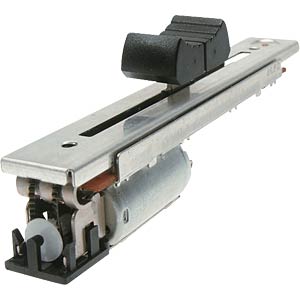 by reichelt elektronik
It has a motor, and the resistance value can be changed without touching it with your fingers by moving the belt.
by reichelt elektronik
It has a motor, and the resistance value can be changed without touching it with your fingers by moving the belt.
by MAlighting
This was originally used in a famous lighting console called the Grand MA1, and was salvaged from a discarded circuit board. It appears to be an “ALPS B5K Single-unit Slide Potentiometer Motor N fader Motor-driven Travel 60MM” from ALPS. Both 5K ohm and 10K ohm versions exist depending on the manufacturing period.

I referenced the websites Flying Faders However, since the motor is an output device, we decided to use the motor to power the device the following week.
// SPDX-FileCopyrightText: 2022 John Park for Adafruit Industries
// SPDX-License-Identifier: MIT
// Motorized fader demo
// capsense implementation by @todbot / Tod Kurt

#include <Bounce2.h>

const int pwmA = 12;  // motor pins
const int pwmB = 11;

const int fader = A0;  // fader pin
int fader_pos = 0;
float filter_amt = 0.75;
float speed = 1.0;

int saved_positions[] = { 230, 180, 120, 60 } ;
int current_saved_position = 1 ;

const int num_buttons = 4;
const int button_pins[num_buttons] = {10, 9, 8, 7};  // feather silk != arduino pin number. 10, 9, 6, 5 on board
Bounce buttons[num_buttons];
bool motor_release_state = false;  // to handle motor release

class FakeyTouch
{
  public:
  FakeyTouch( int apin, int athreshold = 300 ) {  // tune the threshold value to your hardware
    pin = apin;
    thold = athreshold;
  }
  void begin() {
    baseline = readTouch();
  }
  int readTouch() {
    pinMode(pin, OUTPUT);
    digitalWrite(pin,HIGH);
    pinMode(pin,INPUT);
    int i = 0;
    while( digitalRead(pin) ) { i++; }
    return i;
  }
  bool isTouched() {
    return (readTouch() > baseline + thold);
  }
  int baseline;
  int thold;
  int pin;
};

const int touchpin_F = A3;
FakeyTouch touchF = FakeyTouch( touchpin_F );


void setup() {
  Serial.begin(9600);
  delay(1000);
  pinMode (pwmA, OUTPUT);
  pinMode (pwmB, OUTPUT);
  analogWriteFreq(100);
  analogWrite(pwmA, 0);
  analogWrite(pwmB, 0);
  for (uint8_t i=0; i< num_buttons; i++){
    buttons[i].attach( button_pins[i], INPUT_PULLUP);
  }
}

int last_fader_pos = fader_pos;


void loop() {
  for (uint8_t i=0; i< num_buttons; i++){
    buttons[i].update();
    if( buttons[i].fell()) {
      current_saved_position = i;
      go_to_position(saved_positions[current_saved_position]);
    }
  }

  if( touchF.isTouched()){
    motor_release_state = true;
    analogWrite(pwmA, 0);
    analogWrite(pwmB, 0);
    delay(60);
  }
  else{
    motor_release_state = false;
    go_to_position(saved_positions[current_saved_position]);
  }

  fader_pos = int( (filter_amt * last_fader_pos) + ( (1.0-filter_amt) * int(analogRead(fader) / 4 )) );
  if (abs(fader_pos - last_fader_pos) > 1) {
    Serial.println(fader_pos);
    if (motor_release_state==false){
      go_to_position(saved_positions[current_saved_position]);
    }
    last_fader_pos = fader_pos;
  }
}

void go_to_position(int new_position) {
  fader_pos = int(analogRead(fader) / 4);
  while (abs(fader_pos - new_position) > 4) {
   if (fader_pos > new_position) {
    speed = 2.25 * abs(fader_pos - new_position) / 256 + 0.2;
    speed = constrain(speed, -1.0, 1.0);
      if (speed > 0.0) {
        analogWrite(pwmA, 255);
        analogWrite(pwmB, 0);
      }
   }
   if (fader_pos < new_position) {
      speed = 2.25 * abs(fader_pos - new_position) / 256 - 0.2;
      speed = constrain(speed, -1.0, 1.0);
        if (speed > 0.0) {
          analogWrite(pwmA, 0);
          analogWrite(pwmB, 255);
        }
      }

    fader_pos = int(analogRead(fader) / 4);

  }
  analogWrite(pwmA, 0);
  analogWrite(pwmB, 0);
}
test code write by John Park
Rotary encoder
I also removed this from the GrandMA1 and used it. Incidentally, the PB86 switch was also removed from the same unit and used from there.