Week 18: Project Development
Planted June 8, 2026
Week 18: Project Development
Table of contents
June 8, 2026
Project Development: Pockety
Week 18 status for my final project Pockety - pocket e-ink thing with Pico 2 W, custom PCB, MicroPython. BOM, firmware, photos, and assembly notes are on the final project page and project-dev so I am not copying all of that here.
Completed Tasks
Enclosure design and fabrication
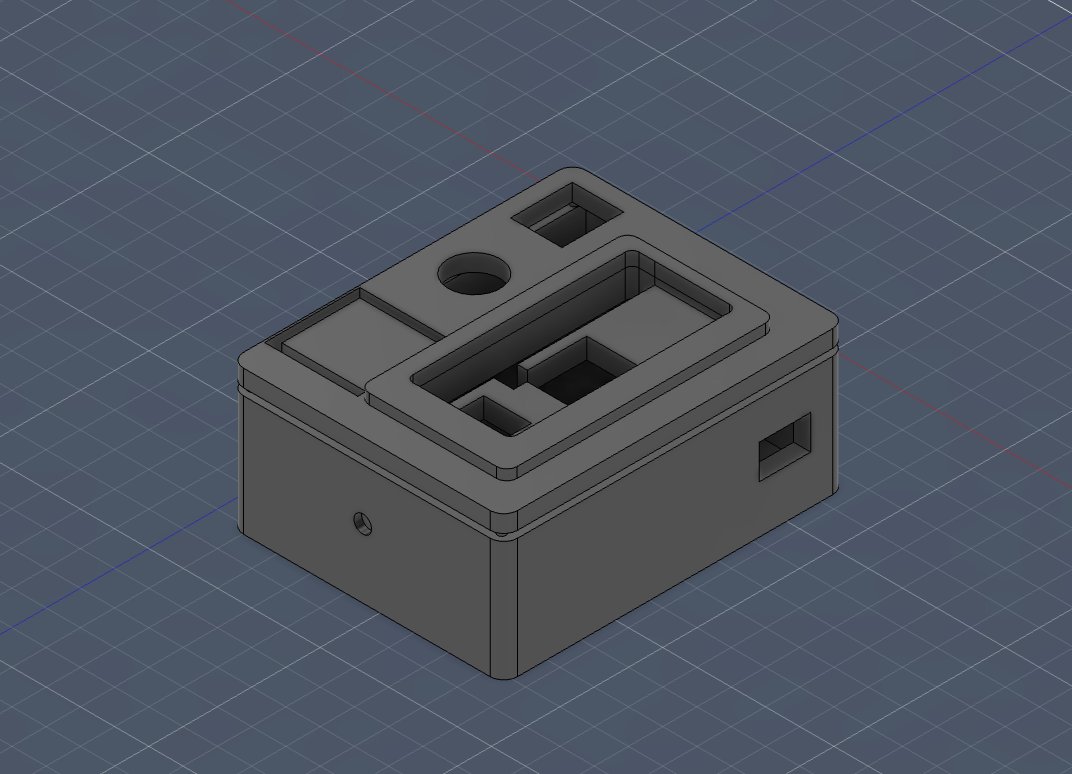
- 3D-printed enclosures from the early chunky box through pocket v2 to version 3 (May integration in Week 15).
- Magnetic e-ink cap and top; M2 screws into brass inserts in the top.
- Submodule parts: Gyro-Stylus housing, EngelBart ChordBoard top (PLA), bottom (3 mm wood), ecoflex silicone buttons.
Electronics design and production
- Custom interconnect PCB in KiCad - fabbed, populated, sockets for Pico 2 W, SPI/I2C/GPIO/power broken out.
- Waveshare 2.13 inch e-ink, SSD1306 OLED, ALPS EC11 encoder, IC184 button, 350 mAh LiPo, TP4056 charger on the board.
- Submodule PCBs: EngelBart ChordBoard (five pads) and Gyro-Stylus (XIAO footprint, tact switches, LED).
System integration
- Full assembly in Week 15: encoder shaft, cable routing, PCB held by OLED guide rails, magnets, screws.
- LiPo -> charger -> board power path checked on the bench.
Software
- Custom
epd_driver.py- SPI, busy wait, landscapeframebuf, rotate to native panel RAM, full/partial refresh. - Apps on the same stack:
calendar_ui.py,eink_reader.py,flashcards_ui.py,weather_ui.py(Open-Meteo over Wi-Fi). - Week 14 canvas server: browser packs 250x122 bitmap, POST to
/draw,/clear,/statuson the Pico W.
Testing and debugging
- Bench tests for e-ink bring-up, partial refresh cadence, encoder long-press/double-click, weather HTTPS fetch.
- Re-crimped screen cables when they turned out too long for the pocket (Week 15 notes - eight leads, ~12 hours, my hands hate crimping).
- Encoder demo video and smoke tests for each app on the integrated unit.
Documentation and presentation
Remaining Tasks
Integration
- One launcher/home screen so I do not have to reboot into a different
.pyfor each app. - To-do and timer apps - still on the original list, not on the device yet.
- Power pass: sleep between use, Wi-Fi only when needed, real battery numbers for demo day.
Mechanical
- CNC wood external casing from Week 17 - cut and assembled as an alternate shell for the pocket.
- Proper harness for ChordBoard and Gyro-Stylus so they plug into the main unit without a rat’s nest.
Documentation
- Short quick-start (charge it, which app does what, how to push a drawing from the browser).
- Clips per app, not just the encoder demo on the final project page.
What Has Worked?
- Magnetic e-ink cap + screwed top - I can open the shell to fix cables without destroying the print.
- EPD driver from the datasheet actually runs; forcing a full refresh every N partials keeps ghosting tolerable.
- Encoder + button is enough for calendar, reader, flashcards, and weather - no touch screen.
- OLED for status/menus so the slow e-ink panel stays on reading, not chrome.
- Week 14 browser -> HTTP -> e-ink path is useful for sleep screens and one-off bitmaps.
- Pocket v3 is thinner and less embarrassing than the box prototypes.
- Weather works when Wi-Fi cooperates (
urequests+ Open-Meteo).
What Hasn’t Worked?
- PCB layout took about twice the time I planned - sockets, ground pours around pads, DRC/ERC loops.
- Crimping in a tight pocket (see Week 15 - 12 hours for eight cables).
- No vendor driver matched my wiring; e-ink bring-up was manual.
- Partial refresh tuning is per-app (
_PARTIALS_BEFORE_FULLnot one number for everything). - School/event Wi-Fi and captive portals break weather fetch sometimes.
- Early enclosures were too big and ugly; that ate weeks.
- No OS layer - you boot one script at a time.
Questions to be Resolved
- How hard can I push deep sleep on the Pico 2 W before encoder wake or Wi-Fi reconnect gets annoying?
- Is 350 mAh enough for a real demo (weather pull + hopping between apps), or do I need a bigger cell?
- Launcher on e-ink, OLED, or split?
- Writer-deck text editing this cycle or v2?
- One connector standard for submodules without making the pocket fat?
Lessons Learned
Fab Academy version of make-fail-learn. I tried to design in parallel with the 20-week schedule instead of dumping everything at the end, so scope kept bouncing between “small pocket utility” and “phone but e-ink.”
PCB work needs more calendar than I gave it. Schematic is quick; layout, fab, and debug are not. The magnetic cap was worth it - opens fast, hides the guts, easier to debug than a glued lid.
Reusing one EPD class, one InputManager pattern, and the same partial-refresh skeleton across apps saved time. Week 14 showed /status, /draw, /clear is enough to iterate bitmaps without reflashing for every test image.
Integration is not polish. Cable length, strain relief, magnet alignment, screw order - that is the product. The Week 15 assembly log (crimp marathon included) is documentation, not embarrassment.
Future Plans
- Thinner walls, better battery fit; maybe smaller e-ink and a PCB respin if it is worth it.
- Writer deck - plain-text editor, minimal UI, the original distraction-free writing goal.
- Single boot menu for calendar, reader, flashcards, weather, canvas.
- Finish ChordBoard + Gyro-Stylus harness.
- Measure current per app; sleep harder; Wi-Fi refresh on a timer.
- To-do and timer to match the original pitch.
- Refine the CNC wood shell from the Week 17 idea (finish quality, ergonomics).
- Reuse the canvas + MicroPython stack as a Fab teaching example for browser-to-display.
I want to keep working on Pockety after Fab Academy - carry it, break it, fix it, v2 the PCB.