For this activity, I reviewed the setup and operation of a SHARK HD520 CNC router that I previously used
at Inspired Lumber, a local woodworking shop. I do not own a CNC router and currently do not have regular
access to one. Because access to the machine requires paid shop time, I was not able to perform additional
test cuts during this week's assignment. Instead, I reflected on the machine setup process and the factors
that influenced machining performance during my previous CNC experience.
Safety Considerations
Before operating the CNC router, safety procedures were reviewed. These included wearing safety glasses,
ensuring materials were securely fastened, keeping hands clear of moving components, and remaining fully
attentive while the machine was operating.
Machine Setup and Operation
Several factors contribute to successful CNC machining:
- Properly securing the workpiece to prevent movement during cutting.
- Verifying machine alignment and zero positions before machining.
- Ensuring the cutting tool is properly installed and tightened.
- Reviewing toolpaths before starting a machining operation.
- Selecting appropriate feed rates and spindle speeds for the material being cut.
Machine Characteristics
Tool Runout
- Tool runout refers to how accurately the cutting tool rotates within the spindle.
- Excessive runout can reduce precision and increase tool wear.
Alignment
- Accurate machine zeroing is important for maintaining dimensional accuracy.
- Proper alignment ensures the final part matches the intended design.
Fixturing
- Secure fixturing prevents material movement during machining.
- Stable workholding improves cut quality and repeatability.
Feed Rates and Spindle Speeds
- Feed rate determines how quickly the cutting tool moves through the material.
- Spindle speed determines how fast the cutting tool rotates.
- Both settings affect surface finish and overall machining performance.
Toolpaths
- Toolpaths define the route taken by the cutting tool.
- Different toolpaths can affect machining time, cut quality, and material removal efficiency.
Machine Characteristics
CAM Software and Toolpath Generation
The SHARK HD520 CNC router relies on CAM (Computer-Aided Manufacturing) software to convert a design into
machine instructions. After creating or importing the design, the geometry is processed in CAM software
where machining parameters and toolpaths are defined.
The CAM workflow generally consists of these steps:
Importing the design geometry.
Defining the stock material dimensions.
Selecting the cutting tool.
Defining feed rates and spindle speeds.
Generating toolpaths.
Previewing the machining operation.
Exporting machine code for the CNC router.
Toolpaths determine the exact route followed by the cutting tool. The CAM software compensates for cutter
diameter and calculates the movement required to produce the final geometry accurately.
Prior to machining, the generated toolpaths were reviewed to verify that the tool would remove material
correctly and produce the desired result.
What I Learned overall
Although I was not able to return to the CNC shop due to new pricing policy, reviewing my previous experience
helped reinforce the importance of machine setup, workholding, tool selection, feed rates, spindle speeds,
and toolpath planning. These factors all play a significant role in achieving accurate and repeatable
machining results.
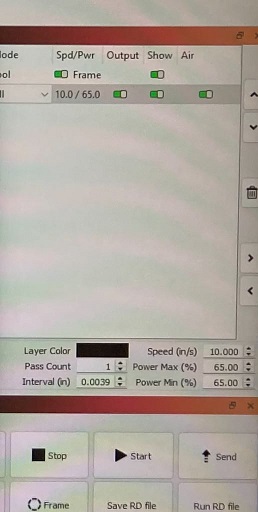
During my previous use of the SHARK HD520 CNC router, machining parameters were selected within the CAM
software prior to cutting. The operation utilized a speed setting of approximately 10.00 inches per
second with a power level of 65% and a single machining pass.
These parameters directly influenced the final results. The selected speed allowed efficient material
removal while maintaining acceptable dimensional accuracy. If the speed had been significantly increased,
cut quality could have decreased due to insufficient cutting time. Conversely, reducing the speed would
have increased machining time and potentially increased material heating.
The 65% power setting provided sufficient cutting performance while helping to minimize excessive burning
and edge discoloration. The single-pass operation successfully produced the desired geometry while
maintaining acceptable cut quality.
The completed part demonstrated that proper selection of speed, power, and machining strategy plays an
important role in achieving accurate and repeatable CNC machining results.
A few shots
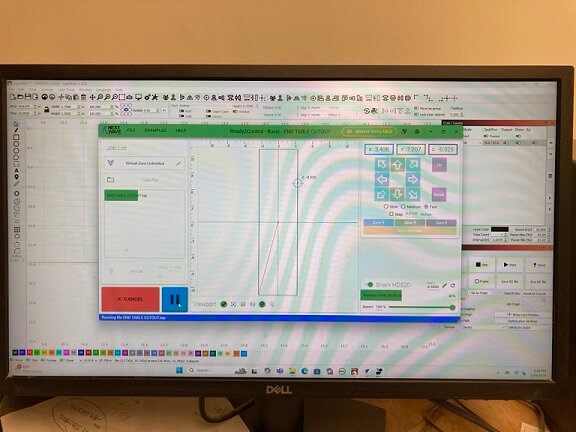
Cam Workspace
Figure 1. CAM software used to generate machining toolpaths for the SHARK HD520 CNC router.
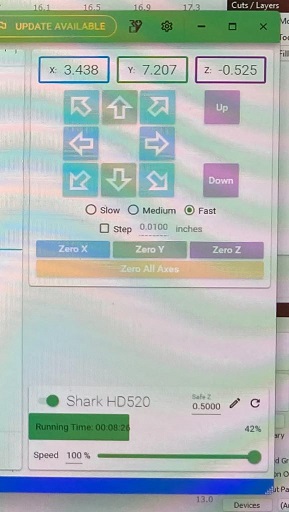
Machine control screen
Figure 2. SHARK HD520 machine control interface showing axis positioning and machine setup.
Settings screenshot
Figure 3. Machining parameters used during fabrication, including speed, power level, and pass count.