
Week 2 COMPUTER AIDED DESIGN
For our second week we will work on computer-aided design, we will learn to use some of the tools, we will explain their basic concepts as well as some of the advantages, and finally we will give examples for a better understanding.
What is computer-aided design?
It's a way to create 3D or 2D designs; we can easily simulate or modify our designs. These models facilitate the user's design processes and, ultimately, create more innovative and higher quality products.
Advantages of CAD
2D DESIGN
In a process that focuses on the creation of flat and two-dimensional representations, this design works with lines, curves, and points, and is also the basis of many projects. It stands out for its lighter files and lower hardware requirements, as well as being easy to work with. Designs can also be quickly copied and modified in sections or features to compare and contrast variations in the final design.
2D SOFTWARE
1.INKSCAPE
It is a free and open-source vector editor that allows you to create professional-quality logos, illustrations, and icons it offers a complete set of vector tools that covers the needs of graphic design. With this tool we can compress some of our images, which tend to be heavier than others.
2.ADOBE ILLUSTRATOR
It is a graphic design software based on the creation of vector graphics, developed by Adobe Systems. Unlike raster graphics, which depend on pixels, vector graphics are composed of lines and mathematical shapes.
IMAGE COMPRESSION WITH INKSCAPE
1. We open our Inkscape
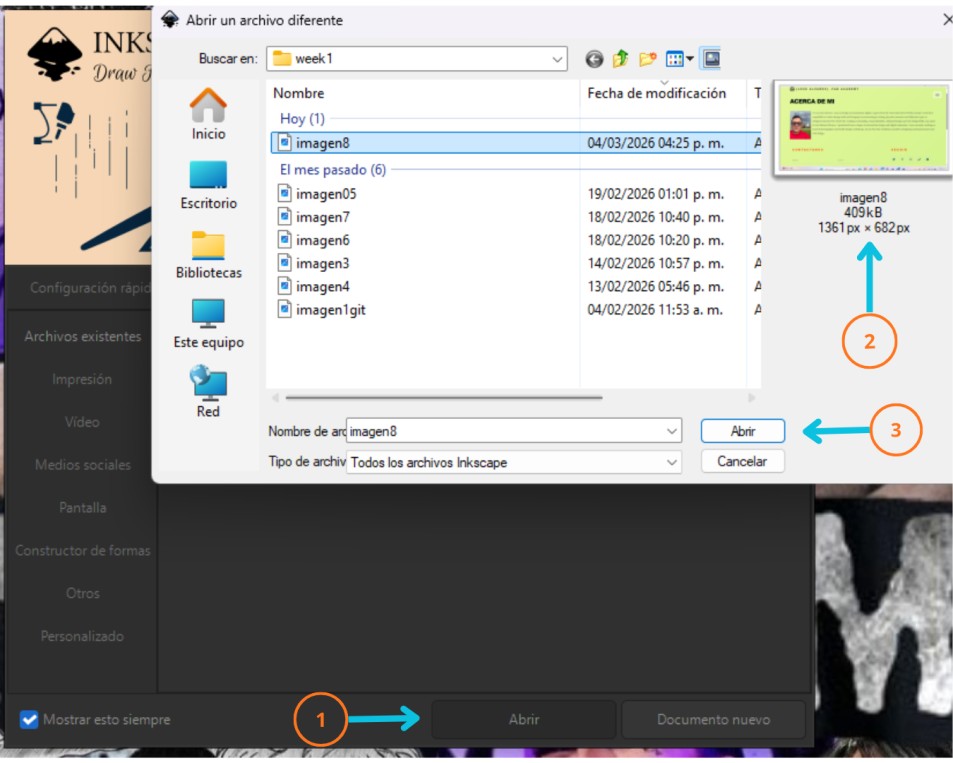
We begin by opening Inkscape. A window will appear with several options. Follow the steps shown in the image:
- 1. Select the "Open" option, and a window will appear displaying all your folders and files.
- 2. Locate your image (I chose the largest image shown) and click on it.
- 3. Once selected, click "Open," and it will open automatically.
2. Import window
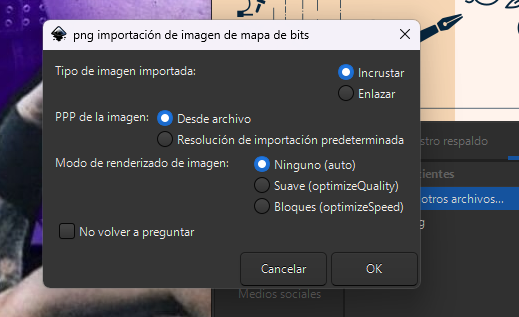
After completing the previous steps, a small window will appear; do not move anything and click on the OK option.
3. Change of values
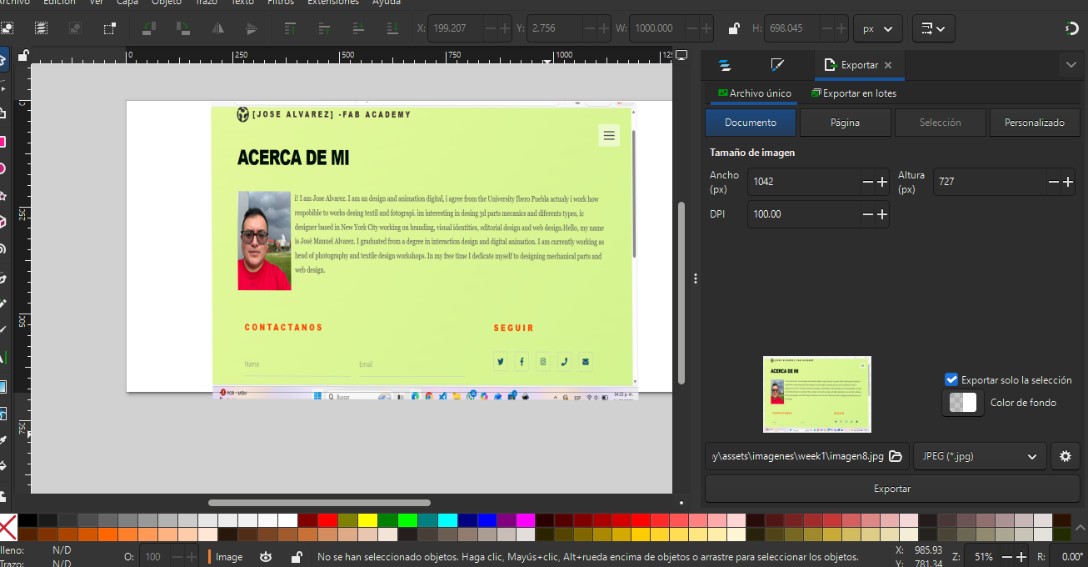
We can see the image we selected, and on the left, we can see some of its values. It's important to adjust the values correctly. In this case, I used the values shown in the image. Another important point is that my previous image was saved as a PNG, but when I compressed it, I saved it as a JPEG. At the bottom, we can name it something else or leave it as is for later export.
4. Compression result
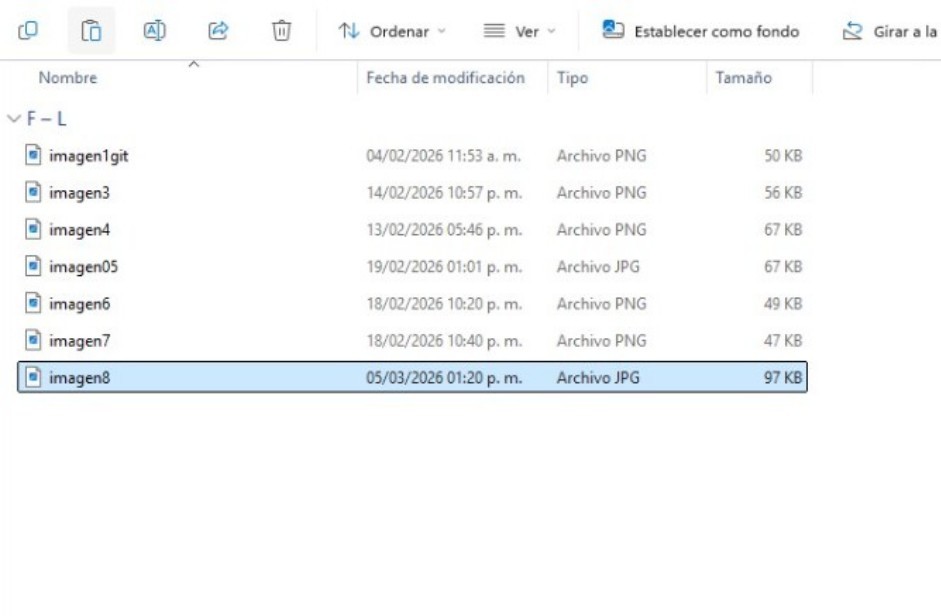
Once the export is complete, we go to our folder and can see that the image is now smaller. It's important to check if it looks good or if it requires other settings, always making sure it doesn't exceed 100 KB.
This short exercise will help us better understand this type of software. We can see that it contains many more tools which we will use later. I hope this short explanation is very helpful.
3D DESIGN
Unlike 2D design, this design is created to modify and analyze three-dimensional models, which are based on mathematical relationships. With all this, precise geometric control can be achieved. 3D design allows us to create more realistic prototypes. Something very interesting and helpful for those of us who work with this type of design is that properties such as weight and size can be added to the physical object.
3D SOFTWARE
CATIA V6
This tool allows us to innovate and covers all stages of development. It uses parameters and constraints that help us modify parts without having to start from scratch, stores files directly in a database, and also allows us to work with parametric and non-parametric models.
SOLIDWORKS
Software with an intuitive interface capable of creating accurate, fast, and easily modifiable models. Working with parametric models, it allows us to model parts with geometric editing, helping to detect problems early and ensuring agility in the design being worked on. It facilitates the evaluation of the size, shape, and various factors of the product.
AUTODESK FUSION
This 3D design tool allows us to design, model, and manufacture parts. It also gives us access to other projects. One of its advantages is that it offers free licenses for students and educators. Unlike other software, if we make changes to our initial design, they will automatically update in the rest. A very distinctive feature is that we can apply materials and then create photorealistic images, which is very useful and can help us meet our expectations.
Okay, now let's try one of these software programs. During the development of this work, we will require images and videos, so some of them may be very large. The next step will be to compress images, showing you how step by step.
AUTODESK MODELING
1. Autodesk Fusion environment
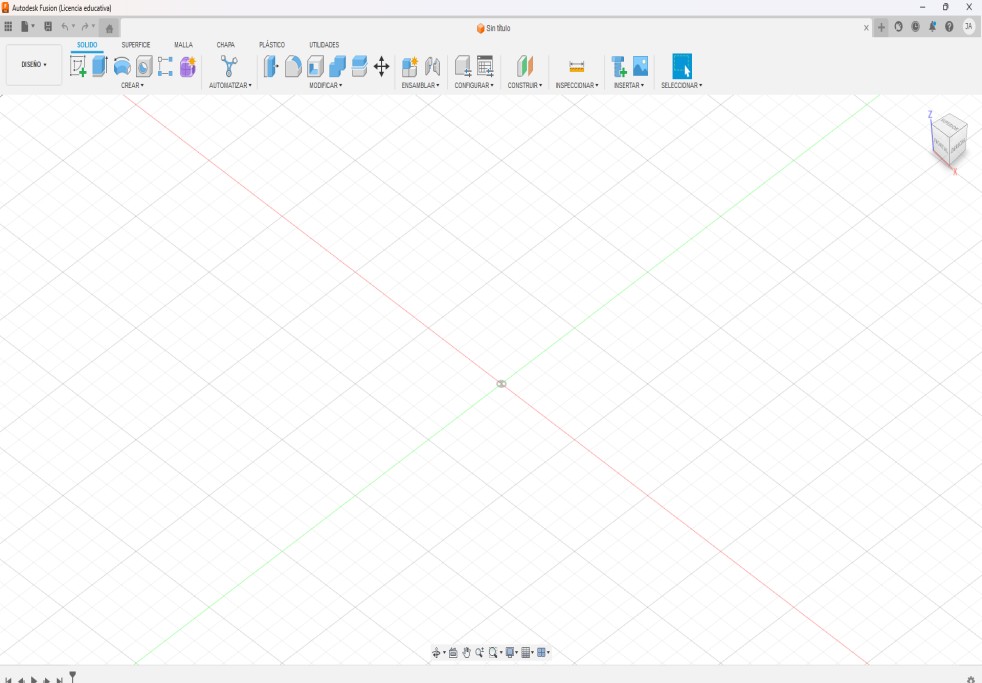
At the beginning, we will see the work environment and all the elements that this software contains, such as the Cartesian plane, which helps us to position the designs; also a view cube, which will help us to change the view; and, very importantly, a reference grid.
2. 2D sketch
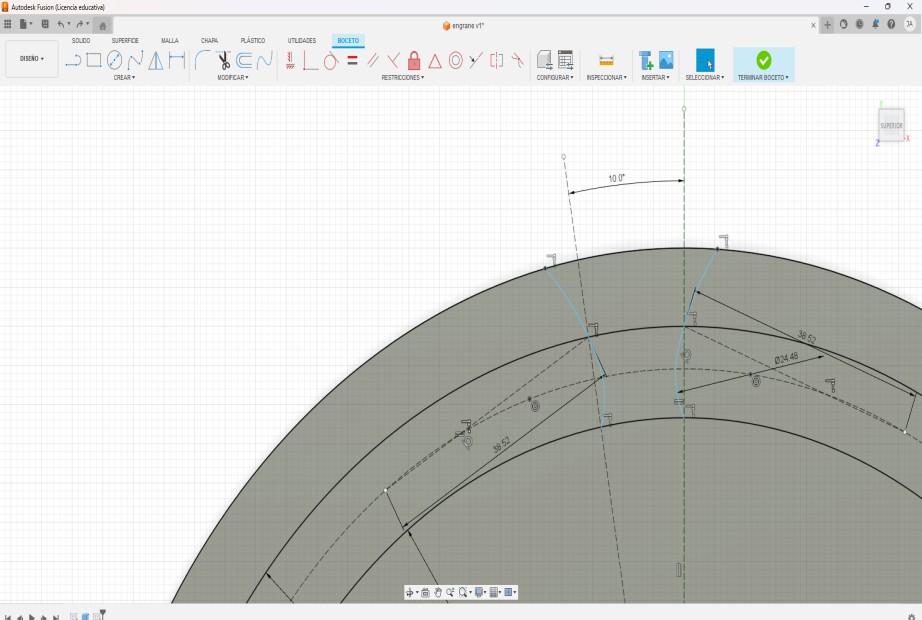
We start working in sketch mode where we first work in 2D to define the shape of our piece. Then the important elements to add are the lines and arcs to give shape to the profile. The values shown as 10º are the angles between some elements. The value of 38.52 is the distance between points. Ø24.46 represents the diameter.
3. 3D process
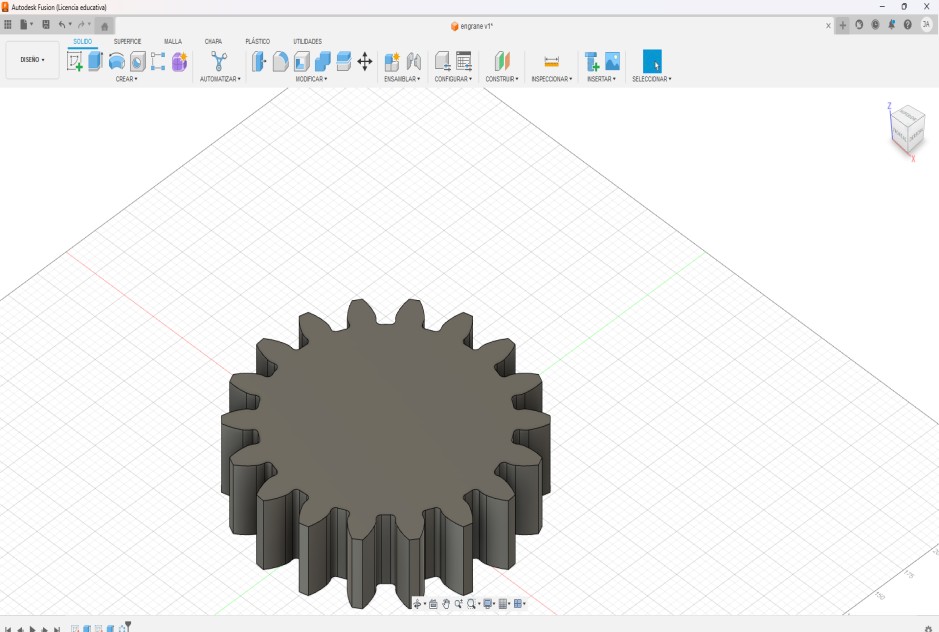
Here we can see the three-dimensional model of the part, which I obtained by transforming the 2D sketch into a 3D solid, resulting in a geometry ready for manufacturing. This model can be used for 3D printing or assemblies for other parts.
4. Top face process
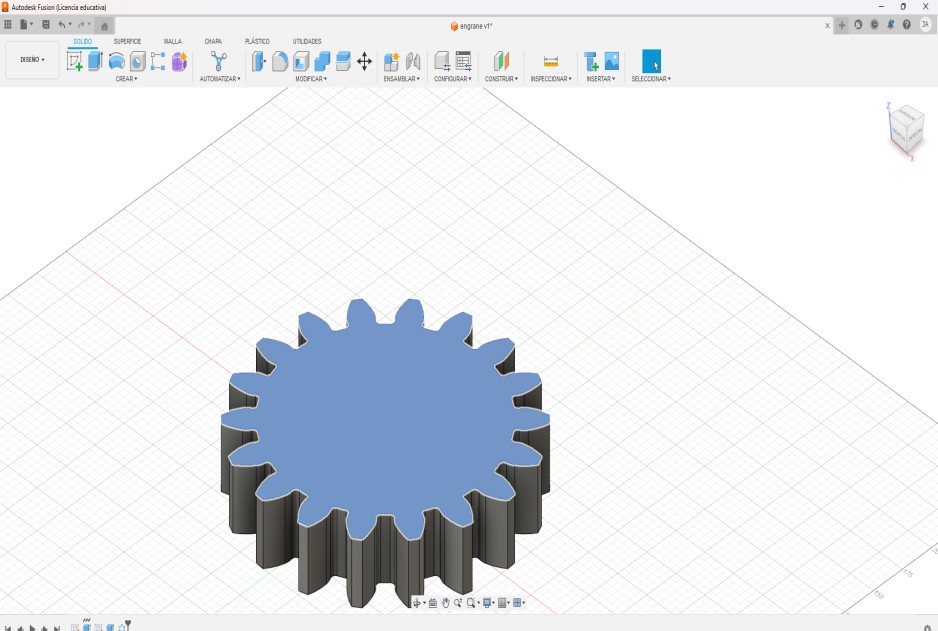
We select a surface of the solid model to perform a new modification or operation on the design, and we can see it as the highlighted blue part; it is important to define where the modification will be performed.
5. Extrusion
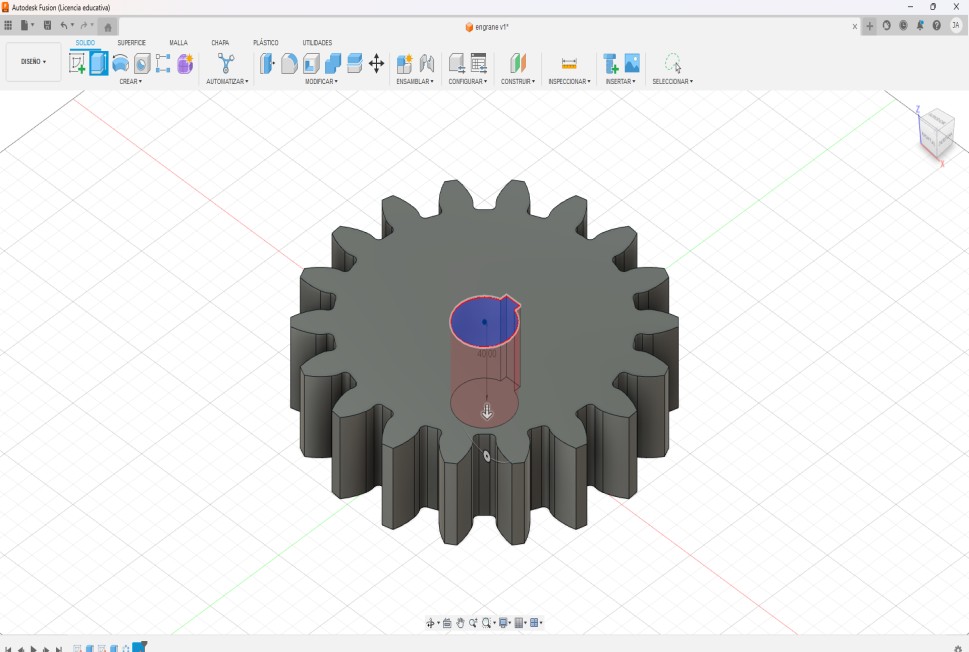
This software contains the extrude tool within our solid environment. We select the center of our piece to apply a vertical extrusion to give our piece cylindrical volume. The central part is fundamental for the correct function of our piece.
6. Result
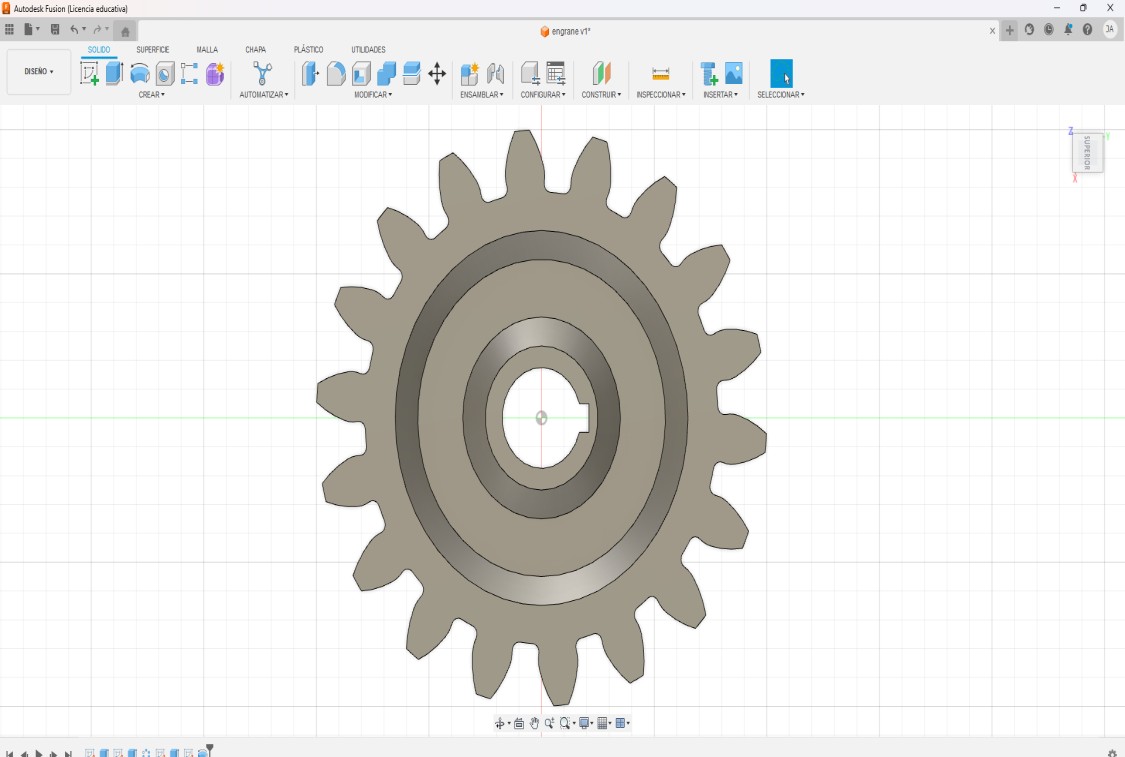
Here we can observe the final result from a top view. We can see the details that were added to our design, and we can verify if the elements are centered or if the design maintains its symmetry.
3D work tools have become very important in many environments, as well as becoming fundamental tools for engineers, students, teachers, among others. 3D design not only allows us to visualize our designs from various perspectives, but also facilitates understanding their operation.
I particularly enjoyed working with Autodesk Fusion because of its extensive functionality and all the tools it provides for creating, modifying, and preparing parts.