Exercise 09- Moulding & Casting
Requirement
Design a 3D mold, machine it and make a cast from the mold.
Safety Data Sheet (SDS)
For this week assisgnment, we are dealing with some materials that maybe harmful. Thus, prior to the assisgnment, i read up some infomrations on Safety Data Sheet (SDS).
A safety data sheet (SDS) tells the important component of product property, occupational safety and health. It is widely used system for classifying information on chemicals, its compound and mixtures.
Proper labelling of substances on the basis of chemical property, health or environmental risk. Labels may include hazard symbols.
The information provided by SDS includes Composition/information on ingredients, first aid measures, firefighting measures, accidental release measures, handling and storage, toxicological information disposal considerations, regulatory information and etc.
However, the more critical information for product handlers are: hazard identification, first aid measures, handling and storage, exposure controls/personal protection
These sections contain the information you need to be informed of the risks, and to make sure you do not suffer an injury while using the product.
For example;
1. Hazard(s) identification by labelling:

2. Hazard and Precautionary Statements:
Hazard statements are standard, assigned phrases determined by the hazard classifications.
The statement may contain harmful if swallowed or caused severe skin burns and etc.
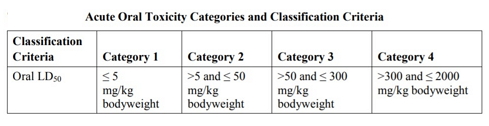
The adverse effects occurring following oral or dermal administration of a single dose of a substance, or multiple doses given within 24 hours. It normally divided into four classification categories for acute oral toxicity, whereby Substances can be allocated to one of four toxicity categories based on acute toxicity by the oral.
Desgin the mold
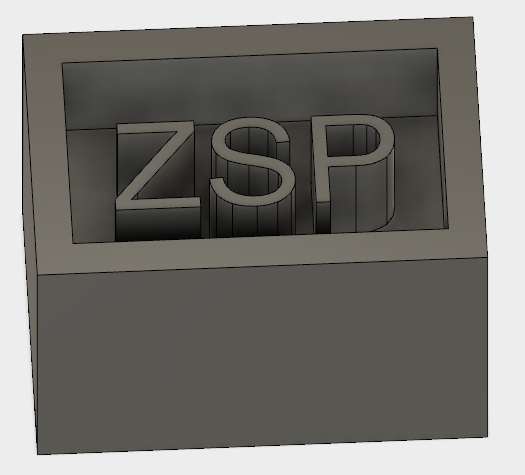
I decided to do something simple. Thus i am doing a mold with my initial on it. I am using Fusion to do my 3D mold design and saved it as STL file.
Milling
The mould will be mill by Roland MDX -540.

Steps of machining
The materials that i used for millings are form and ()
1. open STL file on SPR program
2. Wizard Setups to amke changes of the model size, milling operation
Milling goperation refers to better finish or fast cutting time. The surfcae should be flat or curve and whether it is one-sided or 2-sided and selection of materials.br>
3.Creating Toolpath and set the parameters for boarder, cut area, depth and size of mill bit for finishing .
4. Milling in progress
5. Completed Mold
Creating Silicone Mold
Steps:
1.
2. Mixed the compounds A & B as per instruction
3. Poured the mixture slowly into the mold, to minimise air bubble forming inside the mold, otherwise, gently knocking the mold for a couple of times to get rid of the air bubbles and lastly left it to settle down
4. Leave the mold with sufficient time to dry. Once mold is dried, separated the silicone mold with the form mold.
Casting on Silicone mold
now, casting can be done. Again, follow the instruction to mix the 2 compound together and poured the mixture into the silicone mold.
Fining product as per below.
I did another design based on above steps. However, instead of using Silicone, i am using wax this time.
you may see my end product as per below.